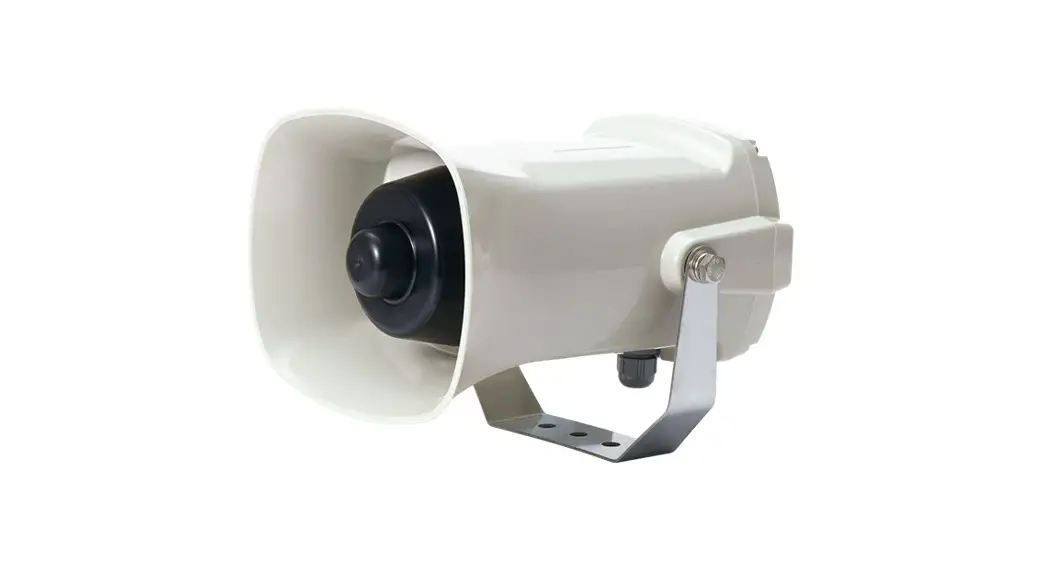
 Self-Standing Multifunctional Electric Sounder
SMP35/ SMP50
Thank you for purchasing Qlight’s products. Please read this user manual carefully prior to installation and operation to ensure safe and correct use.
 Precautions for Safety
Failure to follow the instructions below may cause a loss of life or serious physical injury.
- During wiring or maintenance, please completely turn off the power of the product. (Failure to follow this may lead to an electric shock.)
- Do not install the product in locations that subjects it to excessive dust or water other than the conditions designated by the IP protection ratings indicated for each product. (Failure to follow these instructions may cause a fire to the product, electric shock, physical injury, malfunction or damage to the product.)
- Do not alter or repair this product. If maintenance or repair service is required, please contact your local Qlight contact point. (Failure to follow these instructions may lead to fire, electric shock, or product damage.)
- Please apply the correct voltage to the product. (Failure to follow these instructions may lead to fire, electric shock, or product damage.)
- When the product is applied to a condition that may impact lives or property, please make sure to have a double safety device. (Failure to follow this may cause damage to property, fire, electric shock and loss of life.)
Precautions for Correct Use
Failure to follow the proper instructions may cause damage to property, the product, or malfunction of the product that would void the warranty.
- Please remove any objects that can interrupt ventilation around the product.
- Please turn off the power of the product immediately if it fails to operate properly.
- Carefully wire the product according to each product’s specification.
- Please be careful in preventing chemicals such as thinner, benzene, etc. in contact with the surface of the product.
- Do not apply excessive force/impact to the product.
- Failure to follow any of the instructions above may cause malfunction or damage to the product, fire, and electric shock.
Ordering Specifications
| SMP50 | 110/220 | LC |
| [Model number] | [Voltage] | [Sound selection] |
| • SMP35 • SMP50 | • 12/24-DC12V~24V • 110/220- AC110V~220V | • (Blank)-Built-in switch • LC-External contact |
Product Specifications
| Model number | Voltage | Current | Volume | Input type/ No. of channel | Certificate | Weight |
| SMP35 | DC12-24V | Max.1.720A | • Warning sound : Max. 115dB • MP3 : Max. 113dB | Bit input : 5Ch Binary input : 30Ch |
| 0.76kg |
| AC110V-220V | Max.0.325A | 1.03kg | ||||
| SMP50 | DC12-24V | Max.2.630A | • Warning sound : Max. 123dB • MP3 : Max. 118dB | Bit input : 5Ch Binary input : 30Ch | 0.95kg | |
| AC110V-220V | Max.0.560A | 1.23kg |
- Protection rating : IP65
- Ambient operating temperature : -25°C to +50°C
 https://www.qlight.com/en/products/?qpcateid=36
Please scan the QR code for more detailed product information. www.qlight.com
Dimensions
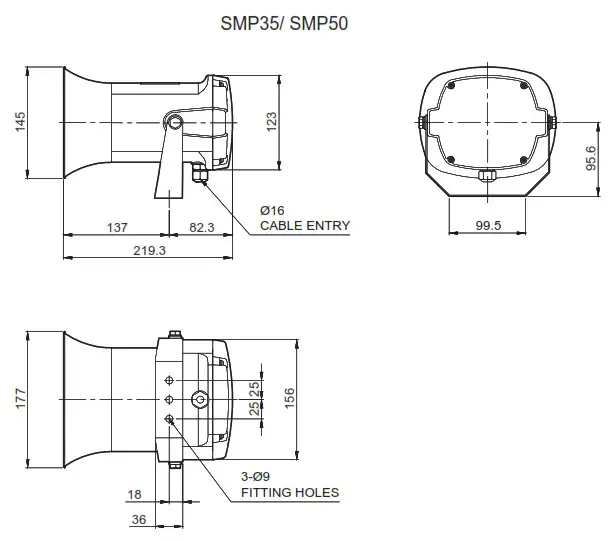
Wiring Instructions
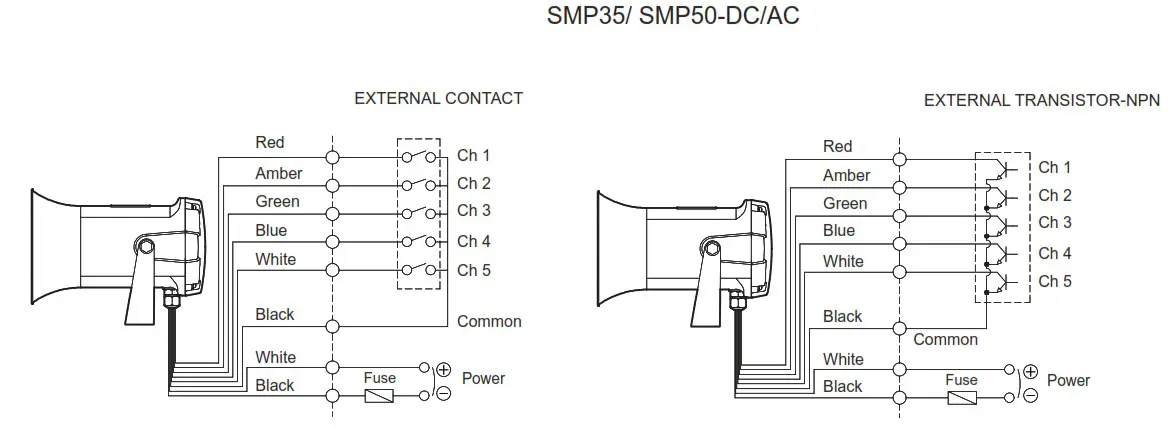
- Standard model uses built-in switch to select sounds.
- Sound signal line model is available upon request if wiring with either external contact or NPN transistor is needed.
- External power line – UL1015 AWG18(0.75sq) x 2C 400mm
- External signal line – UL1007 AWG22(0.3sq) 400mm
- For DC type, the polarity of black line is negative(-).
- In bit input mode, total of 5 sound options are configurable. In binary input mode, total 30 of sound options are configurable.
Parts Definition/ Installation
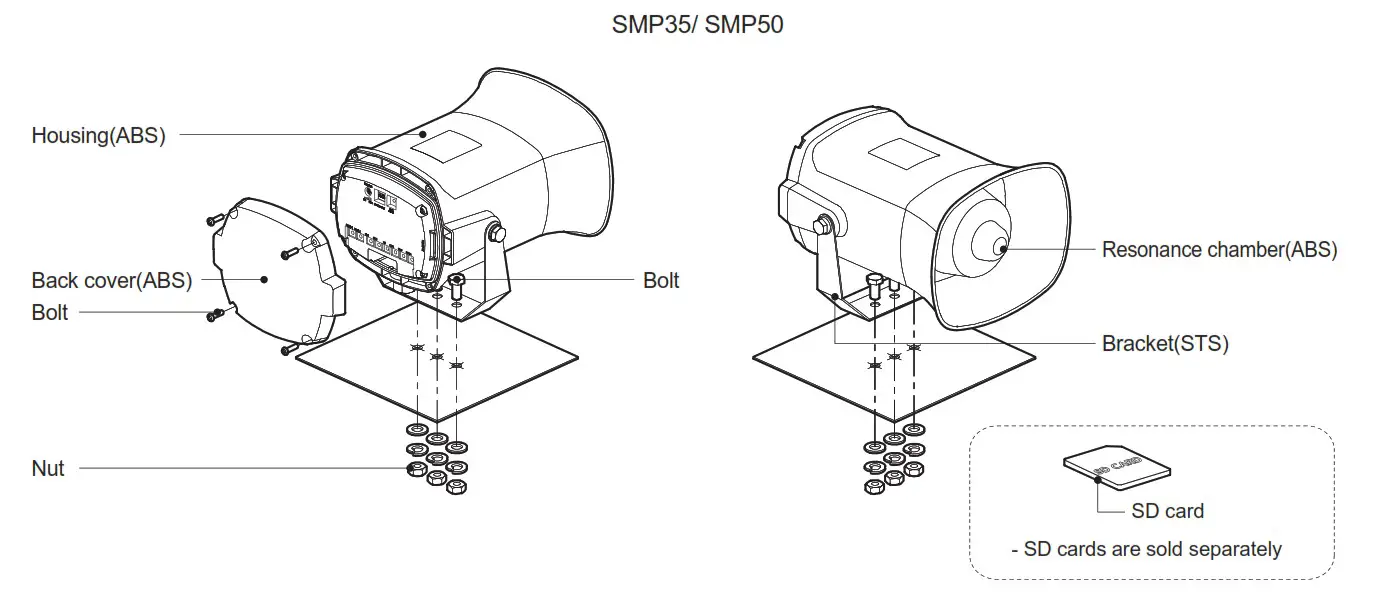
- First, machine taps or holes on the mounting surface.
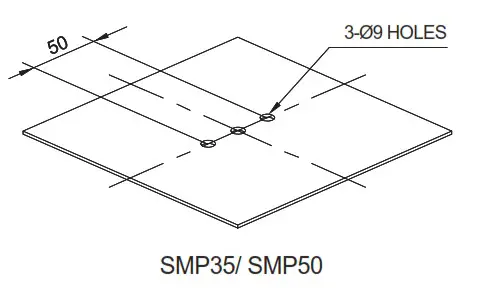
- The mounting hole of this product is 9mm in diameter.
- When machining taps, fasten the bolt through the mounting hole of the product.
- When machining holes, insert the bolt through the hole of the product, and tighten the nut from the opposite side of the mounting surface.
- Install a flat washer and a spring washer to the bolt if the product can experience severe vibration and shock.
Mounting Hole Specifications
- Machine holes on the mounting surface referring to the diagram below.
Precautions for installation
- In case of outdoor applications, install the product in the upright position. Do not install the product horizontal or upside-down positions where water can potentially penetrate into the product and impact it’s operation.
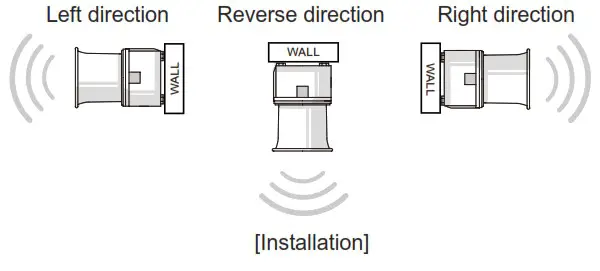
Installation Environment and Protection Rating
- This product is designed for use with protection rating of IP65.
- If the product is installed in locations that subject it to excessive dust or water other than the designated IP protection rating indica ted(IP65), it may cause malfunction or damage to the product.
- For further information, please visit our website(www.qlight.com).
Rear Control Configuration
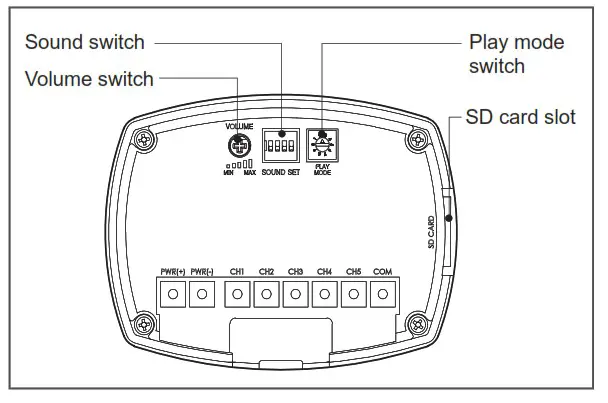
Sound Setting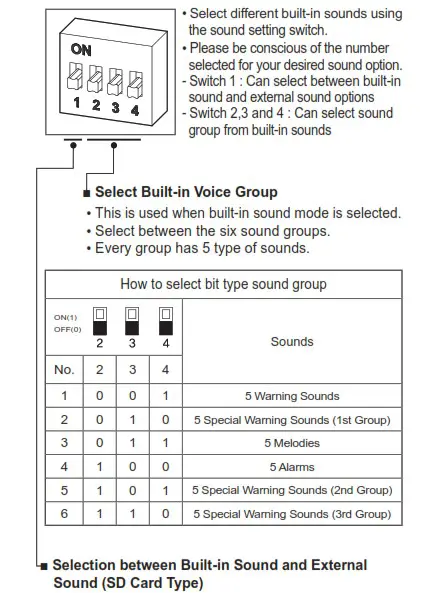
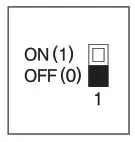
- To play built-in sounds, set the sound setting switch to the OFF (0) position.
- To play an external sound on the SD card, insert the SD card into SD card slot and set the sound setting switch to ON (1).
Rear Cover Removal Instructions
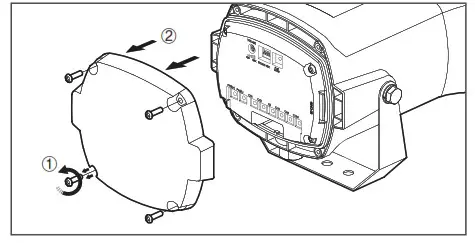
- Please loosen and remove the bolts(M4) fixed to the rear cover of the product.
- Lightly pull off the rear cover (applying excessive force to the cover can cause a damage to the product).
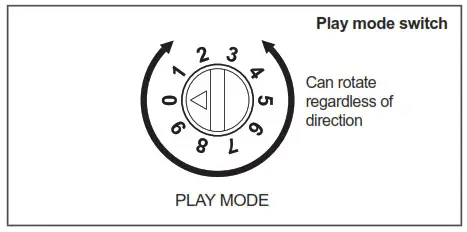
Play Mode Setting
- Can select between channel input methods (bit/ binary) and various playback modes.
- Use a (-) flat screwdriver to rotate one space at a time (regardless of the direction of rotation).
- Switch 0 and 9 have no function.
| PLAY MODE | ||
| 1 | Bit Input Mode | • Play back one of the 5 built-in or external sounds once • For a built-in sound, the playback time is about 10 seconds |
| 2 | Binary Input Mode | • Play back one of the 30 built-in or external sounds once • For a built-in sound, the playback about 10 seconds |
| 3 | Bit Input Hold Playback Mode | • Play back one of the 5 built-in or external sounds continuously |
| 4 | Binary Input Hold Playback Mode | • Play back one of the 30 built-in or external sounds continuously |
| 5 | Bit Input Sound Reduction Mode | • Decrease the volume of the selected channel by 15dB • Play back one of the 5 built-in or external sounds continuously |
| 6 | Binary Input Sound Reduction Mode | • Decrease the volume of the selected channel by 15dB • Play back one of the 30 built-in or external sounds continuously |
| 7 | Bit Input Sequence Memory Playback Mode | • When other channel signals are continu- ously inputted within 3 seconds after inputting the channel, the input order is memorized and playback in the memorized order (playback time is 3 – 5 seconds) • The last input channel is played continu- ously (Bit input only) |
| 8 | Test Mode | • In the test mode, the Ch1 of the built-in sound or the external sound is automatically played continuously • Switch back to another mode to exit test mode |
Volume Adjustment
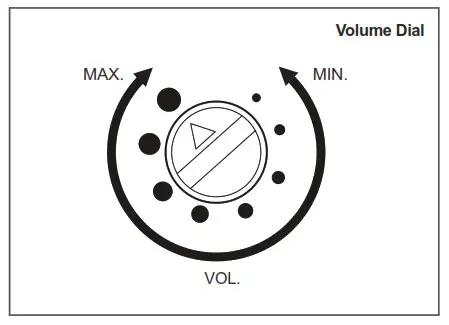
- The volume output of this product is adjustable.
- Turn the volume dial clockwise to increase the volume, and turn counter clockwise to decrease the volume.
- There will be no sound when the dial is put at MIN.
SD Card Specifications and Sound Saving Manual
- SD card specifications
– Use standard SD card.
– Mini SD or Micro SD also can be used with adaptor.
– SD, SDHC type supported
– Storage capacity : Max. 32GB
– Class : No specification - Please save the MP3 sound file on the SD card as shown below.
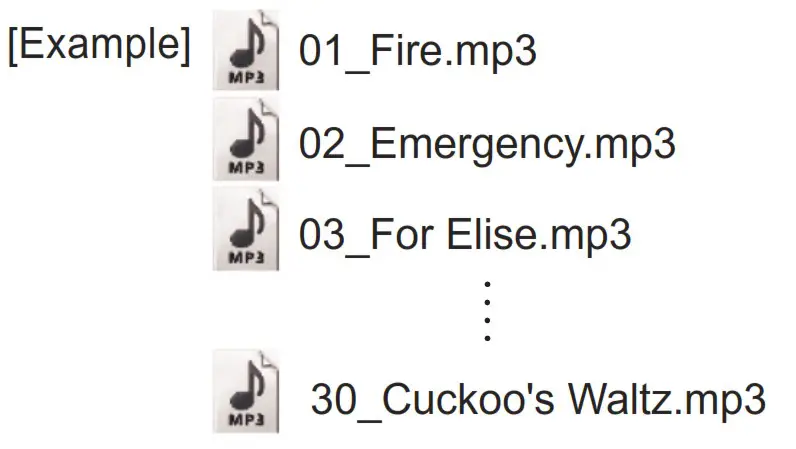
- Create an “MP3_FILE” folder on the SD card and save the MP3 file in the following file format.
- MP3 file format
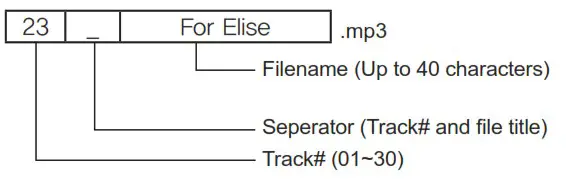
- When saving files, please save them in order.
– Please start saving after formatting the SD card. - The length of the file name must not exceed 40 characters.
Rear Control Configuration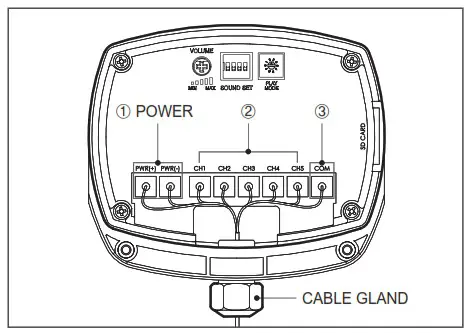
- Terminal for power supply.
- Terminal for sound channel selection via either external con tact or NPN transistor.
- COM terminal for channel selection via wiring – Please refer to Page 2 “Wiring Instructions”.
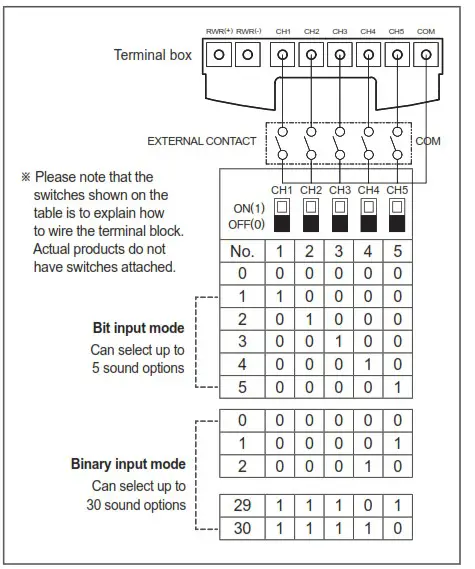
Bit/ Binary Input Method Using Rear Terminal Block
- Bit Input Mode
• Bit input mode(using external line) allows you to select one of five sound options by switching on one of the 5 channels (Ch1 – Ch5).
• Total of 5 sound options are configurable. - Binary Input Mode
• Binary input mode(using external line) allows you to receive multiple inputs by using the 5 channels(Ch1 – Ch5) to configure one of 30 sound options.
• Total of 30 sound options are configurable. - Wiring through terminal block with either external contact or NPN transistor allows either bit or binary input method for sound channel selection.
Sound Type and Combination Manual
- Bit Input – Playing Built-in Sound
• In bit input mode, you can chooses one sound from 30 sounds by configuring the 5 channels.
• This product has a terminal block to select a sound source. For further details, refer to page 5 ‘Bit/ Binary Input Method using Rear Terminal Block’ section of this manual.
• For sound configurations, refer to the table below.
| Bit input method sound configuration | ||||||
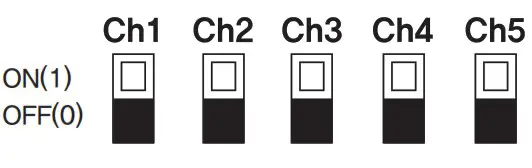 | Type of sound (WS group as an example) | |||||
| No. | 1 | 2 | 3 | 4 | 5 | |
| 0 | 0 | 0 | 0 | 0 | 0 | No sound |
| 1 | 1 | 0 | 0 | 0 | 0 | Fire.A-ANG(560Hz-1.5kHz) |
| 2 | 0 | 1 | 0 | 0 | 0 | Emergency WA-U (600Hz-1.5kHz) |
| 3 | 0 | 0 | 1 | 0 | 0 | Ambulance PI-PO (450Hz-900Hz) |
| 4 | 0 | 0 | 0 | 1 | 0 | Machinery Fault(820Hz) |
| 5 | 0 | 0 | 0 | 0 | 1 | High Expansion(1kHz) |
※ Please be noted that the configuration chart above is explaining how to wire terminal blocks.
The actual product does not have a switch.
■ Sound Type by Group
| Bit input method sound configuration | |||
| Group | Channel | Type of sound | |
|
WS |
5 Warning Sounds | Ch1 | Fire.A-ANG (560Hz-1.5kHz) |
| Ch2 | Emergency WA-U (600Hz-1.5kHz) | ||
| Ch3 | Ambulance PI-PO (450Hz-900Hz) | ||
| Ch4 | Machinery Fault (820Hz) | ||
| Ch5 | High Expansion (1kHz) | ||
|
WP | 5 Special Warning Sounds (1st Group) | Ch1 | Fire.A-ANG (560Hz-1.5kHz) |
| Ch2 | Abandon Alarm (820Hz) | ||
| Ch3 | Machinery Fault (820Hz) | ||
| Ch4 | High Expansion (1kHz) | ||
| Ch5 | 7 Short PI. / 1 Long (1kHz) | ||
|
WM |
5 Melodies | Ch1 | Sweet Home |
| Ch2 | For Elise | ||
| Ch3 | Cuckoo’s Waltz | ||
| Ch4 | Piano Sonata | ||
| Ch5 | Turkish March | ||
|
WA |
5 Alarms | Ch1 | Beep Intermittent |
| Ch2 | Door Chime | ||
| Ch3 | Phone Ring | ||
| Ch4 | PI.PI.PI Short | ||
| Ch5 | Tripping Beat | ||
|
WO | 5 Special Warning Sounds (2nd Group) | Ch1 | Rel rel rel (730Hz-920Hz) |
| Ch2 | Slow Ambulance PI-PO (820Hz-1.05kHz) | ||
| Ch3 | Wye yong Wye yong (770Hz-1.2kHz) | ||
| Ch4 | Phone ring 2 (740Hz-910Hz) | ||
| Ch5 | Fire.A-ANG (770Hz-1.11kHz) | ||
|
WN | 5 Special Warning Sounds (3rd Group) | Ch1 | Oit Oit (500Hz-1.11kHz) |
| Ch2 | Pi o Pi o (940Hz-2.19kHz) | ||
| Ch3 | Slow Di o Di o (680Hz-840Hz) | ||
| Ch4 | Li long Li ling (420Hz-470Hz) | ||
| Ch5 | 911 Siren (150Hz-1kHz) | ||
■ Binary Input – Playing Built-in Sound
- In binary input mode, you can chooses one sound from 30 sounds by configuring the 5 channels.
- This product has a terminal block to select a sound source. For further details, refer to page 5 ‘Bit/ Binary Input Method using Rear Terminal Block’ section of this manual.
- For sound configurations, refer to the table below.
- Please be aware that the configuration for sound using the binary input method is different from the bit input method.
| Binary input method sound configuration | ||||||
| Type of sound | |||||
| No. | 1 | 2 | 3 | 4 | 5 | |
| 0 | 0 | 0 | 0 | 0 | 0 | No sound |
| 1 | 0 | 0 | 0 | 0 | 1 | Fire.A-ANG (560Hz-1.5kHz) |
| 2 | 0 | 0 | 0 | 1 | 0 | Emergency WA-U (600Hz-1.5kHz) |
| 3 | 0 | 0 | 0 | 1 | 1 | Ambulance PI-PO (450Hz-900Hz) |
| 4 | 0 | 0 | 1 | 0 | 0 | Pi-ik Pi-ik (800Hz) |
| 5 | 0 | 0 | 1 | 0 | 1 | Machinery Fault (820Hz) |
| 6 | 0 | 0 | 1 | 1 | 0 | High Expansion (1kHz) |
| 7 | 0 | 0 | 1 | 1 | 1 | Alarm (1kHz) |
| 8 | 0 | 1 | 0 | 0 | 0 | Sweet Home |
| 9 | 0 | 1 | 0 | 0 | 1 | For Elise |
| 10 | 0 | 1 | 0 | 1 | 0 | Cuckoo’s Waltz |
| 11 | 0 | 1 | 0 | 1 | 1 | Piano Sonata |
| 12 | 0 | 1 | 1 | 0 | 0 | Turkish March |
| 13 | 0 | 1 | 1 | 0 | 1 | Magic Flute |
| 14 | 0 | 1 | 1 | 1 | 0 | Badinerie |
| 15 | 0 | 1 | 1 | 1 | 1 | Pineapple Rag |
| 16 | 1 | 0 | 0 | 0 | 0 | Beep Intermittent |
| 17 | 1 | 0 | 0 | 0 | 1 | Door Chime |
| 18 | 1 | 0 | 0 | 1 | 0 | Phone Ring |
| 19 | 1 | 0 | 0 | 1 | 1 | PI.PI.PI Short |
| 20 | 1 | 0 | 1 | 0 | 0 | Tripping Beat |
| 21 | 1 | 0 | 1 | 0 | 1 | Rel rel rel (730Hz-920Hz) |
| 22 | 1 | 0 | 1 | 1 | 0 | Slow Ambulance PI-PO (820Hz-1.05kHz) |
| 23 | 1 | 0 | 1 | 1 | 1 | Wye yong Wye yong (770Hz-1.2kHz) |
| 24 | 1 | 1 | 0 | 0 | 0 | Phone ring 2 (740Hz-910Hz) |
| 25 | 1 | 1 | 0 | 0 | 1 | Fire.A-ANG (770Hz-1.11kHz) |
| 26 | 1 | 1 | 0 | 1 | 0 | Oit Oit (500Hz-1.11kHz) |
| 27 | 1 | 1 | 0 | 1 | 1 | Pi o Pi o (940Hz-2.19kHz) |
| 28 | 1 | 1 | 1 | 0 | 0 | Slow Di o Di o (680Hz-840Hz) |
| 29 | 1 | 1 | 1 | 0 | 1 | Li long Li ling (420Hz-470Hz) |
| 30 | 1 | 1 | 1 | 1 | 0 | 911 Siren (150Hz-1kHz) |
※ Please be noted that the configuration chart above is explaining how to wire terminal blocks. The actual product does not have aswitch.
Sound Type and Combination
■ Bit Input – Playing External Sound (SD Card)
- User can save sounds(MP3) to the SD card and able to select 1 sounds from 5 saved sounds.
- This product has a terminal block to select a sound source. For further details, refer to page 5 ‘Bit/ Binary Input Method using Rear Terminal Block’ section of this manual.
- For sound configurations, refer to the table below.
| Bit input method sound source configuration | ||||||
| Type of sound | |||||
| No. | 1 | 2 | 3 | 4 | 5 | |
| 0 | 0 | 0 | 0 | 0 | 0 | No sound |
| 1 | 1 | 0 | 0 | 0 | 0 | Custom sound1(01_xxx.mp3) |
| 2 | 0 | 1 | 0 | 0 | 0 | Custom sound2(02_xxx.mp3) |
| 3 | 0 | 0 | 1 | 0 | 0 | Custom sound3(03_xxx.mp3) |
| 4 | 0 | 0 | 0 | 1 | 0 | Custom sound4(04_xxx.mp3) |
| 5 | 0 | 0 | 0 | 0 | 1 | Custom sound5(05_xxx.mp3) |
※ Please be noted that the configuration chart above is explaining how to wire terminal blocks.
The actual product does not have aswitch.
■ Binary Input – Playing External Sound (SD Card)
- Binary input mode chooses one of the 30 sounds by combining the on/ off switch of the 5 different channels to the associated tone.
- This product has a terminal block to select a sound source. For further details, refer to page 5 ‘Bit/ Binary Input Method using Rear Terminal Block’ section of this manual.
- For sound configurations, refer to the table below.
- Please be aware that the configuration for sound using the binary input method is different from the bit input method.
Binary input method sound source configuration | ||||||
| Type of sound | |||||
| No. | 1 | 2 | 3 | 4 | 5 | |
| 0 | 0 | 0 | 0 | 0 | 0 | No sound |
| 1 | 0 | 0 | 0 | 0 | 1 | Custom sound1(01_xxx.mp3) |
| 2 | 0 | 0 | 0 | 1 | 0 | Custom sound2(02_xxx.mp3) |
| 3 | 0 | 0 | 0 | 1 | 1 | Custom sound3(03_xxx.mp3) |
| 4 | 0 | 0 | 1 | 0 | 0 | Custom sound4(04_xxx.mp3) |
| 5 | 0 | 0 | 1 | 0 | 1 | Custom sound5(05_xxx.mp3) |
| 6 | 0 | 0 | 1 | 1 | 0 | Custom sound6(06_xxx.mp3) |
| 7 | 0 | 0 | 1 | 1 | 1 | Custom sound7(07_xxx.mp3) |
| 8 | 0 | 1 | 0 | 0 | 0 | Custom sound8(08_xxx.mp3) |
| 9 | 0 | 1 | 0 | 0 | 1 | Custom sound9(09_xxx.mp3) |
| 10 | 0 | 1 | 0 | 1 | 0 | Custom sound10(10_xxx.mp3) |
| 11 | 0 | 1 | 0 | 1 | 1 | Custom sound11(11_xxx.mp3) |
| 12 | 0 | 1 | 1 | 0 | 0 | Custom sound12(12_xxx.mp3) |
| 13 | 0 | 1 | 1 | 0 | 1 | Custom sound13(13_xxx.mp3) |
| 14 | 0 | 1 | 1 | 1 | 0 | Custom sound14(14_xxx.mp3) |
| 15 | 0 | 1 | 1 | 1 | 1 | Custom sound15(15_xxx.mp3) |
| 16 | 1 | 0 | 0 | 0 | 0 | Custom sound16(16_xxx.mp3) |
| 17 | 1 | 0 | 0 | 0 | 1 | Custom sound17(17_xxx.mp3) |
| 18 | 1 | 0 | 0 | 1 | 0 | Custom sound18(18_xxx.mp3) |
| 19 | 1 | 0 | 0 | 1 | 1 | Custom sound19(19_xxx.mp3) |
| 20 | 1 | 0 | 1 | 0 | 0 | Custom sound20(20_xxx.mp3) |
| 21 | 1 | 0 | 1 | 0 | 1 | Custom sound21(21_xxx.mp3) |
| 22 | 1 | 0 | 1 | 1 | 0 | Custom sound22(22_xxx.mp3) |
| 23 | 1 | 0 | 1 | 1 | 1 | Custom sound23(23_xxx.mp3) |
| 24 | 1 | 1 | 0 | 0 | 0 | Custom sound24(24_xxx.mp3) |
| 25 | 1 | 1 | 0 | 0 | 1 | Custom sound25(25_xxx.mp3) |
| 26 | 1 | 1 | 0 | 1 | 0 | Custom sound26(26_xxx.mp3) |
| 27 | 1 | 1 | 0 | 1 | 1 | Custom sound27(27_xxx.mp3) |
| 28 | 1 | 1 | 1 | 0 | 0 | Custom sound28(28_xxx.mp3) |
| 29 | 1 | 1 | 1 | 0 | 1 | Custom sound29(29_xxx.mp3) |
| 30 | 1 | 1 | 1 | 1 | 0 | Custom sound30(30_xxx.mp3) |
※ Please be noted that the configuration chart above is explaining how to wire terminal blocks. The actual product does not have a switch.
Operation Method and Setting
| When using a built-in sound | When using an external sound (SD card) | ||
| Bit input | Binary input | Bit input | Binary input |
| Organized into 6 groups of 5 sound tones for a total of 30 sound tone options. Play one of the five sounds in each 5 group | Play one of 30 built-in sounds | Play one of the 5 user-recorded sounds | Play one of 30 sounds stored by the user |
■ When Using a Built-in Sound in Bit Input Mode
※ Sound switch setting → Play mode switch setting → Channel selection
- Set the No. 1 switch of the Sound setting switch to OFF to select built-in sound.
– For more information, see page 4 ‘Sound Settings’. - Use one of the sound setting switches 2, 3 and 4 to select one of the 6 groups.
– For more information, see page 4 ‘Sound Settings’. - Use the play mode setting switch to select one of the modes between 1, 3, 5, 7, or 8.
– Mode 8 is a test mode which continuously plays channel 1.
(In this case, channel selection is disabled.)
– For more information, refer to page 4 ‘Play Mode Setting’. - Use the sound select switch to select one of the five built-in sounds.
– For more information, please refer to page 6 ‘Bit Input – Playing Built-in Sound’.
■ When Using a Built-in Sound in Binary Input Mode
※ Sound switch setting → Play mode switch setting → Channel selection
- Set the No. 1 switch of the sound setting switch to OFF to select the built-in sound.
– For more information, see page 4 ‘Sound Settings’. - Use the play mode setting switch to select one of the modes between 2, 4, 6, or 8.
– Mode 8 is a test mode which continuously plays channel 1.
(In this case, channel selection is disabled.)
– For more information, refer to page 4 ‘Play Mode Setting’. - Use the sound select switch to select one of the 30 built-in sounds.
– For more information, please refer to page 6 ‘Binary Input – Playing Built-in Sound’.
■ When Using an External Sound Source (SD Card) in Bit Input Mode
※ Insert SD card → Sound switch setting → Play mode switch setting → Channel selection
- Please refer to page 5 ‘SD Card Specifications and Sound Saving Manual’ to see how to save sound files.
– Supports up to 5 user-defined sounds - Insert the SD card into the SD card slot.
- Set the No. 1 switch of the sound switch to ON to select external sound.
– For more information, see page 4 ‘Sound Settings’. - Use the play mode setting switch to select 1, 3, 5, 7 or 8 mode.
– Mode 8 is a test mode which continuously plays channel 1.
(In this case, channel selection is disabled.)
– For more information, refer to page 4 ‘Play Mode Setting’. - To select a channel, use the terminal block in the back side of the product to select one of the 5 user-defined sounds.
– For more information, please refer to page 7 ‘Bit Input – Playing External Sound (SD Card)’.
■ When Using an External Sound Source (SD Card) Source in Binary Input Mode
※ Insert SD card → Sound switch setting → Play mode switch setting → Channel selection
- Please refer to page 5 ‘SD Card Specifications and Sound Saving Manual’ to see how to save sound files.
– Supports up to 30 user-defined sounds - Insert the SD card into the SD card slot.
- Set the No. 1 switch of the sound setting switch to ON to select external sound.
- Use the play mode setting switch to select one of the modes between 2, 4, 6, or 8.
– Mode 8 is a test mode which continuously plays channel 1.
(In this case, channel selection is disabled.)
– For more information, refer to page 4 ‘Play Mode Setting’. - Use the sound select switch to select the one of the 30 user defined sounds.
– For more information, please refer to page 7 ‘Binary Input – Playing External Sound (SD Card)’.
Technical Certification
- Qlight products are designed to meet strict quality and technical standards. Thus, the Qlight brand is widely recognized for its high quality and technical innovations from leading institutions around the world.
 | ISO International Organization for Standardization Qlight quality assurance systems have been certified by ISO by applying the [SO 9001:2008, KS Q ISO 9001:2009 regulation. |
 | ATEX The EuropeanRegulatory Framework or Manufacture, Installation andUse of Equip ment in ExplosiveAtmospheres Qlight’sexplosion proof products comply with ATEX Directives 94/9/EC. |
 | KCs Explosion Proof Device Safety Certification System The safety performance of machines and equipment subject to safety certification and Technical capability and production system have been certified safety certification standards. |
 | CCS China Classification Society Qlight’s design and quality assurance system has been certified by the China Classification Society. |
 | LR Lloyd’s Register Qlight’s design and quality assurance system has been certified from Lioyd’s Register. |
 | KC Korea Safety Certification Ciight’s products are certified by KC for preventing accident caused by fire. |
 | ICAO Intemational Civil Aviation Organization Qlight guarantees our products satisfy the criteria regulated by the International Civil Aviation Organization(ICAO, FAA). |
 | UL Underwriters Laboratories Clight’s design and quality assurance system has been certified from UL to ensure the stability of consumption goods and to protect consumers. |
 | CCC China Compulsory Certificate Ctight’s has obtained CCC which guarantees safety, protection against fraud, environment, etc. |
 | RoHS2 Restriction of Hazardous Substances Directive Qlight c omplies with the Restriction of Hazardous Substances Directive by limiting its use of hazardous materials. |
 | IECEx International Explosion Proof Certification (IECEx) Certified that Qlight’s products are being manufactured and manage according to international standards. |
 | NEPSi National Supervision and Inspection Center for Explosion Protection and Safety of instrumentation Qlight’s design and manufacturing system meets the People’s Republic of China Nationalexplosion proof Standard. (Chinese Standard-GB3836/GB 12476) |
 | TUS Japan Explosion-proof Certification TIS is a Japanes explosion proof test and certification ‘System accordance with the Ministry of Health, Labour and Welfare Notice and the explosion proof guidelines for factory electrical equipment. Qfight’s explosion proof Products hasve been tested and certified by TIS. |
 | RMRS Russian Maritime Register of Shipping Qiight’s design and quality assurance system has been certified from Russian Mariéme Register of Shipping. |
 | _ KR Korean Register of Shipping Qiight’s design and quality assurance system has been certified by the Korean Register of Shipping. |
 | E-mark Commission Directive Regarding Vehicle Industry light has obtained EU mark for approved vehicles and vehicle components sold into the EU(EEA : European Economic Area) |
 | KCC Conformity Assessment of Broad- casting Communication Equipment Qlight has been certified to protect the electromagnetic environment that causes unwanted electromagnetic waves from the device, communication failure due to other devices or extemal radio waves, and matfunction of the device. |
 | CCCEF China Certification Center for Security & Protection of “Passing Fire Protection Products Centering* In order to sell fire-fighting products such as fire alarm equipment to Chinese mariuet. |
 | CE European Commission Qlight has been certified by the European Commission. |
MEMO For your safety
Specification and dimensions listed in this catalogue subject to change without notice for product quality improvement.
The newest product information is available on our website.(www.qlight.com)
Please read the instruction manual attached to the product carefully before installation and use.
Qlight Co., Ltd. www.qlight.com
[email protected]
Head Office | Suite #1510, STX-V Tower, 128 Gasan digital 1-ro, Geumcheon-gu, Seoul, Korea
Tel. +82-2-2679-6152(Toll free. +82-80-328-2222)
Fax. +82-2-2679-6154
Factory | 185-25, Mukbang-ro, Sangdong-myeon, Gimhae-si, Gyeongsangnamdo, Korea
Tel. +82-55-328-1111(Toll free. +82-80-328-1111)
Qlight OverSEAs Sales Dept | 704 Nakdong-daero, Sasang-gu, Busan, Korea(Eomgung-Dong)
Tel : +82-51-620-4100
Qlight Public Relations & Marketing Team Office | 704 Nakdong-daero, Sasang-gu, Busan, Korea(Eomgung-Dong)
Tel. +82-51-245-0017
Qlight USA, Inc. www.qlight.com
www.qlightusa.com
[email protected]
3003 North First Street, Suite #341, San Jose, CA 95134 USA Tel. +1 – 408 – 519 – 5740
Fax. +1 – 408 – 519 – 5739
SHANGHAI Qlight Electronic Co., Ltd.
www.qlight.com
www.qlightcn.com
[email protected]
China Factory/ Shanghai Sales Office | #19, Nanda Road, Baoshan Area, Shanghai, China Tel. +86 – 21 – 6651 – 7100 Fax. +86 – 21 – 6315 – 3929
China Factory Site 2 (Qidong) | #33, Haiyan Road, Qidong High-tech Industrial Development Zone, Qidong, Jiangsu Province, China
Tel +86- 513- 8384- 9999 Fax +86- 513- 8384- 9910
Product Operation Inquiry / Customer Support +82-51-620-4100
Innovation in Alarm & Singnal
You can expect prompt service if you have exact information such as model name, symptom, telephone number and address.
※ALL PRODUCT, PRODUCT SPECIFICATIONS AND DATA ARE SUBJECT TO CHANGE WITHOUT NOTICE TO IMPROVE RELIABILITY, FUNCTION OR DESIGN OR OTHERWISE.
Head office : Suite #1510, STX-V Tower, 128 Gasan digital 1-ro, Geumcheon-gu, Seoul, Korea (Postal Code : 08507)
Factory : 185-25, Mukbang-Ro, Sangdong-Myeon, Gimhae-Si, Gyeongsangnam-Do, Korea (Postal Code : 50805) www.qlight.com
SMP35 – 2201A
 Qlight - Warning Light, Beacon, Audible & Visual Signal, Tower Light
 可莱特(Qlighte)_专注多层信号灯、声光报警器,防爆警示灯,机床照明灯等产品的生产和销售
 Signal Tower Lights, Warning Lights & Electric Horns, Fully Enclosed Products, Explosion proof Products, LED Work Lights-Qlight