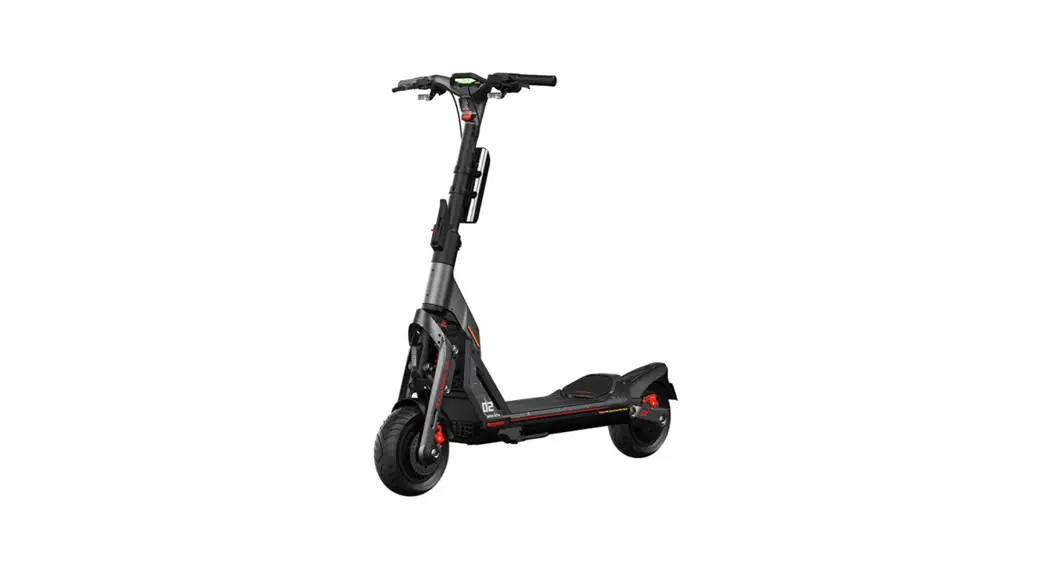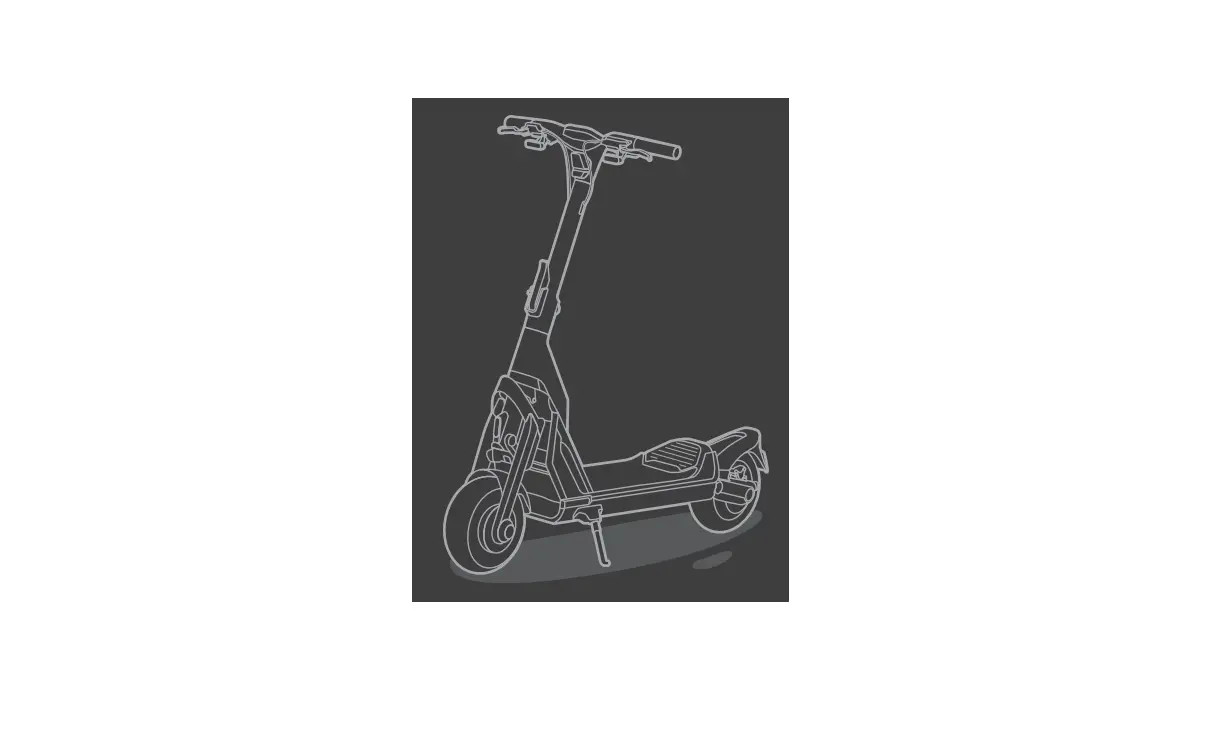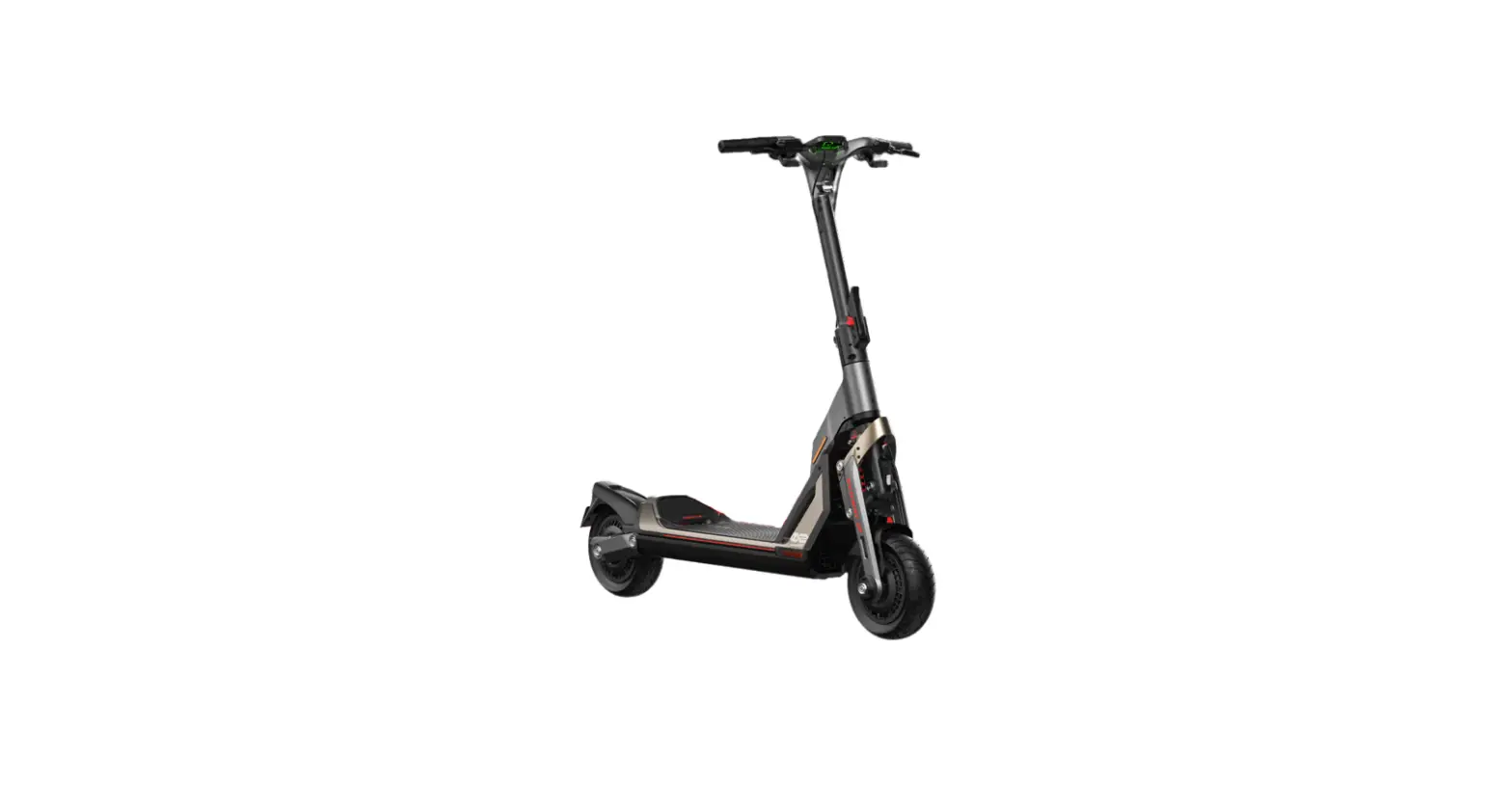


Product Manual
Segway-Ninebot app http://app.ninebot.cn/
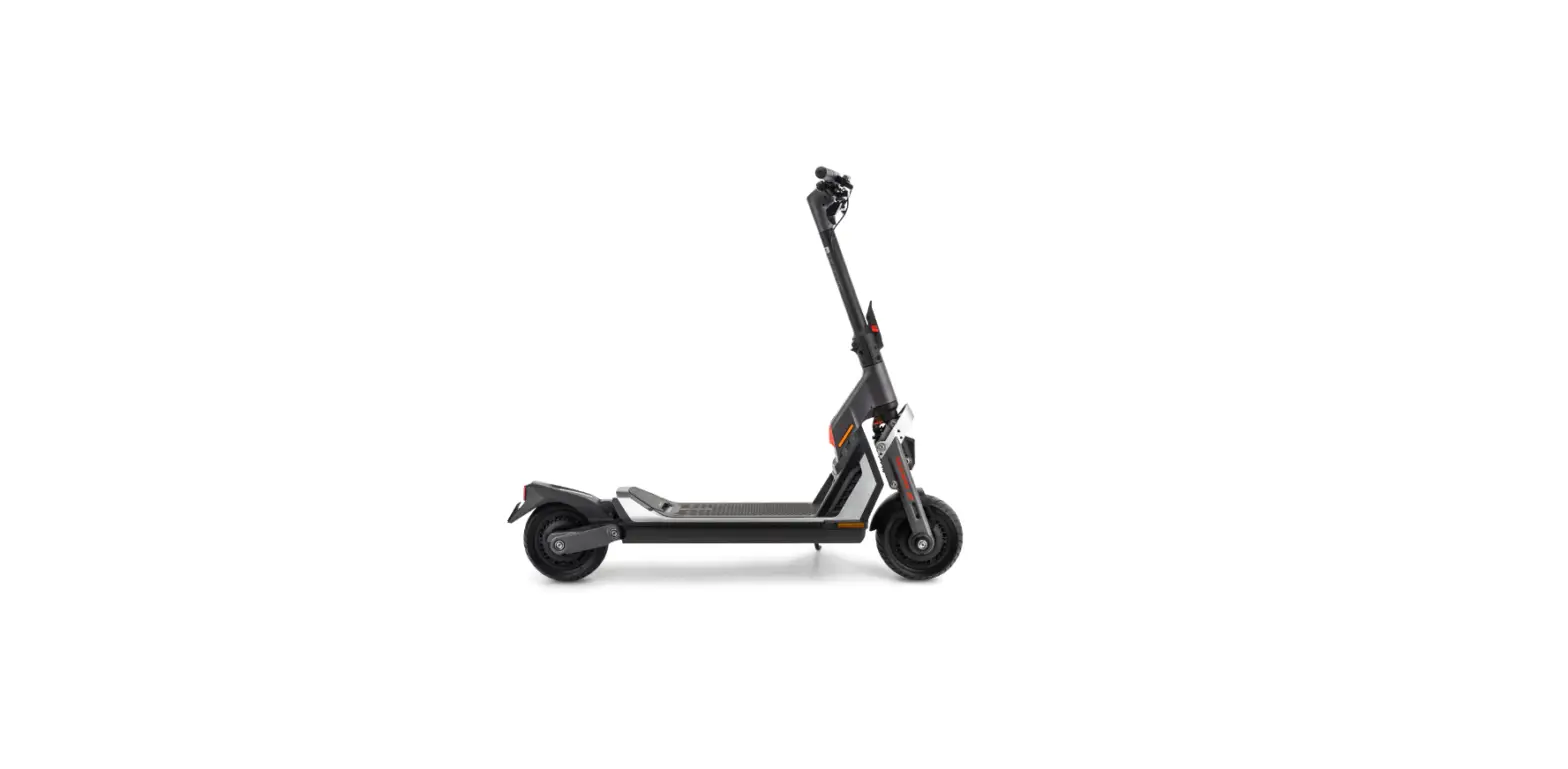
Diagram and Functions
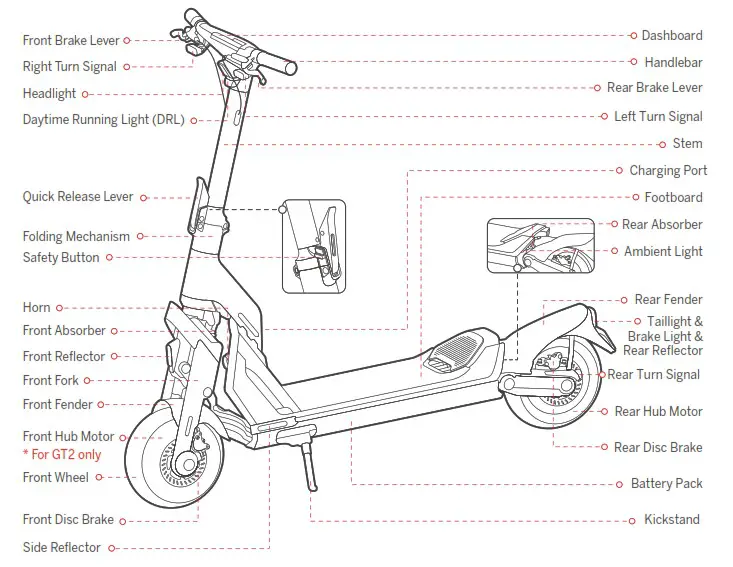
Handlebar Functions
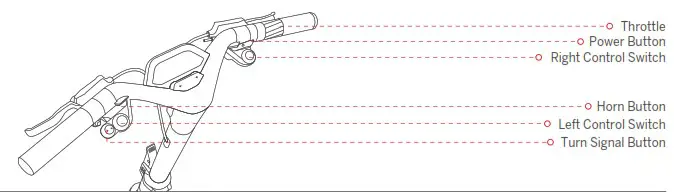
| Name | Function | Operation method |
| Power Button | Power on/off | Press the Power Button to power on the scooter. Press and hold to power it off. |
| Wake up the screen | Press the Power Button to wake up the screen when the screen automatically dims. | |
| Back to the previous speed mode | When the scooter automatically enters PARK mode. press the Power Button to go back to the previous speed mode. | |
| Confirm Bluetooth password | While connecting to the scooter via the Segway-Ninebot app. press the Power Button to confirm Bluetooth password. | |
| Left Control Switch | Turn on/off the headlight | Rotate the Left Control Switch clockwise/counterclockwise to turn off/on the headlight. |
| Turn on/off the cruise mode | Press the Left Control Switch to turn on the cruise mode, and the scooter will cruise at a constant speed. Press again to turn it off. | |
| Switch between 1WD and 2WD | When the scooter is at a complete stop. press and hold the Left Control Switch to switch between 1WD and 2WD. * For GT2 only. | |
| Right Control Switch | Mode switching | Rotate clockwise/counterclockwise to switch between speed modes. |
| Activate the BOOST mode | 1) Press the Right Control Switch to activate the BOOST mode. * In RACE mode only. 2) Press again or switch the speed mode to turn it off. * For GT2 only. | |
| Switch to WALK mode | For GT1: When the scooter is at a complete stop. press the Right Control Switch to switch to WALK mode. At this point, press the Right Control Switch again to go back to the previous speed mode. For GT2: When the scooter is at a complete stop. press and hold the Right Control Switch to switch to WALK mode. At this point. press and hold the Right Control Switch again to go back to the previous speed mode. | |
| Throttle | Speed up | Twist the throttle to speed up. |
| Turn Signal Button | Turn on/off the left/right signal | Press the left/right side of the Turn Signal Button. the left/right turn signal will turn off after three blinks. press and hold the left/right side of the Turn Signal Button, the left/right turn signal will keep blinking until it is released. |
| Horn Button | Turn on the horn | Press the Horn Button. the scooter will beep once. |
Dashboard
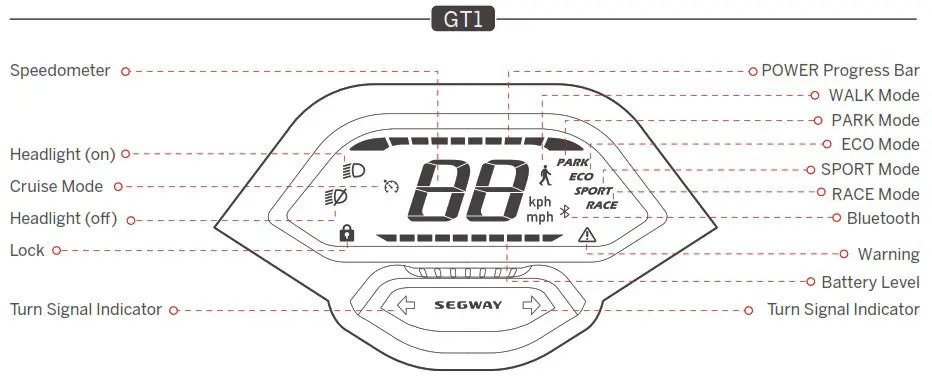
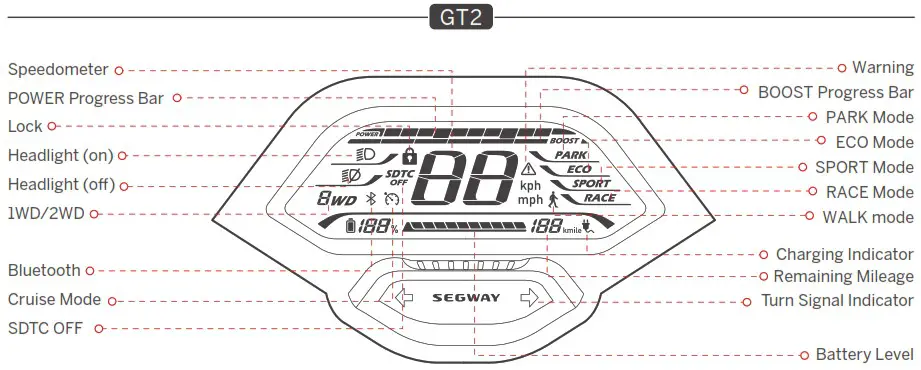
| Symbol | Name | Meaning | Description |
 | POWER Progress Bar | The symbol displays the motor output power of the scooter. | |
 | Speedometer | The symbol displays the current speed of the scooter. | |
 | SDTC OFF (GT2) | The symbol indicates that the SDTC (Segway Dynamic Traction Control) feature is off. | 1)With two-wheel drive. SDTC feature is auto-on in non-RACE modes. Note: This feature helps prevent wheel slippage and maintain stability when accelerating. 2)With one-wheel drive. SDTC feature is auto-off in RACE mode. |
 | Cruise Mode | The symbol indicates that the Cruise mode is activated. | 1)In ECO. SPORT or RACE mode. press the Left Control Switch to turn on the cruise mode when the speed k 3.1 mph (5 km/h). Once turned on. the scooter will cruise at the current speed. 2)Turn off the cruise mode with the following methods: Method 1: Twist the throttle or squeeze brake levers. Method 2: Press the Left Control Switch. Method 3: Switch the speed mode.  DO NOT turn on the cruise mode in complex environments. bad weather or undesirable road conditions. Serious danger or injury may occur. DO NOT turn on the cruise mode in complex environments. bad weather or undesirable road conditions. Serious danger or injury may occur. |
 | When the icon lights up. it means the scooter is locked. | When the scooter is locked via the Segway-Ninebot app: 1)The screen will go dark in 10 seconds. at this point. press the Power Button to wake up the screen. 2)The scooter will sound the alarm with flashing lights when it is moved for 3 seconds. 3)The scooter will keep beeping when it is moved for 10 seconds. and if the scooter is moved again within 60 seconds. the beep will not stop. When the scooter is unlocked. it will automatically power off if there is no operation within 10 minutes. Note: Enable/Disable this feature via the Segway-Ninebot app. | |
 | 1WD/2WD (GT2) | The icon 1WD indicates that the scooter is in the one-wheel drive mode. The icon 2WD indicates that the scooter is in the two-wheel drive mode. | |
 | Battery Level (GT2) | The symbol displays the remaining battery power in battery percentage and battery bar. | |
 | Battery Level (GT1) | The symbol displays the remaining battery power in battery bar. | |
 | BOOST Progress Bar | The symbol displays the remaining available acceleration time of the BOOST mode. | 1) Press the Right Control Switch to activate the BOOST mode. * In RACE mode only. 2) Twist the throttle to accelerate faster. 3) Press the Right Control Switch again or switch the speed mode to turn it off. When the BOOST mode is activated, the scooter will accelerate faster. DO NOTapply this feature in complex environments, bad weather or undesirable road conditions. Serious danger or injury may occur. |
 | Bluetooth | The symbol indicates that the scooter is connected to the Segway-Ninebot app. | |
 | Warning | The symbol indicates that the scooter has detected an error. The error code will display on the dashboard. See page 8 for possible causes and solutions. | |
 | Remaining Mileage | The symbol displays the remaining mileage of the scooter. | |
 | Charging Indicator | The symbol indicates that the scooter is charging. | |
Speed Modes Introduction
| Mode/model | GTI(Speed limit) | GT2(Speed limit) | Switching methods |
 | 3.7 mph (6 km/h) | 3.7 mph (6 km/h) | 1)When the scooter is at a complete stop. rotate the Right Control Switch. 2)For GT1: press the Right Control Switch. For GT2: press and hold the Right Control Switch. Note: In this mode. twist the throttle slightly to walk with the scooter at a low speed. |
 | 0 mph (0 km/h) | 0 mph (0 km/h) | Rotate the Right Control Switch. Note: The scooter will automatically enter PARK mode in the following circumstances: 1)After riding. parking for more than 5 seconds when the scooter is in ECO. SPORT. or RACE mode. 2)Parked for more than 20 seconds when the scooter is not be ridden and in ECO. SPORT. or RACE mode. At this point. press the Power Button to go back to the previous mode. |
 | 24.9 mph (40 km/h) | 24.9 mph (40 km/h) | Rotate the Right Control Switch. |
 | 37.3 mph (60 km/h) | 43.5 mph (70 km/h) | Rotate the Right Control Switch. |
 | 37.3 mph (60 km/h) | 43.5 mph (70 km/h) | Rotate the Right Control Switch. |
Damper Adjustment
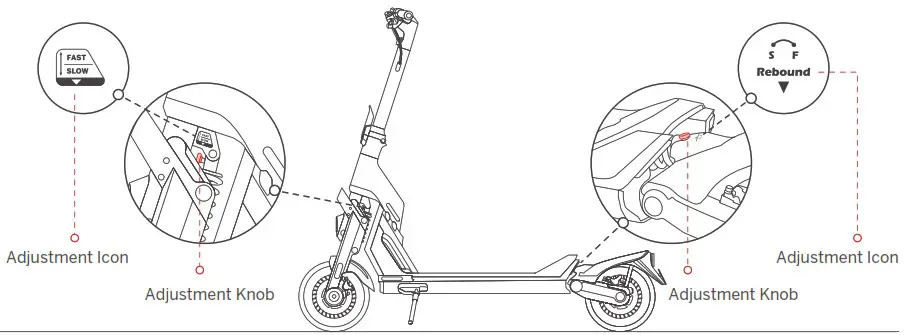
S (Slow rebound): Increase rebound resistance by rotating the Adjustment Knob clockwise.
F (Fast rebound): Decrease rebound resistance by rotating the Adjustment Knob counterclockwise.
Note: The damper is set to the default position before leaving the factory. Please follow the steps above to adjust it according to your riding habits.
| Item | Parameter | ||
| Product | Name | Segway SuperScooter GT1 | Segway SuperScooter GT2 |
| Model | GTIP | GT2P | |
| Length x Width = Height | Approx. 58.5 x 25.8 x 515 in (1485. 656 x 1308mm) | ||
| Folded: Length x Width • Height | Approx. 58.5 x 25.8. 33.9 in (1485 • 656 x 860 mm) | ||
| Net Weight | Approx. 47.6 kg (105 Ibs) | I Approx. 52.6 kg (116 lbs) | |
| Rider | Max. Payload | 1504? (33111,$) | |
| Recommended Age | 14-60 years old | ||
| Required Height | 3’1r-6’61120-200 cm) | ||
| Machine | Wheelbase | 45,21n (1147 mm) | |
| Ground Clearance | 5 51n(140mm) | ||
| Drive System | l’110 (One-wheel drive) | 2WD (Two-wheel dnve) | |
| Max. Speed’, | Approx. 37.3 mph (60 km/h) | Approx. 43.5 mph (70 km/h ) | |
| Theoretical Range”’ | Approx. 43.5 miles (70 krn) | Approx. 55.9 miles (90 krn) | |
| Typical Range’, | Approx. 31.1 miles (50 km) | Approx. 37.3 miles (60 km) | |
| Max. Slope | Approx. 23% | Approx. 30% | |
| Traversable Terrain | Asphalt/flat pavement: obstacles< 1.2 in 3 cm): gaps <1.2 in .3 cm) | ||
| Operating Temperature | -10-40″C (14-104″F) | ||
| Storage Temperature | -20-45t (-4-113″F) | ||
| IP Rating | .PX4 | ||
| Duration of Charging (single) | Approx. 12 h | Approx. 16 h | |
| Duration of Charging (duai) | Approx. 6h | Approx. 8h | |
| battery | Nominal Voltage | 50.4 V  | |
| Max. Charging Voltage | 58.8 V | ||
| Nominal Energy | 1008 Wh | 1512 Wh | |
| Nominal Capacity | 20 Ah | 30 M | |
| Charging Ambient Temperature | 0-40″C(32-104″F ) | ||
| Battery Management System | Overheating, short circuit. over-current. over-discharge and over-charge protection | ||
| Motor | Motor Type | Air-cooled hub motor | |
| Nominal Power | 1.4 kW. 1400 W | 1.5 kW ‘2.1500 W”2 | |
| Max. Power | 3 kW. 3003 W | 3 kW’ 2. 3000W 2 | |
| Charger | Input Voltage | 100-240 V- | |
| Max. Output Voltage | 58.8 V | ||
| Output Power | 0.1 kW.115.6 W | ||
| Rated Output | 57.8 V 2.0 A | ||
| Tire | Type | 11-inch Self-sealing tubeless tires | |
| Tire Pressure | 32 psi | ||
| Material | Rubber | ||
| Others | Speed Modes | WALK mode. PARK mode. ECO mode. SPORT mode and RACE mode | |
| Suspension System | Front and rear spring suspension | ||
| Front and rear adjustable damper | |||
| Brake System | Front & Rear disc brakes | ||
- Warning: it is your legal duty to comply with your local traffic law and regulations when using this product. In the Unites States, in certain States, an electric kickscooter is not allowed to be used on public road (i.e., “on-road” ), if its maximum speed capacity, weight, and/or other features do not comply with the mandatory requirements imposed by law. With respect to maximum speed capacity restriction, certain States require that an electric kickscooters’ maximum speed capacity shall be capped at / limited to a specific miles per hour if it is for on-road use, and the cap/limit varies in different States. By way of examples, the States that impose such maximum speed capacity restriction include New York, Florida, Arizona, New Jersey etc. In the event you intend to use this product on-road in a State that imposes such maximum speed capacity restriction, you MUST select a proper lower speed mode of this Product to assure that the product’s maximum speed capacity under such speed mode complies with the law. In the event the maximum speed capacity of the lowest speed mode of this product nevertheless exceeds the maximum speed capacity restriction imposed by a State for on-road use, you shall not use this product on-road in that State. Furthermore, a State may have other law regulating on-road use of this product, such as maximum speed requirement and/or helmet requirement. In addition to State law, there may be further restrictions or prohibition on use of electric kickscooters by local law and/or regulations. For off-road use of this product, there may be other restrictions and/or limitations imposed by the property owner or others. The App of the product may provide additional useful information related to this matter. Disclaimer: this is not a legal opinion or legal advice. The information provided herein (including in the App) is for your convenience and information purpose only. It is not intended to cover every piece of law and/or regulation that may be applicable to this product. Segway and Ninebot explicitly hereby disclaim any and all warranty and/or representation, express or implied, related to completeness, accuracy, up-to-date of such information. Segway and/or Ninebot reserves the right but not obligation to correct, implement and/or update the information. You shall use the information at your own risk. It is your sole responsibility to learn and understand any and all the law and/or regulation, requirements, prohibition, restriction, and/or limitation imposed by either law, government authority, court, private party, or the others that may apply to your use of this product.
- Theoretical Range: tested while riding with a full battery, 75 kg (165 lbs) load, 25°C (77°F), at the speed of 12.4 mph (20 km/h) on average on pavement.
- Typical Range: tested while riding with a full battery, 75 kg (165 lbs) load, 25°C (77°F), at the speed of 24.9 mph (40 km/h) on average on pavement.
* Some of the factors that affect range include speed, number of starts and stops, ambient temperature, etc.
Common Failures and Solutions
| Error code | Possible causes | Solution |
| 0 | Throttle abnormality | Please contact after-sales service or an authorized dealer. |
| 1 | Dashboard communication failure | |
| 2 | Battery communication failure | |
| 3 | Turn signals abnormality | |
| 4 | Headlight abnormality | |
| 5 | Water dectection in stem top | |
| 6 | Over-voltage protection of motor controller | |
| 7 | Under-voltage protection of battery/motor controller | Please try to charge the scooter. |
| 8 | High scooter temperature | Please try to apply heat dissipation for the scooter. |
| 9 | High battery temperature | Please try to apply heat dissipation for the scooter. |
| 10 | Low battery temperature | Please try to warm up the scooter. |
| 11 | High front-drive-wheel temperature | Please try to apply heat dissipation for the front-drive wheel. |
| 12 | Front-drive-wheel stall | Please restart the scooter and try again. |
| 13 | Front-drive-wheel current sensor error | Please contact after-sales service or an authorized dealer. |
| 14 | Front-drive-wheel over-current | Please restart the scooter and try again. |
| 15 | Front-drive-wheel motor phase failure | Please contact after-sales service or an authorized dealer. |
| 16 | High rear-drive-wheel temperature | Please try to apply heat dissipation for the rear-drive wheel. |
| 17 | Rear-drive-wheel stall | Please restart the scooter and try again. |
| 18 | Rear-drive-wheel current sensor error | Please contact after-sales service or an authorized dealer. |
| 19 | Rear-drive-wheel over-current | Please restart the scooter and try again. |
| 20 | Rear-drive-wheel motor phase failure | Please contact after-sales service or an authorized dealer. |
| 21 | Rear motor hall sensor error | |
| 22 | Front motor hall sensor error |
Certifications
This product is certified to ANSI/CAN/UL-2272.
The battery complies with UN/DOT 38.3.
The battery complies with ANSI/CAN/UL-2271.
Federal Communications Commission (FCC) Compliance Statement for USA
This device complies with part 15 of the FCC rules. Operation is subject to the following two conditions: (1) This device may not cause harmful interference, and (2) this device must accept any interference received, including interference that may cause undesired operation.
Any Changes or modifications not expressly approved by the party responsible for compliance could void the user’s authority to operate the equipment.
NOTE This equipment has been tested and found to comply with the limits for a Class B digital device, pursuant to part 15 of the FCC Rules. These limits are designed to provide reasonable protection against harmful interference in a residential installation. This equipment generates, uses, and can radiate radio frequency energy and, if not installed and used in accordance with the instructions, may cause harmful interference to radio communications. However, there is no guarantee that interference will not occur in a particular installation. If this equipment does cause harmful interference to radio or television reception, which can be determined by turning the equipment off and on, the user is encouraged to try to correct the interference by one or more of the following measures:
- Reorient or relocate the receiving antenna.
- Increase the separation between the equipment and receiver.
- Connect the equipment into an outlet on a circuit different from that to which the receiver is connected.
- Consult the dealer or an experienced radio/TV technician for help.
This equipment complies with FCC radiation exposure limits set forth for an uncontrolled environment. This equipment should be installed and operated with minimum distance 20cm between the radiator & your body.
Industry Canada (IC) Compliance Statement for Canada
This device complies with Industry Canada license-exempt RSS standard (s). Operation is subject to the following two conditions: (1) this device may not cause interference, and (2) this device must accept any interference, including interference that may cause undesired operation of the device.
CAN ICES-3 (B)/NMB-3(B)
Neither Segway Inc. nor Ninebot is responsible for any changes or modifications not expressly approved by Segway Inc. or Ninebot. Such modifications could void the user’s authority to operate the equipment.
| Model: GT1P FCC ID: 2ALS8-KS0008 IC: 22636-KS0008 | Model: GT2P FCC ID: 2ALS8-KS0009 IC: 22636-KS0009 |
Trademark
Segway, Segway GT, Segway-Ninebot and the Rider Design are the trademarks of Segway Inc.; Android is the trademark of Google Inc., App Store is a service mark of Apple Inc. The respective owners reserve the rights of their trademarks and copyrights, etc. referred to in this manual.
We have attempted to include descriptions and instructions for all the functions of the SuperScooter at the time of printing.
However, due to constant improvement of product features and changes of design, your SuperScooter may differ slightly from the one shown in this document. Visit the Apple app Store (iOS) or the Google Play Store (Android) to download and install the Segway-Ninebot App. Please note that there are multiple Segway and Ninebot models with different functions, and some of the functions mentioned herein may not be applicable to your unit. The manufacturer reserves the right to change the design and functionality of the SuperScooter product and documentation without prior notice.
© 2022 Ninebot (Beijing) Tech Co. Ltd. All rights reserved.
(※The Segway-Ninebot App can support SuperScooter with built-in Bluetooth)
 Home | Segway