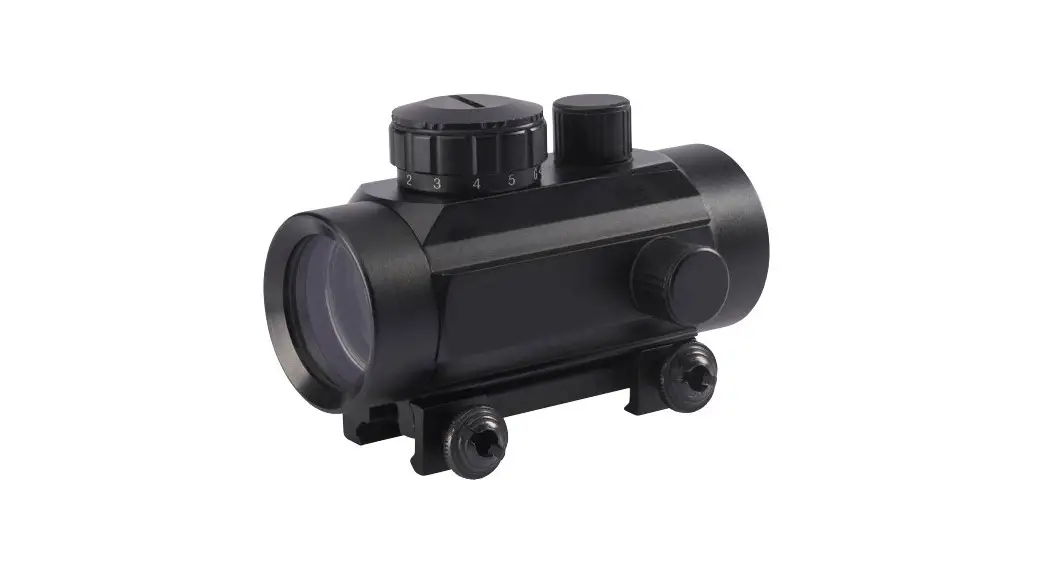
51630 Red-dot Finderscope
Product Information: StarPointerTM Red-dot Finderscope
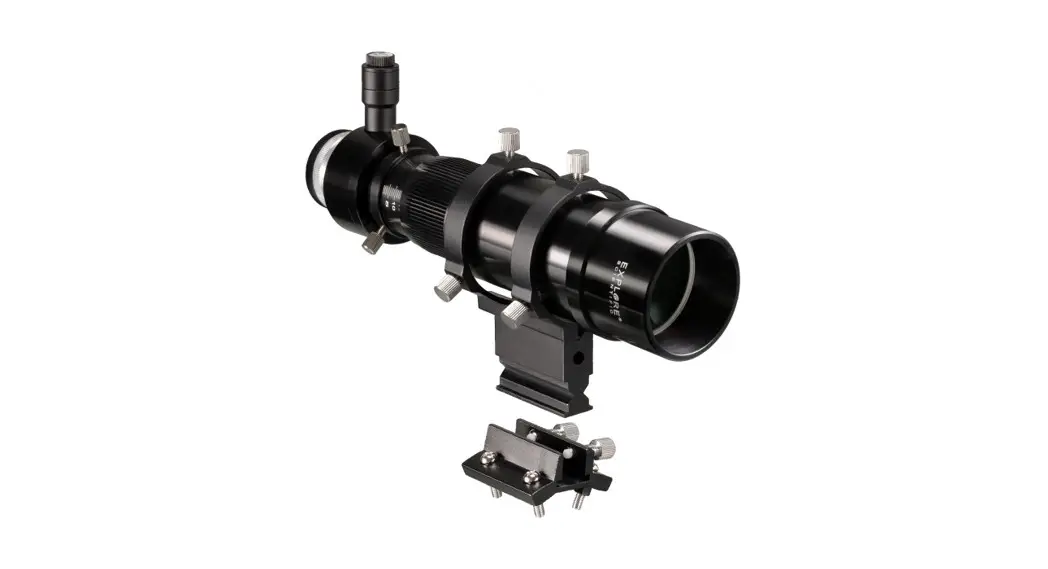
The StarPointerTM Red-dot Finderscope is an essential accessory
for telescopes. It helps users locate objects and center them in
the eyepiece. The finderscope comes with various components:
- Front lens
- Power/brightness knob
- Altitude adjustment knob
- Mounting screws
- Azimuth adjustment knob
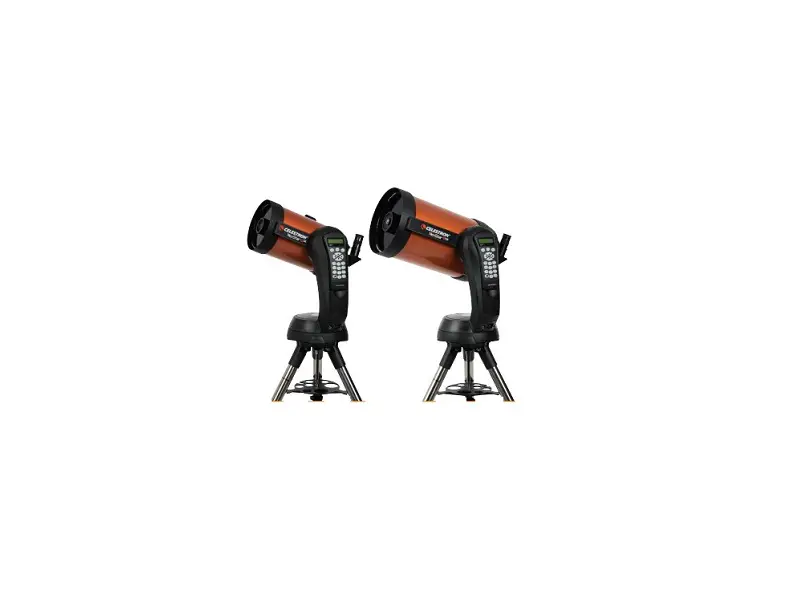
- Small Schmidt-Cassegrain bracket
- Large Schmidt-Cassegrain bracket
- Mounting bracket for small telescopes with dovetails
- Mounting bracket for small telescopes with screw holes
- Metal pocket multi-tool
Product Usage Instructions: Installing the StarPointer
Finderscope
- Loosen the two mounting screws near the bottom of the
finderscope. - Choose the correct bracket for your telescope and attach it to
the base of the finder. - Tighten the screws to secure the bracket in place.
- If your bracket is the dovetail type:
- Loosen the setscrew on the telescope mounting bracket.
- Slide the base of the finderscope into the bracket.
- Tighten the setscrew to secure the finder in place.
- If your bracket is the screw-on type:
- Remove the two Phillips-head screws or thumb screws from the
telescope. - Place the finder over the screw holes or posts.
- Tighten the screws or thumb screws down to secure the finder in
place.
- Remove the two Phillips-head screws or thumb screws from the
- Pull out the clear plastic tab to enable battery usage before
using your finderscope. - Never attempt to view the Sun through this finderscope or any
telescope without a solar filter.
Product Usage Instructions: Aligning the StarPointer
Finderscope
The finderscope needs to be aligned with the telescope’s main
optics in order to locate objects accurately. Follow these
steps:
- Turn on the finderscope using the power knob and take the
telescope outside during the day. - Choose an easily recognizable object, such as a streetlight,
car license plate, or sign, that is at least a quarter mile
away. - Look through the telescope using your lowest power eyepiece and
move it until the chosen object lies in the center of the view.
Adjust the focus knob for sharp focus. - Look through the finderscope’s optical window and locate the
red dot while keeping the object centered in the eyepiece. - Use the finderscope’s adjustment knobs to move it until the red
dot appears over the observed object in the eyepiece without moving
the telescope. - Your finderscope is now aligned and should not require
realignment unless it is bumped or dropped. To test the alignment,
point the red dot at another land-based target and verify its
center in the eyepiece’s field of view.
INSTRUCTION MANUAL
StarPointerTM Red-dot Finderscope
PARTS LIST
2 3
4
5
8
9
6
7
1 10
1. Front lens 2. Power/brightness knob 3. Altitude adjustment knob 4. Mounting screws 5. Azimuth adjustment knob
6. Small Schmidt-Cassegrain bracket 7. Large Schmidt-Cassegrain bracket 8. Mounting bracket for small telescopes with dovetails 9. Mounting bracket for small telescopes with screw holes 10. Metal pocket multi-tool
2 | ENGLISH
INSTALLING THE STARPOINTER FINDERSCOPE
1
2
StarPointerTM Red-dot Finderscope
3
1. Loosen the two mounting screws near the bottom of the finderscope.
2. Choose the correct bracket for your telescope, and attach it to the base of the finder.
3. Tighten the screws to secure the bracket in place.
4
5
OR
4. If your bracket is the dovetail type, loosen the setscrew on the telescope mounting bracket, slide the base of the finderscope into the bracket and tighten the setscrew.
If your bracket is the screw-on type, remove the two Phillips-head screws or thumb screws from the telescope. Place the finder over the screw holes or posts. Tighten the screws or thumb screws down to secure the finder in place.
5. A clear plastic tab prevents the battery from discharging. Pull out the tab before using your finderscope.
* SOLAR WARNING! Never attempt to view the Sun through this finderscope or any telescope without a solar filter!
ENGLISH | 3
StarPointerTM Red-dot Finderscope
ALIGNING THE STARPOINTER FINDERSCOPE
The finderscope is one of the most important parts of your telescope. It helps you locate objects and center them in the eyepiece. The first time you assemble your telescope, you’ll need to align the finderscope with the telescope’s main optics. It’s best to do this during the day* using land-based targets.
* SOLAR WARNING! Never attempt to view the Sun through this finderscope or any telescope without a solar filter.
NOTE: Be sure to turn off the StarPointer finderscope when not in use to conserve battery power. New batteries can be purchased online or at watch/electronic stores.
Power knob
1
2
20mm eyepiece
Altitude adjustment knob (up-and-down)
3
Azimuth adjustment knob (side-to-side)
CHOOSE A TARGET
1. Take the telescope outside during the day and turn on the finderscope using the power knob. Find an easily recognizable object, such as a streetlight, car license plate, or sign. The object should be as far away as possible but at least a quarter mile away.
4
Focus Knobs
CENTER THE TARGET IN THE EYEPIECE 2. Look through the telescope using your
lowest power eyepiece. Move the telescope until your chosen object lies in the center of the view. If the image is blurry, turn the focus knob until it comes into sharp focus.
5
LOOK THROUGH THE FINDERSCOPE
3. With the object precisely centered in the eyepiece, look through the finderscope’s optical window and locate the red dot.
ADJUST THE FINDERSCOPE
4. Without moving the telescope, use the finderscope’s two adjustment knobs to move it around until the red dot appears over the object you are observing in the eyepiece.
YOUR FINDERSCOPE IS NOW ALIGNED!
5. It should not require realignment unless it is bumped or dropped. If you want to test the alignment, point the red dot at another land-based target. Then verify the object is in the center of the eyepiece’s field of view.
4 | ENGLISH
StarPointerTM Red-dot Finderscope
ACCESSING THE FINDERSCOPE BATTERY
The StarPointer finderscope uses a long-life 3V lithium battery (#CR2032), which is located on the StarPointer’s top surface. If you plan on not using your telescope for an extended period, we recommend removing the battery for storage. To remove or replace the battery, follow these instructions:
1
2
3
1. Using a Phillips-head screwdriver, loosen the battery cover screw and flip the cover open.
2. If you are replacing the battery, install the new one with the (+) terminal facing outward.
3. Place the cover back onto the finderscope and retighten the screw with the Phillipshead screwdriver.
NOTE: You will need a small Philips-head screwdriver to replace the StarPointer finderscope’s battery
SAFETY INSTRUCTIONS
· There is a risk of explosion if the battery is replaced with an incorrect type. · The included battery is not rechargeable. · Only use the battery as originally intended to avoid a short circuit. Connecting the conductive material
directly to the battery’s positive and negative sides will cause a short circuit. · Do not use a damaged battery. · Do not store the battery in an extremely cold or hot environment. Doing so can reduce battery life. · When replacing the battery, refer to the instruction manual and ensure the positive and negative sides are
oriented correctly. · Do not put the battery in fire. · Dispose of the battery according to local regulations.
FCC NOTICE: This device complies with Part 15 of the FCC Rules. Operation is subject to the following two conditions: (1) This device may not cause harmful interference, and (2) this device must accept any interference received, including interference that may cause undesired operation.
©2023 Celestron. Celestron and Symbol are trademarks of Celestron, LLC. · All rights reserved. Celestron.com · 2835 Columbia Street, Torrance, CA 90503 USA Product design and specifications are subject to change without prior notification. This product is designed and intended for use by those 14 years of age and older. Made in China
www.celestron.com/pages/warranty 06-23
MODE D’EMPLOI
Chercheur à point rouge StarPointerTM
LISTE DES PIÈCES
2 3
4
5
8
9
6
7
1 10
1. Lentille frontale 2. Molette Alimentation/Luminosité 3. Molette de réglage d’altitude 4. Vis de monture 5. Molette de réglage d’azimut
6. Petite fixation pour Schmidt-Cassegrain 7. Grande fixation pour Schmidt-Cassegrain 8. Petite fixation pour télescopes de petite taille équipés d’une queue d’aronde 9. Grande fixation pour télescopes de petite taille équipés d’une queue d’aronde 10. Rangement métallique pour outil multifonction
7 | FRANÇAIS
INSTALLATION DU CHERCHEUR STARPOINTER
1
2
Chercheur à point rouge StarPointerTM
3
1. Desserrez les deux vis de montage près du bas du chercheur.
2. Sélectionnez la fixation pour votre télescope, et attachez-la à la base du chercheur.
3. Serrez les vis de fixation pour attacher fermement la fixation.
4
5
OU
4. Si la fixation est de type en queue d’aronde, desserrez la vis de fixation sur la monture du télescope. Faites glisser le chercheur dans la monture et serrez la vis.
Si la fixation est de type vissée, retirez les deux vis à tête cruciforme ou les vis à main du télescope. Placez le chercheur sur les deux trous de vis ou les tiges. Serrez les vis de fixation ou les vis à main pour fixer le chercheur.
5. Une languette de plastique transparente est installée pour éviter que la pile ne se décharge. Retirez la languette avant d’utiliser le télescope.
* AVERTISSEMENT SUR LE SOLEIL! N’essayez jamais d’observer le soleil via ce chercheur ou un télescope de n’importe quel type sans utiliser de filtre solaire!
FRANÇAIS | 8
Chercheur à point rouge StarPointerTM
ALIGNER LE CHERCHEUR STARPOINTER
Le chercheur est l’un des composants les plus importants de votre télescope. Il vous aide à localiser des objets et à les centrer dans votre oculaire. La première fois que vous assemblez votre télescope, vous devez aligner le chercheur avec le système optique principal du télescope. Il est préférable de faire ceci pendant la journée* en utilisant des cibles terrestres.
* AVERTISSEMENT SUR LE SOLEIL! N’essayez jamais d’observer le soleil via ce chercheur ou un télescope de n’importe quel type sans utiliser de filtre solaire!
REMARQUE: Assurez-vous de toujours éteindre le chercheur StarPointer lorsque vous ne vous en servez pas, pour économiser la pile. Vous pouvez acheter de nouvelles piles en ligne ou dans les magasins de montres/d’électronique.
Molette d’alimentation
1
2
Oculaire de
20 mm
Bouton de réglage d’altitude (verticalement)
Molette de réglage d’azimut (horizontalement)
3
CHOISIR UNE CIBLE
1. Sortez le télescope pendant la journée et allumez le chercheur à l’aide du bouton d’alimentation. Trouvez un objet facilement reconnaissable, tel qu’un lampadaire, une plaque d’immatriculation ou une enseigne. L’objet doit se situer aussi loin que possible, mais à au moins un quart de mile de vous.
4
Molettes de mise au point
CENTRER LA CIBLE DANS L’OCULAIRE
2. Regardez dans le télescope en utilisant votre oculaire de la plus basse basse puissance. Déplacez le télescope jusqu’à que l’objet choisi se trouve au centre du champ de vision. Si l’image est floue, faites doucement tourner la molette de mise au point jusqu’à ce que l’image soit nette.
5
REGARDER DANS LE CHERCHEUR
3. Une fois l’objet centré avec précision dans l’oculaire, regardez à travers la fenêtre optique du chercheur et localisez le point rouge.
AJUSTER LE CHERCHEUR
4. Sans déplacer le télescope, utilisez les deux molettes d’ajustement pour déplacer le chercheur jusqu’à que le point rouge s’aligne sur l’objet observé dans l’oculaire.
VOTRE CHERCHEUR EST MAINTENANT
ALIGNÉ!
5. Il n’aura pas besoin d’être aligné de nouveau tant qu’il n’aura pas subi un choc ou qu’il sera tombé. Si vous souhaitez tester l’alignement, pointez le point rouge sur une autre cible terrestre. Vérifiez ensuite que l’objet se trouve au centre du champ de vision de l’oculaire.
9 | FRANÇAIS
Chercheur à point rouge StarPointerTM
ACCÉDER À LA PILE DU CHERCHEUR
Le chercheur StarPointer utilise une pile au lithium 3V longue durée (#CR2032), qui est située sur la surface supérieure du StarPointer. Si vous prévoyez de ne pas utiliser votre télescope pendant une période prolongée, nous vous recommandons de retirer la batterie pour le stockage. Pour retirer ou remplacer la pile, suivez ces instructions:
1
2
3
1. À l’aide d’un tournevis cruciforme, desserrez la vis du couvercle de la batterie et ouvrez le couvercle.
2. Si vous remplacez la pile, installez la nouvelle en orientant le pôle (+) vers l’extérieur.
3. Remettez le couvercle sur le chercheur et resserrez la vis avec le tournevis cruciforme.
REMARQUE: Vous aurez besoin de vous munir d’un petit tournevis cruciforme pour remplacer la pile du chercheur StarPointer.
INSTRUCTIONS DE SÉCURITÉ
· Risque d’explosion si la pile est remplacée par un type incorrect. · La pile incluse n’est pas rechargeable. · N’utilisez la pile que de la manière prévue pour éviter les court-circuits. Si un matériau conducteur met
directement en contact les pôles positifs et négatifs d’une pile, cela crée un court-circuit. · N’utilisez pas une pile endommagée. · Ne stockez pas la pile dans un lieu extrêmement froid ou chaud. Ceci pourrait réduire sa durée de vie. · Avant de remplacer la pile, consultez le mode d’emploi et faites attention au sens positif et négatif de la pile. · Ne jetez pas la pile au feu. · Jetez la pile dans le respect de la réglementation
Déclaration de la FCC Cet appareil respecte la section 15 des règles de la FCC. Son utilisation est sujette aux deux conditions suivantes: (1) Cet appareil ne doit pas causer d’interférences nuisibles et (2) cet appareil doit accepter toutes les interférences reçues, y compris celles pouvant entraîner un fonctionnement indésirable.
©2023 Celestron. Celestron et le logo sont des marques déposées de Celestron, LLC. Tous droits réservés. Celestron.com · 2835 Columbia Street, Torrance, CA 90503 États-Unis La conception et les spécifications du produit sont susceptibles d’être modifiées sans notification préalable. Ce produit est conçu et destiné à être utilisé par des personnes de 14 ans et plus. Fabriqué en Chine
www.celestron.com/pages/warranty 06-23
BEDIENUNGSANLEITUNG
StarPointerTM Leuchtpunkt-Sucherfernrohr
TEILELISTE
2 3
4
5
8
9
6
7
1 10
1. Vordere Linse 2. Ein-/Aus-/Helligkeitsregler 3. Knopf zur Höhenverstellung 4. Befestigungsschrauben 5. Azimut-Einstellknopf
6. Kleine Schmidt-Cassegrain-Klammer 7. Große Schmidt-Cassegrain-Klammer 8. Montagehalterung für kleine Teleskope mit Schwalbenschwanz 9. Montagehalterung für kleine Teleskope mit Schraubenlöchern 10. Taschen-Multitool aus Metall
11 | DEUTSCH
INSTALLIEREN DES STARPOINTER SUCHERFERNROHR
1
2
StarPointerTM Leuchtpunkt-Sucherfernrohr
3
1. Lösen Sie die beiden Befestigungsschrauben unten am Sucherfernrohr.
2. Wählen Sie die richtige Halterung für Ihr Teleskop und befestigen Sie sie an der Basis des Suchers.
3. Ziehen Sie die Schrauben fest, um die Halterung zu befestigen.
4
5
ODER
4. Wenn es sich bei Ihrer Halterung um eine Schwalbenschwanzhalterung handelt, lösen Sie die Stellschraube an der Teleskophalterung, schieben die Basis des Sucherfernrohrs in die Halterung und ziehen die Stellschraube fest.
Wenn es sich bei Ihrer Halterung um eine Schraubhalterung handelt, entfernen Sie die beiden Kreuzschlitzschrauben oder Rändelschrauben vom Teleskop. Setzen Sie den Sucher über die Schraubenlöcher oder Stifte. Ziehen Sie die Schrauben oder Rändelschrauben fest, um den Sucher zu befestigen.
5. Eine durchsichtige Plastiklasche verhindert, dass sich der Akku entlädt. Ziehen Sie die Lasche heraus, bevor Sie Ihr Sucherfernrohr verwenden.
* WARNUNG BEI SONNENBEOBACHTUNG! Versuchen Sie niemals, die Sonne ohne Sonnenfilter durch dieses Sucherfernrohr oder ein anderes Teleskop zu betrachten!
DEUTSCH | 12
StarPointerTM Leuchtpunkt-Sucherfernrohr
AUSRICHTEN DES STARPOINTER SUCHERFERNROHR
Der Sucher ist eines der wichtigsten Teile Ihres Teleskops. Es hilft Ihnen, Objekte zu suchen und im Okular zu zentrieren. Wenn Sie das Teleskop zum ersten Mal zusammenbauen, müssen Sie das Sucherfernrohr nach der Hauptoptik des Teleskops ausrichten. Am besten tun Sie dies tagsüber* mit Zielen auf der Erde.
* WARNUNG BEI SONNENBEOBACHTUNG! Versuchen Sie niemals, die Sonne ohne Sonnenfilter durch dieses Sucherfernrohr oder ein anderes Teleskop zu betrachten.
HINWEIS: Schalten Sie das StarPointer-Sucherfernrohr unbedingt aus, wenn Sie es nicht verwenden, um die Batterien zu schonen. Neue Batterien können Sie online oder in Uhren-/Elektronikgeschäften kaufen.
Ein-/Aus-Knopf
1
2
20-mm-Okular
HöheneinstellungsKnopf (auf und ab)
3
Azimut-Einstellknopf (von Seite zu Seite)
WÄHLEN SIE EIN ZIEL
1. Nehmen Sie das Teleskop tagsüber mit nach draußen und schalten Sie das Sucherfernrohr mit dem Ein-/ Aus-Knopf ein. Suchen Sie nach einem leicht erkennbaren Objekt, beispielsweise einer Straßenlaterne, einem Autokennzeichen oder einem Schild. Das Objekt sollte so weit wie möglich entfernt sein, mindestens 400 Meter entfernt.
4
Fokussierknöpfe
ZENTRIEREN SIE DAS ZIEL IM OKULAR
2. Schauen Sie mit Ihrem Okular mit der niedrigsten Vergrößerung durch das Teleskop. Bewegen Sie das Teleskop, bis Ihr ausgewähltes Objekt in der Mitte der Ansicht liegt. Wenn das Bild unscharf ist, drehen Sie den Fokussierknopf so lange, bis das Bild scharf ist.
5
DURCH DAS SUCHERFERNROHR SCHAUEN
3. Schauen Sie mit genau zentriertem Objekt im Okular durch das optische Fenster des Sucherfernrohrs und lokalisieren den Leuchtpunkt.
SUCHERFERNROHR AUSRICHTEN
4. Ohne das Teleskop zu bewegen, verwenden Sie die beiden Einstellknöpfe des Sucherfernrohrs, um es zu bewegen, bis der Leuchtpunkt über dem Objekt erscheint, das Sie im Okular beobachten.
IHR SUCHERFERNROHR IST JETZT
AUSGERICHTET!
5. Es sollte keine Neuausrichtung erforderlich sein, es sei denn, es wird gestoßen oder fallen gelassen. Wenn Sie die Ausrichtung testen möchten, richten Sie den Leuchtpunkt auf ein anderes Landziel. Überprüfen Sie dann, ob sich das Objekt in der Mitte des Sichtfelds des Okulars befindet.
13 | DEUTSCH
StarPointerTM Leuchtpunkt-Sucherfernrohr
AUF DIE BATTERIE DES SUCHERFERNROHRS ZUGREIFEN
Das StarPointer-Sucherfernrohr verwendet eine langlebige 3-V-Lithiumbatterie (#CR2032), die sich auf der Oberseite des StarPointer befindet. Wenn Sie Ihr Teleskop über einen längeren Zeitraum nicht verwenden möchten, empfehlen wir Ihnen, die Batterie zur Lagerung herauszunehmen. Um die Batterie zu entfernen oder auszutauschen, befolgen Sie diese Anweisungen:
1
2
3
1. Lösen Sie mit einem Kreuzschlitzschraubendreher die Schraube der Batterieabdeckung und klappen die Abdeckung auf.
2. Wenn Sie die Batterie austauschen, legen Sie die neue Batterie so ein, dass der (+)-Anschluss nach außen zeigt.
3. Setzen Sie die Abdeckung wieder auf das Sucherfernrohr und ziehen die Schraube mit dem Kreuzschlitzschraubendreher wieder fest.
HINWEIS: Zum Ersetzen der Batterie des StarPointer-Sucherfernrohrs benötigen Sie einen kleinen Kreuzschlitzschraubendreher
SICHERHEITSHINWEISE
· Es besteht eine Explosionsgefahr, wenn die Batterie durch einen falschen Batterietyp ersetzt wird. · Die mitgelieferte Batterie ist nicht wiederaufladbar. · Verwenden Sie die Batterie nur wie ursprünglich vorgesehen, um einen Kurzschluss zu vermeiden. Das
direkte Anschließen des leitenden Materials an die positiven und negativen Seiten der Batterie führt zu einem Kurzschluss. · Verwenden Sie keine beschädigte Batterie. · Lagern Sie die Batterie nicht in einer extrem kalten oder heißen Umgebung. Dies kann die Batterielebensdauer verringern. · Beachten Sie beim Ersetzen der Batterie die Bedienungsanleitung und sorgen Sie dafür, dass die positiven und negativen Pole richtig ausgerichtet sind. · Werfen Sie die Batterie nicht ins Feuer. · Entsorgen Sie die Batterie gemäß den örtlichen Vorschriften.
FCC-HINWEIS: Dieses Gerät entspricht Teil 15 der FCC-Bestimmungen. Der Betrieb unterliegt folgenden zwei Bedingungen: (1) Dieses Gerät darf keine schädlichen Störungen erzeugen und (2) dieses Gerät muss Störungen von außen akzeptieren, dazu gehören solche Störungen, die einen unerwünschten Betrieb verursachen.
©2023 Celestron. Celestron und Symbol sind Marken von Celestron, LLC. · Alle Rechte vorbehalten. Celestron.com · 2835 Columbia Street, Torrance, CA 90503 USA Produktdesign und Technische Daten können ohne vorherige Ankündigung geändert werden. Dieses Produkt ist für die Verwendung durch Personen ab 14 Jahren konzipiert und vorgesehen. Hergestellt in China
www.celestron.com/pages/warranty 06-23
MANUALE DI ISTRUZIONI
StarPointerTM Cercatore con mirino
ELENCO COMPONENTI
2 3
4
5
8
9
6
7
1 10
1. Lente anteriore 2. Manopola alimentazione/luminosità 3. Manopola regolazione altitudine 4. Viti di montaggio 5. Manopola regolazione azimut 6. Staffa piccola Schmidt-Cassegrain
7. Staffa grande Schmidt-Cassegrain 8. Staffa di montaggio per piccoli telescopi con coda di rondine 9. Staffa di montaggio per piccoli telescopi con fori per viti 10. Strumento multifunzione in metallo
16 | ITALIANO
INSTALLAZIONE DEL CERCATORE STARPOINTER
1
2
StarPointerTM Cercatore con mirino
3
1. Allentare le due viti di montaggio vicino alla base del cercatore.
2. Scegliere la staffa corretta in base al proprio telescopio e fissarla alla base del cercatore.
3. Serrare le viti per fissare la staffa in posizione.
4
5
OPPURE
4. Se si possiede un staffa della tipologia a coda di rondine, allentare la vite di fissaggio sulla staffa di montaggio del telescopio, fare scorrere la base del cercatore nella staffa e serrare la vite di fissaggio.
Se si possiede una staffa della tipologia a vite, rimuovere le due viti a croce o viti di bloccaggio dal telescopio. Sistemare il cercatore sopra i fori delle viti o le aste. Serrare le viti o le viti di bloccaggio per fissare il cercatore in posizione.
5. Una linguetta di plastica trasparente impedisce alla batteria di scaricarsi. Rimuovere la linguetta prima di utilizzare il cercatore.
* AVVERTENZA SOLARE! Non provare mai a osservare il Sole attraverso il cercatore o il telescopio senza un filtro solare!
ITALIANO | 17
StarPointerTM Cercatore con mirino
ALLINEAMENTO DEL CERCATORE STARPOINTER
Il cercatore è uno dei componenti più importanti del telescopio. Aiuta a localizzare gli oggetti e a centrarli nell’oculare. Al primo assemblaggio del telescopio è necessario allineare il cercatore con le ottiche principali del telescopio. È preferibile eseguire questa operazione durante il giorno* utilizzando degli oggetti terrestri.
* AVVERTENZA SOLARE! Non tentare mai di osservare il Sole attraverso il cercatore o il telescopio senza un filtro solare.
NOTA: Assicurarsi di spegnere il cercatore StarPointer quando non in uso per risparmiare batteria. È possibile acquistare nuove batterie online oppure presso rivenditori di orologi/elettronica.
Manopola alimentazione
1
2
Oculare 20mm
Manopola regolazione altitudine (su e giù)
3
Manopola regolazione azimut (laterale)
SCEGLIERE UN OGGETTO DA OSSERVARE
1. Portare il telescopio all’esterno durante il giorno e accendere il cercatore mediante la manopola di alimentazione. Individuare un oggetto facilmente riconoscibile, come ad esempio un lampione, la targa di un’auto o un cartello. L’oggetto dovrebbe trovarsi il più lontano possibile, minimo a 400 metri.
4
Manopole messa a fuoco
CENTRARE L’OGGETTO NELL’OCULARE 2. Guardare attraverso il telescopio
utilizzando l’oculare con minor potenza. Muovere il telescopio fino a quando l’oggetto prescelto si trova al centro del campo visivo. Se l’immagine è sfocata, ruotare la manopola di messa a fuoco fino a quando non è nitida.
5
GUARDARE ATTRAVERSO IL CERCATORE
3. Con l’oggetto centrato precisamente nell’oculare, osservare attraverso la finestra ottica del cercatore e individuare il mirino.
REGOLARE IL CERCATORE
4. Senza spostare il telescopio, utilizzare le due manopole di regolazione del cercatore per spostarlo fino a quando il mirino appare sull’oggetto che si sta osservando nell’oculare.
IL CERCATORE È ORA ALLINEATO!
5. Non occorre effettuare un nuovo allineamento salvo colpi o cadute. Se si desidera verificare l’allineamento, puntare il mirino ad un altro obiettivo terrestre. Quindi verificare che l’oggetto si trovi al centro del campo visivo dell’oculare.
18 | ITALIANO
StarPointerTM Cercatore con mirino
ACCESSO ALLA BATTERIA DEL CERCATORE
Il cercatore StarPointer utilizza una batteria al litio a lunga durata da 3V (CR2032), posta sulla superficie superiore dello StarPointer. Se si pensa di non utilizzare il telescopio per un periodo prolungato, si consiglia di rimuovere la batteria durante la conservazione. Per rimuovere o sostituire la batteria, seguire le seguenti istruzioni:
1
2
3
1. Mediante un cacciavite a croce, allentare la vite del coperchio della batteria e aprire il coperchio.
2. Se si sta sostituendo la batteria, installare la nuova con il polo (+) rivolto verso l’esterno.
3. Posizionare nuovamente il coperchio sul cercatore e serrare la vite con il cacciavite a croce.
NOTA: È necessario un piccolo cacciavite a croce per sostituire la batteria del cercatore StarPointer.
ISTRUZIONI DI SICUREZZA
· Rischio di esplosione se la batteria è sostituita con un tipo di batteria non corretto. · La batteria in dotazione non è ricaricabile. · Utilizzare la batteria esclusivamente come previsto originariamente per evitare un corto circuito. Quando il materiale
conduttivo è in contatto diretto con il polo positivo e negativo della batteria si ha un corto circuito. · Non usare una batteria danneggiata. · Non conservare la batteria in un ambiente eccessivamente freddo o caldo. Ciò può ridurre la durata della batteria. · Quando si sostituisce la batteria, consultare il manuale di istruzioni e assicurarsi che i poli positivo e negativo siano
orientati correttamente. · Non gettare la batteria nelle fiamme. · Smaltire la batteria in conformità ai regolamenti locali.
NOTA FCC: Il presente dispositivo è conforme alla Parte 15 delle Norme FCC. L’utilizzo è soggetto alle seguenti due condizioni: (1) Il presente dispositivo non deve causare interferenze dannose, e (2) il presente dispositivo deve accettare qualsiasi interferenza ricevuta, comprese interferenze che potrebbero causare un funzionamento indesiderato.
©2023 Celestron. Celestron e Symbol sono marchi di fabbrica di Celestron, LLC. Tutti i diritti riservati. Celestron.com · 2835 Columbia Street, Torrance, CA 90503 Stati Uniti Il design e le specifiche del prodotto sono soggetti a modifiche senza previa notifica. Il prodotto è ideato e inteso per persone di età superiore ai 14 anni. Fabbricato in Cina
www.celestron.com/pages/warranty 06-23
MANUAL DE INSTRUCCIONES
Localizador de punto rojo StarPointerTM
LISTA DE PIEZAS
2 3
4
5
8
9
6
7
1 10
1. Lente anterior 2. Mando de encendido/brillo 3. Mando de ajuste de altitud 4. Tornillos de montaje 5. Mando de ajuste de azimut
6. Soporte Schmidt-Cassegrain pequeño 7. Soporte Schmidt-Cassegrain grande 8. Soporte de montaje para telescopios pequeños con machihembrado 9. Soporte de montaje para telescopios pequeños con huecos para tornillos 10. Multiherramienta de bolsillo metálica
21 | ESPAÑOL
INSTALAR EL LOCALIZADOR STARPOINTER
1
2
Localizador de punto rojo StarPointerTM
3
1. Afloje los dos tornillos de montaje cerca de la parte inferior del localizador.
2. Seleccione el soporte correcto para su telescopio e instálelo en la base del localizador.
3. Apriete los tornillos para asegurar el soporte en posición.
4
5
O
4. Si su soporte es de tipo machihembrado, afloje el tornillo del soporte de montaje del telescopio, deslice la base del localizador en el soporte y apriete el tornillo.
Si su soporte es de tipo atornillado, retire los dos tornillos de cabezal Phillips o tornillos manuales del telescopio. Coloque el localizador sobre los agujeros para tornillo o postes. Apriete los tornillos o tornillos manuales para asegurar el localizador en posición.
5. Una pestaña de plástico transparente evita que se descargue la batería. Retire esta pestaña antes de usar el localizador.
* ¡AVISO SOLAR! ¡No intente nunca observar el Sol por este localizador ni ningún telescopio sin un filtro solar!
ESPAÑOL | 22
Localizador de punto rojo StarPointerTM
ALINEAR EL LOCALIZADOR STARPOINTER
El localizador es una de las piezas más importantes de su telescopio. Le ayuda a localizar objetos y centrarlos en el ocular. La primera vez que monte el telescopio, deberá alinear el localizador con la óptica principal del telescopio. Es preferible hacerlo de día* usando objetivos terrestres.
* ¡AVISO SOLAR! No intente nunca observar el Sol por este localizador ni ningún telescopio sin un filtro solar.
NOTA: Asegúrese de apagar el localizador StarPointer cuando no lo use para conservar energía de las baterías. Puede adquirir nuevas baterías por Internet o en tiendas de relojes/electrónica.
Mando de encendido
1
2 Ocular de 20mm
Mando de ajuste de altitud (arriba y abajo)
3
Mando de ajuste de azimut (lado a lado)
ELEGIR UN OBJETO
1. Saque el telescopio al exterior de día y encienda el localizador con el mando de encendido. Localice un objeto fácilmente identificable, como una farola, matrícula de coche o señal. El objeto debe estar lo más lejos posible, al menos a 400 m.
4
Mandos de enfoque
CENTRAR EL OBJETO EN EL OCULAR 2. Mire por el telescopio usando el
ocular con menor potencia. Mueva el telescopio hasta que el objeto elegido quede en el centro de la vista. Si la imagen está borrosa, gire suavemente el mando de enfoque hasta que quede bien enfocada.
5
MIRAR POR EL LOCALIZADOR
3. Con el objeto centrado con precisión en el ocular, mire por la ventana óptica del localizador y encuentre el punto rojo.
AJUSTAR EL LOCALIZADOR
4. Sin mover el telescopio, use los dos mandos de ajuste del localizador para moverlo hasta que el punto rojo aparezca sobre el objeto que está observando en el ocular.
SU LOCALIZADOR ESTÁ ALINEADO.
5. No debería necesitar realinearse, a menos que reciba golpes o caiga. Si quiere probar la alineación, apunte el punto rojo a otro objetivo terrestre. Compruebe que el objeto esté en el centro del campo de visión del ocular.
23 | ESPAÑOL
Localizador de punto rojo StarPointerTM
ACCEDER A LA BATERÍA DEL LOCALIZADOR
El localizador StarPointer usa una batería de litio de 3V de larga duración (#CR2032), situada en la superficie superior del StarPointer. Si no va a usar su telescopio durante un tiempo prolongado, recomendamos retirar la batería para guardarlo. Para retirar o sustituir la batería, siga estas instrucciones:
1
2
3
1. Usando un destornillador con cabezal Phillips, afloje el tornillo de la cubierta de la batería y abra la tapa.
2. Si está sustituyendo la batería, instale la nueva con el terminal (+) hacia fuera.
3. Vuelva a colocar la tapa en el localizador y apriete el tornillo con el destornillador de cabezal Phillips.
NOTA: Necesitará un destornillador de cabezal Phillips pequeño para sustituir la batería del localizador StarPointer
INSTRUCCIONES DE SEGURIDAD
· Riesgo de explosión si se sustituye la batería por un tipo incorrecto. · La batería incluida no es recargable. · Use la batería exclusivamente del modo originalmente pretendido para evitar un cortocircuito. Cuando el
material conductor se conecte directamente al positivo y negativo de la batería causará un cortocircuito. · No use una batería dañada. · No guarde la batería en un entorno extremadamente frío o cálido. Hacerlo puede reducir la duración de la
batería. · Cuando cambie la batería, consulte el manual de instrucciones y asegúrese de que los lados positivo y
negativo estén correctamente orientados. · No ponga las baterías en el fuego. · Deseche la batería según la normativa local.
NOTIFICACIÓN FCC: Este dispositivo cumple con el apartado 15 de las normas FCC. Su uso está sujeto a las dos condiciones siguientes: (1) este dispositivo no puede causar interferencias nocivas, y (2) este dispositivo debe admitir cualquier interferencia recibida, incluidas las interferencias que puedan causar un funcionamiento indeseado.
©2023 Celestron. Celestron y su símbolo son marcas comerciales de Celestron, LLC. Todos los derechos reservados. Celestron.com · 2835 Columbia Street, Torrance, CA 90503 EE.UU. El diseño del producto y sus especificaciones están sujetos a cambio sin previo aviso. Este producto ha sido diseñado y está pensado para ser usado por personas de 14 o más años de edad. Fabricado en China
www.celestron.com/pages/warranty 06-23
 Celestron - Telescopes, Telescope Accessories, Outdoor and Scientific Products
 Warranty | Celestron