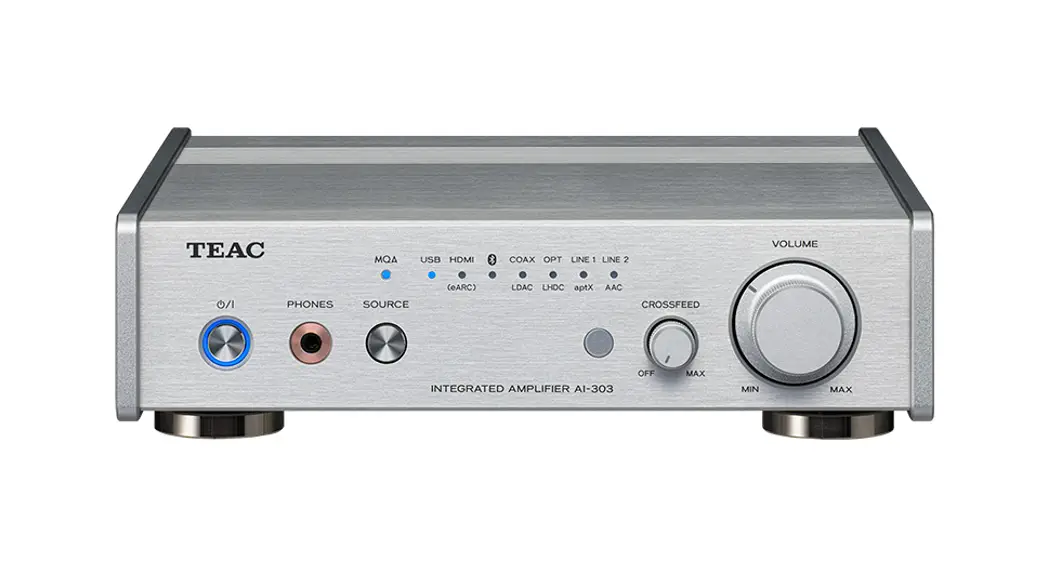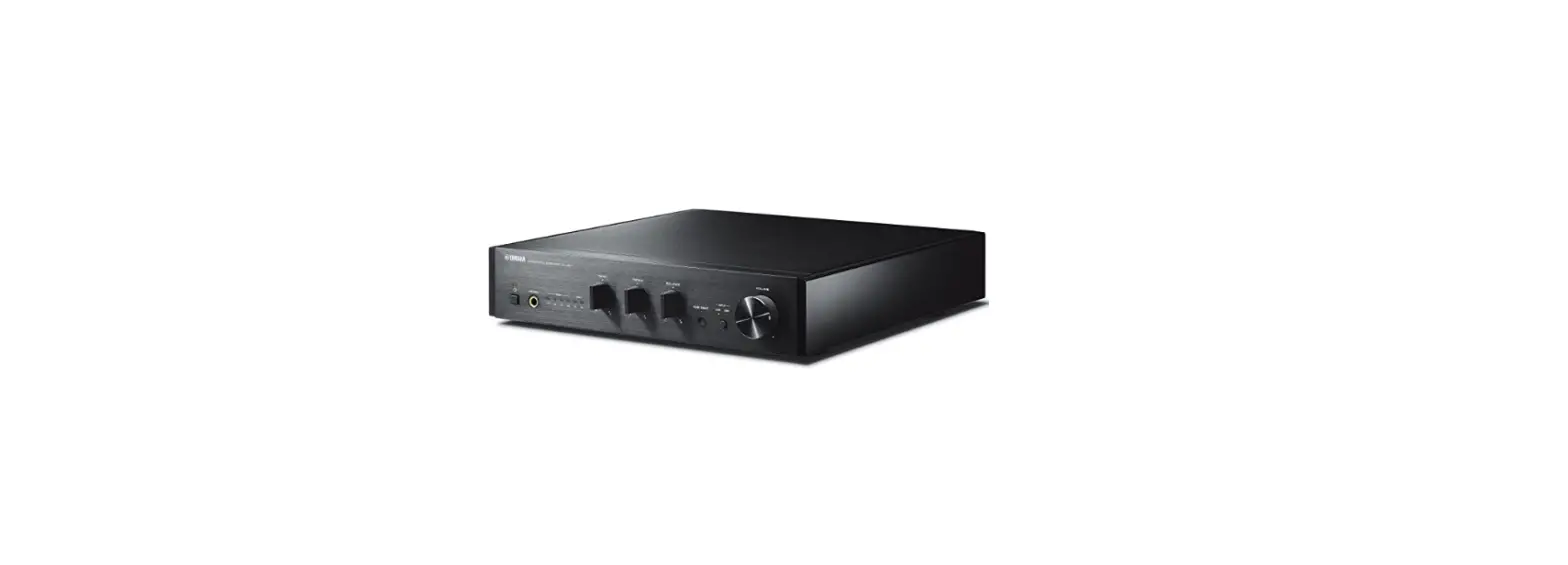

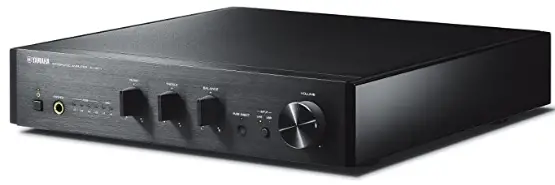
Yamaha A-U671 Stereo Amplifier with USB DAC Function
IMPORTANT SAFETY INSTRUCTIONS
CAUTION
TO REDUCE THE RISK OF ELECTRIC SHOCK, DO NOT REMOVE THE COVER (OR BACK). NO USER-SERVICEABLE PARTS INSIDE. REFER SERVICING TO QUALIFIED SERVICE PERSONNEL.
Explanation of Graphical Symbols
The lightning flash with the arrowhead symbol, within an equilateral triangle, is intended to alert you to the presence of uninsulated “dangerous voltage” within the product’s enclosure that may be of sufficient magnitude to constitute a risk of electric shock to persons. The exclamation point within an equilateral triangle is intended to alert you to the presence of important operating and maintenance (servicing) instructions in the literature accompanying the appliance.
- Read these instructions.
- Keep these instructions.
- Heed all warnings.
- Follow all instructions.
- do not use this apparatus near water.
- Clean only with a dry cloth.
- Do not block any ventilation openings. Install in accordance with the manufacturer’s instructions.
- Do not install near any heat sources such as radiators, heat registers, stoves, or other apparatus (including amplifiers) that produce heat.
- Do not defeat the safety purpose of the polarized or grounding-type plug. A polarized plug has two blades one wider than the other. A grounding-type plug has two blades and a third grounding prong. The wide blade or the third prong is provided for your safety. If the provided plug does not fit into your outlet, consult an electrician for the replacement of the obsolete outlet.
- Protect the power cord from being walked on or pinched particularly at plugs, convenience receptacles, and the point where they exit from the apparatus.
- Only use attachments accessories specified by the manufacturer.
- Use only with the cart, stand, tripod, bracket, or table specified by the manufacturer, or sold with the apparatus. When a cart is used, use caution when moving the cart apparatus combination to avoid injury from tip-over.
- Unplug this apparatus during lightning storms or when unused for long periods of time.
- Refer all servicing to qualified service personnel. Servicing is required when the apparatus has been damaged in any way, such as power-supply cord or plug is damaged, liquid has been spilled or objects have fallen into the apparatus, the apparatus has been exposed to rain or moisture, does not operate normally, or has been dropped.
We Want You to Listening For A Lifetime
Yamaha and the Electronic Industries Association’s Consumer Electronics Group want you to get the most out of your equipment by playing it at a safe level. One that lets the sound come through loud and clear without annoying blaring or distortion – and, most importantly, without affecting your sensitive hearing.
Since hearing damage from loud sounds is often undetectable until it is too late, Yamaha and the Electronic Industries Association’s Consumer Electronics Group recommend you avoid prolonged exposure to excessive volume levels.
CAUTION: READ THIS BEFORE OPERATING YOUR UNIT
- To assure the finest performance, please read this manual carefully. Keep it in a safe place for future reference.
- Install this sound system in a well-ventilated, cool, dry, clean place – away from direct sunlight, heat sources, vibration, dust, moisture, and/or cold. For proper ventilation, allow the following minimum clearances.
Top: 10 cm (4 in), Rear: 10 cm (4 in), Sides: 10 cm (4 in) - Locate this unit away from other electrical appliances, motors, or transformers to avoid humming sounds.
- Do not expose this unit to sudden temperature changes from cold to hot, and do not locate this unit in an environment with high humidity (i.e. a room with a humidifier) to prevent condensation inside this unit, which may cause an electrical shock, fire, damage to this unit, and/or personal injury.
- Avoid installing this unit where foreign objects may fall onto this unit and/or this unit may be exposed to
liquid dripping or splashing. On the top of this unit, do not place:- Other components, as may cause damage and/or discoloration on the surface of this unit.
- Burning objects (i.e. candles), as they may cause fire, damage to this unit, and/or personal injury.
- Containers with liquid in them, as they may fall and liquid may cause electrical shock to the user and/or damage to this unit.
- Do not cover this unit with a newspaper, tablecloth, curtain, etc. in order not to obstruct heat radiation.
If the temperature inside this unit rises, it may cause fire, damage to this unit, and/or personal injury. - Do not plug in this unit to a wall outlet until all connections are complete.
- Do not operate this unit upside-down. It may overheat, possibly causing damage.
- Do not use force on switches, knobs and/or cords.
- When disconnecting the power cable from the wall outlet, grasp the plug; do not pull the cable.
- Do not clean this unit with chemical solvents; this might damage the finish. Use a clean, dry cloth.
- Only voltage specified on this unit must be used. Using this unit with a higher voltage than specified is dangerous and may cause fire, damage to this unit, and/or personal injury. Yamaha will not be held responsible for any damage resulting from use of this unit with a voltage other than specified.
- To prevent damage by lightning, keep the power cable and outdoor antennas disconnected from a wall outlet or this unit during a lightning storm.
- Do not attempt to modify or fix this unit. Contact qualified Yamaha service personnel when any service is needed. The cabinet should never be opened for any reasons.
- When not planning to use this unit for long periods of time (i.e. vacation), disconnect the AC power plug from the wall outlet.
- Be sure to refer to the “Troubleshooting” section for common operating errors before concluding that this unit is faulty.
- before moving this unit, press A to set it to standby mode and disconnect the AC power plug from the wall outlet.
- Condensation will form when the surrounding temperature changes suddenly. Disconnect the power cable from the outlet, then leave this unit alone.
- When using this unit for a long time, this unit may become warm. Turn the power off, then leave this unit alone for cooling.
- Install this unit near the AC outlet and where the AC power plug can be reached easily.
- The batteries shall not be exposed to excessive heat such as sunshine, fire or the like. When you dispose of batteries, follow your regional regulations.
- Excessive sound pressure from earphones and headphones can cause hearing loss.
WARNING
TO REDUCE THE RISK OF FIRE OR ELECTRIC SHOCK, DO NOT EXPOSE THIS UNIT TO RAIN OR MOISTURE.
This unit is not disconnected from the AC power source as long as it is connected to the wall outlet, even if this unit itself is turned off by A. This state is called the standby mode. In this state, this unit is designed to consume a very small quantity of power.
Notes on remote controls and batteries
- Do not spill water or other liquids on the remote control.
- Do not drop the remote control.
- Do not leave or store the remote control in the following conditions:
- places of high humidity, such as near a bath
- places of high temperatures, such as near a heater or stove
- places of extremely low temperatures
- dusty places
- Insert the battery according to the polarity markings (+ and -).
- Change all batteries if you notice the following conditions:
- the operation range of the remote control narrows
- the transmit indicator does not flash or is dim
- If the batteries run out, immediately remove them from the remote control to prevent an explosion or acid leak.
- If you find leaking batteries, discard the batteries immediately, taking care not to touch the leaked material. If the leaked material comes into contact with your skin or gets into your eyes or mouth, rinse it away immediately and consult a doctor. Clean the battery compartment thoroughly before installing new batteries.
- Do not use old batteries together with new ones. This may shorten the life of the new batteries or cause the old batteries to leak.
- Do not use different types of batteries (such as alkaline and manganese batteries) together. Specifications of batteries may be different even though they look the same. The danger of explosion may happen if batteries are incorrectly replaced.
- Before inserting new batteries, wipe the compartment clean.
- Dispose of batteries according to your regional regulations.
- Keep batteries away from children. If a battery is accidentally swallowed, contact your doctor immediately.
- When not planning to use the remote control for long periods of time, remove the batteries from the remote control.
- Do not charge or disassemble the supplied batteries.
The user shall not reverse engineer, decompile, alter, translate or disassemble the software used in this unit, whether in part or in whole. For corporate users, employees of the corporation itself as well as its business partners shall observe the contractual bans stipulated within this clause. If the stipulations of this clause and this contract cannot be observed, the user shall immediately discontinue using the software.
INTRODUCTION
What the unit can do
- The unit is an integrated amplifier that plays back analog stereo signals with high-quality sound. Combined with speakers, the unit can play back music with high audio quality.
- TREBLE (high-frequency range), BASS (low-frequency range), and BALANCE (right and left balance) can be desirably adjusted with the controls on the front panel.
- The USB DAC function allows you to play back music stored on a PC (+page 11).
- Enjoy pure, high-fidelity sound by using the PURE DIRECT function (+page 13).
- Boost bass sounds by connecting a subwoofer (+page 9).
Supplied accessories
Please check that you received all of the following parts.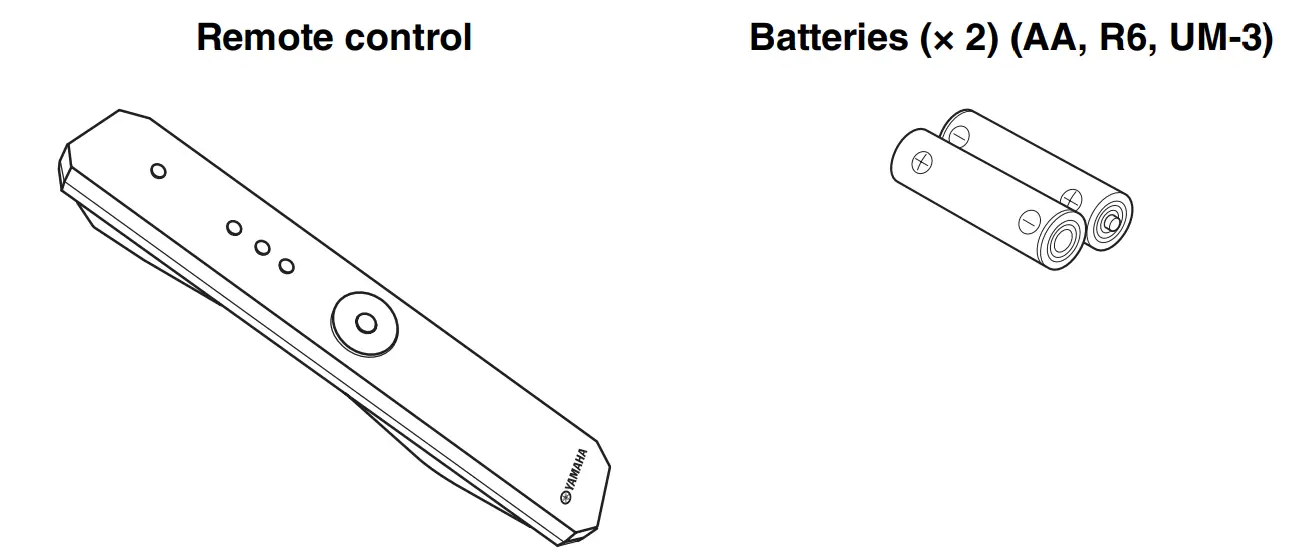
NAMES AND FUNCTIONS OF THE PARTS
Front panel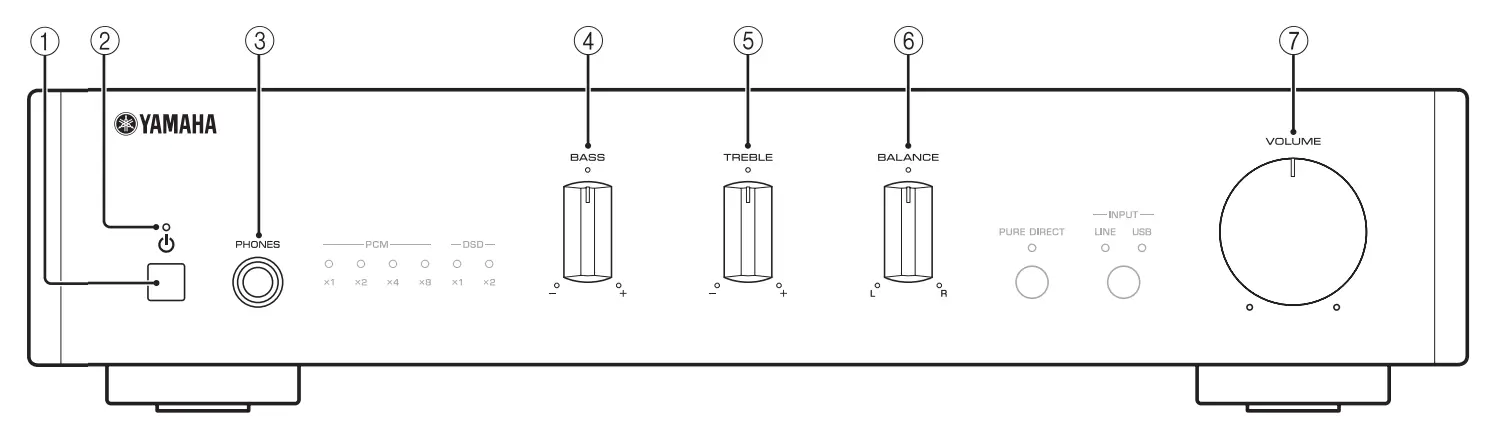
 (Power) button
Turns this unit on, or sets it to standby mode.
Notes
In standby mode, the unit consumes a small amount of power.- Power indicator
Lights up when the unit is turned on. - pHONES jack
Connect your headphones.
Notes
When headphones are connected, no sound comes from the speakers or subwoofer. - BASS control
Increases or decreases the low-frequency response.
Control range: –10 dB to +10 dB - TREBLE control
Increases or decreases the high-frequency response.
Control range: –10 dB to +10 dB - BALANCE control
Adjusts the sound output balance of the left and right speakers to compensate for
sound imbalances. - VOLUME control
Adjusts the volume.
- USB DAC indicators
Lights up when audio signals are input to the USB jack of this unit (+page 12). - PURE DIRECT indicator
Lights up when the PURE DIRECT function is turned on (+page 13). - INPUT button and indicator
Each time you press the button, the input source switches to LINE or USB. The input source indicators light up when the corresponding input sources are selected.
Press and hold the button to switch the PURE DIRECT function on or off. - Remote control sensor
Receives infrared signals from the remote control.
 (Power) button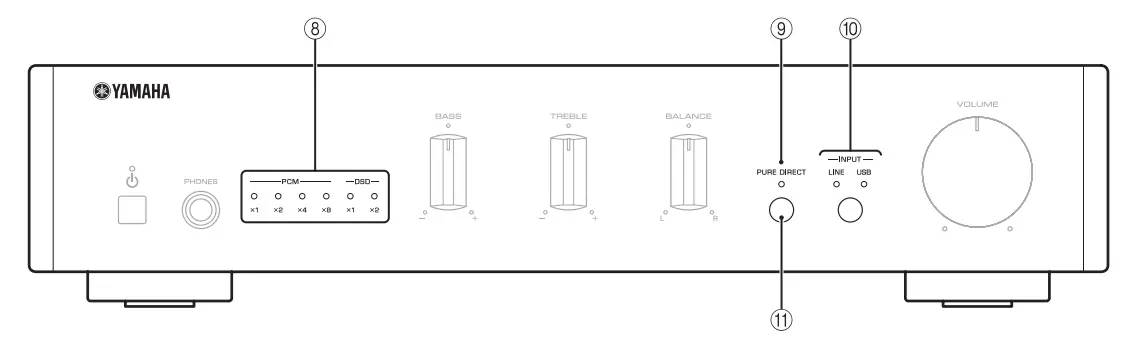
Rear panel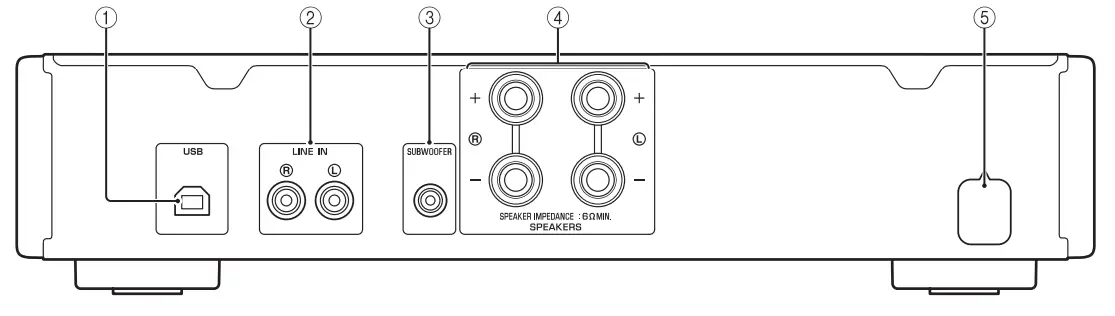
- USB (Type B) jack
Used to connect a PC (+page 8). - LINE IN jacks
Used to connect an external component (+page 8). - SUBWOOFER jack
Used to connect a subwoofer with a built-in amplifier (+page 8). - SPEAKERS terminals
Used to connect speakers (+page 8). - Power cable
Remote control
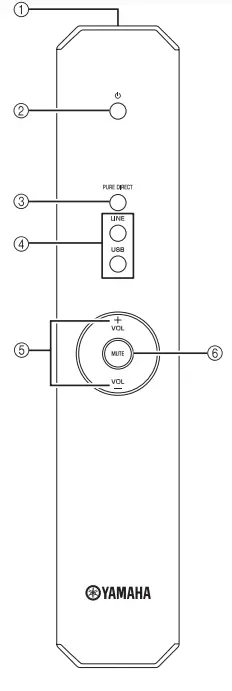
- Infrared signal transmitter
Sends infrared signals. - A (Power)
Turns this unit on, or sets it to standby mode. - PURE DIRECT
Reproduces any input source in the purest sound possible (+page 13). - Input selector buttons
Selects the input source (LINE or USB) you want to listen to. - VOL +/–
Adjusts the volume. - MUTE
Reduces the current volume level by approximately 20 dB. Press again to restore the audio output to the previous volume level. Pressing the VOL +/– also cancels muting. The INPUT indicator on the front panel for the current input source blinks while the output is muted.
Installing batteries
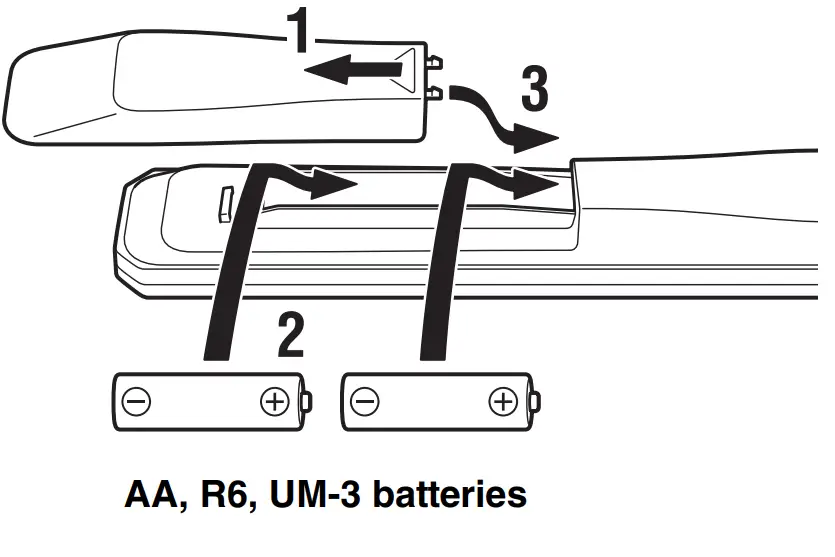
Notes
- The area between the remote control and this unit must be clear of large obstacles.
- Change all batteries if you notice the operation range of the remote control narrows.
Operation range
Point the remote control at the remote control sensor on this unit and remain within the operating range shown below.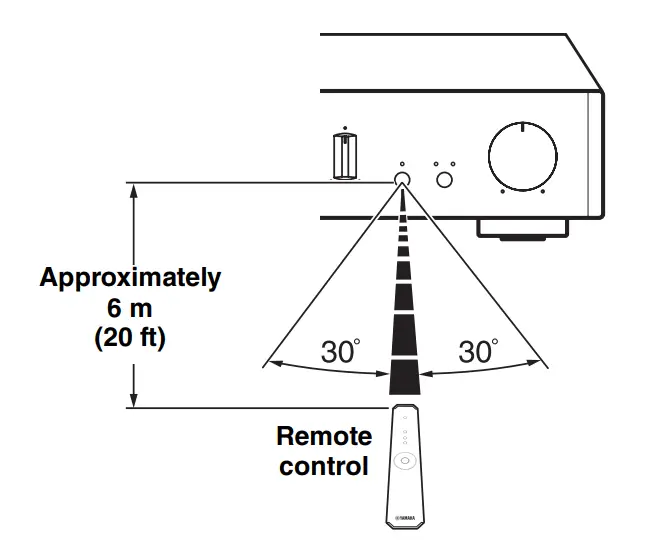
CONNECTIONS
Make sure to connect L (left) to L, R (right) to R, “+” to “+” and “–” to “–.” If the connections are faulty, no sound may be heard from the speakers, and if the polarity of the speaker connections is incorrect, the sound may be unnatural and lack bass. Refer to the owner’s manual for each of your components.
Make sure to use RCA-type cables or commercially available USB cables to connect audio components.
CAUTION
Do not connect this unit or other components to the main power until all connections between components are complete.
Connecting an external component
Connect the analog audio output jacks of the external component to the LINE IN jacks of the unit as shown in the figure.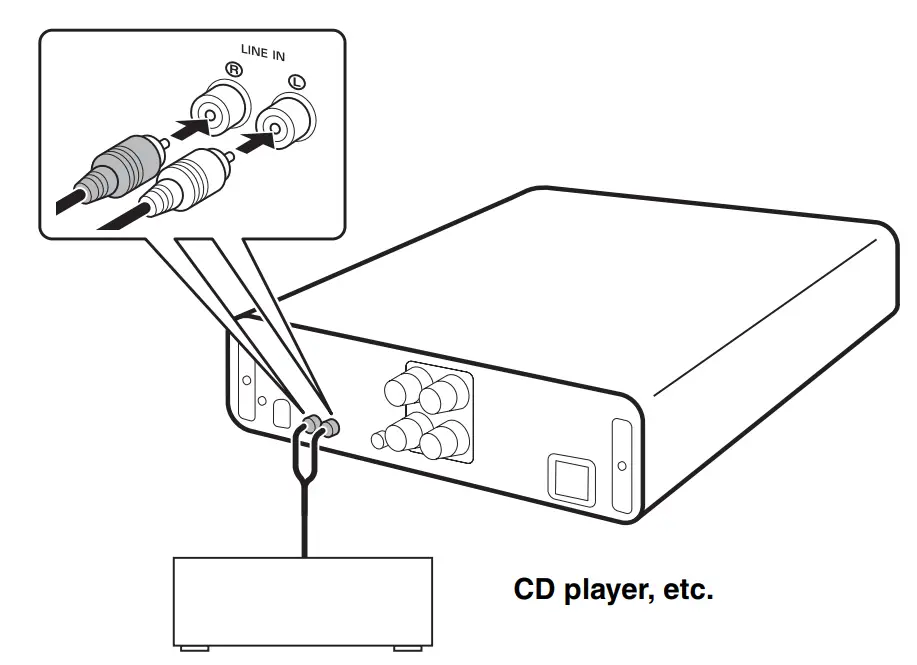
Connecting speakers
Connect the SPEAKERS terminals of the unit and the terminals of the speakers as shown in the figure.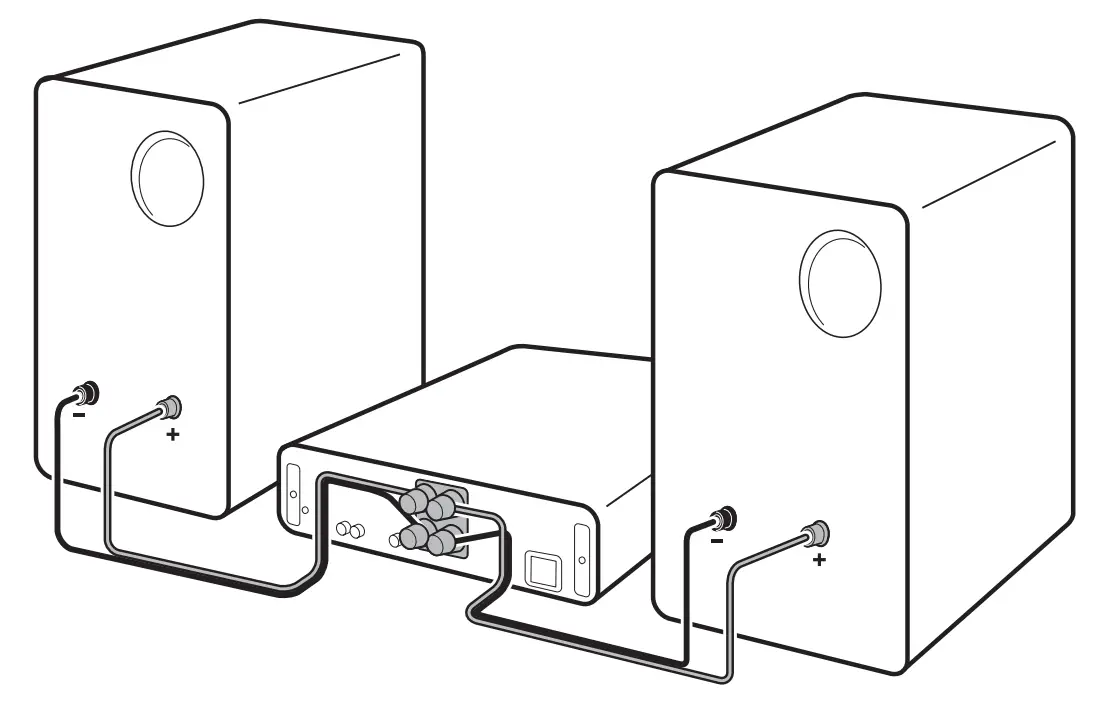
Connecting speaker cables
- Remove approximately 10 mm (3/8”) of insulation from the end of each speaker cable.
- twist the bare wires of the cable firmly together.
- Unscrew the knob.
- Insert one bare wire into the hole in the side of each terminal.
- Tighten the knob to secure the wire.

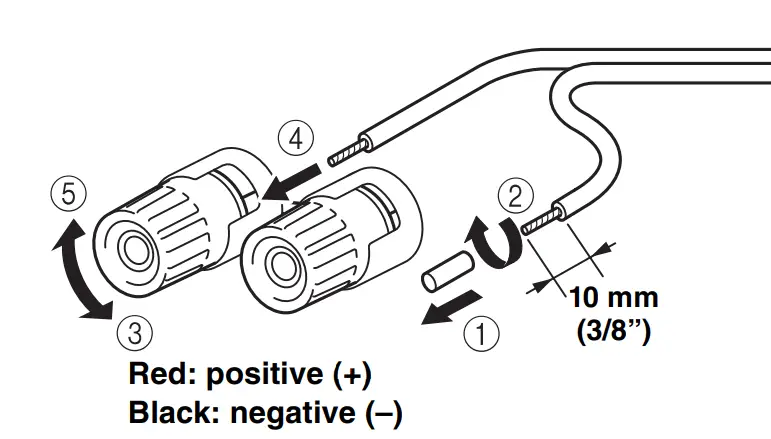
CAUTION
- Use speakers with an impedance of 6 Ω or higher.
- Do not let bare speaker wires touch each other or any metal part of this unit. This could damage this unit and/or the speakers.
Using a banana plug (North America, China and Australia models only)
- Tighten the knob.
- Insert the banana plug into the end of the corresponding terminal.

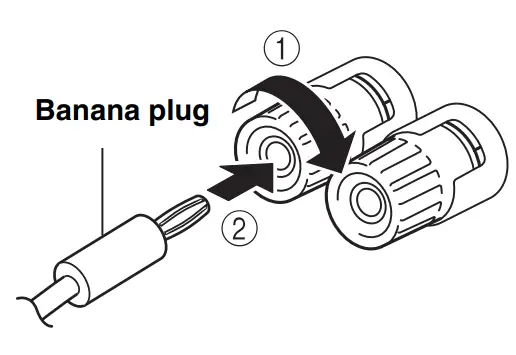
Connecting a subwoofer
To use a subwoofer, connect the jack of the subwoofer to the SUBWOOFER jack of the unit as shown in the figure.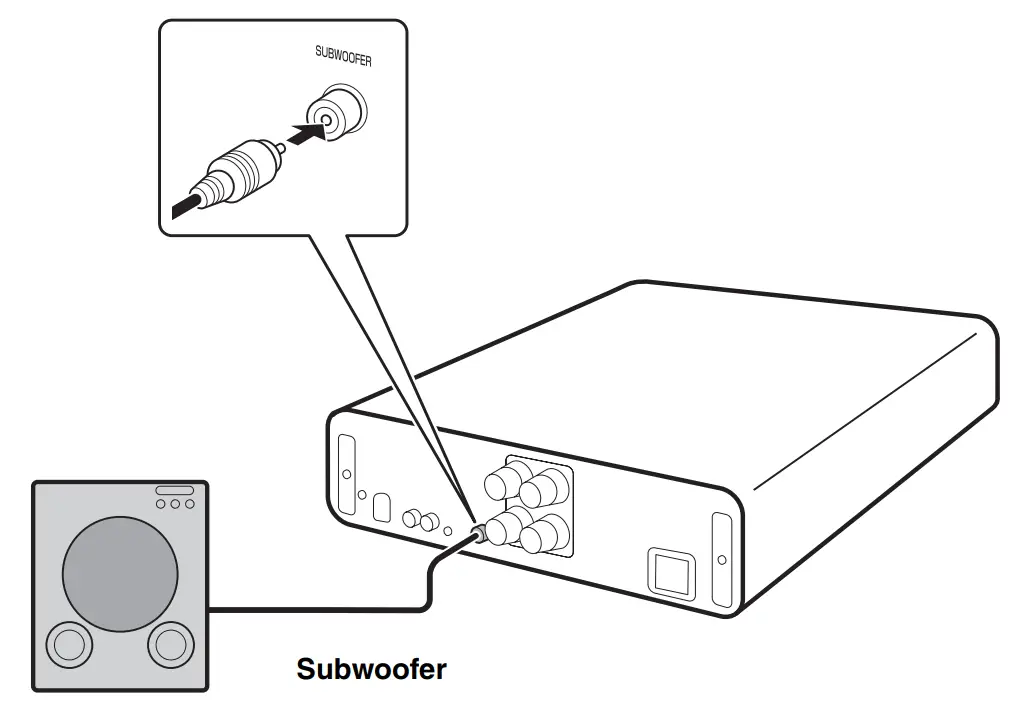
Connecting to a power source
After all the connections are complete, plug in the power cable to the AC outlet.
PLAYBACK
Playing a source
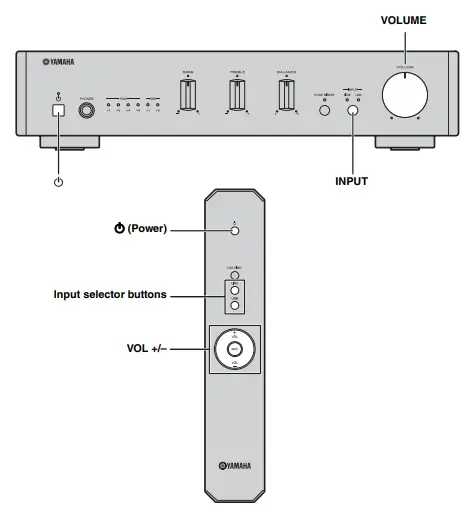
- Rotate the VOLUME control on the front panel fully counter-clockwise as not to play sounds loud suddenly.
- Press the A (power) button on the front panel (or press the (power) button on the remote control) to turn on the unit.
- Press the INPUT button on the front panel (or press the input selector buttons on the remote control) to select LINE or USB.
The indicator for the selected input source lights up. - Play the selected input source.
- Rotate the VOLUME control on the front panel (or press VOL +/– on the remote control) to adjust the volume.
- When finished listening, press the (power) button on the front panel (or press the (power) button on the remote control) to set the unit to standby mode.
Auto power standby function
- The auto power standby function will be activated as follows (default setting).
- The unit turn off automatically if no operation has been performed for more than 8 hours.
Activating/deactivating the auto power standby function
- While pressing and holding (power) on the unit, plug in the power cable to the AC outlet.
- Keep pressing A (power).
- The auto power standby function switches and the power indicator blink as follows:
- Auto power standby function is activated: blink twice
- Auto power standby function is deactivated: blink once.
- The auto power standby function switches and the power indicator blink as follows:
PLAYING BACK MUSIC STORED ON A PC (USB DAC FUNCTION)
When a PC is connected to the USB jack of the unit, the unit works as a USB DAC and can play back songs stored on the PC.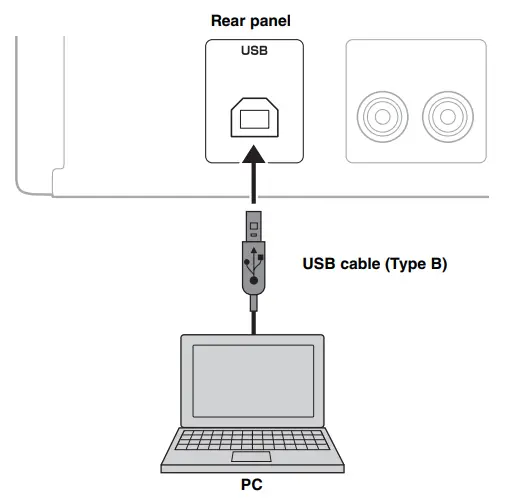
Supported operating systems
The USB connection is available for PCs with the following operating systems:
For Windows: Windows 7 (32/64bit) / Windows 8 (32/64bit) /Windows 8.1 (32/64bit)
For Mac: OS X 10.6.4 or later
Notes
- Operations with other operating systems are not guaranteed.
- Operations may be disabled even with the above-mentioned operating systems, depending on the configuration or environment of the PC.
Installing the dedicated driver
Before connecting a PC to this unit, install the dedicated driver on the PC. The dedicated driver is available only for Windows. For Mac, the standard driver of Mac OS is available for setting.
- Access the following URL to download the dedicated “Yamaha HiFi USB Driver,” and unzip and execute the file.
Website for downloading the dedicated driver URL: http://download.yamaha.com/ - Install the downloaded “Yamaha HiFi USB Driver” to your PC.
For details, refer to the Installation Guide supplied with the downloaded driver. - When the installation is complete, quit all running applications.
Notes- Operations may not be executed correctly if the PC is connected to this unit before the driver is installed.
- The “Yamaha HiFi USB Driver” is subject to change without prior notice. For details and the latest information, refer to the download page for the driver.
PLAYING BACK MUSIC STORED ON A PC (USB DAC FUNCTION)
Playing back music stored on a PC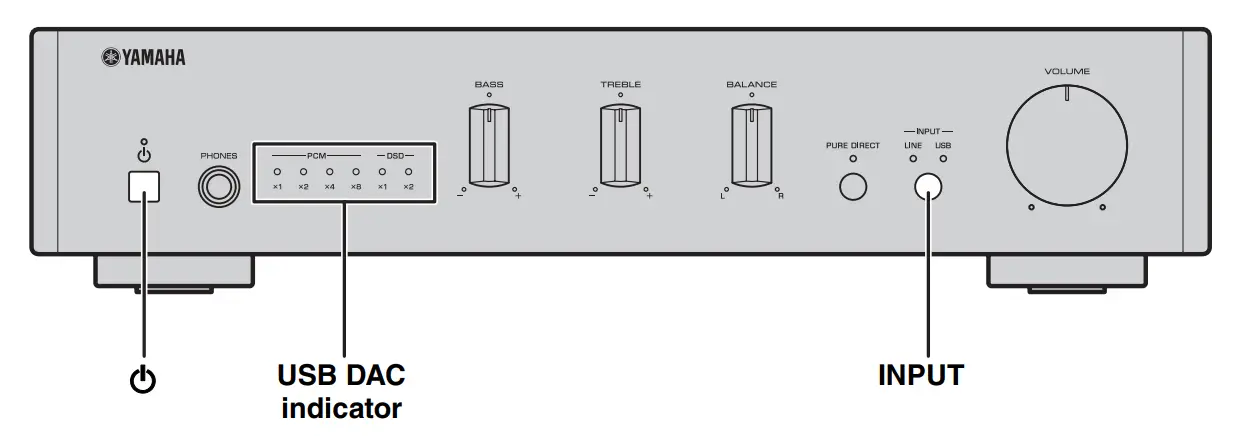
- Connect the PC to the unit with a USB cable.
- Turn on the PC.
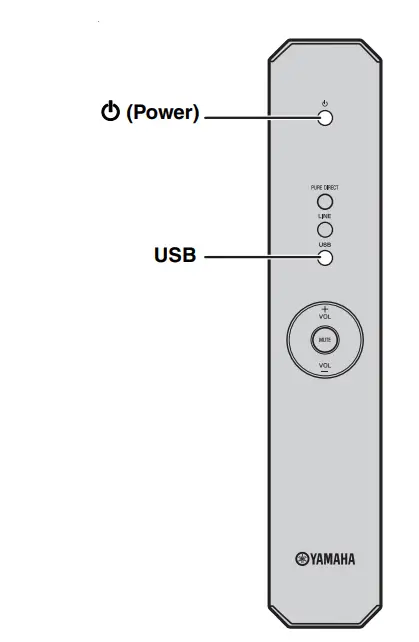
- Press the A (power) button on the front panel (or press (power) button on the remote control) to turn on the unit.
- Press the INPUT button on the front panel (or press USB on the remote control) to select USB.
- Set the audio output destination of the PC to “Yamaha A-U670/A-U671.”
With Windows OS:
Control Panel -> Hardware and Sound -> Sound -> [Playback] tab
With Mac OS:
System Preferences -> Sound -> [Output] tab
The setting may vary, depending on the operating systems. For details, consult the manufacturer of your PC. - Operate the PC to start playback of music files.
When the music signal is input from the PC to the unit, the USB DAC indicator on the front panel lights up in accordance with the sampling frequency of the music being played. Sampling frequencies available for the unit are as follows:Indicator Frequency PCM
×1 44.1/48 kHz ×2 88.2/96 kHz ×4 176.4/192 kHz ×8 352.8/384 kHz DSD
×1 2.8224 MHz ×2 5.6448 MHz
Adjusting the sound volume
To obtain higher sound quality, set the sound volume at the PC to the maximum, and gradually increase the volume at this unit from the minimum to your desired level.
Notes
- Do not disconnect the USB cable, turn off the unit, or change the input while playback on a PC connected via the USB cable is in progress. Doing so may cause a malfunction.
- To mute operation sounds of the PC during music playback, change the setting on the PC.
- If music files cannot be played correctly, restart the computer and perform the mentioned procedure again.
- The music files stored on a PC cannot be controlled from this unit. Operate them on the PC.
ADJUSTING TO THE DESIRED SOUND
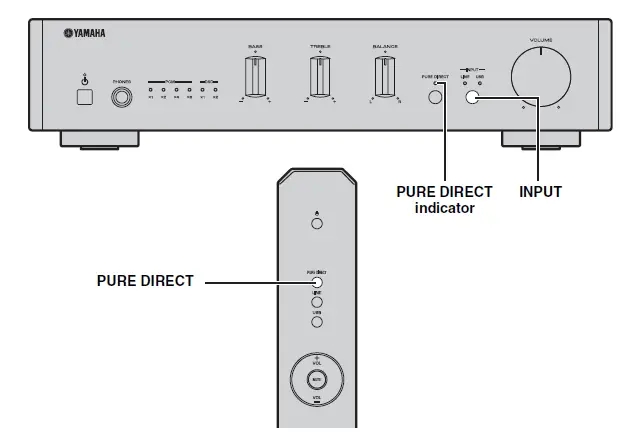
Reproducing pure, high-fidelity sound (PURE DIRECT)
With the PURE DIRECT function on, the BASS, TREBLE, and BALANCE circuits are bypassed to reduce noises. Therefore, in all input sources, you can enjoy music playback in straight and high-quality sound. Hold down the INPUT button on the front panel (or press the PURE DIRECT button on the remote control) to switch the PURE DIRECT function on or off. The PURE DIRECT indicator lights up when this function is turned on.
note
The BASS, TREBLE, and BALANCE controls do not function while the PURE DIRECT function is turned on.
TROUBLESHOOTING
Refer to the chart below if this unit does not function properly. If the problem you are experiencing is not listed below or if the instructions below do not help, turn off this unit,
disconnect the power cable, and then contact the nearest authorized Yamaha dealer or service center.
| Problem | Cause | Solution | See page |
| This unit fails to turn on. | The power cable is not connected or the plug is not completely inserted. | Connect the power cable firmly. | 9 |
| The protection circuitry has been activated because of a short circuit, etc. | Check that the speaker wires are not touching each other and then turn the power of this unit back on. | 9 | |
| There is a problem with the internal circuitries of this unit. | Disconnect the power cable and contact the nearest authorized Yamaha dealer or service center. | – | |
| A speaker with a low impedance is connected. | Use speaker(s) with proper speaker impedance (6 Ω or higher). | 9 | |
| This unit turns off suddenly and the power indicator turns off. | The speaker wires are touching each other or shorting out against the rear panel. | Connect the speaker cables properly and turn the power on again. Confirm normal sound output from speakers after the unit is turned on. | 9 |
| The speaker is malfunctioning. | Replace the speaker set and turn the power on again. Confirm normal sound output from speakers after the unit is turned on. | – | |
| The protection circuitry has been activated because of excessive input or excessive volume level. | Rotate the VOLUME control on the front panel to decrease the volume level and then turn the power on again. | – | |
| The protection circuitry has been activated due to excessive internal temperature. | Allow about 30 minutes for the temperature inside this unit to decrease, rotate the VOLUME control on the front panel to lower the volume and then turn the power on again. Set the unit in a place where heat can readily dissipate from the unit. | – | |
| This unit has been exposed to a strong external electric shock (such as lightning or strong static electricity). | Turn off this unit, disconnect the power cable, plug it back in after 30 seconds, then use the unit normally. | – | |
| There is a problem with the internal circuitries of this unit. | Disconnect the power cable and contact the nearest authorized Yamaha dealer or service center. | – |
| Problem | Cause | Solution | See page |
| No sound. | Headphones are connected.
(When headphones are connected, no sound comes from the speakers or subwoofer.) | Disconnect headphones when you use the speakers or subwoofer. |
– |
| Sound is muted. | Turn off the mute. | 6 | |
| Incorrect cable connections. | Connect the stereo cable for audio units and the speaker wires properly. If the problem persists, the cables may be defective. | 8 | |
| Playback has been stopped on the connected component. | Turn the component on and start playback. | 10 | |
| No appropriate input source has been selected. | Select an appropriate input source with the INPUT button on the front panel (or the input selector buttons on the remote control). | 10 | |
| The driver is not installed in the PC connected with the unit via USB. | Before connecting a PC to this unit, install the driver on the PC. | 11 | |
| The volume of the unit is set to the minimum. | Turn up the volume with the VOLUME control so that you can hear sound. | 10 | |
| The unit cannot be turned off. | The internal microprocessor is frozen due to an external electronic shock (lightning, excessive static electricity, etc.) or decrease in the power supply voltage. | Press the power button on the front panel of the unit for 10 seconds or more to restart the unit (If the problem persists, unplug the power cable and after about 30 seconds, then plug it back in again). |
– |
| Only the speaker on one side can be heard. | Incorrect cable connections. | Connect the cables properly. If the problem persists, the cables may be defective. | 8 |
| Incorrect setting for the BALANCE control. | Set the BALANCE control to the appropriate position. | 3 | |
| There is a lack of bass and no ambience. | (When a subwoofer is connected.)
The subwoofer is not properly connected. | Connect the cables properly. If the problem persists, the setting for the subwoofer may be incorrect. | 9 |
| The + and – wires are connected in reverse at the amplifier or the speakers. | Connect the speaker wires to the correct + and – phase. | 9 | |
| Incorrect setting for the BASS control. | Set the BASS control to the appropriate position. | 3 | |
| A “humming” sound can be heard. | Incorrect cable connections. | Connect the audio plugs firmly. If the problem persists, the cables may be defective. | 8 |
| The sound level is low. | The volume of the unit is set to a low level. | Turn up the volume with the VOLUME control so that you can hear sound. | 10 |
| The volume of the PC connected with the unit via USB is set to a low level. | Turn up the volume of the PC. | – | |
| The BASS, TREBLE, and BALANCE
controls does not work. | The PURE DIRECT function is turned on. | Turn off the PURE DIRECT function. | 13 |
| The connected PC does not recognize this unit. | The operating system of the PC is not supported. | Use a PC with an operation-guaranteed operating system. | 11 |
| Improper USB cable connection. | Connect the USB cable properly. | 11 | |
| The output of the PC or application is muted. | Cancel the sound muting of the PC or application. | – |
| Problem | Cause | Solution | See page |
| Noisy playback. | Another application is launched on the PC while a music file is being played.
(If another application is launched while a music file is being played, sound may be momentarily lost or noise may be generated.) | Do not launch other applications during playback. |
– |
| The sound is interrupted. | Another application is launched on the PC while a music file is being played.
(If another application is launched while a music file is being played, sound may be momentarily lost or noise may be generated.) | Do not launch other applications during playback. |
– |
| Music files cannot be played. | The music data are not properly reproduced, because this unit is connected to the PC or the input of this unit is switched to USB while the music application is running on the PC. | Connect this unit to the PC and set the input of the unit to USB in advance. Then launch the music application and start playback. |
|
| The dedicated “Yamaha HiFi USB Driver” has not been installed correctly. | Install the “Yamaha HiFi USB Driver” again by following the correct procedure. | 11 | |
| The audio output destination of the computer is not set to “Yamaha A-U670/A-U671.” | Set the audio output destination of the computer to “Yamaha A-U670/A- U671.” | 12 |
SPECIFICATIONS
AUDIO SECTION
LINE IN
- Input jack:RCA jack
USB
- Input jack: USB (Type B), supported USB2.0
- Supported sampling frequencies: 384/352.8/192/176.4/96/88.2/48/44.1 kHz
- PCM word depths:32/24/16 bits
- DSD:2.8224/5.6448 MHz
SPEAKERS
- Maximum output power (6 Ω, 1 kHz, 10% THD):70 W + 70 W
- Frequency response (10 Hz to 40 kHz):0±3 dB
- Total harmonic distortion (30 W/6 Ω, 1 kHz):0.05% or less
PHONES
- Output level/Output impedance (Input 1 kHz, 230 mV, 32 Ω terminated):500 mV/24 Ω
SUBWOOFER
- Output level/Output impedance (Input 1 kHz, 230 mV):2.0 V/1 kΩ
GENERAL
- Power supply
[U.S.A. and Canada models] : AC 100 to 120 V, 50/60 Hz
[Asia model]:AC 220 to 240 V, 50/60 Hz - Power consumption:30 W
- Standby power consumption: 0.5 W
- Dimensions (W × H × D):314 × 70 × 342 mm (12-3/8″ × 2-3/4″ × 13-1/2″)
- Weight:3.3 kg (7.3 lbs.)
Specifications are subject to change without notice.
FAQS
Is this good for headphones?
With mine, I have had no noticeable no issues whatsoever… I have heard a few other owners of this DAC say that they hear a low-frequency ground-hum and/or low-pass-hiss… But with the unit I purchased here on Amazon, a little over a year ago, I have not noticed anything in my headphones (nor my studio monitors either) no matter of the volume level … And I use it daily in a professional recording studio.
It works power 220v
no
Does anyone know if the DAC will work in Linux?
Don’t know but the Yamaha website only have support and a driver for window, not even OS X for Mac
Is the remote in aluminum or plastic? also will it be enough power for the kef ls50?
Plastic.
Will they drive kef ls 50
My A-U671 drives a pair of KEF Q-100 bookshelf speakers and a small powered sub. Great for listening at low to moderate volume all day long, and it produces almost no heat so you can place it inside a cabinet with no worries. I have been pleased overall with the sound quality, the compact size, and the cool operating temperature. However, the amp seems weaker than its 70-watt rating. Perhaps I am just used to a traditional high-current amp, but this unit performs more like 30 to 40 watts in my opinion. Not sure I would recommend for loud volume levels or power-hungry speakers. Also has very limited input options if that is significant for your application.
Did anybody try it with MacBook pro through (it’s only available) USB-c, using USB-c to usb2 adapter with supplied cable or a totally new cable?
I have one of these amps, the sound is really good with it’s internal USB DAC at 32 bits but I haven’t try my new MacBook Thunderbolt 3, I think that’s a question for the Yamaha support website
Does it work with power 220v?
No, the U.S. model has a standard 110-volt plug.
Will this amp handle 5-ohm bookshelf speakers?
It handled a pair of bookshelf speakers nominally rated at 4 ohms without any issues – no excessive heat, and protection circuitry untriggered.
Can I use this amplifier with floor-standing speakers with an active subwoofer as the definitive
technology bipolar 8020?
Not sure what you mean by “active” subwoofer. I use my A-U671 to power KEF bookshelf speakers and a Wharfedale-powered subwoofer. This amp seems to fall way short of its 70-watt rating. In my opinion, it drives my speakers more like it has only 30 or 40 watts. Maybe I am used to a traditional “high current” amp. However, this amp will run all day and not even feel warm. I can close the glass doors on my cabinet and not worry about heat. Nice simple amp but has very few connection options if that concerns you.
Does this thing have any bass? Or is the sound small, thin, and clinical?
It sounds pretty good for a class D of this size. Give it a try and if you don’t like it, you can always return it.
can it be connected to a turntable?
Yes, you can… but you’ll need to ground the turntable to the amp chassis as there IS NOT a dedicated phono ground lug.