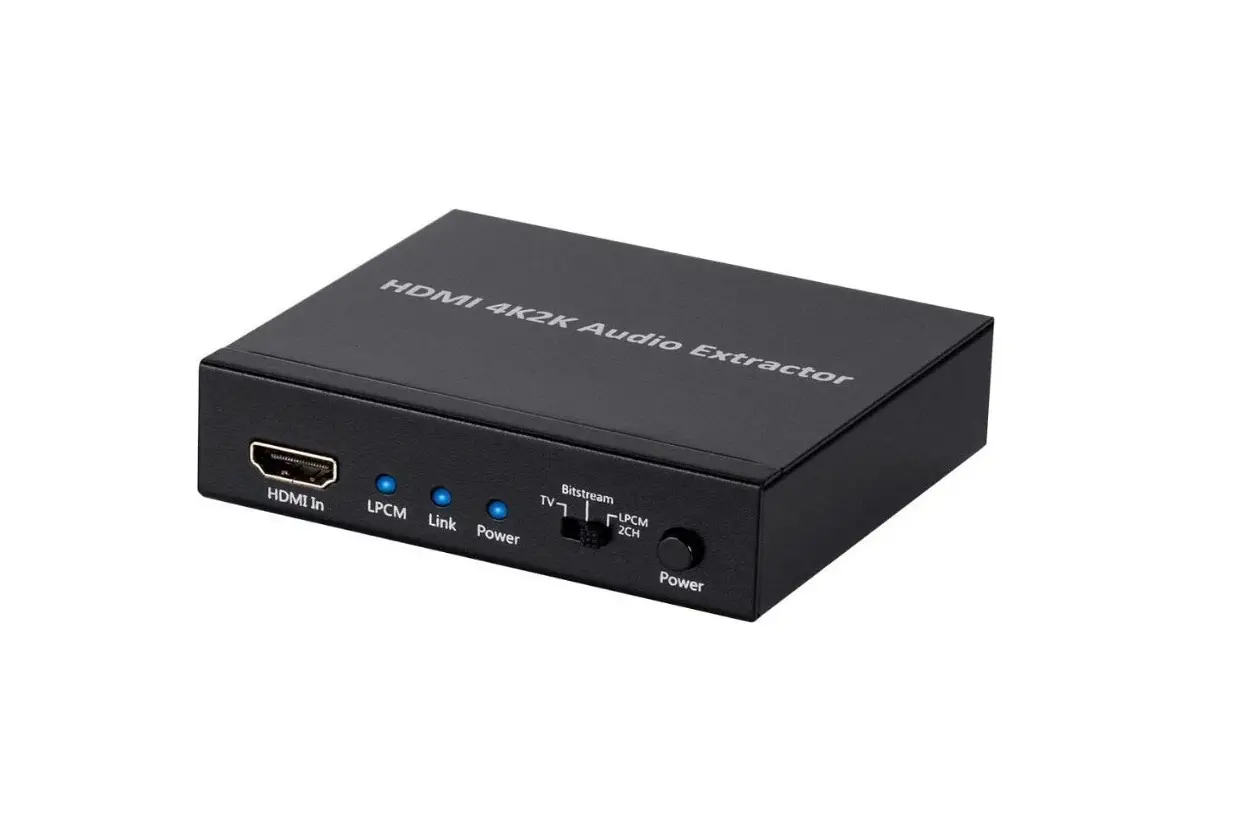

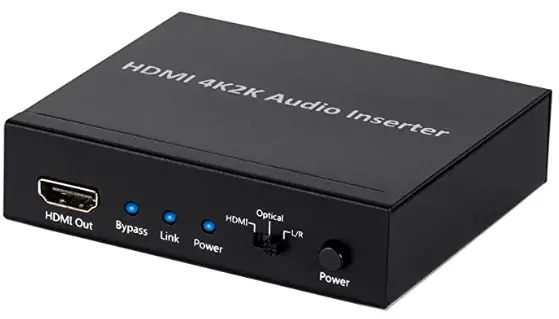
Monoprice 113347 BlackbirdTM 4K-Series HDMI Audio Inserter
SAFETY WARNINGS AND GUIDELINES
- This device is intended for indoor use only.
- Do not expose this device to water or moisture of any kind. Do not place drinks or other containers with moisture on or near the device. If moisture does get in or on the device, immediately unplug it from the power source and allow it to fully dry before reapplying power.
- Do not touch the device, the power cord, or any other connected cables with wet hands.
- Do not expose this device to excessively high temperatures. Do not place it in, on, or near heat sources, such as a fireplace, stove, radiator, etc. Do not leave it in direct sunlight.
- Prior to operation, check the unit and power cord for physical damage. Do not use if physical damage has occurred.
- Unplug this device from the power source when not in use.
- Take care to prevent damage to the power cord. Do not allow it to become crimped, pinched, walked on, or become tangled with other cords. Ensure that the power cord does not present a tripping hazard.
- Never unplug the unit by pulling on the power cord. Always grasp the connector head or adapter body.
- Ensure that power is turned off and disconnected before making any electrical connections.
- Clean using a soft, dry cloth only. Do not use chemical cleaners, solvents, or detergents. For stubborn deposits, moisten the cloth with warm water.
- This device has no user-serviceable parts. Do not attempt to open, service, or modify this device.
INTRODUCTION
Thank you for purchasing this HDMI® Audio Inserter!
This device combines an HDMI video signal with audio from a digital optical (Toslink) or 3.5mm TRS stereo input. This makes it ideal for use with DVI or VGA video sources, which lack embedded audio. It has a bandwidth of 10.2Gbps and therefore supports all High-Speed HDMI features, including 4K (3840x2160p) video resolution and 3D video.
FEATURES
- Compliant with HDMI®, HDCP 1.2, and DVI 1.0 standards
- Supports HDMI audio sampling rates up to 192 kHz
- Supports Digital Optical S/PDIF audio sampling rates up to 192 kHz
- Supports external Digital Optical or Analog audio replacement for HDMI audio signal
- HDMI supports High-Bit-Rate (HBR) audio
- Supports DVI conversion with DVI to HDMI adapter
- Supports CEC pass-through
- Supports 4K resolution and 3D video signals
CUSTOMER SERVICE
The Monoprice Customer Service department is dedicated to ensuring that your ordering, purchasing, and delivery experience is second to none. If you have any problem with your order, please give us an opportunity to make it right. You can contact a Monoprice Customer Service representative through the Live Chat link on our website www.monoprice.com during normal business hours (Mon-Fri: 5am-7pm PT, Sat-Sun: 9am-6pm PT) or via email at [email protected]
PACKAGE CONTENTS
Please take an inventory of the package contents to ensure you have all the items listed below. If anything is missing or damaged, please contact Monoprice Customer Service for a replacement.
- 1x HDMI® audio inserter
- 1x AC power adapter
- 1x User’s manual
PRODUCT OVERVIEW
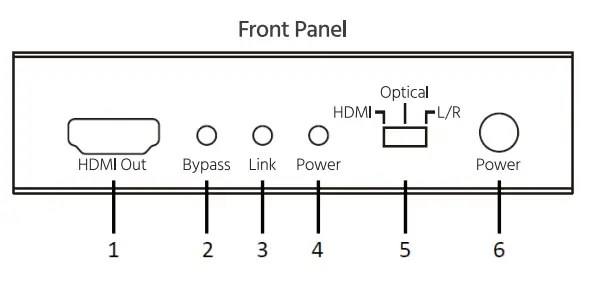
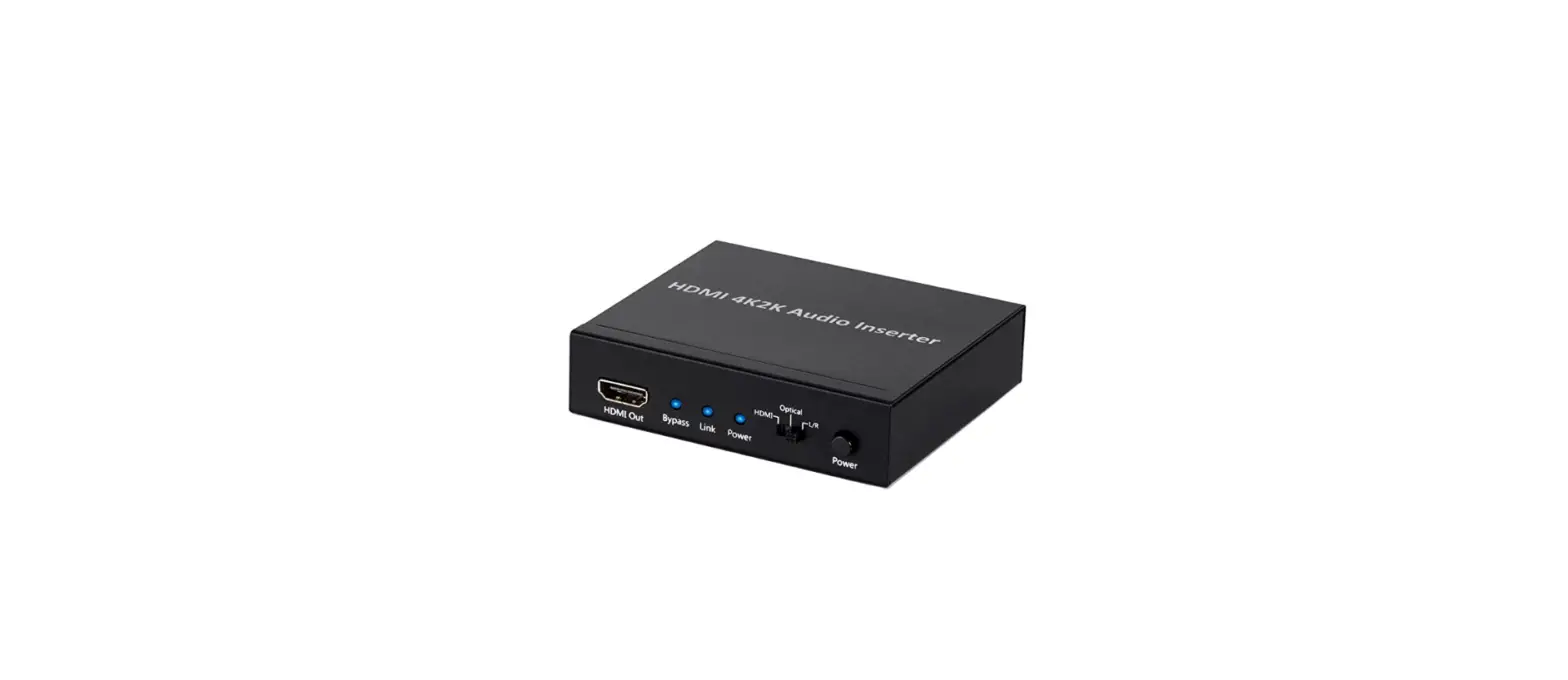
- HDMI Out: HDMI® audio/video output jack.
- Bypass: This LED illuminates when the audio selection switch is set to the HDMI position.
- Link: This LED illuminates whenever external optical or analog audio is synced with the HDMl video.
- Power: This LED illuminates whenever power is applied.
- HDMI /Optical/ L / R: Use this Audio Source Selection switch to select the audio source. When set to the HDMI position, the audio from the original HDMI video signal is used.
- Power: Depress the Power switch to turn power on or off.
Rear Panel 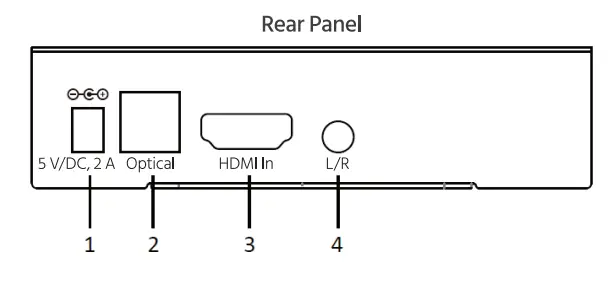
- (5 V/DC, 2 A): DC power jack for use with the included AC power adapter.
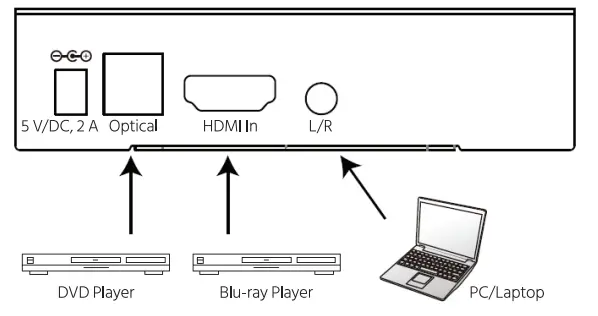
- (Optical): Digital optical S/PDIF (Toslink®) audio input.
3 (HDMI In): HDMI® audio/video input.
4 (L/R): 3.5mm TRS analog stereo audio input.
INSTALLATION
Perform the following steps to install this inserter into your home theater system.
- Power off and unplug all devices that will be connected to this device.
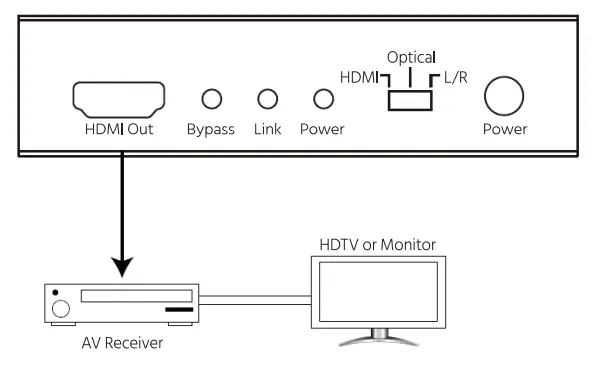
- Using a High Speed HDMI® Cable (not included), plug one end into the Input on your HDMl-equipped display, then plug the other end into the HDMI Out port on the front panel.

- Using a High Speed HDMI® Cable (not included), plug one end into the HDMI In port on the rear panel, then plug the other end into the Output port on your Blu-ray Disc™ player, computer, or other video source device.
Note: You can use a OVI to HOM/ cable to use a OVI video source or a VGA to HOM/ converter to use a VGA video source, - (Optional) Using a Digital Optical (Toslink®) cable (not included), plug one end into the Optical In port on the rear panel, then plug the other end into the Digital Optical (Toslink) output on your DVD player, CD player, or another digital audio source device.
- (Optional) Using a 3.5mm TRS audio cable (not included), plug one end into the L/R port on the rear panel, then plug the other end into the 3.5mm TRS output on your computer, mp3 player, or another analog audio source device.

- Plug the DC barrel connector on the included AC power adapter into the 5 V/DC, 2 A jack on the rear panel.
- Plug in and power on all connected equipment. Start audio playback from the Toslink and Analog audio sources and video playback from the HDMI source.
- Depress the Power switch on the front panel to power the Inserter on.
- Slide the audio source selection switch to the HDMI position. Verify that you are watching the HDMI video with the original HDMI audio, if applicable.
- Slide the audio source selection switch on the front panel to the Optical position. Verify that the audio from the Toslink source is combined with the HDMI video.
- Slide the audio source selection switch on the front panel to the L/R position. Verify that the audio from the analog source is combined with the HDMI video.
Congratulations, your HOM! Audio Inserter is properly installed and is ready for use!
TROUBLESHOOTING
- There is no audio or video on the output display, regardless of audio source selection.
Verify that the correct video input is selected and that the display is powered on. Check the Power LED to verify that the Inserter is powered on. Try swapping out the HDMI® output cable with a known good one. - There is audio from the original HDMI source and from one of the two external audio sources, but not from the other.
Verify that the source without audio is powered on and producing an audio output. Try swapping out the audio input cable from the audio source device with a known good one. - There is audio from both external audio sources, but not from the original HDMI source.
Verify that the HDMI source video contains audio. Verify that the video source interface supports embedded audio (DVI and VGA do not support audio). Try swapping out the HDMI cable from the HDMI source with a known good one. - There is audio from all audio sources, but no video on the output display.
Verify that the output resolution on the video source device does not exceed the resolution capabilities of the display, such as a 1080p video source connected to a display limited to 720p. Try swapping out the HDMI cable from the HDMI source with a known good one.
TECHNICAL SUPPORT
Monoprice is pleased to provide free, live, online technical support to assist you with any questions you may have about installation, setup, troubleshooting, or product recommendations. If you ever need assistance with your new product, please come online to talk to one of our friendly and knowledgeable Tech Support Associates. Technical support is available through the on line chat button on our website www.monoprice.com during regular business hours, 7 days a week. You can also get assistance through email by sending a message to [email protected]
SPECIFICATIONS
REGULATORY COMPLIANCE
Notice for FCC
This device complies with Part 15 of the FCC rules. Operation is subject to the following two conditions: (1) this device may not cause harmful interference, and (2) this device must accept any interference received, including interference that may cause undesired operation.
Modifying the equipment without Monoprice’s authorization may result in the equipment no longer complying with FCC requirements for Class B digital devices. In that event, your right to use the equipment may be limited by FCC regulations, and you may be required to correct any interference to radio or television communications at your own expense.
This equipment has been tested and found to comply with the limits for a Class B digital device, pursuant to Part 15 of the FCC Rules. These limits are designed to provide reasonable protection against harmful interference in a residential installation. This equipment generates, uses and can radiate radio frequency energy and, if not installed and used in accordance with the instructions, may cause harmful interference to radio communications. However, there is no guarantee that interference will not occur in a particular installation. If this equipment does cause harmful interference to radio or television reception, which can be determined by turning the equipment off and on, the user is encouraged to try to correct the interference by one or more of the following measures:
- • Reorient or relocate the receiving antenna.
• Increase the separation between the equipment and receiver.
• Connect the equipment into an outlet on a circuit different from that to which the receiver is connected.
• Consult the dealer or an experienced radio/TV technician for help.
Notice for Industry Canada
This Class B digital apparatus complies with Canadian ICES-003.
HOM the HOM/ Logo, and High-Definition Multimedia Interface• are trademarks or registered trademarks of HOM/ Licensing LLC in the United States and other countries.
Btu-rayâ„¢ and Btu-ray Oiseâ„¢ are trademarks of the Btu-ray Oise Association.
Toslink• is a registered trademark of Toshiba Corporation.
Dolby• and the doub/e-0 symbol are registered trademarks of Dolby Laboratories.
ors• is a registered trademark and the DTS logos, Symbol, DTS-HD™ and DTS-HD Master Audio™ are trademarks of DTS, Inc.
FAQS
YES
We have over 30 of these units injecting analog (L/R) audio into a HDMI stream. The 3.5mm jack is used and the audio selector switch is set to “L/R” HOWEVER, the input is at ‘Line” input level and not at mic level. As we already have the L/R at line level, we use a “RCA” style plug to 3.5mm male adapter cable. If your input is actually a microphone, a preamplifier is required to feed the inserter at the correct L/R level.
analog)? A similar looking Bytecc HM-CV032K does not.
There is a switch that selects what type of audio you are going to send down the HDMI cable. They do not combine, you have to choose which one you are using.
It didn’t work for me. I think it adds audio on to an HDMI connection that already has audio in it. I tried to use it with an older Mac that audio out only on Toslink, but not HDMI, hoping I could hook it to my TV, but it did not do that , so I returned it. I think you will find other reviews for this that had the same problem.
We use 2 of these for remote TVs at our church for viewing the worship service. A line output from the soundboard feeds the BlackbirdTM. Initially, our sound was very low and cut out occasionally on both devices. The problem was that the audio input plug was not plugged in all the way. . . had to press it until it snapped in. Still, since we are feeding a line level, rather than amplified signal to the device, we still need to turn up the TV volume to about 50% – 60%. Also, we use the L/R option on the device.
In my experience, it’s not humanly perceptible.
Stereo signal does transmit. The .1 part of the question is for a subwoofer, it too should work just fine using either L or R channel on the receiver end.
It should. This is 4K rated HDMI and is working fine for me. Mine is feeding my Dell 4K monitor. I feed in various devices and computers that all produce 4K video.
Possibly yes. You are going to need to be more specific. This gadget did a good job of inserting both analog and digital sound into an HDMI stream. If you are wanting to insert analog audio from an old turntable, it would likely work. Your application might need a small preamp if the turntable has the low-level signal I remember many of the better phono cartridges had. Yes, I’m old enough to have built an audio preamp with a 12AX7 to feed my Hi-Fi stereo amplifier.
Unfortunately no
The other answers here are flatly wrong.
Probably, if (1) you can get the output from your turntable into a 1/8″ headphone-jack-style stereo input, at full “line” level like what comes out of most stereo gear (be wary, because some turntables produce signals at a reduced level), and (2) you want to use a spare HDMI input on your AV receiver instead of an audio-only input. Item #1 will probably require an adapter or two to get the plug into the right format, and it still may not sound good if the signal coming from your turntable is weak. Unfortunately, you will probably have to try it yourself to see if it plays well with your particular turntable. I
Yes. Without an HDMI input, the HDMI output will be a blue screen standard definition (525) video with audio embedded.
The manufacturer’s web site says that this box supports two channel audio. So it will not support the 5.1 Dolby sound most TV networks use. However, if you are listening with headphones, as I did, it doesn’t matter. Also, if you don’t have Surround Sound it doesn’t matter.
It does look like a 3.5mm barrel plug. The body says it needs 5VDC at 2A. Not all USB plugs can supply that – usually only USB 3.0 or special USB charger plugs.