 CAR DEFENDER
PARTCODE: CARDEFENDER-WE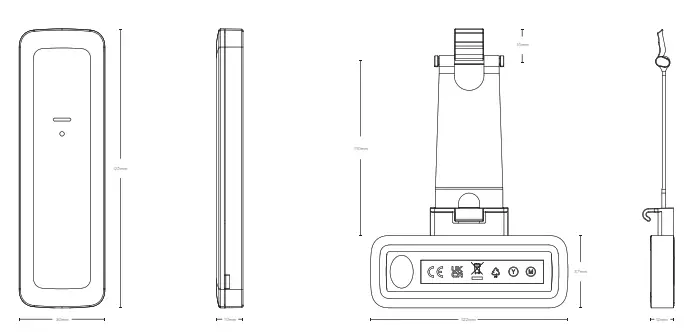
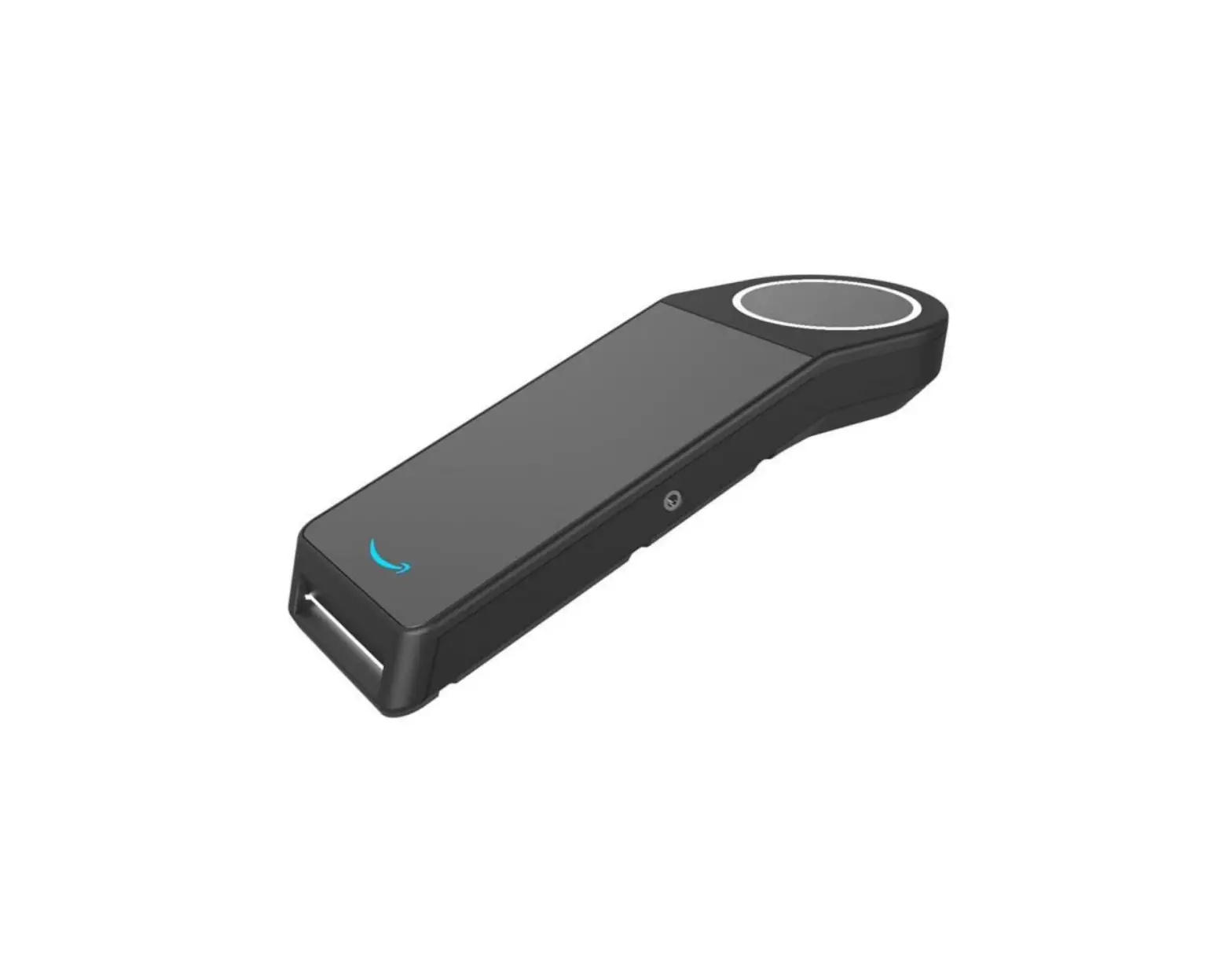
CARDEFENDER-WE Car Defender
| Specification | Value |
| Dimensions and weight (W x H x D) | Device – 30 x 95 x 10mm, 30g Holder – 122 x 163 x 12mm, 35g |
| Casing / Colour | Device – 2mm polycarbonate-ABS, anthracite Holder – Silicone strap, yellow | UV Additive RIASORB UV-329 holder, black |
| LED colours | Red, blue and green |
| Transmission frequency | 868MHz FM transceiver narrow band |
| Transmission method | Fully encrypted rolling code |
| Detection methods | Shock only | tilt only | tilt or shock |
| Tilt alarm threshold | ~4° |
| Shock sensitivity | Low, medium and high |
| Battery | 2 x lithium CR2450R , 3V,500mAh with a 50mA pulse |
| Low battery threshold | 2.2V +/-5% @ 25°C |
| Temperature | Storage: -20°C to 50°C Operating: -10°C to 40°C |
| Standards | EN50131-2-6-2008 EN50131-2-8-2016 |
| RoHS Directive | EU 2015/853 | UK RoHS regulation 2012 |
| RE Directive | 2014/53/EU | Radio Equipment Regulations 2017 (RED) |
| Emissions | EN 55032:2015+A11:2020 Class B |
| Immunity compliance | EN 50130-4:2011+A1:2014 |
| Environmental class | II |

PCB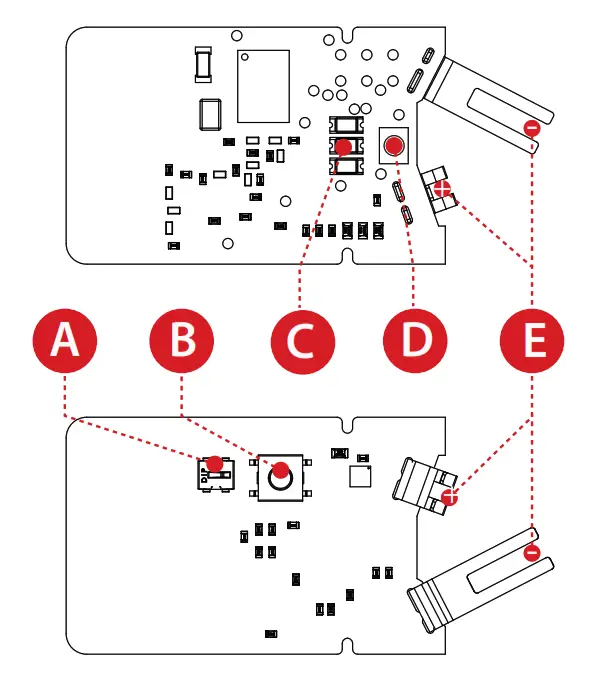
A. Setting activation button
B. Learn button
C. LEDs
D. Multi-functional button
E. Battery contacts
WIRELESS DEVICE CONTROL
Removing the Cover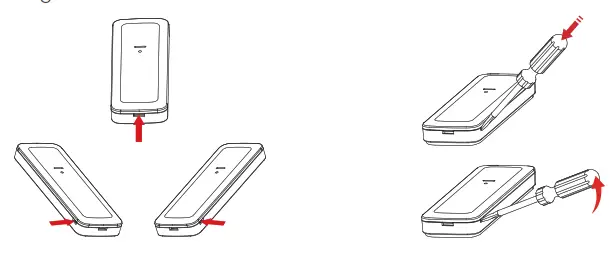
Before learning the device, the cover needs to be removed to expose the learn button and batteries. The device’s case has 3 opening points; using a flat bladed screwdriver, carefully push into 1 of these points and prise open.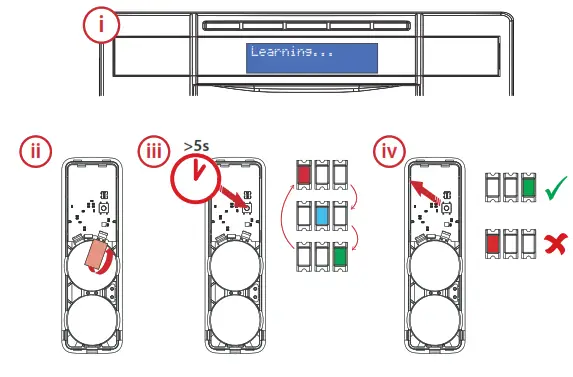
i. Prepare the system for pairing with the device.
– Please refer to control panel instructions.
ii. Remove the piece of polyester film that is separating the battery from the battery contacts.
iii. Press and hold the ‘learn button’ on the device for at least 5 seconds and then release.
– The three LEDs will cycle through on the device whilst the button is held.
iv. On releasing the learn button, the device attempts to pair with the system and will indicate via the LEDs whether it has been successful or failed.
–  The green LED will illuminate to indicate the device has successfully paired with the system and has adequate signal.
– If the device fails to pair with the system the red LED will illuminate, and then will return to the alternating flashing green and red.
PROGRAMMING
 Once learnt to the system, the zone needs to be programmed so that the system responds as specified when the device is triggered.
 Please note: Refer to the installation or programming guides provided with the control panel for advice=
Programming advice
Intruder/Instant zone type – typical zone type
This zone type will only notify the user when the area it is designated to is armed. This will typically be the best zone type for this device as the system can be armed and disarmed relative to when the device is within or out of range.
Day Alarm/24 Hour zone type
This zone type is constantly active and will notify the user whether the system is armed or disarmed. The device should only be programmed as this zone type if the car being protected will always in be range of the system and is required to notify every time the device is triggered. Please note: In both cases, if the panel is programmed to signal an ARC, then the alarm event will be reported to the ARC.
POLLING AND SUPERVISION
The device will poll the system every 5 minutes to see whether it is within range. As this device is unsupervised (allowing for the device to be taken away from the property) the system will not display any supervision fault messages if the system does not receive any supervision signals from the device. A signal can be sent from the device notifying the system that the it is back within range, please see B2H section of the multi-functional button.
INSTALLATION
This device can either be installed into the holder and then attached to the vehicle it is protecting or it can be permanently fixed to a surface using screws, or with the adhesive pad provided. Alternatively, the device can be relocated whenever necessary as long as the control panel is disarmed (depending on control panel programming). Please note: To achieve optimum battery life, locate in environments that are typically room temperature and adhere to installation advice. Battery life will be reduced if left in environments with temperatures 0° and below for extended periods of time.
Inserting and Removing the Device from the Holder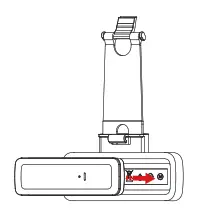 To insert the device into the holder, it just needs to be firmly pushed in.
To remove the device from the holder, the device requires pushing out via the hole in the back of the holder.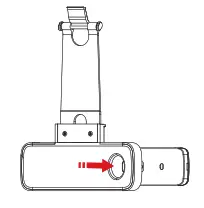
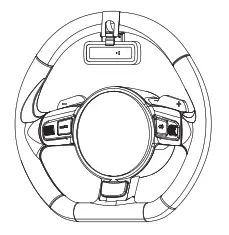
Attaching Holder to Steering Wheel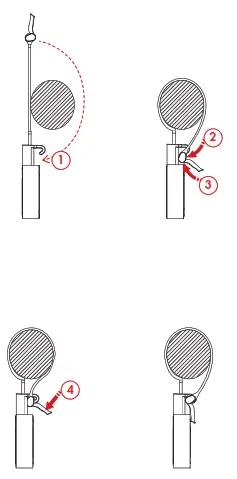
- First, wrap the strap around the wheel.
- Then, insert the locking mechanism under the hook.
- Push the locking mechanism up around the back of the hook.
- To lock in place, push the tab of the locking mechanism down so that the top slides into the hook.
The holder can be used to attach the device to other objects, however, it is designed for use with vehicle steering wheels.
Permanent Fixing Using Screws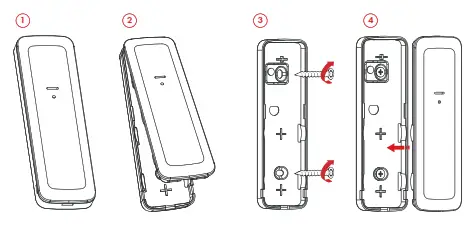
- Use a flat bladed screwdriver to prise the cover off the device
- Remove the front cover and PCB
- Screw the back of the device to the installation surface.
- Put the front and the PCB back.
Permanent Fixing Using Adhesive Strip
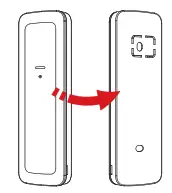 Rotate the device 180° so that the rear of the device is now facing.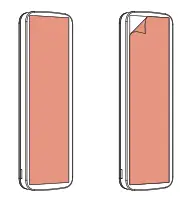
Affix the adhesive pad firmly to the rear of the device and peel the backing paper layer away.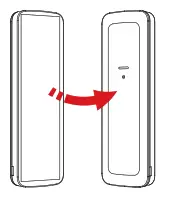
Rotate the device so that the rear is facing the surface it is to be attached to.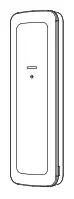 Press the device firmly against the surface.
In order to minimise the risk of false alarms, it is recommended that this device is not installed in any of the following locations:
- Close proximity to sources of vibration.
- Within 1m of a device emitting a sound pressure equal to or above 100 decibels
LED VISIBILITY
Please note: The enabling and disabling the LEDs only relates to ‘Detection Mode Setting’
and ‘Detection Mode Check’. The B2H function will still operate
Auto-disable
The calibration status LEDs will turn off after a period of 10 minutes and the blue alarm LED will turn off after a period of 1 hour from:
- Device is powered up.
- The case being closed (which presses the ‘setting activation button’ in).
- Conducting a wireless signal strength test
Re-activating the LEDs
The calibration and alarm LEDs can be reactivated by any of the following methods. - Power cycling the product.
- Opening the case (activating the setting activation button on the device).
- Conducting a wireless signal strength test.
MULTI-FUNCTIONAL BUTTON
Overview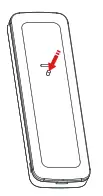
Detection mode setting
A 6 second press puts the device into detection mode setting where the sensitivity can be changed.
Detection mode check
A 3 second press is used to check the configuration setting the device is currently set to.
Back to Home (B2H)
Short press (less than 1 second). Polls the panel to check whether the device is in range.
Detection Mode Setting
A 6 second press puts the device into configuration mode where the sensitivity can be changed
| Description | Sensitivity Level | Blink | RED | Green | Blue |
| Till only | Fixed 4- | 1 all LEDs |  | | |
| Shock only | Low | 1 | | ||
| Medium | 2 | | |||
| High | 3 | | |||
| Tilt or Shock | Low | 1 | | ||
| Medium | 2 | | |||
| High | 3 | |
Tilt Only
There is one sensitivity setting for the tilt mode. The angle of tilt required to trigger the detector is ~4°.
Shock Only
There are 3 sensitivity settings for the shock mode, low, medium, and high.
Shock is someone hitting the vehicle or an intruder attempting to break a window or a lock. If set to high, the device is more sensitive to shock activation.
Tilt or Shock
In this mode, if the device is triggered via tilt or shock, it will signal an alarm.
Note
The 10 minute detection mode setting timer (along with the LEDs) can be restarted by either:
- Power cycling the product.
- Tampering the device.
- Conducting a wireless signal strength test.
Tilt Detection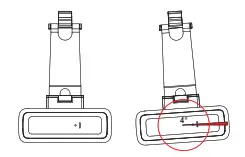
When movement is detected, it is then analysed by the unit and if the movement threshold angle is exceeded, an alarm will be generated. Tilt or movement more than ~4° on the x or y axis from the “home position” will constitute as movement. Please note: The degree of angle given to constitute movement is an approximation.
Detection Mode Check
If the button is pressed and held for 3 seconds, the LEDs will indicate what the detection mode is set to. Please note: In order for detection mode to work, the LEDs must be activated.
Back to Home (B2H)
If the button is pressed for 1 second and released, the device polls the panel to check whether the device is in range of the system.
This is the only function relating to the LEDs that will still function after the 1 hour timer has expired.
| Blue flash then green | 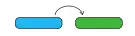 | Indicates the device is within range of the system and has good signal strength. |
| Blue flash then red | 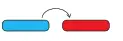 | Indicates the device is within range of the system but has bad signal strength. |
| Blue flash only | 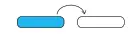 | The device has polled the system but has not had a response therefore it is out of range. |
HOME POSITION
The “Home Position” is the installation position of the device. Once a “Home Position” has been determined by the device, if the device is triggered, it will signal to the system it has been triggered.
The device will calibrate its “Home Position” after the following scenarios:
- After a period of 4 seconds once the case is closed.
- After a period of 10 seconds following an alarm activation.
The device can be relocated wherever the user sees fit when the system is disarmed (providing the zone is not programmed as 24 hour or day alarm).
TESTING, TRIGGERING AND DOUBLE KNOCK
Testing, Triggering and Double Knock To test the device, the system can be put in walk test mode and the device activated. Whilst in walk test mode, the system will chime when the device is triggered for the first time. Please note: As the device can only be triggered once before needing to be recalibrated to a “Home Position”, it can’t be used with the double knock attribute enabled.
BATTERY INFORMATION
 The batteries supplied have been chosen to provide long service life whilst. for safety reasons, having limited output current.
 The battery is protected on purchase by a piece of plastic that must be removed for operation. Wnen disposing of the product, the battery must
REPLACING THE BATTERIES
 Important: When replacing the batteries in the device, both batteries must be replaced at the same time.
PRODUCT WARNING INFORMATION
For electrical products sold within the European Community. k the end of the electrical products hie, it should not be disposed of with household waste. Please recycle where facilities exist. Check with your local Authority a retailer for recycling advice in your country. To prevent possible damage to components, any static charge on your body needs to be eliminated before touching the inside of the unit. This con be accomol,sed by •iuckina 1,57* grounded/earthed metallic conductor such as a rodiator/pipework immediately before replacing the batteries.
WARRANTY
This product is sold subject to our standard warranty conditions and is warranted against defects in workmanship for a period of two years (battery excluded). In the interest of continuing care and design, Pyronix Ltd reserves the right to amend specifications. without giving prior notice. Please see the control panel programming manuals for further information or visit: www.pyronix.com/uk/terms.conditions-sales/
Pyronix Limited
Secure House, Braithwell Way, Hellaby, Rotherham, S66 8QY, United Kingdom
CARDEFENDER-WE
Software revision V3.50
Field trial guide V1.0
08/12/22
 Terms and Conditions of Sales | Pyronix UK & ROI