
PIE MERCHANDISER
CARTER-HOFFMANN MODELS MDPM2 & MDPM4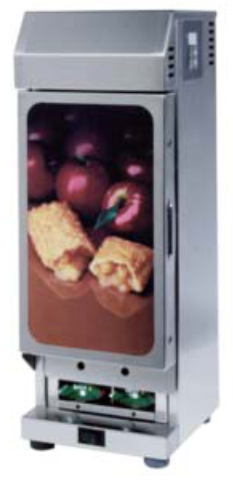 MDPM2
MDPM2
INTRODUCTION
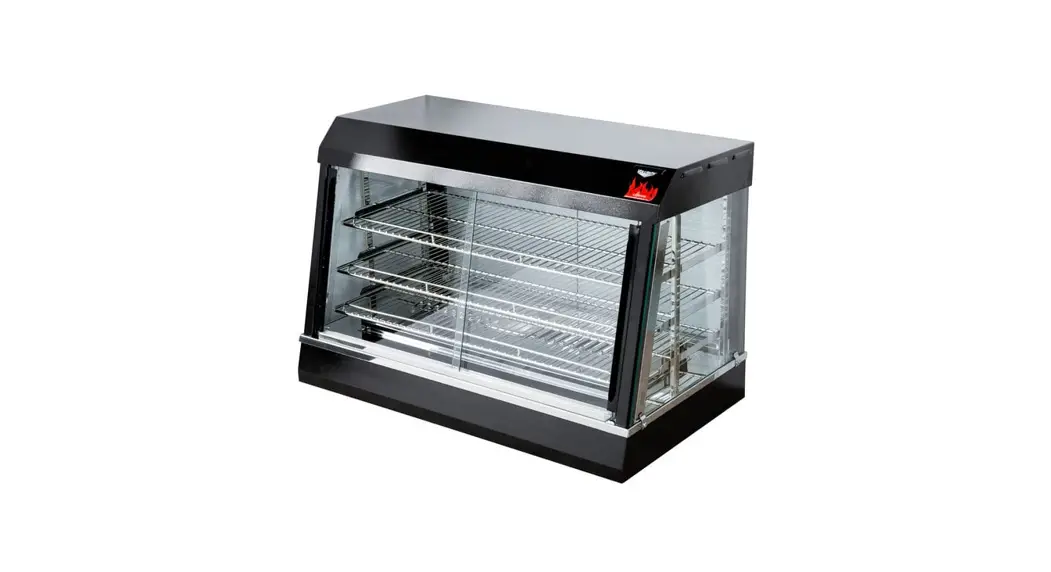
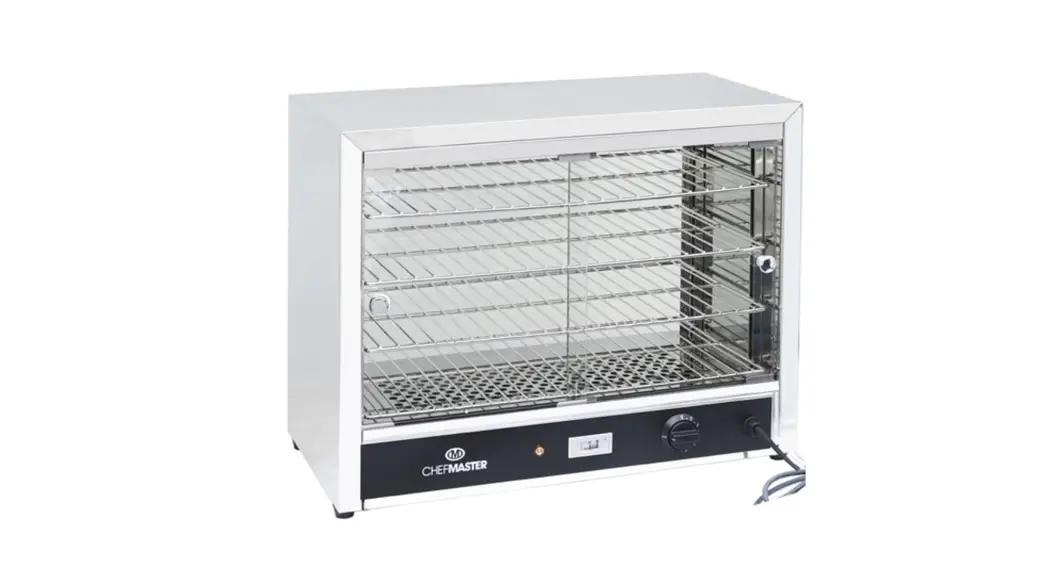
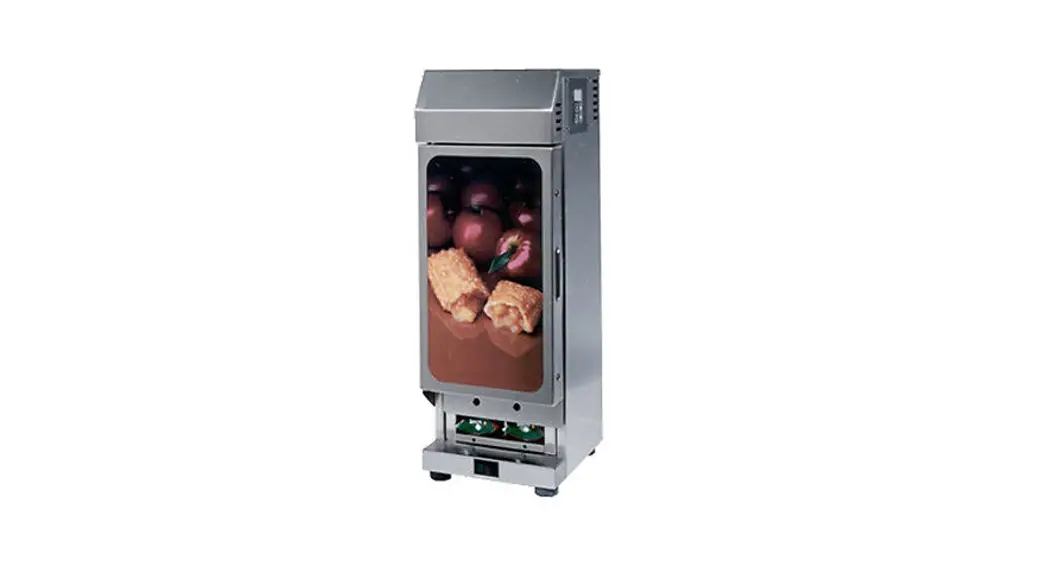
The MDPM2 & MDPM4 Pie Merchandisers are designed to hold pies at serving temperature. The cabinets have a programmable controller with a low temperature alarm. The controller is factory pre-set for a holding temperature of 165 o F (74 o C) for baked pies or 155 o F (69 o C) for fried pies, and a low temperature alarm of 140 o F (60 o C). The heater can be accessed for service by removing the top cover. There is also a bottom panel to access the wiring and the switch. Each cabinet includes a removable pie caddy that holds individually boxed and stacked pies.
SAFETY
Knowledge of proper installation, operation and maintenance procedures is essential to ensure safe operation of any equipment.
- Always have dry hands prior to turning the ON/OFF switch ON or OFF.
- Turn OFF the ON/OFF switch any time the cabinet is not in use.
- If an electrical shock is felt when touching the cabinet, disconnect the power immediately and call CarterHoffmann’s Technical Service Department for assistance and service.
- If you find the power cord is frayed or the plug damaged, DO NOT PLUG IT INTO THE ELECTRICAL RECEPTACLE. IF IT IS ALREADY PLUGGED IN, SHUT OFF THE MAIN CIRCUIT BREAKER, LOCATED IN THE BREAKER BOX AT THE REAR OF THE STORE. THEN DISCONNECT THE PLUG.
- DISCONNECT THE POWER CORD BEFORE ATTEMPTING ANY REPAIRS TO THE CABINET AND/OR CLEANING THE UNIT.
- DO NOT SUBMERGE THE CABINET. ELECTRICAL COMPONENTS AND WIRING PRESENT A HIGH SHOCK HAZARD WHEN WET.

Carter-Hoffmann, LLC All Rights Reserved
Printed in April, 2013
Part #s: 18400-3065
Printed in
The United States of America
INSTALLATION
- Remove the cabinet from shipping carton making sure all packing materials are removed from the carton and cabinet.
- Check to ensure all components are included: Cabinet, Pie Caddy, Equipment Manual
- Read this equipment manual completely before operating the cabinet.
- Locate cabinet on clean, dry surface.
- Clean cabinet thoroughly before use. See PAGE 3.
- Connect the cabinet power cord to a correctly-wired and protected power source.
OPERATION
- The power switch is located at the base of the cabinet, underneath the door.
Turn the power switch on. Preheat cabinet for 30 minutes. When the cabinet is turned on, the air heater will operate until the cabinet reaches the air temperature setpoint. The display will read the actual cabinet temperature.
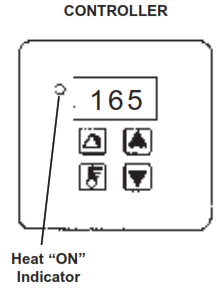
The heat “ON” light will illuminate when the cabinet air temperature is below the air temperature setpoint. The controller display will flash alternately LO and the actual cabinet air temperature until it reaches the low temperature alarm temperature setpoint. - After preheat, load cooked/baked, boxed pies into cabinet.
- Cabinet dispenses pies from the bottom, underneath the door.
- When cabinet is not in use, turn power off.
- This cabinet must be cleaned DAILY. See PAGE 3
NOTE: The pie caddy has a reserve storage of 12 or 18 pies. This reserve is intended to provide additional pies while a new batch of pies are being baked. Holes beneath the door provide visual indication of low pie level in the cabinet.
PROGRAMMING INSTRUCTIONS
The controller has been factory pre-set for a holding temperature of 165 o F (74 o C) for baked pies, 155 o F (69 o C) for fried pies, and a low temperature alarm of 140 o F (60 o C). In most cases, the temperature will not need to be changed. However, if changes are necessary, the controller is programmable.
To View or Change the Temperature Setpoints:
Turn the power on. To view the temperature setpoint, press and hold the temperature set button.
To change the temperature setpoints, press and hold the temperature set button, press the up or down arrow button until the desired air temperature is displayed. The display will advance in 1 o increments.
To View or Change Alarm Setpoints:
Turn the power on. To view the alarm setpoint, press and hold the alarm reset button. 
To change the alarm setpoint, press and hold the alarm reset button, press the up or down arrow button until the desired alarm temperature is displayed. The display will advance in 1 o increments.
To View or Change Temperature Scale:
The cabinet is programmable for a temperature scale in degrees Fahrenheit and Centigrade (Celsius). Turn power off. Hold down both arrow buttons. Turn power back on while holding both arrows. Display will show current scale (C or F). If desired, push the up or down arrow to change the scale. Turn power off to save change.
NON-SCHEDULED MAINTENANCE
Changing Illuminated Front Graphic on Door:
Tools: Phillips Screwdriver
Remove the four screws on the sides of the door and remove the door trim. Slide the POP graphic out. Slide new
POP graphic in, making sure to leave white diffuser backround panel in place. Replace the door trim and secure
with screws.
Changing the Light Bulb in the Door:
Tools: Phillips Screwdriver
The POP graphic on the front door is illuminated by one flourescent bulb. If a bulb burns out, turn off the cabinet.
Remove the four screws on the sides of the door and remove the door trim. Replace the burned out bulb, replace door trim, and secure with screws. Turn the power switch on.
NOTE: Lamp contains mercury. Manage in accordance with disposal laws.
Maintenance & Cleaning
Maintenance
Equipment:Carter-Hoffmann Pie Merchandiser: Models MDPM2 & MDPM4
Precaution: CAUTION: Cleansers, detergents, degreasers, sanitizers or bleaching agents that contain chlorides or phosphates will cause permanent damage to stainless steel
products. The damage appears as pits, eruptions, voids, small holes, cracks, severe discoloration, or dulling of the metal finish. Water with high chloride content can also damage stainless steel. If you are uncertain of your water quality, we recommend you have it tested. THIS DAMAGE IS PERMANENT, COSTLY TO REPAIR, AND IS NOT COVERED BY THE WARRANTY.
Warning:DO NOT SPRAY WITH WATER DURING CLEANING
Daily and As Needed Cleaning Tools: See Precaution above, regarding the care and cleaning of stainless steel. Use only cleaners approved for use on stainless steel, and only in recommended concentrations. Do not use steel wool or other scrubbers that may scratch the finish of the cabinet.
WARNING: Be sure cabinet is cool and unplugged before cleaning. The heater components should not be exposed to direct contact with water or cleaning sprays. DO NOT SPRAY WITH WATER DURING CLEANING. Permanent damage to the electrical components will result.
- Remove all food products and containers from the cabinet. Turn the power switch to OFF. Unplug cabinet and allow it to cool.
- Remove the pie caddy and bring to back sink. Wash in back sink, rinse and sanitize. Use a NO-SCRATCH TM pad on heavy soils.
- Clean the interior and exterior of cabinet with a clean, sanitized towel. Use a NO-SCRATCH TM pad on heavy soils.
- After the cabinet and pie caddy have been thoroughly air-dried, place the pie caddy back in the cabinet.
- Reconnect power cord.
Semi-Annually Tools: Temperature Verification
·Digital thermometer with oven probe
Note: The pie merchandiser can be be empty or full to conduct this check.
- Ensure that the pie merchandiser has been turned on and in operation for at least 30 minutes.
- Clip the oven probe to the pie caddy where the wire guides intersect. Close door.
- After the oven probe has been in place for at least five (5) minutes, compare the digital thermometer temperature to the controller temperature.
Note: The measured temperature must reflect the controller display temperature within +/- 10 o F (6 o C). 4. - The temperature verification is complete. If the unit does not pass the verification test, turn the power switch to OFF and do not use the cabinet. Contact CarterHoffmann Technical Service at (800)323-9793.
WIRING DIAGRAMS & REPLACEMENT PARTS
REPLACEMENT PARTS – 220-240V 500W 2.5A 50-60HZ 1PH
| Part Number | Description | |
| 1 | 18612-0222 | *Heat Element, 220 Volt, 500 Watt |
| 2 | 18614-0340 | *Fan Motor 220 Volt, 50-60 Hz |
| 3 | 18614-0323 | *Cooling Fan 220 Volt |
| 4 | 18616-0229 | *Controller |
| 5 | 18616-0252 | *Light Socket |
| 6 | 18616-0208 | *Light Bulb |
| 7 | 18602-0075 | *On/Off Switch 220 Volt |
| 8 | 18603-5090 | Fan Blade |
| 9 | 18605-0200 | *6’ Power Cord |
| 10 | 16090-2213 | Pie Caddy |
| 11 | 18616-0131 | *Transformer 220 Volt |
| 12 | 18616-0223 | *Relay 24 Volt |
| 13 | 18616-0144 | *Ballast 220 Volt |
| 14 | 18617-0002 | Cord Grip |
| 15 | 18616-0198 | *Probe |
| 16 | 29037-9003 | White Diffuser Panel |
| 17 | 18305-0071 | Rubber Foot |
| 18 | 18600-0062 | *Snap Disc 155 o (68 o C) |
| 19 | 18600-0049 | *Snap Disc 243 o (115 o C) |
| 20 | 18312-0194 | Name Plate |
| 21 | 16502-8541 | Door Trim |
| 22 | 18312-0189 | Overlay, Controller |
| ** | 29037-9013 | International POP |
| ** | 16090-2462 | Top Hinge Assembly |
| ** | 16090-2508 | Bottom Hinge Assembly |
| ** | 16090-2235 | Magnetic Shield Assembly |
*WEEE Parts & Locations
**Not Shown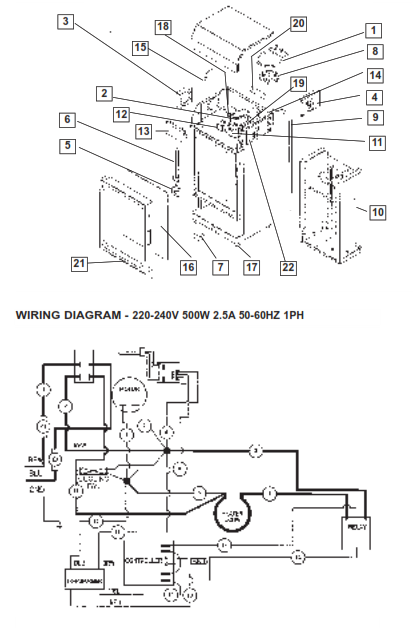
TROUBLESHOOTING
| PROBLEM | DISPLAY READS | PROBABLE CAUSE | CORRECTIVE ACTION |
| NO POWER | Blank | Cabinet is unplugged Tripped hi limit Faulty cooling fan Faulty circulation motor Faulty On/Off switch Faulty wiring | Plug cabinet in Reset hi limit* Replace cooling fan* Replace circulation motor* Replace switch* Replace wires Follow wiring per diagram* |
| NO HEAT/ LOW TEMPERATURE | Ambient air temperature | Faulty heat element Faulty relay Faulty air probe Faulty controller | Replace element* Replace relay* Replace air probe* Replace controller* |
| CONTROLLER LED’s | Some segments are out Dim or Flickering | Faulty controller Faulty controller Low volts to controller | Replace controller* Replace controller* Check supply transformer for 24-28 volt output |
| ERROR CODE DISPLAYED ON CONTROLLER | Error code | Faulty controller Faulty probe or connection | Replace controller* Replace probe/check wiring* |
| FUNCTION KEY DOES NOT OPERATE | Blank | Faulty controller Controller loose/misaligned | Replace controller* Tighten mounting screws/realign |
| PRODUCT NOT GETTING HOT ENOUGH | Normal | Wrong temperature setting See also NOHEAT/LOW TEMPERATURE | Correct temperature setting (see page 2) Check calibration (see page 3) |
* These procedures must be performed by a qualified technician. Contact Carter-Hoffmann Technical Service at (800)323-9793, 847-362-5500 or your local service agent.
Carter-Hoffmann Warranty:
Carter-Hoffmann (“CARTER-HOFFMANN”) warrants to the initial purchaser of its standard Carter Line Products that CARTER-HOFFMANN will, at its option, repair or replace, during the warranty period set forth below, any part of such products made necessary due to a defect in material or workmanship which is present when the product leaves its factory and which manifests itself during the warranty period under normal use and service.
This warranty applies only to original equipment owned and possessed by the initial purchaser and the waranty period begins on the date of original shipment from the CARTER-HOFFMANN factory and extends as follows: to component parts and labor for 12 months (36 months on insulated hotLOGIX holding cabinets levels 3 through 10 and cook & hold cabinets); to refrigeration compressor unit for one year (limited to replacement only – not to include labor for removal, repair or replacement). Repair or replacements under this warranty will be performed, unless otherwise authorized in writing by CARTER-HOFFMANN, at its factory. All parts or components to be repaired or replaced under this warranty are to be shipped prepaid to CARTER-HOFFMANN, with reimbursement credit for such part or component to be given if found by CARTER-HOFFMANN to be defective.
CARTER-HOFFMANN neither makes nor assumes and does not authorize any other person to make or assume any obligation or liability in connection with its products other than that covered in this warranty. This warranty applies only within the continental United States and Canada. In Alaska and Hawaii, this warranty applies only to and is limited to the supply of replacement parts.
Warranty Exclusions and Limitations:
Any implied warranty of merchantability or fitness for a particular purpose is hereby specifically disclaimed by CARTER-HOFFMANN. There are no warranties, expressed or implied, which extend beyond the description on the face hereof.
This warranty does not cover and CARTER-HOFFMANN shall not under any circumstances be liable for any incidental, consequential or other damages (such as injury to persons or property, loss of time, inconvenience, loss of business or profits, or other matters not specifically covered) arising in connection with the use of, inability to use, or failure of these products.Specifications subject to change through product improvement and innovation.
Printed in U.S.A.
1551 McCormick Avenue, Mundelein, Illinois 60060
Tel. 1-800-323-9793 Fax No. (847)367-8981
MANUFACTURED BY CARTER-HOFFMANN
1551 McCORMICK AVENUE
MUNDELEIN, IL 60060
PHONE: (847)362-5500
FAX (847)367-8981
TOLL FREE SERVICE: 1 (800)421-3744 02/11
Supersedes all previous warranty information.