Performance Synthesizer
Version 1.1
© 2021-2022 by Björn Arlt www.fullbucket.de/music
Presets and testing by kraftraum soundcloud.com/kraftraum
VST is a trademark of Steinberg Media Technologies GmbH
Windows is a registered trademark of Microsoft Corporation
The Audio Units logo is a trademark of Apple Computer, Inc.
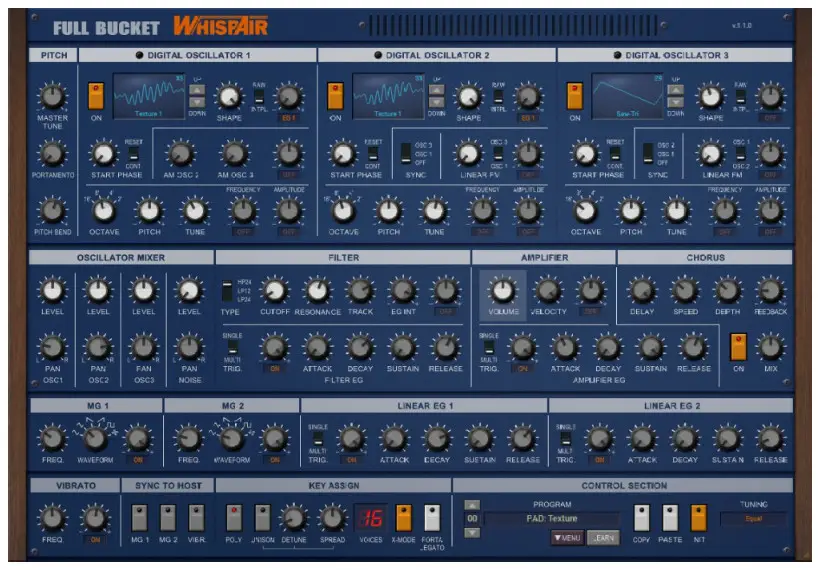
Digital Oscillators
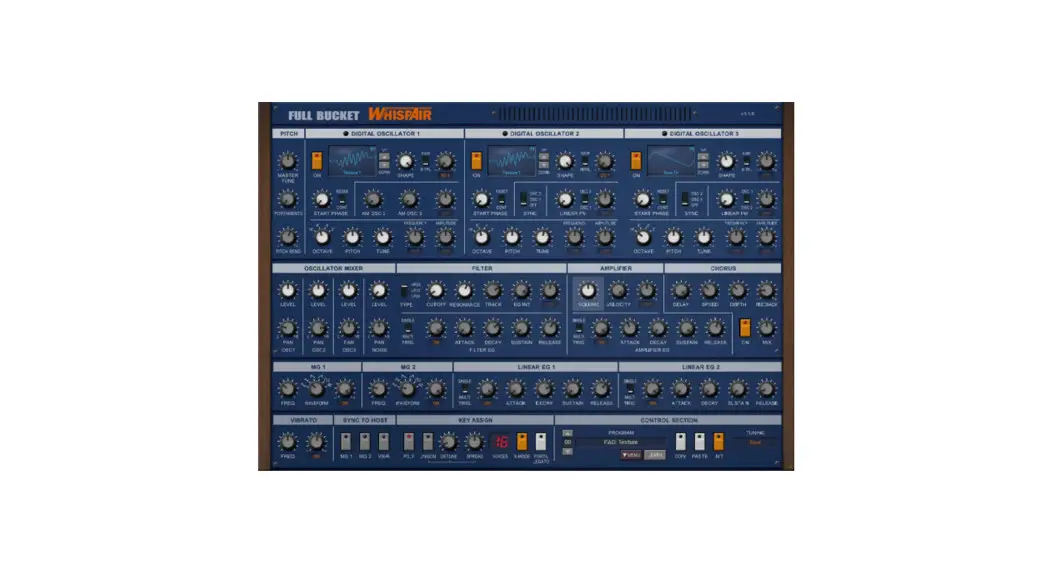
WhispAir features three wavetable oscillators – each oscillator holds one of 40 wavetables (37 built-in and 3 user tables). Oscillator 1 offers additional Amplitude
Modulation by oscillator 2 and/or oscillator 3, while the other two oscillators allow for Hard Sync and Linear Frequency modulation.
Pitch Section
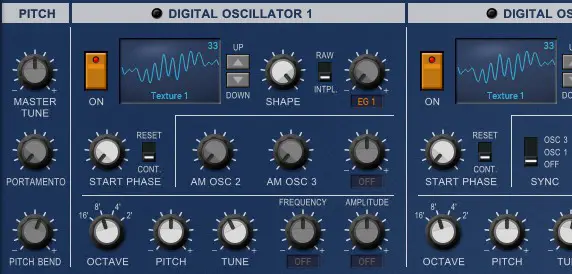
The three parameters MASTER TUNE (± 100 cents), PORTAMENTO (Portamento time) and PITCH BEND (± 12 notes) of the Pitch section affect all oscillators. Also note the micro tuning options – see section Micro Tuning.
Common Oscillator Parameters
The following parameters are common for all three oscillators:
- ON/OFF switch
- Wavetable selection and modulation (see section Wavetables)
- OCTAVE (16’, 8’, 4’, and 2’), PITCH (± 12 notes), and TUNE (± 100 cents)
- FREQUENCY modulation (± 48 notes) and AMPLITUDE modulation
- START PHASE (start of the current waveform; 0° to 360°)
Note that one can select whether the oscillator should run continuously or restart on the next note event.
Specific Parameters To Oscillator 1
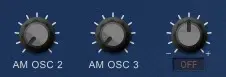
Oscillator 1 allows for Amplitude Modulation (AM) by the two other oscillators; the amount of AM can be set individually. Furthermore, it is possible to modulate the overall AM amount by any of the available modulation sources (see section Modulation Sources).
Specific Parameters To Oscillator 2 And 3
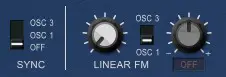
Oscillators 2 and 3 can be hard-synced by oscillator 1 or mutually by each other. The same is true for Linear Frequency Modulation (FM). The amount of Linear FM can be modulated by any of the available modulation sources (see section Modulation Sources).
Wavetables
The wavetables can be selected by clicking on the respective wavetable screen and are grouped in four categories:
- Standard Waveforms
Classical waveforms like Sawtooth or
Square that are well-known from analog synthesizers. - Additive Synthesis
Waveforms that are derived via additive synthesis. - Resynthesis
Waveforms that are re-synthesized from various samples. - User-Defined
Wavetables that can be imported from Xfer Serum or Waldorf Blofeld wavetable files or even from standard WAVs.
You can also step through the different wavetables by clicking the UP/DOWN buttons.
For a complete list of wavetables see section Built-In Wavetables.
Imported WAV files will be treated as a single wavetable consisting of subsequent waves with 2048 samples each. The maximum number of imported waves (i.e. the length of the wavetable) is 64.
The SHAPE parameter controls which wave of the selected wavetable will be played.
As known from the famous PPG Wave synthesizers (and others), this parameter can also be changed/modulated by one of the modulation sources. Therefore, two modes are available:
- INTPL. (Interpolated)
The waves are “morphed” into each other. This will result in a smooth transition between adjacent waves of the wavetable. - RAW
The wave are “stepped through” i.e. there is no smoothing between adjacent waves. This will result in rather harsh transitions.
Oscillator Mixer
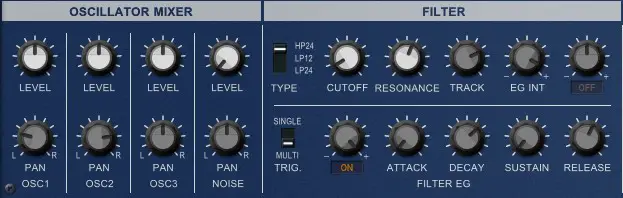
The signals of the three oscillators as well as an additional white noise signal are sent to the Oscillator Mixer. Each signal has its own LEVEL and (stereo) PANORAMA control.
The output of the mixer is finally sent to the filter.
Filter
The potentially self-resonating stereo filter can work in three modes: LP24 (lowpass with 24dB/Octave characteristics), LP12 (lowpass with 12dB/Octave characteristics), and HP24 (highpass with 24dB/Octave characteristics).
Besides the standard cutoff, resonance, keyboard tracking and modulation control it features an individual ADSR envelope generator (EG) with exponential slopes. The EG can be triggered for each key pressed (multiple) or only for the first key when played legato (single).
Amplifier And Chorus
The stereo filter signal is sent to the amplifier section which has its own envelope generator (identical to the EG of the Filter section). The overall amplitude can be modulated by Velocity and additionally by any modulation source.
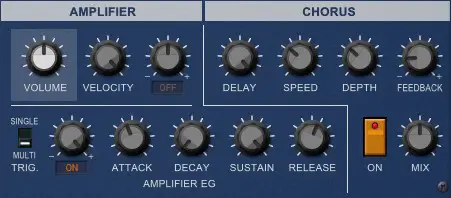
Finally, the signal is processed by a wide-range stereo Chorus unit (which also can be deactivated). The Chorus has controls for effect mix, manual delay time, modulation depth and speed, and positive or negative feedback.
Modulation Sources

Apart from the filter and amplifier envelope generators, WhispAir adds two general-purpose EGs with linear slope characteristics, two modulation generators (MGs) and a third Vibrato MG. All three MGs can be synchronized to the host tempo. MG1 and MG2 have different waveforms while the Vibrato MG always produces a sine wave.
All the EGs and MGs feature an amount control that allows for modulation of the generator signal level by any of the available modulation sources. This way for example a vibrato can be controlled by the modulation wheel or velocity, or the modulation amount of an MG can itself be modulated by an envelope generator.

Other modulation sources are Modulation Wheel, Pitch Bend, Velocity, Poly, and Channel Aftertouch, and Note value. Most of these sources are available in a bipolar and unipolar (positive) version.
Key Assign Modes
In POLY mode, WhispAir can be played polyphonically or monophonically – the number of voices can be chosen from 1 to 64.
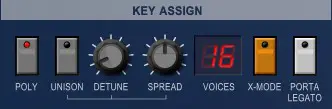
In UNISON mode, these voices will be “stacked” i.e. played monophonically all for the same note value while it is possible to set the overall detune and stereo spread amount. Thus it is possible to play all 64 voices for one key at the same time – note that this may have a severe impact on your CPU performance though.
X-MODE is a special performance mode where the enabled oscillators are played in sequence per key (in contrast to all at the same time). For example, if oscillators 1 and 2 plus X-MODE are enabled, the first note pressed will cause only oscillator 1 to play while the next note plays oscillator 2 etc. This way you can produce very different sounds per note.
Finally, you can set whether the polyphonic Portamento should only be activated during legato play.
Control Section
The Control section has controls for selecting and handling programs, as well as MIDI (un), learn and micro tuning.
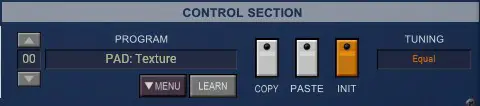
Note that the COPY, PASTE and INIT buttons are shortcuts to the respective function of the Options Menu.
MIDI Learn And The Config File “whispair.ini”
Every parameter of WhispAir can be controlled by one MIDI controller. If you want to change the assignment of MIDI controller (CC; MIDI Control Change) to WhispAir parameter the MIDI Learn function comes in quite handy: Just click the MIDI Learn button in the Control Section (caption turns red) and wiggle both the MIDI controller and the parameter you want to assign (you can abort MIDI Learn by clicking the button again). If you want to unlearn the assignment, right-click the MIDI Learn button (the label now reads “UNLEARN”) and activate it. Now wiggle the MIDI controller or the parameter that you want to unlearn. To save the controller assignments use “Save Configuration” in the Options Menu (see below); they are stored in the whispair.ini configuration file. The exact location of this file depends on your operating system and will be displayed when you click on “Reload” or “Save Configuration”.
Micro Tuning
WhispAir features 14 built-in microtonal scales and can import various tuning files (Scala SCL/KBM, TUN). Scales are selected by clicking on the TUNING control which also displays the name of the current scale.
Furthermore, WhispAir is compatible with MTS-ESP by ODDSound, a very cool framework for dynamic micro tuning. For more (and how to get) MTS-ESP plug-ins see https://oddsound.com.
When clicking on the MENU button, a context menu opens with the following options:
| Copy Program | Copy current program to internal clipboard |
| Paste Program | Paste internal clipboard to current program (either the full program, only the sound, or only the sequencer data) |
| Init Program | Initialize the current program |
| Load Program | Load a program file containing a patch to WhispAir’s current program |
| Save Program | Save WhispAir’s current program to a program file |
| Load Bank | Load a bank containing 64 patches into WhispAir |
| Save Bank | Save WhispAir’s 64 patches to a bank file |
| Select Startup Bank | Select the bank file that should always be loaded when WhispAir is started |
| Load Startup Bank | Load the Startup bank file; can also be used to check what the current Startup bank is |
| Unselect Startup Bank | Unselect the current Startup bank |
| MIDI Thru | Set globally if MIDI data sent to WhispAir should be sent through to its MIDI output (stored in the configuration file) |
| Ignore Program Change | Set globally if MIDI Program Change data sent to WhispAir should be ignored (stored in the configuration file) |
| Reload Configuration | Reload WhispAir’s configuration file |
| Save Configuration | Save WhispAir’s configuration file |
| Window Size… | Change the window size of whisper |
| Save Window Size | Stores the current window size to the configuration file so that it will be restored on the next loading of WhispAir |
| Check Online for Update | When connected to the Internet, this function will check if a newer version of WhispAir is available at fullbucket.de |
| Visit fullbucket.de | Open fullbucket.de in your standard browser |
Built-In Wavetables
| Category | Wavetable | Number of Waves |
| Standard Waveforms | Saw | 1 |
| Pulse | 1 | |
| Full PWM | 1 | |
| Tri | 2 | |
| Sine | 2 | |
| Sine-Tri-Square-Saw | 4 | |
| Saw-Square | 2 | |
| Saw-Sine | 2 | |
| Saw-Tri | 64 | |
| Square-Tri | 64 | |
| Square-Sine | 2 | |
| DW-8000 | 16 | |
| Additive Synthesis | Dirac Meltdown | 64 |
| Odd | 16 | |
| Even | 16 | |
| Even to Odd | 9 | |
| Primes | 12 | |
| Octaves | 8 | |
| Frequency Up | 16 | |
| Phased Saw | 64 | |
| Drawbar Full | 16 | |
| Drawbar Mixed | 16 | |
| Resynthesis | Acoustic Piano | 33 |
| Planet | 33 | |
| Slap Low | 33 | |
| Slap High | 33 | |
| Re-PWM | 33 | |
| Resonance 1 | 33 | |
| Resonance 2 | 33 | |
| MP4 Cross Modulation | 33 | |
| Formant Shift | 33 | |
| A-O-E | 3 | |
| Geesh | 33 | |
| TD Teh’ | 33 | |
| Texture 1 | 33 | |
| Texture 2 | 33 | |
| Ladies & Gentlemen | 33 |
Parameters
Common
| parameter | ID | description |
| Volume | 0 | Total volume |
| Master Tune | 1 | Master tune (± 100 cents) |
| Number of Voices | 2 | Number of voices (1 – 64) |
| Unison Mode | 3 | Unison off/on |
| Unison Detune | 4 | Unison detune |
| Unison Spread | 5 | Unison stereo spreading |
| X-Mode | 6 | X-Mode off/on |
| Pitch Bend | 7 | Amount of pitch bending (± 12 notes) |
| Portamento | 8 | Portamento time |
| Portamento Legato | 9 | Portamento Legato off/on |
Digital Oscillator 1
| parameter | ID | description |
| Osc Off/On | 10 | Oscillator on/off |
| Wave Table | 11 | ID of the current wavetable |
| Wave Shape | 12 | Wavetable shape |
| Wave Mode | 13 | Wavetable shape mode (Interpolated/Raw) |
| Wave Shape Mod | 14 | Wavetable shape modulation amount |
| Wave Shape Mod Source | 15 | Wavetable shape modulation source |
| Restart Mode | 16 | Restart wave off/on |
| Start Phase | 17 | Start phase (0 to 360°) |
| AM by Osc 2 | 18 | Amplitude Modulation by oscillator 2 |
| AM by Osc 3 | 19 | Amplitude Modulation by oscillator 3 |
| AM Mod | 20 | AM modulation amount |
| AM Mod Source | 21 | AM modulation source |
| Octave | 22 | Octave (16’, 8’, 4’, 2’) |
| Pitch | 23 | Pitch (± 12 notes) |
| Tune | 24 | Tune (± 100 cents) |
| Frequency Mod | 25 | Frequency modulation amount |
| Frequency Mod Source | 26 | Frequency modulation source |
| Amplitude Mod | 27 | Amplitude modulation amount |
| Amplitude Mod Source | 28 | Amplitude modulation source |
Digital Oscillator 2
| parameter | ID | description |
| Osc Off/On | 29 | Oscillator on/off |
| Wave Table | 30 | ID of the current wavetable |
| Wave Shape | 31 | Wavetable shape |
| Wave Mode | 32 | Wavetable shape mode (Interpolated/Raw) |
| Wave Shape Mod | 33 | Wavetable shape modulation amount |
| Wave Shape Mod Source | 34 | Wavetable shape modulation source |
| Restart Mode | 35 | Restart wave off/on |
| Start Phase | 36 | Start phase (0 to 360°) |
| Hard Sync | 37 | Hard Sync (by oscillator 1 or 3) |
| Linear FM | 38 | Linear FM amount |
| Linear FM Source | 39 | Linear FM source (oscillator 1 or 3) |
| Linear FM Mod | 40 | Linear FM modulation amount |
| Linear FM Mod Source | 41 | Linear FM modulation source |
| Octave | 42 | Octave (16’, 8’, 4’, 2’) |
| Pitch | 43 | Pitch (± 12 notes) |
| Tune | 44 | Tune (± 100 cents) |
| Frequency Mod | 45 | Frequency modulation amount |
| Frequency Mod Source | 46 | Frequency modulation source |
| Amplitude Mod | 47 | Amplitude modulation amount |
| Amplitude Mod Source | 48 | Amplitude modulation source |
Digital Oscillator 3
| parameter | ID | description |
| Osc Off/On | 49 | Oscillator on/off |
| Wave Table | 50 | ID of the current wavetable |
| Wave Shape | 51 | Wavetable shape |
| Wave Mode | 52 | Wavetable shape mode (Interpolated/Raw) |
| Wave Shape Mod | 53 | Wavetable shape modulation amount |
| Wave Shape Mod Source | 54 | Wavetable shape modulation source |
| Restart Mode | 55 | Restart wave off/on |
| Start Phase | 56 | Start phase (0 to 360°) |
| Hard Sync | 57 | Hard Sync (by oscillator 1 or 2) |
| Linear FM | 58 | Linear FM amount |
| Linear FM Source | 59 | Linear FM source (oscillator 1 or 2) |
| parameter | ID | description |
| Linear FM Mod | 60 | Linear FM modulation amount |
| Linear FM Mod Source | 61 | Linear FM modulation source |
| Octave | 62 | Octave (16’, 8’, 4’, 2’) |
| Pitch | 63 | Pitch (± 12 notes) |
| Tune | 64 | Tune (± 100 cents) |
| Frequency Mod | 65 | Frequency modulation amount |
| Frequency Mod Source | 66 | Frequency modulation source |
| Amplitude Mod | 67 | Amplitude modulation amount |
| Amplitude Mod Source | 68 | Amplitude modulation source |
Oscillator Mixer
| parameter | ID | description |
| Level Osc 1 | 69 | Level of oscillator 1 |
| Level Osc 2 | 70 | Level of oscillator 2 |
| Level Osc 3 | 71 | Level of oscillator 3 |
| Level Noise | 72 | Level of white noise |
| Pan Osc 1 | 73 | Panorama of oscillator 1 |
| Pan Osc 2 | 74 | Panorama of oscillator 2 |
| Pan Osc 3 | 75 | Panorama of oscillator 3 |
| Pan Noise | 76 | Panorama of white noise |
Filter
| parameter | ID | description |
| Type | 77 | Filter type (LP24, LP12, HP24) |
| Cutoff | 78 | Cutoff frequency |
| Resonance | 79 | Resonance |
| Keyboard Track | 80 | Keyboard tracking |
| Filter EG Intensity | 81 | Intensity of the Filter EG |
| Filter cFM | 82 | Cutoff frequency modulation amount |
| Filter cFM Source | 83 | Cutoff frequency modulation source |
Amplifier
| parameter | ID | description |
| Velocity | 84 | Velocity |
| Amplitude Mod | 85 | Amplitude modulation amount |
| Amplitude Mod Source | 86 | Amplitude modulation source |
| parameter | ID | description |
| Chorus | 87 | Chorus off/on |
| Chorus Delay | 88 | Chorus delay |
| Chorus Speed | 89 | Chorus modulation speed |
| Chorus Depth | 90 | Chorus modulation depth |
| Chorus Feedback | 91 | Chorus feedback (± 100%) |
| Chorus Mix | 92 | Chorus effect mix |
Filter EG
| parameter | ID | description |
| Filter EG Trigger | 93 | EG Trigger (Multiple/Single) |
| Filter EG Mod | 94 | EG level modulation |
| Filter EG Mod Source | 95 | EG level modulation source |
| Filter EG Attack | 96 | Attack time |
| Filter EG Decay | 97 | Decay time |
| Filter EG Sustain | 98 | Sustain level |
| Filter EG Release | 99 | Release time |
Amplifier EG
| parameter | ID | description |
| Amp EG Trigger | 100 | EG Trigger (Multiple/Single) |
| Amp EG Mod | 101 | EG level modulation |
| Amp EG Mod Source | 102 | EG level modulation source |
| Amp EG Attack | 103 | Attack time |
| Amp EG Decay | 104 | Decay time |
| Amp EG Sustain | 105 | Sustain level |
| Amp EG Release | 106 | Release time |
Linear EG 1
| parameter | ID | description |
| Lin EG 1 Trigger | 107 | EG Trigger (Multiple/Single) |
| Lin EG 1 Mod | 108 | EG level modulation |
| Lin EG 1 Mod Sourc | 109 | EG level modulation source |
| Lin EG 1 Attack | 110 | Attack time |
| Lin EG 1 Decay | 111 | Decay time |
| Lin EG 1 Sustain | 112 | Sustain level |
| Lin EG 1 Release | 113 | Release time |
Linear EG 2
| parameter | ID | description |
| Lin EG 2 Trigger | 114 | EG Trigger (Multiple/Single) |
| Lin EG 2 Mod | 115 | EG level modulation |
| Lin EG 2 Mod Source | 116 | EG level modulation source |
| Lin EG 2 Attack | 117 | Attack time |
| Lin EG 2 Decay | 118 | Decay time |
| Lin EG 2 Sustain | 119 | Sustain level |
| Lin EG 2 Release | 120 | Release time |
MG 1
| parameter | ID | description |
| MG 1 Frequency | 121 | Frequency |
| MG 1 Waveform | 122 | Waveform (Sine, Triangle, Rectangle, Saw |
| MG 1 Sync to Host | 123 | Down, Saw Up, S/H) |
| MG 1 Sync Rate | 124 | Sync to host tempo on/off |
| MG 1 Mod | 125 | Sync to host tempo rate |
| MG 1 Mod Source | 126 | MG level modulation |
MG 2
| parameter | ID | description |
| MG 2 Frequency | 127 | Frequency |
| MG 2 Waveform | 128 | Waveform (Sine, Triangle, Rectangle, Saw Down, Saw Up, S/H) |
| MG 2 Sync to Host | 129 | Sync to host tempo on/off |
| MG 2 Sync Rate | 130 | Sync to host tempo rate |
| MG 2 Mod | 131 | MG level modulation |
| MG 2 Mod Source | 132 | MG level modulation source |
Vibrato MG
| parameter | ID | description |
| Vibrato Frequency | 133 | Frequency |
| Vibrato Sync to Host | 134 | Sync to host tempo on/off |
| Vibrato Sync Rate | 135 | Sync to host tempo rate |
| Vibrato Mod | 136 | Vibrato level modulation |
| Vibrato Mod Source | 137 | Vibrato level modulation source |
Frequently Asked Questions
How do I install WhispAir (Windows VST2 32 bit version)?
Just copy the files whispair.dll from the ZIP archive you have downloaded to your system’s or favorite DAW’s VST2 plug-in folder. Your DAW should automatically register the WhispAir VST2 plug-in the next time you start it.
How do I install WhispAir (Windows VST2 64 bit version)?
Just copy the file whispair64.dll from the ZIP archive you have downloaded to your system’s or favorite DAW’s VST2 plug-in folder. Your DAW should automatically register the WhispAir VST2 plug-in the next time you start it.
Note: You may have to remove any existing (32 bit) whispair.dll from your VST2 plug-in folder or else your DAW may screw the versions up…
How do I install WhispAir (Windows VST3 64 bit version)?
Just copy the files whispair.vst3 from the ZIP archive you have downloaded to your system’s or favorite DAW’s VST3 plug-in folder. Your DAW should automatically register the WhispAir VST3 plug-in the next time you start it.
How do I install WhispAir (Mac VST2/VST3/AU 64 bit)?
Locate the downloaded PKG package file whispair_1_1_0_mac.pkg in Finder (!) and do a right- or control-click on it. In the context menu, click on “Open”. You will be asked if you really want to install the package because it comes from an “unidentified developer” (me J). Click “OK” and follow the installation instructions.
What is the “N” version of WhispAir?
The “N” version is the non-resizable version of WhispAir that should run on almost any older Windows or Mac machine. So if you have problems with the standard WhispAir version, this is the one to go for.
What is the plug-in ID of whisper?
The ID is what .
How do I know if a new version of WhispAir is available?
When connected to the Internet, open the File menu (see section Options Menu) by clicking the MENU icon and selecting the entry “Check Online for Updates”. If a new version of WhispAir is available on fullbucket.de the respective information will be shown in a message box.
How do I resize the WhispAir window?
Just grab the yellow triangle at the bottom right of the WhispAir window and drag it.
You can save the current window size using the menu entry “Save Window Size” in the Options Menu.