
Stauer 53143 Incan Treasure Chronograph Watch

WATCH DISPLAY
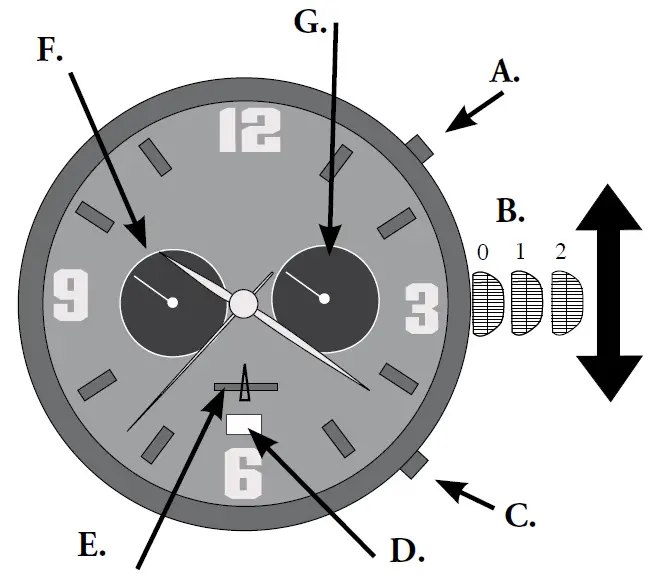
- A – Start/Stop Button
- B – Crown
- C – Split/Reset Button
- D – Date Window
- E – Chronograph Second Dial
- F – Chronograph Minute Dial
- G – 24-Hour Military Time Dial
TIME SETTING
SETTING THE DATE
- Pull the crown (part B) out to position “1” and turn clockwise (away from you) to set the desired date.
- Push the crown back to position “0”.
NOTE: The date should not be adjusted between 9:00 pm to 1:00 am, otherwise the day may not change properly.
SETTING THE TIME
- Pull the crown (part B) out to position “2” when the second hand is at the twelve o’clock position. Turn the crown counterclockwise (towards you) to set the desired time.
- Push the crown back to position “0”.
USING THE CHRONOGRAPH
This is a 60 second chronograph.
- To START the Chronograph press the Start/Stop button (part A).
- To STOP the Chronograph press the Start/Stop button (part A) again.
- To RESET (set to zero) the Chronograph pull the crown (part B) out to position “2”. Press the Split/Reset button (part C). Push the crown back to position “0”.
This procedure should be performed when the chronograph second-hand does not return to zero position after the chronograph has been reset and after the battery has been replaced.
Visit us at www.stauer.com. to learn more about the fantastic benefits of owning a Stauer Watch! www.stauer.com.
 Stauer Jewelry - Afford the Extraordinary