
TC-916-IP Rev. C, March 2021
Installation Instructions
FIST RSKG 4
About this manual
This kit is used to install 4 drop cables of 4 to 7 mm diameter in a new unused round port of the FIST-GCO2-BX6 and BX8, the FIST-GC02-FX and the FIST-EDSA2.
Kit contents
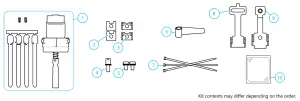
| N° | Description | Qty FX | Qty BX6 | Qty BX8 | Qty EDSA2 |
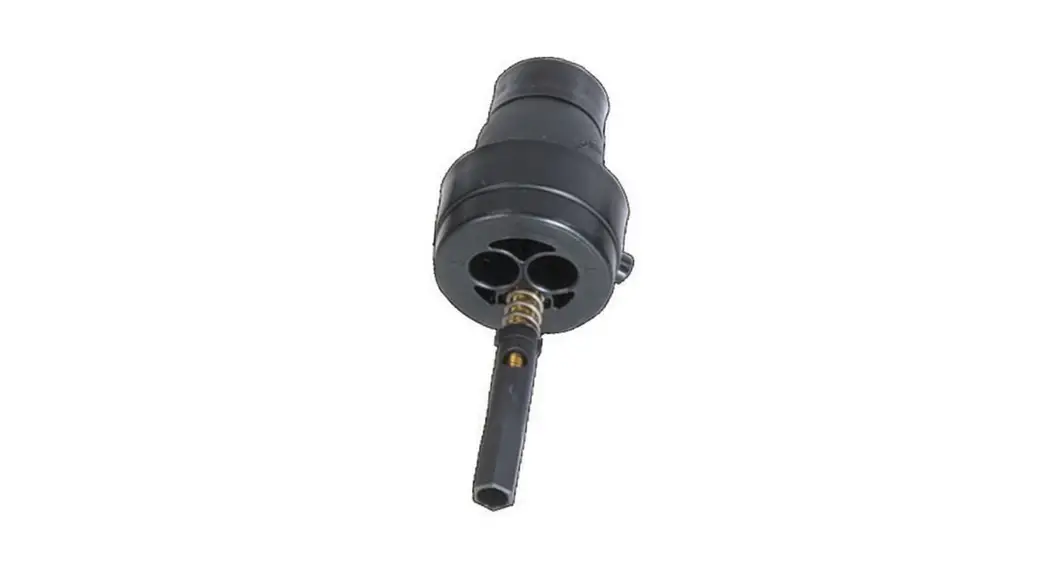
| 1 | FIST GCO2 RSKG-4 with securing screws and blind plugs | 1 | 1 | 1 | 1 |
| 2 | Strmbr fixation cap double | 2 | 2 | 2 | 2 |
| 3 | Strmbr fixation base plate | 2 | 2 | 2 | 2 |
| 4 | Spacer with star washer | 1 | 1 | 1 | 1 |
| 5 | Bolt with star washer M5x10 | 2 | 1 | 2 | 2 |
| 6 | Felt tape | 1 | 1 | 1 | 1 |
| 7 | Cable ties bundle | 1 | 1 | 1 | 1 |
| 8 | Cable term GCO2 brkt 3/4 OUT | – | 1 | – | – |
| 9 | Cable term GCO2-FX brkt 3/4 OUT | 1 | – | 1 | 1 |
| 10 | Lubrication oil | 1 | 1 | 1 | 1 |
Cable diameter range gel seals
| Number of ports | Cable diameter range (mm) | Number of ports | Cable diameter range (mm) | |
| 1 | 11 – 14 | 8 | 3 – 5 | |
| 2 | 8 – 11 | 16 | 0 – 2A (up to 3 depending on the kit contents) | |
| 3 | 63-8 | FOSC OSKG | 6-15 | |
| 4 | 4 – 7 | FIST OSKG | 5 – 18 | |
| 4 FLAT | 8 x 4,5 – 11 x 6,5 | FIST OSKG 20 | 16 – 20 |
Install gel seal
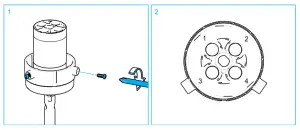
- Before installing the gel seal in the port, install the 2 securing screws.
- The first cable must be installed in port position number 1. The next cable must follow the numbering.
 Note: The lubrication oil in the kit makes it easier to install a gel seal in the closure ports.
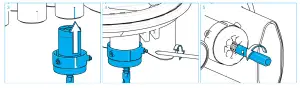
- Open the port. The cutting wire can be used. Make sure that the edges are free of burrs. Install the seal in the port, mark line always facing forward. The mark line on the gel seal should match with the mark line on the FIST-GCO2 drop port. (The mark at the FIST-GCO2- FX/EDSA2 should be hidden when the seal is installed).
- Tighten the 2 screws and make sure they grip in the port.
- Make sure the seal is decompressed before installing a cable.
Prepare cable
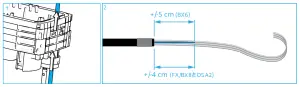
1 Feed the cable through the port. Cutting the cable edge under 45° will help to feed the cables through the RSKG seal. Prepare as per standard practice. Note: The lubrication oil in the kit makes it easier to guide cables through pores in the gel seal.
2 Cut the strength member at ± 5 cm (BX6) / ± 4 cm (FX/BX8/EDSA2) from the cable jacket. Apply felt tape at +/- 5 mm from the cable jacket end, make sure the cable jacket is clean and oil-free.
Install cable
Install bracket
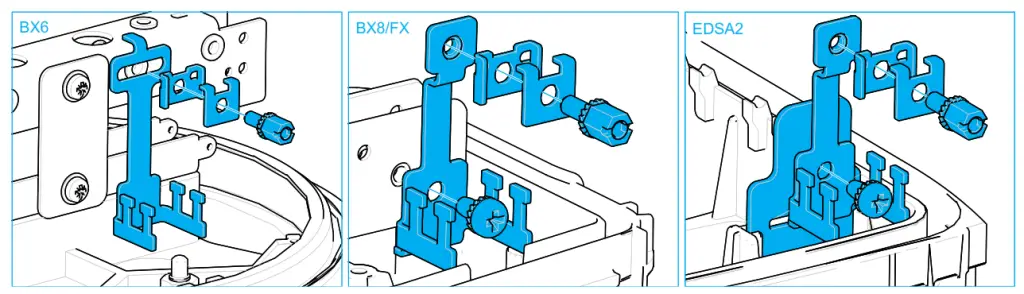
- BX6: Secure the metal bracket together with the 2 metal plates to the frame using the spacer and the washer. Make sure that it is positioned at the center of the port. Do not tighten the spacer completely.
- BX8/FX: Secure the metal bracket to the frame with the screw (M5x10) and washer. Install the first set of metal plates with the spacer and washer to the bracket.
- EDSA2: Secure the metal bracket to the frame with the screw (M5x10) and washer. Install the first set of metal plates with the spacer and washer to the bracket.
Install cable
For BX8/FX: Start with ports 3 and 8.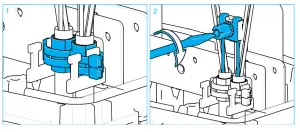
- Install the first two cables left and right in the back position as shown. Position the strength members between the metal plates. Secure the cables with each 2 cable ties to the T shape
- Secure the strength members between the 2 metal plates by tightening the spacer. Route the loose tubes as per standard practice.
For EDSA2: It is recommended to divide the fibers that are coming from the round port into separate slots in the tube holders.
- Install the second set of metal plates on top of the spacer with the remaining screw and washer. Do not tighten yet.
- Install the third and fourth cable in the front positions as shown. Position the strength members between the second set of metal plates. Secure the cables with each 2 cable ties to the T shape.
- Secure the strength members between the 2 metal plates by tightening the spacer. Route the loose tubes as per standard practice.
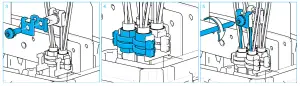
For EDSA2: It is recommended to divide the fibers that are coming from the round port in separate slots in the tube holders.
Activate seal mechanism
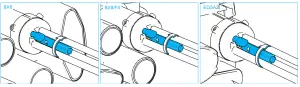
- Use the blind plug(s) to fill up the unused hole(s) if all 4 cables are not installed on the same day. Engage the seal mechanism by tightening the ‘nut’ of the central bolt assembly until the spring is no longer visible and the ‘nut’ is flush with the gland body.
- To add a cable: release the trigger, remove the blind plug, prepare a new cable and continue with one of the previous sections above depending on the closure type.Note: Depending on outside conditions, some oil bleed-out may occur. This will not affect in any way the sealing performance.
OPTIONAL: Secure cable to the outside bracket
A cable securing frame is optionally available for the FIST-GCO2-BX6, FIST-GC02-BX8, and the FIST-GC02-FX.
860661092 Rev. A
© 2021 CommScope, Inc. All Rights Reserved
Visit our website or contact your local CommScope® representative for more information. www.commscope.com. All trademarks identified by ® are registered trademarks in the US and may be registered in other countries. All third-party product names, trademarks, and registered trademarks are the property of their respective owners. This product may be covered by one or more U.S. patents or their foreign equivalents. For patents, see www.cs-pat.com. For technical assistance, customer service, or to report any missing/damaged parts, visit us at: http://www.commscope.com/SupportCenter.
© 2021 CommScope, Inc. All Rights Reserved