
Toastmaster TM-121CM DIGITAL COFFEE MAKER
IMPORTANT SAFEGUARDS
When using electrical appliances especially when children are present, basic safety precautions should always be followed to reduce the risk of fire, electric shock, and/or injury to persons, including the following
- READ ALL INSTRUCTIONS.
- Do not touch hot surfaces. Use any handles or knobs.
- To protect against fire, electrical shock, or injury to persons DO NOT immerse cord, plug or appliance in water or other liquid.
- Close supervision is necessary when any appliance is used by or near children.
- Unplug from outlet when not in use and before cleaning. Allow to cool before putting on or taking off parts and before cleaning the appliance.
- Do not operate any appliance with a damaged cord or plug, or after the appliance malfunctions or has been damaged in any manner. Return appliance to the nearest authorized service facility for examination, repair or adjustment.
- The use of accessory attachments not recommended by the appliance manufacturer may result in fire, electric shock or injury to persons.
- Do not use outdoors.
- Do not let cord hang over edge of table or counter or touch hot surfaces.
- Do not place on or near a hot gas or electric burner, or in a heated oven.
- Extreme caution must be used when moving an appliance containing hot food, hot oil, water or other hot liquids.
- Do not use appliance for other than intended use.
- To disconnect, turn Off, then remove plug from wall outlet.
- The glass container is designed for use with this appliance. It must never be used on a range top. Do not set a hot container on a wet or cold surface. Do not use a cracked container or a container having a loose or weakened handle. Do not clean container with cleansers, steel wool pads or other abrasive materials. Do not place in a microwave oven.
- The lid on the glass carafe must be closed for brewing.
- Fill the water reservoir of this appliance with water only. Do not fill with other liquids or foods.
- Scalding water may occur if the lid is removed during the brewing cycle.
- See the illustration for instructions on the placement and removal of the carafe lid.
SAVE THESE INSTRUCTIONS
OPERATING INSTRUCTIONS
PRODUCT MAY VARY SLIGHTLY FROM ILLUSTRATIONS
This appliance is for HOUSEHOLD USE ONLY. It may be plugged into an AC electrical outlet (ordinary household current). Do not use any other electrical outlet.
DO NOT OPERATE THE APPLIANCE IF THE LINE CORD SHOWS ANY DAMAGE, OR IF APPLIANCE WORKS INTERMITTENTLY OR STOPS WORKING ENTIRELY.
A short power-supply cord is to be provided to reduce risks resulting from becoming entangled in or tripping over a longer cord. Longer detachable power-supply cords or extension cords are available and may be used if care is exercised in their use. If a longer detachable power-supply cord or extension cord is used:
- The marked electrical rating of the detachable power-supply cord or extension cord should be at least as great as the electrical rating of the appliance, and;
- The longer cord should be arranged so that it will not drape over the countertop or tabletop where it can be pulled on by children or tripped over unintentionally.
POLARIZED PLUG
This appliance has a polarized plug (one blade is wider than the other). To reduce the risk of electric shock, this plug is intended to fit into a polarized outlet only one way. If the plug does not fit fully into the outlet, reverse the plug and try again. If it still does not fit, contact a qualified electrician. Do not attempt to modify the plug in any way.
LINE CORD SAFETY TIPS
- Never pull or yank on cord or the appliance.
- To insert plug, grasp it firmly and guide it into outlet.
- To disconnect appliance, grasp plug and remove it from outlet. Do not pull on the line cord.
- Before each use, inspect the line cord for cuts and/or abrasion marks. If any are found, this indicates that the appliance should be serviced and the line cord replaced.
- Never wrap the cord tightly around the appliance, as this could place undo stress on the cord where it enters the appliance and cause it to fray and break.
IMPORTANT: During the first few minutes of initial use, you may notice smoke and/or a slight odor. This is normal and should quickly disappear. It will not recur after appliance has been used a few more times.
WARNING: To reduce the risk of fire or electric shock, do not remove the bottom cover. No user-serviceable parts inside. Repair should be done by authorized service personnel only.
UNPACKING
- Carefully unpack the Coffee Maker and all parts. Remove any tape, labels or packaging materials.
- Wash filter basket, glass carafe and carafe lid with warm, soapy water. Rinse well and dry thoroughly.
- Wipe exterior surfaces of the product with a soft, moist cloth to remove dust particles collected during packing and handling. NEVER IMMERSE THE COFFEE MAKER, CORD OR PLUG IN WATER OR ANY OTHER LIQUID.
- Place Coffee Maker on a solid, level, heat-resistant surface.
PREPARING FOR USE
CONTROLS
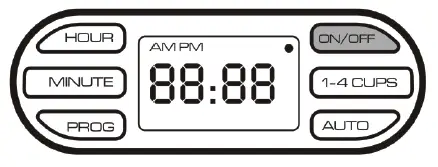
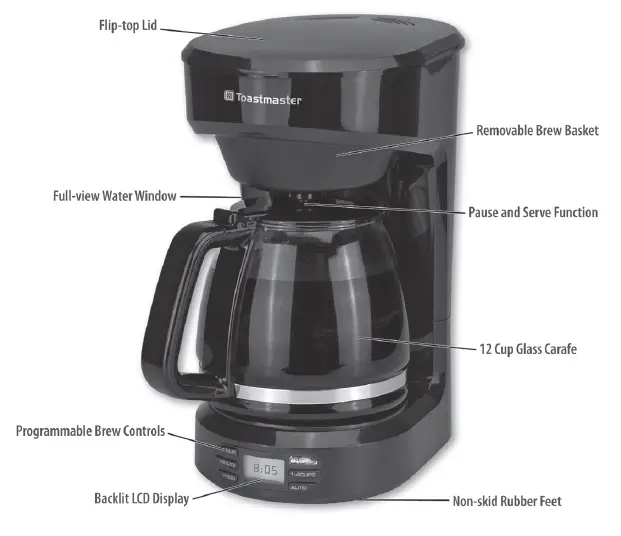
- HOUR and MINUTE Buttons: Use for setting the hour and minute for the clock and the automatic start time.
- PROG Button: Use to set the clock.
- ON / OFF Button: Use to start or stop the Brew Cycle and to stop the Keep Warm function.
- 1-4 CUPS Button: Use when brewing a smaller volume of coffee.
- AUTO Button: Use to set the Programmable Brew Start (Delay Brew).
CLEANING THE COFFEE MAKER
Before the first use, the Coffee Maker should be rinsed with clean water by running a brew cycle.
- Fill the glass carafe to MAXIMUM FILL LINE with cool water and pour it into the water reservoir.
- Make sure the filter basket is properly seated with tabs aligned and engaged .
- NOTE: Allow water to cycle through without coffee, this will clean the water reservoir and filter basket.
- Plug the Coffee Maker into an electrical outlet. Ideally, the Coffee Maker should be operated on its own circuit, separate from other appliances. The LED screen light will flash five times and display the clock.
- Push the ON / OFF button once. The brew cycle will begin. The ON / OFF button will be illuminated during the brew cycle and dot will flash on the digital display while brewing. This cycle will take approximately 10 to 12 minutes to complete.
- After the cycle is complete, the flashing dot on the digital display will shut off, but the ON / OFF button will remain illuminated during the 2 hour Keep Warm mode.
- NOTE: After 2 hours, the Coffee Maker will automatically shut off and the ON / OFF button will no longer be illuminated.
- The Coffee Maker is now ready for use.
SETTING THE CLOCK
Setting the Clock on the Coffee Maker is optional. When set, the time will appear in the digital display. When the coffee maker is plugged in, it will default to 12:00 if the clock setting process is not started within 5 seconds.
- Press the PROGRAM button and the digital display will flash.
- To set the HOUR, press the HOUR button to advance one hour at a time. Hold the button to rapidly advance the hours. The hours will only count upward. Make note of the AM and PM indicator when setting the hour.
- To set the MINUTE, press the MIN button to advance one minute at a time. Hold the button to rapidly advance the minutes. The minutes will only count upward.
- After selecting the hour and minute, press the PROGRAM button. The time is now set.
FILTER BASKET
To remove the filter basket
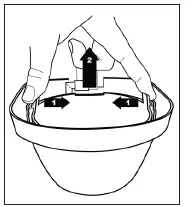
- Squeeze the tabs of the filter basket toward the center until they release from the latches.
- Lift the filter basket upward.
To replace the filter basket
- Lower the filter basket into place.
- While gently squeezing tabs of the filter basket align them with the latches to secure basket in place.
BREWING COFFEE
- Make sure the Coffee Maker is on a dry, level, heat-resistant surface.
- Fill the glass coffee carafe to MAXIMUM FILL LINE with cool water and pour into the water reservoir.
- Make sure the filter basket is properly seated and the tabs on the filter basket are aligned and properly engaged (See illustrations on Page 5).
- Follow the coffee manufacturers recommended serving size and add coffee to the coffee filter for each cup desired, increasing or decreasing to suit individual taste. A paper cone filter #4 is the recommended filter size.
- Push the ON / OFF button once. The digital display will show a flashing dot while brewing and the ON / OFF button will be illuminated. The brew cycle will begin, taking approximately 10 to 12 minutes to complete. This function is programmed for 12 cups of coffee. For 1 – 4 cups please refer to the directions in the following section.
- After the cycle is complete, the Coffee Maker will switch to Keep Warm mode. After 2 hours, the Coffee Maker will automatically shut off.
NOTE: If the ON / OFF button is pressed while the Coffee Maker is in the process of brewing, this will cancel the brew cycle. To restart, empty the carafe and insert a new paper filter with ground coffee. Check the water level in the water reservoir for any remaining water to prevent over-filling on the next brew cycle.
BREWING 1 – 4 CUPS OF COFFEE
- Make sure the Coffee Maker is on a dry, level, heat-resistant surface.
- Fill the glass coffee carafe to the “4” mark with cool water and pour into the water reservoir.
- Make sure the filter basket is properly seated and the tabs on the filter basket are aligned and properly engaged.
- Insert a paper coffee filter and add coffee, increasing or decreasing the amount to suit individual taste.
- Push the 1-4 CUPS button. A dot will illuminate next to the 1 – 4 Cup setting indicating this function is selected. Push the ON / OFF button once. The digital display will show a flashing dot and the light behind the ON / OFF button will be illuminated. The brewing cycle will begin. This will take approximately 3 to 4 minutes to complete.
- After the cycle is complete, the Coffee Maker will automatically shut off.
NOTE: If the ON / OFF button is pressed while the Coffee Maker is in the process of brewing, this will cancel the brew cycle. To restart, empty the carafe and insert a new paper filter with ground coffee. Check the water level in the water reservoir for any remaining water to prevent over-filling on the next brew cycle.
PROGRAMMABLE BREW START (DELAY BREW) FUNCTION
- Prepare the Coffee Maker by adding water and coffee for brewing as you would for immediate brewing.
- Press and hold the AUTO button for 2 seconds. A dot will be illuminated next to the AUTO button indicating that the AUTO function has been selected. The time will begin flashing.
- While the display is flashing, set the time you would like your coffee to start brewing by pressing the HOUR and MIN buttons.
- NOTE: If the time is not set after 5 seconds of flashing, the AUTO start time will default to the time indicated on the digital display.
- When you have finished setting the desired AUTO start time, press the AUTO button again to lock the time.
- The Coffee Maker will begin brewing at the set time. The display will now show the flashing dot next to ON / OFF. After the brew cycle is complete, the Coffee Maker will switch to Keep Warm mode. After 2 hours, the Coffee Maker will automatically shut off.
PROGRAMMABLE BREW START (DELAY BREW) FUNCTION FOR 1-4 CUPS
- For delayed brewing using the 1-4 cup setting, prepare the water and coffee grounds for 4 cups.
- Set the delay brew time as described above.
- Press the 1 – 4 Cup button after the delay brew start time has been selected.
KEEP WARM AND AUTO SHUT-OFF
After brewing the Coffee Maker will switch to a keep warm function. During this function, the warming plate stays hot to keep the brewed coffee at a suitable serving temperature. After 2 hours, the Coffee Maker will automatically turn off. If carafe is empty, turn Coffee Maker off.
NOTE: There is no Keep Warm mode when using the 1 – 4 Cup setting.
FOR A SECOND POT
Turn the coffee machine off and allow to cool for 10 minutes before brewing a second pot of coffee. Replace the coffee filter and add new coffee grounds. Place carafe on warming plate and use another container to pour cold water into water reservoir. Use the water level indicator to determine water level.
PAUSE AND SERVE
If at any time during the brewing process the glass carafe is removed from the warming plate, the brewing process will pause until the carafe is placed back onto the warming plate. This feature ensures that coffee will not drip if carafe is removed from the warming plate to serve a cup of coffee while it is brewing. To use this feature, be sure carafe is properly positioned on warming plate, and allow it to fill with at least one or two cups of freshly brewed coffee before removing. After pouring, immediately replace carafe on the warming plate.
WARNING: TO AVOID DAMAGE TO THE UNIT, SPILLS OR BURNS, USE THE PAUSE AND SERVE FEATURE ONLY AS DIRECTED. DO NOT PLACE A MUG OR CUP DIRECTLY UNDERNEATH THE WATER OUTLET.
USER MAINTENANCE INSTRUCTIONS
This appliance contains no user-serviceable parts. Do not try to repair it yourself. Refer it to qualified service personnel if servicing is needed. The Coffee Maker should be cleaned on a regular basis to prolong the life of the machine and to guarantee optimal brewing results.
TO CLEAN
- Remove paper filter and coffee grounds from the filter basket.
- Fill the coffee carafe with cool water and pour into the water reservoir.
- Press the ON / OFF button to run a brew cycle with only clean water.
- Turn off the Coffee Maker and unplug from the wall outlet.
- Wipe down the outside surfaces of the Coffee Maker with a damp cloth and dry thoroughly. NEVER use harsh chemicals or abrasive cleaning pads. NEVER immerse the Coffee Maker in water or any other liquid and NEVER place the appliance under running water.
- Remove the filter basket, and carafe and wash in warm soapy water. Do not use harsh chemicals or abrasive cleaners. Dry thoroughly prior to use.
- FOR A MORE THOROUGH CLEANING, pour one cup of white vinegar into carafe. Add cold water until carafe is filled to the MAX marking. Pour water and vinegar mixture into water reservoir. Place a filter in the filter basket and place the carafe on the warming plate and press the ON / OFF button. Allow to steam and drip until carafe is half full. Turn Coffee Maker off, remove carafe from warming plate and let it sit for 15 minutes.
- When carafe is cool, pour liquid back into water reservoir, place carafe back on warming plate, and press the ON / OFF button again. Allow all liquid to drip into carafe. Turn Coffee Maker OFF, and discard the liquid in the carafe.
- Allow Coffee Maker to cool for 10 minutes; then rinse by filling the water reservoir with clean, cold water, inserting a new filter and allowing water to drip into carafe. Turn Coffee Maker OFF and discard water. Wash and dry carafe and filter basket. When Coffee Maker has cooled, wipe with a dry cloth.
TO STORE
- Be sure all parts are clean and dry before storing. Store appliance in its box or in a clean, dry place. Never store it while it is hot or wet. Never wrap cord tightly around the appliance; the line cord should be inserted into the cord storage on back of coffee maker.
- ALWAYS store the Coffee Maker in an upright position.
PLACEMENT AND REMOVAL OF CARAFE LID
To remove the carafe lid
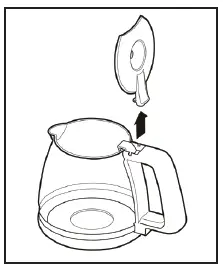
- Open the lid to the vertical position.
- Gently pull the lid upward to allow the tabs on the carafe lid to release from the notches on the carafe handle.
To replace the carafe lid
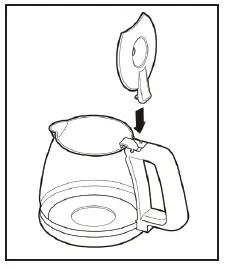
- Align the tabs on the lid with the notches on the carafe handle.
- Gently press the lid down until the tabs on the carafe lid engage with the notches on the carafe handle.
ONE-YEAR LIMITED WARRANTY
SELECT BRANDS, INC. warrants, subject to the conditions stated below, that from the date of purchase, this product will be free from mechanical defects for a period of one (1) year. SELECT BRANDS, INC., at its option, will repair or replace this product found to be defective during the warranty period. Should this product become defective by reason of improper workmanship or material defect during the specified warranty period, Select Brands, Inc. will repair or replace the same effecting all necessary parts replacements for a period of one year from the date of purchase. Transportation charges on parts, or products in whole, submitted for repair or replacement, under this warranty, must be borne by the purchaser.
CONDITIONS: This warranty is valid for the original retail purchaser from the date of the initial retail purchase and is not transferable. Keep the original sales receipt. Proof of purchase is required to obtain warranty service or replacement. Dealers, service centers, or retail stores do not have the right to alter, modify or in any way, change the terms and conditions of this warranty. Warranty registration is not necessary to obtain a warranty on Select Brands, Inc. products. Save your proof of purchase receipt.
ABOUT YOUR PRODUCT WARRANTY: Most warranty repairs are handled routinely, but sometimes requests for warranty service may not be appropriate. For example, warranty service would NOT apply if the product damage occurred because of misuse, lack of routine maintenance, shipping, handling, warehousing or improper installation. Similarly, the warranty is void if the manufacturing date or the serial number on the product has been removed or the equipment has been altered or modified. During the warranty period, the authorized service dealer, at its option, will repair or replace any part that, upon examination, is found to be defective under normal use and service.
NORMAL WEAR: This warranty does not cover normal wear of parts or damage resulting from any of the following: Negligent use or misuse of the product; Improper voltage or current; Use contrary to the operation instructions; Deviation from instructions regarding storage and transportation; Repair or alteration by anyone other than SELECT BRANDS, INC. or an authorized service center. Further, the warranty does not cover Acts of God, such as fire, flood, hurricanes and tornadoes. SELECT BRANDS, INC. shall not be liable for any incidental or consequential damages caused by the breach of any express or implied warranty. Except to the extent prohibited by applicable law, any implied warranty of merchantability or fitness for a particular purpose is limited in duration to the duration of the above warranty. Some states, provinces or jurisdictions do not allow the exclusion or limitation of incidental o consequential damages or limitations on how long an implied warranty lasts, so the above limitations or exclusion may not apply to you. This warranty gives you specific legal rights, and you may also have other rights that vary from state to state or province to province.
HOW TO OBTAIN WARRANTY SERVICE: You must contact SELECT BRANDS, INC. Customer Service at 1-913-663-4500. A Customer Service representative will attempt to resolve warranty issues over the phone. If telephone resolution is not possible, the Customer Service representative will require your assistance in performing routine diagnostic procedures. This warranty is effective for the time periods listed above and subject to the conditions provided for in this policy.
To register this product and view other fine products, visit us online at www.selectbrands.com
TOASTMASTER is a Registered Trademark of Applica Consumer Products, Inc., and used under license by Select Brands, Inc.
Made in China