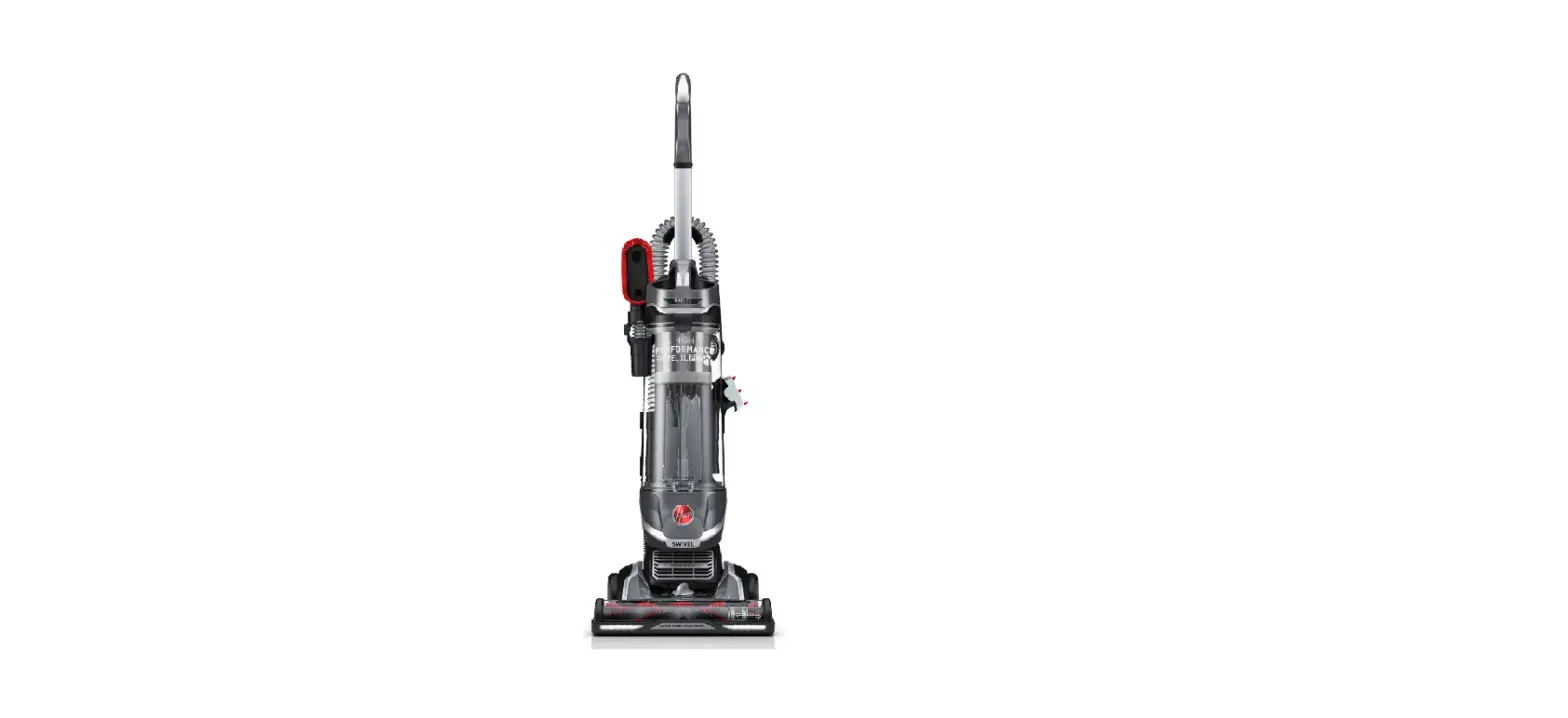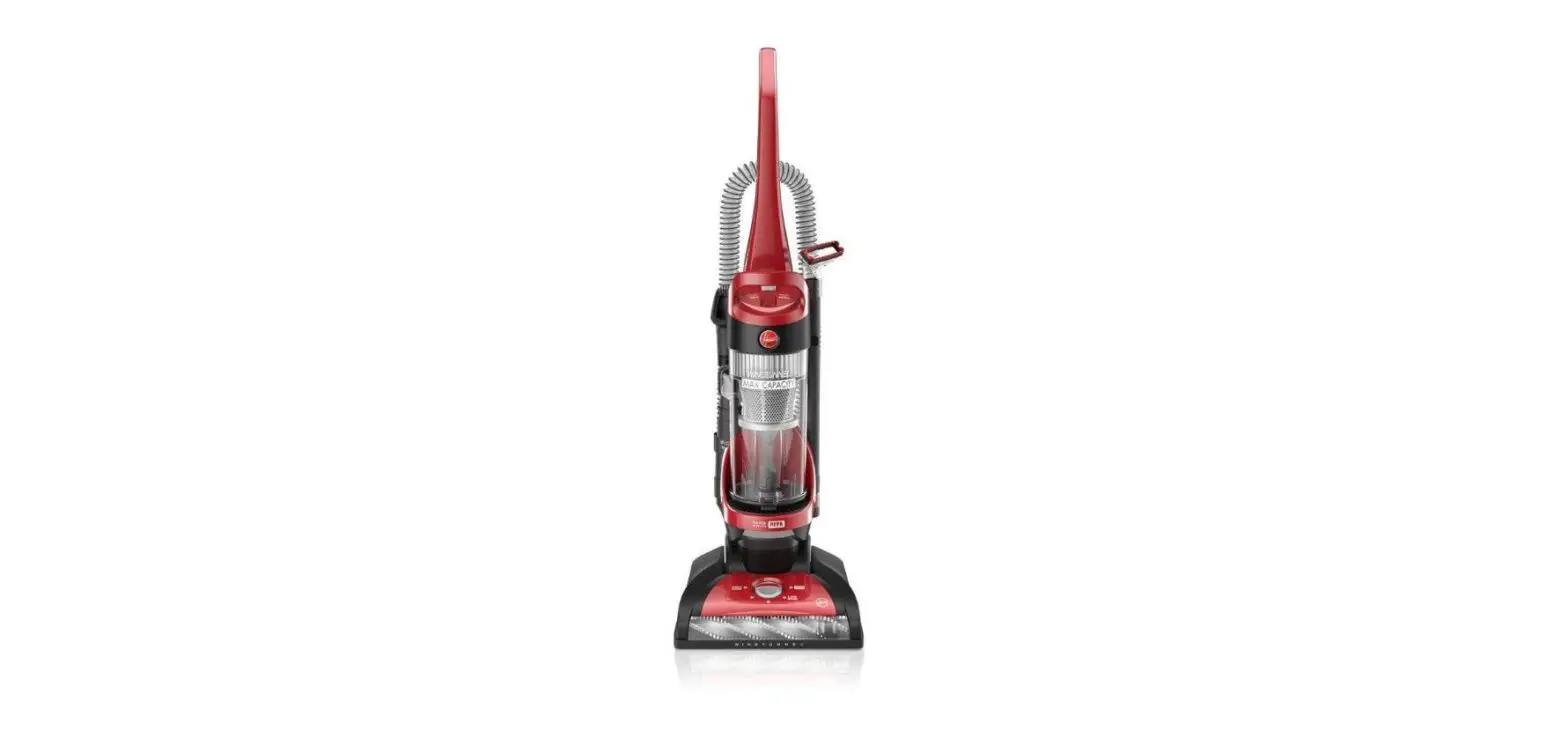

Hoover Wind Tunnel Vacuum Cleaner User Manual
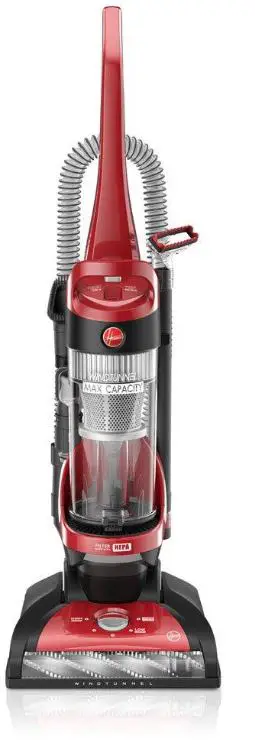
This WindTunnel™ vacuum cleaner takes HOOVER® Type “Y” Allergen Filtration filter bags
Fill in and retain
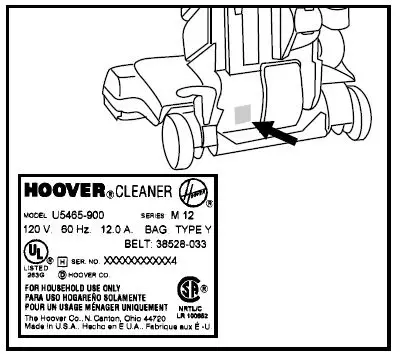
The model and serial number are located on the back of the handle as shown.
For your personal records, please enter the COMPLETE model and serial number in the spaces provided and retain this information.
Your cleaner is model___________________________________
and has serial number___________________________________
It is suggested that you attach your sales receipt to this owner’s manual. Verification of date of purchase may be required for warranty service of your HOOVER product. Be sure to fill out and return the product registration card included with your cleaner.
Important Safeguards!
When using an electrical appliance, always follow basic precautions, including the following:
READ ALL INSTRUCTIONS BEFORE USING THIS APPLIANCE
Warning:To reduce the risk of fire, electric shock, or injury:
- Do not use outdoors or on wet surfaces.
- Close supervision is necessary when any appliance is used by or near children. Do not allow vacuum cleaner to be used as a toy or to run unattended at any time.
- Keep hair, loose clothing, fingers, feet and all parts of body away from openings, rotating agitator and other moving parts. Do not operate cleaner in bare feet or when wearing open toe shoes or sandals.
- Do not pick up anything that is burning or smoking, such as cigarettes, matches, or hot ashes.
- Do not use to pick up flammable or combustible materials such as gasoline or fine wood sandings or use in areas where they may be present.
- Avoid picking up hard, sharp objects with the cleaner. They may damage the cleaner and the bag.
- Always turn off this appliance before connecting or disconnecting hose.
- Do not use without dust bag or filters in place. Change bag frequently when picking up very fine materials such as powder.
- Use extra care when cleaning on stairs.
- Do not put any object into openings. Do not use with any opening blocked; keep free of dust, lint, hair, or anything that may reduce air flow.
- Do not pull or carry by cord, use cord as a handle, close door on cord or pull cord around sharp edges or corners. Do not run appliance over cord. Keep cord away from heated surfaces.
- Always disconnect cord from electrical outlet before servicing the cleaner.
- Unplug cleaner when not in use. Turn off all controls before unplugging.
- Do not unplug by pulling on cord. To unplug, grasp the plug, not the cord. Never handle plug or appliance with wet hands.
- The use of an extension cord is not recommended.
- Do not use with damaged cord or plug. If appliance is not working as it should, has been dropped, damaged, left outdoors, or dropped into water, take it to a Hoover Factory Service Center or Authorized Hoover Warranty Service Dealer
(Depot). - Use vacuum cleaner only for its intended use as described in the instructions. Use only attachments recommended by The Hoover Company; others may cause hazards.
Assembling cleaner
This cleaner was inspected and packaged carefully before being shipped from the factory. If you should happen to need assistance during assembly or operation, call 1-800-944-9200 for an automated referral of authorized service outlet locations (U.S. only) or 1-330-499-9499 to speak with a representative in our Consumer Response Center or Visit us online at www.hoover.com to find the service outlet nearest you (click on the “Service” button).
Carton contents
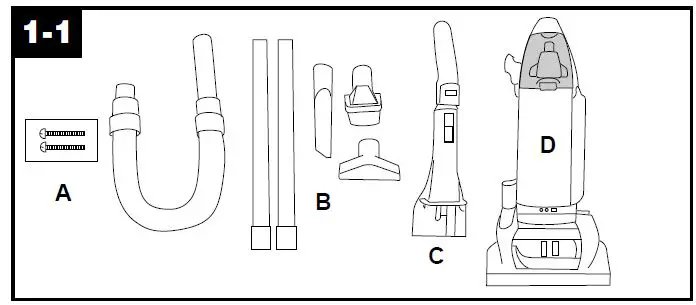
Remove all parts from carton and identify each item shown. Make sure all parts are located before disposing of packing.
- Handle screws (in bag with owner’s manual)
- Hose, cleaning tools and wands
- Handle
- Cleaner-Powered Hand Tool packed in storage area
STEP I Attach handle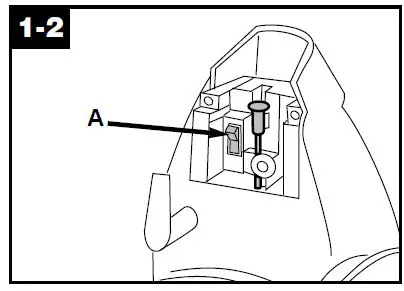
Looking at the back of the cleaner, make sure switch (A) is in the OFF position.Slide handle into back of cleaner. Push screws into holes on back of handle.
Using a Phillips screw driver, tighten screws securely.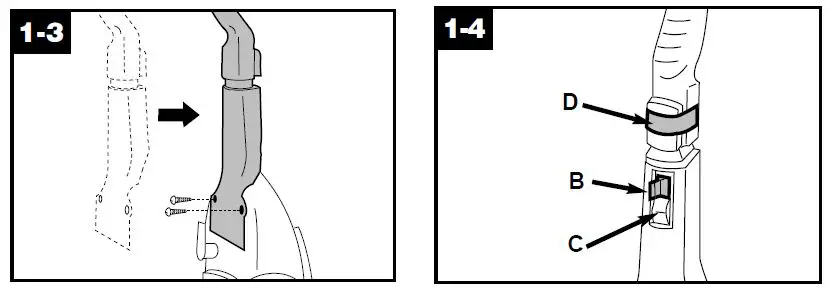
Remove switch lock (B) above ON-OFF switch (C) on front of handle by pulling it straight out. Dispose of lock. If switch lock has come off during assembly, make sure switch is in OFF position (down) before plug-ging cord into electrical outlet. Remove label (D) from self-propel button.
STEP II Attach hose
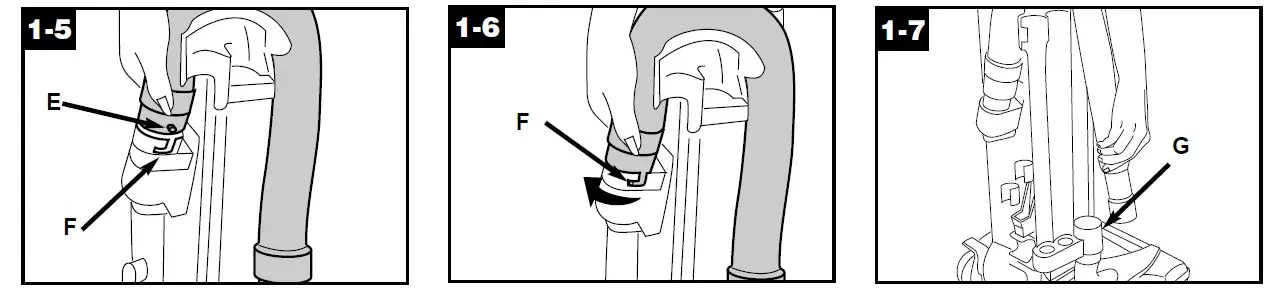
Align end of hose with projection (E) over slots (F) in dirt duct on back of handle. Slide hose into (F) and twist hose to lock it into place.Position hose over rack and into hose tube (G).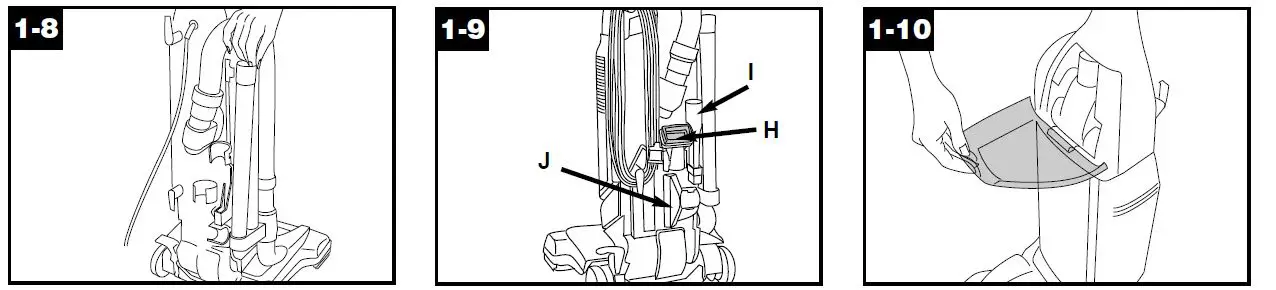
Place smaller diameter end of wand, into bottom of rack. Snap wand into clip at the top. Repeat with other wand.Snap dusting brush (H), crevice tool (I) and furniture nozzle (J) into stor-age area on back of cleaner.Open tool cover. The powered hand tool is shipped in a plastic bag for protection. Remove tool from storage area and discard bag. Reposition tool and close tool cover.
How to use
Cleaner description
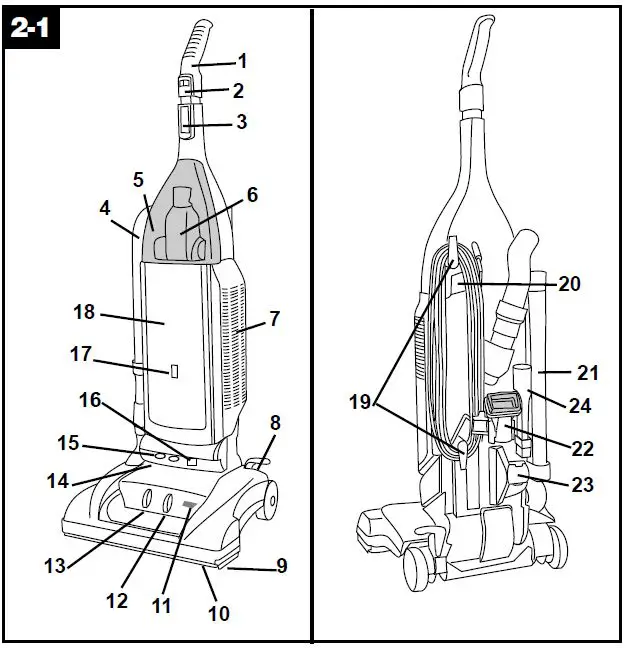
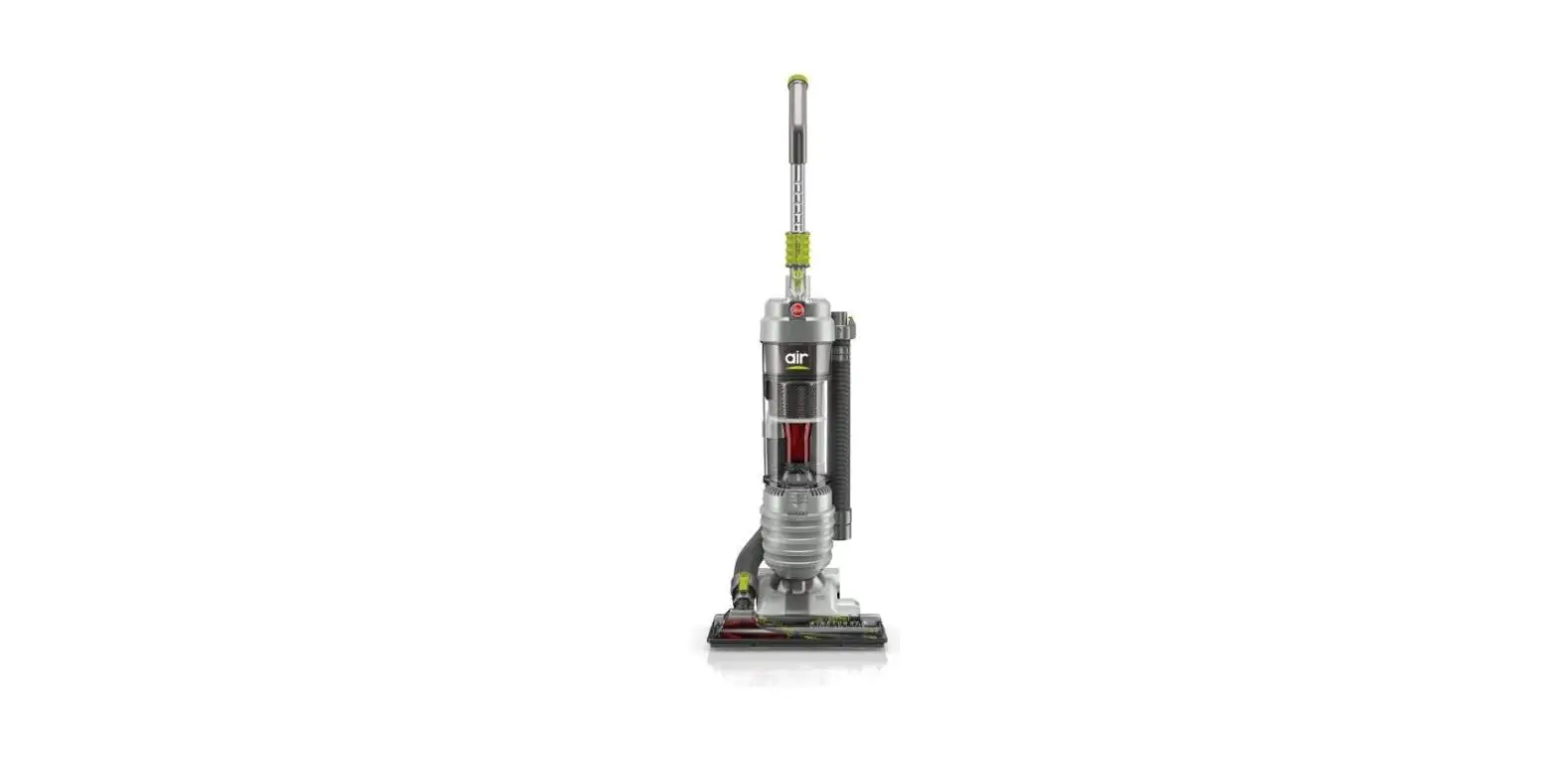
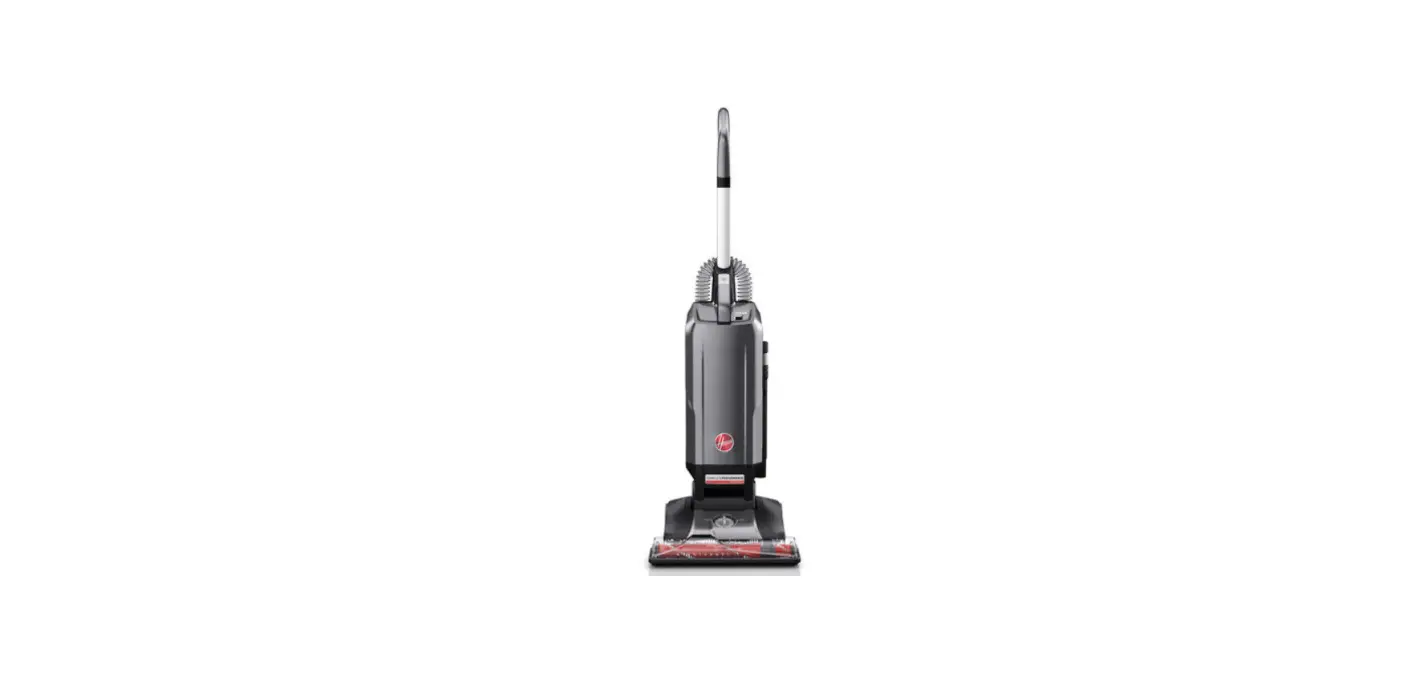
The assembled cleaner will look like the drawing.
- Handle
- Self-propel button
- ON-OFF switch
- Hose
- Tool cover
- Powered hand tool
- Final filter door
- Handle release lever: step on lever to lower handle to operating or low positions.
- Edge groomers
- Furniture guard: helps prevent cleaner from marking furniture.
- Automatic brush roll indicator*: shows when brush roll is rotating or stopped.
- Brush roll control: slide control to “Carpet” for cleaning with brush roll ON or to “Hard” for cleaning with brush roll OFF.
- Carpet height control: slide knob to correct setting for height of carpet being cleaned.
- Headlight
- ‘Dirt FINDER’ display*
- Embedded ‘Dirt FINDER’ sensitivity switch*
- Check bag indicator
- Bag door
- Cord hooks: wrapcord around hooks for storage. The top hook can be rotated right or left for easy cord release.
- Carrying handle
- Wands
- Dusting brush
- Furniture nozzle
- Crevice tool
Operate cleaner only at voltage specified on data plate on bottom of cleaner. This cleaner is intended for household use.
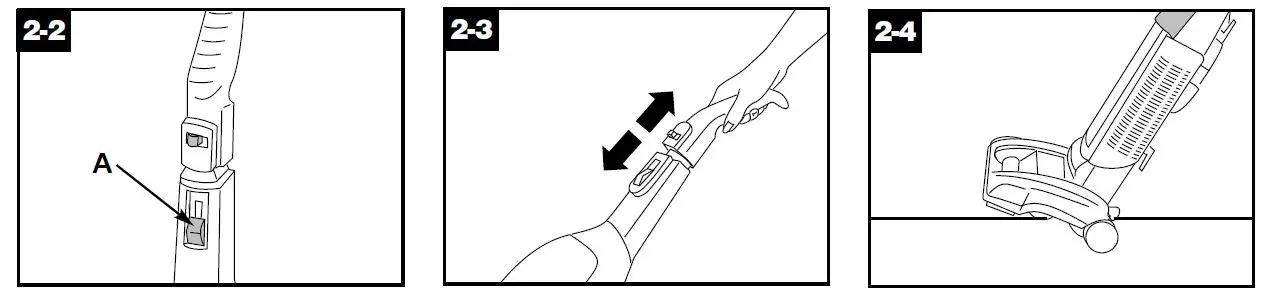
ON-OFF Switch
Plug cord into electrical outlet. To turn cleaner ON, push switch up. To turn cleaner OFF, push switch down.
Note: To reduce the risk of electric shock, this appliance has a polarized plug (one blade is wider than the other). This plug will fit in a polarized outlet only one way. If the plug does not fit fully in the outlet, reverse the plug. If it still does not fit, contact a qualified electrician to install the proper outlet. Do not change the plug in any way.
Self-propel feature
This feature allows you to control how quickly the cleaner moves.
Note: The self-propel feature oper-ates only when the cleaner switch and the self propel button are both ON. To move forward, push handle for-ward and guide cleaner away from you. To move backward, gently pull handle back and guide the cleaner toward you. Guide cleaner carefully at first until you have adjusted to the ease of operation. For increased control in tight places (e.g., around and under furniture, non-carpeted floors), slide the self-propel button to OFF to deactivate the feature.
Transporting cleaner
To move your cleaner from room to room, put handle in upright position, tilt cleaner back on rear wheels and push forward.
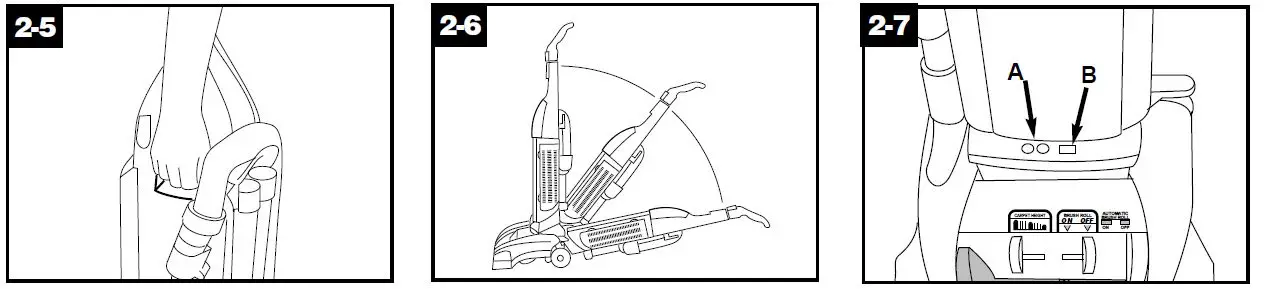
Carrying cleaner
The cleaner can be moved by using the carrying handle located on the back of the cleaner.
Handle positions
The handle of your cleaner has three positions; upright for storage and when using cleaning tools; operating posi-tion for general operation on carpet and floors; low for reaching under low furniture. Step on handle release lever to lower handle.
Embedded Dirt FINDER
feature (some models only) With red and green lights (A), the ‘Dirt FINDER’ system alerts the user to areas of carpet that may need more cleaning attention. It is able to sense when larger amounts of dirt particles, especially embedded dirt, are removed. To let you know that the ‘Dirt FINDER’ feature is ready the red light will come on when the cleaner is first turned on. After a few seconds, the red light will go off and the green light will come on. Cleaning may then begin.The green light will remain on through-out cleaning except when the detector senses that a larger amount of dirt is being picked up; then the red light will come on.(Fig. 2-7 continued) When the red light is on, you should take additional cleaning strokes in the area until it changes to green.
- The red light may seldom come on during cleaning. This means that your cleaner is picking up primarily fine sur-face dust and lint which the system may not detect, or that the carpet is general-ly clean. To increase the feature’s sen-sitivity to dirt, set the switch (B) to the “Hi” position.
- At other times, the red light may stay on for a considerable amount of time. This means that the carpet contains a high level of dirt which is being removed by the cleaner. To decrease the feature’s sensitivity to dirt, set the switch to the “Reg.” (Regular) position.
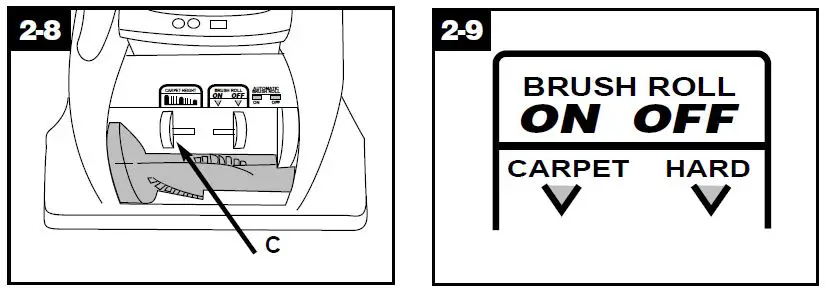
Carpet height adjustment
When it is necessary to raise and lower the front of the cleaner for various car-pet pile heights, slide the carpet height control (C) to the desired setting.
For maximum cleaning performance, the following carpet height settings are recommended:
- Low setting: for all types of carpet
- Higher settings: for very deep pile carpet where easier pushing effort is desired, while maintaining good clean-ing performance.
Note: If the cleaner is difficult to push, slide control to the next higher setting.
Brush roll control
Note: When handle is in upright position, brush roll is automatically OFF. Move the brush roll control only when the handle is in the upright position.
Slide control to “Carpet” to turn brush roll ON for cleaning carpet or rugs. Slide control to “Hard” to turn brush roll OFF when cleaning bare floors.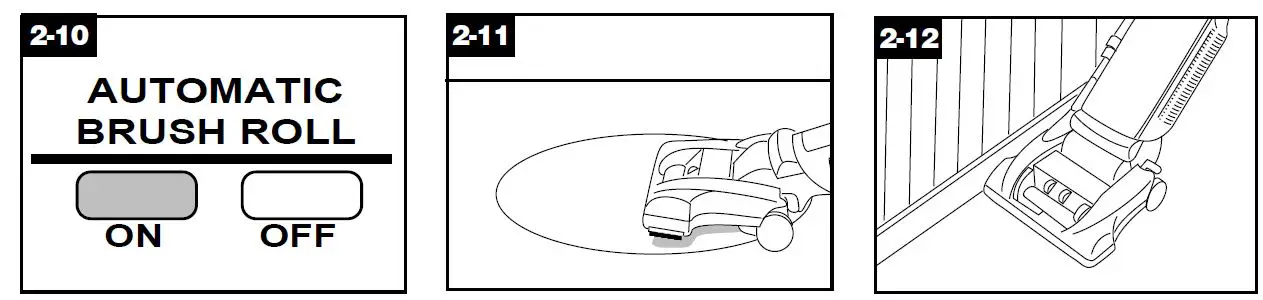
Automatic brush roll indicator (some models only)
When red is in the OFF window, brush roll is STOPPED. When red is in the ON window brush roll is ROTATING.
Cleaning lightweight flexible rugs
Stand on one end of rug and move cleaner toward other end or edge. Before reaching edge, push down on handle. This will lift up the front of clean-er as shown and will prevent rug from clinging to cleaner.
Continue to lift front of cleaner so that when you have reached the edge, it is completely off the rug. Move cleaner back to start again, lower front of cleaner, and use only forward strokes.
Edge cleaning
Special edge groomers are provided on both sides of the front of the cleaner to remove dirt in carpet near base-boards and furniture. Guide either side parallel to the edge of carpet or furniture.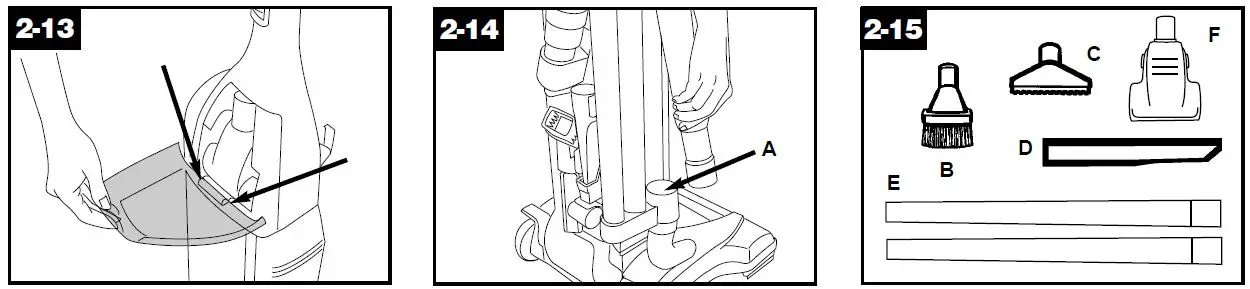
How to attach tool cover
The tool cover is designed with a “break-away” feature which allows it to snap free if it is pushed open too far. To reattach, align hinges of cover with slots on sides of tool storage area. Push cover down to secure in place. How to clean tools To clean the hose, wipe off dirt with a cloth dampened in a mild detergent. Rinse with a damp cloth. Cleaning tools may be washed in warm water with a detergent. Rinse and air dry before using.
Cleaning tools
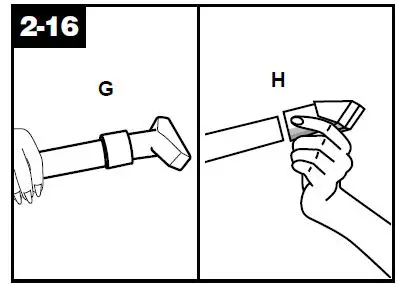
When using cleaning tools, cleaner handle should be in the upright posi-tion to activate the automatic “brush roll OFF” and for convenience in moving the cleaner from one area to another. Turn cleaner OFF before disconnect-ing and connecting hose to hose tube (A). To use hose, lift hose end as shown.
Select proper tool
- Dusting brush may be used for carved furniture, table tops, books, lamps, lighting fixtures, venetian blinds, baseboards, shutters, and registers.
- Furniture nozzle may be used for upholstered furniture, draperies, mat-tresses, clothing, automobile interiors, and carpeted stairs.
- Crevice tool may be used in tight spaces, corners and along edges in such places as dresser drawers, uphol-stered furniture, stairs and baseboards.
- Wands are used to give extra length to your hose. Use them with any of the above tools.
- Powered hand tool may be used for upholstered furniture, carpeted stairs and hard-to-reach places.
Attach wand and tools
Attach any tool or wand to the hose (G) by pushing it firmly into hose. Attach second wand or tool to wand (H) by pushing it firmly onto the wand. Twist wand or tool slightly to tighten or loosen the connection.
Stair Cleaning
Use the hose and powered hand tool or furniture nozzle for stair cleaning.
CAUTION: To prevent the cleaner from falling, always place it at the bottom of the stairs. With handle in upright position, clean from bottom to top.
Extra reach hose
The extra reach hose provides an extra 20 foot reach for easier cleaning of stairs and hard to reach high places.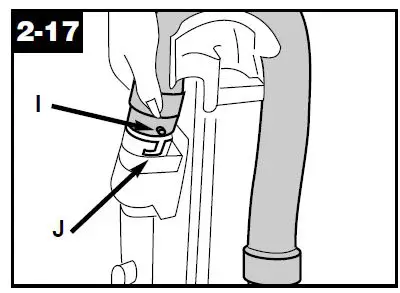
Attach hose
Push ON/OFF switch to OFF position. Remove regular hose from cleaner. Align end of extra reach hose with pro-jections (I) over slots (J) in dirt duct.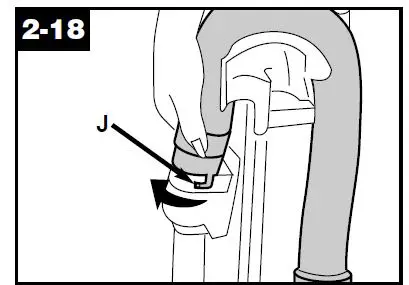
Slide hose into (J) and twist hose to lock it into place. (To detach hose, reverse procedure.) Attach wands or tools to the other end of hose. Available at additional cost if not included with your cleaner.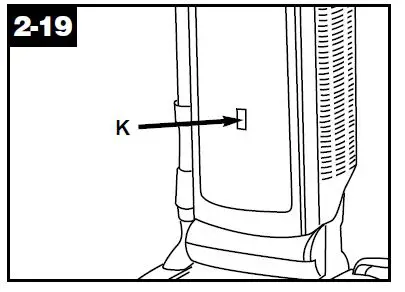
Check bag indicator (some models only)
The indicator (K) will begin to show red as the filter bag fills with dirt. There are three conditions that will cause the indicator to become completely red:
- If the bag is full; change the bag.
- If very fine materials have been picked up, clogging the bag pores; change the bag.
- If there is a blockage at the front of the cleaner, in the hose, tools or at the bag opening; remove the blockage (see “Clearing blockages” section).
Maintenance
Familiarize yourself with these home maintenance tasks as proper use and care of your cleaner will ensure contin-ued cleaning effectiveness.
Filter bag When to replace
Check filter bag from time to time. Change the filter bag when dirt reaches the dotted line. If more dirt than this accumulates, your cleaner will not oper-ate effectively.
Note: All new carpet has loose fibers which can fill the bag quickly while vacuuming. This type of debris does not activate the “Check Bag” indicator, available on some models. So, if you are using the cleaner on new carpet, be sure to change the fil-ter bag often, even if you have a “Check Bag” indicator and it does not show red.
CAUTION: Very fine materials, such as face powder, cornstarch, fireplace ashes or fireplace soot, may seal the filter bag and may cause it to burst even though it is only partially full of dirt. When cleaner is used to remove material of this nature, change filter bag often.
Where to buy
Filter bags may be purchased from Authorized Hoover Dealers (Depot), Leading Retailers, from Hoover Factory Service Centers, or through The Hoover Company on-line at www.hoover.com.
What to buy
To assure cleaning effectiveness, use only Genuine HOOVER® Allergen Filtration Type Y disposable filter bags.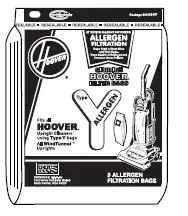
Replacing bag door
Reposition bag door by placing tab on bottom of door into opening (C). Press top of door to snap securely shut.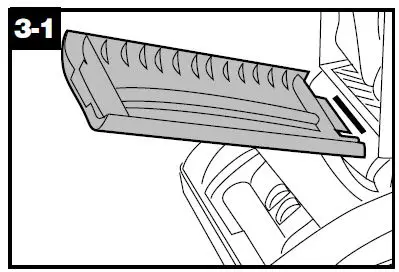
It is imperative that you use only gen-uine HOOVER filter bags made by The Hoover Company to assure your clean-er operates at peak performance. HOOVER bags can be identified by these trademarks
Changing filter bag
Disconnect cleaner from electrical outlet.
Removing bag door
To change filter bag, grasp top of bag door and pull door forward. Remove door.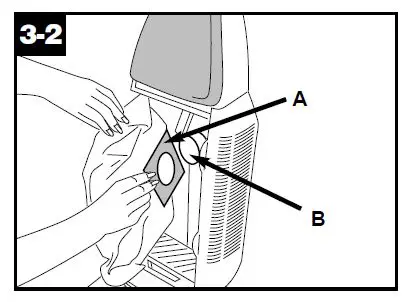
Removing and installing filter bag
Grasp filter bag collar (A) and pull collar from tube (B).
Note: Do not clean out old filter bag and reuse. Discard used filter bag. Hold new filter bag as shown. Align open-ing in filter bag with (B). Push (A) firmly onto (B). Tuck in filter bag.
Replacing bag door
Reposition bag door by placing tab on bottom of door into opening (C). Press top of door to snap securely shut.
Cleaning secondary filter
Disconnect cleaner from electrical outlet. The secondary filter (A), located behind the grill in the bottom of bag compartment, protects the motor from dirt particles. If filter becomes dirty, pull off grill and lift out filter. Hand wash filter in cold water with mild detergent, then air dry. Reposition dry filter and grill.
Should you want to replace this filter, ask for HOOVER part No. 38765019.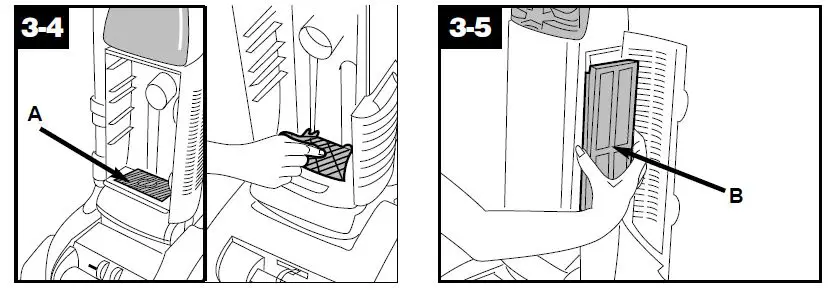
Replacing final filter
The final filter assists in the filtration process to return clean air to the room. The pleated filter will become dirty and needs to be replaced about once a year to maintain efficient filtration. The 3 layer filter (some models) can be washed in the same manner as the secondary filter and reused. To remove final filter, first open the door on the side of the cleaner (Fig. 3-5). Grasp filter (B) and pull it straight out. Reposition new filter by reversing this procedure. The final filter can be replaced with any of the following filters. 3 layer, washable – HOOVER part No. 40110006 HEPA filter HOOVER part No. 43613022 Do not operate cleaner without both the secondary and final filter in place.
How to reattach filter door
The filter door is designed with a “break-away“ feature which allows it to snap free if it is pushed open too far. To reattach, align hinges (C) of cover with slots on sides of filter area. Press door back into place.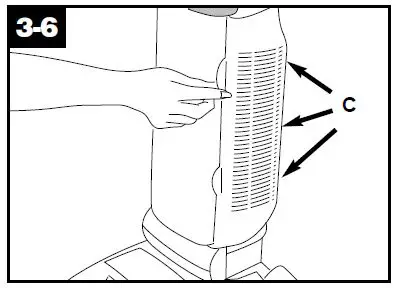
Check brush roll chan-nels
Because your WindTunnel™ cleaner picks up so well, we strongly recom-mend you check for debris accumulation in the channels next to the brush roll when you check the filters. Removing this debris will help maintain you clean-er’s excellent pick up and suction. Remove debris as follows:
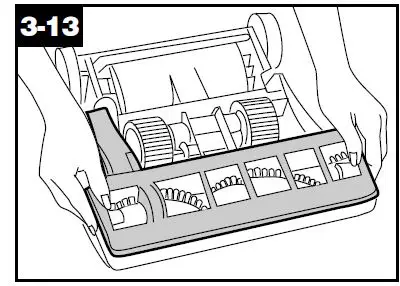
Disconnect cleaner from electrical outlet. Check for debris accumulation by removing bottom plate (Fig. 3-9) and looking in the channels next to the brush roll (Fig. 3-18).Remove any accumulation. Reposition bottom plate (Fig. 3-13).
Headlight replace-ment
What to buy
This cleaner uses a 12 volt, wedge base type 912 bulb, Hoover part No. 27313101.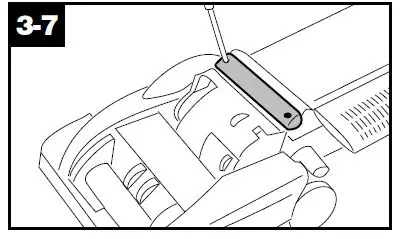
Removing lens
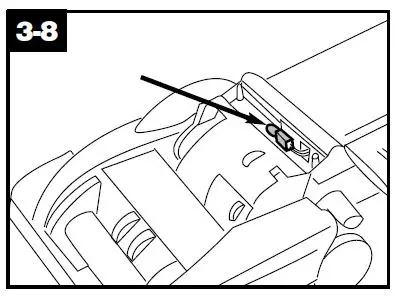
Disconnect cleaner from electrical outlet. Using a Phillips screwdriver, remove the two screws as shown and lift off lens.
Installing bulb and replacing lens
Pull old bulb straight out of socket. Push new bulb straight into socket until locked in place. Excessive force is not required. Reposition lens and secure with the two screws.
Belt replacement
The belts are located under the bottom plate of the cleaner and should be checked from time to time to be sure they are in good condition. The flat (wide) belt is described below; the other is described under “Brush roll replacement”.
When to replace
Disconnect cleaner from electrical outlet. Warning – Brush roll can start suddenly. Unplug cleaner when it is turned over. to check the flat belt, remove bottom plate as shown in Fig. 3-9. Replace belt if it is stretched, cut or broken.
What to buy
To assure effective operation, use only genuine HOOVER belts with your clean-er. When purchasing a new belt, ask for: Flat belt – HOOVER part No. 38528035.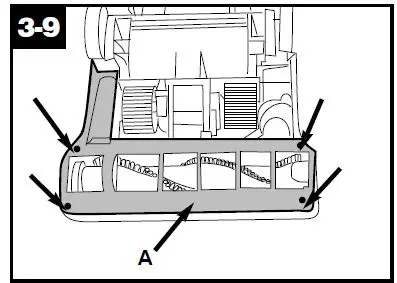
Replacing flat belt
Removing bottom plate
Disconnect cleaner from electrical outlet. Warning – Brush roll can start suddenly. Unplug cleaner when it is turned over. Place handle in low position and turn cleaner over so bottom side is up. Remove the 4 screws as shown with a Phillips screw driver. Lift off bottom plate (A).
Removing belt
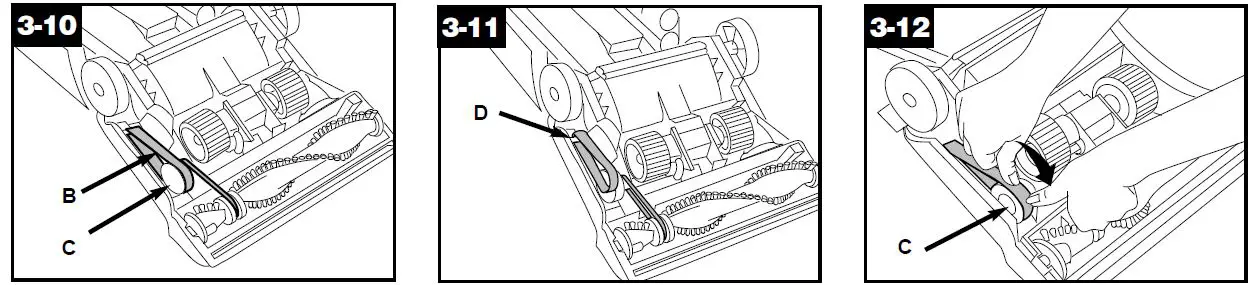
Flat belt (B) operates the self-propel fea-ture and indirectly drives the brush roll. Remove used belt (B) from large pulley (C) and discard.
Positioning back of belt
With lettering on outside of belt, slide new belt over motor shaft (D).
Positioning front of belt
Place other end of belt over large pulley (C) while rolling the pulley in direction shown.
Replacing bottom plate
Reposition bottom plate and 4 Phillips head screws. Tighten screws securely.
When to replace
Disconnect cleaner from electrical outlet.
Warning – Brush roll can start suddenly. Unplug cleaner when it is turned over. When brush roll brushes are worn, it should be replaced.
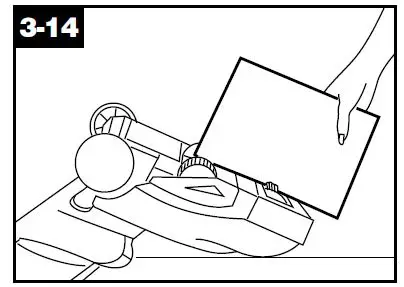
To check condition of brushes, move the edge of a card across bottom plate while turning brush roll. To maintain cleaning effectiveness, replace brush roll if brushes do not touch card.
What to buy
When purchasing a new brush roll, ask for HOOVER part No. 48414069.
Replacing brush roll
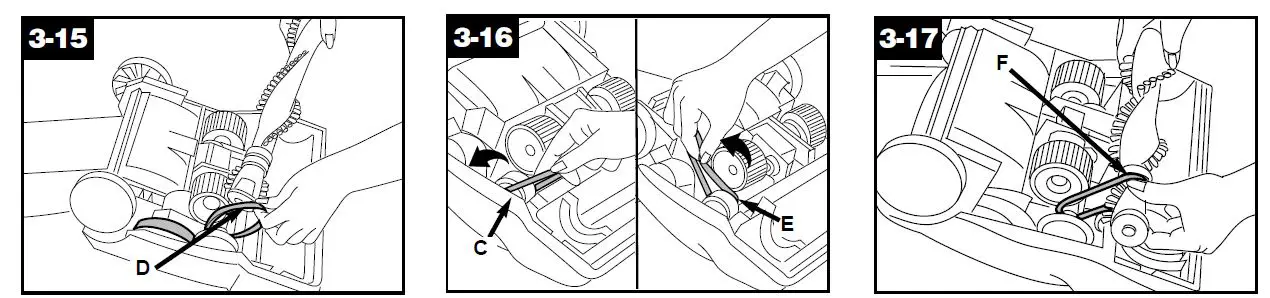
Slide Brush Roll Control (Fig. 2-9) to “Hard” (OFF) position. Turn cleaner over and remove bottom plate (Fig. 3-9). Lift up brush roll and slide V-belt (D) off brush roll.
Inspecting V-belt
The V-belt is designed to last for a long time and is not normally replaced. However, if V-belt is cracked, gouged or broken, now is a good time to replace it as follows. Slide flat belt off large pulley as shown in Fig. 3-10. To remove V-belt, slide back of belt over pulley (C). Then firmly pull on belt and “snap” it out. Discard used belt. Replace with HOOVER part No. 38528034. To install new belt (with lettering on out-side of belt), slide back of belt over pulley and pull front of belt toward groove (E) next to pulley. Belt will “pop” into place.
Positioning belt on brush roll
Before positioning belt onto brush roll, check for debris accumulation as described in Fig. 4-2. Insert brush roll through belt and posi-tion belt in groove (F) on brush roll.
Installing brush roll
Grasp brush roll and fit it into position by first sliding end, opposite the belt, into the rectangular slot (G) on side of clean-er. Push other side of brush roll (H) into place. Belt may fit loosely when proper-ly installed. Reposition flat belt and bottom plate (Figs. 3-12 and 3-13).
Powered hand tool
Agitator brush roll replacement When agitator brush roll brushes are worn, the brush roll should be replaced. Ask for HOOVER part No. 48414088.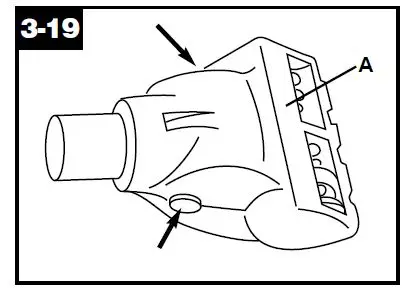
How to replace
- Remove tool from hose and turn it so bottom faces up. Press the latches on either side of tool and remove bottom plate (A).
- Unscrew the two Phillips screws and remove belt guard (B).
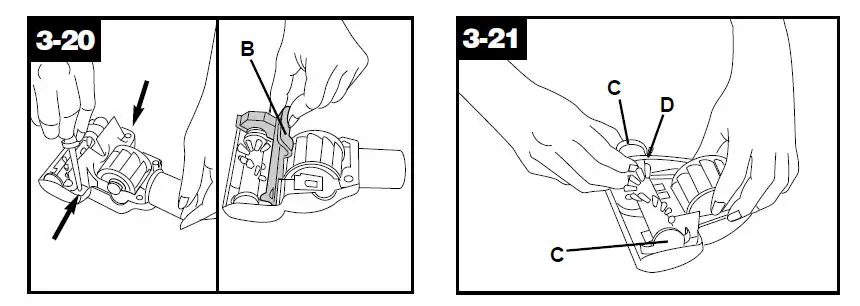
- Remove agitator including end plates (C) and discard.
- inspect belt to ensure that it is in good condition. If belt is cracked, gouged or broken, replace it (see follow-ing section).
- Insert brush roll through belt and posi-tion belt over gear teeth (D) on brush roll.
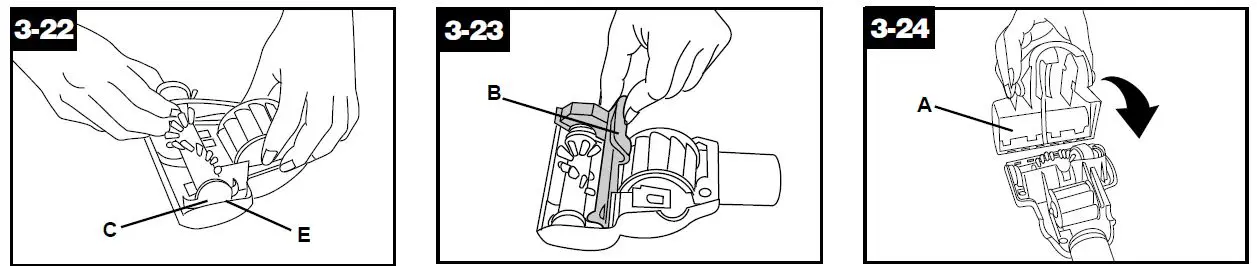
- With curved ends down, slide end plates (C) of brush roll into slots (E) on tool.
- Replace belt guard (B) making sure not to pinch brush bristles in guard. Turn agitator, making sure it rotates freely. Replace and tighten screws.
- To replace bottom plate (A), insert the four tabs on edge of bottom plate into slots on front of tool. Pivot bottom plate down and snap closed.
Powered hand tool
Belt replacement
The powered hand tool belt is designed to last a long time and is not normally replaced. However, if the belt is crack-ed, gouged or broken, it should be replaced.
Replacing belt
When replacing belt, ask for HOOVER part No. 38528037.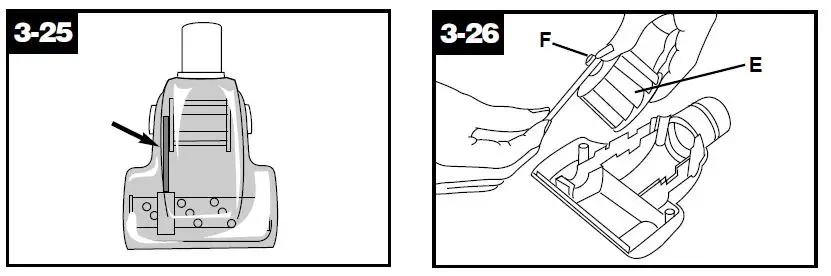
- Remove bottom plate, belt guard and brush roll as described in Figs. 3-19 through 3-21.The belt can be seen through the top of the nozzle or by removing the bottom plate and belt guard (Figs. 3-19 and
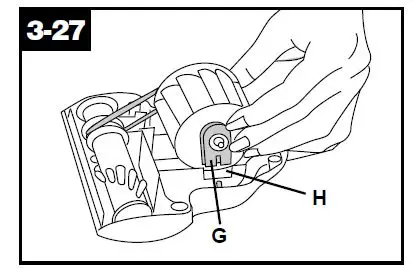
- Grasp turbine (E) and pull firmly to remove.
- Remove belt from turbine pulley (F). Replace with new belt.
- With flat sides of turbine retainers (G) pointing down, slide retainers into grooves (H) in tool housing and snap into place.
- Replace brush roll, belt guard, and bottom plate as described in Figs. 3-21 through 3-24.
Edge groomer replacement When to replace
The edge groomers, located on both sides of the front of the cleaner, should be replaced when they appear worn.
What to buy
When purchasing edge groomers, ask for HOOVER part No. 39511004.Installing brush roll
Grasp brush roll and fit it into position by first sliding end, opposite the belt, into the rectangular slot (G) on side of clean-er.Push other side of brush roll (H) into place. Belt may fit loosely when proper-ly installed.Reposition flat belt and bottom plate (Figs. 3-12 and 3-13).
Powered hand tool
Agitator brush roll replacement
When agitator brush roll brushes are worn, the brush roll should be replaced. Ask for HOOVER part No. 48414088.
How to replace
- Remove tool from hose and turn it so bottom faces up. Press the latches on either side of tool and remove bottom plate (A).
- Unscrew the two Phillips screws and remove belt guard (B).
- Remove agitator including end plates (C) and discard.
- Inspect belt to ensure that it is in good condition. If belt is cracked, gouged or broken, replace it (see follow-ing section).
- Insert brush roll through belt and posi-tion belt over gear teeth (D) on brush roll.
- with curved ends down, slide end plates (C) of brush roll into slots (E) on tool.
- Replace belt guard (B) making sure not to pinch brush bristles in guard. Turn agitator, making sure it rotates freely. Replace and tighten screws.
- To replace bottom plate (A), insert the four tabs on edge of bottom plate into slots on front of tool. Pivot bottom plate down and snap closed.
Powered hand tool
Belt replacement
The powered hand tool belt is designed to last a long time and is not normally replaced. However, if the belt is crack-ed, gouged or broken, it should be replaced.
Replacing belt
When replacing belt, ask for HOOVER part No. 38528037.
- Remove bottom plate, belt guard and brush roll as described in Figs. 3-19 through 3-21.The belt can be seen through the top of the nozzle or by removing the bottom plate and belt guard (Figs. 3-19 and
- Grasp turbine (E) and pull firmly to remove.
- Remove belt from turbine pulley (F). Replace with new belt.
- With flat sides of turbine retainers (G) pointing down, slide retainers into grooves (H) in tool housing and snap into place.
- Replace brush roll, belt guard, and bottom plate as described in Figs. 3-21 through 3-24.
Edge groomer replacement
When to replace
The edge groomers, located on both sides of the front of the cleaner, should be replaced when they appear worn.
What to buy
When purchasing edge groomers, ask for HOOVER part No. 39511004.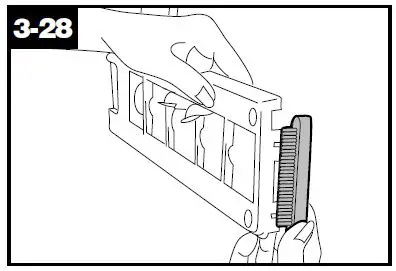
Replacing edge groomers
Disconnect cleaner from electrical outlet.
Warning – Brush roll can start sud-denly. Unplug cleaner when it is turned over. Remove bottom plate as described in Fig. 3-9. Lift off both old edge groomers and slide new edge groomers into position as shown. Reposition bottom plate and secure with 4 Phillips head screws (Fig. 3-14).
Thermal protector
An internal thermal protector has been designed into your cleaner to protect it from overheating. When the thermal protector activates, the cleaner will stop running. If this happens, proceed as follows:
- Turn the cleaner OFF and discon-nect it from the electrical outlet.
- Check secondary and final filters for dirt accumulation.
- Refer to “Clearing blockages” sec- tion.
- When cleaner is unplugged and the motor cools for 30 minutes, the thermal protector automatically resets and cleaning may continue. If the thermal protector continues to acti-vate after following the above steps, your cleaner may need servicing (see “Service” section).
Lubrication
The motor is equipped with bearings that contain sufficient lubrication for the life of the motor. The addition of lubricant could cause damage. Therefore, do not add lubricant to motor bearings. The agitator is equipped with two ball bearings that should be lubricated peri-odically by a Hoover Factory Service Center or an Authorized Hoover Warranty Service Dealer (Depot).
Service
To obtain approved HOOVER service and genuine HOOVER parts, locate the nearest Hoover Factory Service Center or Authorized Hoover Warranty Service Dealer (Depot) by:
- checking the Yellow Pages under “Vacuum Cleaners – Household” OR-
- checking the list of Factory Service Centers provided with this cleaner OR –
- calling 1-800-944-9200 for an automated referral of authorized service outlet locations (U.S. only) OR-
- checking the Service section of The Hoover Company on-line at www.hoover.com
Do not send your cleaner to The Hoover Company in North Canton for service, this will only result in delay. If further assistance is needed, contact The Hoover Company Consumer Response Center, North Canton, Ohio 44720 Phone: 330-499-9499. In Canada, contact Hoover Canada, Burlington, Ontario L7R 4A8, Phone: 1-800-263-6376. Always identify your cleaner by the complete model number when request-ing information or ordering parts. (The model number appears on the back of the handle.)
Hoover Cleaning
Performance
This Hoover Cleaning Performance System is for comparing the relative pro-gressive performance of Hoover uprights only and not for comparison with any other brands. The majority of this rating is based upon the American Society for Testing and Materials (ASTM) Carpet Cleaning Effectiveness Testing (ASTM Test F608). Other performance factors include Hose Power (ASTM Test F558), Surface Litter Cleaning, Hard Floor Cleaning, Edge Cleaning, Air Filtration and Cleaning Width.
Trouble shooting
If a minor problem occurs, it usually can be solved quite easily when the cause is found by using the checklist below.
Problem: Cleaner won’t run
Possible Cause Possible Solution
- Not firmly plugged in
- Plug unit in firmly
- No voltage in wall plug
- Check fuse or breaker
- Blown fuse or tripped breaker
- replace fuse or reset breaker
- Thermal protector activated
- Allow cleaner to cool for 30 minutes (this will reset the thermal protector)
Problem: Cleaner / tools won’t pick up
Possible Cause
Possible Solution
- Broken or worn belt(s)
- Replace belt(s)
- Brush roll worn
- Replace brush roll
- Filter bag full
- Change filter bag
- Incorrect carpet height setting
- Move carpet height control to lower setting
- Blockage in air flow passage
- Clear blockage (see “Clearing blockages section)
Problem: Cleaner hard to push
Possible Cause
Possible Solution
- Incorrect carpet height setting
- Move carpet height control to a higher setting
Problem: Cleaner won’t self-propel
Possible Cause
Possible Solution
- Flat belt broken or worn
- Replace belt
- Self-propel button in OFF position
- Slide button to ON
Problem: Powered hand tool brush roll won’t turn
Possible Cause
Possible Solution
- Too much pressure being applied to tool
- Continue using tool applying light pressure
- Blockage in turbine channel
- Remove blockage
- Broken or worn belt
- Replace belt
- Low cleaner suction
- Check items under “Cleaner suction low”
Clearing blockages
Disconnect cleaner from electrical outlet.
Warning – Brush roll can start suddenly. Unplug cleaner when it is turned over. Low suction or pick up may be due to a blockage in the system. Refer to the
following steps to check for blockages continuing with each step until the blockage is found:
- Check fullness of filter bag; change if needed.

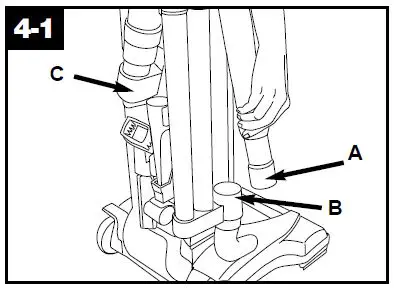
Checking airflow path
Plug cleaner in and turn ON. Check for suction at end of hose (A).
- If there is suction, continue with step 3.
- If there is no suction, check for blockage in hose and dirt tube as follows:
- Disconnect hose from dirt duct (C) by reversing procedure for “Attach hose” on p. 4, Figs. 1-5 and 1-6.
- clear out hose.
- look into (C) and remove blockage.
- Check connection at hose tube (B); remove any blockage.
- Turn cleaner OFF and unplug.
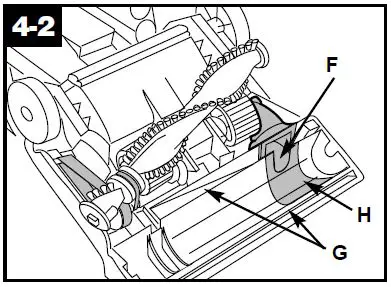
- Checking under bottom plate
- Remove bottom plate ( Fig. 3-9) and brush roll (Fig. 3-15). Look into opening (F), in channnels (G) and around liner (H), and remove any accumulated debris.
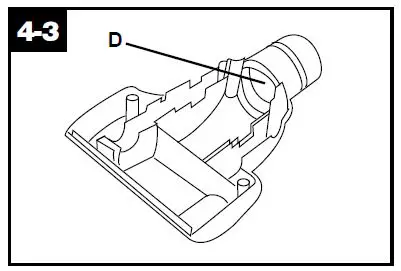
If blockage occurs during powered hand tool use Disconnect powered hand tool from hose. Remove bottom plate, belt guard and turbine as described in Figs. 3-19, 3-20 and 3-27. Remove any blockage from turbine channel (D). Replace belt turbine, brush roll, belt guard and bottom plate.
Full One Year Warranty
(Domestic Use)
Your HOOVER® appliance is warranted in normal household use, in accordance with the Owner’s Manual against original defects in material and workmanship for a period of one full year from date of purchase. This warranty provides, at no cost to you, all labor and parts to place this appliance in correct operating con-dition during the warranted period. This warranty applies when the appliance is purchased in the United States including its territories and possessions, or in Canada or from a U. S. Military Exchange. Appliances purchased else-where are covered by a limited one year warranty which covers the cost of parts only. This warranty does not apply if the appliance is used in a commercial or rental application. Warranty service can only be obtained by presenting the appliance to one of the following authorized warranty service outlets. Proof of purchase will be required before service is rendered.
- Hoover Factory Service Centers.
- Hoover Authorized Warranty Service Dealers (Depots).
For an automated referral of autho-rized service outlets in the U.S.A., phone 1-800-944-9200 OR visit The Hoover Company on-line at www.hoover.com
This warranty does not cover pick up, delivery, or house calls; however, if you mail your appliance to a Hoover Factory Service Center for warranty service, transportation will be paid one way. While this warranty gives you specific legal rights, you may also have other rights which vary from state to state. If further assistance is needed, or if there are questions concerning this war-ranty or the availability of warranty ser-vice outlets, write or phone the Consumer Response Center, The Hoover Company, 101 East Maple St., North Canton, Ohio 44720. Phone 1-330-499-9499. In Canada, contact Hoover Canada, Burlington, Ontario L7R 4A8, 1-800-263-6376.