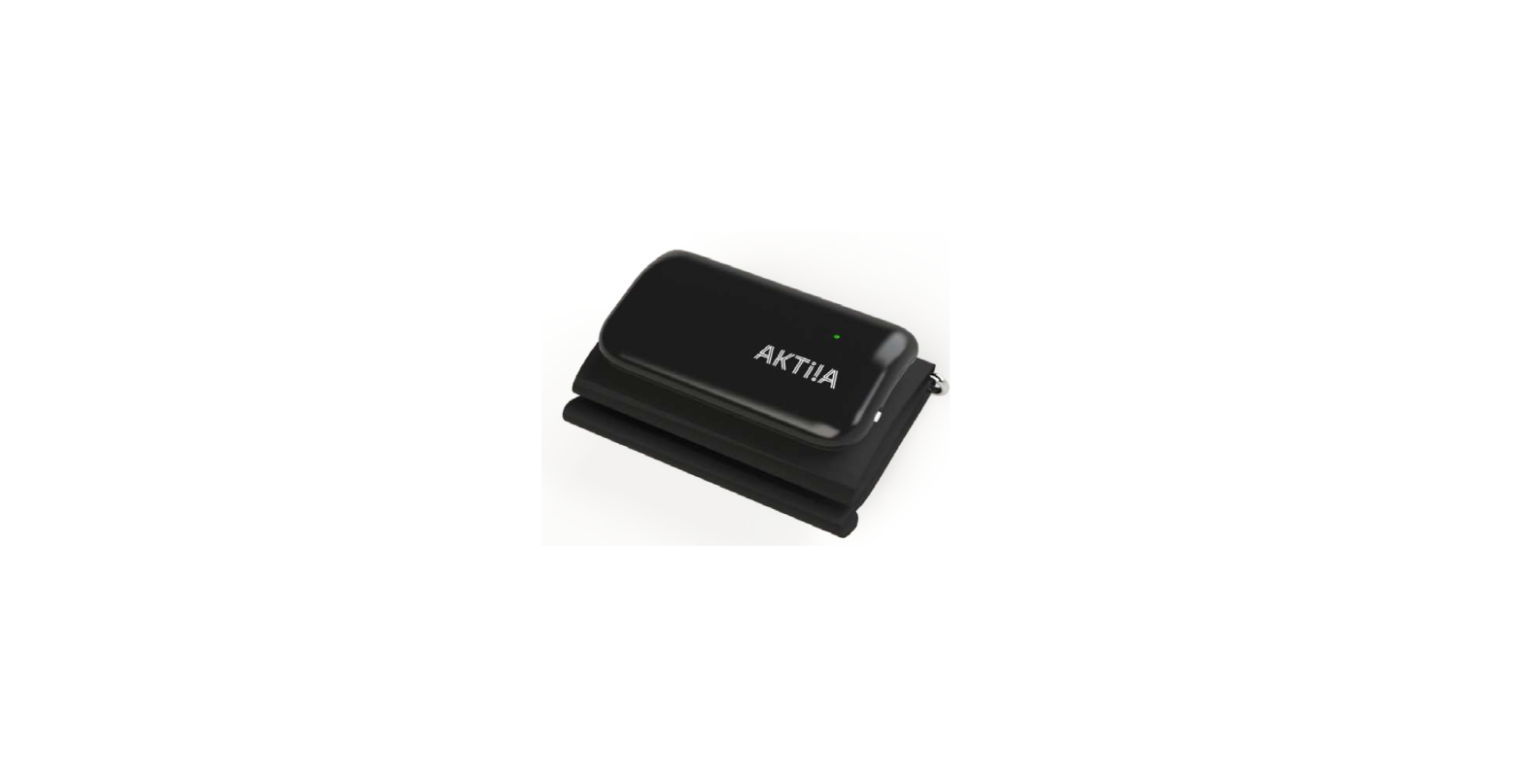

AKTiiA G1 Blood Pressure Monitoring Bracelet
Introduction
Welcome to the Aktiia 24/7 Blood Pressure Monitor System! The Aktiia System is the smart way to track your Blood Pressure over days and nights without any effort. The Aktiia Bracelet is designed to be discreet, with no lights or alarms bothering you during your daily life. With its accuracy and ease of use, Aktiia is the perfect solution to track your blood pressure 24 / 7.
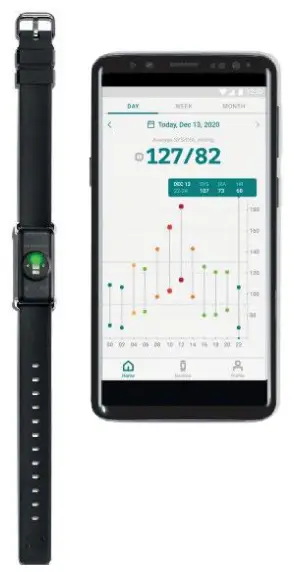
Aktiia offers a new way to monitor your heart health that easily integrates into your life. Our device tracks your Blood Pressure through unnoticeable measurements performed multiple times per day. All you need to do is to wear the Bracelet. You can access your data anytime by simply looking at the Aktiia mobile app. Speaking of the app, make sure you download the Aktiia App from the Apple app store. The app has all the information you need to get started with your Aktiia System.
Contact Information
Please read this User Manual carefully to gain a complete understanding of the device’s functions and safety-related information. In case you have any additional questions, you encounter any issue, or you would like to suggest some improvements, please contact Aktiia’s Customer Service at [email protected] or visit our website at www.aktiia.com.
For an electronic version of this user manual and for common symbols, please visit www.aktiia.com/uk/manuals/electronicsymbols
Intended purpose
The Aktiia Bracelet is a non-invasive blood pressure (BP) monitor intended to measure optical Photoplethysmography (PPG) signals on the user’s wrist and to calculate blood pressure values using a Pulse Wave Analysis (PWA) technique, following an initialization process using an oscillometric blood pressure monitor. The Aktiia Bracelet can also calculate estimated pulse rate based on the same measurement and analysis technology.
Indications for use
The Aktiia 24/7 Blood Pressure Monitor System is a non-invasive monitor comprising of an oscillometric cuff and an optical bracelet for both on-demand & continual measurements of blood-pressure and estimated pulse rate.
The system is intended for OTC use for adult patients (ages 21-60) in an at-home environment.
Intended Patient Population
The Aktiia 24/7 Blood Pressure Monitor System is appropriate for users that are 21 to 60 years old, with an arm circumference of 22cm to 42cm (8 ¾ inches to 16 ½ inches) and a wrist circumference of 14cm to 21 (5 ½ inches to 8 ¼ inches).
Contraindications
Patients with the following conditions are NOT part of the intended patient population:
- Pregnant women
- Patients with the following heart conditions:
- Patients with Tachycardia and resting pulse rate greater than 120 beats per minute
- Congestive heart failure with reduced heart function
- Atrial fibrillation
- Severe valvular disease
- Implanted devices such as a pacemaker or defibrillator
- Patients with the following medical conditions:
- Renal dysfunction
- Raynaud’s disease
- Actively undergoing treatment for the following endocrine disorders:
- Diabetes
- Pheochromocytoma
- Hyperthyroidism
- Arteriovenous fistula
- Lymphoedema of the arm
- Presence of an intravascular device
- Other conditions:
- Any condition that might interfere with readings, such as trembling and shivering
- Exfoliative skin diseases involving the wrist, such as eczema or psoriasis
- Arm amputation(s)
Important safety information
Please read the important safety information in this user manual before using the device. Any serious incident occurring in relation to the Aktiia Bracelet should be reported to Aktiia.
Warnings
- The “WARNING” sign in this user manual indicates a potentially hazardous situation which, if not avoided, could result in serious injury or death.
- Your Aktiia Bracelet Pod is small enough to be swallowed by a young child. To prevent risk of suffocation, never leave your Pod unattended!
- The Aktiia Bracelet is not intended to diagnose any medical condition. The Akttia Bracelet is a monitoring device and will not alarm you based on your blood pressure readings or pulse rate physiological alarm conditions. Consult your physician for an appropriate analysis of your blood pressure data for diagnosis.
- No modification of the equipment is allowed.
- The Aktiia System does not display information that would indicate a cardiovascular event, such as a heart attack, stroke, or arrhythmia. If you believe you are having a medical emergency, call emergency services immediately
The Aktiia System is designed for assessment and monitoring of blood pressure, and it is not intended to diagnose any medical condition. The Akttia Bracelet is a monitoring device and will not alarm you based on your blood pressure readings or pulse rate. Consult your physician for an appropriate analysis of your blood pressure data for diagnosis and management, and do not change medications without discussing it first with your medical professional.
Cautions
- The “Caution” sign in this user manual indicates a potentially hazardous situation which, if not avoided,could result in minor injury to the user or patient or damage to the equipment or other property.
- This device may only be used for the purposes described in this User Manual. Aktiia cannot be held liable for damage or injury caused by incorrect use. Always follow the operating procedures described in this User Manual to measure your blood pressure accurately and safely.
- Aktiia Bracelet is designed as a device for personal use (single user) only.
- Do not share your device with others as it may result in inaccurate blood pressure readings.
- The strap of your Aktiia Bracelet contains silicone material. Avoid wearing the Bracelet in case of known allergy to silicone. In case of skin irritation, stop wearing your
- Aktiia Bracelet immediately and consult your doctor.
- Use of this device adjacent to or stacked with other equipment should be avoided because it could result in improper operation. If such use is necessary, this device and the other equipment should be observed to verify that they are operating normally.
- Wireless communication devices (including home networking devices & peripherals such as antenna cables and external antennas) should be used no closer than 30 cm (12 inches) to any part of this device. Otherwise, degradation of the performance of this product could result.
- Use of this device with active implantable medical devices, such as cardiac pacemakers and ICDs, has not been evaluated and is therefore not recommended
- Avoid exposure of this device to known sources of EMI (electromagnetic interference) such as magnetic resonance imaging (MRI) systems, diathermy, lithotripsy, electrocautery, RFID (radio frequency identification), and electromagnetic security systems such as metal detectors. Note that the presence of RFID devices may not be obvious.
- If such interference is suspected reorient equipment if possible to maximize distances.
- The performance of the Bracelet can be affected by extremes of temperature, humidity and altitude.
- Do not use the device with other medical equipment simultaneously
- If, at any time, the device loses Bluetooth connectivity with the phone, the user must manually reestablish connectivity with the device through the Aktiia App
- The Aktiia System is intended to be used by people who have general familiarity and experience with mobile device platforms
Technological characteristics
Aktiia Bracelet uses PPG technology (Photoplethysmography) to acquire optical data on your wrist. The PPG data are then transferred through the Aktiia App to a secured cloud server on which Aktiia’s algorithms estimate your blood pressure through advanced processing of the optical data. Aktiia Bracelet detects if the user is moving before initiating a PPG measurement and will provide blood pressure measurement only when the user is still.
This product is licensed under patents owned by CSEM SA, Switzerland.
Package contents
Your Aktiia Bracelet is supplied in a box containing the following items: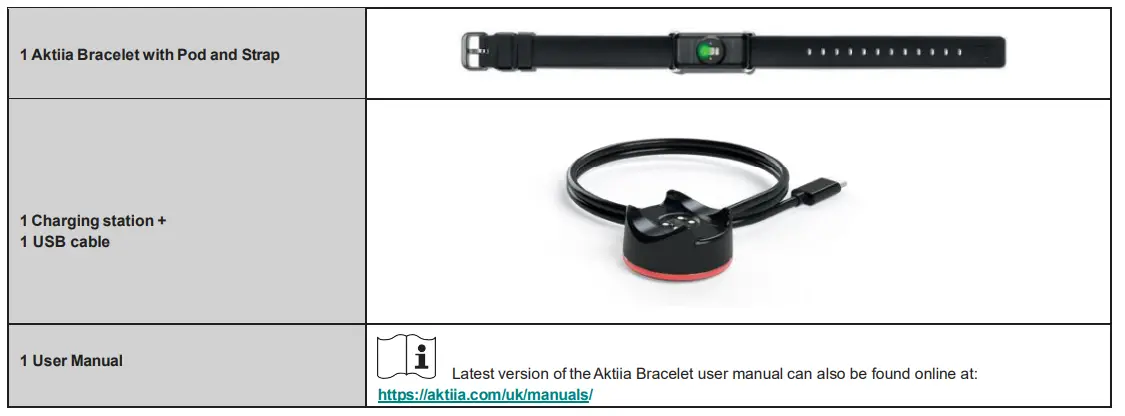
Latest version of the Aktiia Bracelet user manual can also be found online at: https://aktiia.com/uk/manuals/
Operating requirements
To use the Aktiia System, you should have general familiarity and experience using mobile device platforms.
To use the Aktiia Bracelet you need to download the free Aktiia App from the Apple App store. Creation of a user account and login are required to operate the Aktiia Bracelet.
Access to the Internet is required to:
- Download the Aktiia App.
- Set up your Aktiia user account.
- Update Aktiia Monitor’s firmware.
- Visualize your new Blood Pressure data.
- Receive insights on your Blood Pressure readings.
Authorized accessories and compatible devices
Your Aktiia Bracelet requires initialization and periodic re-initialization every 7 days. The Aktiia Bracelet must be used with the complementary Aktiia Cuff. The Aktiia Cuff is an oscillometric device provided by Aktiia in a separate package.
The Aktiia mobile application requires a mobile device with iOS 11 or later, Bluetooth 4.2 or higher and Wi-fi or 3G / 4G / 5G connection.
Quality of Service of Aktiia Bracelet G1: In regard to Quality of Service, the Aktiia Bracelet connects to the app using Bluetooth Low Energy (BLE). The BLE radio of the bracelet is always on and discoverable. Once the device has been paired to the app, no specific action is required for an authenticated user to connect to it. The Aktiia System is primarily intended for retrospective review of blood pressure and pulse rate data, there are no risks associated with data latency and throughput. The device is not being used as diagnostic tool and there are no alarms
Set up and initialization procedures
- Charge Bracelet before First Use.
- To charge the Bracelet:
- Connect the charging station to a USB port using the charging cable provided
- Remove the thin plastic protective film that is attached to the bottom of the pod of the Bracelet before charging
- Place the Aktiia Bracelet, with the sensor on the bottom, onto the charging station.
- A red light at the bottom of the charger will begin glowing to indicate that the bracelet has been placed correctly on the charging station.
- When charging is completed, the red light is steady.
- Download the Aktiia App.
Scan the QR code on this page or go to the Apple App Store, then download and install the Aktiia App. - Create a user account on the Aktiia App.
Open the Aktiia App on your mobile device and follow the instructions to register and set up your personal account. - Pair your Aktiia Bracelet with your mobile device.
Place the Aktiia Bracelet on the charging station and enable Bluetooth connection on your mobile device. Wait until pairing is confirmed by the Aktiia App. - Pair your Aktiia Cuff with your mobile device.
Switch ON the Aktiia Cuff by turning on the toggle button. A blue light should start blinking. Wait until pairing is confirmed by the Aktiia App andthe light indicator is a steady blue. For further information on the Aktiia Cuff operation, please refer to the user manual - Fit your Aktiia Bracelet on your wrist.
For optimal measurement by the Aktiia Bracelet, please carefully read the instructions in the “Correct Aktiia Bracelet positioning” section of this user manual. - Fit your Aktiia Cuff on the opposite arm.
The Aktiia Cuff must be placed on the opposite arm than the one wearing the Bracelet (i.e if you wear your Aktiia Bracelet on your RIGHT wrist, place the Cuff over your LEFT arm and vice versa).
The accuracy of blood pressure measurement done by the Aktiia Cuff depends on the right Cuff positioning. Please carefully read the instructions in the section “Correct Aktiia Cuff positioning” of this user manual. - Initialize your Aktiia Bracelet.
On the Aktiia App, carefully follow the instructions on the screen to start the initialization procedure. The Cuff will start inflating. - Switch OFF your Aktiia Cuff.
The accuracy of the initialization process depends on your body posture during the initialization. Carefully read the section “Body Posture during Initialization Procedure” of this user manual.
Congratulations! Your Aktiia Bracelet is now initialized and ready to track your blood pressure!
The Aktiia Bracelet is not intended to diagnose any medical condition. The Akttia Bracelet is a monitoring device and will not alarm you based on your blood pressure readings or pulse rate physiological alarm conditions. Consult your physician for an appropriate analysis of your blood pressure data for diagnosis.
You need to complete an initialization procedure at least once every 7 days, when prompted by the mobile application. The notification to reinitialize will appear beginning on Day 5. If you do not reinitialize by Day 7, you will no longer see new data on your App. Data obtained outside the period may be inaccurate.
Correct Aktiia Bracelet positioning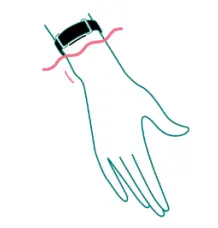
Fasten your Aktiia Bracelet around your wrist with the sensor (Aktiia Pod) facing toward or placed against the skin on top of your wrist. The clasp will be on the underside of the wrist. The bracelet should be about 1 inch from your most prominent wrist bone. This ensures that the Bracelet does not move around as much whenyou are using your hands. The Bracelet should be snug but comfortable
Correct Aktiia Cuff positioning
The Aktiia Cuff must be placed on the opposite arm with respect to the one wearing the Bracelet (i.e if you wear your Aktiia Bracelet on your RIGHT wrist. Place the Cuff over your LEFT arm and vice versa).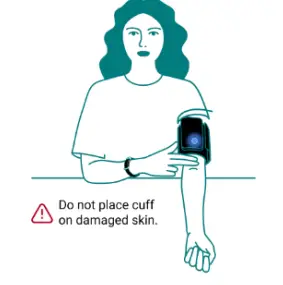
- Remove garments from your upper arm. If you roll up your sleeve, please ensure that the garment is not too tight so that it does not cause any blood flow constriction.
- Place your bare arm through the Cuff and position the Cuff 1″ (2-3 cm) above your elbow joint. The middle of the Cuff should be placed as the same level as your heart.
- Tighten the Cuff around your arm so that it fits closely but you can still insert two fingers between your arm and the Cuff. Secure the Cuff closed with the Velcro fastener.
- While seated, place your hand, palm side-up in front of you so that it is supported by a flat surface and the Aktiia Cuff is at the same height as your heart. Your Aktiia Cuff monitor is positioned on the inner side of your arm, over the artery and the logo is towards your elbow joint.
Please check the instructions for use provided with the Aktiia Cuff initialization device
Body posture during the initialization procedure
Please sit down and relax for 5 minutes before starting the initialization procedure.
Note: Blood Pressure measurements can be affected by the position of the Cuff and your physiological and emotional condition.
- Sit upright with your back straight, keep your legs uncrossed, and your feet flat on the floor.
- Place both your hands palm-side down in front of you on a flat surface such as a desk or a table up to and including your elbow.
- Do not move or tense your arm muscles during measurement.
- Relax, and do not talk.
Accessing your data
Your Aktiia Bracelet automatically tracks your blood pressure, periodically measuring throughout the day and night. To ensure optimal data security, your data is stored on a secured cloud server, and not the Aktiia Bracelet or on your phone. Visualizing your data in the Aktiia App therefore requires internet connection to synchronize with Aktiia’s secure server.
Syncing your data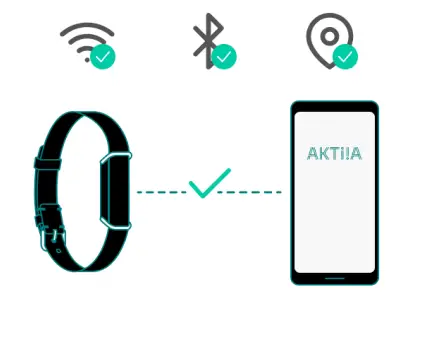
- Make sure Bluetooth and Internet connection on your mobile device are enabled.
Open the Aktiia App to synchronize data from your Aktiia Bracelet. The synchronization is done automatically and a sync view at the top of the screen shows you the sync status. This might take few seconds to several minutes depending on how often you open the app and synchronize your data. - In case you do not see a sync view when opening the app, swipe down to manually activate the synchronization.
- Make sure you open the app regularly so that the synchronization is fast, and you avoid losing data. For this reason, synching once a day is recommended.
Visualizing your Blood Pressure data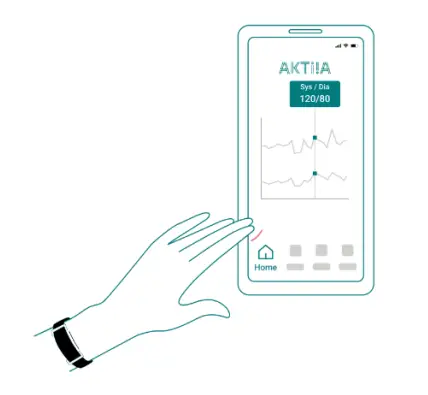
- Press the Home button on the Aktiia App to see your blood pressure data in a chart format.
- The top is the systolic (SYS) value and the bottom the diastolic (DIA) value. Tap on the line to read the numeric values, hold, and move your finger on the screen to navigate through the values.
- In the Aktiia App you will be shown metrics such as the average Blood Pressure values for the day.
- You are also able to swipe left and right to navigate through your historical data, in day, week, and month view.
How to evaluate your blood pressure
- The Aktiia Bracelet is not intended to diagnose any medical condition. The Akttia Bracelet is a monitoring device and will not alarm you based on your blood pressure readings or pulse rate physiological alarm conditions. Consult your physician for an appropriate analysis of your blood pressure data for diagnosis.
- The following classifications are based on measurements taken on a seated person after few minutes of rest. It is important to note that Blood Pressure readings in normal life conditions might be higher.
- These charts are not intended to provide a basis for any type of diagnosis or emergency assessment; these charts only depict different classifications of blood pressure.
- Consult your physician for an interpretation and diagnosis based on your personal blood pressure results. If you feel that your readings are abnormal, contact your physician.
The American Heart Association (AHA) has created the following guide for classifying blood pressure values.
| BLOOD PRESSURE CATEGORY | SYSTOLIC BP mm Hg (upper number) | AND/OR | DIASTOLIC BP mm Hg (lower number) | COLOR INDICATOR |
| NORMAL | LESS THAN 120 | AND | LESS THAN 80 | Green |
| ELEVATED | 120-129 | AND | LESS THAN 80 | Yellow |
| HIGH BLOOD PRESSURE (HYPERTENSION) STAGE I | 130-139 | OR | 80-89 | Orange |
| HIGH BLOOD PRESSURE STAGE (HYPERTENSION) 2 | 140 OR HIGHER | OR | 90 OR HIGHER | Light Red |
| HYPERTENSIVE CRISIS (consult your doctor immediately) | HIGHER THAN 180 | AND/OR | HIGHER THAN 120 | Dark Red |
Note: Various factors such as age, obesity and medical condition should be considered for a correct evaluation. Consult with your physicians for an accurate assessment and diagnosis of your health condition.
Battery handling and power supply
The battery of Aktiia Bracelet is a built-in rechargeable li-polymer battery.
When the monitor is connected to a mobile device, the battery volume will be displayed in the mobile app, in the Devices section. If the battery is lower than 10%, please charge your device.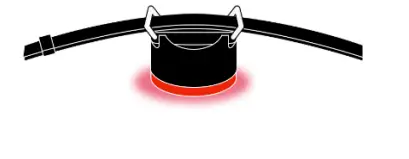
- Connect the USB microB connector (the smaller side) of the USB cable to the charger’s USB connector port.
- Connect the USB A connector (the larger side) of the USB cable to a power source.
- Place Aktiia Bracelet on the charger as depicted below.
A red light on the bottom part of the charger starts glowing when the bracelet is charging. - A steady red light indicates that the device is fully charged.
It is recommended that you charge the battery when the battery is less than 10%. Aktiia Bracelet charger is designed to work when plugged to a constant 5V DC source.
The battery in this device is a fixed battery and can only be changed by an authorized Aktiia Service agent.
Should your battery be defective, please contact Aktiia Customer Service for a replacement.
Lithium battery replacement by inadequately trained personnel could result in a hazard such as a fire or explosion.
Note: Battery life and charge cycles vary by use and settings.
Unpair your device
Aktiia Bracelet is designed for personal use (single user) only.
During the pairing procedure, the devices are linked to your account. In case you wish to reset the pairing and allow another person to use the device you must reset the pairing first.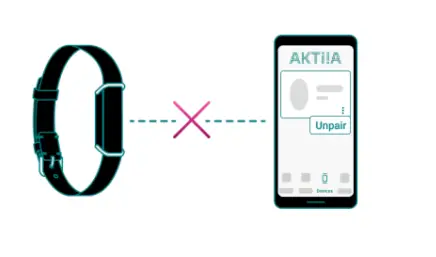
To complete the unpairing procedure you should:
- Login to your account
- Tap on the device tab
- Tap on the button with the three dots
- Press unpair
Note: Unpairing is needed if Aktiia Bracelet and / or Aktiia cuff need to be linked with a new user account
Note: Unpairing is not needed if a new mobile device is used to download Aktiia data with the same user account
Troubleshooting
Aktiia Bracelet is designed to be discreet, with no lights or alarms bothering you during your daily life. To know if your Aktiia Bracelet is ON: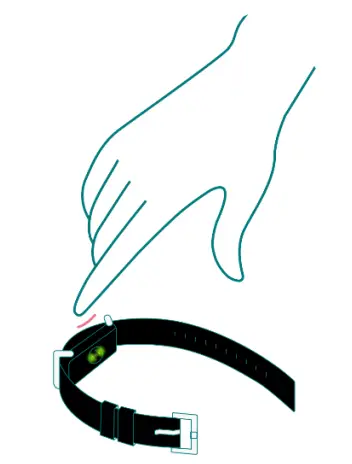
- Take off your Aktiia Bracelet.
- Look at the sensor on the bottom side of the pod.
- Gently tap the Bracelet’s pod twice – a green light should blink within 5 seconds.
If the green light does not blink, your Aktiia Bracelet may be out of power. Please put your device on the charging station.
| Problem | Solution |
| I don’t see a red light when charging my Aktiia Bracelet | Verify that the charging station is well connected to a power supply through the USB cable provided. Try replacing the Pod by turning it by 180°. The charging pins on the Pod should be aligned with the ones on the charging station. The Pod should be magnetically locked on the charging station. |
|
My Aktiia Bracelet does not connect to my mobile device | Check that your mobile device Bluetooth is activated and that you enabled permissions for Bluetooth connection and location. If your mobile device Bluetooth is activated but your Aktiia Bracelet still does not connect, place your Aktiia Bracelet on the charging station to force a reset (you will not lose your personal data or account information). If the problem persists, contact Aktiia customer service. |
| I cannot Sync my Aktiia Bracelet with the app | Check that your Aktiia Bracelet is connected in the Devices section. On the Home screen scroll down to activate Sync. |
| I cannot Pair my Aktiia Bracelet | Verify that your Aktiia Bracelet is correctly placed on the charger and that a red light is visible at the bottom of the charging station. |
|
Initialization recording failed | Verify that Bluetooth and Location services are enabled, and devices are connected. Verify that you have a stable internet connection. Verify that the Aktiia Bracelet and Aktiia Cuff are positioned correctly. Do not move during recording and take 5 deep breaths before starting the initialization procedure again. |
| Aktiia was not found | Place your Aktiia Bracelet on the charging station and connect it to the power supply. Verify that Bluetooth is on and permissions are granted and try again. |
| There is no reliable measurement data for this period | Aktiia Bracelet only measures your Blood Pressure while you are at rest. You might not get any measurements during periods of high activity. If you don’t get any measurements over more than 24 hours, and other troubleshooting steps do not resolve this, please contact our customer support. |
Care and maintenance
- The Aktiia Bracelet does not contain any part or component that requires maintenance operation by the user.
- To avoid skin irritation, it is recommended to regularly clean your Aktiia Bracelet. Simply wipe your Aktiia Bracelet with soft cloth lightly moistened with water. Then dry your Aktiia Bracelet with a dry cloth.
- The Aktiia Bracelet battery can maintain the performance characteristics for a maximum of 300 charge cycles, which corresponds to an expected service life of 3 years.
- Do not attempt to disassemble The Aktiia Bracelet as this will result in permanent damages and will void your warranty. If you encounter troubles with your Aktiia Bracelet battery, please contact Aktiia customer support.
- Do not immerse the Aktiia Bracelet in water and do not expose the Aktiia Bracelet to water moving with force, such as water running from a tap, shower, ocean waves, or waterfalls.
Warranty
Your Aktiia Bracelet is warranted to be free from defects in materials and workmanship within two years from the date of purchase when used in accordance with the provided instructions. Issues related by strap’s wearing are not covered by the warranty.
The warranty extends only to the end user. We will, at our option, repair or replace without charge Aktiia Bracelet covered by the warranty. Repair or replacement is our only responsibility and your only remedy under the warranty.
Specifications
| Product description | Blood pressure monitor |
| Model | Aktiia Bracelet G1 |
| Measurement method | Photoplethysmography (PPG) |
| Sensor to measure PPG | Green light (wavelength 526nm); silicon receiver diode |
| Measurement accuracy (Blood Pressure) | ± 5mmHg |
| Measurement accuracy (Pulse Rate) | ± 5 pulse/min |
| Measurement range | 40-250 mmHg for blood pressure, 40-180 beats/min for heart rate |
| Classifications | Internally powered Applied parts: Pod (type BF). IP33 (protected from spraying water and tools >2.5mm) |
|
Communication module | BLE 5.0 Frequency range 2.4 to 2.4835 GHz Modulation GFSK |
| Operating conditions | +5°C to 35°C 700hPa to 1060hPa15 % to 90 % RH |
| Storage and transportation conditions | -20°C to +60°C 700hPa to 1060hPa10% to 95% RH |
| Aktiia Bracelet size | 14 cm to 21 cm / 5 ½ to 8 ¼ inches (circumference) |
| Aktiia Bracelet weight | approximatively 18g (0.6 ounces). |
| Bracelet essential performance: Safety | The bracelet connects with the app |
| Bracelet essential performance: EMC | Normal Mode: If the EUT does not sync measured data after performing a test, or if the measurements are unsatisfactory (in accordance to the customer’s standards), or if the Bluetooth connectivity with the phone is lost, then it is considered a failure. Charging Mode: If the EUT’s Bluetooth connectivity with the phone is lost or if the EUT stops charging, then it is considered a failure. |
| Power Source | Li-Ion rechargeable battery 3.7 Vdc 55mAh |
| Charging Cable | USB Micro B to USB A cable |
| Note: The user needs to supply an external USB power supply that meets the following requirements: | · Voltage: 5VDC · Current: 100mA (minimum) |
Electromagnetic Compatibility (EMC) and Radio Frequency (RF) statements
- The Aktiia 24/7 Blood Pressure Monitor System (hereafter, the Aktiia System) needs special precautions regarding EMC and needs to be installed and put into serviceaccording to the EMC information provided in the following section.
- The Aktiia System is suitable for use in all establishments, including domestic establishments and those directlyconnected to the public low voltage power supply network that supplies buildings used for domestic purposes.
- The Aktiia System uses RF energy only for its internal function. Therefore, its RF emissions are very lowand are not likely to cause any interference in nearby electronic equipment.
- The Aktiia System is intended for use in an electromagnetic environment in which radiated RF disturbances arecontrolled. Interference may occur in the vicinity of equipment marked with the following symbol .
- Portable and mobile RF communication equipment (e.g. cell phones) can affect the Aktiia System. CAUTIONS :
- The Aktiia Bracelet should not be used adjacent to or stacked with other equipment and if adjacent or stacked use is necessary, it should be observed to verify normal operation in the configuration in which it will be used.
- Use of accessories, transducers, and cables other than those specified or provided by the manufacturer of this equipment could result in increased electromagnetic emissions or decreased electromagnetic immunity of this equipment and result in improper operation.
- Wireless communication devices (including home networking devices & peripherals such as antenna cables and external antennas)
should be used no closer than 30 cm (12 inches) to any part of the Aktiia Bracelet, including cables specified by the manufacturer. Otherwise, degradation of the performance of this equipment could result.” - Avoid exposure of this device to known sources of EMI (electromagnetic interference) such as magnetic resonance imaging (MRI) systems, diathermy, lithotripsy, electrocautery, RFID (radio frequency identification), and electromagnetic security systems such as metal detectors. Note that the presence of RFID devices may not be obvious.
- If such interference is suspected reorient equipment if possible, to maximize distances.
- If, at any time, the device loses Bluetooth connectivity with the phone, the user must manually reestablish connectivity with the device through the Aktiia App.
Electromagnetic compatibility and coexistence information
| Guidance and manufacture’s declaration – electromagnetic emissions | ||
| The Aktiia System is intended for use in the electromagnetic environment specified below. The user of Aktiia Bracelet should ensure that it is used in such an environment. The Aktiia System is suitable for use in “Home Healthcare Environment”, i.e. all establishments, including domestic establishments and those directly connected to the public low-voltage power supply network that supplies buildings used for domestic purposes. | ||
| Emission test | Compliance | Electromagnetic environment – guidance |
| Conducted emissions CISPR11 | Groupe 1 | The Aktiia System uses RF energy only for its internal function. Therefore, its RF emissions are very low and are not likely to cause any interference in nearby electronic equipment. |
| Radiated emissions CISPR11 | Class B | |
| Harmonic emissions IEC 61000-3-2 | Not Applicable | |
| Voltage fluctuations/ Flicker emissions IEC 61000-3-3 | Not Applicable | |
| Guidance and manufacturer’s declaration – electromagnetic immunity | ||
| The Aktiia System is intended for use in the electromagnetic environment specified below. The user of the Aktiia System should ensure that it is used in such an environment. The Aktiia System is suitable for use in “Home Healthcare Environment”, i.e. all establishments, including domestic establishments and those directly connected to the public low-voltage power supply network that supplies buildings used for domestic purposes. | ||
| Immunity test | 60601-1-2 test levels | Compliance |
| Electrostatic discharge IEC 61000-4-2 | ± 8 kV contact ± 2 kV, ± 4 kV, ± 8 kV, ± 15 kV in air | ± 8 kV contact ± 2 kV, ± 4 kV, ± 8 kV, ± 15 kV in air |
| Radiated RF electromagnetic field IEC 61000-4-3 | 10 V/ m 80 MHz à 2.4 GHz 80 % MA à 1 kHz | 10 V/ m 80 MHz à 2.4 GHz 80 % MA à 1 kHz |
|
Proximity fields from RF wireless communications equipment IEC 61000-4-3 (interim method) | 9 V/ m 710 MHz, 745 MHz, 780 MHZ, 5240 MHz, 5550 MHz, 5785 MHz
27 V/ m 385 MHz
28 V/ m 450 MHz, 810 MHz, 870 MHz, 930 MHz, 1720 MHz, 1845 MHz, 1970 MHz, 2450 MHz | 9 V/ m 710 MHz, 745 MHz, 780 MHZ, 5240 MHz, 5550 MHz, 5785 MHz
27 V/ m 385 MHz
28 V/ m 450 MHz, 810 MHz, 870 MHz, 930 MHz, 1720 MHz, 1845 MHz, 1970 MHz, 2450 MHz |
| Power frequency magnetic field IEC 61000-4-8 | 30 A/ m 50 Hz | 30 A/ m 50 Hz |
| Olivier | ||
Essential Performance:
Performance as required by IEC 60601-1-2 and IEC 80601-2-30 clause 202.8.1.101 for basic safety, the bracelet connects with the app. For the EMC the following were monitored during testing:
Normal Mode: If the EUT does not sync measured data after performing a test, and/or if the measurements are unsatisfactory in accordance to IEC 80601-2-30 clause 202.8.1.101 as below then it is considered a failure.
Charging Mode: If the EUT stops charging, then it is considered a failure.
Performance criterion per IEC 80601-2-30 clause 202.8.1.101 were monitored as below:
- component failures; (Normal Mode & Charging Mode)
- changes in programmable parameters or settings; (Normal Mode & Charging Mode)
- reset to default settings; (Normal Mode & Charging Mode)
- Per manufacturer, to meet to appropriate technology, CUFF pressure at any point of the
NOMINAL measurement range greater than 2 mmHg (0,3 kPa) per IEC 80601-2-30 clause 202.8.1.101 clause d) was monitored with below parameters. SBP EMC bias, DBP EMC bias, RF_Num_Rec, Spread_DueToNoise_SBP, NRF2_Num_Precise_Rec/NRF2_Num_meas_Rec, and NRF2_acceptance were calculated internally by Aktiia SA.
During the tests, the following rules need to be met:
- The percentage of removed measurements to be <= Floor(0.04 x RF_Num_Rec)
- SBP_EMC_bias < 2 mmHg
- DBP_EMC_bias < 2 mmHg
- SBP_EMC_bias + (2.576 x Spread_DueToNoise_SBP) < 2
- SBP_ EMC_bias – (2.576 x Spread_DueToNoise_SBP) > -2
- DBP_EMC_bias + (2.576 x Spread_DueToNoise_DBP) < 2
- DBP_EMC_bias – (2.576 x Spread_DueToNoise_DBP) > -2
After the tests, the following rules need to be met: - NRF2_Num_Precise_Rec/ NRF2_Num_meas_Rec > 0.96.
- NRF2_acceptance is calculated.
Aktiia SA monitored the accuracy of parameters from the raw data provided by Intertek. These parameters were monitored,
- during and after exposure to non-transient phenomena; and
- after exposure to transient phenomena.
If, at any time, the EUT loses Bluetooth connectivity with the phone, the user must manually reestablish connectivity with the EUT through the Aktiia’s proprietary app. Disconnection with the phone will not create any risk of harm to the user and will only cause a slight procedural delay in uploading collected raw data.
EMC Test Plan & Summary
The Aktiia System is intended for use in the electromagnetic environment specified below from the EMC testing.report The user of Aktiia Bracelet should ensure that it is used in such an environment. The Aktiia System is suitable for use in “Home Healthcare Environment”, i.e. all establishments, including domestic establishments and those directly connected to the public low-voltage power supply network that supplies buildings used for domestic purposes.
| IEC 60601-1-2 (Edition 4.0): 2014+AMD1:2020, FCC Part 15 Subpart B, ISED ICES-003 Proposed Tests for Home Healthcare Environment | |||
| Basic Standard | Test Specifications | Applicable Ports | Test Mode and Configuration |
| CISPR 11 | Radiated Emission | – | Charging Mode at 120 Vac 60 Hz Normal Mode on Battery Mode |
| CISPR 11 | Conducted Emission | – | Charging Mode at 100V 50Hz, 120V 60Hz, 240V 50Hz |
| ANSI C63.4 | Radiated Emission | – | Charging Mode at 120 Vac 60 Hz Normal Mode on Battery Mode |
| ANSI C63.4 | Conducted Emission | AC Power | Charging Mode at 120V 60Hz |
| EN/IEC 61000-4-2 | Electrostatic Discharge, ± 8 kV contact discharge | Enclosure | Charging Mode at 120 Vac 60 Hz Normal Mode on Battery Mode |
| Electrostatic Discharge, ± 15 kV air discharge | Enclosure | ||
| Electrostatic Discharge, ± 8 kV contact discharge | PATIENT coupling PORT | Not Applicable3 | |
| Electrostatic Discharge, ± 15 kV air discharge | PATIENT coupling PORT | ||
| EN/IEC 61000-4-3 | Radiated Immunity, 10 V/m, 80 –2700 MHz, 80% AM at 1 kHz & Proximity fields from RF Wireless communications equipment | Enclosure |
Charging Mode at 120 Vac 60 Hz Normal Mode on Battery Mode |
| EN/IEC 61000-4-4 | Fast Transient/Burst ± 2 kV, 5/50 nsec pulse, 100 kHz repetition freq. | AC Power | Charging Mode at 120 Vac 60 Hz |
| Fast Transient/Burst ± 2 kV, 5/50 nsec pulse, 100 kHz repetition freq. | DC Power | Not Applicable4 | |
| Fast Transient/Burst (Capacitive clamp) ± 1 kV, 5/50 nsec pulse, 100 kHz repetition freq. | Input/ Output Lines | Not Applicable1 | |
| EN/IEC 61000-4-5 | Surges, 1.2/50 (8/20) S ± 2 kV (line to earth) ± 1 kV (line to line) | AC Power | Not Applicable5 |
| Surges, 1.2/50 (8/20) S ± 2 kV (line to earth) ± 1 kV (line to line) | DC Power | Not Applicable4 | |
| Surges, 1.2/50 (8/20) S ± 2 kV (line to earth) | Input/ Output Lines | Not Applicable2 |
| IEC 60601-1-2 (Edition 4.0): 2014+AMD1:2020, FCC Part 15 Subpart B, ISED ICES-003 Proposed Tests for Home Healthcare Environment | |||
| Basic Standard | Test Specifications | Applicable Ports | Pass/Fail Comments |
| EN/IEC 61000-4-6 | Continuous Conducted RF, 80% AM (1 kHz) 3 Vrms, 0.15-80 MHz 6 Vrms in ISM and amateur radio Bands within 150kHz – 80MHz | AC Power |
Charging Mode at 120 Vac 60 Hz |
| Continuous Conducted RF, 80% AM (1 kHz) 3 Vrms, 0.15-80 MHz 6 Vrms in ISM and amateur radio Bands within 150kHz – 80MHz | DC Power | Not Applicable4 | |
| Continuous Conducted RF, | |||
| 80% AM (1 kHz) | Input/ Output Lines | Not Applicable1 | |
| 3 Vrms, 0.15-80 MHz | |||
| 6 Vrms in ISM and amateur radio Bands within | |||
| 150kHz – 80MHz Cables longer than 3 m | |||
| Continuous Conducted RF, 80% AM (1 kHz) 3 Vrms, 0.15-80 MHz 6 Vrms in ISM and amateur radio Bands within 150kHz – 80MHz | PATIENT | ||
| coupling PORT | Not Applicable3 | ||
| EN/IEC 61000-4-8 | Power Frequency Magnetic Field 30A(rms)/m at 50Hz /60Hz | Enclosure | Charging Mode at 120 Vac 60 Hz Normal Mode on Battery Mode |
| Continuous Conducted RF, | |||
| 80% AM (1 kHz) | Input/ Output Lines | Not Applicable1 | |
| 3 Vrms, 0.15-80 MHz | |||
| 6 Vrms in ISM and amateur radio Bands within | |||
| 150kHz – 80MHz Cables longer than 3 m | |||
| Continuous Conducted RF, 80% AM (1 kHz) 3 Vrms, 0.15-80 MHz 6 Vrms in ISM and amateur radio Bands within 150kHz – 80MHz | PATIENT | ||
| coupling PORT | Not Applicable3 | ||
| EN/IEC 61000-4-8 | Power Frequency Magnetic Field 30A(rms)/m at 50Hz /60Hz | Enclosure | Charging Mode at 120 Vac 60 Hz Normal Mode on Battery Mode |
| b l e 5 | |||
| Voltage Dips > 95% reduction, 1 period At 0° | AC Power | N o t A p p l i c a b l e 5 | |
| Voltage Interruptions > 95% reduction, 250/300 periods | AC Power | Not Applicable5 |
| EN 61000-3-2 | Emissions: Harmonics Disturbances | AC Power | Not Applicable5 |
| EN 61000-3-3 | Emissions: Voltage Fluctuation | AC Power | Not Applicable5 |
The EUT does not contain signal input/output lines longer than 3 m in length.
- The EUT does not contain signal ports that connect directly to the outdoors.
- The EUT does not contain any patient coupling ports.
- The EUT does not contain DC power ports.
- Per the client, the power adapters are not provided with the EUT; only power cable and docking station will be provided. See Section 5.4 for details
| IEC 60601-1-2 (Edition 4.0): 2014+AMD1:2020, FCC Part 15 Subpart B, ISED ICES-003 Test Summary for Home Healthcare Environment | |||
| Basic Standard | Test Specifications | Applicable Ports | Pass/Fail Comments |
| ANSI C63.4 | Radiated Emission | – | Complies |
| ANSI C63.4 | Conducted Emission | AC Power | Complies |
| CISPR 11 | Radiated Emission | – | Complies |
| CISPR 11 | Conducted Emission | AC Power | Complies |
| EN/IEC 61000-4-2 | Electrostatic Discharge, ± 8 kV contact discharge | Enclosure | Complies6 |
| Electrostatic Discharge, ± 15 kV air discharge | Enclosure | ||
| Electrostatic Discharge, ± 8 kV contact discharge | PATIENT coupling PORT | Not Applicable3 | |
| Electrostatic Discharge, ± 15 kV air discharge | PATIENT coupling PORT | ||
| EN/IEC 61000-4-3 | Radiated Immunity, 10 V/m, 80 – 2700 MHz, 80% AM at 1 kHz & Proximity fields from RF Wireless communications equipment | Enclosure | Complies6 |
| EN/IEC 61000-4-4 | Fast Transient/Burst ± 2 kV, 5/50 nsec pulse, 100 kHz repetition freq. | AC Power | Complies6 |
| Fast Transient/Burst ± 2 kV, 5/50 nsec pulse, 100 kHz repetition freq. | DC Power | Not Applicable4 | |
| Fast Transient/Burst (Capacitive clamp) ± 1 kV, 5/50 nsec pulse, 100 kHz repetition freq. | Input/ Output Lines | Not Applicable1 | |
| EN/IEC 61000-4-5 | Surges, 1.2/50 (8/20) S ± 2 kV (line to earth) ± 1 kV (line to line) | AC Power | Not Applicable5 |
| Surges, 1.2/50 (8/20) S ± 2 kV (line to earth) ± 1 kV (line to line) | DC Power | Not Applicable4 | |
| Surges, 1.2/50 (8/20) S ± 2 kV (line to earth) | Input/ Output Lines | Not Applicable2 |
| IEC 60601-1-2 (Edition 4.0): 2014+AMD1:2020 Test Summary for Home Healthcare Environment | ||||
| Basic Standard | Test Specifications | Applicable Ports | Pass/F ail Comm ents | |
| EN/IEC 61000-4-6 | Continuous Conducted RF, 80% AM (1 kHz) 3 Vrms, 0.15-80 MHz 6 Vrms in ISM and amateur radio Bands within 150kHz – 80MHz | AC Power | Compli es6 | |
| Continuous Conducted RF, 80% AM (1 kHz) 3 Vrms, 0.15-80 MHz 6 Vrms in ISM and amateur radio Bands within 150kHz – 80MHz | DC Power | Not Applica ble4 | ||
| Continuous Conducted RF, 80% AM (1 kHz) 3 Vrms, 0.15-80 MHz 6 Vrms in ISM and amateur radio Bands within 150kHz – 80MHz Cables longer than 3 m | Input/ Output Lines | Not Applica ble1 | ||
| Continuous Conducted RF, 80% AM (1 kHz) 3 Vrms, 0.15-80 MHz 6 Vrms in ISM and amateur radio Bands within 150kHz – 80MHz | PATIENT coupling PORT | Not Applica ble3 | ||
| EN/IEC 61000-4-8 | Power Frequency Magnetic Field 30A(rms)/m at 50Hz /60Hz | Enclosure | Compli es6 |
|
EN/IEC 61000-4-39 | Radiated Fields in close proximity 8A/m, CW, 30kHz; 65A/m (rms), PM at 2.1 kHz, 50% duty cycle, 134.2kHz; 7.5A/m (rms), PM at 50 kHz, 50% duty cycle, 13.56MHz |
Enclosure | Compli es6 | |
| EN/IEC 61000-4-11 | Voltage Dips 30% reduction, 25/30 periods At 0° | AC Power | Not Applica ble5 | |
| Voltage Dips > 95% reduction, 0.5 period At 0°, 45°, 90°, 135°, 180°, 225°, 270° and 315° | AC Power | N o t A p p l i c a b |
| l e 5 | ||||
| Voltage Dips > 95% reduction, 1 period At 0° | AC Power | N o t A p p l i c a b l e 5 | ||
| Voltage Interruptions > 95% reduction, 250/300 periods | AC Power | Not Applica ble5 |
| EN 61000-3-2 | Emissions: Harmonics Disturbances | AC Power | Not Applica ble5 | |
| EN 61000-3-3 | Emissions: Voltage Fluctuation | AC Power | Not Applica ble5 |
The EUT does not contain signal input/output lines longer than 3 m in length.
- The EUT does not contain signal ports that connect directly to the outdoors.
- The EUT does not contain any patient coupling ports.
- The EUT does not contain DC power ports.
- Per the client, the power adapters are not provided with the EUT; only power cable and docking station will be provided. See Section 5.4 for details.
- The Performance Criteria per IEC 80601-2-30:2018 clause 202.8.1.101 were applied, refer to report section 5.7 for details.
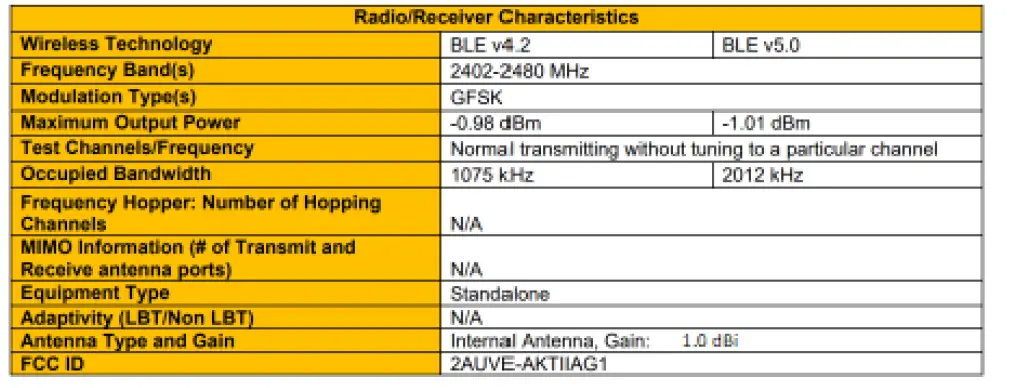
Radio Characteristics
FCC Statement
The present product has the FCC ID: 2AUVE-AKTIIAG1
This device complies with part 15 of the FCC Rules. Operation is subject to the following two conditions: (1) This device may not cause harmful interference, and (2) this
device must accept any interference received, including interference that may cause undesired operation.
Changes or modifications not expressly approved by the party responsible for compliance could void the user’s authority to operate the equipment.
The Device wireless operation is safe and complies to RF Exposure requirements.
This equipment has been tested and found to comply with the limits for a Class B digital device, pursuant to part 15 of the FCC Rules. These limits are designed to provide
reasonable protection against harmful interference in a residential installation. This equipment generates, uses and can radiate radio frequency energy and, if not installed
and used in accordance with the instructions, may cause harmful interference to radio communications. However, there is no guarantee that interference will not occur in a
particular installation. If this equipment does cause harmful interference to radio or television reception, which can be determined by turning the equipment off and on, the
user is encouraged to try to correct the interference by one or more of the following measures:
- Reorient or relocate the receiving antenna.
- Increase the separation between the equipment and receiver.
- Connect the equipment into an outlet on a circuit different from that to which the receiver is connected.
- Consult the dealer or an experienced radio/TV technician for help.
The FCC-ID is located in the settings menu of the Aktiia App.
Disposal
This symbol applied on the device or its packaging means that at the end of its useful life the product must not be disposed of with domestic waste.
At the end of the device’s useful life, the user must deliver it to the able collecting centers for electric and electronic garbage or give back to the retailer when purchasing a new device. Disposing of the product separately prevents possible negative consequences for the environment and for health, deriving from inadequate disposal. It also allows the recovery of materials of which it’s made up in order to obtain an important saving of energy and resources and to avoid negative effects to the environment and health. In case of abusive disposal of device by the user, will be applied administrative endorsements in compliance with current standard. The device and its parts are made with regard to disposal, as appropriate, in accordance with national or regional regulations
Network security recommendations
The following recommendations detail security measures that Aktiia users should follow to ensure appropriate protection of their personal data. Failure to comply with these recommendations may lead to user personal data leakage or destruction.
Only use mobile application authorized by Aktiia. Aktiia only makes its mobile application and subsequent updates available on official app stores (e.g. Apple App store).
Use unique credentials (username and password) for login to your Aktiia account. Safely store your password so that no other person can access it. It is recommended to regularly update your password, at least once every 3 months.
Do not let other people login to your Aktiia account on your behalf.
Clinical Safety Information
The Aktiia Bracelet was validated in a clinical study compared to double-auscultation measurements at the upper arm. The data set used for comparison comprised of 4’517 data pairs generated from 85 adults ages 22-60 years old, from a multitude of body and arm positions, under conditions of natural changes in blood pressure (BP), under conditions of induced changes in BP by physical maneuvers, and at different times throughout the 7-day calibration interval.
The primary outcome results including all body positions and all time points (n=4’517 data pairs) are shown in the following table:
| Primary outcome | Mean value of differences | Standard deviation of all differences |
| Systolic Blood Pressure Performance | -1.0 mmHg | 10.8 mmHg |
| Diastolic Blood Pressure Performance | -4.9 mmHg | 9.5 mmHg |
- Because the Aktiia system is not intended to be used only for a single measurement, but to repeatedly measure the BP of a user over the long-term, it is also important that the device provides a reliable representation of BP over time. The results of a subject-level analysis that included all the data collected over the one-week study period found that the device error for systolic BP is within 10 mm Hg for 85% of users and for diastolic BP within 10 mm Hg for 75% of users.
- A subgroup analysis found that there is no systematic bias of results across the following subgroups: age, sex, skin tone, or hypertension status, apart from an underestimation of the diastolic BP (but not systolic BP) for subject with highly pigmented skin.
- Device performance was assessed in the following body positions: sitting, lying, and standing and at different elevations of the arm. For most body and arm positions, device performance is similar to the overall performance presented above. However, the device did show a systematic under-estimation of diastolic blood pressure when measurements are made in the standing position.
- Data from a motion study that evaluated 31 subjects found that an average of 27 measurements are performed over 24 hours, and that those measurements are only obtained when the subject is quiet in any of the sitting, lying or standing positions.
Aktiia Bracelet G1 Blood pressure monitor
Aktiia SA, Bassin 8a, 2000 Neuchâtel, Switzerland Website : www.aktiia.com
Customer Service: [email protected]
User Manual & Symbols Glossary: www.aktiia.com/uk/manuals/electronicsymbols
Version 1 – 11/10/2022
 Aktiia | Your Home Blood Pressure Monitoring Solution
 Manuals | Aktiia