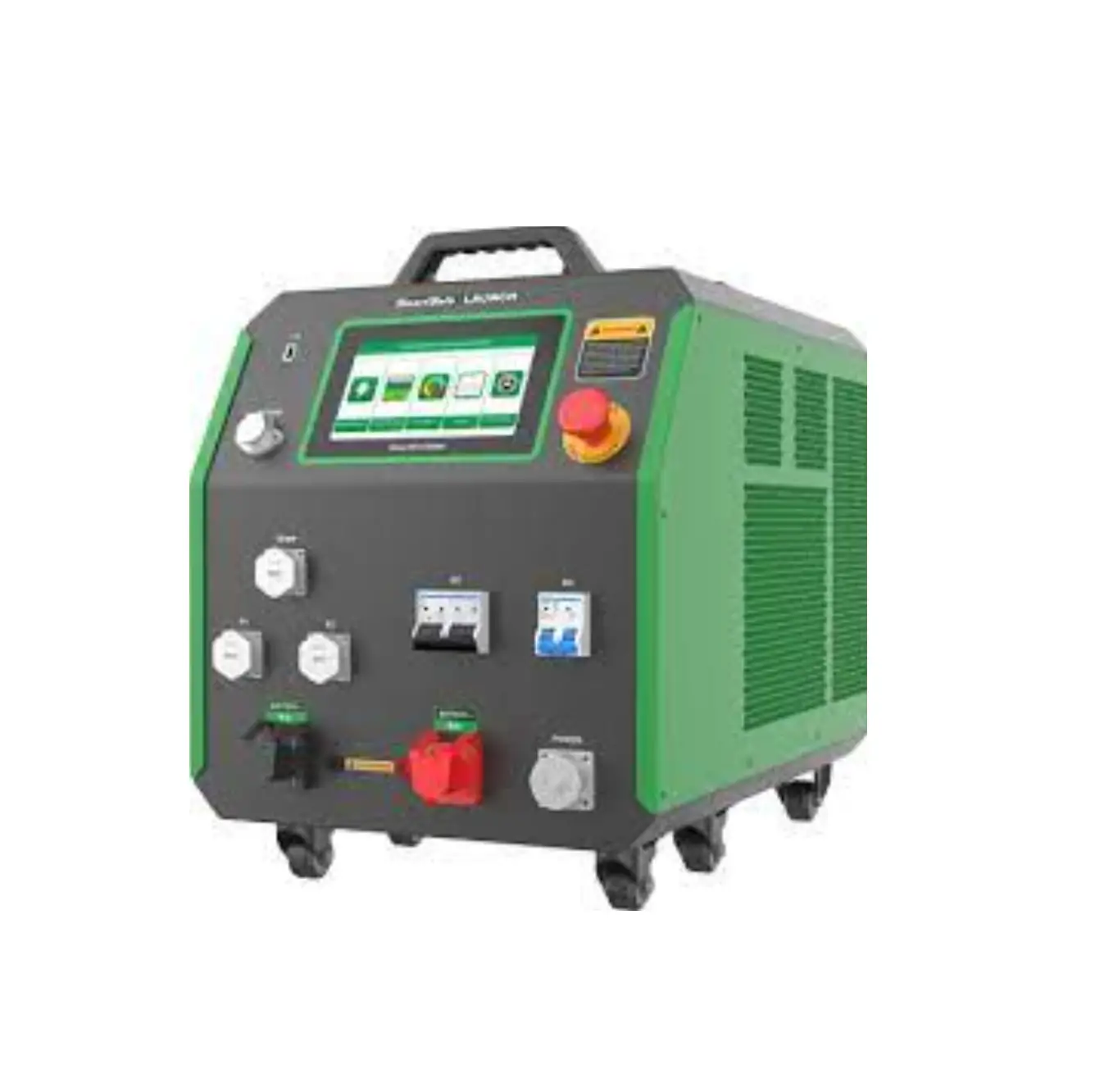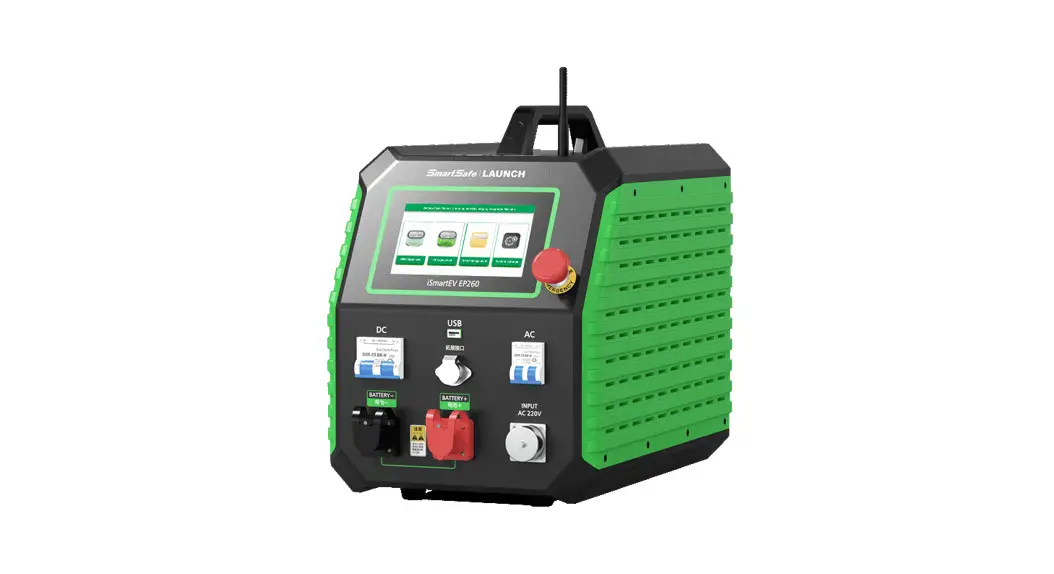
 iSmartEV EB480
Lithium Battery Balancer for EV
User Manual
iSmartEV EB480 Lithium Battery Balancer for EV
Copyright Information
Copyright © 2021 by SHENZHEN SMARTSAFE TECH CO.,LTD. All rights reserved. No part of this publication may be reproduced, stored in a retrieval system, or transmitted in any form or by any means, electronic, mechanical, photocopying, recording or otherwise, without the prior written permission of SMARTSAFE.
Neither SMARTSAFE nor its affiliates shall be liable to the purchaser of this unit or third parties for damages, losses, costs, or expenses incurred by purchaser or third parties as a result of: Accident, misuse, or abuse of this unit, or unauthorized modifications, repairs, or alterations to this unit, or failure to strictly comply with SMARTSAFE operating and maintenance instructions. SMARTSAFE shall not be liable for any damages or problems arising from the use of any options or any consumable products other than those designated as Original SMARTSAFE Products or SMARTSAFE Approved Products by SMARTSAFE.
All information, specifications and illustrations in this manual are based on the latest information available at the time of printing. SMARTSAFE reserves the right to make changes at any time without prior written or oral notice.
Trademark Information is a registered trademark of SHENZHEN SMARTSAFE TECH CO.,LTD. in China and other countries. All other SMARTSAFE trademarks, service marks, domain names, logos, and company names referred to in this manual are either trademarks, registered trademarks, service marks, domain names, logos, company names of SMARTSAFE or are otherwise the property of SMARTSAFE or its affiliates. In countries where any of the SMARTSAFE trademarks, service marks, domain names, logos and company names are not registered, SMARTSAFE claims other rights associated with unregistered trademarks, service marks, domain names, logos, and company names. Other products or company names referred to in this manual may be trademarks of their respective owners. You may not use any trademark, service mark, domain name, logo, or company name of SMARTSAFE or any third party without permission from the owner of the applicable trademark, service mark, domain name, logo, or company name. You may contact SMARTSAFE by visiting the website at www.newsmartsafe.com, or writing to SHENZHEN SMARTSAFE TECH CO.,LTD., 3310, Building 11, Tianan Cloud Park, Bantian Street, Longgang District, Shenzhen, Guangdong, China, to request written permission to use Materials on this manual for purposes or for all other questions relating to this manual.
Product Overview
iSmartEV EB480 battery cell balancer is a battery maintenance equipment specially designed for new energy batteries developed by Smartsafe. It is used to quickly solve the cruising range degradation caused by the difference in cell capacity due to inconsistent cell voltages. It has the characteristics of simple operation, stable performance, strong anti harmonic ability and convenient carrying. It can be applied to power battery production, new energy vehicle enterprise R & D, new energy battery pack maintenance and other scenarios.
1.1 Product Features
- Adopt the latest equalizing maintenance technology and avoid the interference to BMS (Battery Management System), iSmartEV EB480 is designed for lithium battery pack daily discharge, charge, and equalizing maintenance.
- Based on wide voltage range design, iSmartEV EB480 can be applied to lithium battery packs testing with various voltage levels.
- Equalizing maintenance test mode can activate the lithium battery performance completely.
- Voltage and temperature monitoring and protection during test can prevent over-charge and over discharge.
- Multiple discharge auto-stop conditions make testing mode more intelligent and flexible, and avoid over-charge and over-discharge.
- Intelligent equalizing function based on each cell voltage monitoring and equalizing charge.
- Support equalizing maintenance parameter customization.
- Support multiple protection design and alarm settings of voltage, current, temperature abnormal to protect the battery and the balancer.
- Support functions such as overvoltage, undervoltage, overcurrent, output short circuit, anti-reverse protection and overheating protection.
- Adopt wave width modulation technology, high efficiency, high power factor, low noise, low electromagnetic interference.
- 7-inch touch screen, easy to operate.
- Built in memory, supporting automatic storage of operation records.
- Portable design, easy to carry and transport.
1.2 Main Function and Test Range
Mainly used for lithium battery pack charge & discharge test and equalizing maintenance, suitable for various voltage levels.
1.3 System Components
The device consists of main unit and equalizing cables. The main unit includes color display screen, data processing unit, data monitoring unit, auxiliary power unit, power consuming unit, and panel operation unit.
1.4 Working Conditions
NO CORROSIVE, NO EXPLOSIVE, NO ELECTRICAL BREAKDOWN AIR OR CONDUCTIVE DUST.
1.5 Environment & Energy Impact
The balancer can convert the tested battery energy into heat and use cooling system to blow the heat out of the unit, so during the discharge test, please pay more attention to heat dissipation and ventilation.
1.6 Protection & Alarm
This balancer has hardware and software protection functions such as reverse connection, overvoltage, overcurrent, overtemperature, communication error, etc.
Precautions for Safe Use
2.1 Safe Working Period & Production Date
The designed safe working period for this balancer is 5 years, please refer to the factory inspection list for the production date.
2.2 General Rule
Please follow the user manual to use this balancer.
2.3 Common Incorrect Operation
- Tools for connecting is not well insulated.
- Operating without following the user manual.
2.4 Damage Probably Caused By Incorrect Operation
- Short circuit accident: Tools is not well insulated, or battery pack positive and negative electrodes are too close.
- Failure to follow the correct operation method will cause the device not working properly.
2.5 Emergency Treatment In Exceptional Cases
Disconnect the device power supply and test cables.
2.6 Precautions In Exceptional Circumstances
If the operator uses tools without well insulation or improper operate to cause short circuit, please separate the cables immediately.
2.7 Other Safety Alerts
Strict compliance with safety operating norms and correct operating procedure.
Technical Features
| Function Parameter | |
| Model | iSmartEV EB480 |
| Power input | AC 90~265V |
| Charging & discharging voltage range | 1.8~4.5V |
| Voltage measurement accuracy | ±0.1%FS±2mV (Maximum range 5V) |
| Charging & discharging current range | 0.1~ 5A |
| Current measurement accuracy | ±1%FS±0.05A (Maximum range 5A) |
| Battery Temperature Detection accuracy | ±2℃ ( -25℃–85 ℃) Charge and discharge temperature range is settable |
| Max channel quantity in single unit | 4 string x Max 12 cells |
| Charging & discharging power | 1200W Max |
| Equalization Test Port | 26Pin*2 |
| Temp Test Port | 24Pin |
| Display | 7-inch TFT LCD screen, resolution 800*480 |
| PC Data communication | TCP/IP ,USB-Device |
| Wireless communication | Wi-Fi and BT (Wi-Fi antenna external) |
| Data transfer | U Disk (USB-Host) |
| Charging mode | Constant current charging + constant voltage charging |
| Discharge mode | Constant current (constant power, constant resistance discharge selectable) |
| Protections | Overcurrent and overvoltage protection for input and output |
| Safety Testing | |
| Breaking down test | AC input-metal shell: 2200Vdc 1min |
| DC input-metal shell: 2200Vdc 1min | |
| Working Environment | |
| Cooling | Forced air cooling |
| Temperature | Operating temperature: -5~40℃; Storage temperature: -20~70℃ |
| Humidity | Relative humidity 0-90% (40±2℃) |
| Elevation | Rated altitude of 2000 meters |
| Size and Weight | |
| Dimension | 640*276*490mm |
| Weight | 28kg |
Operating Instructions
4.1 Panel Description
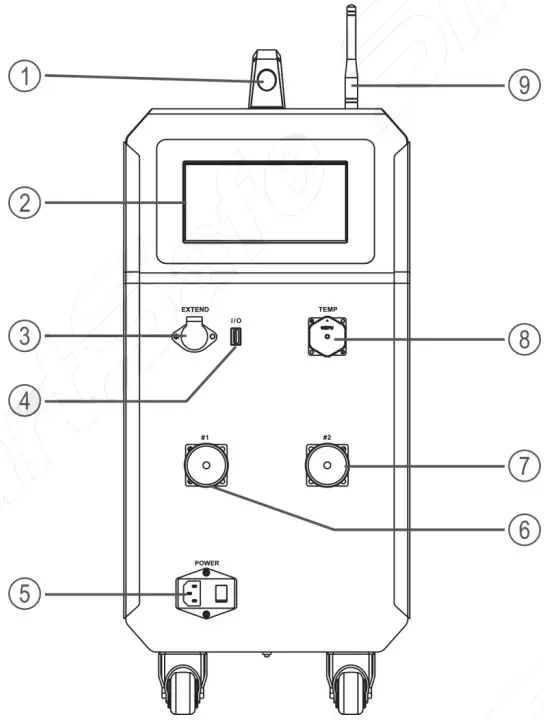
| No. | Name | Description |
| 1 | Handle | Easy to move the device |
| 2 | Display | 7-inch touch screen |
| 3 | Communication Port | RS485 extend port, reserved for functional expansion, need to be used with dedicated communication lines |
| 4 | USB Port | for data download and device system upgrades |
| 5 | AC input & Main Switch | Single Phase 90~265V AC input, max input 10A |
| 6 | 1# Equalization Unit Port | 26pin, equalization harness socket, max 12cells*2/unit |
| 7 | 2# Equalization Unit Port | 26pin, equalization harness socket, max 12cells*2/unit |
| 8 | Temp Acquisition Port | 24pin, temperature acquisition port |
| 9 | Antenna stick | to enhance the received signal |
4.2 Interface PIN Definition
1) 26PIN:Equalization port #1
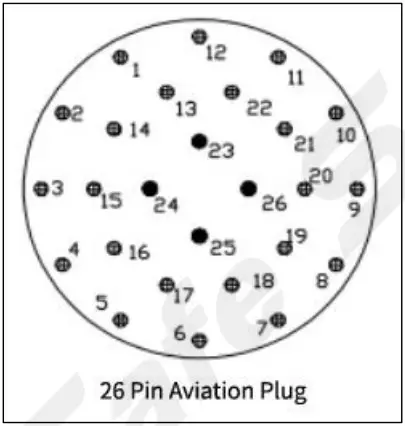
| Pin_SN | Description | Line Marker | Pin_SN | Definition | Line Marker |
| 1 | Cell #1 – | B1- | 14 | Cell #13 – | B13- |
| 2 | Cell #1 + | B1+ | 15 | Cell #13 + | B13+ |
| 3 | Cell #2 + | B2+ | 16 | Cell #14 + | B14+ |
| 4 | Cell #3 + | B3+ | 17 | Cell #15 + | B15+ |
| 5 | Cell #4 + | B4+ | 18 | Cell #16 + | B16+ |
| 6 | Cell #5# + | B5+ | 19 | Cell #17 + | B17+ |
| 7 | Cell #6 + | B6+ | 20 | Cell #18 + | B18+ |
| 8 | Cell #7 + | B7+ | 21 | Cell #19 + | B19+ |
| 9 | Cell #8 + | B8+ | 22 | Cell #20 + | B20+ |
| 10 | Cell #9 + | B9+ | 23 | Cell #21 + | B21+ |
| 11 | Cell #10 + | B10+ | 24 | Cell #22 + | B22+ |
| 12 | Cell #11 + | B11+ | 25 | Cell #23 + | B23+ |
| 13 | Cell #12 + | B12+ | 26 | Cell #24 + | B24+ |
2) 26PIN:Equalization port #2
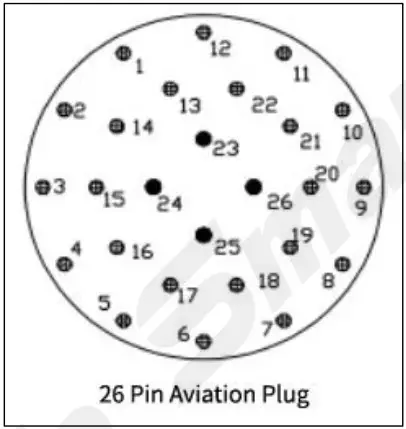
| Pin_SN | Definition | Line Marker | Pin_SN | Definition | Line Marker |
| 1 | Cell #1 – | B1- | 14 | Cell #13 – | B13- |
| 2 | Cell #1 + | B1+ | 15 | Cell #13 + | B13+ |
| 3 | Cell #2 + | B2+ | 16 | Cell #14 + | B14+ |
| 4 | Cell #3 + | B3+ | 17 | Cell #15 + | B15+ |
| 5 | Cell #4 + | B4+ | 18 | Cell #16 + | B16+ |
| 6 | Cell #5 + | B5+ | 19 | Cell #17 + | B17+ |
| 7 | Cell #6 + | B6+ | 20 | Cell #18 + | B18+ |
| 8 | Cell #7 + | B7+ | 21 | Cell #19 + | B19+ |
| 9 | Cell #8 + | B8+ | 22 | Cell #20 + | B20+ |
| 10 | Cell #9 + | B9+ | 23 | Cell #21 + | B21+ |
| 11 | Cell #10 + | B10+ | 24 | Cell #22 + | B22+ |
| 12 | Cell #11 + | B11+ | 25 | Cell #23 + | B23+ |
| 13 | Cell #12 + | B12+ | 26 | Cell #24 + | B24+ |
4.3 Main Unit Connection
Firstly connect the equalization bus-harness to the equalizing test socket of the balancer, then plug the equalization bus-harness and the equalization sub harness, and finally clamp the clamps of the equalization sub harness on the battery module under test in turn.
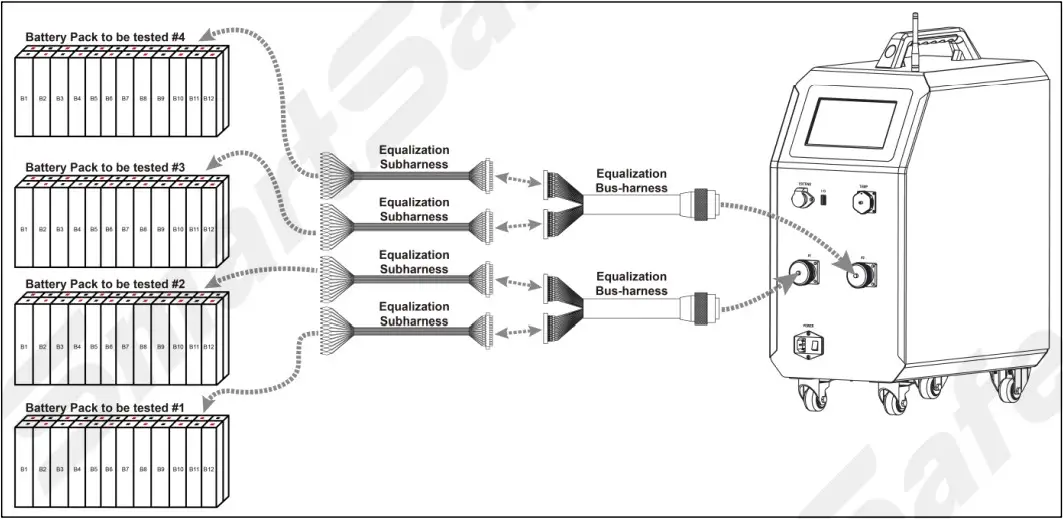
4.3.1 Equalization sub harness and Battery Pack Connection
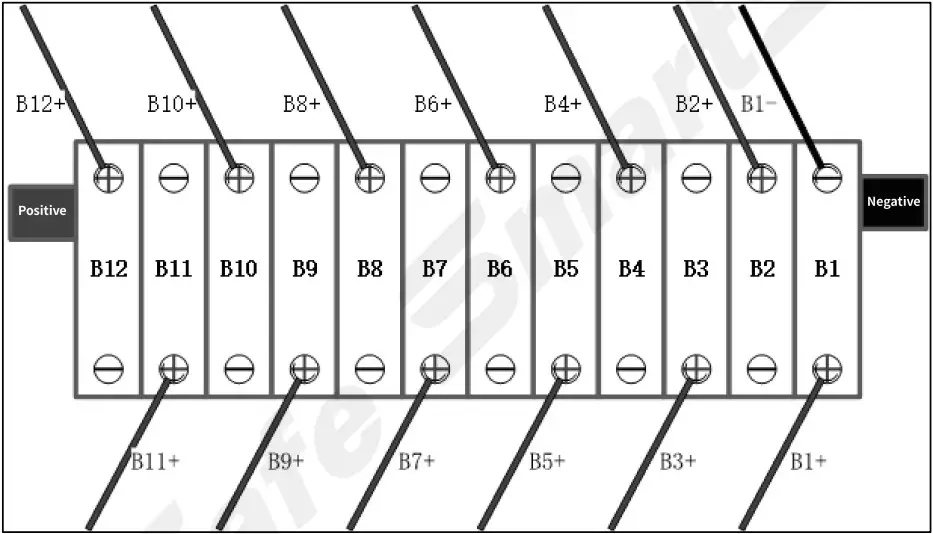
According to the wire label on the equalization sub harness, B1 – is connected to the negative electrode of No. 1 single cell (B1), B1 + is connected to the positive electrode of No. 1 single cell (B1), B2 + is connected to the positive electrode of No. 2 single cell (B2), and connected in sequence.
Note: the nearest to the negative terminal of the battery module is the No. 1 single cell.
4.3.2 Working Power Supply Connecting
Connect the power supply cord with the main unit AC socket, and please ensure AC power supply can support Single phase 90~265V AC Max 10Amp output.
4.4 Main Unit Operation
4.4.1 Welcome Screen

4.4.2 Main Menu
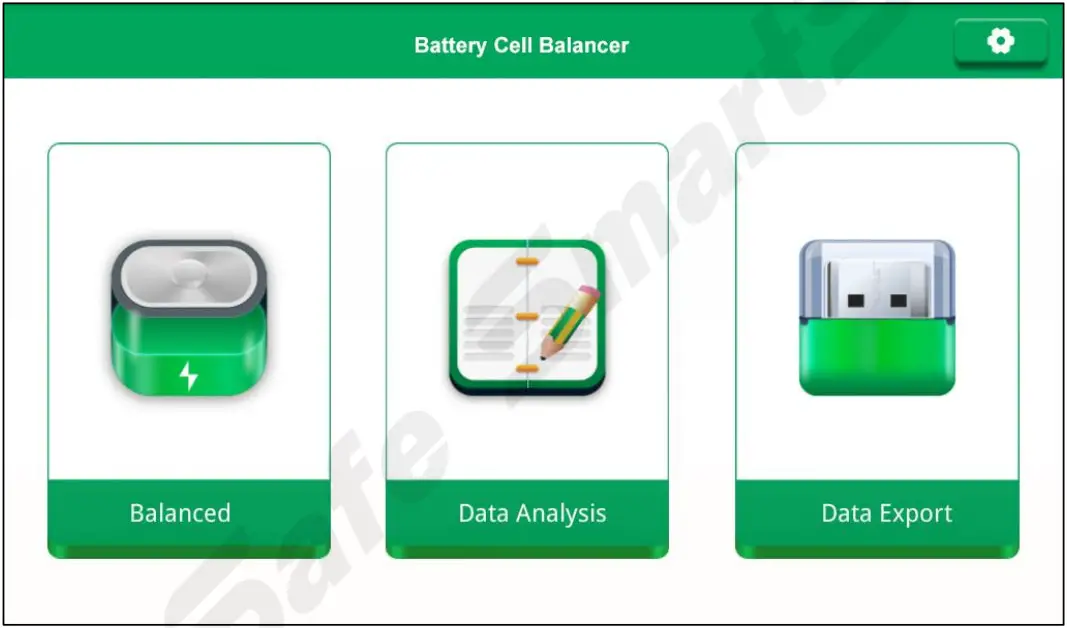
Click the function module on the main menu to enter the corresponding function operation interface.
4.4.3 General Settings
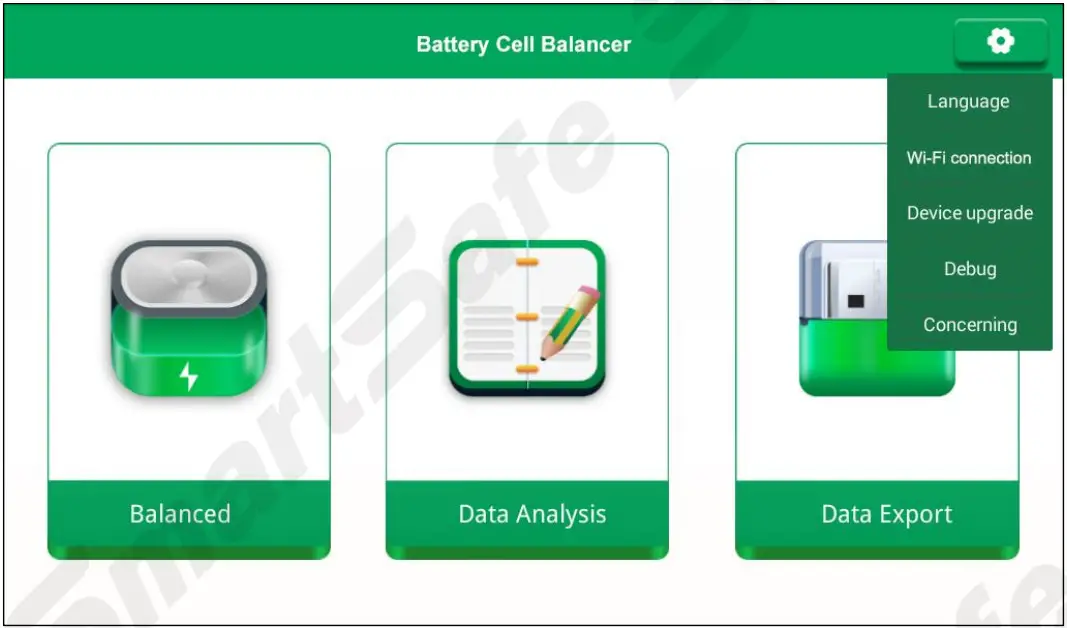
“System settings” mainly includes Language settings, Wi-Fi connection, Device upgrade, Debug and Concerning. Click the button in the upper right corner of the main interface, and select the options to be set or viewed in the expanded list.
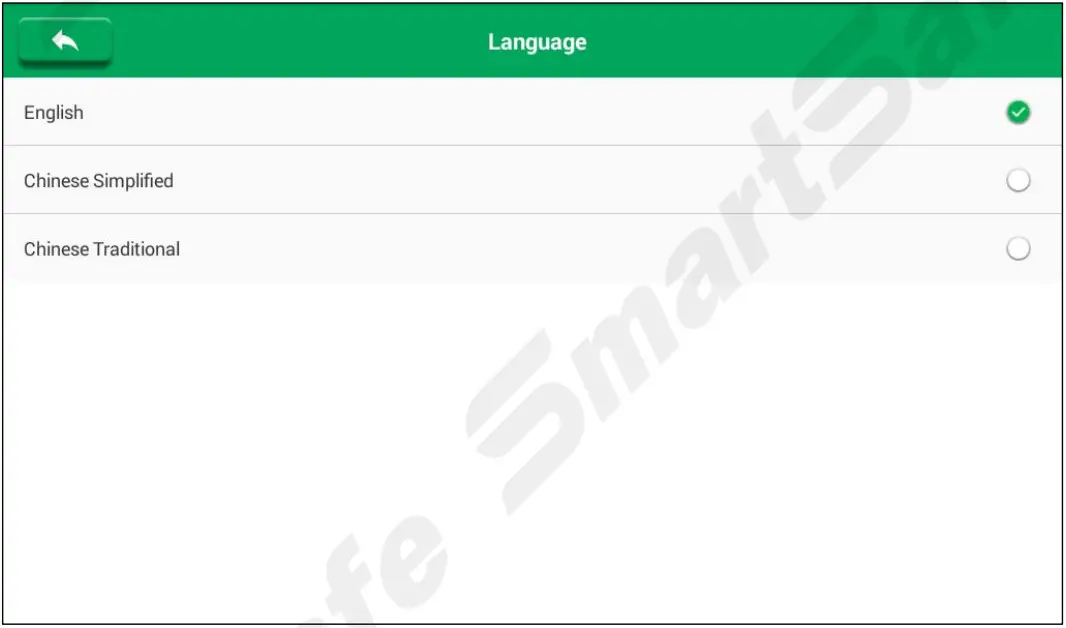
Language settings: Used to change the system language.
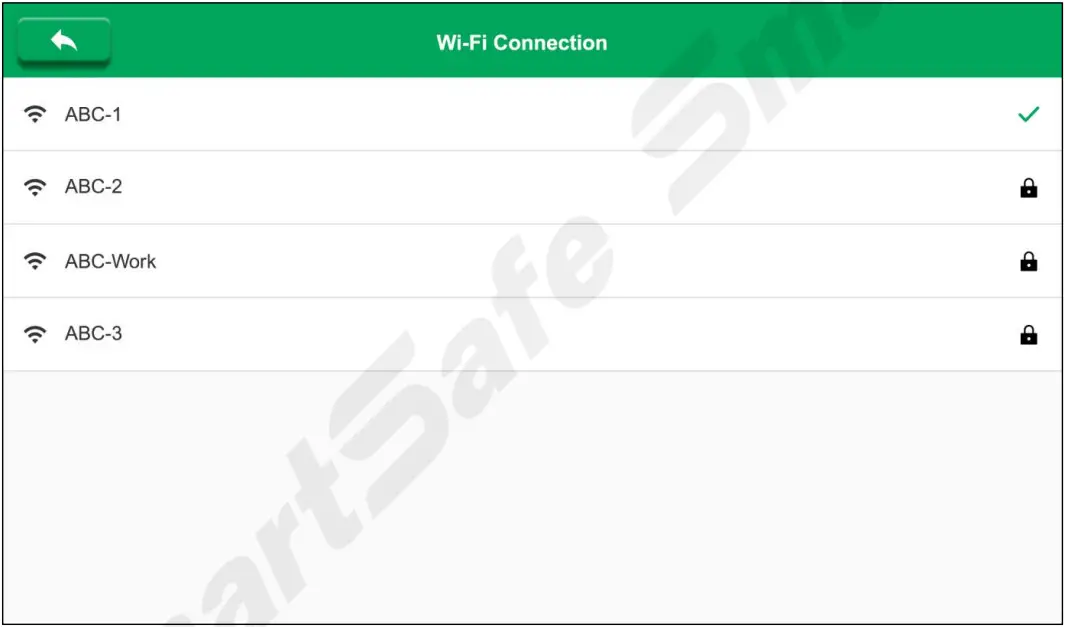
Wi-Fi connection: Used for Wi-Fi connection setting of the balancer.
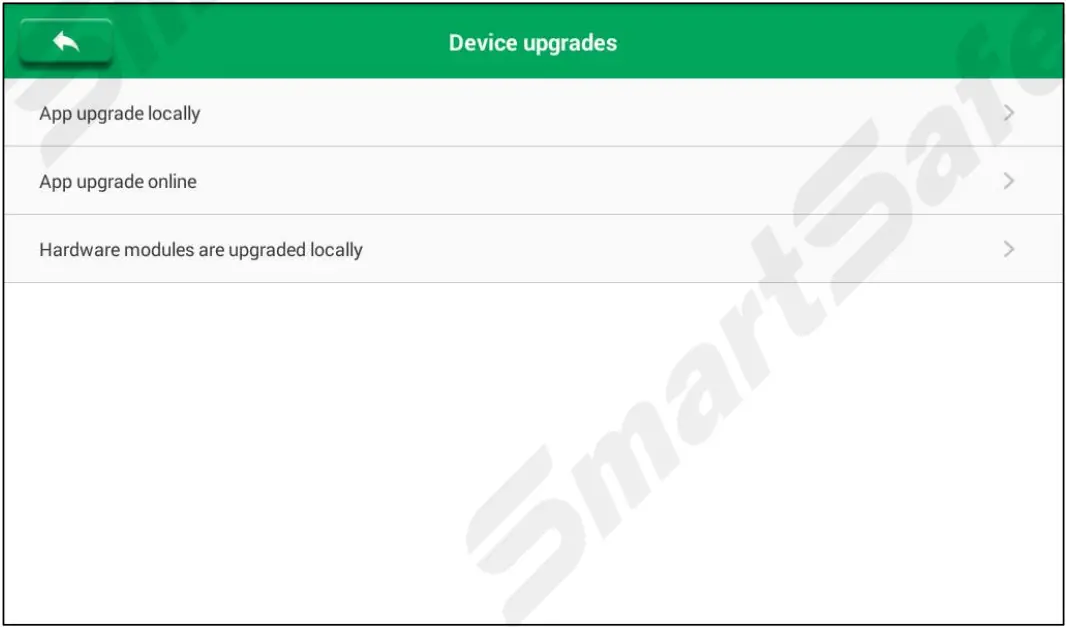
Device upgrade: Can use U disk for local upgrade, or choose upgrade online.
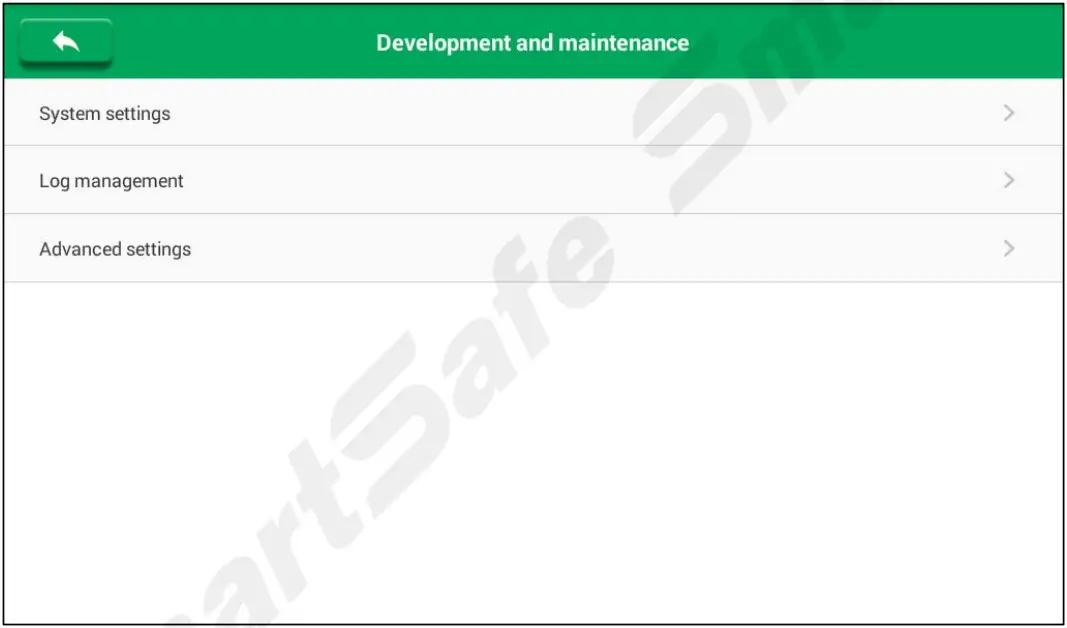
Debug: Only for development and maintenance.
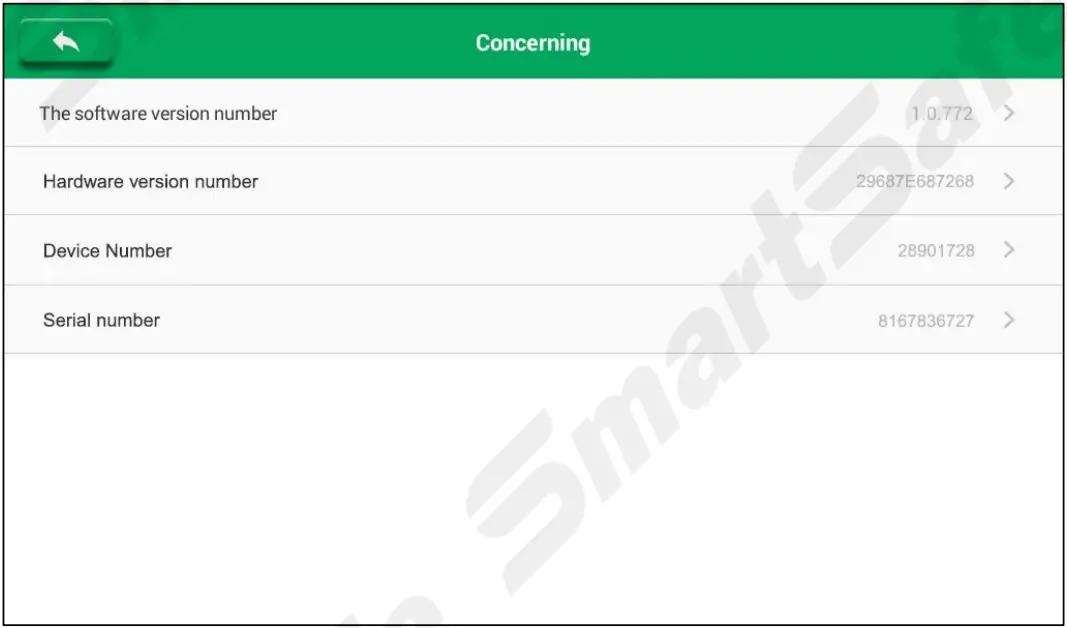
Concerning: Used to view information such as software and hardware version number, device number and serial number.
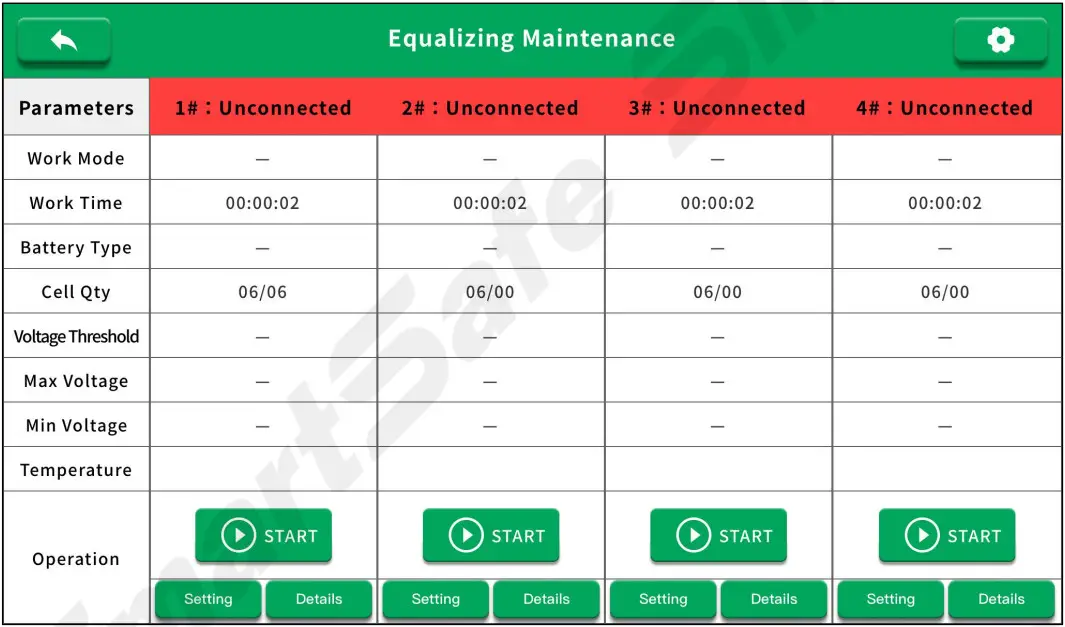
4.5 Equalizing Maintenance
Tap Balanced in the main interface to enter the following interface.
4.5.1 Equalizing Maintenance Setting
Tap the button in the upper right corner and select the option to be set in the expanded list.
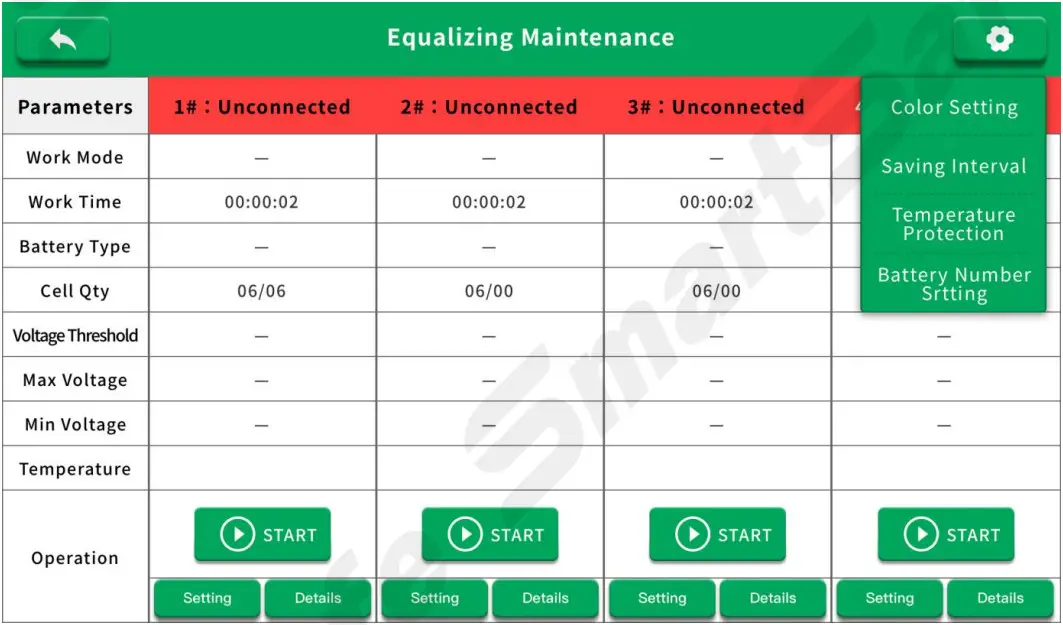
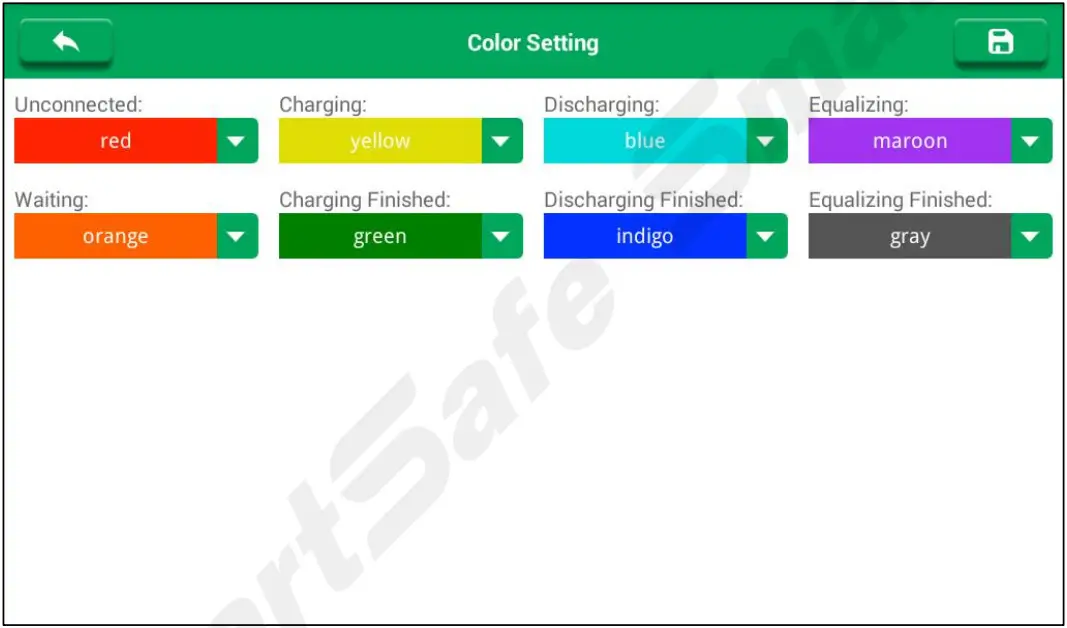
- Color Setting
Used to set the color display of the balancer in various working status.
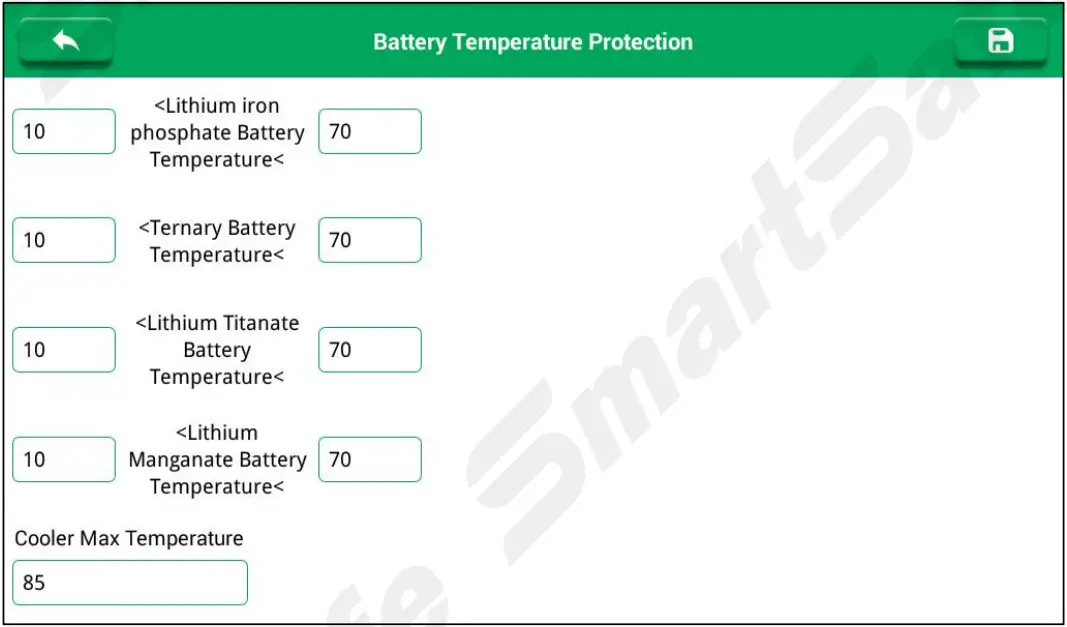
- Temperature Protection
Used to set the temperature protection high and low limit for different type of lithium battery packs and the balancer internal cooler. If the battery temperature exceeds the set range during the use of the equipment, it will stop working and pop up an alarm message.
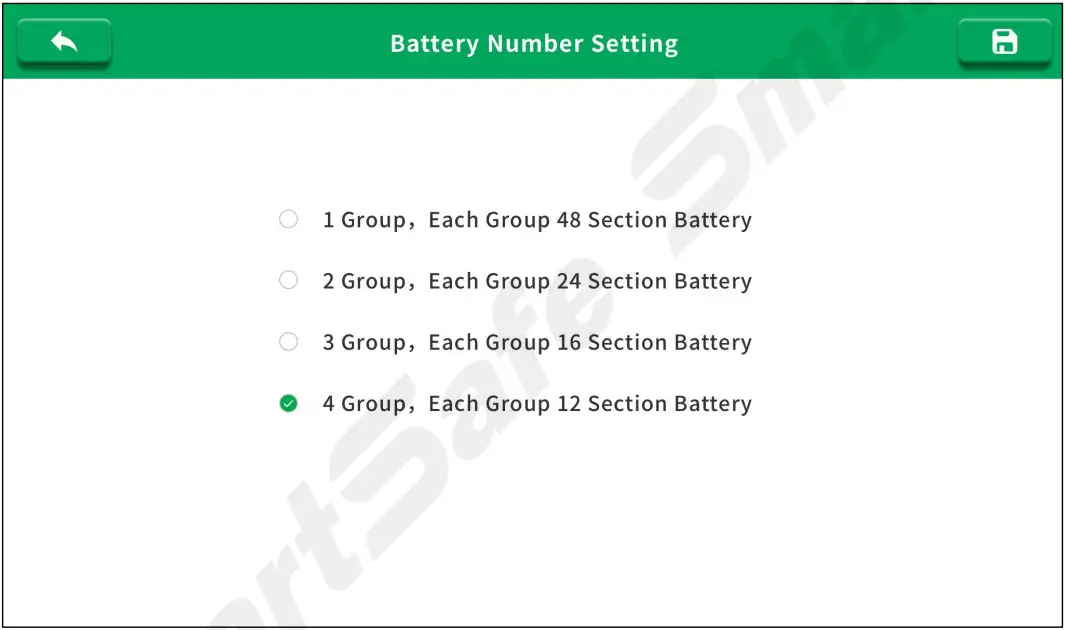
- Battery Number Setting
Used to adjust the number of cells in the battery pack.
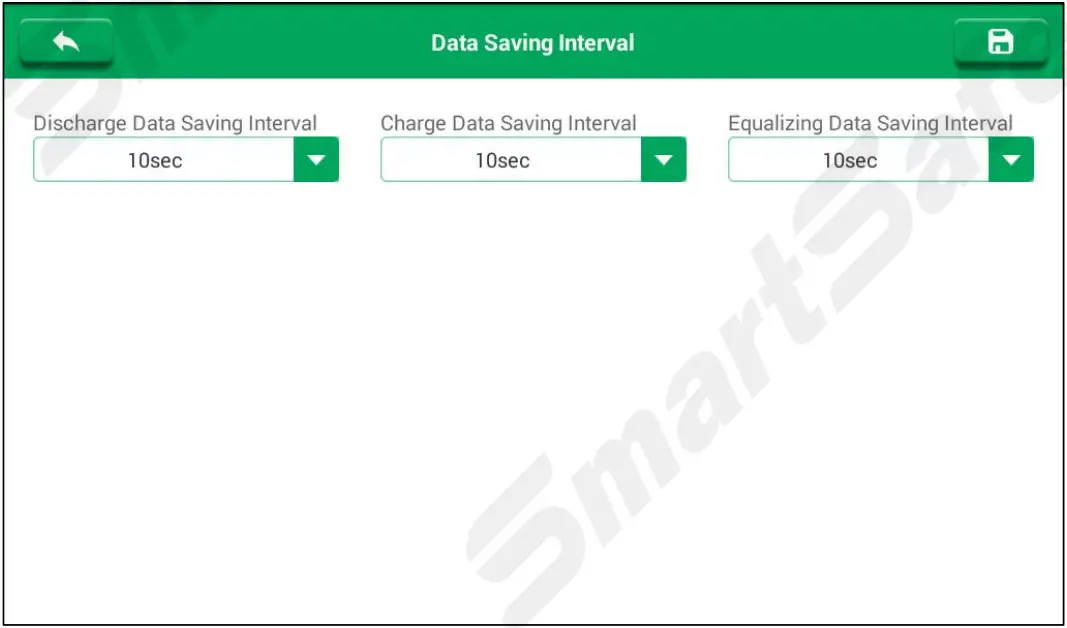
- Saving Interval
Used to set the data saving interval time of discharge, charge and equalizing.
4.5.2 Parameters
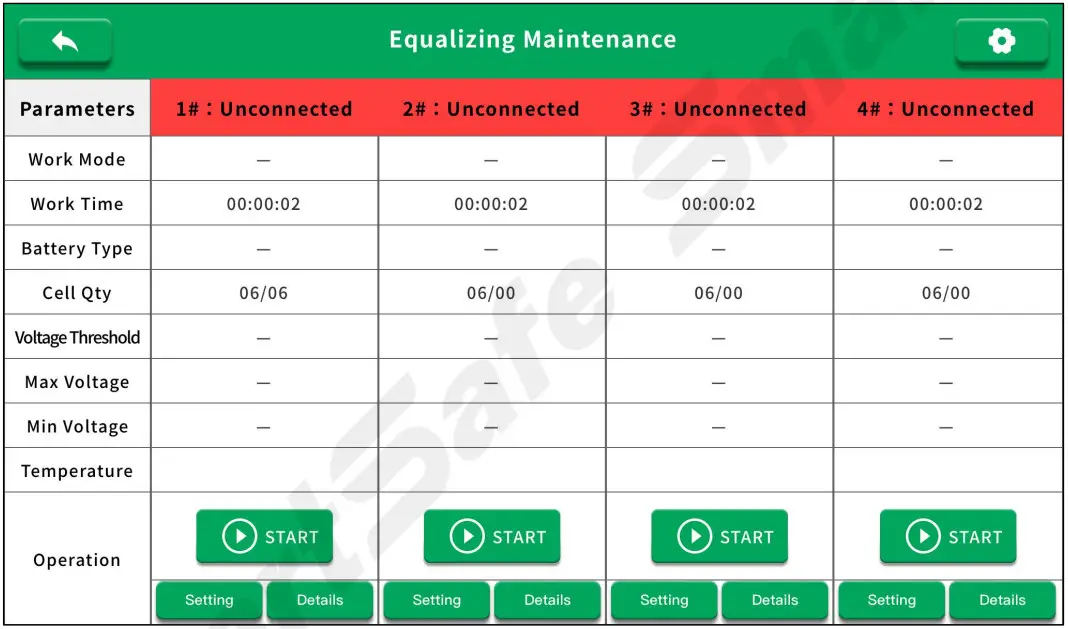
The balancer can maintain at most 4 groups of batteries, each with 12 batteries (subject to the number of connected batteries).
When power on, if the battery pack is connected correctly, the current status of the battery pack will be displayed after the battery pack number. If the battery pack is not connected or there is a connection failure, the display status is: unconnected.
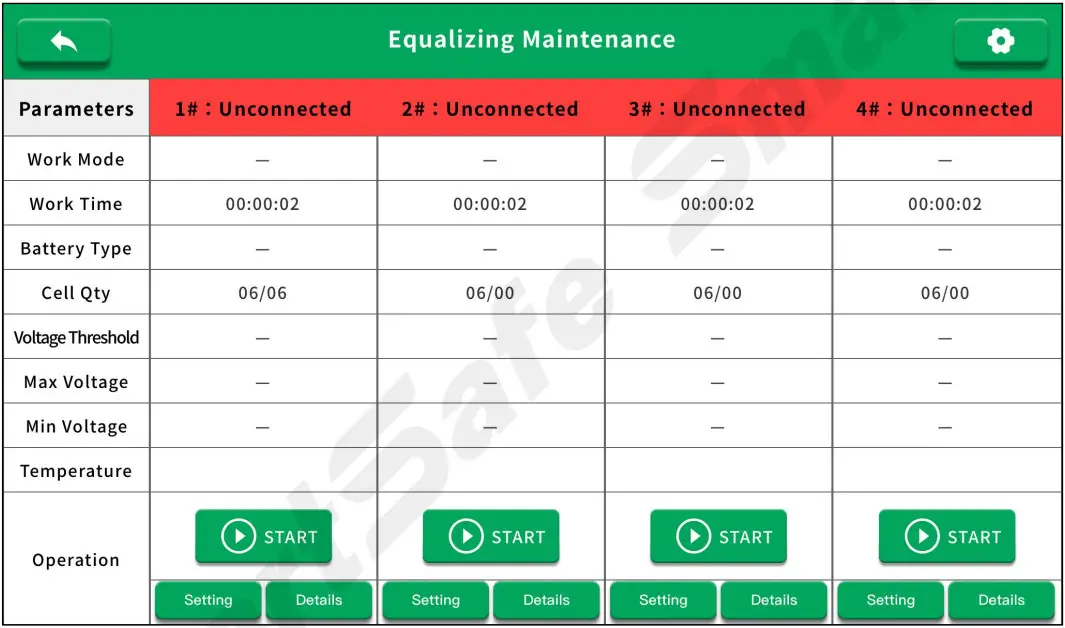
| Parameters | Parameter Description | Parameters | Parameter Description |
| Battery pack number and status | Display the battery pack number and the status of the battery pack. | Work Mode | Charge, discharge or equalizing |
| Work Time | Work time since test started. | Battery Types | The type of lithium battery pack. |
| Cell Qty | Cell quantity in a battery pack. | Voltage Threshold | The end voltage to terminate the testing. |
| Max Voltage | The max voltage in all cells. | Min Voltage | The min voltage in all cells. |
| Temperature | Max temperature measured in battery pack. | Operation | Start/stop discharge, charge or equalizing. |
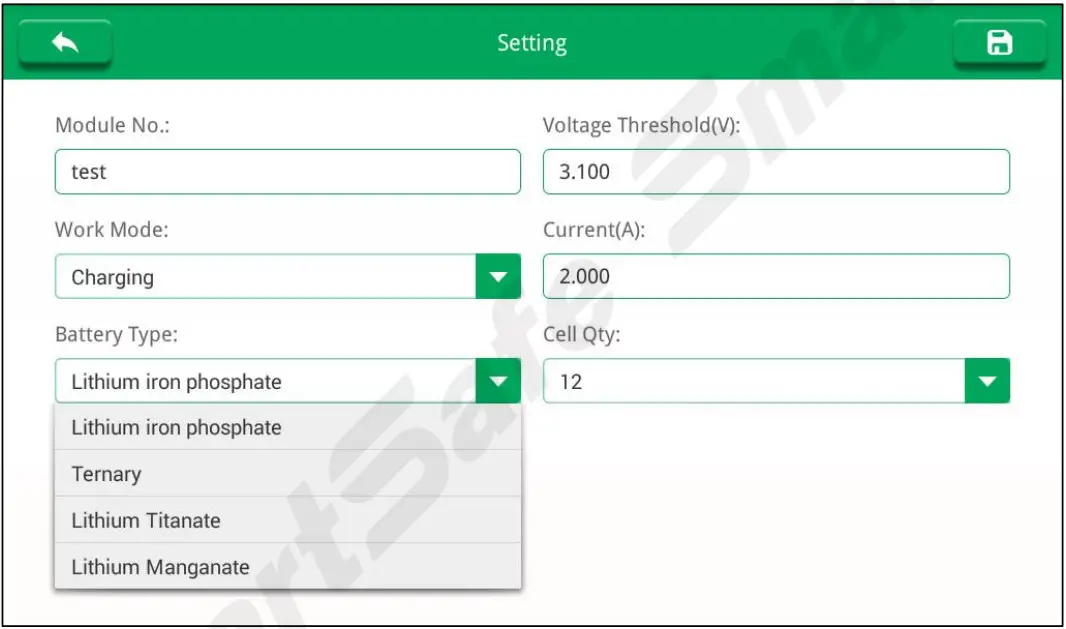
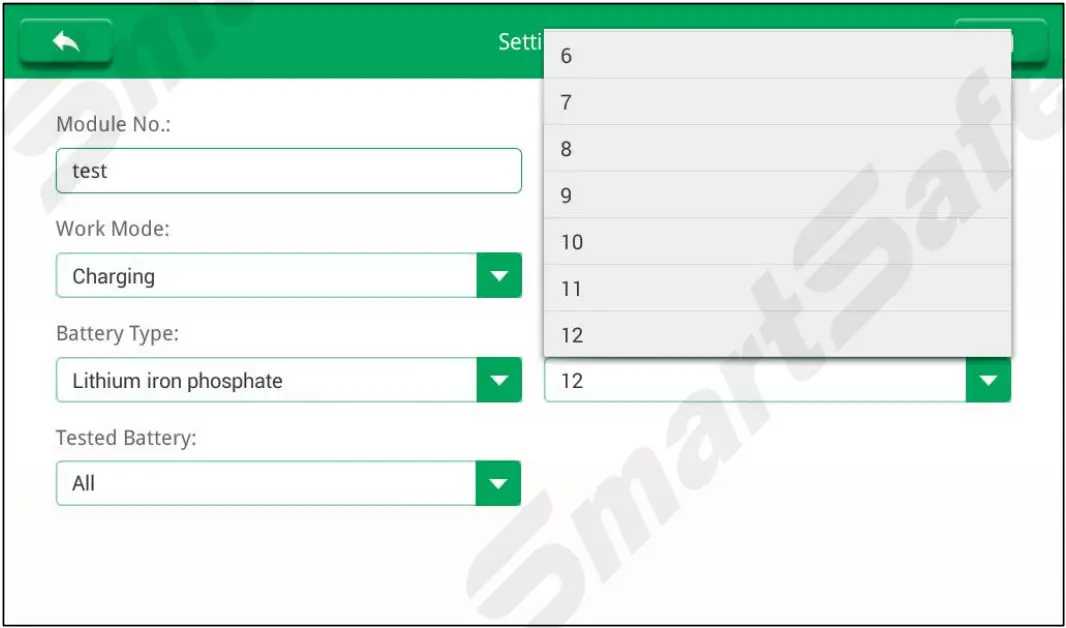
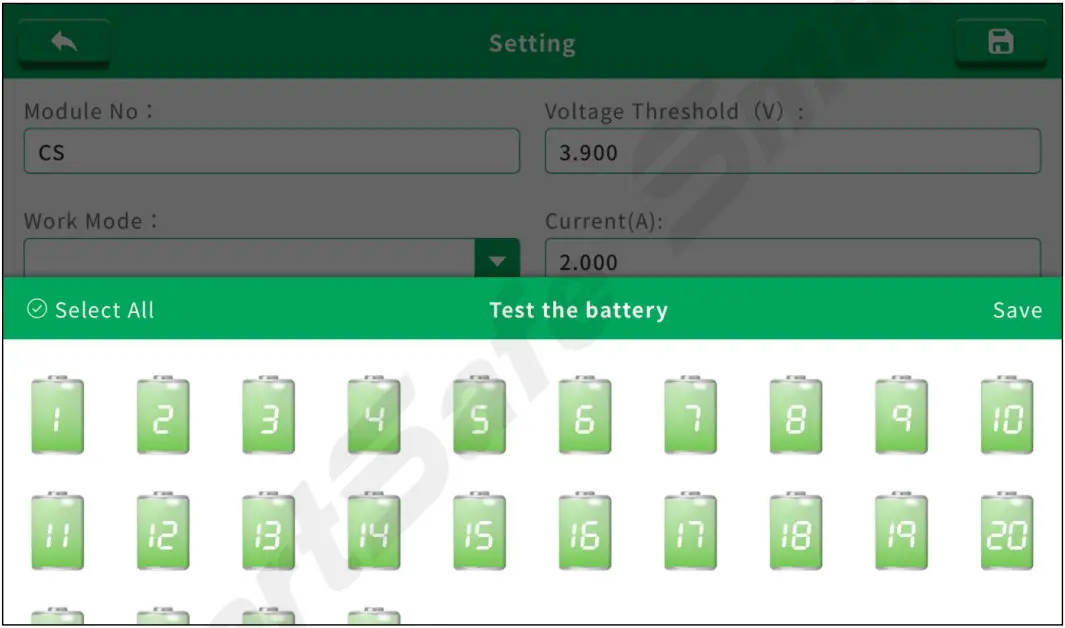
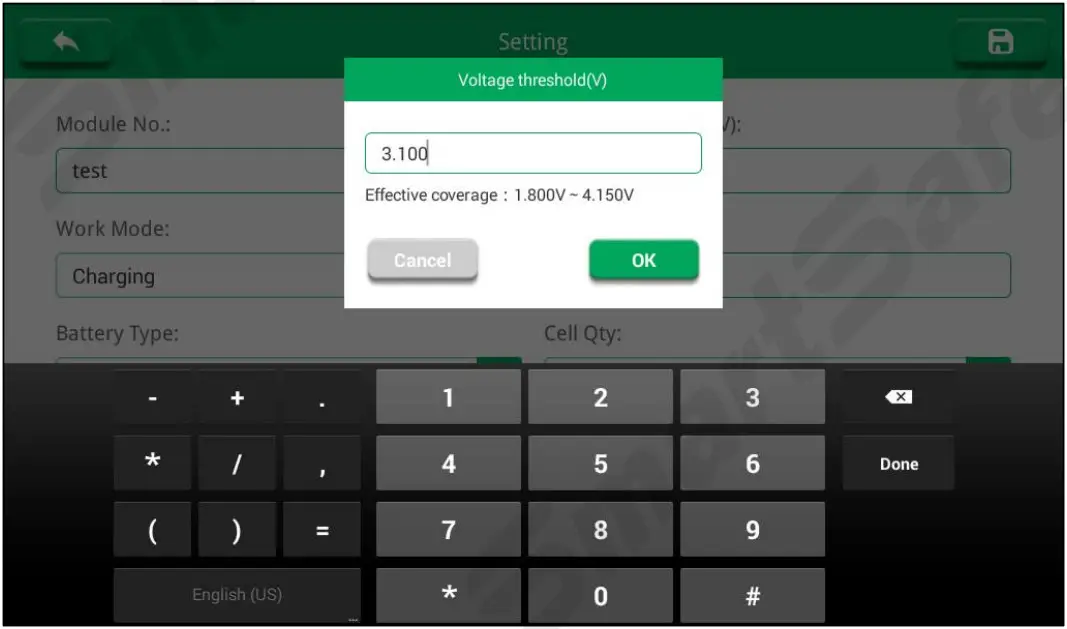
4.5.3 Battery Pack Settings
On the “Equalizing Maintenance” interface, tap Settings button below the battery pack to enter the corresponding setting interface for the battery pack.
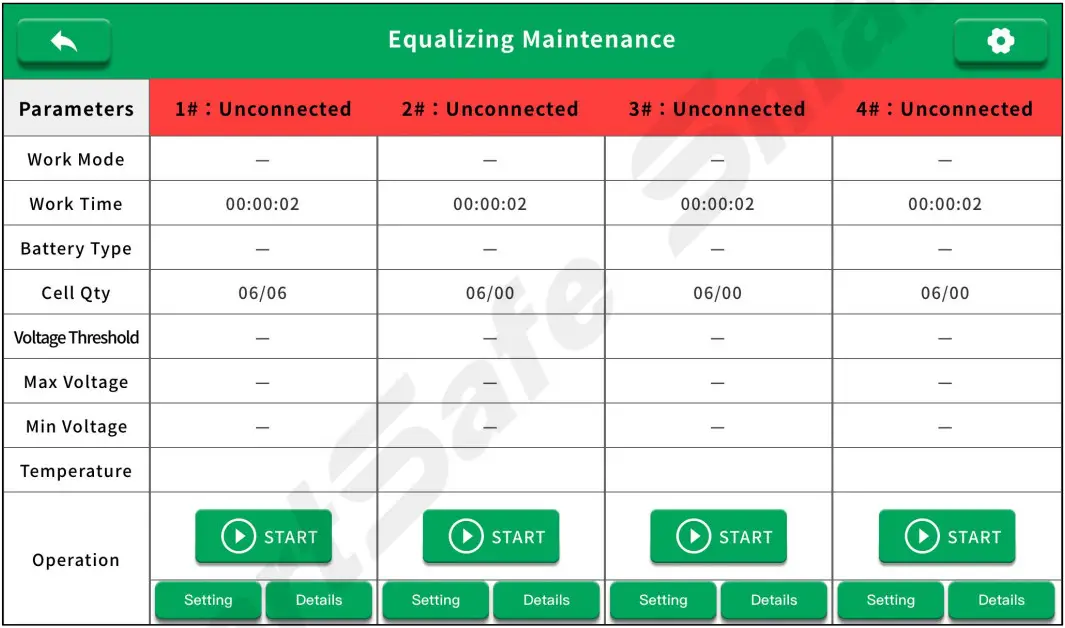
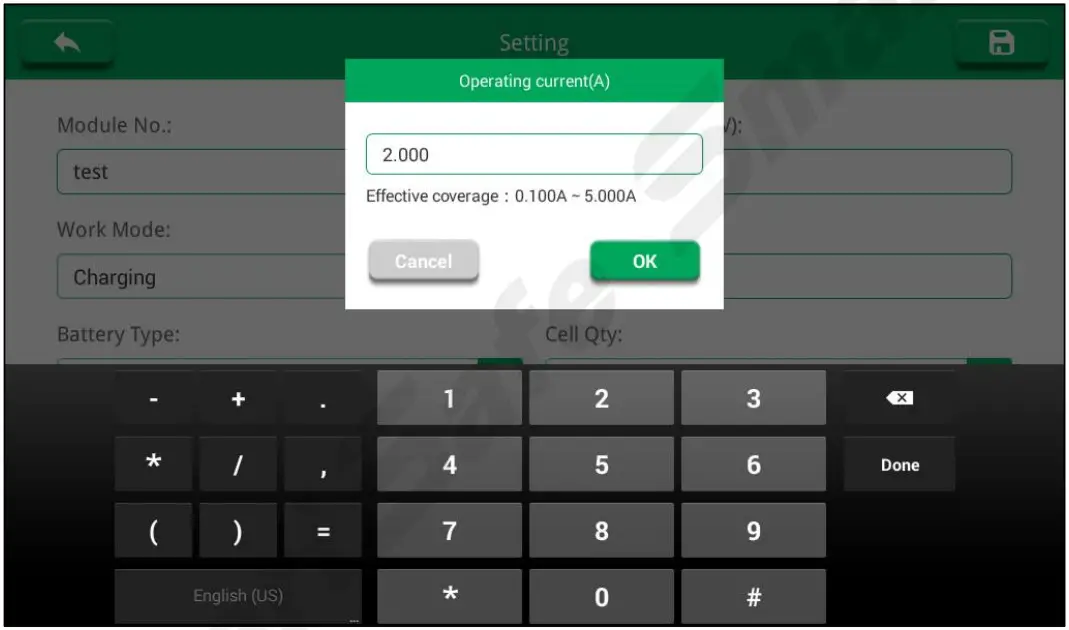
- Module No.: Enter the battery pack number or the corresponding information for testing to name it.
- Work Mode: Click the drop-down menu to select the corresponding work mode (charge, discharge or equalizing).

- Battery Type: Click the drop-down menu to select the appropriate lithium battery pack.

- Cell Qty: Click the drop-down menu to select the corresponding cell number of the test battery pack.

- Test the Battery: Click Select All to select all batteries; deselect all, then click the battery that requiring to be tested.

- Voltage Threshold: Input the end voltage to terminate the testing.

- Operating Current: Input the max discharge or charge current.

- click
 to save the adjustment, and click
 back to the testing interface.
 to save the adjustment, and click
 back to the testing interface.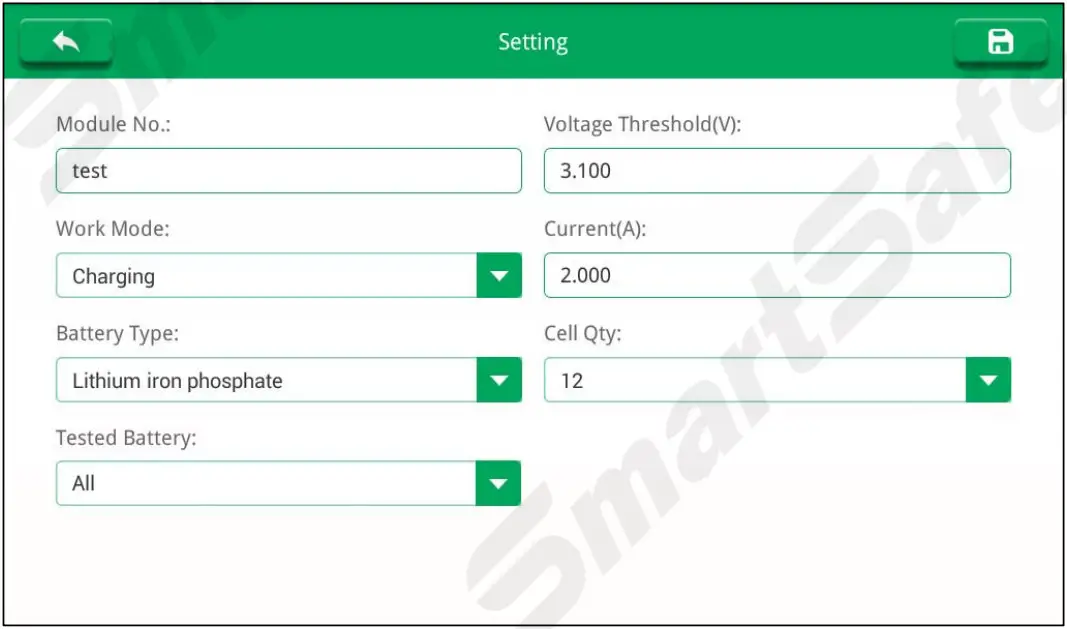
4.5.4 Start the Test
- On the “Equalizing Maintenance” interface, tap Start button to start the test.

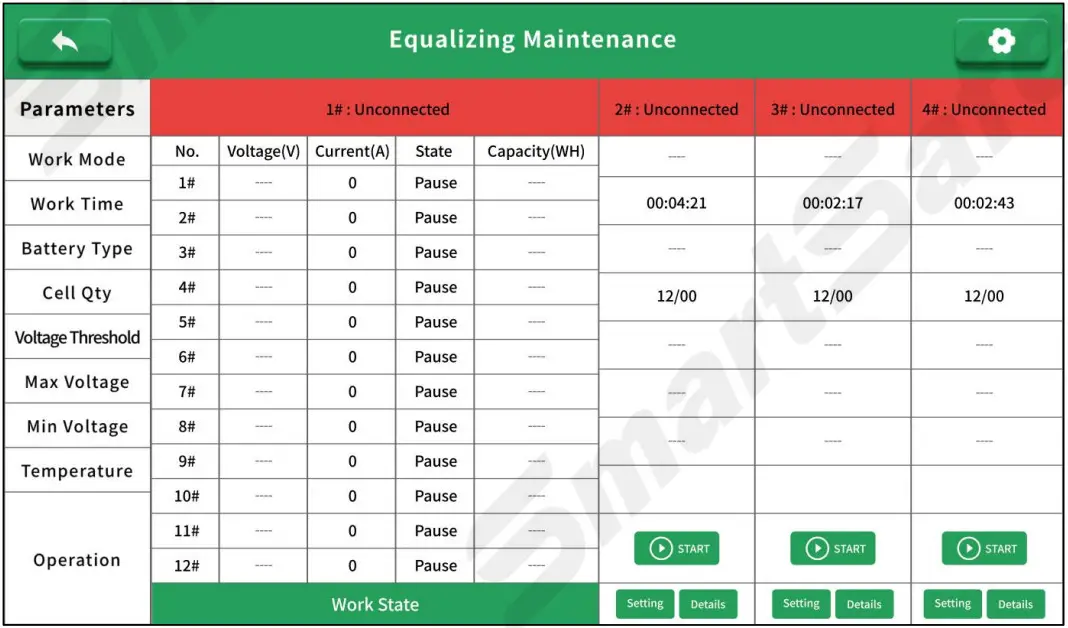
- Tap Details to view parameters such as cell voltage, working current, working status, test duration, and capacity of the corresponding test battery pack.

- Equalizing Finished Conditions:
– When the cell voltage reach the voltage threshold, and current is less than 0.2A over 3 mins, the unit will display Finished on this cell channel.
– All working cell channels display ‘Finished’, the whole equalizing is complete.
4.6 Data Analysis
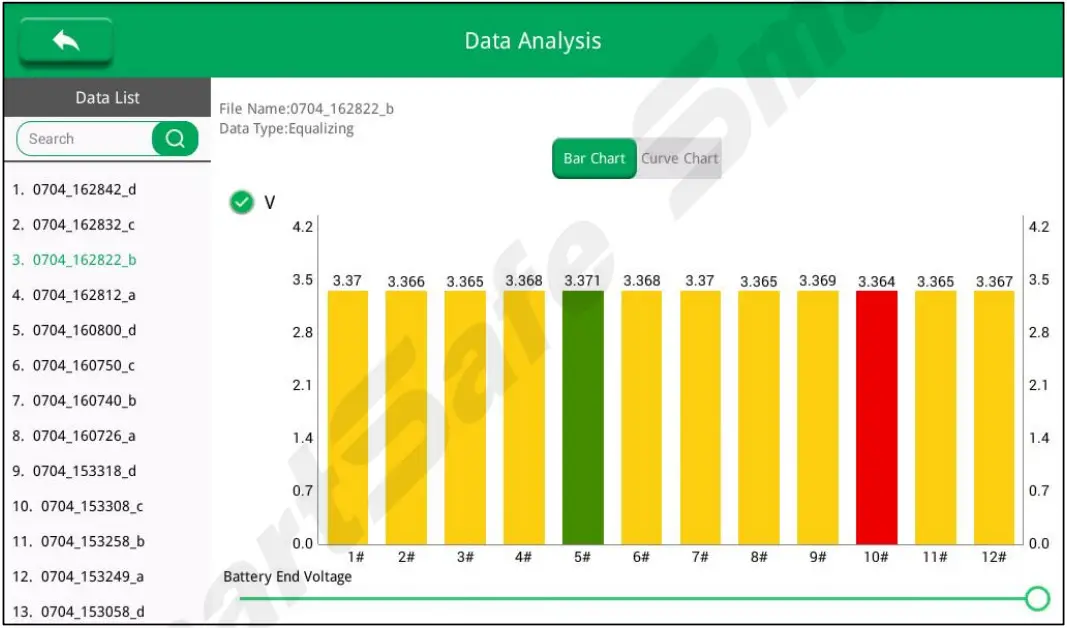
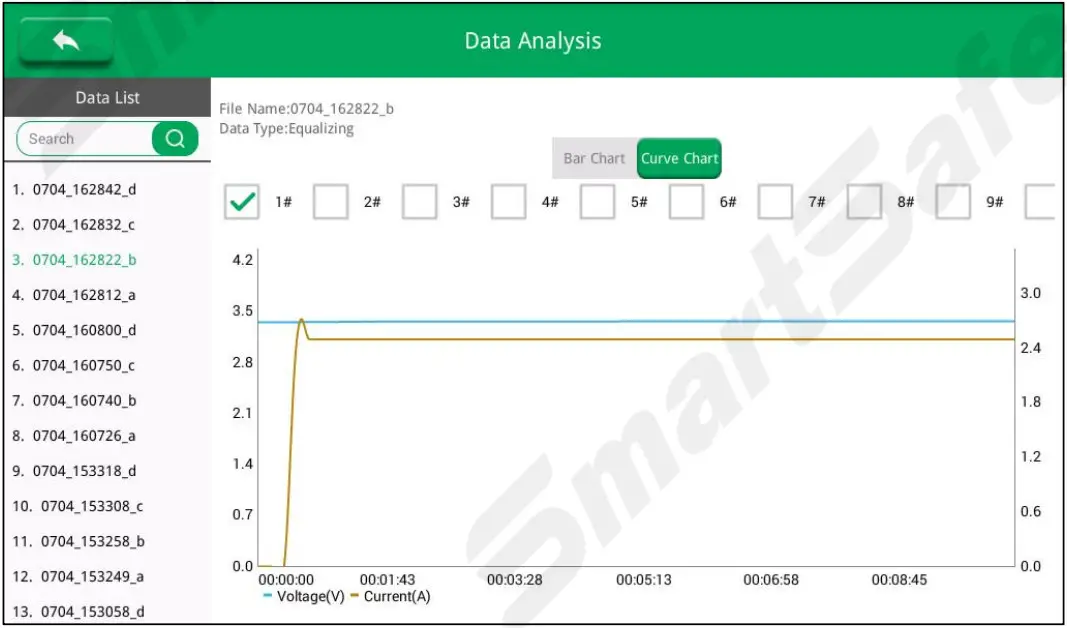
After the test is completed, the test data is displayed in column chart or curve mode.
Tap Bar Chart, the test data voltage is displayed as a bar graph.
Tap Curve Chart to test the data voltage and display it as a curve graph.
4.7 Data Export
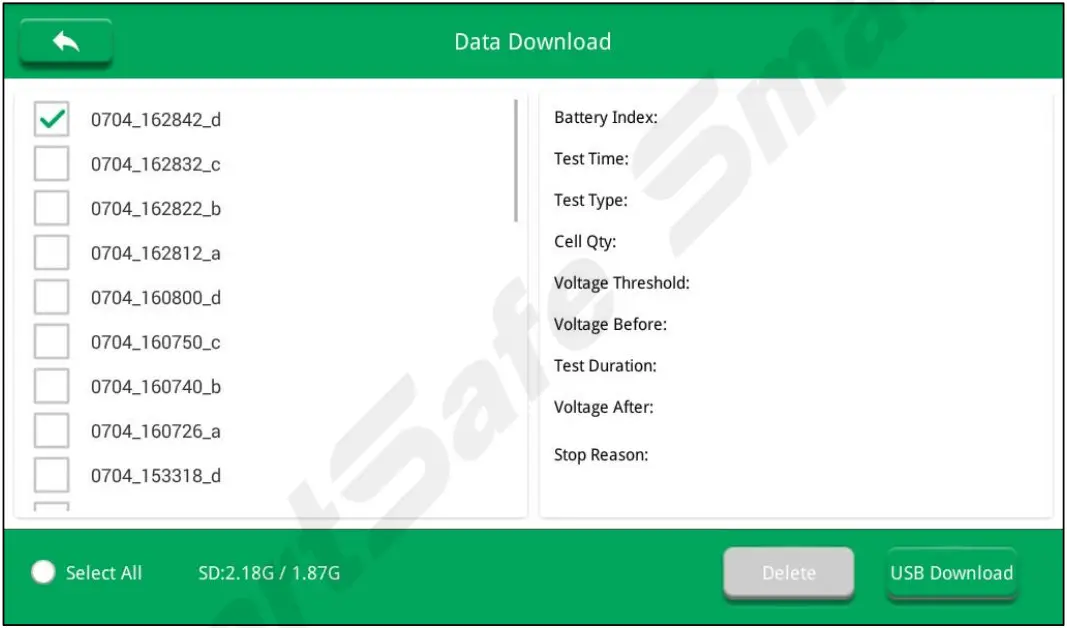
Test data can be transferred to U disk. On the main interface, tap Data Export to enter the data export interface, click the data to be transferred, insert a U disk and tap USB Download, the data will be stored in the U disk in Excel format.
Fault Analysis and Troubleshooting
| No. | Fault Situation | Troubleshooting Methods |
| 1 | Main unit temperature is too high | Confirm the placement of the device, pay attention to ventilation, heat flow. |
| 2 | Internal memory insufficient | Periodically transfer data files to USB disk and delete some files to release the space |
| 3 | USB Error | Check the free space in USB disk |
Transport & Storage
- This balancer is equipped with special equipment box for packing, which is has anti-vibration and reliable for transportation.
- Storage conditions: dry storage room, temperature: -20~70℃, Humidity: 95%Within.
Environmental Protection and Others
- The outer carton of this equipment is made of recyclable material.
- The main unit and other components are non pollution sources.
Warranty
THIS WARRANTY IS EXPRESSLY LIMITED TO PERSONS WHO PURCHASE SMARTSAFE PRODUCTS FOR PURPOSES OF RESALE OR USE IN THE ORDINARY COURSE OF THE BUYER’S BUSINESS.
SMARTSAFE electronic product is warranted against defects in materials and workmanship for one year from date of delivery to the user.
This warranty does not cover any part that has been abused, altered, used for a purpose other than for which it was intended, or used in a manner inconsistent with instructions regarding use. The exclusive remedy for any automotive meter found to be defective is repair or replacement, and SMARTSAFE shall not be liable for any consequential or incidental damages.
Final determination of defects shall be made by SMARTSAFE in accordance with procedures established by SMARTSAFE. No agent, employee, or representative of SMARTSAFE has any authority to bind SMARTSAFE to any affirmation, representation, or warranty concerning SMARTSAFE automotive meters, except as stated herein.
Disclaimer
The above warranty is in lieu of any other warranty, expressed or implied, including any warranty of merchantability or fitness for a particular purpose.
Purchase Order
Replaceable and optional parts can be ordered directly from your SMARTSAFE authorized dealer. Your order should include the following information:
- Order quantity
- Part number
- Part name
Statement:
SMARTSAFE reserves the rights to make any change to product designs and specifications without notice. The actual object may differ a little from the descriptions in the manual in physical appearance, color and configuration. We have tried our best to make the descriptions and illustrations in the manual as accurate as possible, and defects are inevitable, if you have any question, please contact local dealer or after-sale service center of SMARTSAFE, SMARTSAFE does not bear any responsibility arising from misunderstandings.
 ADAS Calibrations, Wheel Alignment Tools, Car Diagnostic Tools, Injector Cleaning