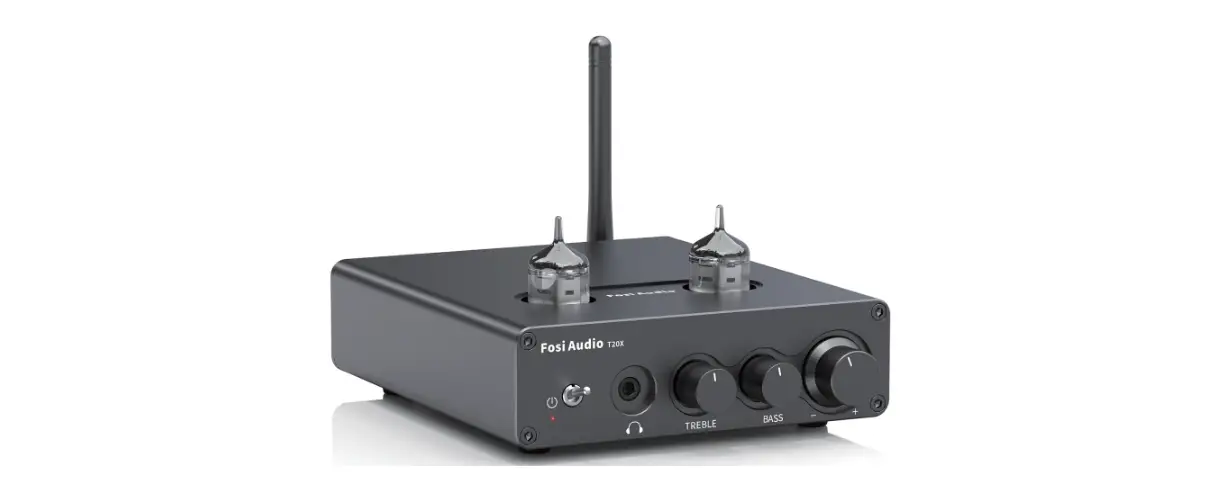

Fosi Audio T20X User Manual
Thanks for choosing us
Product Specifications
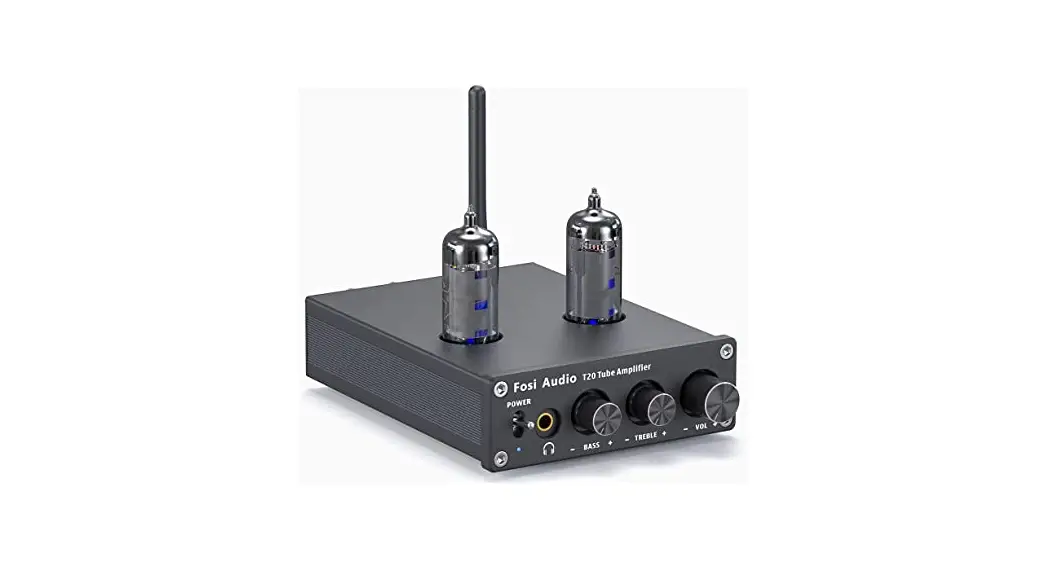
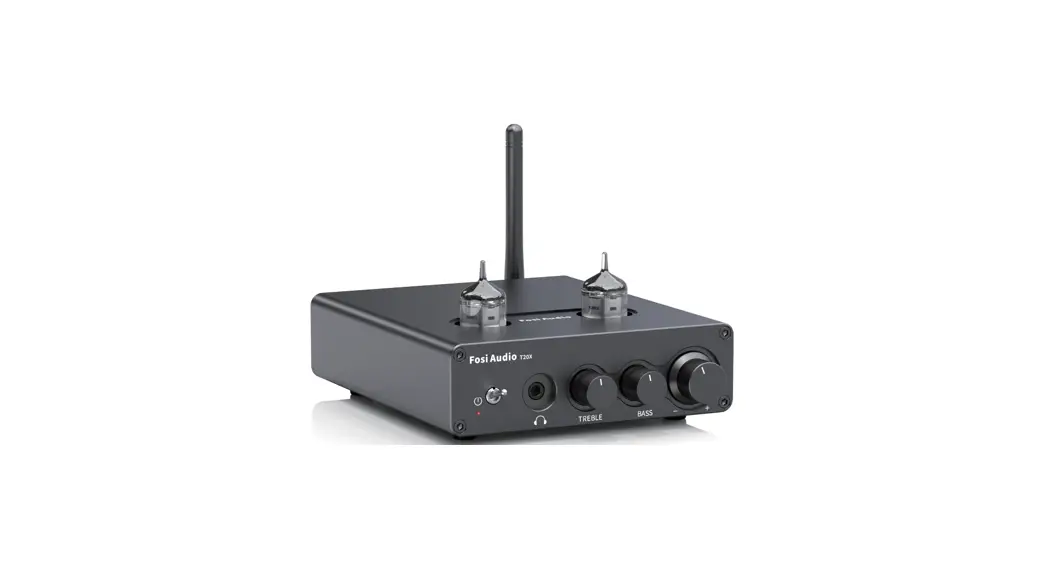
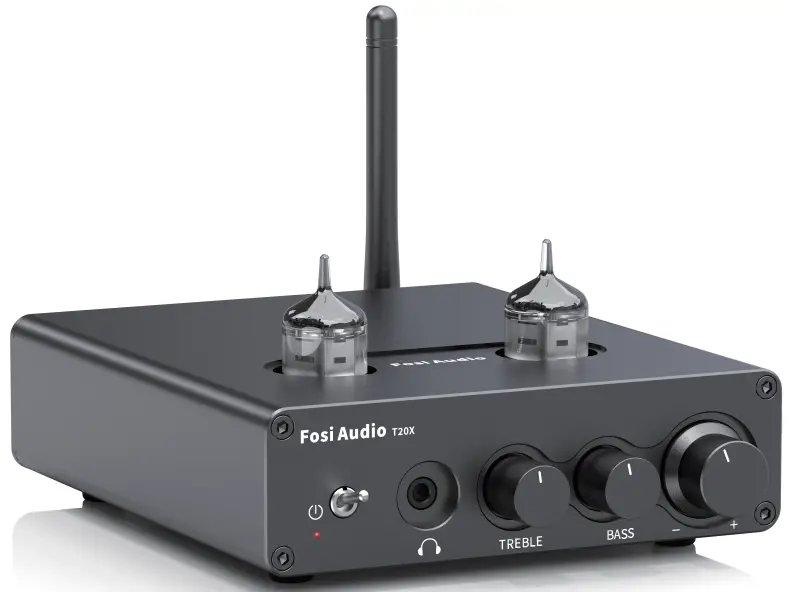
Thanks again so much for your purchase! This is a creative audio amplifier for you, it combines the beauty of traditional vacuum tubes and the power of digital amplifiers. It has a BASS & Treble adjustable function and supports audio output through a passive speaker or 3.5mm headphones. And the vacuum tubes are also replaceable as you like, it is a fantastic amplifier that suits your personal PC or your home theater in your living room. Bring joy and happiness to your smarter life!
| Power Adapter: | 24V/4.5A |
| DC Input Range: | 12V – 30V |
| Terminating Impedance: | 2 0 – 8 0 |
| Max Power Output: | 100W x 2@40 |
| THD: | 0.3% |
| SNR: | ? 86dB |
| Amplifier Chip: | TPA3221 |
| Input Sensitivity: | 650mV |
| Frequency Range: | 20Hz – 20kHz (±1 dB) |
| Input Mode: | Bluetooth and AUX |
| Bluetooth Transmission Distance: | Up to 28ft(10m) |
Product Overview & Control Functions
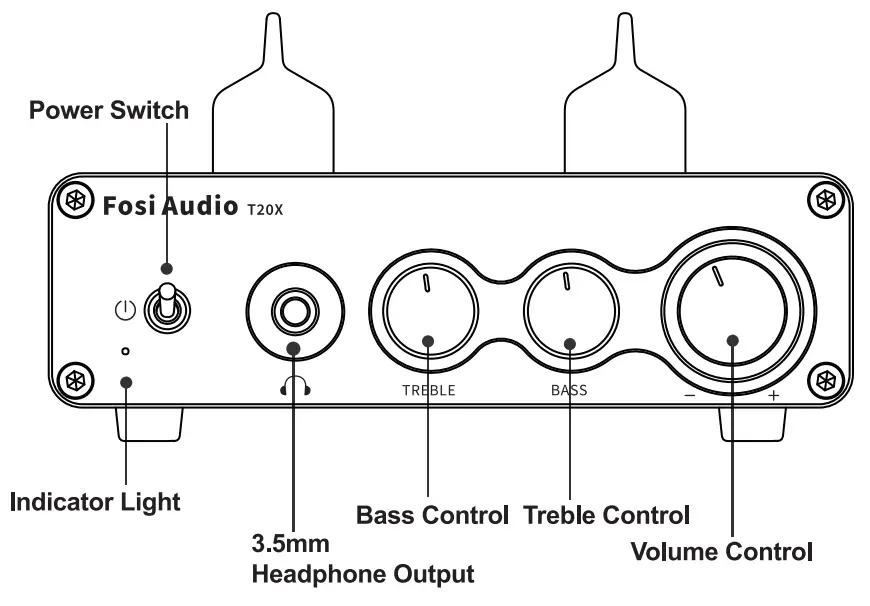
Front Panel
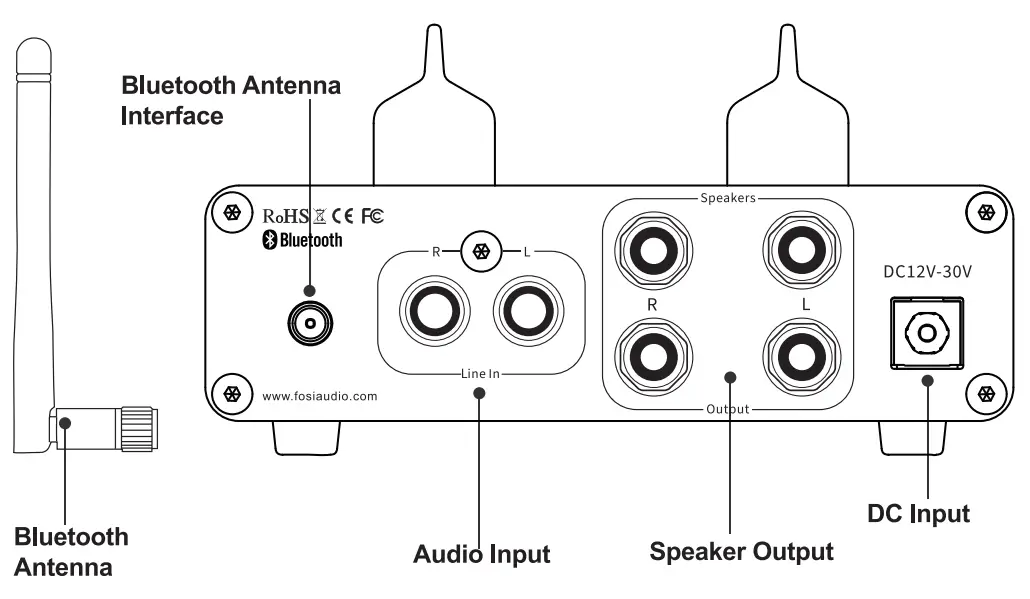
Back Panel
Package Contents
T2OX Tube Amplifierl Vacuum Tubes*2 Bluetooth Antenna*1 24V/4.5A Power Adapterl User Manual*1
Quick Setup
Preparation
Prepare 1: T20X, 24V power supply, passive speakers, speaker wires or banana plugs;
Prepare 2: Insert the tube carefully and make sure that all pins are fully inserted.
Prepare 3: • Connect the T20X to the passive speakers via the speaker wires, you can connect the speaker’s wire via the bare wire or the banana plugs;
• Or Connect a wired headset to the Headphone Output on the front panel of the T20X.
Prepare 4: Connect the 24V power supply to the DC input;
Prepare 5: Turn on the Power Switch.
Note: Before turning on the power switch of the amplifier, please turn the volume button to the lowest position.
Note: Be sure that the power switch is in the OFF position before connecting the power supply. Please turn on the T2OX first and then turn on the speakers to avoid noise.
How to connect the speaker wire?
Methodl : Bare wire connection illustration
- Release the horn terminals block terminals;
- Insert the two ends of the speaker wire into the amplifier and speaker terminal holes
- Tighten the horn terminals;
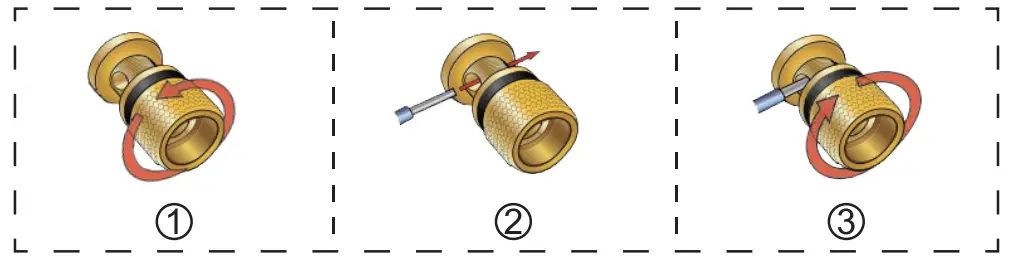
Note: Please make sure that the speakers’ wires are not attached to each other, the speaker connection area is very narrow, it is easy to cause the positive and negative speakers’ wires to contact each other, which will result in no sound output.
Method 2: Banana plugs connection illustration
- Release the banana jacket;
- Loosen the screw;
- Insertion speaker wire and tighten the screw;
- Tighten the banana jacket;
- Insert the banana plug into the horn terminals of the speaker and amplifier.
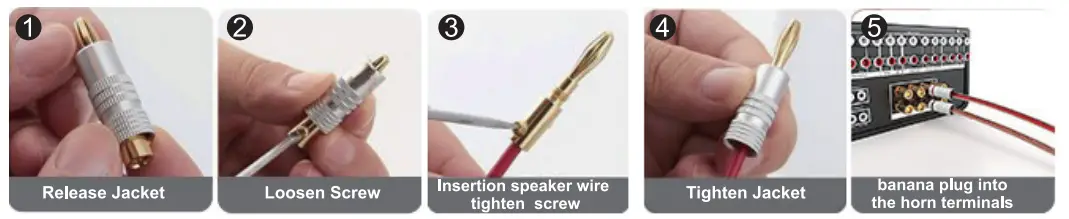
Note: Please make sure that the speakers’ wires are not attached to each other, the speaker connection area is very narrow, it is easy to cause the positive and negative speakers’ wires to contact each other, which will result in no sound output.
Bluetooth Input Prepare your Bluetooth device (take a phone as an example)
Step 1: Install the Bluetooth antenna.
Step 2: Turn on the Bluetooth on your phone and search “Fosi Audio T2OX”, the indicator stays blue after a successful pairing.
Step 3: Open the audio application, play, and enjoy!
AUX Input
Prepare an audio source (take TV as an example), an RCA cable, or a 3.5mm AUX to RCA cable.
Step 1: Connect your TV to “Audio Input” via an RCA cable;
Step 2: Open your TV, play, and enjoy!
Troubleshooting/QA
– Fosi Audio Amplifiers work great with any 2-8 ohms passive speakers.
– You can connect passive speakers via the Speaker Output or active speakers via the Headphone Output.
– As the turntables do not have a built-in preamp, you need to add an external phono preamp before connecting T20X, such as our BOX Xl, or BOX X2.
– As for the turntables which have a built-in preamp, you need to switch the preamp on before connecting T20X.
– As the turntables do not have a built-in preamp, you need to add an external phono preamp before connecting T20X, such as our BOX Xl, or BOX X2.
– As for the turntables which have a built-in preamp, the switch must be set to LINE before connecting T20X.
– Please make sure all the cables are completely pushed into the devices, the incomplete connection will cause this cracking.
– Please remove all the inputs then check whether the cracking noise disappears or not, the cracking may be from the audio source or input cables.
– If you are not using the original factory standard power supply, please replace the power supply before testing. Many power supplies in the market has large interference coefficients, which will cause a lot of current sounds.
– Please check if the vacuum tube is completely plugged in, and try to change the left and right vacuum tubes.
– Make sure that T2OX is powered on.
– Make sure that T2OX is not paired with other devices.
– Make sure that the distance between your device and T2OX is not too long.
– Make sure there are no barriers between your device and T20X, barriers will affect the Bluetooth operation distance.
– Please reconnect the power supply to the T20X, and move the T2OX to another room to have a try.
– Restart the T2OX and then try to connect again, and try to use another Bluetooth device.
– Please try with another Bluetooth device.
– Make sure there is no interference from other electronic devices between the T2OX and the audio source.
– Place your device close to the T20X, and plug in the power adapter again.
– This is the class D amplifier, it will cost very low power when it is in standby mode.
– It can be connected all the time and it is safe without power consumption.
– Make sure all the cables are fully connected.
– Adjust the treble and bass control of the power amplifier to achieve the right tone.
– Please try to change the sound source and cables to test.
– Please check if the vacuum tube is broken or completely plugged in.
– Please make sure your Bluetooth microphone must be the transmitter.
– Because T2OX is a Bluetooth receiver amplifier
– Please make sure that the microphone’s Bluetooth can be connected to the T2OX’s Bluetooth by your operation.
– Please try to change the sound source.
– Lower the treble and bass of the T20X.
– Make sure that the positive and negative terminals of the speaker outputs do not touch each other.
– Some of the larger banana plugs can easily touch each other and cause a short circuit
– No, this amplifier can’t be bridged.
– Because the vacuum tubes amplify the sound.
– If you turn the sound up too loud, distortion may occur.
– Please try turning the volume down a little.
– If necessary, there are substitutions: EF95, 6AK5, 6AK5W, 403A/403B, 6J1, 6J1P, 6J2, 6J3, 6J4, 6J5 vacuum tubes, etc.
– You can replace the vacuum tubes to DIY your stereo system.
– Note: Please must remember switch off the power BEFORE you pull out the tube, or it might damage the device.
– Due to the long distance, the vacuum tube may be damaged during transportation.
– If you find that the vacuum tube is broken or there is other problems, please contact our email, and we will replace the vacuum tube for you.
– Yes, once the headphones are plugged in, it could play through headphones and speakers at the same time.
– The RCA jack is the audio input. It can through RCA input connect your TV.
– Please check whether the cable of the power supply is connected to T2OX and whether the power indicator is on.
– Make sure the T2OX’s indicator light is on when the power is turned on.
– Please check that the T2OX and your source components are turned on and not set to minimum volume, if possible replace your source and test again.
– Check that the wire connections from the audio source to each speaker in the amplifier are connected correctly.
– Please check that the cable is not loose, or damaged.
– Incomplete connection is one of the main reasons for no sound.
– Please make sure the Bluetooth is paired or not, if Bluetooth is connected, AUX input will be disconnected.
– If you want to connect this amplifier with a 3.5mm AUX cable, you need to disconnect the Bluetooth first.
– This tube amplifier is a Bluetooth receiver, not a Bluetooth transmitter.
– It works with 3.5mm wired headphones.
Warranty Information
- All Fosi Audio products have an 18-month limited warranty on parts and labor from the date of purchase. Please contact us if you have any problems.
About Fosi Audio
- Fosi Audio designs and builds innovative audio products with all your music in mind. Great sound, simple but elegant designs, high-quality materials, and truly useful features are what Fosi Audio is about. We sincerely hope you get as much enjoyment from our products as we’ve had to create them!
Our website: www.fosiaudio.com
Amazon store: www.amazon.com/fosiaudio
Our Youtube channel: Fosi Audio
Our Facebook page: Fosi Audio
After-sale Service and Technical Support Email: [email protected]
[email protected]
https://h5.shengcai.net/wwei/url?url=H666G_V7w6G