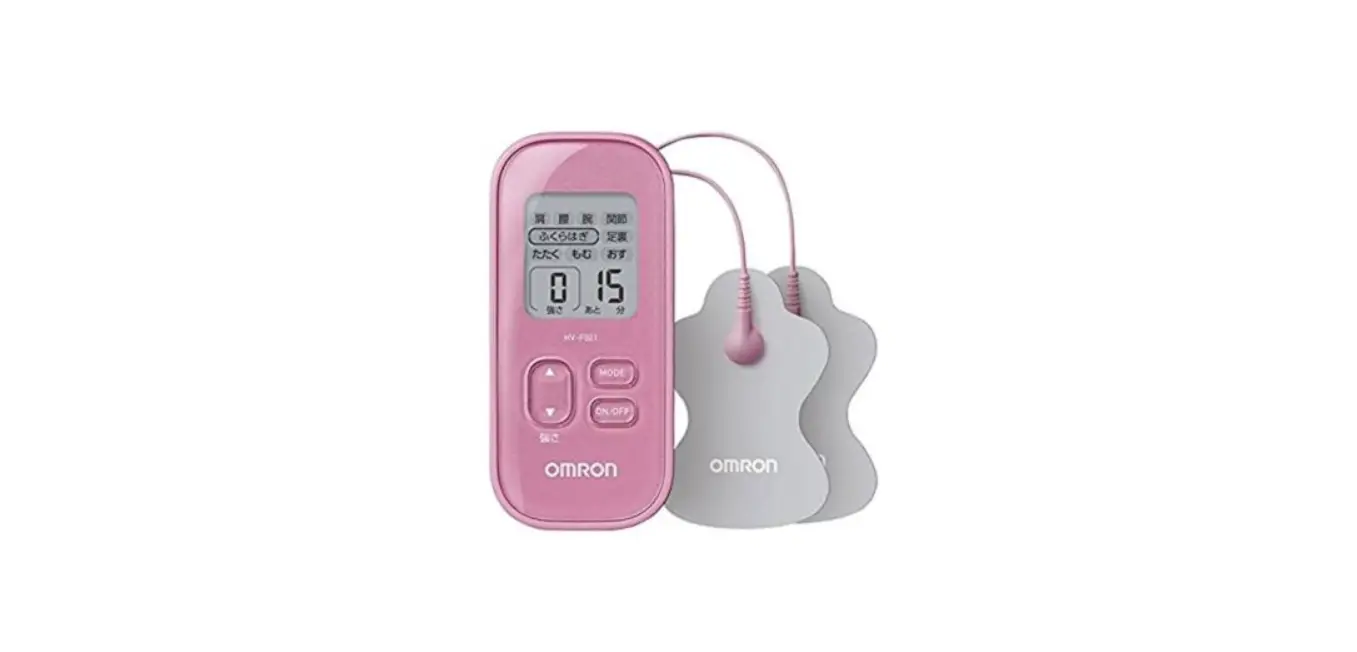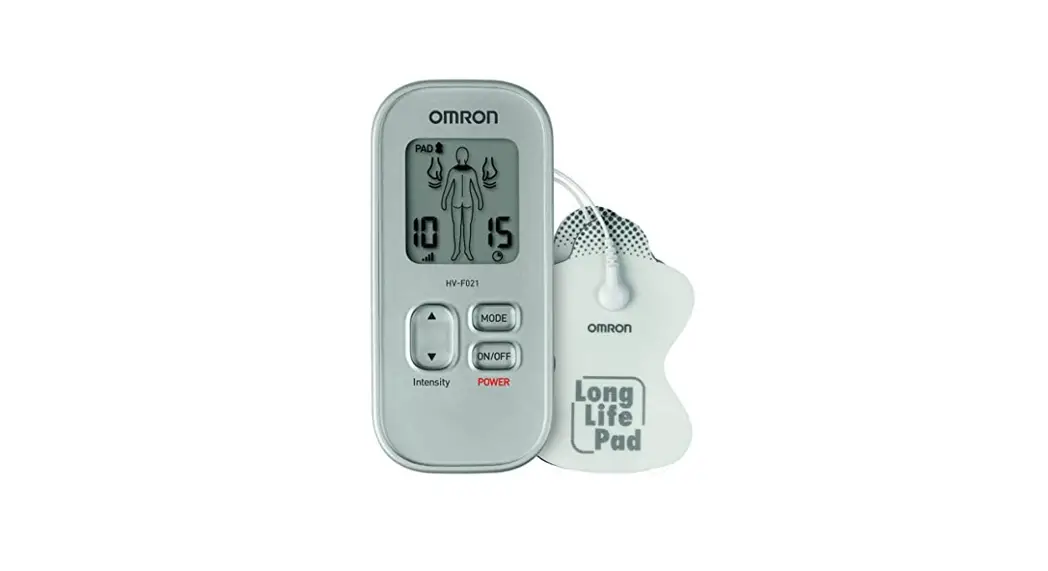

Electronic Nerve Stimulator
HV-F021
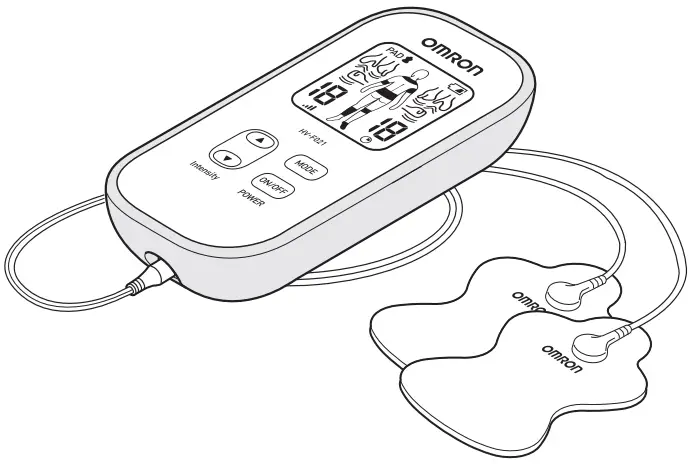
Instruction Manual
All for Healthcare
Introduction
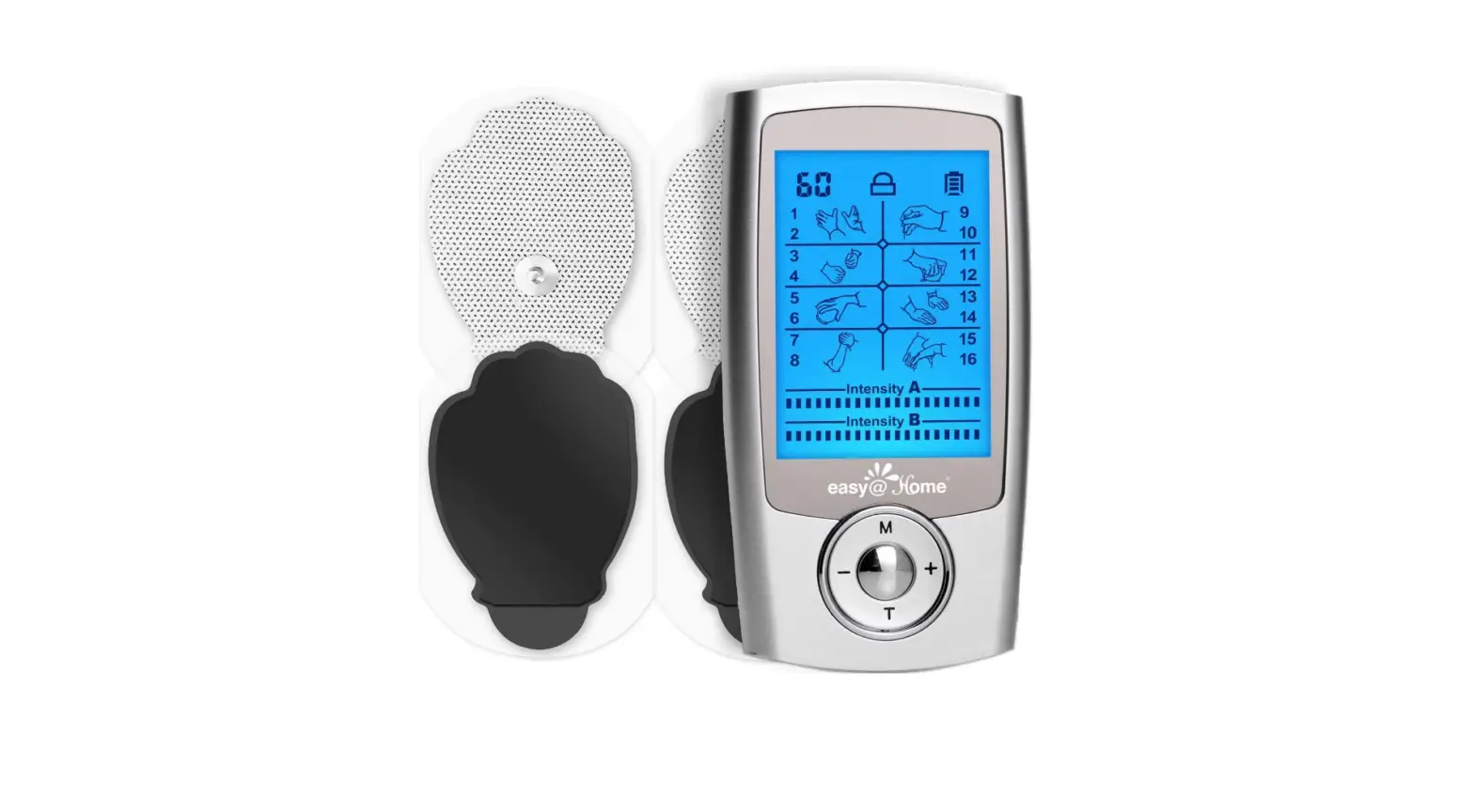
Thank you for purchasing OMRON Electronic Nerve Stimulator HV-F021.
In order to use the unit safely, read the complete manual carefully before using the unit for the first time.
How does it work?
OMRON Electronic Nerve Stimulator HV-F021 uses Triple Action TENS {Transcutaneous Electrical Nerve Stimulation) technology that helps to:
– block the pain message
– trigger the release of endorphins (natural pain killers)
– improve the blood circulation (as result of repeated muscle contracting and relaxing)
Intended use
Medical purpose
OMRON Electronic Nerve Stimulator HV-F021 is intended for reducing and relieving muscle and joint pain, as well as stiffness in the back, arms, legs, shoulders and feet by applying electrical nerve stimulation to the surface of the skin near the site of the pain. It should be applied to normal, healthy, dry, and clean skin of adult patients.
Any of the modes can safely be used on body parts or pains described in this manual. Just find one that feels good and is comfortable on your pain. It can be successfully used in conjunction with any other pain treatment or medication.
Since 1970s, pain relief based on Transcutaneous Electrical Nerve Stimulator {TENS) has been widely used by many healthcare professionals, such as physiotherapists and pain specialists.
Intended User
This unit is intended to be operated by adults who can understand this instruction manual. It is not for professional use in hospitals or other medical facilities, it is intended for home use only.
Important safety precautions and warnings
 It is important that you read all the warnings and precautions included in this instruction manual because they are intended to keep you safe, prevent injury and avoid a situation that could result in damage to the unit.
SAFETY SYMBOLS USED IN THIS INSTRUCTION MANUAL
 DANGER DANGER | Improper use may cause danger resulting in death or serious injury. These are situations in which the device should not be used. |
 WARNING WARNING | Indicates a potentially hazardous situation which, if not avoided, could result in death or serious injury. |
| CAUTION | Indicates a potentially hazardous situation which, if not avoided, may result in minor or moderate injury to the user or patient or damage to the equipment or other property . |
DANGER Do not use this unit with these other devices:
- If you have a pacemaker, implanted defibrillator, or other implanted metallic or electronic device. Such use could cause electric shock, burns, electrical interference or death.
- Do not use this device while using another TENS device.
- Together with a life-supporting medical electronic device such as an artificial heart or lung or respirator.
- For Hospitals and Clinics, in the presence of or when attached to the body, electronic monitoring equipment (e.g. cardiac monitors, ECG alarms), which may not operate properly when the electrical stimulation device is in use.
- For Hospitals and Clinics, simultaneous connection of a patient to a high frequency surgical ME equipment may result in burns at the site of the stimulator electrodes and possible damage to the stimulator.
- For Hospitals and Clinics, operation in close proximity (e.g. 1m) to a shortwave or microwave therapy ME equipment may produce instability to the stimulator output.
Do not use this unit under these conditions Consult with your healthcare professional before using this unit. The unit may cause lethal rhythm disturbances in certain susceptible individuals. If you have had a recent surgical procedure, the stimulation may disrupt the healing process.
Do not use on these individuals Pregnant women. Do not use on children or infants because this device has not been evaluated for pediatric use. Keep out of the reach of young children because the electrode cord could cause strangulation. Persons incapable of expressing their thoughts or intentions. Persons incapable of operating the unit by themselves. Use caution if you have a tendency to bleed internally, such as following an injury or fracture. If you have suspected or diagnosed heart disease, you should follow precautions recommended by your healthcare professional. If you have suspected or diagnosed epilepsy, you should follow precautions recommended by your healthcare professional. Use caution if stimulation is applied over the menstruating uterus . NEVER APPLY THE PADS TO THESE BODY AREAS:
 | The head, the mouth, or any area of the face. |
 | The neck or any area of the throat because this could cause severe muscle spasms resulting in losure of the airway, difficulty in breathing, or adverse effects on heart rhythm or blood pressure. |
 | Do not use near the heart, or on genital area. |
 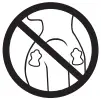 | Both sides of the thorax simultaneously (lateral or front and back), or across your chest because the introduction of electrical current may cause rhythm disturbances which could be lethal. |
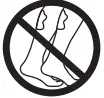 | On the calves of both legs at the same time because this may cause cardiac disturbance. |
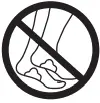 | On the bottom of both feet at the same time because this may cause cardiac disturbance. |
Open wounds or rashes or over swollen, red, infected or inflamed areas or skin eruptions (such as varicose veins, phlebitis, thrombophlebitis and thrombosis), or on top of or close to cancerous lesions, or over areas of skin that lack normal sensation.
Do not use this unit during these activities When in the bath or shower; While sleeping; While driving, operating machinery, or during any activity in which electrical stimulation can put you at risk of injury.
Pain management warnings If you have had medical or physical treatment for your pain, consult with your healthcare professional before using this unit. If your pain does not improve, becomes seriously chronic or severe, or continues for more than 5 days, stop using the unit and consult with your healthcare professional. The mere existence of pain functions as a very important warning telling us that something is wrong. Therefore, if you suffer from any serious illness, consult your healthcare professional in order to confirm that it is advisable for you to use this OMRON Electronic Nerve Stimulator HV-F021.
Do not alter the unit Do not plug this cord into any other device that is not an OMRON Electronic Nerve Stimulator HV-F021. No modification of this unit is allowed. Use this unit only with the leads, electrodes, and accessories recommended by the manufacturer to avoid damage to the unit.
Warnings regarding the pads Apply pads to normal, healthy, dry, and clean skin (of adult patients) because it may otherwise disrupt the healing process. If you experience any skin irritation or redness after a session, do not continue stimulation in that area of the skin.
Precautions regarding the pads Do not move the pads to another location while the unit is on. Therapy won’t work with just 1 pad. You must use 2 pads at the same time. Make sure the components are connected well and the pads are fixed on the part of the body you wish to treat or the therapy may not be effective. Pads should not touch any metal object, such as a belt buckle, necklace, or other metal worn under clothing. Do not overlap pads or place pads on top of each other. It may weaken or stop therapy, or the unit may stop working.
Gel pads may also stick together and cause gel to be removed when separating. Do not share pads with another person. This may cause a skin irritation or infection. Pads are intended for use by one person. Do not leave pads attached to the skin after treatment. Do not bend or fold because the gel may get damaged and it won’t stick or function properly. To avoid damage to the adhesive surface of the pads, place the pads only on the skin or on the plastic pad holder provided to avoid damage to the adhesive surface of the pads. Always place clean pads in accordance with illustrations provided (Refer to pages 12-14, Pad Placement). Do not apply ointment or any solvent to the pads or to your skin because it will disrupt the pads from functioning properly. The self-adhesive pads will adhere to your skin. Place pads at least 3 cm apart for optimal results.
Caution while using the unit
Main unit If the unit is not functioning properly or you feel discomfort, immediately stop using the unit. Do not use for any other purpose except for what it is intended for. Do not place in a room with high humidity, such as a bathroom. This will damage the unit. Ideal temperature for using +10 – +40 °C, 30 – 80 % relative humidity. Do not use the unit without proper lighting. You may not be able to operate the unit successfully. While using this device, make sure that no mobile phone or any other electrical devices that emit electromagnetic fields is within 30cm. This may result in degradation of performance of the device.
Cord Do not insert the electrode plug into any place other than the jack on the unit. Do not pull on the electrode cord during treatment. Do not bend or pull the end of the cord .
When pulling out the cord from the unit, hold the plug and pull. Replace the cord when broken or damaged.
Battery Do not throw the batteries into a fire. The batteries may explode . Dispose of the unit, batteries, and components according to applicable legal regulations. Unlawful disposal may cause environmental pollution . Do not mix alkaline and manganese batteries as this will shorten the battery life . During therapy, do not remove the battery cover and do not touch the battery terminals. Use the battery within recommended period mentioned to it.
Pads Detach the pads before replacing the batteries.
General precautions
The long-term effects of electrical stimulation are unknown . Apply stimulation to only normal, intact, clean, dry, and healthy skin. TENS is not effective in treating the original source or cause of the pain, including headache . TENS is not a substitute for pain medications and other pain management therapies. TENS devices do not cure disease or injuries . TENS is a symptomatic treatment and, as such, suppresses the sensation of pain that would otherwise serve as a protective mechanism . You may experience skin irritation or hypersensitivity due to the electrical stimulation or electrical conductive medium (gel) .Keep the unit away from young children. The unit contains small pieces that may be swallowed.
Immediately contact your healthcare professional.
Possible adverse reactions You should stop using the unit and consult with your healthcare professional if you experience adverse reactions from the unit. You may experience skin irritation beneath the stimulation electrodes applied to your skin . Do not use to treat one region for extended periods of time (more than 215 minutes a session, up to 3 times/day) or muscles in that region may become exhausted and sore.
Know your unit
Package contents
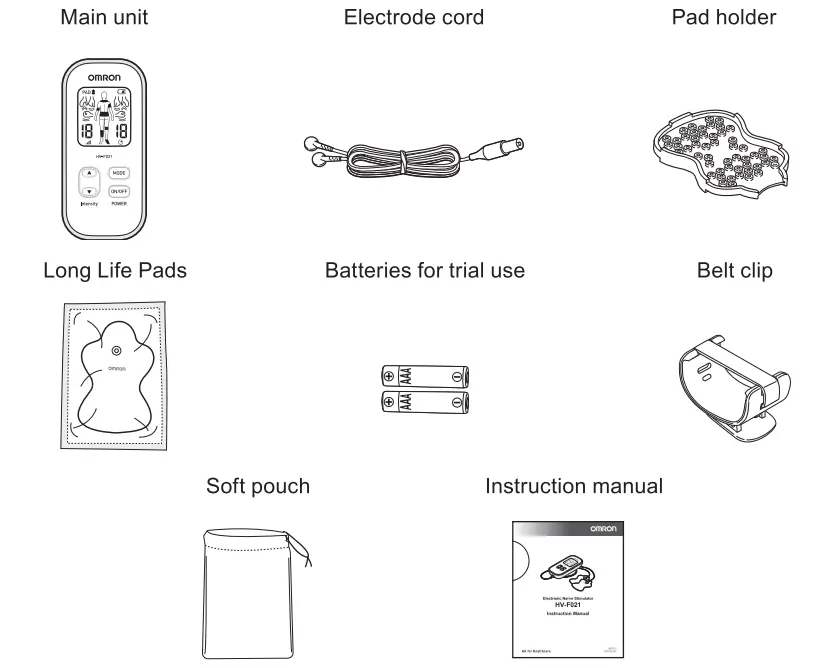
Optional accessories
- Long Life Pads (HV-LLPAD-C1)
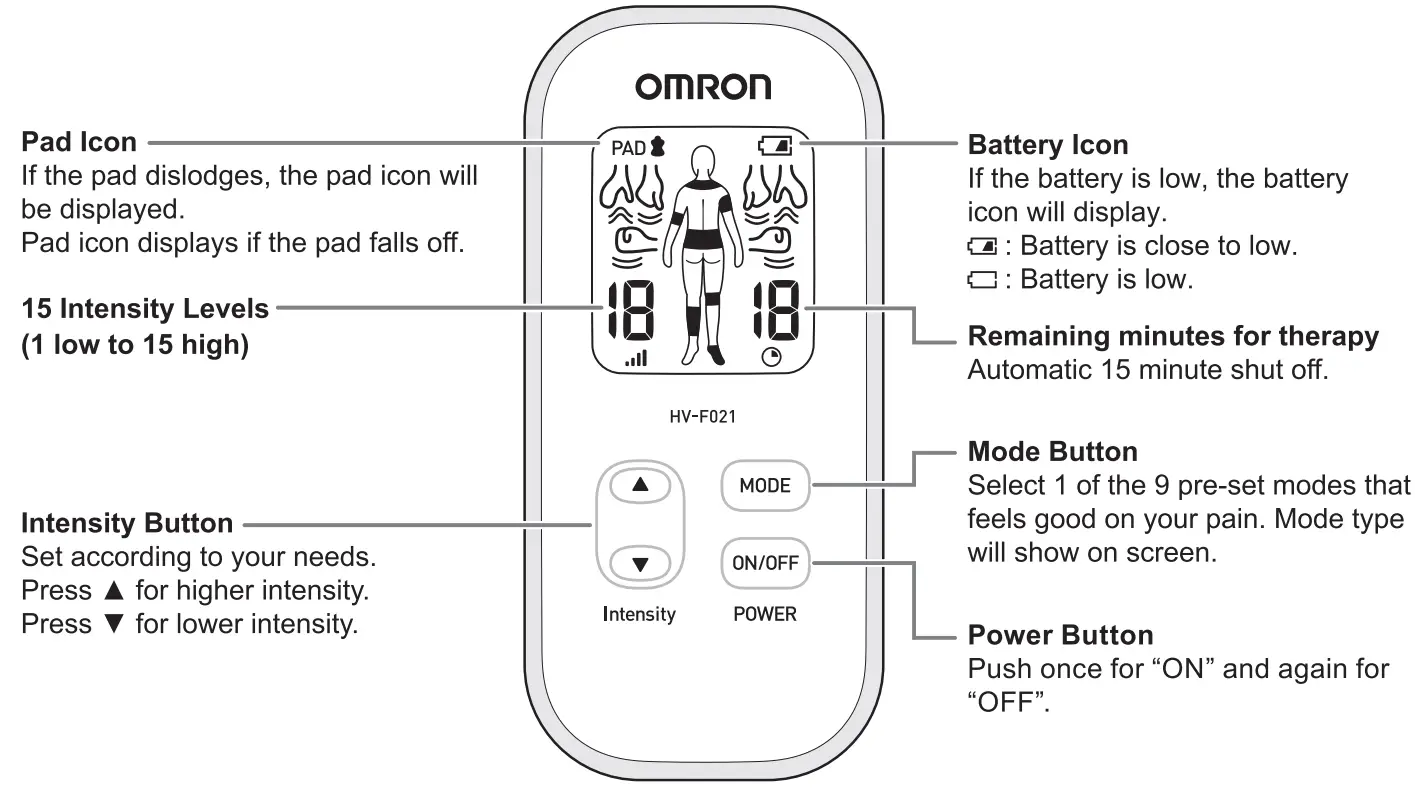
Buttons and their functions
Assembly steps
Before using, check these points to make sure everything is working properly.
- The cord is not broken.
- The pad adhesive sticks and is not damaged.
- The electrode cord connection is not broken.
- The unit is intact and in working order.
- There is no battery leakage.
STEP 1 – Insert batteries
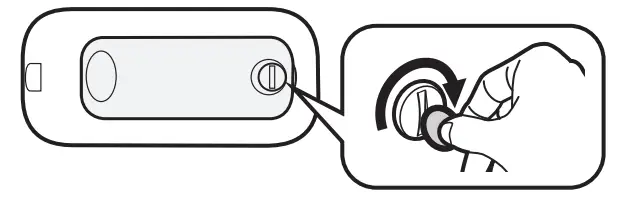
- Remove the battery cover on the back using a coin.

- Insert batteries. Make sure the
 signs correspond when inserting batteries.
- Reinstall the battery cover. Tighten with a coin.
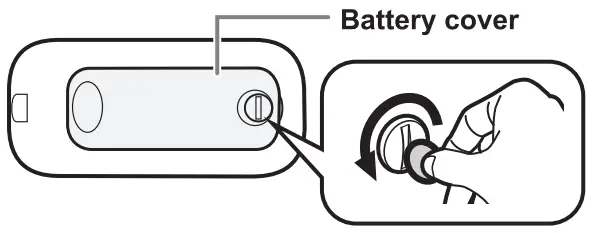
 signs correspond when inserting batteries.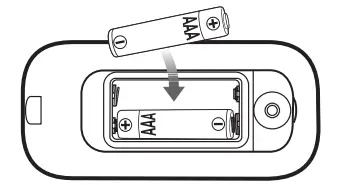
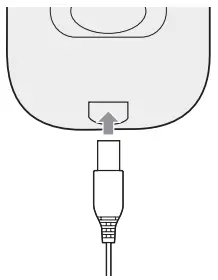
STEP 2 -Attach the electrode cord to the main unit
Attach the electrode cord plug to the bottom of the main unit.
STEP 3 – Snap either electrode cord to each of the pads
During the first use, take the pads out of the sealed package.
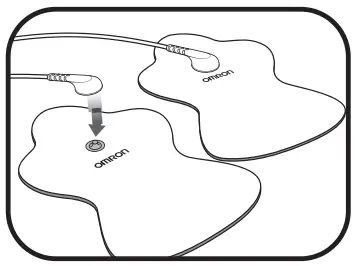 Do not turn the unit on, until pads are on your skin. You must use both pads or stimulation will not work.
STEP 4 – Remove and discard plastic film from pads (in case of new pads)
Remove the clear plastic film from the back of the pad.
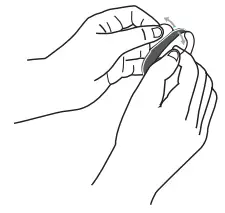 Discard the plastic film backing as well as the clear packaging.
STORING PADS ON PAD HOLDER
After using, place sticky side of pads on either side of the pad holder.
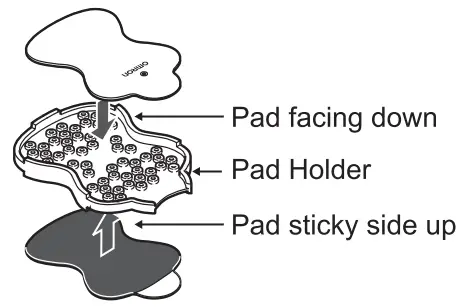
STEP 5 (Optional) – Attach the unit to the belt clip
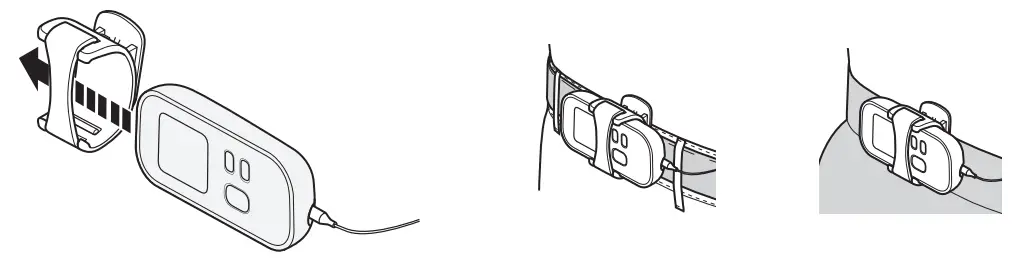
The clip may fall off if attached to soft or thin clothing.
Get started with your therapy
(Use for a maximum of 2 x 15 minutes per session)
STEP 1 – Pad placement
For optimal therapy:
Place pads on either side of the pain, not directly on the pain. Place 2 pads at least 3 cm apart. Do not overlap pads or place on top of each other. Do not add spray, lotions or creams to skin or pads. Do not share pads.
Before starting your therapy, rate your pain from 1 low to 15 high. This mental check gives you a basis you can compare to once the session is completed.
Examples of pads application
LOWER BACK
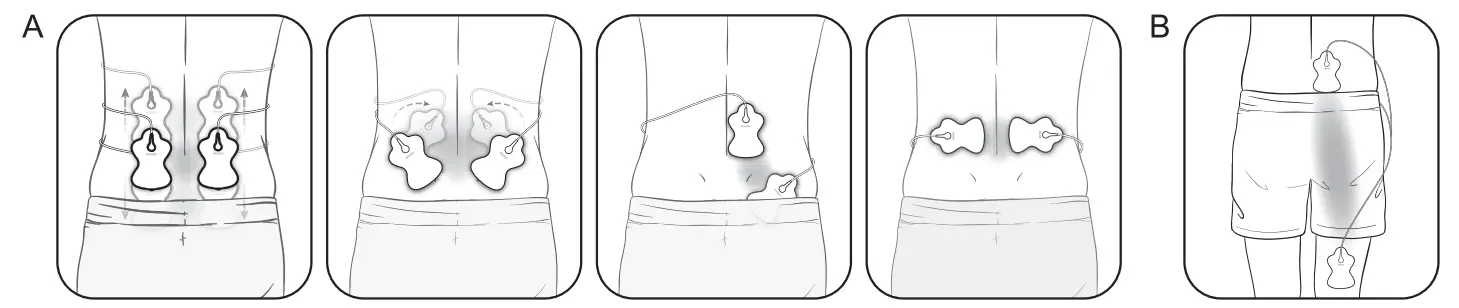
A. Attach both pads on the lower back according to your pain.
Place pads on muscle of the back, not on spine, for optimal therapy.
B. Attach both pads at same side, one above and one below the region in pain.
ARM
Attach both pads on either side of the area with pain.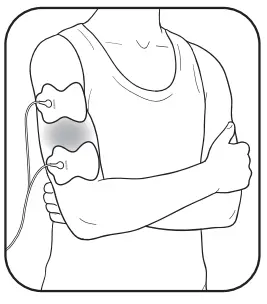
JOINT (ELBOW}
Attach both pads on either side of the joint with pain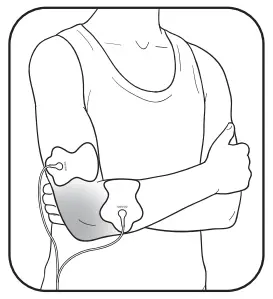
JOINT (KNEE}
Attach both pads above the knee or above and below the joint with pain.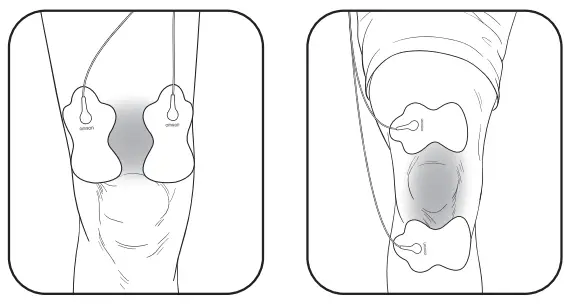
LEG (HIP & THIGH}
Attach both pads on either side of the area with pain.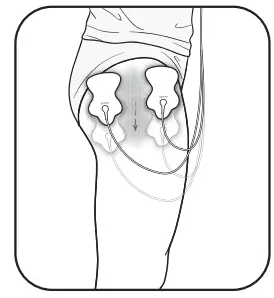
LEG (CALF}
Attach both pads on the calf with pain. Pads should not be placed simultaneously on the calves of both legs.
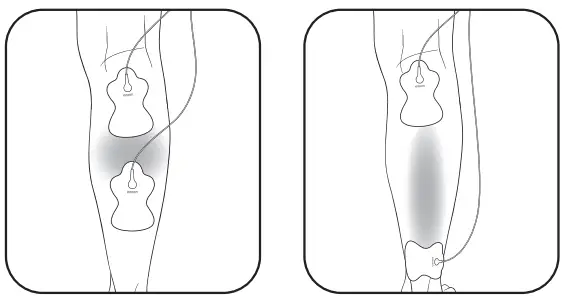
STEP 1 – Pad placement (continued)
FOOT (ANKLE)
Attach the pads on the left for pain on the outside of your ankle/foot. Attach the pads on the right for pain on the inside of your ankle/foot.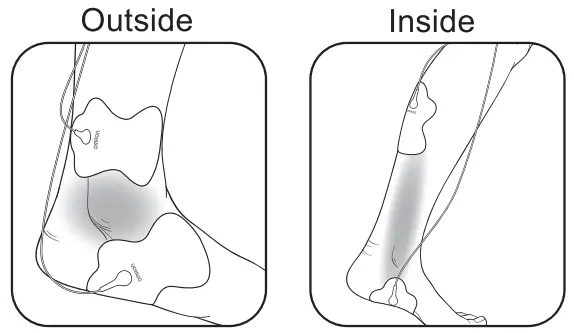
Do not attach the pads on the bottom of both feet at the same time.
SHOULDER
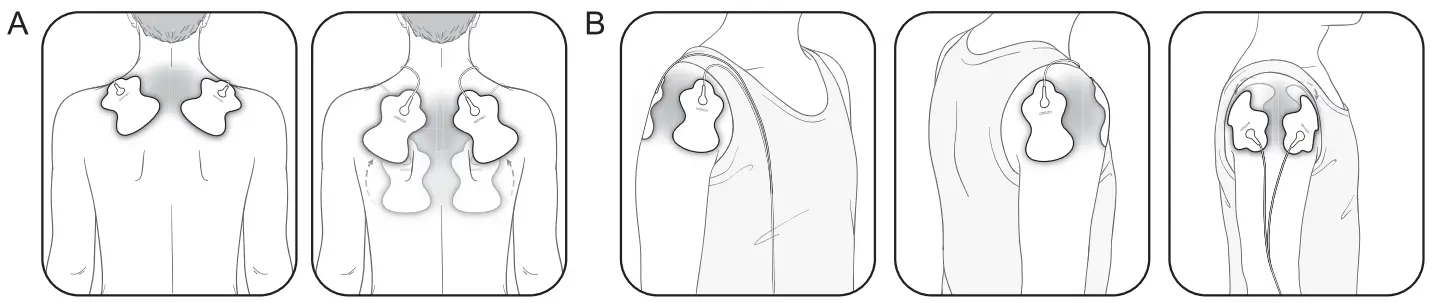
A. Attach both pads on the shoulder according to your pain.
B. Attach 1 pad on the front and on the back of your shoulder.
Do not use near the heart, on both sides of the thorax or across your chest because the introduction of electrical current may cause rhythm disturbances which could be lethal.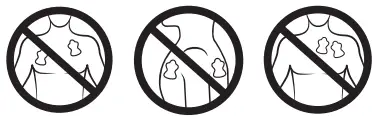
STEP 2 – Select 1 of 9 modes
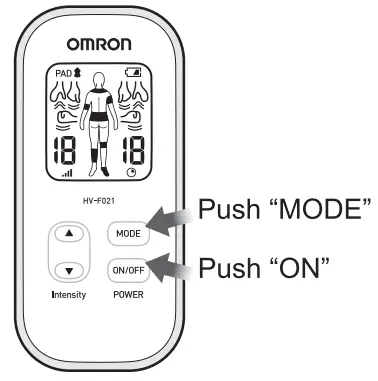
- Push “ON/OFF”.
- Select ONLY 1 out of the 9 modes. (Modes cannot be combined.)
Select Massage-like-mode
- Tapping
- Kneading
- Rubbing
OR Select Pain Mode - Arm
- Lower Back
- Leg
- Foot
- Joint (Knee/elbow)
- Shoulder
How to switch modes
The unit automatically defaults to the last mode selected. Each time you push the mode button, it switches to the next mode at the lowest intensity. You can only use ONE MODE at a time.
How to select the right mode
Any of the modes can be used on body parts or pains described in this manual.
Select the mode that feels right for your unique pain. 
| Therapies designed for | Arm | Lower back | Leg | Foot |
| Potential conditions | Swelling, stiffness, sore or achy, muscle or nerve pain. | Stiffness, soreness, muscle or nerve pain. | Swelling, fatigue, stiffness, muscle or nerve pain. | Swelling, fatigue, chilly feeling, sore or achy. |
| Sensation | Series of low to medium rate tapping, tingling and pulsing sensations. | Series of high rate to low tingling sensations, followed by tapping. With higher intensity, you may feel kneading or massage-like sensations. | Series of low to medium tapping and rubbing sensations. | Series of low rate tapping, pulsing sensations. |
STEP 2 – Select 1 of 9 modes (continued)

| Therapies designed for | Joint | Shoulder | Tap | Knead | Rub |
| Potential conditions | Swelling, stiffness, sore or achy. | Stiffness, sore or achy, tight feeling. | Stiffness, soreness, tight feeling. | Stiffness, sore or achy, knotty muscles, tight feeling. | Stiffness, sore or achy, knotty muscles, tight feeling. |
| Sensation | Series of medium to high rate tapping, pulsing sensations. | Series of low to high rate tapping, pulsing, kneading and massage-like sensations. | Series of low rate tapping sensations. | Series of medium rate pulsing sensations to mimic massage. | Series of high rate pulsing sensations to mimic hands rubbing. |
STEP 3 – Select the correct intensity level (1 low – 15 high)
Start at the lowest intensity level and slowly increase it by pushing the “A(Up)” arrow button. You should feel a gentle pulsing sensation.
How do I pick the right intensity level for my pain?
Each time you push “ (Up)” or “
 (Down)” arrow, it moves to another level. If the stimulation sensation becomes weaker or disappears, increase the intensity until it is restored. But, if the sensation is at all uncomfortable, press the down arrow to decrease the intensity.
- Press for higher intensity.
- Press for lower intensity.
How long is the therapy?
The unit will operate automatically for 15 minutes
before it shuts off. We recommend a total of 2 15 minutes therapy in one sitting, up to 3 times/day.
The screen shows you how many minutes are remaining. 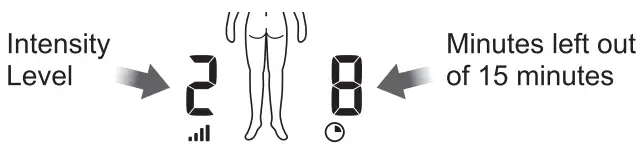
How to manage and reduce your pain
When should I start therapy?
When you feel pain on body area, start with 1 session (the unit automatically turns off at 15 minutes).
Turn off with pads still on and rate your pain again.
How long should you use it?
Start with one 15 minute session. Always turn the unit off with pads still on. Rate your pain to check your progress. Stop therapy session if pain has reduced or stopped. Press “ON/OFF” button to continue therapy for another 15 minute session. Each therapy session should not exceed 30 minutes. And maximum 3 sessions of 30 minutes therapy per day.
| 1 session 15 minute automatic shut-off | Max minutes/session 2 x 15 minutes | Max times/day 3 times per day |
See warnings on page 7. Long-time treatment and strong stimulation may cause muscular fatigue and may generate adverse effects.
When to stop using the unit?
- If you experienced an adverse reaction (skin irritation/redness/burns, headache or other painful sensation, or if you feel any unusual discomfort).
- If your pain does not improve, becomes seriously chronic and severe, or continues for more than 5 days.
Cleaning and storage
The unit is designed for repeated use over time. The pads are valid for 4 years in the unopened state and will last up to 150 uses, or 5 months (based on use 1/day). Here are important cleaning and storage instructions:
Cleaning the pads
- Turn the power off and remove the electrode cord from the pads.
- Wash the pads when the adhesive surface becomes dirty and/or the pads are difficult to attach.
• Wash the pad softly with your fingertips under slow running cold water for several seconds (do not use a sponge/cloth/ sharp object like a nail on the adhesive side, do not use detergents, chemicals or soap).
- Pads can be washed after 15 uses, approximately 10 times for up to 150 uses. Do not wash the pads too long or too frequently. If the adhesive surface becomes sticky or the pad peels off, leave the pad in the refrigerator (do not freeze) overnight. The adhesion may be restored.
- Dry the pads and let the adhesive surface air-dry completely. Do not wipe with a tissue paper or cloth.
- Pads are replaceable and can be purchased.
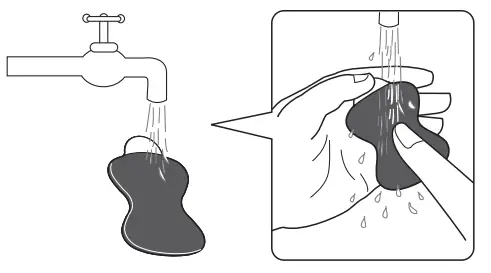
The life of the pads may vary by how often you wash the pads, the skin condition, and how you store the pads.
When should you replace your pads?
If the pad no longer sticks to your skin or if more than 25 % of the pad’s surface is not in contact with your skin.
Cleaning the unit
- Turn the unit off and disconnect the electrode cord from the pads.
- Clean with a cloth lightly moistened or soaked in a neutral (mild) cleaning solution and wipe gently.
• Do not use chemicals (like thinner, benzene).
• Do not let water get into the internal area.
Storing the pads
- Turn the unit off and remove the cord from the bottom of the unit.
- Remove the pads from your body.
- Leave the electrode cord connected to the pads.
Place the pads on the pad holder, 1 pad on each side with the sticky side of each pad on the pad holder.
- Wrap the electrode cord around the pad holder.
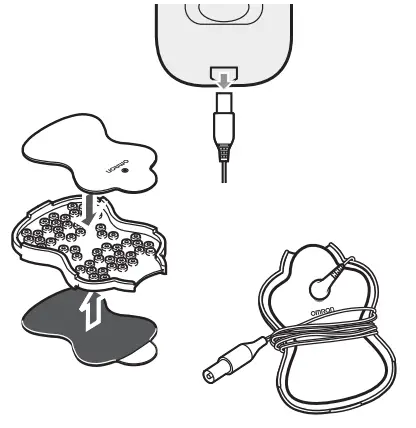
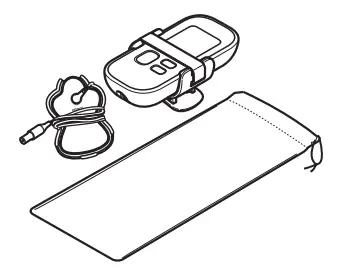
Storing the unit and pads
- Store the unit with the belt clip on.
Store the pads with the electrode cord on the pad holder and put into the pouch.
- Do not keep in areas subject to direct sunlight, high or low temperatures, humid area, near to fire, vibration, or shock.
- Do not keep at places that can be easily reached by children.
- When not in use for a long period, remove the batteries before storage, to avoid liquid discharge from batteries.
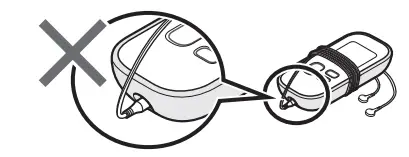
- Do not wrap the electrode cord around the unit because it may damage the cord.

Troubleshooting
In case of any of the below problems occurs during use, first check that no other electrical device is within 30cm. If the problem persists, refer to the table below.
| If this happens… | Possible causes… | Try this solution… |
| The intensity is not felt. Very weak intensity level. | Are you using only 1 pad? | Place the other pad on your skin. You must use both pads for therapy to work. |
| Have you removed the transparent film from the pads? | Peel off the film on the adhesive surface of pads. | |
| Are the pads stacked together or do pads overlap? | Check placement of pads. Refer to pages 12-14, Pad Placement. | |
| Is the cord properly connected to the unit? | Connect the cord plug correctly into the jack at the bottom of this unit. | |
| Is the intensity setting too low? | Press the up button. | |
| Is the gel damaged? | Replace the pads. | |
| Are the batteries weak? | Replace both batteries. | |
| The skin turns red or feels Irritated. | Is the adhesive surface of pads dirty or dry? | Wash the adhesive surface of pads softly with your fingertips for about 3 seconds under slow and cold running water. |
| Is therapy time too long? | Shorten your therapy to less than 15 minutes. | |
| Are the 2 pads attached properly to the body? | Refer to pages 12-14, Pad Placement and attach correctly. | |
| Is the pad surface worn out? | Replace both pads at the same time. | |
| No power source. | Are the polarities of battery (+ and -) aligned in the wrong direction? Are the batteries depleted? | Check the batteries for correct alignment. Replace the batteries. |
| Power cut off during use. | Are the batteries weak? | Replace both batteries at the same time. |
| Is the cord broken? | Replace the cord. | |
Battery icon is empty or close to empty. | Are the batteries weak? | Replace both batteries at the same time. |
| Pad gel does not stick to skin. | Is the adhesive surface of pads dirty or dry? | Wash the adhesive surface of pads softly with your fingertips for about 3 seconds under slow and cold running water. |
| Have you removed the transparent film from the pads? | Peel off the film on the adhesive surface of pads. | |
| Is the pads wet? or Is your skin too wet? | Air dry the pads. Or dry the skin. | |
| The pad gel may be damaged. | Replace the pads. | |
| Are you using the pads during perspiring? | Dry the pad placement area. | |
| Have the pads been washed too long and/ or too frequently? | Leave the pads in refrigerator (do not freeze) for overnight. | |
| Were the pads stored under high temperature, high humidity, or direct sunshine? | Replace the both pads. |
| If this happens… | Possible causes… | Try this solution… |
| Pad Icon is displayed. PAD  | Only 1 pad is attached, or both pads are not attached. | Re-attach dislocated pad(s) onto the skin firmly. Power off-on after correction. |
| Have you removed the transparent film from the pad? | Peel off the film on the adhesive surface of pads. Power off-on after correction. | |
| Is the cord properly connected to the main unit? | Connect the cord plug correctly into the jack at the bottom of the main unit. Power off-on after correction. | |
| Is the adhesive surface of pads dirty or dry? | Wash the adhesive surface of pads softly with your fingertips for about 3 seconds under cold slow running water. Power off-on after correction. |
Technical data
| Product Description | Electronic Nerve Stimulator |
| Model (code) | HV-F021 |
| Operation Mode | Continuous operation |
| Power Source | DC3 V (2 AAA alkaline batteries or 2 AAA manganese batteries) |
| Battery Life | New batteries (2 AAA alkaline batteries) will last for approx. 4 months (when used for 15 minutes a day, Lower Back Mode, max. intensity). |
| Frequency | Approx. 1 to 238 Hz |
| PULSE Duration | 150 psec |
| Maximum Output Voltage | 70 V (during 500 0 load) |
| Power Control | 15 intensity levels |
| Operating Temperature and Humidity, Air Pressure | +10 to +40 °C / 30 to 80 % RH (non-condensing) / 700 to 1060 hPa |
| Storage and Transportation Temperature, Humidity, Air Pressure | -20 to +60 °C / 10 to 95 % RH / 700 to 1060 hPa |
| Weight | Approx. 100 g (incl. batteries) |
| Outer Dimensions | 52 (W) x 112 (H) x 25 (D) mm |
| Package Contents | Main unit, Electrode cord, Pad holder, Long Life Pads, Batteries for trial use, Belt clip, Soft pouch, Instruction manual |
| Classifications | Internally powered (Protection against electric shock) Type BF (Applied part; Pads) IP22 (Ingress Protection) |

NOTE:
- These specifications are subject to change without notice.
- Designed for a minimum of 5 years life expectancy.
- IP classification is degrees of protection provided by enclosures in accordance with IEC 60529.
The device is protected against solid foreign objects of 12.5 mm diameter and greater such as a finger, and against oblique falling water drops which may cause issues during a normal operation. - This OMRON product is produced under the strict quality system of OMRON HEALTHCARE Co. Ltd., Japan.
- Please report to the manufacturer and the competent authority of the Member State in which you are established about any serious incident that has occurred in relation to this device.
| Symbols description | |||
| This product should not be used by persons with medical implants, e.g. heart pacemakers, artificial heart, lung or other electronic ife support systems. | ||
 | Applied part – Type BF Degree of protection against electric shock (leakage current) |  | Ingress protection degree provided by IEC 60529 |
 | Serial number | | Need for the user to consult the instructions for use |
 | CE Marking | 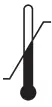 | Temperature limitation |
 | Humidity limitation |  | Atmospheric pressure limitation |
 | Date of manufacture |  | Medical device |
Important information regarding Electromagnetic Compatibility (EMC)
HV-F021 manufactured by OMRON HEALTHCARE Co., Ltd. conforms to EN60601-1-2:2015 Electromagnetic Compatibility (EMC) standard.
Further documentation in accordance with this EMC standard is available at http://www.omronhealthcare-ap.com/emc-information.
Refer to the EMC information for HV-F021 on the website.
Correct Disposal of This Product
(Waste Electrical & Electronic Equipment)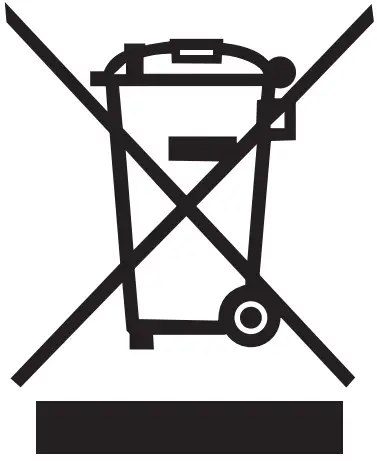 This marking shown on the product or its literature, indicates that it should not be disposed of, with other household wastes at the end of its working life. To prevent possible harm to the environment or human health from uncontrolled waste disposal, please separate this product from other types of wastes and recycle it responsibly to promote the sustainable reuse of material resources.
Household users should contact either the retailer where they purchased this product, or their local government office, for details of where and how they can return this item for environmentally safe recycling.
Business users should contact their supplier and check the terms and conditions of the purchase contract. This product should not be mixed with other commercial waste for disposal.
Manufacturer | OMRON HEALTHCARE Co., Ltd. 53, Kunotsubo, Terado-cho, Muko, KYOTO, 617-0002 JAPAN |
EU-representative | OMRON HEALTHCARE EUROPE B.V. Scorpius 33, 2132 LR Hoofddorp, THE NETHERLANDS www.omron-healthcare.com |
| Importer in EU | |
| Asia Pacific HQ | OMRON HEALTHCARE SINGAPORE PTE LTD. www.omronhealthcare-ap.com |
| Production facility | OMRON DALIAN Co., Ltd. Dalian 116600, China |
Made in China