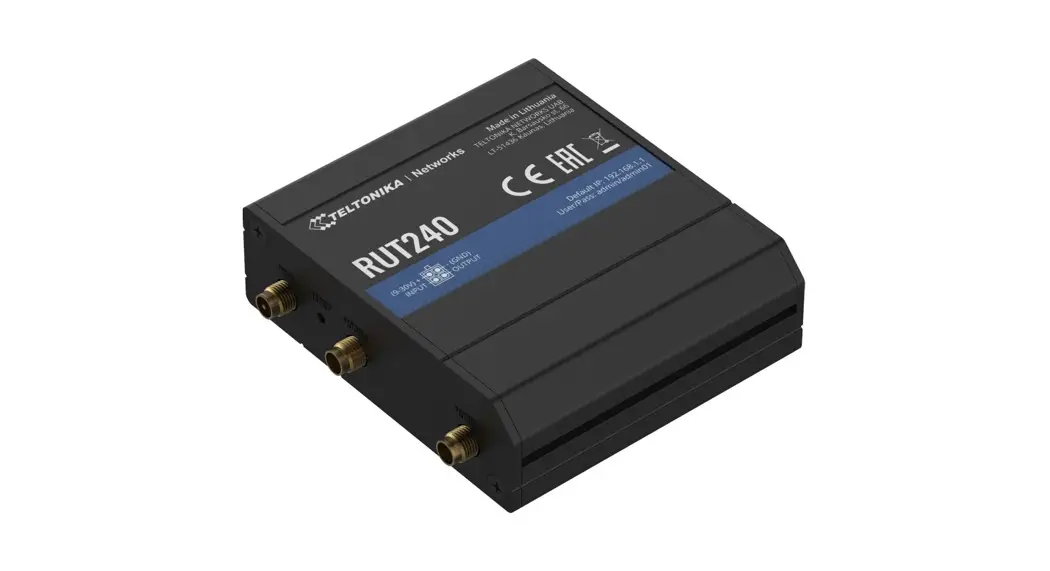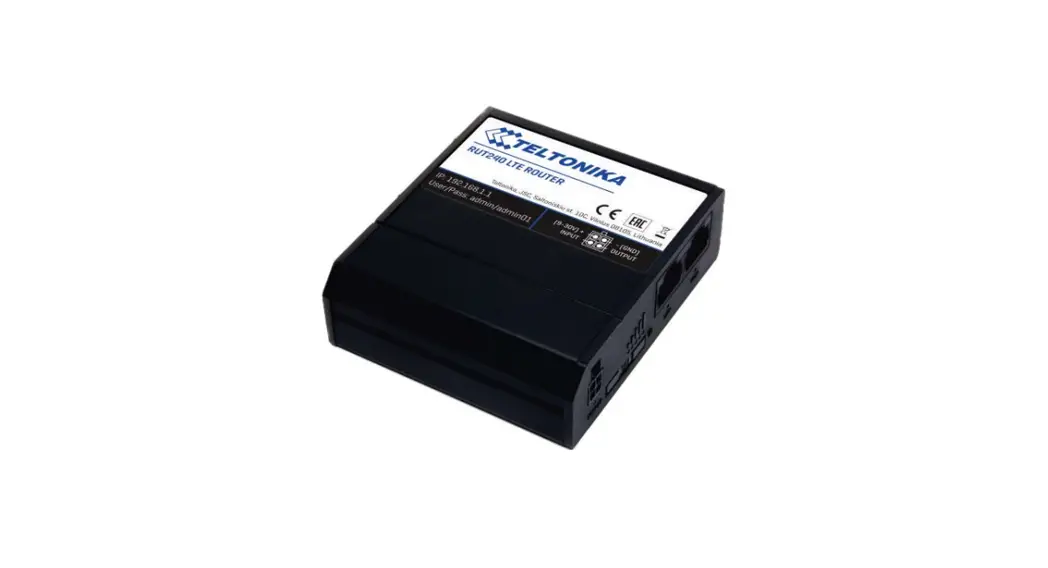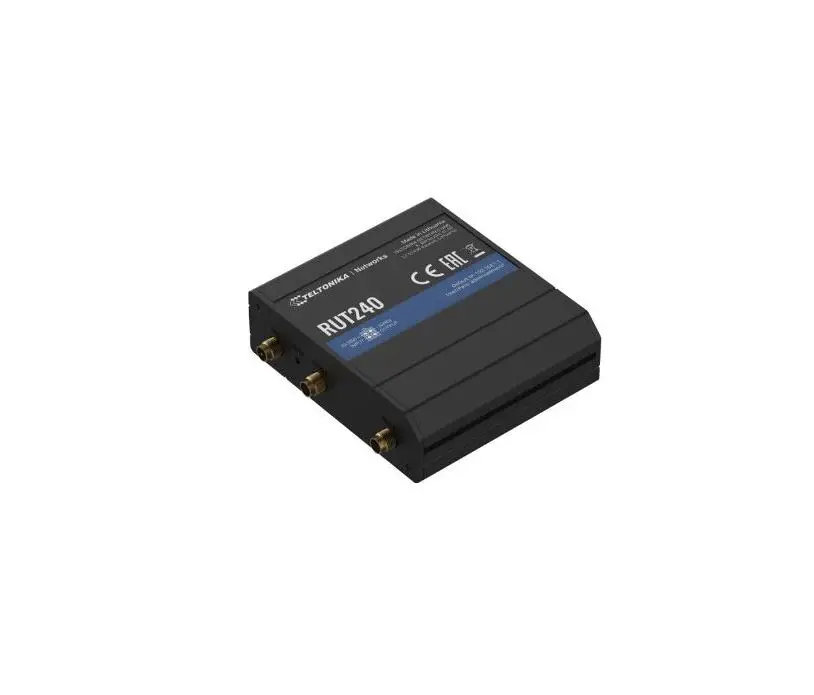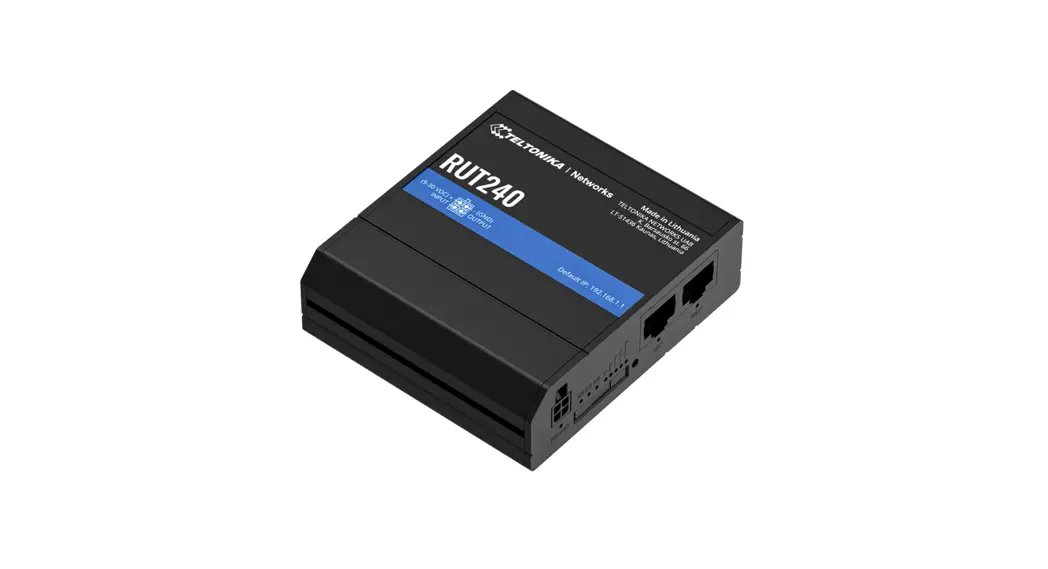
 RUT240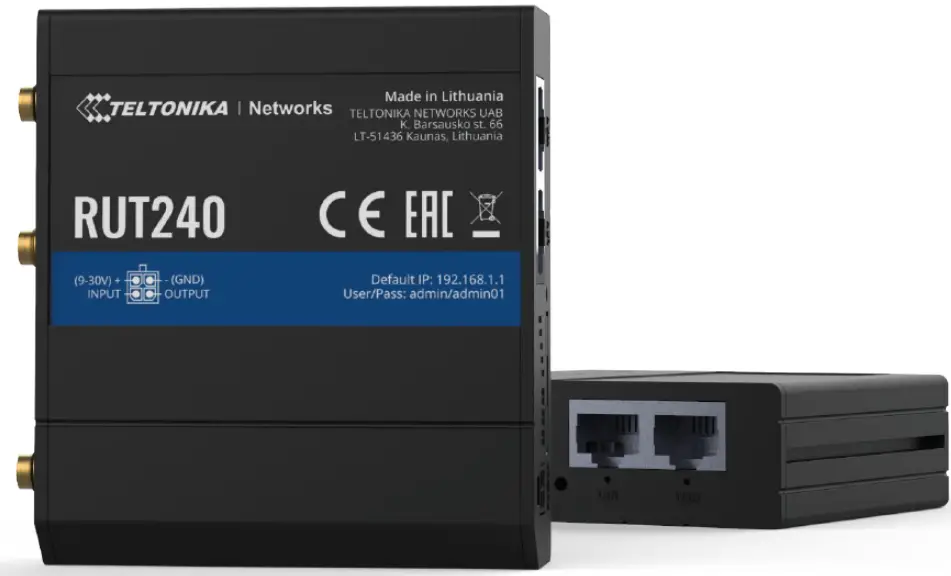
HARDWARE
FRONT VIEW
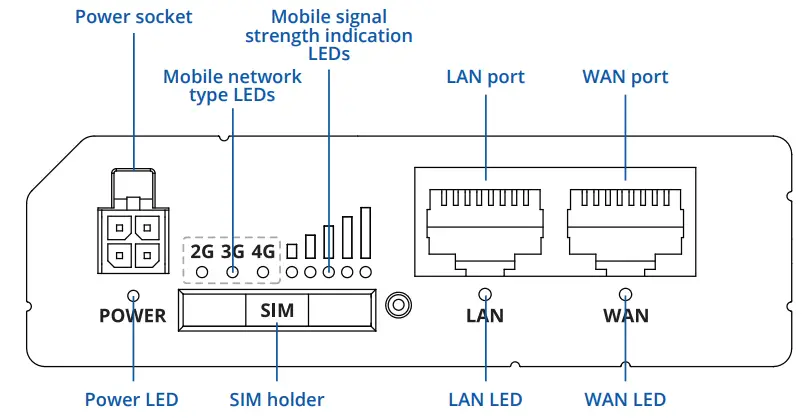
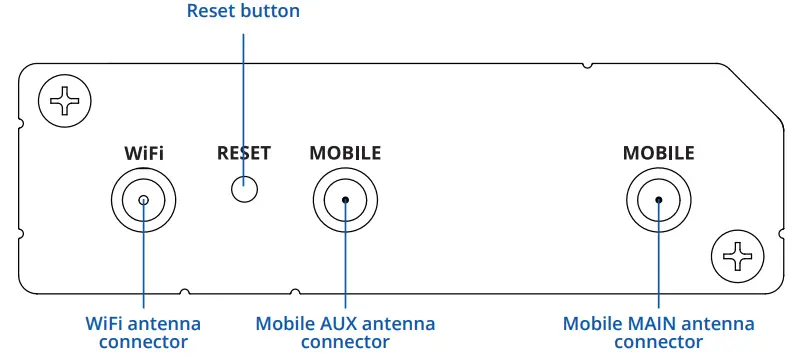
BACK VIEW
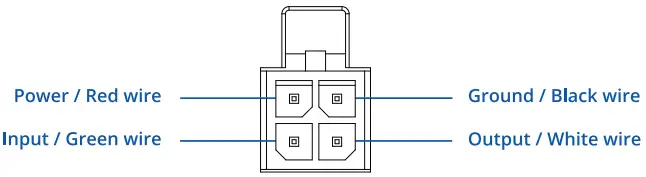
POWER SOCKET PINOUT
FEATURES
MOBILE
| Mobile module | 4G (LTE) – Cat 4 up to 150 Mbps, 3G – Up to 42 Mbps, 2G – Up to 236.8 kbps |
| Status | Signal strength (RSSI), SINR, RSRP, RSRQ, EC/IO, RSCP, Bytes sent/received, connected band, IMSI, ICCID |
| SMS | SMS status, SMS configuration, send/read SMS via HTTP POST/GET, EMAIL to SMS, SMS to EMAIL, SMS to HTTP, SMS to SMS, scheduled SMS, SMS autoreply, SMPP |
| Black/White list | Operator black/white list |
| Band management | Band lock, Used band status display |
| APN | Auto APN |
| Bridge | Direct connection (bridge) between mobile ISP and device on LAN |
| Passthrough | Router assigns its mobile WAN IP address to another device on LAN |
| Multiple PDN (optional) | Possibility to use different PDNs for multiple network access and services (not available in standard FW) |
| WIRELESS | |
| Wireless mode | IEEE 802.11b/g/n, Access Point (AP), Station (STA) |
| WiFi security | WPA2-Enterprise – PEAP, WPA2-PSK, WEP, WPA-EAP, WPA-PSK; AES-CCMP, TKIP, Auto Cipher modes, client separation |
| SSID | SSID stealth mode and access control based on MAC address |
| WiFi users | Up to 50 simultaneous connections |
| Wireless Hotspot | Captive portal (Hotspot), internal/external Radius server, built in customizable landing page |
| ETHERNET | |
| WAN | 1 x WAN port (can be configured to LAN) 10/100 Mbps, compliance with IEEE 802.3, IEEE 802.3u standards, supports auto MDI/MDIX |
| LAN | 1 x LAN port, 10/100 Mbps, compliance with IEEE 802.3, IEEE 802.3u standards, supports auto MDI/MDIX |
| NETWORK | |
| Routing | Static routing, Dynamic routing (BGP, OSPF v2, RIP v1/v2, RIPng, OSPF6) |
| Network protocols | TCP, UDP, IPv4, IPv6, ICMP, NTP, DNS, HTTP, HTTPS, FTP, SMTP, SSL v3, TLS, ARP, VRRP, PPP, PPPoE, UPnP, SSH, DHCP, Telnet client, SNMP, MQTT, Wake On Lan (WOL) |
| VoIP passthrough support | H.323 and SIP-alg protocol NAT helpers, allowing proper routing of VoIP packets |
| Connection monitoring | Ping Reboot, Wget Reboot, Periodic Reboot, LCP and ICMP for link inspection |
| Firewall | Port forward, traffic rules, custom rules |
| DHCP | Static and dynamic IP allocation, DHCP Relay, Relayd |
| QoS / Smart Queue Management (SQM) | Traffic priority queuing by source/destination, service, protocol or port, traffic priority queuing by source/destination, service, protocol or port, WMM, 802.11e |
| DDNS | Supported >25 service providers, others can be configured manually |
| Network backup | VRRP, Mobile, Wired and WiFi WAN options, each of which can be used as backup, using automatic Failover |
| Load balancing | Balance your internet traffic over multiple WAN connections |
| SSHFS (optional) | Possibility to mount remote file system via SSH protocol (not available in standard FW) |
| SECURITY | |
| Authentication | Pre-shared key, digital certificates, X.509 certificates |
| Firewall | Pre-configured firewall rules can be enabled via WebUI, unlimited firewall configuration via CLI; DMZ; NAT; NAT-T |
| Attack prevention | DDOS prevention (SYN flood protection, SSH attack prevention, HTTP/HTTPS attack prevention), port scan prevention (SYN-FIN, SYN-RST, X-mas, NULL flags, FIN scan attacks) |
| VLAN | Port and tag based VLAN separation |
| Mobile quota control | Set up custom data limits for the SIM card |
| WEB filter | Blacklist for blocking out unwanted websites, whitelist for specifying allowed sites only |
| Access control | Flexible access control of TCP, UDP, ICMP packets, MAC address filter |
| VPN | |
| OpenVPN | Multiple clients and server can be running simultaneously, 12 encryption methods |
| OpenVPN Encryption | DES-CBC, RC2-CBC, DES-EDE-CBC, DES-EDE3-CBC, DESX-CBC, BF-CBC, RC2-40-CBC, CAST5-CBC, RC2-64-CBC, AES-128-CBC, AES-192-CBC, AES-256-CBC IKEv1, IKEv2, supports up to 4 x VPN IPsec tunnels (instances), with 5 encryption methods (DES, 3DES, AES128, AES192, AES256) |
| IPsec | GRE tunnel |
| GRE | Client/Server services can run simultaneously |
| PPTP, L2TP | Proxy designed to add TLS encryption functionality to existing clients and servers without any changes in the programs’ code |
| Stunnel | SSTP client instance support |
| SSTP | ZeroTier VPN |
| ZeroTier | WireGuard VPN client and server support |
| MODBUS TCP SLAVE | |
| ID filtering | Respond to one ID in range [1;255] or any |
| Allow Remote Access | Allow access through WAN |
| Custom registers | MODBUS TCP custom register block requests, which read/write to a file inside the router, and can be used to extend MODBUS TCP Slave functionality |
| MODBUS TCP MASTER | |
| Supported functions | 01, 02, 03, 04, 05, 06, 15, 16 |
| Supported data formats | 8 bit: INT, UINT; 16 bit: INT, UINT (MSB or LSB first); 32 bit: float, INT, UINT (ABCD (big-endian), DCBA (little-endian), CDAB, BADC) |
| MODBUS DATA TO SERVER | |
| Protocol | HTTP(S), MQTT, Azure MQTT |
| MQTT GATEWAY | |
| MQTT gateway | Allows sending commands and receiving data from Modbus Master through MQTT broker |
| MONITORING & MANAGEMENT | |
| WEB UI | HTTP/HTTPS, status, configuration, FW update, CLI ,troubleshoot, event log, system log, kernel log |
| FOTA | Firmware update from sever, automatic notification |
| SSH | SSH (v1, v2) |
| SMS | SMS status, SMS configuration, send/read SMS via HTTP POST/GET |
| Call | Reboot, Status, WiFi on/off, Mobile data on/off, Output on/off |
| TR-069 | OpenACS, EasyCwmp, ACSLite, tGem, LibreACS, GenieACS, FreeACS, LibCWMP, Friendly tech, AVSystem |
| MQTT | MQTT Broker, MQTT publisher |
| SNMP | SNMP (v1, v2, v3), SNMP trap |
| JSON-RPC | Management API over HTTP/HTTPS |
| MODBUS | MODBUS TCP status/control |
| RMS | Teltonika Remote Management System (RMS) |
| IoT PLATFORMS | |
| Cumulocity | Allows monitoring of: Device data, Mobile data, Network info, Availability |
| Azure IoT Hub | Allows monitoring of: WAN Type, WAN IP Mobile Operator Name, Mobile Signal Strength, Mobile Network Type |
| Clouds of things | Allows monitoring of: Device Model, Revision and Serial Number, Mobile Cell ID, ICCID, IMEI, Connection Type, Operator, Signal Strength, WAN Type and IP |
| ThingWorx | Can send device IP, Number of bytes send/received/ 3G connection state, Network link state, IMEI, ICCID, Model, Manufacturer, Serial, Revision, IMSI, Sim State, PIN state, GSM signal, WCDMA RSCP WCDMA EC/IO, LTE RSRP, LTE SINR, LTE RSRQ, CELL ID, Operator, Operator number, Connection type, Temperature, PIN count to Azure IoT Hub server |
| SYSTEM CHARACTERISTICS | |
| CPU | Atheros Hornet, MIPS 24Kc, 400 MHz |
| RAM | 64 MB, DDR2 |
| FLASH storage | 16 MB, SPI Flash |
| FIRMWARE / CONFIGURATION | |
| WEB UI | Update FW from file, check FW on server, configuration profiles, configuration backup, restore point |
| FOTA | Update FW/configuration from server |
| RMS | Update FW/configuration for multiple devices |
| Keep settings | Update FW without losing current configuration |
| FIRMWARE CUSTOMIZATION | |
| Operating system | RutOS (OpenWrt based Linux OS) |
| Supported languages | Busybox shell, Lua, C, C++ |
| Development tools | SDK package with built environment provided |
| INPUT/OUTPUT | |
| Input | 1 x Digital input, 0 – 5 V detected as logic low, 8 – 30 V detected as logic high |
| Output | 1 x Digital open collector output, max output 30 V, 300 mA |
| Events | SMS, EMAIL, RMS |
| POWER | |
| Connector | 4 pin industrial DC power socket |
| Input voltage range | 9 – 30 VDC, reverse polarity protection, surge protection >33 VDC 10us max |
| PoE (passive) | Passive PoE over spare pairs (available from HW revision 0007 and batch number 0010). Possibility to power up through LAN port, not compatible with IEEE802.3af, 802.3at and 802.3bt |
| Power consumption | < 6.5 W Max |
| PHYSICAL INTERFACES (PORTS, LEDS, ANTENNAS, BUTTONS, SIM) | |
| Ethernet | 2 x RJ45 ports, 10/100 Mbps |
| I/Os | 1 x Digital Input, 1 x Digital Output on 4 pin power connector |
| Status LEDs | 3 x Connection type status LEDs, 5 x Connection strength LEDs, 2 x LAN status LEDs, 1 x Power LED |
| SIM | 1 x SIM slot (Mini SIM – 2FF), 1.8 V/3 V, external SIM holder |
| Power | 1 x 4 pin DC connector |
| Antennas | 2 x SMA for LTE, 1 x RP-SMA for WiFi antenna connectors |
| Reset | Reboot/Factory reset button |
| PHYSICAL SPECIFICATION | |
| Casing material | Aluminium housing with DIN rail mounting option, plastic panels |
| Dimensions (W x H x D) | 83 x 25 x 74 mm |
| Weight | 125 g |
| Mounting options | Bottom and sideways DIN rail mounting slots |
| OPERATING ENVIRONMENT | |
| Operating temperature | -40 C to 75 C |
| Operating humidity | 10 % to 95 % non-condensing |
| Ingress Protection Rating | IP30 |
| REGULATORY & TYPE APPROVALS | |
| Regulatory | CE/RED, FCC, IC/ISED, EAC, RCM, PTCRB, RoHS, WEEE, Wi-Fi Certified, CCC, Anatel, GCF, REACH, Thailand NBTC, Ukraine UCRF, SDPPI (POSTEL) |
| Operator | Verizon, AT&T |
| Vehicle | ECE R10 (E-mark) |
| EMI IMMUNITY | |
| Standards | Draft EN 301 489-1 V2.2.0, Draft EN 301 489-17 V3.2.0, Draft EN 301 489-52 V1.1.0 FCC 47 CFR Part 15B (2017), ANSI C63.4 (2014) |
| RS | EN61000-4-2:2009 |
| EFT | EN 61000-4-3:2006 + A1:2008 + A2:2010 |
| ESD | EN 61000-4-4:2012 |
| Surge immunity (AC Power Line) | EN 61000-4-5:2006 |
| Surge immunity (Ethernet ports) | EN 61000-4-5:2014, clause 7.1 of ITU-T K21 |
| CS | EN 61000-4-6:2009 |
| DIP | EN 61000-4-11:2004 |
| RF | |
| Standards | EN 300 328 V2.1.1, EN 301 511 V12.5.1, EN 301 908-1 V11.1.1, EN 301 908-2 V11.1.1, EN 301 908-13 V11.1.1 FCC 47 CFR Part 15C (2017), FCC 47 CFR Part 2 (2017), FCC 47 CFR Part 22H (2017), FCC 47 CFR Part 24E (2017), FCC 47 CFR Part 27C (2017) RSS-Gen Issue 4 (2014), RSS-247 Issue 2 (2017), RSS-132 Issue 3 (2013), RSS-133 Issue 6 (2013), RSS-139 Issue 3, RSS-130 Issue 1 AS/CA S042.1:2018, AS/ACIF S042.3:2005, AS/CA S042.4:2018, AS/NZS 4268:2017 |
| SAFETY | |
| Standards | IEC 60950-1:2005 (Second Edition) + Am 1:2009 + Am 2:2013 AS/NZS 60950.1:2015 EN 50665:2017, EN 62311:2008 FCC 47 CFR Part 1 1.1310 RSS-102 Issue 5 (2015) |
HARDWARE INSTALLATION
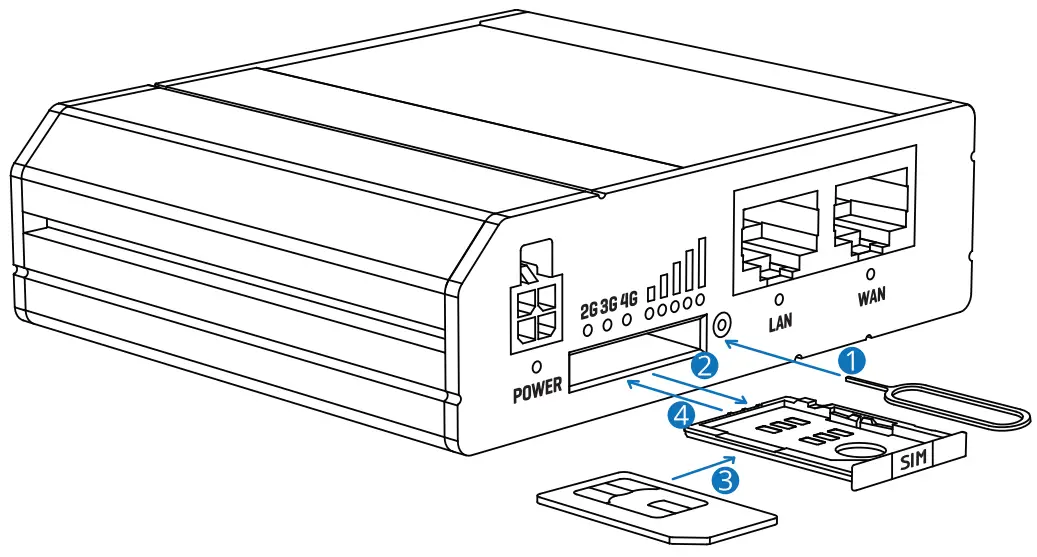
- Push the SIM button with the SIM needle.
- Pull out the SIM holder.
- Insert your SIM card into the SIM holder.
- Slide the SIM holder back into the router.
- Attach Mobile and WiFi antennas.
- Connect the power adapter to the socket on the front of the device. Then plug the other end of the power adapter into a power outlet.
- Connect to the device wirelessly using SSID and password provided on the device information label or use an Ethernet cable connected to LAN port.
LOGIN TO DEVICE
- To enter the router’s Web interface (WebUI), type http://192.168.1.1 into the URL field of your Internet browser.
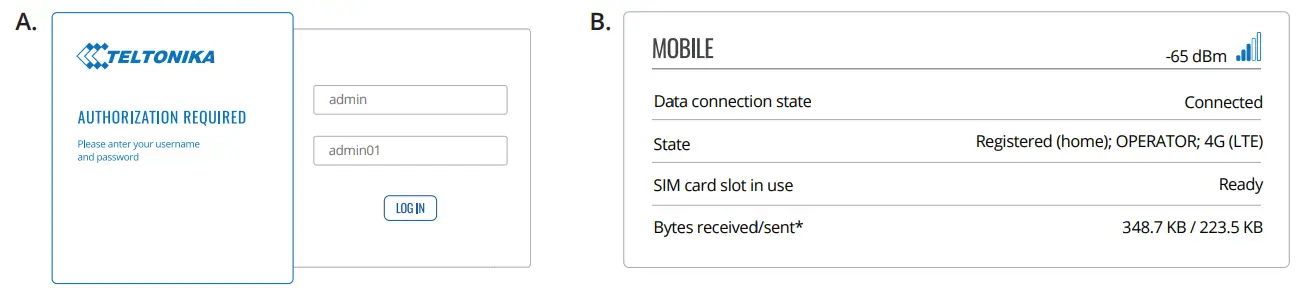
- Use login information shown in image A when prompted for authentication.
- After you log in, you will be prompted to change your password for security reasons. The new password must contain at least 8 characters, including at least one uppercase letter, one lowercase letter, and one digit. This step is mandatory, and you will not be able to interact with the router’s WebUI before you change the password.
- When you change the router’s password, the Configuration Wizard will start. The Configuration Wizard is a tool used to set up some of the router’s main operating parameters.
- Go to the Overview page and pay attention to the Signal Strength indication (image B). To maximize the cellular performance try adjusting the antennas or changing the location of your device to achieve the best signal conditions.
TECHNICAL INFORMATION
| Radio specifications | |
| RF technologies | 2G, 3G, 4G, WiFi |
| Max RF power | 33 dBm@GSM, 24 dBm@WCDMA, 23 dBm@LTE, 20 dBm@ WiFi |
| Bundled accessories specifications* | |
| Power adapter | Input: 0.4A@100-240VAC, Output: 9VDC, 1A, 4-pin plug |
| Mobile antenna | 698-960/1710-2690 MHz, 50 0, VSWR<3, gain** 3 dBi, omnidirectional, SMA male connector |
| WiFi antenna | 2400-2483.5 MHz, 50 0, VSWR<2, gain** 5 dBi, omnidirectional, RP-SMA male connector |
*Order code dependent.
**Higher gain antenna can be connected to compensate for cable attenuation when a cable is used. The user is responsible for the compliance with the legal regulations.
WHAT’S IN THE BOX?
STANDARD PACKAGE CONTAINS*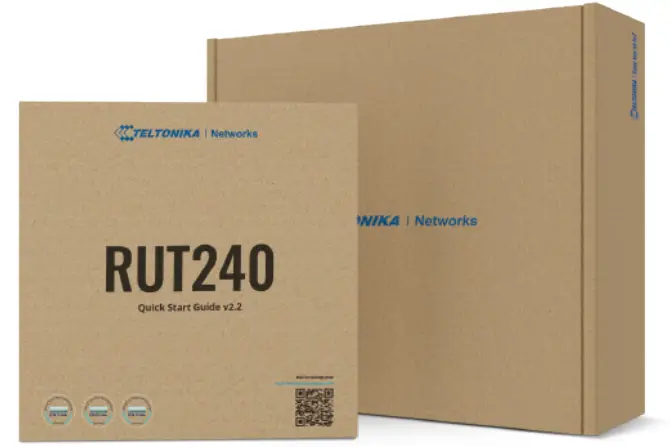
- Router RUT240
- 9 W PSU
- 2 x LTE antennas (swivel, SMA male)
- 1 x WiFi antenna (swivel, RP-SMA male)
- Ethernet cable (1.5 m)
- SIM Adapter kit
- QSG (Quick Start Guide)
- RMS Flyer
- Packaging box
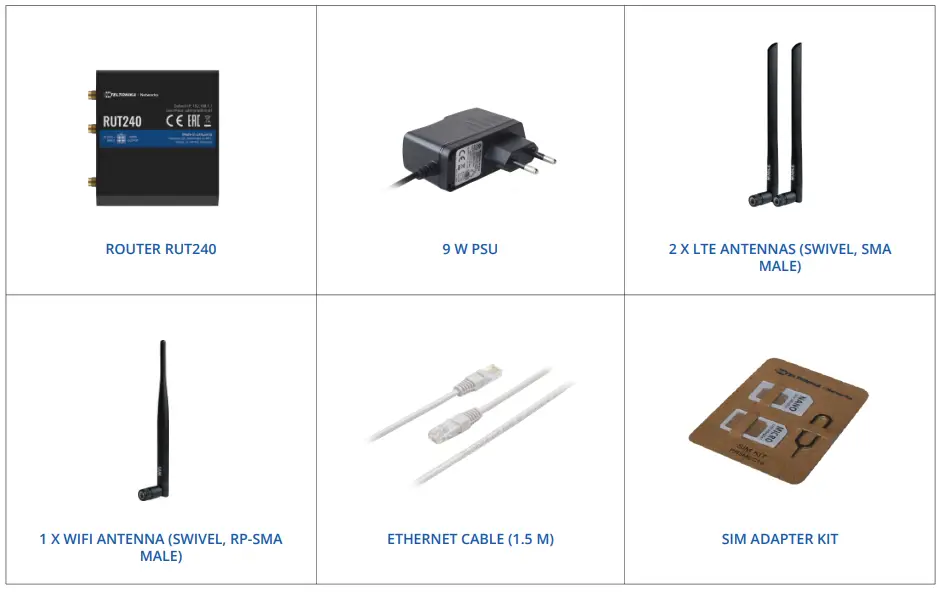
* For all standard order codes standard package contents are the same, execpt for PSU.
STANDARD ORDER CODES
| PRODUCT CODE | HS CODE | HTS CODE | PACKAGE CONTAINS |
| RUT240 06E000 | 851762 | 8517.62.00 | Standard package with Euro PSU |
| RUT240 01U000 | 851762 | 8517.62.00 | Standard package with US PSU |
| RUT240 02U000 | 851762 | 8517.62.00 | Standard package with US PSU |
AVAILABLE VERSIONS
| PRODUCT CODE | REGION (OPERATOR) | FREQUENCY |
| RUT240 *8**** | Europe, the Middle East, Africa, Korea, Thailand, India, Malaysia | 4G (LTE-FDD): B1, B3, B7, B8, B20, B28A 4G (LTE-TDD): B38, B40, B41 3G: B1, B8 2G: B3, B8 |
| RUT240 *6**** | Europe, the Middle East, Africa, Korea, Thailand, Malaysia | 4G (LTE-FDD): B1, B3, B7, B8, B20, B28A 3G: B1, B8 2G: B3, B8 |
| RUT240 *0**** | Europe, the Middle East, Africa, Korea, Thailand, India, Malaysia | 4G (LTE-FDD): B1, B3, B5, B7, B8, B20 4G (LTE-TDD): B38, B40, B41 3G: B1, B5, B8 2G: B3, B8 |
| RUT240 *1**** | North America (AT&T, Bell, T-Mobile)1 | 4G (LTE-FDD): B2, B4, B12 3G: B2, B4, B5 |
| RUT240 *2**** | North America (Verizon) | 4G (LTE-FDD): B4, B13 |
| RUT240 *4**** | South America, Australia, New Zealand, Taiwan | 4G (LTE-FDD): B1, B2, B3, B4, B5, B7, B8, B28 4G (LTE-TDD): B40 3G: B1, B2, B5, B8 2G: B2, B3, B5, B8 |
| RUT240 *7**** | Global | 4G (LTE-FDD): B1, B3, B8, B18, B19, B26 4G (LTE-TDD): B41 3G: B1, B6, B8, B19 |
| RUT240 *0*00G | Japan | 4G (LTE-FDD): B1, B2, B3, B4, B5, B7, B8, B12,B13, B18, B19, B20, B25, B26, B28 4G (LTE-TDD): B38, B39, B40, B41 3G: B1, B2, B4, B5, B6, B8, B19 2G: B2, B3, B5, B8 |
| RUT240 *5**** | Europe, the Middle East, Africa, Korea, Thailand, India (Vodafone) | 4G (LTE-FDD): B1, B3, B5, B7, B8, B20 4G (LTE-TDD): B38, B40, B41 3G: B1, B5, B8 2G: B3, B8 |
The price and lead-times for region (operator) specific versions may vary. For more information please contact us.
1 – Router is not certified on T-Mobile, Bell network (In progress).
MOUNTING OPTIONS
DIN RAIL KIT
| Parameter | Value |
| Mounting standard | 35mm DIN Rail |
| Material | Low carbon steel |
| Weight | 57g |
| Screws included | Philips Pan Head screw #6-32×3/16, 2pcs |
| Dimensions | 82 mm x 46 mm x 20 mm |
| RoHS Compliant | V |
DIN RAIL KIT
- DIN Rail adapter
- Philips Pan Head screw #6-32×3/16, 2pcs for RUT2xx/RUT9xx
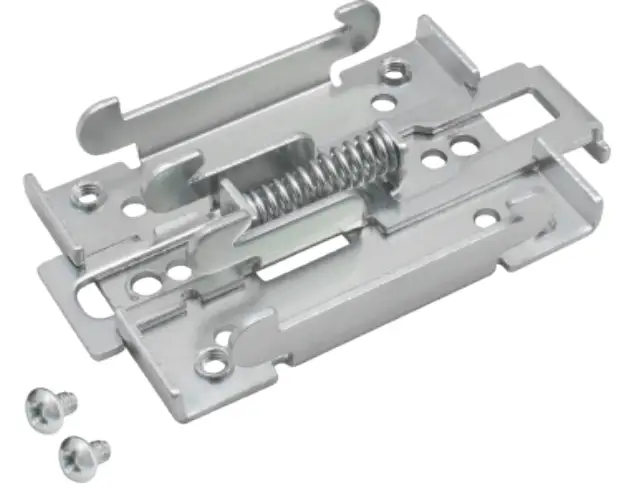
| ORDER CODE | HS CODE | HTS CODE |
| PR5MEC00 | 73269098 | 7326.90.98 |
For more information on all available packaging options – please contact us directly.
COMPACT DIN RAIL KIT
| Parameter | Value |
| Mounting standard | 35mm DIN Rail |
| Material | ABS + PC plastic |
| Weight | 6.5 g |
| Screws included | Philips Pan Head screw #6-32×3/16, 2pcs |
| Dimensions | 70 mm x 25 mm x 14,5 mm |
| RoHS Compliant | V |
DIN RAIL KIT
- Compact plastic DIN Rail adapter (70x25x14,5mm)
- Philips Pan Head screw #6-32×3/16, 2pcs

| ORDER CODE | HS CODE | HTS CODE |
| PR5MEC11 | 73269098 | 7326.90.98 |
For more information on all available packaging options – please contact us directly.
SURFACE MOUNTING KIT
| Parameter | Value |
| Mounting standard | Flat surface mount |
| Material | ABS + PC plastic |
| Weight | 2×5 g |
| Screws included | Philips Pan Head screw #6-32×3/16, 2pcs |
| Dimensions | 25 mm x 48 mm x 7.5 mm |
| RoHS Compliant | V |
DIN RAIL KIT
- Surface mounting kit
- Philips Pan Head screw #6-32×3/16, 2pcs
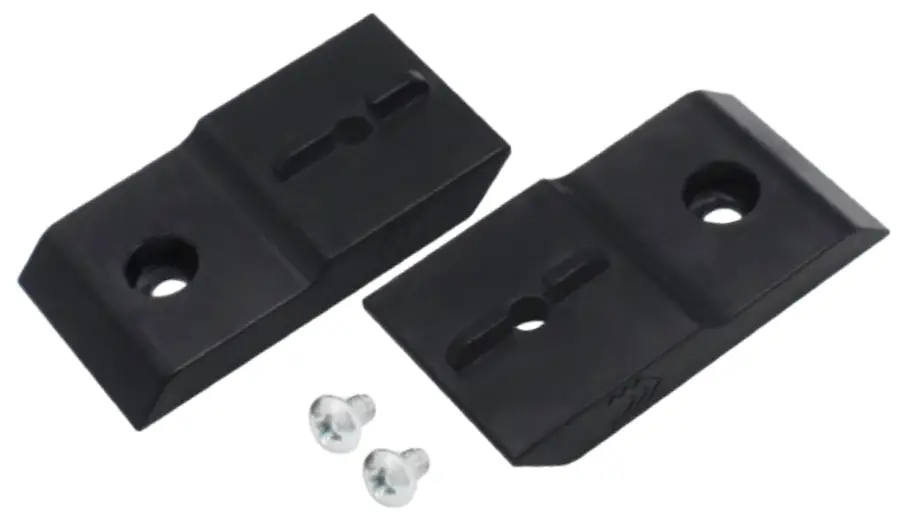
| ORDER CODE | HS CODE | HTS CODE |
| PR5MEC12 | 73269098 | 7326.90.98 |
For more information on all available packaging options – please contact us directly.
RUT240 SPATIAL MEASUREMENTS & WEIGHT
MAIN MEASUREMENTS
W x H x D dimensions for RUT240:
| Device housing*: | 83 x 25 x 74 |
| Box: | 173 x 71 x 148 |
*Housing measurements are presented without antenna connectors and screws; for measurements of other device elements look to the sections below.
TOP VIEW
The figure below depicts the measurements of RUT240 and its components as seen from the top:
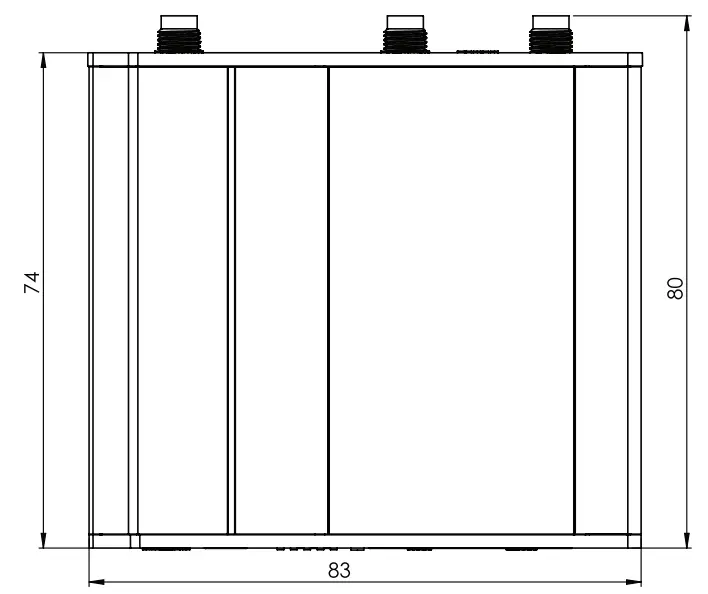
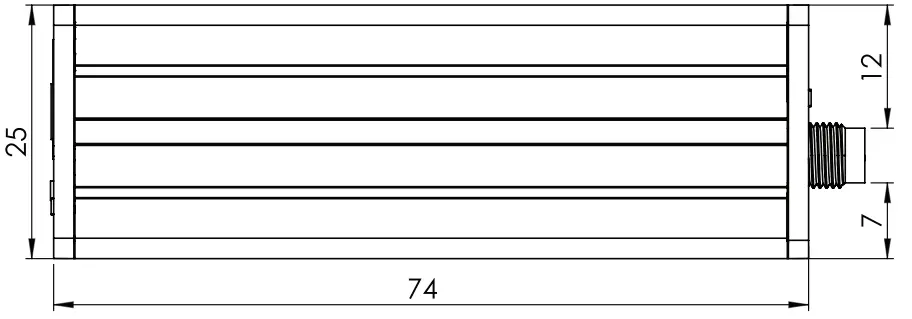
RIGHT VIEW
The figure below depicts the measurements of RUT240 and its components as seen from the right side:
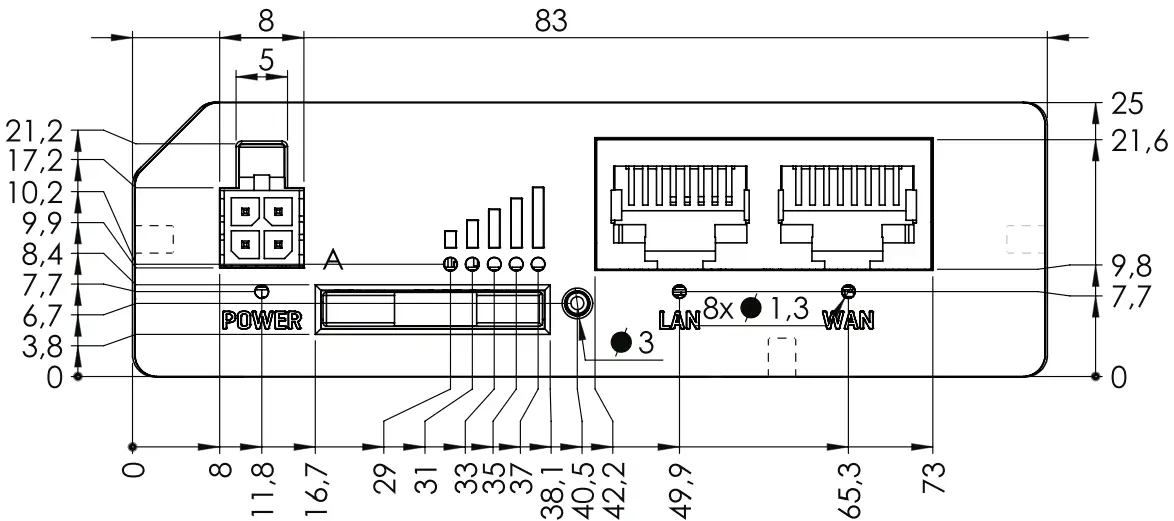
FRONT VIEW
The figure below depicts the measurements of RUT240 and its components as seen from the front panel side:
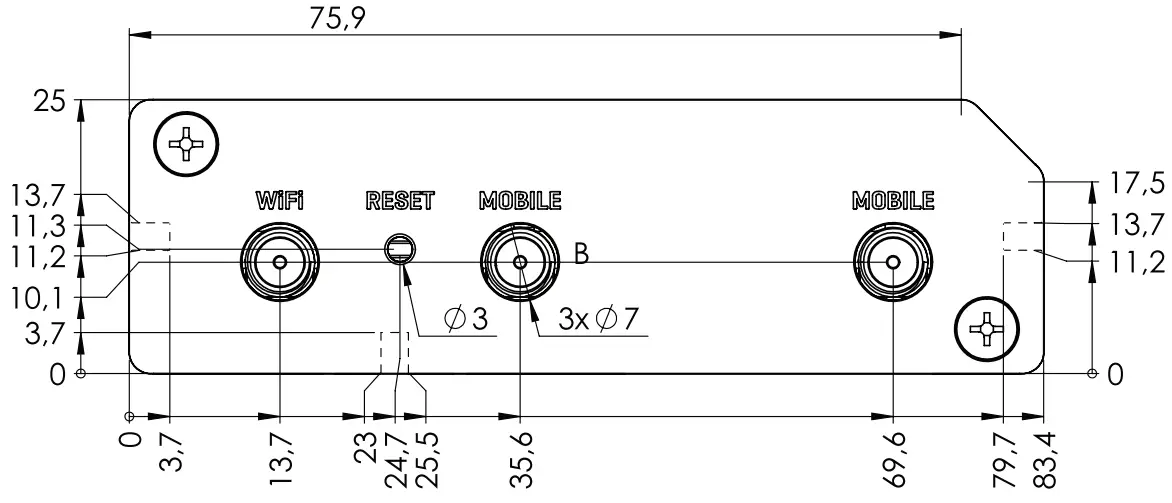
REAR VIEW
The figure below depicts the measurements of RUT240 and its components as seen from the back panel side:
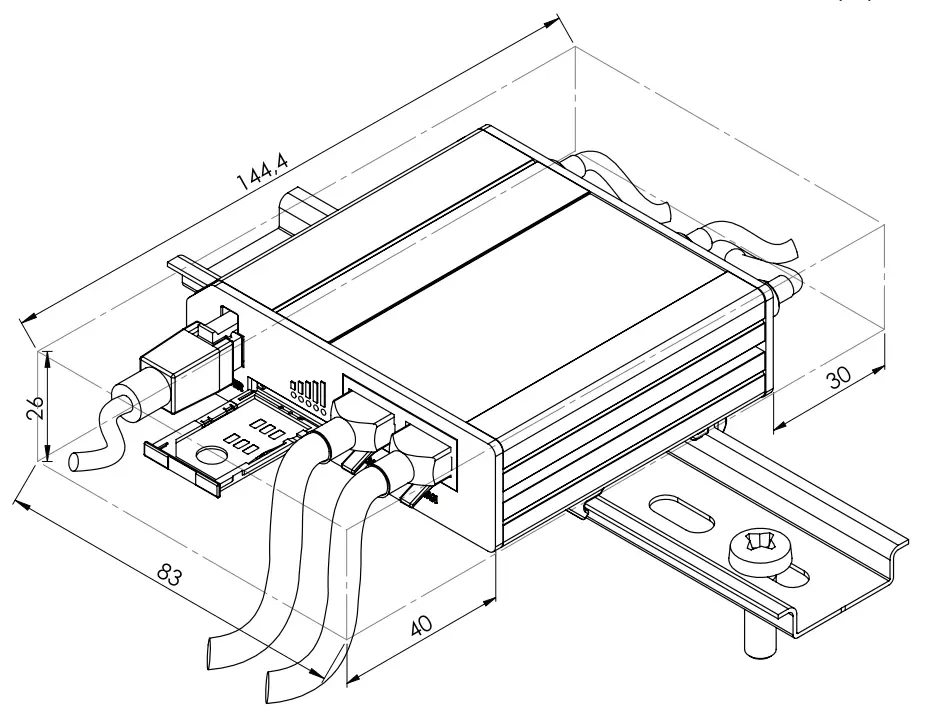
MOUNTING SPACE REQUIREMENTS
The figure below depicts an approximation of the device’s dimensions when cables and antennas are attached:
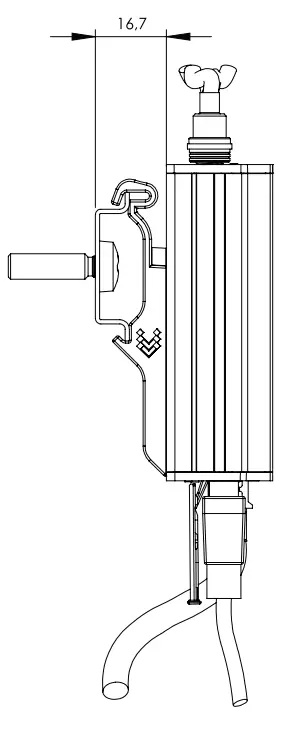
DIN RAIL
The scheme below depicts protrusion measurements of an attached DIN Rail:
 Copyright © 2022, TELTONIKA NETWORKS.
Specifications and information given in this document are subject to change by TELTONIKA NETWORKS without prior notice.