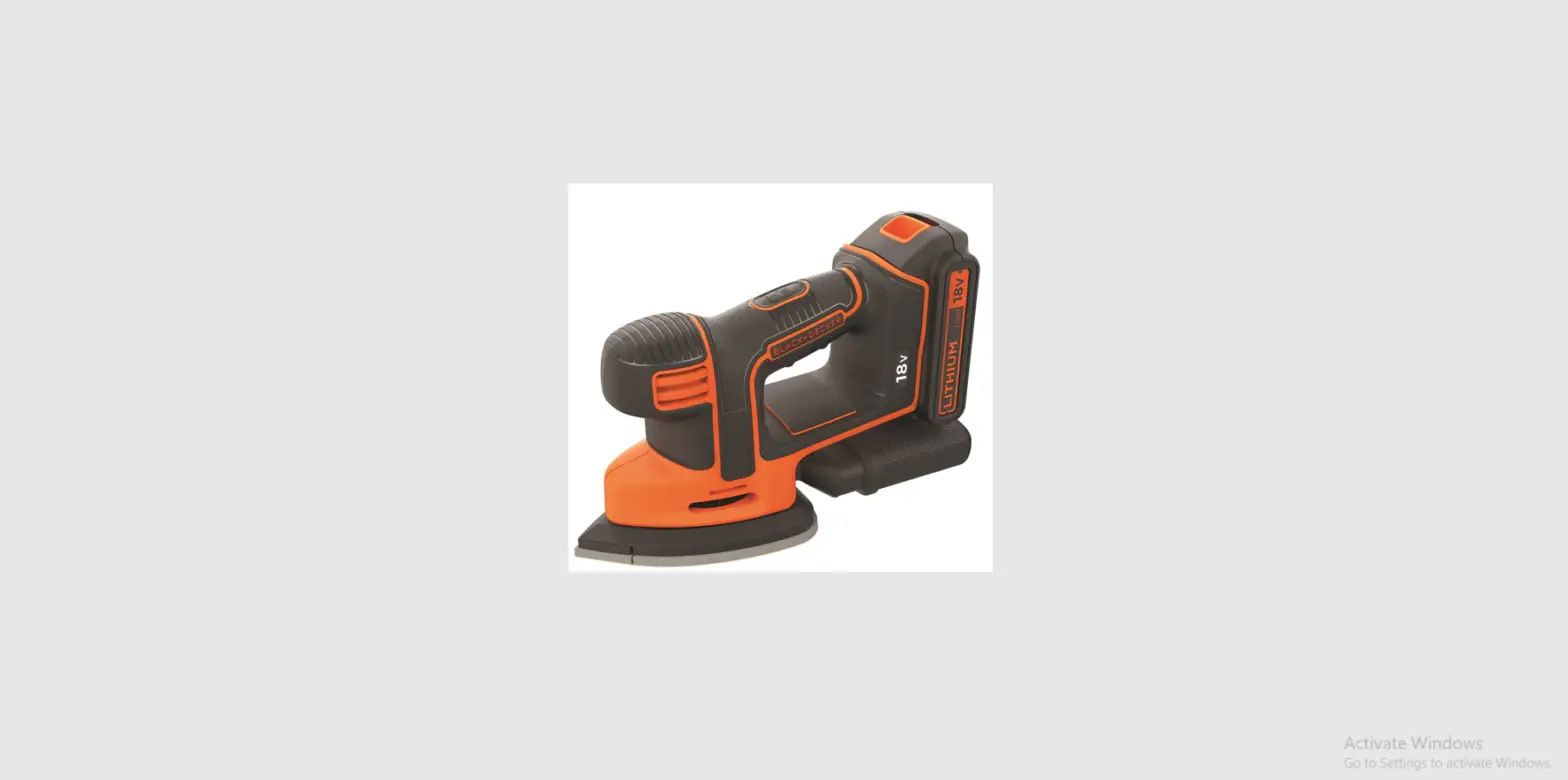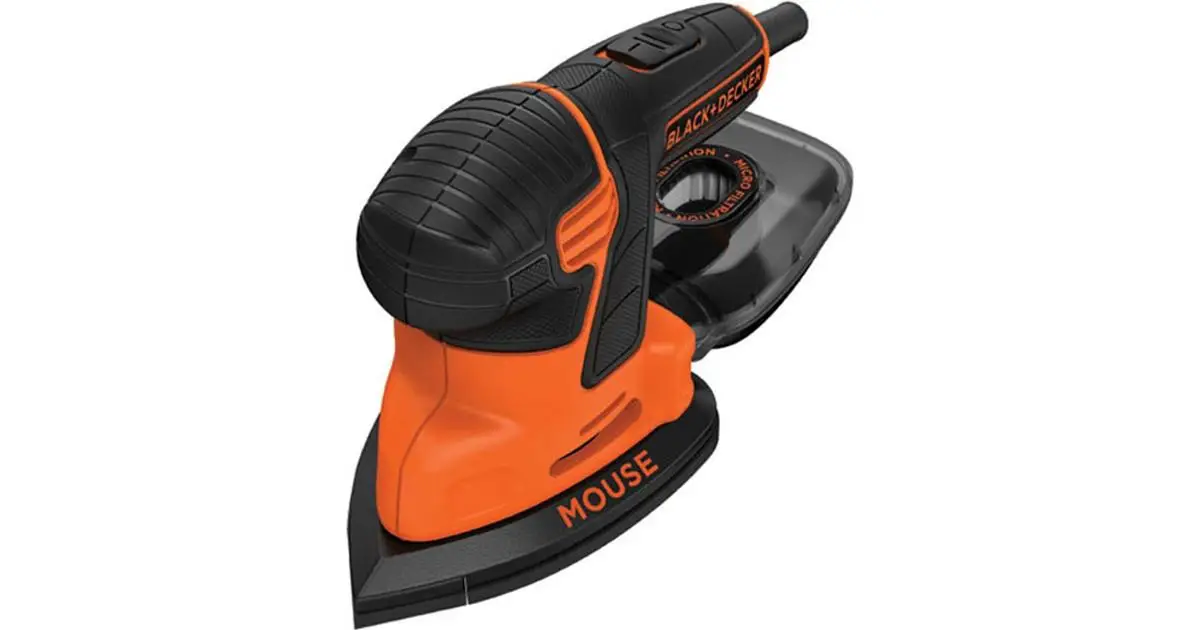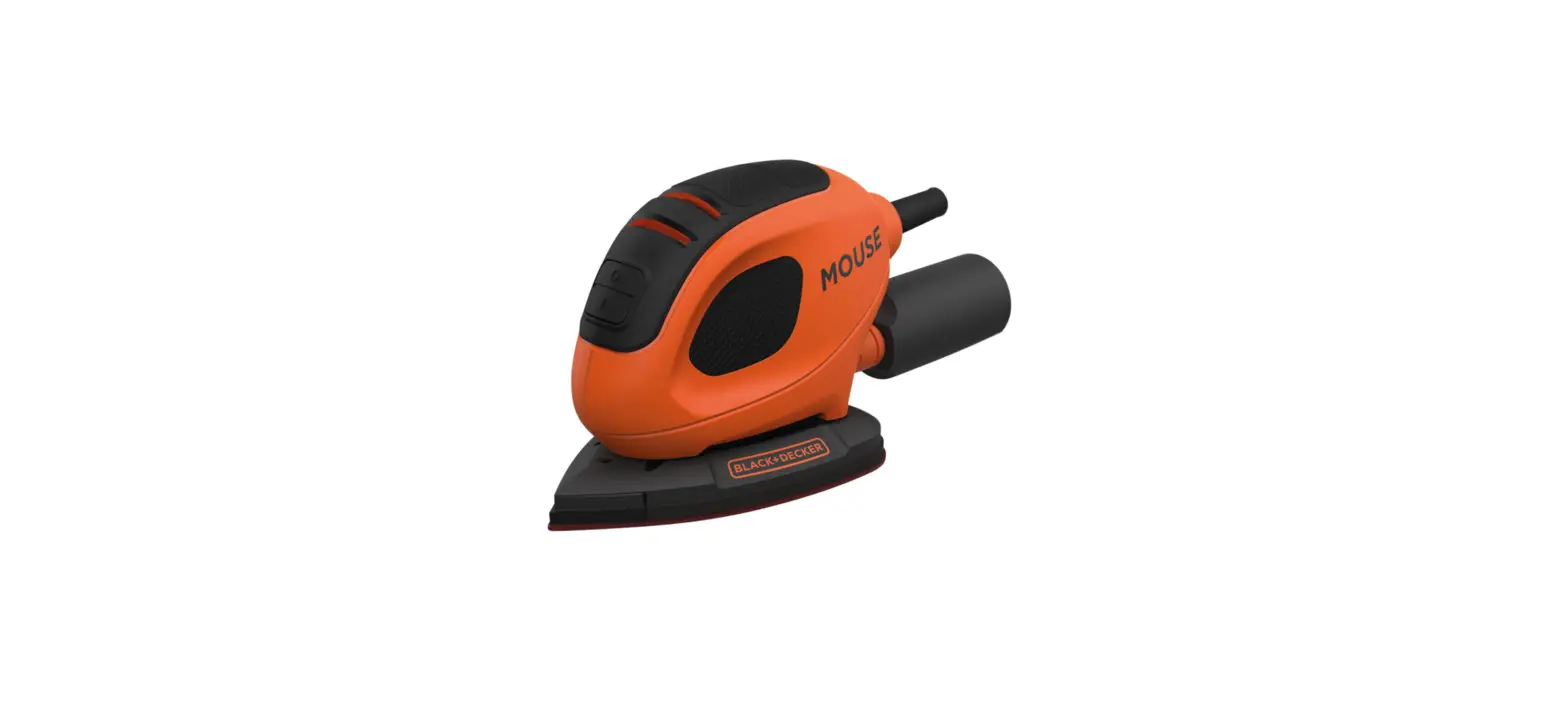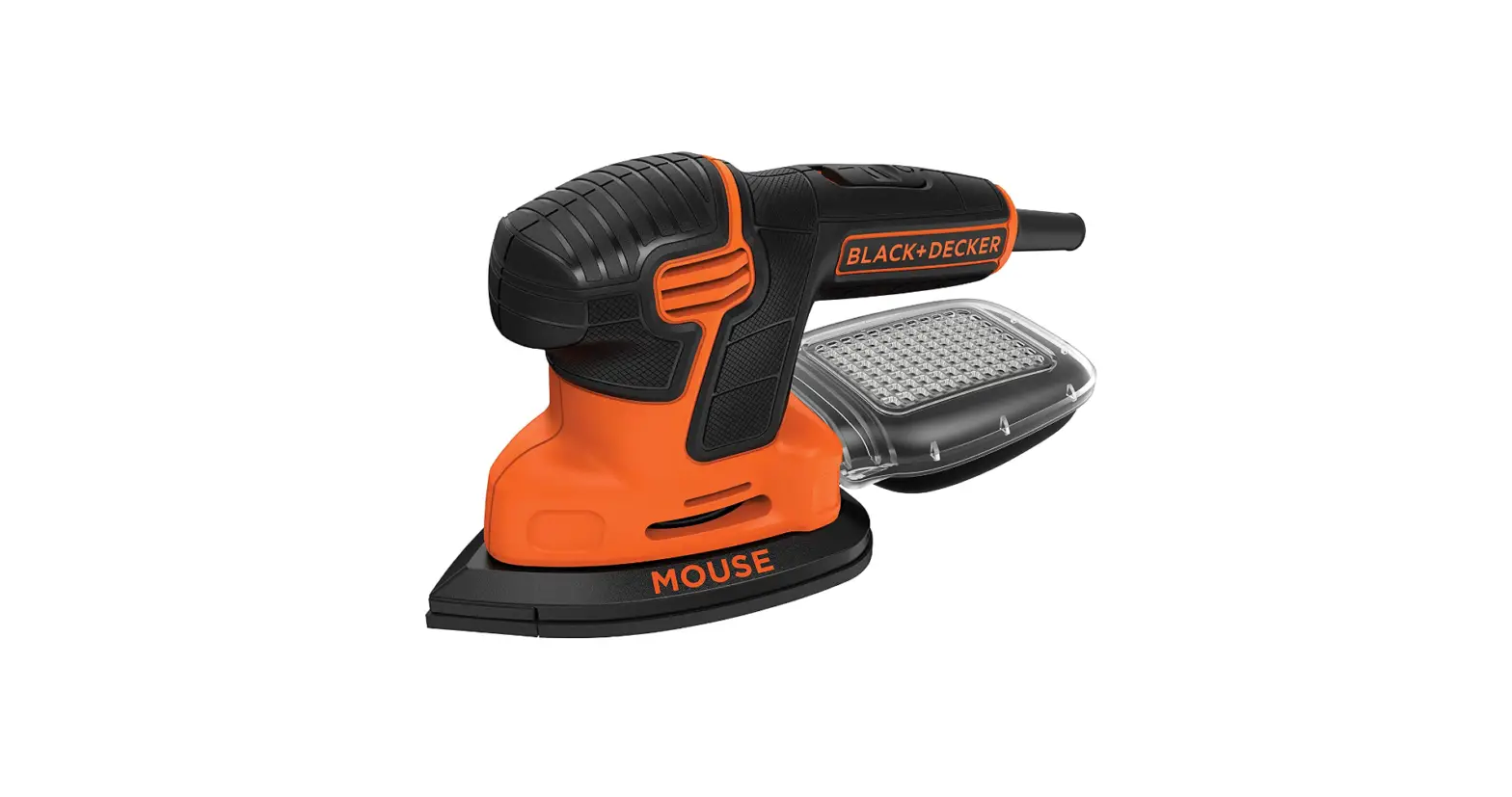

BLACK+DECKER BDEMS600 Electric Mouse Sander

Introduction
Thank you for choosing BLACK+DECKER! If you have a question or experience a problem with your BLACK+DECKER purchase, go to: http://www.blackanddecker.com/instantanswers If you can’t find the answer or do not have access to the Internet, call 1-800-544-6986 from 8 a.m. to 5 p.m. EST Mon. – Fri. to speak with an agent. Please have the CATALOG NUMBER available when you call. Definitions: Safety Alert Symbols and Words This instruction manual uses the following safety alert symbols and words to alert you to hazardous situations and your risk of personal injury or property damage.
- DANGER: Indicates an imminently hazardous situation that, if not avoided, will result in death or serious injury.
- WARNING: Indicates a potentially hazardous situation that, if not avoided, could result in death or serious injury.
- CAUTION: Indicates a potentially hazardous situation which, if not avoided, may result in minor or moderate injury. (Used without a word) Indicates a safety-related message.
NOTICE: Indicates a practice not related to personal injury which, if not avoided, may result in property damage.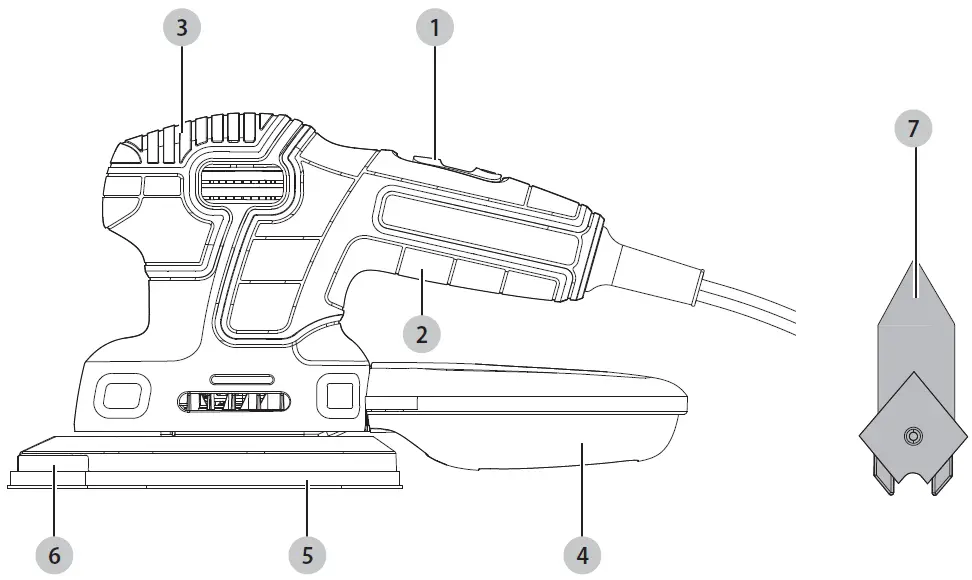
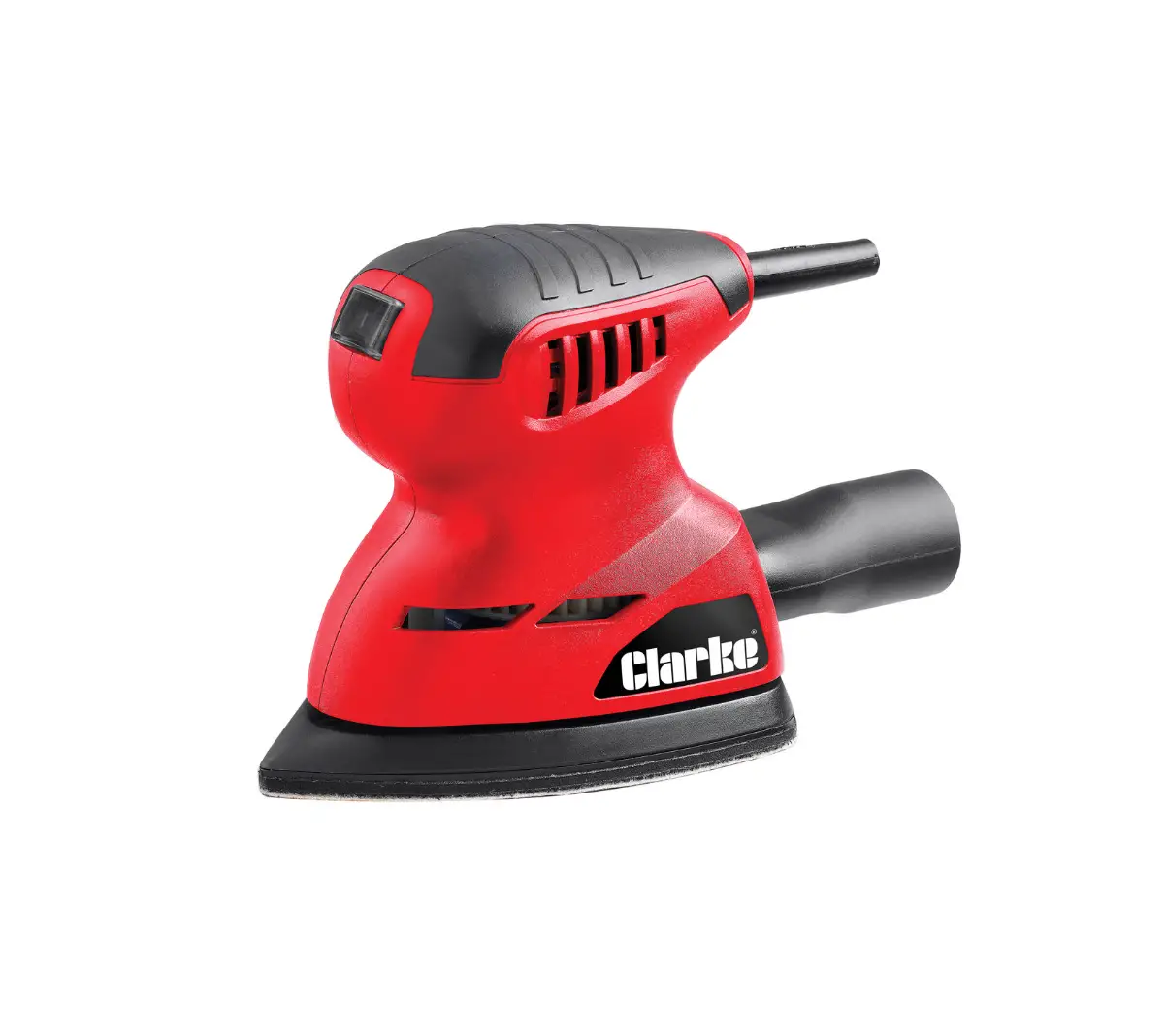
- On/off switch
- Back handle
- Front handle
- Dust collection canister 5 Sanding pad
- Removable pad tip
- Finger attachment
WARNING
- Read all safety warnings and all instructions.
- Failure to follow the warnings and instructions may result in electric shock, fire, and/or serious injury.
- To reduce the risk of injury, read the instruction manual.
GENERAL POWER TOOL SAFETY WARNINGS
- WARNING! Read all safety warnings and all instructions. Failure to follow the warnings and instructions may result in electric shock, fire, and/or serious injury.
SAVE ALL WARNINGS AND INSTRUCTIONS FOR FUTURE REFERENCE
- The term “power tool” in the warnings refers to your mains-operated (corded) power tool or battery-operated (cordless) power tool.
Work Area Safety
- a ) Keep the work area clean and well-lit. Cluttered or dark areas invite accidents.
- b ) Do not operate power tools in explosive atmospheres, such as in the presence of flammable liquids, gases, or dust. Power tools create sparks that may ignite dust or fumes.
- c ) Keep children and bystanders away while operating a power tool. Distractions can cause you to lose control.
Electrical Safety
- a ) Power tool plugs must match the outlet. Never modify the plug in any way. Do not use any adapter plugs with earthed (grounded) power tools. Unmodified plugs and matching outlets will reduce the risk of electric shock.
- b ) Avoid body contact with earthed or grounded surfaces such as pipes, radiators, ranges, and refrigerators. There is an increased risk of electric shock if your body is earthed or grounded.
- c ) Do not expose power tools to rain or wet conditions. Water entering a power tool will increase the risk of electric shock.
- d ) Do not abuse the cord. Never use the cord for carrying, pulling, or unplugging the power tool. Keep the cord away from heat, oil, sharp edges, or moving parts. Damaged or entangled cords increase the risk of electric shock.
- e ) When operating a power tool outdoors, use an extension cord suitable for outdoor use. The use of a cord suitable for outdoor use reduces the risk of electric shock.
- f ) If operating a power tool in a damp location is unavoidable, use a ground fault circuit interrupter (GFCI) protected supply. The use of a GFCI reduces the risk of electric shock.
Personal Safety
- a ) Stay alert, watch what you are doing, and use common sense when operating a power tool. Do not use a power tool while you are tired or under the influence of drugs, alcohol, or medication. A moment of inattention while operating power tools may result in serious personal injury.
- b ) Use personal protective equipment. Always wear eye protection. Protective equipment such as dust masks, non-skid safety shoes, hard hats, or hearing protection used for appropriate conditions will reduce personal injuries.
- c ) Prevent unintentional starting. Ensure the switch is in the off position before connecting to a power source and/or battery pack, picking up, or carrying the tool. Carrying power tools with your finger on the switch or energizing power tools that have the switch on invites accidents.
- d ) Remove any adjusting key or wrench before turning the power tool on. A wrench or a key left attached to a rotating part of the power tool may result in personal injury.
- e ) Do not overreach. Keep proper footing and balance at all times. This enables better control of the power tool in unexpected situations.
- f ) Dress properly. Do not wear loose clothing or jewelry. Keep your hair, clothing, and gloves away from moving parts. Loose clothes, jewelry or long hair can be caught in moving parts.
- g ) If devices are provided for the connection of dust extraction and collection facilities, ensure these are connected and properly used. Use of dust collection can reduce dust-related hazards.
Power Tool Use and Care
- a ) Do not force the power tool. Use the correct power tool for your application. The correct power tool will do the job better and safer at the rate for which it was designed.
- b ) Do not use the power tool if the switch does not turn on and off. Any power tool that cannot be controlled with the switch is dangerous and must
- be repaired.
- c ) Disconnect the plug from the power source and/ or the battery pack from the power tool before making any adjustments, changing accessories, or storing power tools. Such preventive safety measures reduce the risk of starting the power tool accidentally.
- d ) Store idle power tools out of the reach of children and do not allow persons unfamiliar with the power tool or these instructions to operate the power tool. Power tools are dangerous in the hands of untrained users.
- e ) Maintain power tools. Check for misalignment or binding of moving parts, breakage of parts, and any other condition that may affect the power tool’s operation. If damaged, have the power tool repaired before use. Many accidents are caused by poorly maintained power tools.
- f ) Keep cutting tools sharp and clean. Properly maintained cutting tools with sharp cutting edges are less likely to bind and are easier to control.
- g ) Use the power tool, accessories and tool bits, etc. in accordance with these instructions, taking into account the working conditions and the work to be performed. Use of the power tool for operations different from those intended could result in a hazardous situation.
Service
- a ) Have your power tool serviced by a qualified repair person using only identical replacement parts. This will ensure that the safety of the power tool is maintained.
SAFETY WARNINGS AND INSTRUCTIONS
SANDERS ALWAYS WEARS EYE PROTECTION
- Clean your tool out periodically.
CAUTION: Wear appropriate hearing protection during use. Under some conditions and duration of use, noise from this product may contribute to hearing loss.
OTHER IMPORTANT SAFETY WARNINGS AND INSTRUCTIONS
Sanding Lead-based Paint
Sanding of lead-based paint is NOT RECOMMENDED due to the difficulty of controlling the contaminated dust. The greatest danger of lead poisoning is to children and pregnant women. Since it is difficult to identify whether or not a paint contains lead without a chemical analysis, we recommend the following precautions when sanding any paint:
PERSONAL SAFETY
- No children or pregnant women should enter the work area where the paint sanding is being done until all cleanup is completed.
- A dust mask or respirator should be worn by all persons entering the work The filter should be replaced daily or whenever the wearer has difficulty breathing.
Note: Only those dust masks suitable for working with lead paint dust and fumes should be used. Ordinary painting masks do not offer this protection. See your local hardware dealer for the proper (NIOSH-approved) mask.
- NO EATING, DRINKING, or SMOKING should be done in the work area to prevent ingesting contaminated paint Workers should wash and clean up BEFORE eating, drinking, or smoking. Articles of food, drink, or smoking should not be left in the work area where dust would settle on them.
ENVIRONMENTAL SAFETY
- Paint should be removed in such a manner as to minimize the amount of dust
- Areas, where paint removal is occurring, should be sealed with plastic sheeting of 4 mils
- Sanding should be done in a manner to reduce tracking of paint dust outside the work
CLEANING AND DISPOSAL
- All surfaces in the work area should be vacuumed and thoroughly cleaned daily for the duration of the sanding project. Vacuum filter bags should be changed frequently.
- Plastic drop cloths should be gathered up and disposed of along with any dust chips or other removal They should be placed in sealed refuse receptacles and disposed of through regular trash pick-up procedures. During clean-up, children and pregnant women should be kept away from the immediate work area.
- All toys, washable furniture, and utensils used by children should be washed thoroughly before being used
SAVE THESE INSTRUCTIONS
Additional Safety Information
WARNING: ALWAYS use safety glasses. Everyday eyeglasses are NOT safety glasses. Also, use a face or dust mask if the cutting operation is dusty.
ALWAYS WEAR CERTIFIED SAFETY EQUIPMENT
- ANSI Z87.1 eye protection (CAN/CSA Z94.3), ANSI S12.6 (S3.19) hearing protection, NIOSH/OSHA/MSHA respiratory protection.
- WARNING: Some dust created by power sanding, sawing, grinding, drilling, and other construction activities contains chemicals known to the State of California to cause cancer, birth defects, or other reproductive harm. Some examples of these chemicals are: lead from lead-based paints,
- Crystalline silica from bricks and cement and other masonry products, and arsenic and chromium from chemically treated lumber. Your risk from these exposures varies, depending on how often you do this type of work. To reduce your exposure to these chemicals: work in a well-ventilated area, and work with approved safety equipment, such as those dust masks that are specially designed to filter out microscopic particles.
- Avoid prolonged contact with dust from power sanding, sawing, grinding, drilling, and other construction activities. Wear protective clothing and wash exposed areas with soap and water. Allowing dust to get into your mouth and eyes, or lay on the skin may promote the absorption of harmful chemicals.
- WARNING: Use of this tool can generate and/or disperse dust, which may cause serious and permanent respiratory or other injuries. Always use NIOSH/OSHA-approved respiratory protection appropriate for dust exposure. Direct particles away from the face and body.
- WARNING: Always wear proper personal hearing protection that conforms to ANSI S12.6 (S3.19) during use. Under some conditions and duration of use, noise from this product may contribute to hearing loss.
- CAUTION: When not in use, place the tool on its side on a stable surface where it will not cause a tripping or falling hazard. Some tools with large battery packs will stand upright on the battery pack but may be easily knocked over.
- Air vents often cover moving parts and should be avoided. Loose clothes, jewelry, or long hair can be caught in moving parts.
- An extension cord must have adequate wire size (AWG or American Wire Gauge) for safety. The smaller the gauge number of the wire, the greater the capacity of the cable, that is, 16 gauge has more capacity than 18 gauge. An undersized cord will cause a drop in line voltage resulting in loss of power and overheating. When using more than one extension to make up the total length, be sure each individual extension contains at least the minimum wire size. The following table shows the correct size to use depending on cord length and nameplate ampere rating. If in doubt, use the next heavier gauge. The lower the gauge number, the heavier the cord.
Minimum Gauge for Cord Sets
| Volts | The total length of the Cord in Feet
(meters) | ||||
| 120 V | 25 (7.6) | 50 (15.2) | 100 (30.5) | 150 (45.7) | |
| 240 V | 50 (15.2) | 100 (30.5) | 200 (61.0) | 300 (91.4) | |
| Ampere Rating |
American Wire gauge | ||||
| More Than | not
More Than | ||||
| 0 | 6 | 18 | 16 | 16 | 14 |
| 6 | 10 | 18 | 16 | 14 | 12 |
| 10 | 12 | 16 | 16 | 14 | 12 |
| 12 | 16 | 14 | 12 | Not Recommended | |
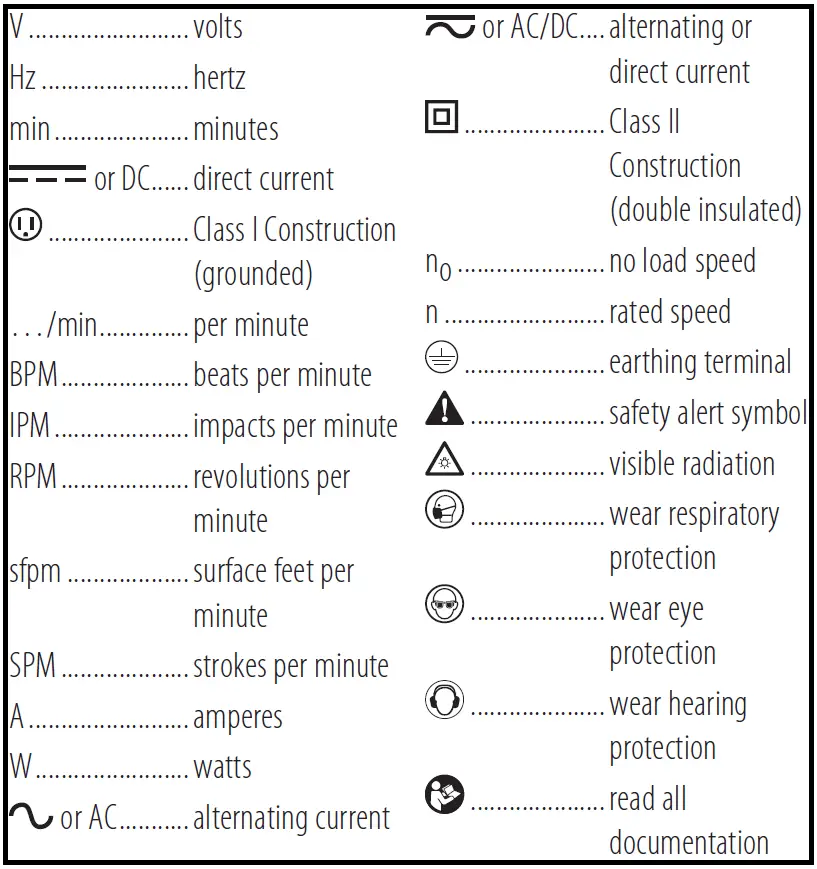
The label on your tool may include the following symbols. The symbols and their definitions are as follows:
Motor
Be sure your power supply agrees with the nameplate marking. A voltage decrease of more than 10% will cause loss of power and overheating. DeWALT tools are factory tested; if this tool does not operate, check the power supply.
COMPONENTS
WARNING: Never modify the power tool or any part of it. Damage or personal injury could result. Refer to Figure A at the beginning of this manual for a complete list of components.
INTENDED USE
Your BLACK+DECKER random orbital sander has been designed for sanding wood, metal, plastics, and painted surfaces. This product is intended for household, consumer use only.
- DO NOT use under wet conditions or in presence of flammable liquids or gases.
- DO NOT let children come into contact with the tool. Supervision is required when inexperienced operators use this tool.
- OPERATION WARNING: To reduce the risk of serious personal injury, turn the unit off and disconnect it from the power source before making any adjustments or removing/installing attachments or accessories. An accidental start-up can cause injury.
- WARNING: To reduce the risk of serious personal injury, read and follow all important safety warnings and instructions prior to using this tool.
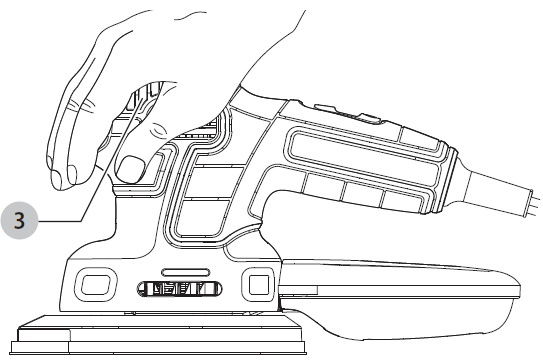
Proper Hand Position
- WARNING: To reduce the risk of serious personal injury,
- ALWAYS: use proper hand position as shown.
- WARNING: To reduce the risk of serious personal injury,
- ALWAYS hold securely in anticipation of a sudden reaction.
Proper hand position requires one hand on the main handle 3 as shown in Fig. B.
Switch
To turn the tool ON, hold it as shown in Figure C or C1 and push the on/off switch 1 toward the front of the tool. To turn the tool OFF, pull the on/off switch back toward the cord.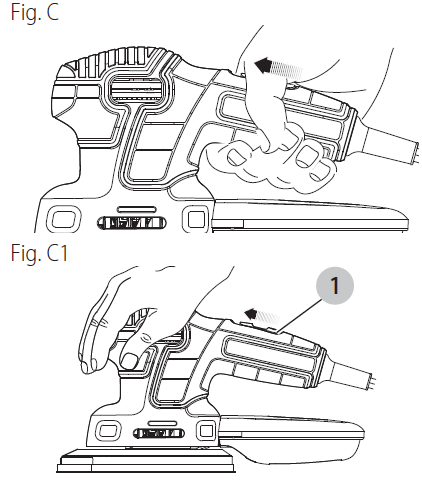
Operation
Grasp the product as shown in Fig. C or C1 and turn it on.
NOTE: Do not rest your fingers on the platen during use. Move it in long sweeping strokes across the surface, letting it do the work. Light pressure is all that is required for sanding, polishing, or scrubbing. Excessive pressure will slow the tool and produce inferior results. Check your work often, the product is capable of removing material rapidly.
- WARNING: Shock hazard. Under no circumstances should this product be used near water.
- CAUTION: To reduce the risk of injury, turn off and unplug the tool before making any adjustments or removing or installing attachments or accessories.
Detail Sanding
Your tool is equipped with a teardrop base which allows you to use it on large flat surfaces and tight spots or corners. The pad tips may wear unevenly, depending on use.
Fitting sanding sheets
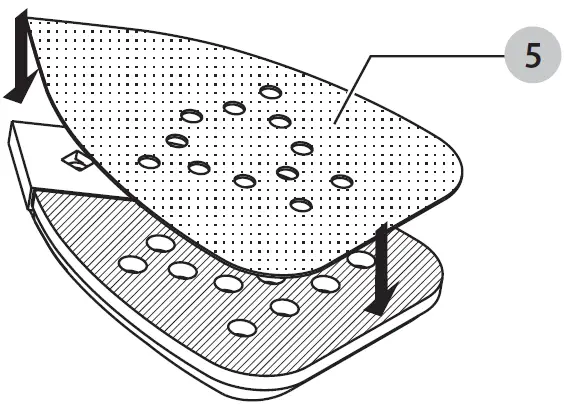
- Hold the tool with the sanding pad 5 facing upward.
- Place the sanding sheet onto the sanding base, ensuring all the holes of the paper line up with the holes in the sanding pad as shown in Fig. D.
Finger Attachment
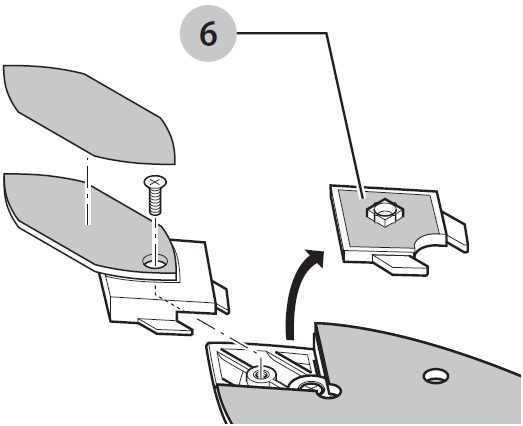
The finger attachment is used for fine-detail sanding.
- Remove the screw.
- Remove the diamond-shaped pad tip 6 from the base.
- Fit the finger attachment onto the sanding base as shown in Fig. E.
- Fit and tighten the screw.
- Align the proper sanding sheet with the finger 7 attachment. Fig. E
Dust Extraction
To Empty the Dust Canister
- CAUTION: Respiratory hazard. Never operate this tool for wood sanding unless the dust canister is in place. Sanding dust exhaust may create a breathing hazard.
- WARNING: Fire hazard. Collected sanding dust from sanding surface coatings (polyurethane, linseed oil, etc.) can self-ignite in the sander dust canister or elsewhere and cause a fire. To reduce risk, empty canisters frequently and strictly follow the sander manual and coating manufacturer’s instructions.
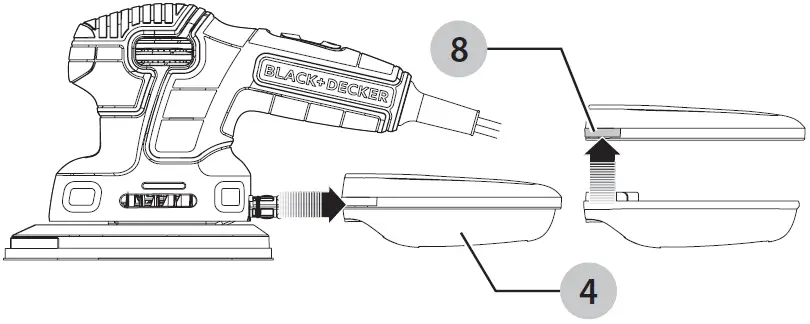
- WARNING: Fire hazard. When working on metal surfaces, do not use the dust canister or a vacuum cleaner because sparks are generated. Wear safety glasses and a dust mask. Due to the danger of fire, do not use your sander to sand magnesium surfaces. Do not use it for wet sanding. The dust collection canister 4 should be emptied after every 10 minutes of sanding.
- While holding the sander, grasp the dust collection canister and pull it off of the sander as shown in Fig. F.
- Hold the canister just inside a garbage can to ensure dust is contained.
- Push up on tab 8 to separate the top of the canister from the bottom as shown in Fig. F.

- Gently shake or tap the top and bottom of the canister to empty.
- Reattach the top and bottom and firmly push the canister back onto the sander.
Hints for optimum use
- Do not place your hands over the ventilation slots.
- Do not exert too much pressure on the tool.
- Regularly check the condition of the sanding sheet. Replace when necessary. Always sand with the grain of the wood.
- When sanding new layers of paint before applying another layer, use extra fine grit.
- On very uneven surfaces, or when removing layers of paint, start with coarse grit. On other surfaces, start with medium grit. In both cases, gradually change to fine grit for a smooth finish.
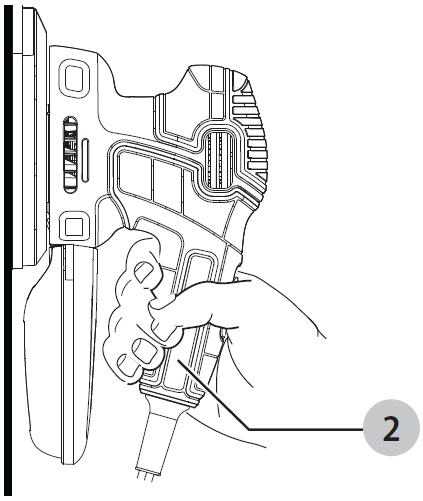
- When sanding on a vertical surface, hold the back handle 2 for better grip and control as shown in Fig. G.
MAINTENANCE WARNING
To reduce the risk of serious personal injury, turn the unit off and disconnect it from the power source before making any adjustments or removing/installing attachments or accessories. An accidental start-up can cause injury.
- Cleaning WARNING: Blow dirt and dust out of all air vents with clean, dry air at least once a week. To minimize the risk of eye injury, always wear ANSI Z87.1-approved eye protection when performing this.
- WARNING: Never use solvents or other harsh chemicals for cleaning the non-metallic parts of the tool. These chemicals may weaken the plastic materials used in these parts. Use a cloth dampened only with water and mild soap. Never let any liquid get inside the tool; never immerse any part of the tool in a liquid.
Repairs
The charger and battery pack are not serviceable.
WARNING: To assure product SAFETY and RELIABILITY, repairs, maintenance, and adjustment (including brush inspection and replacement, when applicable) should be performed by a BLACK+DECKER factory service center or a BLACK+DECKER authorized service center. Always use identical replacement parts.
Register Online
Thank you for your purchase. Register your product now for:
- WARRANTY SERVICE: Registering your product will help you obtain more efficient warranty service in case there is a problem with your product.
- CONFIRMATION OF OWNERSHIP: In case of an insurance loss, such as fire, flood, or theft, your registration of ownership will serve as your proof of purchase.
- FOR YOUR SAFETY: Registering your product will allow us to contact you in the unlikely event a safety notification is required under the Federal Consumer Safety Act.
Register online at www.blackanddecker.com/register.
ACCESSORIES
A variety of Mouse® accessories are available at extra cost. Listings per retailer may vary. Note: Use only sandpaper with holes in the same configuration as on the base of the sander. Sandpaper without holes will not allow dust to enter the canister. The hook and loop pad and individual bases are replaceable parts. If they become worn, contact your local service center. For more information call: 1-800-544-6986.
WARNING: The use of any accessory not recommended for use with this appliance could be hazardous.
| APPLICATION / ACCESSORY MATRIX | |
| ACCESSORY | RECOMMENDED APPLICATIONS / USES |
| Medium grit sandpaper Fine grit sandpaper Extra fine grit sandpaper
Detail sanding tips 1 OT polishing/stripping wool 4 OT fine polishing wool Grey foam pad White non-woven pad Red non-woven pad | Paint, varnish, rust removal Surface blending, and finishing
Sanding between coats of paint or varnish Corners / hard-to-reach places Polishing metals / stripping varnish or urethane Fine polishing, satin finish on paint/varnish/urethane Applying and removing polish Light scrubbing Heavy scrubbing/rust removal |
The pads described above may be available in kits where Mouse® products are sold. For more information call 1-800-544-6986.
SERVICE INFORMATION
All BLACK+DECKER Service Centers are staffed with trained personnel to provide customers with efficient and reliable power tool service. Whether you need technical advice, repair, or genuine factory replacement parts, contact the BLACK+DECKER location nearest you. To find your local service location, call: 1-800-544-6986 or visit www.blackanddecker.com
TWO-YEAR LIMITED WARRANTY
BLACK+DECKER warrants this product to be free from defects in material or workmanship for a period of two to 2 years following the date of purchase, provided that the product is used in a home environment. This limited warranty does not cover failures due to abuse, accidental damage, or when repairs have been made or attempted by anyone other than BLACK+DECKER and its Authorized Service Centers.
A defective product meeting the guarantee conditions set forth herein will be replaced or repaired at no charge in either of two ways:
The first, which will result in exchanges only, is to return the product to the retailer from whom it was purchased (provided that the store is a participating retailer). Returns should be made within the time period of the retailer’s policy for exchanges. Proof of purchase may be required. Please check with the retailer for its specific return policy regarding time limits for returns or exchanges. The second option is to take or send the product (prepaid) to a BLACK+DECKER-owned or authorized Service Center for repair or replacement at BLACK+DECKER’s option. Proof of purchase may be required. BLACK+DECKER-owned and authorized service centers are listed online at www.blackanddecker.com.
This warranty does not apply to accessories. This warranty gives you specific legal rights and you may have other rights which vary from state to state or province to province. Should you have any questions, contact the manager of your nearest BLACK+DECKER Service Center. This product is not intended for commercial use, and accordingly, such commercial use of this product will void this warranty. All other warranties, express or implied, are hereby disclaimed.
LATIN AMERICA: This warranty does not apply to products sold in Latin America. For products sold in Latin America, check country-specific warranty information contained in the packaging, call the local company or see the website for such information.
FREE WARNING LABEL REPLACEMENT: If your warning labels become illegible or are missing, call 1-800-544- 6986 for a free replacement. Imported by Black & Decker (U.S.) Inc., 701 E. Joppa Rd. Towson, MD 21286
Troubleshooting Guide
Be Sure to Follow Safety Rules and Instructions
For assistance with your product, visit our website www.blackanddecker.com for the location of the service center nearest you or call the BLACK+DECKER helpline at 1-800-544-6986.
FAQ’s
You can, of course. With 16,000 rpm, it is far more powerful than nearly every orbital/finish sander available, allowing you to reach details like the corners where the tread and riser meet. puts Milwaukee, Dewalt, Makita, Rigid, and other brands to shame. Pun not intended. This is the most functional sander available, regardless of style. If you had the time, you could use this to sand a whole hardwood floor, though I wouldn’t advise it. The point is that you’ll undoubtedly utilize this more frequently on subsequent projects. A belt sander is something I would also buy. Next, you can enjoy the benefits of both worlds.
The BLACK+DECKER® 1.2 Amp MOUSE® sander features a dust collection canister, a comfortable grip, and a strong 1.2 Amp motor with 14,000 OPM (orbits per minute). You can do anything if you have the correct tools.
Mouse sanders can be used to finish sand drywall, plastic, and even soft metals. However, they are typically used to sand wood to a soft and smooth surface.
The Detail Sander is excellent for sanding edges and difficult-to-reach places.
This sander is not intended for sanding hardwood floors. It is a mouse-type sander that is designed to sand soft surfaces such as wood, plastic, and metal.
This sander is not intended for use on cars. It is a mouse-type sander that is designed to sand soft surfaces such as wood, plastic, and metal.
Yes, the BLACK+DECKER Mouse Sander has a dust collection system that collects most of the dust created by the sanding process. However, some dust may still be created during the sanding process. We recommend that you wear eye protection and a dust mask when using this product.
Yes, this product has been designed with safety in mind. The on/off switch will only turn on when the front handle is pressed down and the back handle is pulled up. When the front handle is released, the back handle automatically returns to its original position turning off the power to the unit. The finger attachment prevents your hands from coming into contact with the pad while it is spinning at high speeds. This product also has a safety guard that prevents you from accidentally touching the spinning pad while it is in operation. When using this product always wear eye protection and a dust mask for your own safety.
The BLACK+DECKER® MOUSE® sander set includes two number 0 polishing wool pads, two 180-grit sandpapers, two 220-grit sandpapers, five fingertips, and two foam pads, ensuring that you can complete any sanding or polishing tasks.
Always keep in mind that the sanding pad will move considerably more quickly the greater the amperage and power. As a result, the procedure can be finished fast.
Generally speaking, Uneeda’s air sanders need 90 PSI to operate at peak efficiency; therefore, if you just have one machine connected to the compressor, double-check that the compressor is set to 90 and that the whole 90 is getting to the sander.
The use and movement of random orbital sanders are intended to be gradual. What is the ideal speed, then? Per linear foot or about an inch per second, it takes ten to twelve seconds. Although it seems extremely slow and laborious, this is necessary to allow the random oscillations to function as intended.
You can use a tack cloth, a sort of cheesecloth covered in beeswax, to gather up tiny dust fragments left over following sanding. It has a sticky characteristic that might have been missed by other techniques but attracts dust. To remove any fine dust left behind, simply press down and swipe.
For general sanding and sanding in small locations, the BLACK+DECKER BDEMS600 Mouse Sander is the best option. High-performance microfiltration and dust collecting for a tidy workspace. For control and convenience in a variety of applications, this sander is built with a 3-position grip.