
Thermo Fisher EPDTRUDOSE EPD TruDose Electronic Personal Dosimeter
Wi-Fi Connection
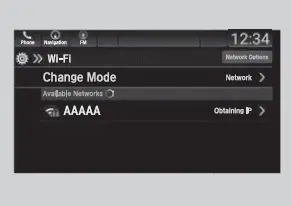
This vehicle is equipped with Wi-Fi connectivity. You can connect to an external Wi-Fi hotspot or communication device.
Connect the vehicle to a Wi-Fi hotspot
- Select.
- Select Settings.
- Select Connections.
- Select Wi-Fi.
- Select Change Mode.
- Select Network or HotSpot, then Save. u To change the Wi-Fi settings, select
- Network Options or HotSpot Options.
u Select the access point you want to connect to the system.
- Network Options or HotSpot Options.
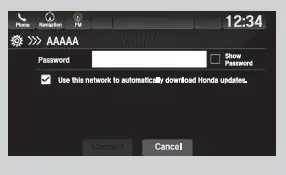
- Select Connect. u Enter a password for the access point,
and select OK. u When the connection is successful, the icon is displayed on the list. - Select to go back to the home screen.
Wi-Fi and Wi-Fi Direct a registered trademark of Wi-Fi Alliance®.
Connect the vehicle to a Wi-Fi hotspot
You cannot go through the setting procedure while the vehicle is moving. Park in a safe place to set up the Wi-Fi connection.
Some cell phone carriers charge for tethering and smartphone data use. Check your phone’s data subscription package.
Check your phone manual to find out if the phone has Wi-Fi connectivity.
You can confirm whether the Wi-Fi connection is on or off with the icon on the Wi-Fi network list.
Transmission speed and others will not be displayed on this screen.
In case of a Wi-Fi connection with your phone, make sure your phone’s Wi-Fi setting is in access point (tethering) mode.
AT&T Hotspot*
If you have subscribed to AT&T hotspot services, your vehicle will provide data to connect your mobile devices to the Internet. You can use the AT&T Hotspot app to turn on/off vehicle data and monitor data usage left on your subscription.
AT&T Hotspot Menu
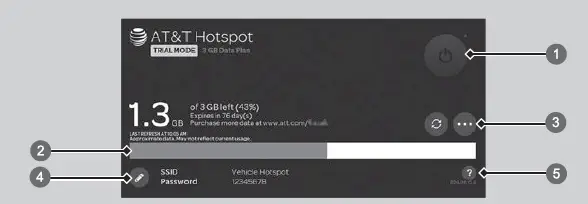
- Hotspot Enable
Turn on/off AT&T Hotspot. b Data Usage Bar - Check the current status of your data plan. This Usage Bar will show your current plan and how much data remains on your plan. Subscription plans for AT&T Hotspot can be added/modified at www.att.com/honda.
- Refresh and Plan Info Refreshes screen to show data remaining. Shows your current AT&T subscription plan for the vehicle.
- Edit Hotspot Properties
- Shows the current username and password for vehicle Hotspot. Hotspot settings can be changed while the vehicle is not in motion.
- Help* Not available on all models
1AT&T Hotspot*
To use AT&T Hotspot services, your vehicle must be subscribed to a data plan. If your vehicle is not subscribed to a data plan, you can visit
www.att.com/honda to add vehicle data services.
Hotspot username and password can be changed in the Edit Hotspot Properties of the AT&T Hotspot app. Settings cannot be accessed while driving. Park in a safe place to adjust Hotspot settings.
Alternatively, you can use your mobile hotspot to connect the vehicle and other mobile devices to the Internet.
Wi-Fi Connection P. 334