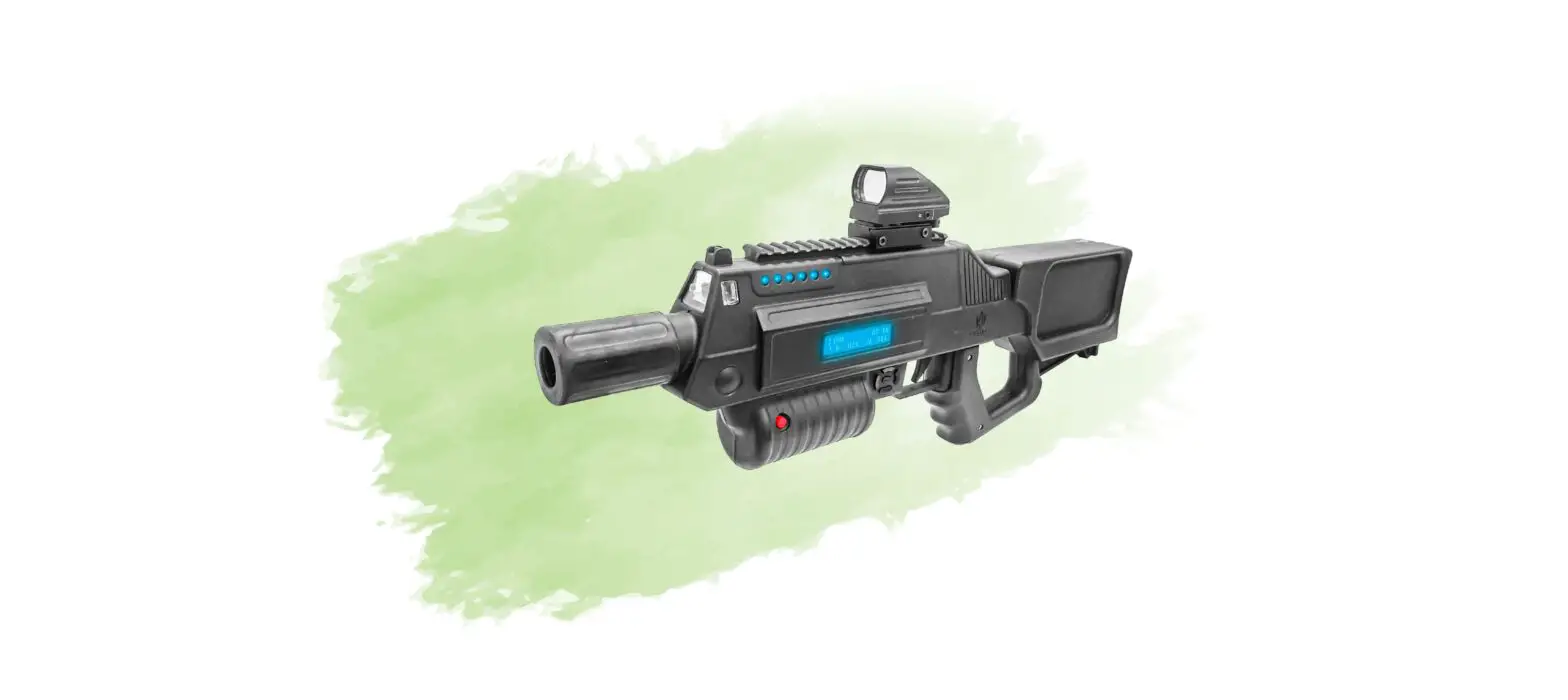

BATTLE BRX Laser Tag Rifle

INCLUDED INSIDE THE BOX
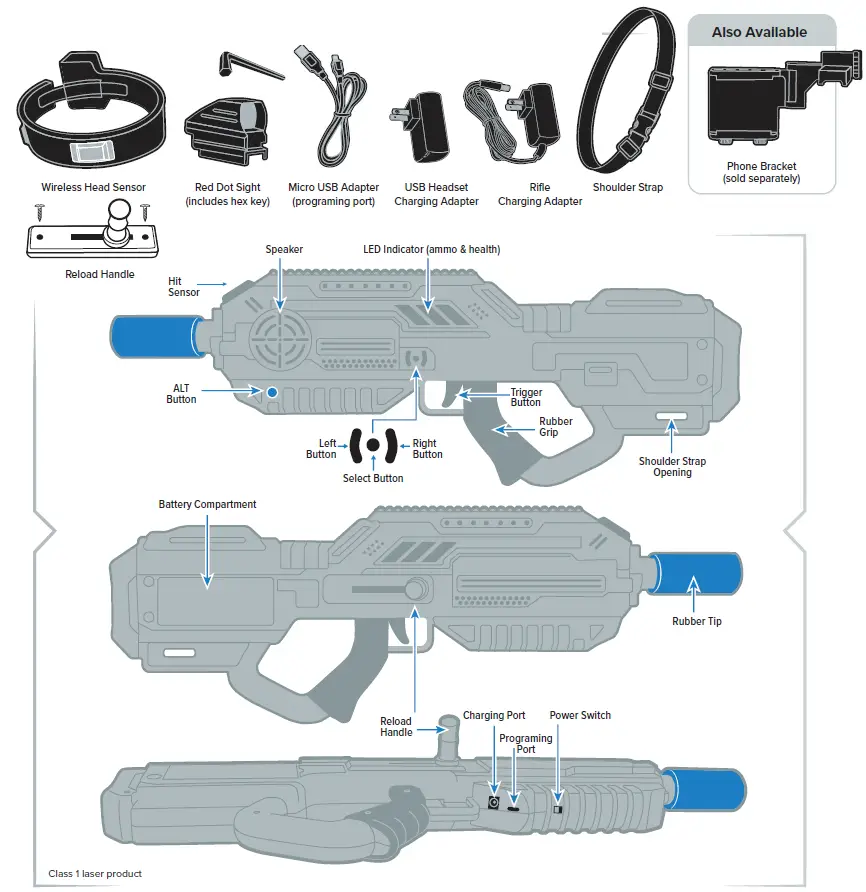
Note: Charge battery 2 hours prior to use. When fully charged red LED light turns to green. Riffle will last 8 hours after fully charged.
QUICK START GUIDE
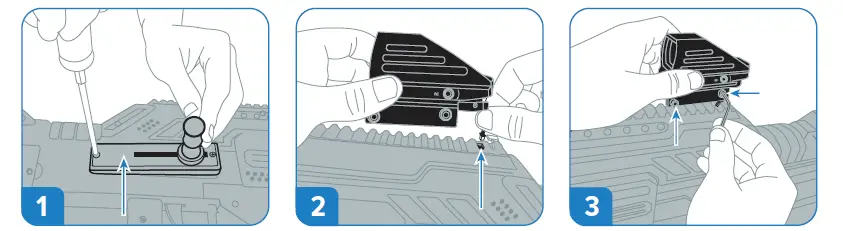
- Screw in the reload handle on the right side of the riffle wherethe slot is. Make sure the the handle faces the front of the riffle.
- Plug scope adapter into slot as shown. Scope powers on when riffle is turned on. For in-depth instruction on how to sight your riffle
- Attach scope onto rail using hex key as shown. Turn clockwise to secure to the rail.

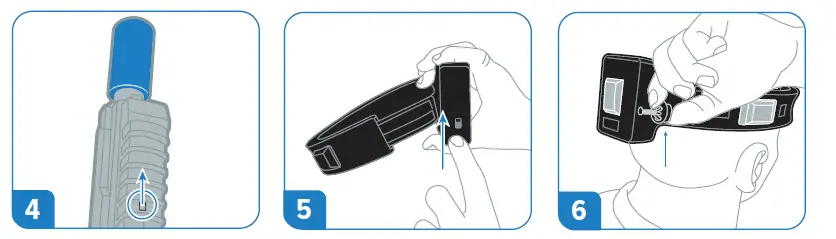
- Power the gun ON by sliding the switch towards the barrel at the bottom of the riffle.
- Locate the switch on the side of the headset to power it on and give it a moment to pair to the riffle.
- Place the headset on your head with the box facing to the back. Tighten the headset pinching side button then pulling the drawstring outwards.

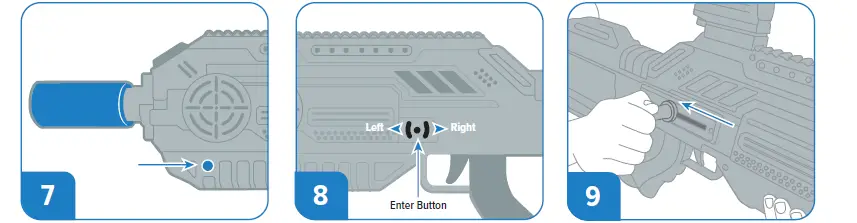
- Hold the ALT button for 3 seconds toa toggle between indoor or outdoor mode.
- Use directional pad to choose game modes, sound effects, game times, respawn time and volume.
- To start a game, pull back the reload handle towards you and you are ready to play!

HOW DO I SIGHT IN MY SCOPE?
PUTTING YOUR RIFLE INTO TARGET MODE
It is VERY IMPORTANT to SIGHT IN YOUR RIFLE before entering combat. We suggest sighting in your scope to match your ideal shooting range based on the size of the playing field. Example: indoors 20 feet, outdoor about 300 feet.
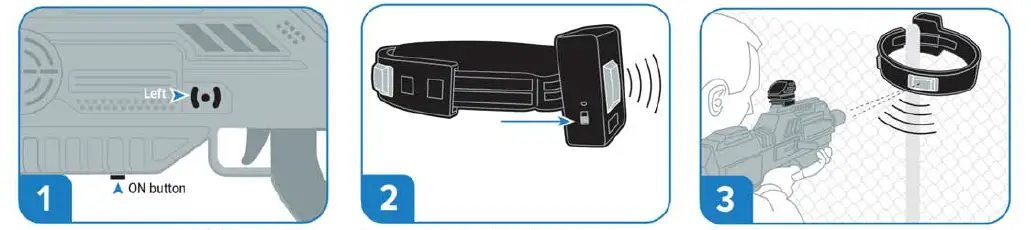
- Enter target mode by holding the LEFT button while powering on the gun, release the button after you hear the voice announcement “TARGET MODE.”
- Turn on your headset, it will not pair while in target mode. If you shoot the gun directly at the headset, it will flash bright green.
- Mount the headset on an object in front you. Begin shooting at a close range until you see the headset flash green. Slowly walk backward while sighting in your scope using the instructions below.
EXAMPLES OF SIGHTING YOUR SCOPE
PRO TIP
To be an accurate sniper a player should sight their rifle at a longer range (300 to 400 feet). A player who likes to use a shot gun or SMG should sight their rifle at a closer range (50 to 100 feet)
EXAMPLE 1
THE HEADSET NEEDS TO MOVE DOWN AND TO THE LEFT TO BE CENTERED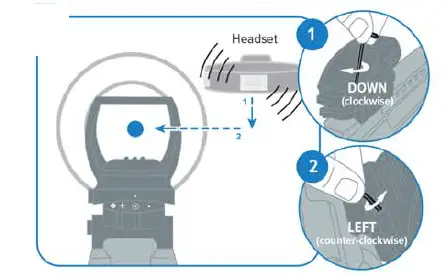
- Rotate the top screw clockwise to move the headset down.
- Rotate the side screw counter-clockwise to move the headset left.
EXAMPLE 2
THE HEADSET NEEDS TO MOVE UP AND TO THE RIGHT TO BE CENTERED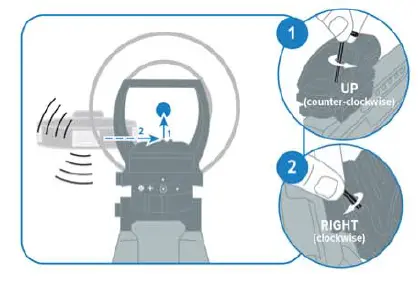
- Rotate the top screw counter-clockwise to move the headset up.
- Rotate the side screw clockwise to move the headset right.
EXAMPLE 3
THE HEADSET NEEDS TO MOVE DOWN TO BE CENTERED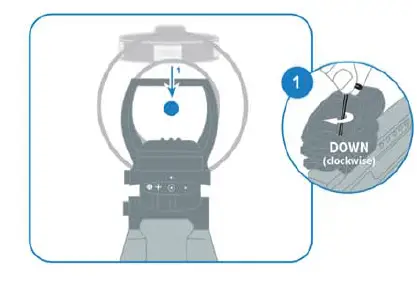
- Rotate the top screw clockwise to move the headset down ..
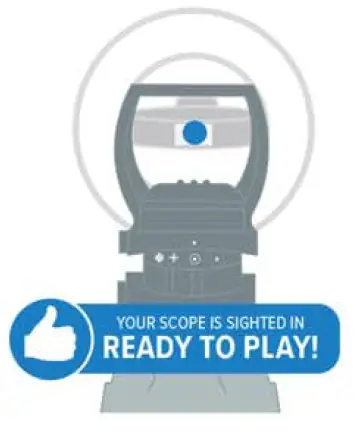
TYPICAL EXPECTED MAX RANGE IN SUNLIGHT IS 600 FEET 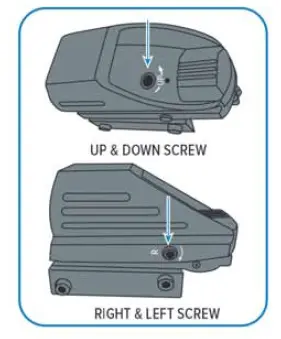
STARTING A GAME IN FIVE EASY STEPS
STEP ONE
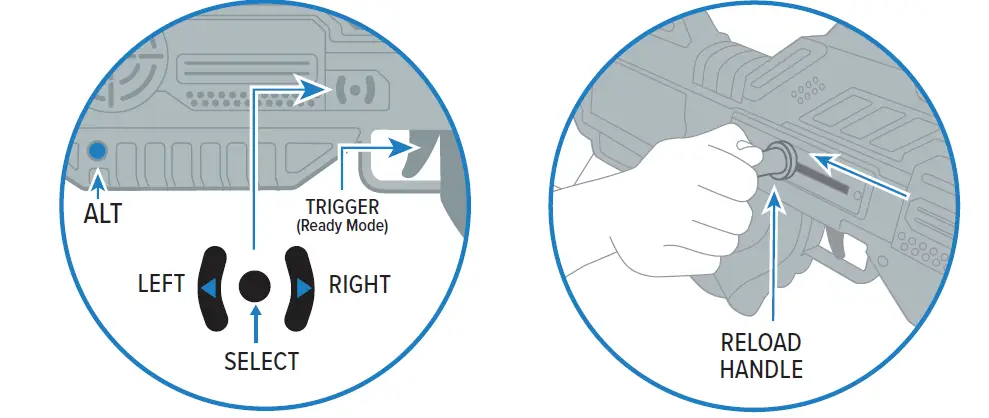
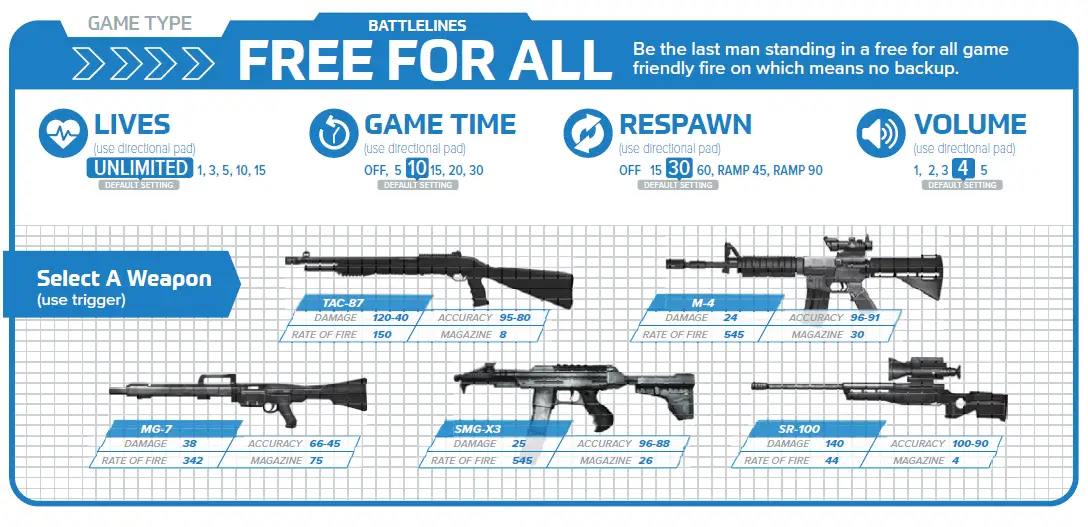
Use the left and right button to select a game mode, pull the trigger when you and the game you want to play. Game example: Free For All, Team Death Match, Supremacy or Survival
DO YOU WANT TO CUSTOMIZE YOUR SETTINGS ?
You can customize the Lives, Game Time, Respawn, or Volume. Use the directional pad to cycle through the settings press the select key to advance forward. These setting will become your new defaults after you start a game.
STEP TWO
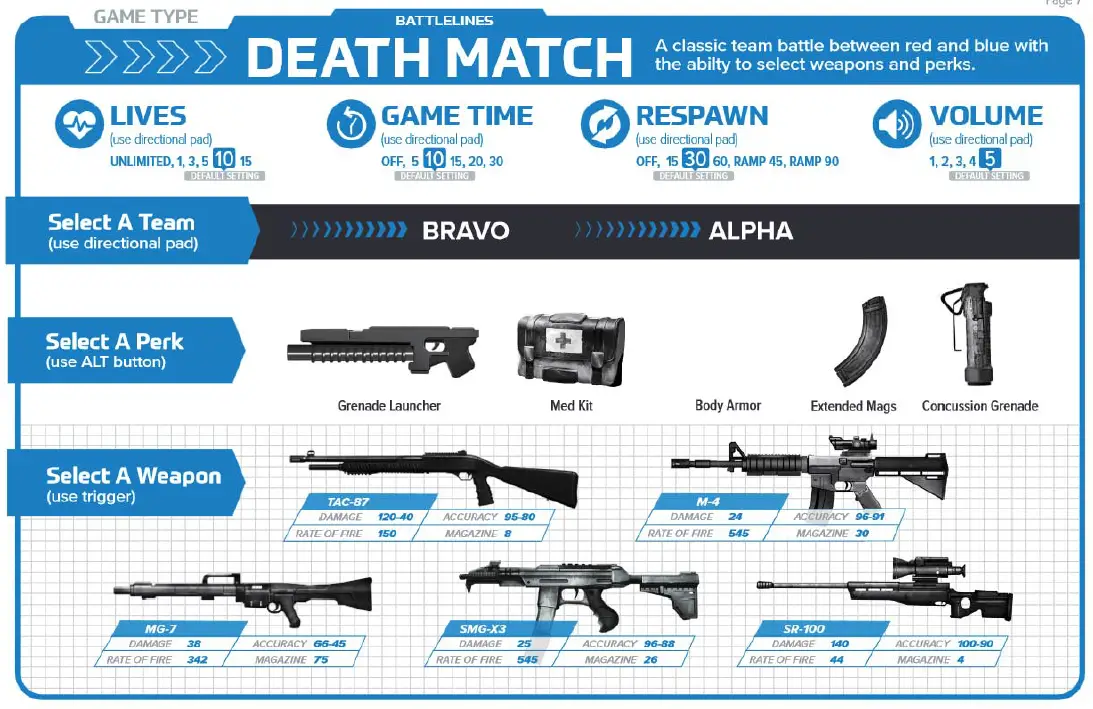
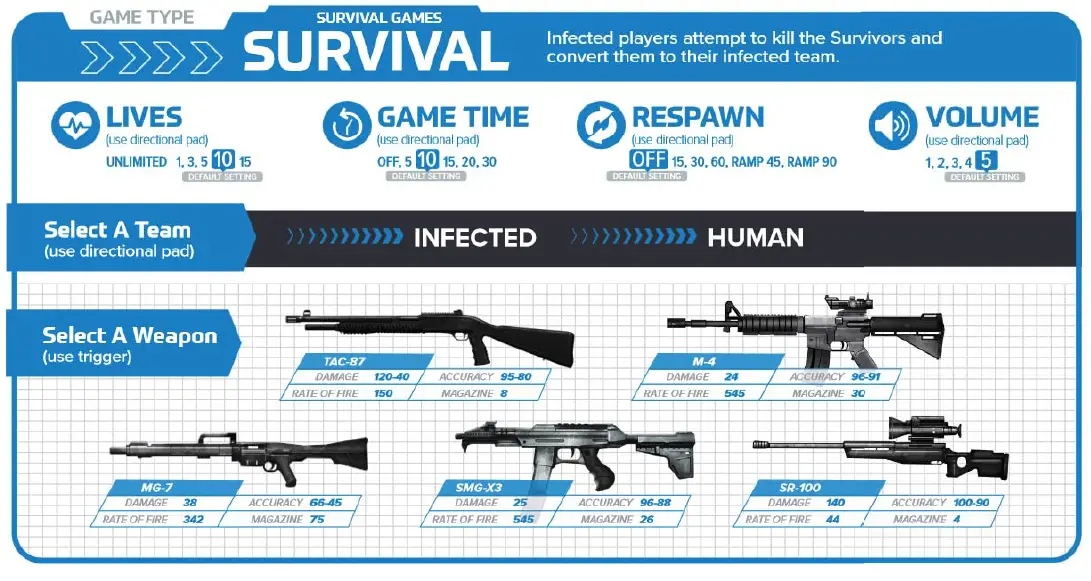
Now that you are in the game mode, use the directional pad to select the Team Color or Faction.
STEP THREE
Pull the trigger to cycle through the weapons or characters depending on the game mode you chose.
STEP FOUR
Some game modes have perks. Example Team Death Match. Press the ALT orange button to cycle through the perks.
STEP FIVE
When you have selected the team, weapon, perk, and character pull the reload handle to start the game.
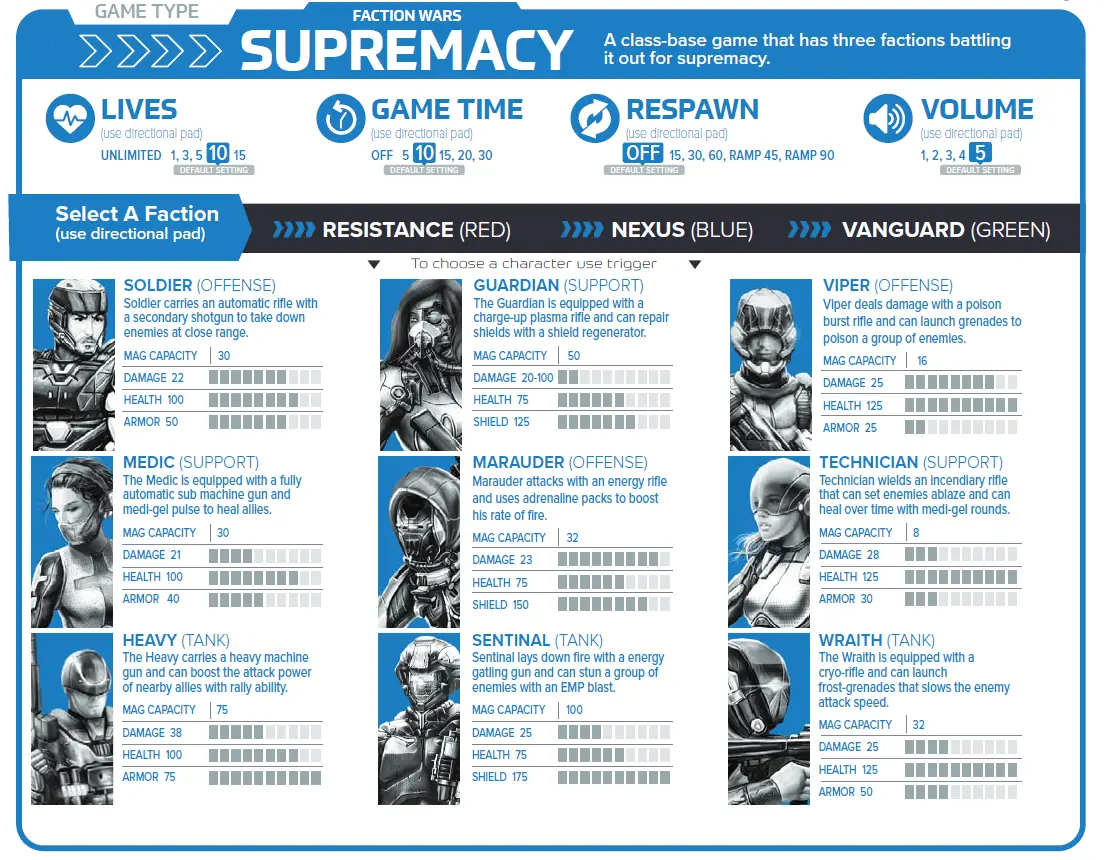
FACTION WARS SUPREMACY
BATTLELINES FREE FOR ALL
BATTLELINES DEATH MATCH
SURVIVAL GAMES
TROUBLESHOOTING
| PROBLEM | SOLUTION |
| Headset takes too long to pair | Sometimes if there are a large number of players turning on headsets at the same time, or if there are a LOT of wireless bluetooth devices nearby, it could take up to 3 minutes to pair. |
| Headset will not pair | If the headset will not pair after 3 minutes, and the battery is fully charged, the headset or battery may need replacement. |
| Gun will not turn on | Make sure the battery is fully charged, if it is charged, the gun or battery may need repair |
| Headset will not turn on | Make sure the battery is fully charged, if it is charged, the headset may need repair |
| Plug headset into charger and LED not turn on | It is possible the charger LED is burned out, but if still does not charge or turn on, headset may need replacement. |
| Reload does not work | The switch may not be making good contact, take the reload mechanism of with the two screws, and try pressing the switch with a pen. If it still does not work, it may need repair. |
| Gun battery will not charge | If the LED on the charger does not turn red during charging, then the battery or charger may need replacement. |
| Can not hit player (laser, headset or sighting) | If you can not hit an enemy headset even at close range, then perhaps your laser needs replacement. If it is one player that is not able to hit your headset in one or more directions, your headset may need repairs. |
| Can not see a red dot in scope | The battery in the scope maybe dead. |
| Alt fire button not working | The button maybe clogged with dirt/oil or need replacement. |
| Can not get a third party zoom optical scope sighted in | If your laser is very of center, then you may not be able to adjust your scope far enough to get a centered shot. You could try a diferent brand scope to have more room for adjustment. |
| Gun will not shoot while in game | If you disconnect headset after a game has started, the gun will lock until reconnected, to prevent cheating. Gun will however shoot if no headset was connected at boot up |
BATTERY SPECIFICATIONS & CAUTIONS
OPTIONAL 6X AA(LR06) 1.5V
- Do not use rechargeable batteries.
- Non-rechargeable batteries are not to be recharged.
- Different types of batteries or new and old batteries are not to be mixed.
- Batteries are to be inserted using correct polarity.
- Remove exhausted batteries as soon as possible and discard properly.
- Remove all batteries from compartment if riffe is not used for more than seven months.
- The supply terminals are not to be short circuited.
Conforms to product safety standards ASTM F963. Not suitable for children under 3 years due to small parts. Remove and discard wire ties before giving this product to children.
PRODUCT COLORS AND STYLES MAY VARY FROM THOSE SHOWN.
This device complies with PART 15 of the FCC Rules. Operation is subject to the following two conditions. (1) this device may not cause harmful interference, and (2) this device must accept any interference received, including interference that may cause undesired operation.
CAUTION: Changes or modifications to this unit not expressly approved by the party responsible for compliance could void the user’s authority to operate the equipment.
Class 1 Laser Product, EN/IEC 60825 – 2014,
Battle Company, 9100 S. Nicholson Rd, Oak Creek, WI 53154
This product is in conformity with performance standards for laser products under 21CFR 1040, except with respect to those characteristics authorized by Variance Number FDA-2017-V-0792 effective on September 12, 2017
Model: BRX
Warning: Changes or modifications to this unit not expressly approved by the party responsible for compliance could void the user’s authority to operate the equipment.
NOTE: This device complies with part 15 of the FCC Rules. Operation is subject to the following two conditions: (1) This device may not cause harmful interference, and (2) this device must accept any interference received, including interference that may cause undesired operation.
FCC Statement
This equipment has been tested and found to comply with the limits for a Class B digital device, pursuant to part 15 of the FCC Rules. These limits are designed to provide reasonable protection against harmful interference in a residential installation. This equipment generates, uses and can radiate radio frequency energy and, if not installed and used in accordance with the instructions, may cause harmful interference to radio communications. However, there is no guarantee that interference will not occur in a particular installation. If this equipment does cause harmful interference to radio or television reception, which can be determined by turning the equipment off and on, the user is encouraged to try to correct the interference by one or more of the following measures:
- Reorient or relocate the receiving antenna.
- Increase the separation between the equipment and receiver.
- Connect the equipment into an outlet on a circuit different from that to which the receiver is connected.
- Consult the dealer or an experienced radio/TV technician for help.
Warning:
- Always maintain awareness of your surrounding.
- Keep a safe distance away from streets, public thoroughfares and power lines, near high voltage poles, railway tracks, road, or swimming pools.
- Ensure that your phone bracket is secure.
- Contains a long cord and straps which are strangulation hazard for young children. Keep out of reach of children under 3.
- Avoid intentionally aiming at someone’s eyes or staring down the barrel at short range for extended periods of time.
To download the most recent product firmware or a more detail manual, go to our website at www.BattleCompany.com
 Battle Company - Best Indoor and Outdoor Guns, Equipment and Software
 Battle Company - Best Indoor and Outdoor Guns, Equipment and Software