D8020 Elite Plug-in Fan System
Elite Plug-in Fan System
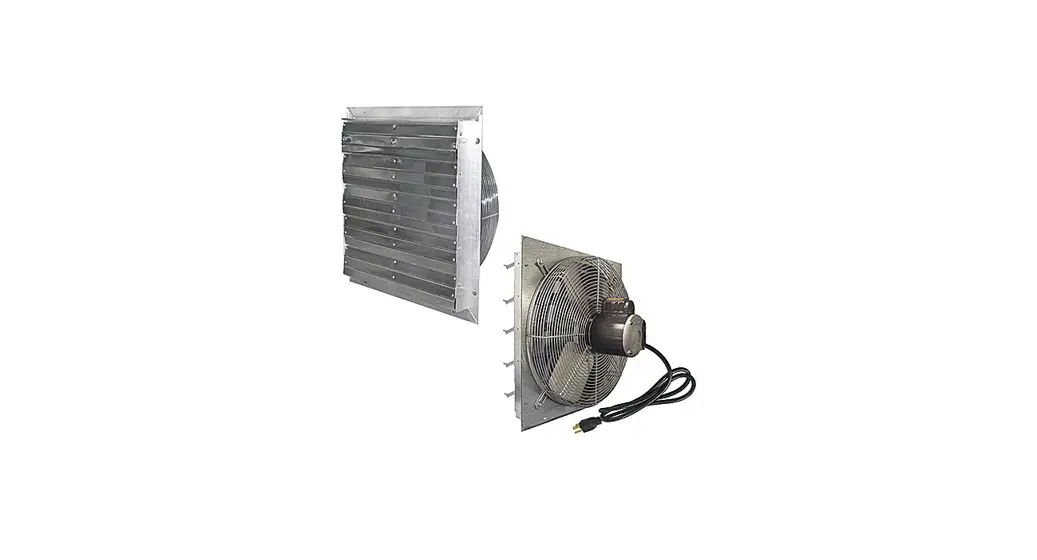
The Elite Plug-in Fan System is a ventilation system designed
for use in greenhouses. The system includes an exhaust fan and
intake shutters that work together to keep the greenhouse cool and
minimize hot spots. The installation guide provides detailed
instructions on how to install the system for optimal
performance.
Fan & Shutter Installation
- Select a location on the greenhouse to insert the fan and
shutters (optimal placement is shown in above picture). - Draw an outline of the area to be cut in the plastic panels.
Dimensions for fans and shutters are included with these
instructions. - Use a drill or a razor to create an opening large enough to
insert a fine saw blade inside the outlined area of the wall
panel. - Cut out the remainder of the outlined area with the saw, and
repeat for each shutter and/or fan. - Fasten the fan and shutter to the greenhouse frame. DO NOT
mount the fan to the covering because it will not support the fan’s
weight. You can make mounting brackets if needed out of 1/8 thick 1
x 1 aluminum angle available at most hardware stores. Drill four
holes in the brackets for mounting (2 center holes for fan or
shutter and the 2 exterior holes for mounting to your frame). - Insert the fan and shutters into the openings cut in the
plastic panel and attach the mounting brackets to the greenhouse
(shutter motors should be mounted to the shutter before this step).
All equipment should be mounted so that the louvers open to the
outside of the greenhouse. - Seal around where the fan and shutters exit your structure with
silicone or caulking designed for the material that the fan
equipment is mounted through.
Exhaust Fan Dimensions
| Fan Size | A | B | C | D | E | F | G | H |
|---|---|---|---|---|---|---|---|---|
| 12 | 15 | 15 | 12 1/8 | 12 1/8 | 1 1/2 | 5 1/2 | 1/8 | 2 |
| 16 | 19 | 19 | 16 1/8 | 16 1/8 | 2 | 5 1/4 | 1/8 | 2 |
| 20 | 23 | 23 | 20 1/8 | 20 1/8 | 2 | 5 1/4 | 1/8 | 2 |
| 24 | 27 | 27 | 24 1/8 | 24 1/8 | 2 1/8 | 5 3/4 | 1/8 | 2 |
Intake Shutter Dimensions
| Shutter Size | A | B | C |
|---|---|---|---|
| 12 | 12 1/16 | 15 1/8 | 2 5/16 |
| 16 | 16 1/16 | 19 1/8 | 2 5/16 |
| 20 | 20 1/16 | 23 1/8 | 2 5/16 |
| 24 | 24 1/16 | 27 1/8 | 2 5/16 |
| 30 | 30 1/16 | 33 1/8 | 2 5/16 |
Mounting Motor and Arm Linkage
When mounting the motor and arm linkage, follow these important
notes:
- Mount the motor to the aluminum shutters using the front slot
on the motor bracket. - Make sure the motor is off and the shutter louvers are
completely closed when attaching the arm linkage to the tie
bar. - The arm linkage section attached to the black shutter motor arm
should not have to be adjusted. Only the slider on the arm linkage
itself should be adjusted for a snug fit.
Setting the Rotation Limiter
The rotation limiter controls how far the arm on the shutter
motor rotates. To set it properly for use with intake shutters,
follow these steps:
- Take a Phillips head screwdriver, and turn the screw counter
clockwise to loosen the limiter screw (shown in picture to the
right). - Slide the limiter as far up as it will go.
- Tighten the limiter screw by turning it clockwise.
FORM: D8020
Elite Plug-in Fan System Installation Guide
The picture to the left shows optimal fan and shutter placement in a greenhouse. The exhaust fan should be mounted near the peak so that it is exhausting the hottest air in the greenhouse. The intake shutters should be mounted on the opposite end of the greenhouse so that the cooler fresh air travels across the entire structure minimizing hot spots.
Fan & Shutter Installation
1. Select a location on the greenhouse to insert the fan and shutters (optimal placement is shown in above picture).
2. Draw an outline of the area to be cut in the plastic panels. Dimensions for fans and shutters are included with these instructions.
3. Use a drill or a razor to create an opening large enough to insert a fine saw blade inside the outlined area of the wall panel.
4. Cut out the remainder of the outlined area with the saw, and repeat for each shutter and/or fan.
5. Fasten the fan and shutter to the greenhouse frame. DO NOT mount the fan to the covering because it will not support the fan’s weight. You can make mounting brackets if needed out of 1/8″ thick 1″ x 1″ aluminum angle available at most hardware stores. Drill four holes in the brackets for mounting (2 center holes for fan or shutter and the 2 exterior holes for mounting to your frame).
6. Insert the fan and shutters into the openings cut in the plastic panel and attach the mounting brackets to the greenhouse (shutter motors should be mounted to the shutter before this step). All equipment should be mounted so that the louvers open to the outside of the greenhouse.
7. Seal around where the fan and shutters exit your structure with silicone or caulking designed for the material that the fan equipment is mounted through.
Exhaust Fan Dimensions
Fan Size A
B
C
D
E
F
G H
12″
15″ 15″ 12 1/8″ 12 1/8″ 1 1/2″ 5 1/2″ 1/8″ 2″
16″
19″ 19″ 16 1/8″ 16 1/8″
2″
5 1/4″ 1/8″ 2″
20″
23″ 23″ 20 1/8″ 20 1/8″
2″
5 1/4″ 1/8″ 2″
24″
27″ 27″ 24 1/8″ 24 1/8″ 2 1/8″ 5 3/4″ 1/8″ 2″
Opening Size
12 1/4″ sq.
16 1/4″ sq.
20 1/4″ sq.
24 1/4″ sq.
Intake Shutter Dimensions
Shutter Size 12″ 16″ 20″ 24″ 30″
A 12 1/16″ 16 1/16″ 20 1/16″ 24 1/16″ 30 1/16″
B 15 1/8″ 19 1/8″ 23 1/8″ 27 1/8″ 33 1/8″
C 2 5/16″ 2 5/16″ 2 5/16″ 2 5/16″ 2 5/16″
Opening Size 12 1/4″ sq. 16 1/4″ sq. 20 1/4″ sq. 24 1/4″ sq. 30 1/4″ sq.
Mounting Motor and Arm Linkage
IMPORTANT NOTES: 1. Motors are fastened to the aluminum shutters with a single nut and bolt. Use the front slot on the motor bracket to mount it to the shutter. 2. Make sure the motor is off and the shutter louvers are completely closed when attaching the arm linkage to the tie bar. 3. The arm linkage section attached to the black shutter motor arm should not have to be adjusted. Only the slider on the arm linkage itself should be adjusted for a snug fit.
Setting the Rotation Limiter
The rotation limiter controls how far the arm on the shutter motor rotates. It should be set to the highest position to work properly with intake shutters. To do this, take a Phillips head screwdriver, and turn the screw counter clockwise to loosen the limiter screw (shown in picture to the right). Then slide the limiter as far up as it will go. Now tighten the limiter screw by turning it clockwise.
Plugging Everything In
The included multi-outlet adapter can be used to plug multiple devices into a single control outlet (left picture below) or to plug multiple control outlets into a single power outlet (right picture below).