

BladeCenter Open Fabric Manager (Withdrawn)
Product Guide (withdrawn product)
BladeCenter Open Fabric Manager (BOFM) is a tool for simplifying the deployment, failover, and repurposing of blade servers. BOFM performs these tasks by controlling the assignment of physical Ethernet MAC and Fibre Channel WWN addresses for the integrated Ethernet interfaces and I/O expansion cards in each blade.
BOFM provides the ability to create predefined configurations for external infrastructure connections including network switches, SAN switches, storage systems, and so on. With BOFM, you can configure MAC-based VLANs and security policies, WWN-based zones on switches, and storage partitions on storage systems by using your own pool of MAC addresses and WWNs created in advance. You can then assign these predefined addresses to a blade’s I/O ports with BOFM instead of using burned-in hardware addresses that were assigned during manufacture.
Did you know?
It is highly recommended that you plan BOFM together with boot-from-SAN to make the most of the entire solution. BOFM functionality, together with boot-from-SAN techniques, enables you to deploy new blades easily by assigning predefined MAC addresses and WWNs to them and, thus, connecting them to the existing infrastructure in minutes. You can also repurpose blades quickly by assigning addresses from different services or even provide simplified failover by assigning addresses from a failed blade to the spare blade.
Part number information
There are three different versions of BladeCenter Open Fabric Manager. Table 1 shows the part number to order them.
Table 1. Part number and feature code for ordering
| Description | Part number | Feature code |
| BladeCenter Open Fabric Manager Basic | 2019B1X | 4941 |
| BladeCenter Open Fabric Manager for BladeCenter S | 2019B2X | 4195 |
| BladeCenter Open Fabric Manager 2.1 Advanced Upgrade (stand-alone utility) | 4812S1X | None |
| BladeCenter Open Fabric Manager 2.1 Advanced Upgrade for IBM Director 5.2 | 4812S1D | None |
| BladeCenter Open Fabric Manager 3.0 Advanced Upgrade (stand-alone utility) | 4812S3X | None |
| BladeCenter Open Fabric Manager 3.0 Advanced Upgrade for IBM Director 6.1 | 4812S3D | None |
Notes:
- One BOFM license is required for each BladeCenter chassis (not for each server)
- Any of the BOFM Advanced Upgrade products requires BOFM Basic or BOFM for BladeCenter S as a prerequisite
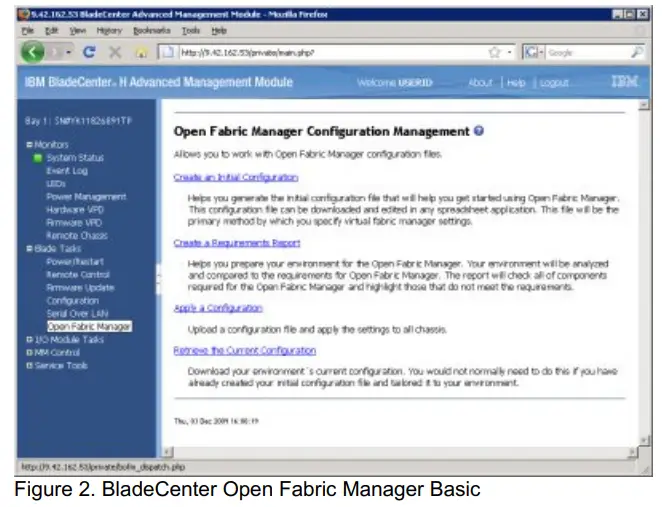
Each of the part numbers listed in Table 1 includes a letter explaining how to activate BOFM. BOFM Basic and BOFM for BladeCenter S are part of the advanced management module interface as shown in Figure 2, and other than the latest AMM firmware, no additional BOFM software is needed. The BOFM Advanced Upgrade consists of an activation letter with instructions on how to download the software. You can download the installation guides using the links in the Related Publications section. Figure 2 shows the AMM interface of BladeCenter Open Fabric Manager Basic.
Features
BladeCenter Open Fabric Manager solution consists of the following components:
- BladeCenter Open Fabric Manager Basic (BOFM Basic or BOFM for BladeCenter S)
- BladeCenter Open Fabric Manager Advanced Upgrade
BOFM Basic is the core part of the BOFM solution and is integrated into the firmware of the Advanced Management Module of the BladeCenter chassis. BOFM Basic controls address assignments and provides a Web-based user interface through AMM. With BOFM Basic, you are able to manually configure address assignments and reassignments.
BOFM Advanced Upgrade is either a stand-alone or IBM Director-based management extension to the user interface that provides IBM Director-style GUI (Java-based for Director 5.2 or Web-based for Director 6.1) and policy-based automated failover capabilities with Event Action Plans.
Table 2 summarizes the management tasks of BOFM Basic and BOFM Advanced Upgrade.
Table 2. Comparing BOFM Basic and BOFM Advanced Upgrade management tasks
| Management Task | BOFM Basic BOFM for BC-S | BOFM Advanced Upgrade |
| Slot-based I/O address assignment | Yes | Yes |
| Manages Ethernet MAC addresses, Fibre Channel and SAS WWN numbers | Yes | Yes |
| Supports Fibre Channel and SAS boot targets | Yes | Yes |
| Pre-assignment allows LAN/SAN configuration prior to blade installation | Yes | Yes |
| Automatic re-assignment on blade swap | Yes | Yes |
| Web-based GUI through Advanced Management Module | Yes | No |
| IBM Director-based GUI | No | Yes |
| Blade Address Manager Configuration Wizard | No | Yes |
| Standby Blade Pools | No | Yes |
| Event Action Plans | No | Yes |
| Provides I/O parameter and VLAN migration to standby blades in case of blade failure | No | Yes |
| Number of chassis supported by one BOFM console | 100 | 100 |
| Number of manageable ports per blade | 8 | 8 |
BladeCenter Open Fabric Manager Basic
BOFM Basic is a software upgrade to the Advanced Management Module. It interacts with the BMC or IMM microcode in the blades and the firmware in the I/O expansion cards to replace the burned-in addresses with addresses specified at the blade-bay level by the administrator. BOFM Basic uses the AMM browser-based user interface. When a blade server is inserted into a specific bay, it inherits hardware addresses for I/O ports that were assigned to this bay by the administrator. This enables simplified deployment of blades because you can preconfigure your infrastructure before the physical installation of the blade server into the chassis. In case of blade failure, all you need to do is to replace the failed blade with a new one. The following solution components must support BOFM for the solution to work properly. These components all need to have firmware levels that support BOFM.
- Blade servers (BIOS and BMC/IMM)
- Expansion cards
- Advanced management modules in each chassis
BOFM is compatible with most I/O modules because it is not dependent on them. It also uses address reassignment at the blade level rather than at the I/O module level.
With BOFM Basic, you can provide quick deployment and redeployment of blades, and manual slot-based failover or manual blade replacement. To provide automated failover capabilities, the BOFM Advanced Upgrade is required.
BladeCenter Open Fabric Manager for BladeCenter S
BladeCenter Open Fabric Manager for BladeCenter S is based on BOFM Basic and allows you to reassign the Ethernet MAC addresses and Fibre Channel WWN addresses used by the I/O ports. This version offers a low-cost offering designed specifically for small and medium businesses (SMB), as well as distributed and retail clients.
With this offering, you can preconfigure the BC-S chassis at a central location and deploy it uniformly across your remote locations. As with BOFM Basic, BOFM for BladeCenter S can be enhanced with BOFM Advanced Upgrade.
BladeCenter Open Fabric Manager Advanced Upgrade
BOFM Advanced Upgrade adds capabilities for managing address assignments through the IBM Systems Director user interface and policy-based automated failover. With this upgrade, you can define failover pools of spare blades across chassis and failover rules with Event Action Plans. BOFM Basic uses the advanced management module’s Web interface for configuration tasks. However, BOFM Advanced Upgrade uses a separate IBM Director-based GUI (for both IBM Director and stand-alone editions). BOFM Advanced Upgrade is available in two editions:
- Stand-alone utility
BladeCenter Open Fabric Manager 2.1 Advanced Upgrade, part number 4812S1X
BladeCenter Open Fabric Manager 3.0 Advanced Upgrade, part number 4812S3X - IBM Systems Director extension
BladeCenter Open Fabric Manager 2.1 Advanced Upgrade, part number 4812S1D
BladeCenter Open Fabric Manager 3.0 Advanced Upgrade, part number 4812S3D
BOFM 2.1 Advanced Upgrade is based on the IBM Director 5.2 core and user interface and is a Java application. You use BOFM 2.1 Advanced Upgrade if you are currently running IBM Director 5.2, including both the stand-alone and Director extension. BOFM 3.0 Advanced Upgrade is based on the IBM Systems Director 6.1 core and user interface and is a Web interface. You use BOFM 3.0 Advanced Upgrade if you have an IBM Systems Director 6.1 infrastructure in place. You need to install the Stand-alone utility on a separate management workstation. You install the IBM Systems Director extension on an existing IBM Systems Director management server. We list the supported
operating systems later.
The BOFM 3.0 Advanced Upgrade adds the following features compared to BOFM 2.1 Advanced Upgrade:
- Web-based user interface (based on IBM Systems Director 6.1)
- New Wizards:
Blade Address Manager Configuration Template Wizard
Standby Blade Pool Configuration Template Wizard
CSV configuration file import/export - Support for evaluation and permanent license keys
- Support for SAS cards and I/O modules
- Support for CIOv cards
- Support for HS22 and JS23/43
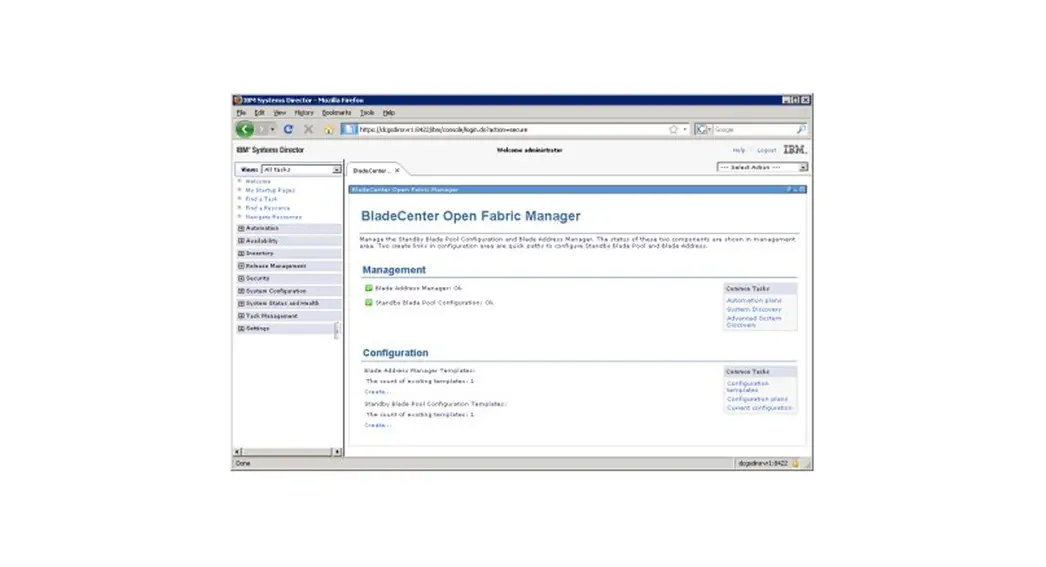
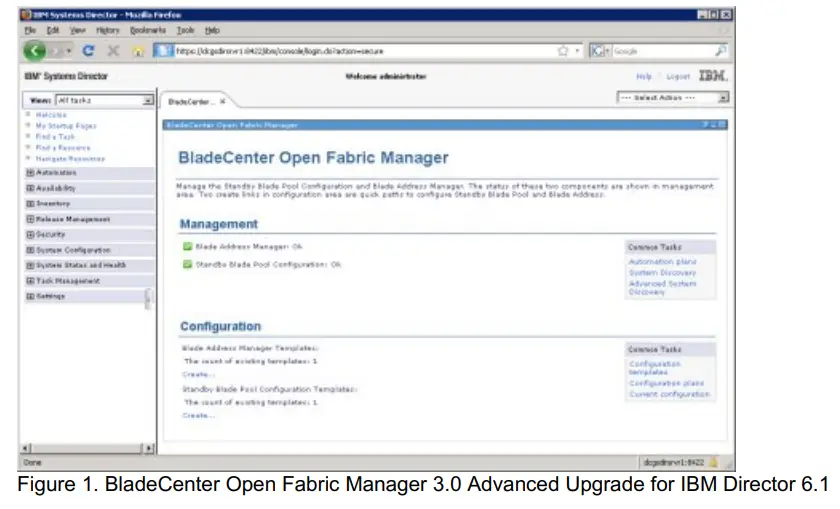
Figure 3 shows the stand-alone version of BOFM Advanced Upgrade 3.0 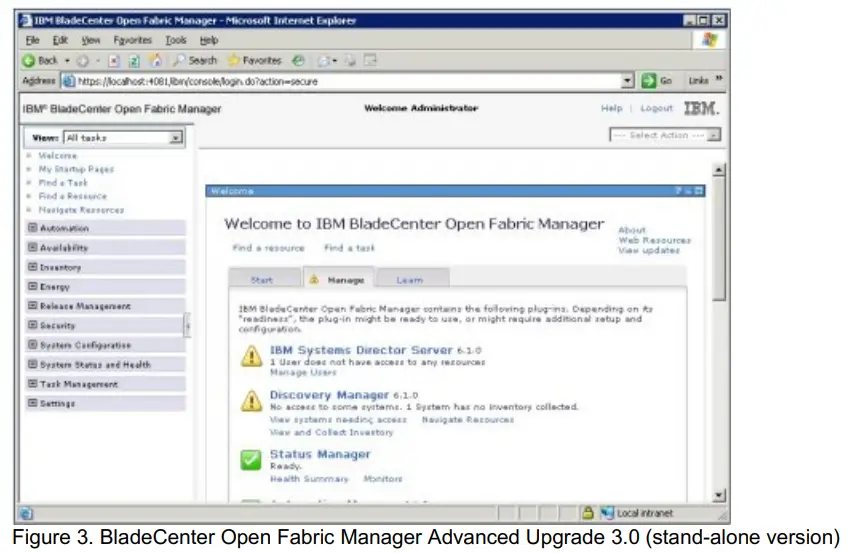
For more information, go to the BOFM product Web page:
http://www.ibm.com/systems/bladecenter/hardware/openfabric/openfabricmanager.html
Supported hardware
The following tables list chassis, servers, and options that support the various BOFM part numbers.
Table 3. BOFM solution support matrix – chassis support
| BORM Basic(2019B1X) | 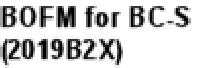 | 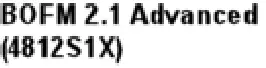 | 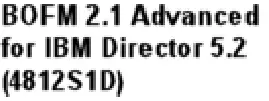 | 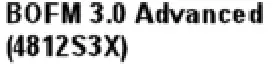 | 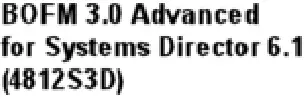 | ||
| BladeCenter E | 8677 | Y | N | Y | Y | Y | Y |
| BladeCenter H | 8852 | Y | N | Y | Y | Y | Y |
| BladeCenter S | 8886 | Y | Y | Y | Y | Y | Y |
| BladeCenter T | 8720, 8730 | Y | N | Y | Y | Y | Y |
| BladeCenter HT | 8740, 8750 | Y | N | Y | Y | Y | Y |
| BladeCenter QS22 | 793 | Y | N | Y | Y | Y | Y |
| BladeCenter JS23/JS43 | 7778 | Y | Y | N | N | Y | Y |
| BladeCenter HS22 | 7870 | Y | Y | N | N | Y | Y |
| BladeCenter LS22 | 7901 | Y | Y | Y | Y | Y | Y |
| BladeCenter LS42 | 7902 | Y | Y | Y | Y | Y | Y |
| BladeCenter LS21 | 7971 | Y | Y | Y | Y | Y | Y |
| BladeCenter LS41 | 7972 | Y | Y | Y | Y | Y | Y |
| BladeCenter HS21 XM | 7995 | Y | Y | Y | Y | Y | Y |
| BladeCenter JS12 | 7998-60X | Y | Y | Y | Y | Y | Y |
| BladeCenter JS22 | 7998 | Y | Y | Y | Y | Y | Y |
| BladeCenter HS12 | 8014, 8028 | Y | Y | Y | Y | Y | Y |
| BladeCenter HS21 | 8853 | Y | Y | Y | Y | Y | Y |
| Integrated Gigabit Ethernet | None | Y | Y | Y | Y | Y | Y |
| QLogic 2-port 10Gb CNA (CFFh) | 42C1830 | Y | N | N | N | Y | Y |
| SFF Gigabit Ethernet Expansion Card | 39R8624 | Y | Y | Y | Y | Y | Y |
| NetXen 10 Gb Ethernet (CFFh) | 39Y9271 | Y | N | Y | Y | Y | Y |
| Ethernet Expansion Card (CFFv) | 39Y9310 | Y | Y | Y | Y | Y | Y |
| Ethernet Expansion Card (CIOv) | 44W4475 | Y | Y | N | N | Y | Y |
| 2/4 Port Ethernet Expansion Card (CFFh) | 44W4479 | Y | Y | Y | Y | Y | Y |
| QLogic Ethernet & 4Gb FC (CFFh) | 39Y9306 | Y | N | Y | Y | Y | Y |
| QLogic Ethernet & 8Gb FC (CFFh) | 44X1940 | Y | N | N | N | Y | Y |
| Broadcom 10Gb 4-port Ethernet (CFFh) | 44W4465 | Y | N | Y | Y | Y | Y |
| Broadcom 10Gb 2-port Ethernet (CFFh) | 44W4466 | Y | N | Y | Y | Y | Y |
| Broadcom 10Gb Gen 2 4-port Ethernet (CFFh) | 46M6164 | N | N | N | N | N | N |
| Broadcom 10Gb Gen 2 2-port Ethernet (CFFh) | 46M6168 | N | N | N | N | N | N |
| Emulex Virtual Fabric Adapter (CFFh) | 49Y4235 | Y | N | N | N | Y | Y |
| Fibre Channel Expansion Cards | |||||||
| QLogic 4Gb StFF FC Expansion Card | 26R0884 | Y | Y | Y | Y | Y | Y |
| QLogic 4Gb SFF FC Expansion Card | 26R0890 | Y | Y | Y | Y | Y | Y |
| Emulex 4Gb SFF FC Expansion Card | 39Y9186 | Y | Y | Y | Y | Y | Y |
| QLogic Ethernet and 4Gb FC (CFFh) | 39Y9306 | Y | N | Y | Y | Y | Y |
| QLogic 4Gb Fibre Channel (CFFv) | 41Y8527 | Y | Y | Y | Y | Y | Y |
| Emulex 4Gb Fibre Channel (CFFv) | 43W6859 | Y | Y | Y | Y | Y | Y |
| QLogic Ethernet & 8Gb FC (CFFh) | 44X1940 | Y | N | N | N | Y | Y |
| QLogic 8Gb Fibre Channel (CIOv) | 44X1945 | Y | Y | N | N | Y | Y |
| QLogic 4Gb Fibre Channel (CIOv) | 46M6065 | Y | Y | N | N | Y | Y |
| Emulex 8Gb Fibre Channel (CIOv) | 46M6140 | Y | Y | N | N | Y | Y |
| SAS Expansion Cards | |||||||
| SAS Expansion Card (CFFv) | 39Y9190 | Y | Y | N | N | Y | Y |
| SAS Connectivity Card (CFFv) | 43W3974 | Y | Y | N | N | Y | Y |
| SAS Connectivity Card (CIOv) | 43W4068 | Y | Y | N | N | Y | Y |
| ServeRAID MR10ie (CIOv) | 46C7167 | N | N | N | N | N | N |
Notes:
- Any I/O module that is compatible with the chassis and expansion card can be used with BOFM.
- The following blade servers are not supported by BOFM:
HS20 (8678, 8832, 7981, 8843)
HS40 (8839)
LS20 (8850)
HC10 (7996)
JS20 (8842)
JS21 (7988)
QS20 (0200)
QS21 (0792)
PN41 (3020) - InfiniBand adapters and I/O modules are not supported by BOFM.
Supported operating systems
BOFM Basic and BOFM for BladeCenter S are operating system independent.
BOFM 2.1 Advanced Upgrade is supported with the following operating systems:
- Microsoft Windows 2003 (SP1, SP2, R2)
- Microsoft Windows 2000 (Up to SP4)
- RHEL 3 (up to SP9)
- RHEL 4 (up to SP6)
- RHEL 5 with Xen 3.0 (up to SP1)
- SLES 9 (up to SP4)
- SLES 10 with Xen 3.0 (up to SP1)
BOFM 3.0 Advanced Upgrade is supported with the following operating systems:
- Microsoft Windows 2008 (SP1, SP2)
- Microsoft Windows 2003 (SP1, SP2, R2)
- RHEL 4 (up to SP8)
- RHEL 5 (up to SP4)
- SLES 9 (up to SP4)
- SLES 10 (up to SP2)
Related publications
For more information, see the following resources:
- BOFM home page
http://www.ibm.com/systems/bladecenter/hardware/openfabric/openfabricmanager.html - BladeCenter Advanced Management Module User’s Guide (including BOFM Basic)
http://ibm.com/support/entry/portal/docdisplay?lndocid=MIGR-5073887 - BladeCenter Open Fabric Manager 3.0 Installation and User’s Guide (online)
http://publib.boulder.ibm.com/infocenter/director/v6r1x/topic/bofm_300/btp0_bofm_main.html - BladeCenter Open Fabric Manager 3.0 Installation and User’s Guide (PDF)
http://publib.boulder.ibm.com/infocenter/director/v6r1x/topic/bofm_300/btp0_bofm_users_doc.pdf - BladeCenter Open Fabric Manager 2.1 Installation and User’s Guide (online)
http://publib.boulder.ibm.com/infocenter/director/v5r2/topic/bofm_1.00/btp0_bofm_main.html - BladeCenter Open Fabric Manager 2.1 Installation and User’s Guide (PDF)
http://publib.boulder.ibm.com/infocenter/director/v5r2/topic/bofm_1.00/btp0_bofm_users_doc.pdf - BladeCenter Interoperability Guide
http://ibm.com/support/entry/portal/docdisplay?lndocid=MIGR-5073016 - Lenovo Press publication BladeCenter Products and Technology, SG24-7523
http://lenovopress.com/sg247523
Product families related to this document are the following:
- BladeCenter Open Fabric Manager
- Network Management
Notices
Lenovo may not offer the products, services, or features discussed in this document in all countries. Consult your local Lenovo representative for information on the products and services currently available in your area. Any reference to a Lenovo product, program, or service is not intended to state or imply that only the Lenovo product, program, or service may be used. Any functionally equivalent product, program, or service that does not infringe any of Lenovo’s intellectual property rights may be used instead. However, it is the user’s responsibility to evaluate and verify the operation of any other product, program, or service. Lenovo may have patents or pending patent applications covering the subject matter described in this document. The furnishing of this document does not give you any license to these patents. You can send license inquiries, in writing, to:
Lenovo (United States), Inc.
8001 Development Drive
Morrisville, NC 27560
U.S.A.
Attention: Lenovo Director of Licensing
LENOVO PROVIDES THIS PUBLICATION ”AS IS” WITHOUT WARRANTY OF ANY KIND, EITHER EXPRESS OR IMPLIED, INCLUDING, BUT NOT LIMITED TO, THE IMPLIED WARRANTIES OF NON-INFRINGEMENT, MERCHANTABILITY, OR FITNESS FOR A PARTICULAR PURPOSE. Some jurisdictions do not allow disclaimers of express or implied warranties in certain transactions, therefore, this statement may not apply to you.
This information could include technical inaccuracies or typographical errors. Changes are periodically made to the information herein; these changes will be incorporated in new editions of the publication. Lenovo may make improvements and/or changes in the product(s) and/or the program(s) described in this publication at any time without notice.
The products described in this document are not intended for use in implantation or other life support applications where malfunction may result in injury or death to persons. The information contained in this document does not affect or change Lenovo product specifications or warranties. Nothing in this document shall operate as an express or implied license or indemnity under the intellectual property rights of Lenovo or third parties. All information contained in this document was obtained in specific environments and is presented as an illustration. The result obtained in other operating environments may vary. Lenovo may use or distribute any of the information you supply in any way it believes appropriate without incurring any obligation to you.
Any references in this publication to non-Lenovo Web sites are provided for convenience only and do not in any manner serve as an endorsement of those Web sites. The materials at those Web sites are not part of the materials for this Lenovo product, and use of those Web sites is at your own risk. Any performance data contained herein was determined in a controlled environment. Therefore, the result obtained in other operating environments may vary significantly. Some measurements may have been made on development-level systems and there is no guarantee that these measurements will be the same on generally available systems. Furthermore, some measurements may have been estimated through extrapolation. Actual results may vary. Users of this document should verify the applicable data for their specific environment.
© Copyright Lenovo 2022. All rights reserved.
This document, TIPS0713, was created or updated on December 8, 2009.
Send us your comments in one of the following ways:
- Use the online Contact us review form found at:
https://lenovopress.lenovo.com/TIPS0713 - Send your comments in an e-mail to:
[email protected]
This document is available online at https://lenovopress.lenovo.com/TIPS0713.
Trademarks
Lenovo and the Lenovo logo are trademarks or registered trademarks of Lenovo in the United States, other countries, or both. A current list of Lenovo trademarks is available on the Web at
https://www.lenovo.com/us/en/legal/copytrade/.
The following terms are trademarks of Lenovo in the United States, other countries, or both:
Lenovo®
BladeCenter Open Fabric
BladeCenter®
Fabric Manager for BladeCenter
ServeRAID
The following terms are trademarks of other companies:
Microsoft® and Windows® are trademarks of Microsoft Corporation in the United States, other countries, or both.
Other company, product, or service names may be trademarks or service marks of others.
BladeCenter Open Fabric Manager (Withdrawn) (withdrawn product)
References
 IBM Support
-
IBM Support
 IBM BladeCenter Products and Technology (withdrawn product) > Lenovo Press
-
IBM Documentation
-
IBM Documentation
-
IT Infrastructure | IBM
-
BladeCenter Open Fabric Manager > Lenovo Press
-
Network Management > Lenovo Press
-
BladeCenter Open Fabric Manager (Withdrawn) Product Guide (withdrawn product) > Lenovo Press
-
Copyright and Trademark Information | Lenovo US | Lenovo US
 IBM Support
 IBM BladeCenter Products and Technology (withdrawn product) > Lenovo Press
 IBM Documentation
 IT Infrastructure | IBM
 BladeCenter Open Fabric Manager > Lenovo Press
 Copyright and Trademark Information | Lenovo US | Lenovo US