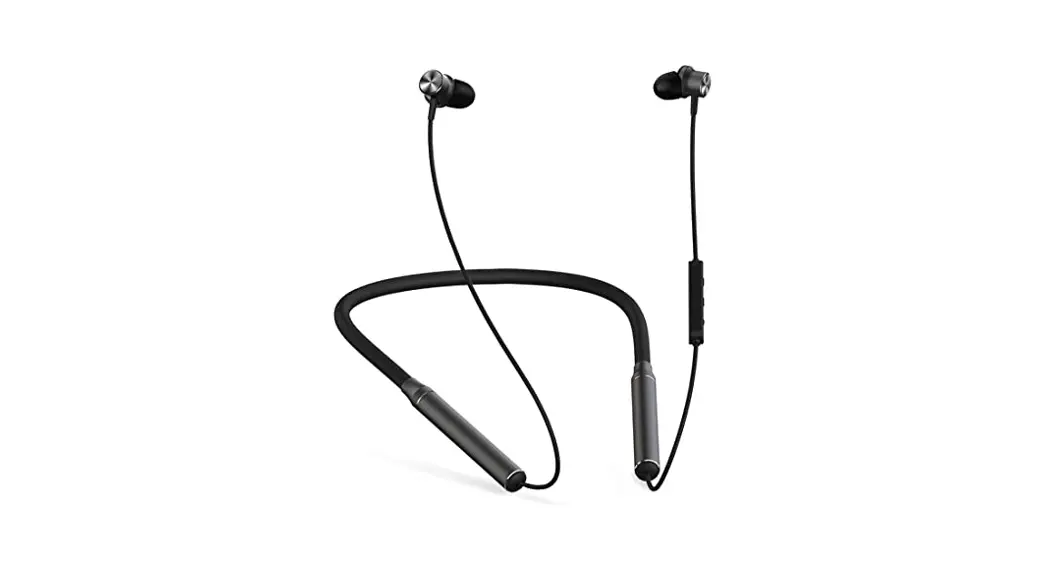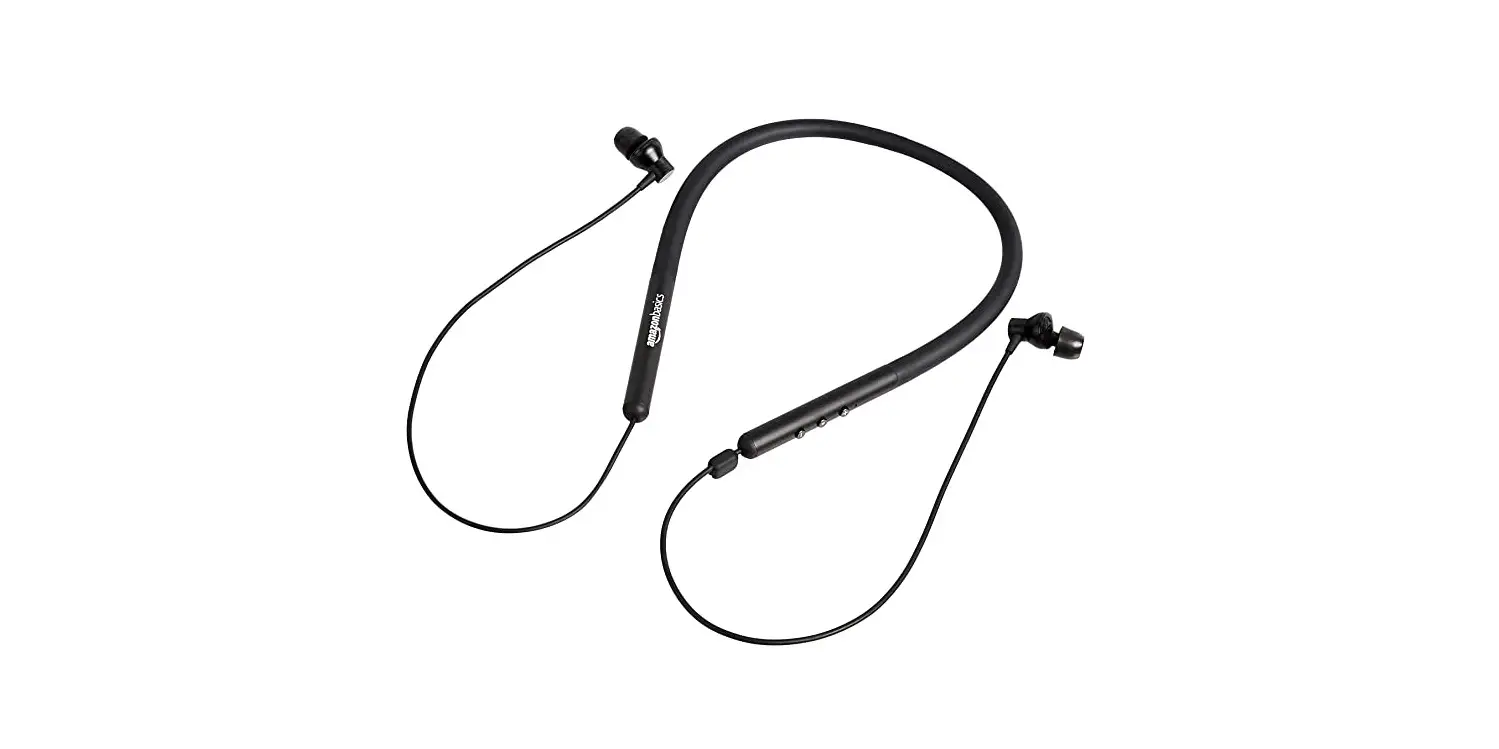

Amazon Basics PBH-171993 Bluetooth Neckband Headphone
IMPORTANT SAFEGUARDS
Read these instructions carefully and retain them for future use. If this product is passed to a third party, then these instructions must be included. To prevent possible hearing damage, do not listen at high volume levels for long periods, and do not use the headphones while driving or cycling or in any situation where you should be able to hear other sounds. As a guide to setting the volume level, check that you can still hear your own voice when speaking normally while listening with the headphones.
WARNING
Chocking hazard -Small parts. Not for children under 3 years.
Battery Warnings
- The battery contained in this product is non-replaceable. Do not throw the product into a fire. Before disposal, the battery must be removed from the product. Contact a qualified professional.
- Do not leave the battery charging for a prolonged period of time when the product is not in use.
- Do not charge the battery overnight. Charge the product once every 3 months to avoid shortening its battery life.
- If the battery leaks, avoid contact with the skin and eyes. Rinse affected areas immediately with plenty of clean water, then consult a doctor.
Product Description
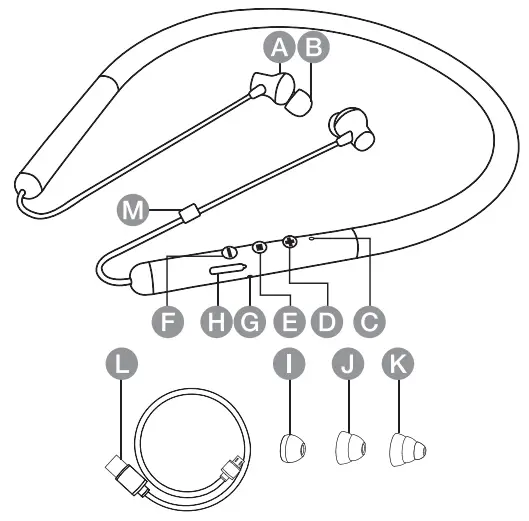
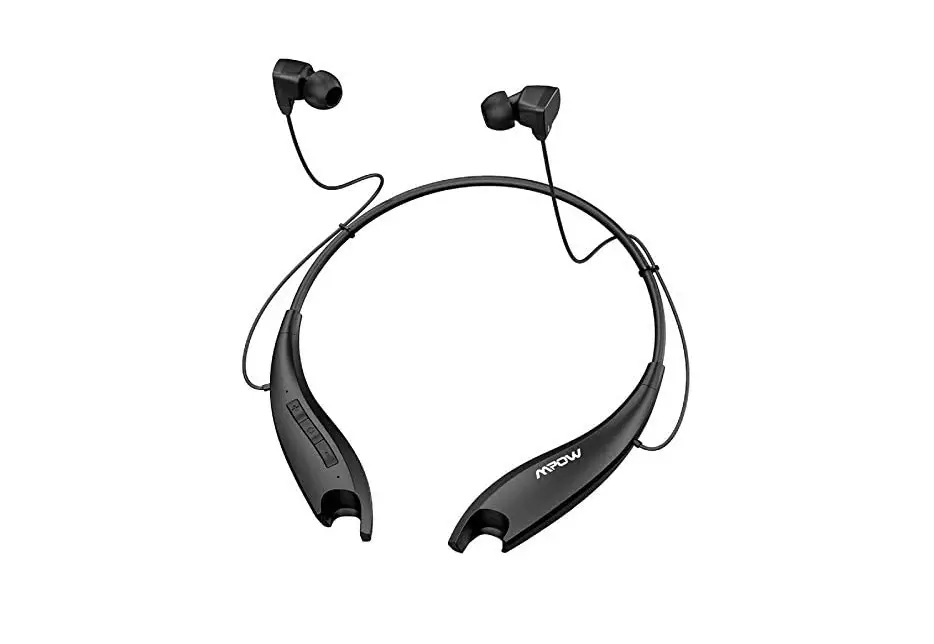
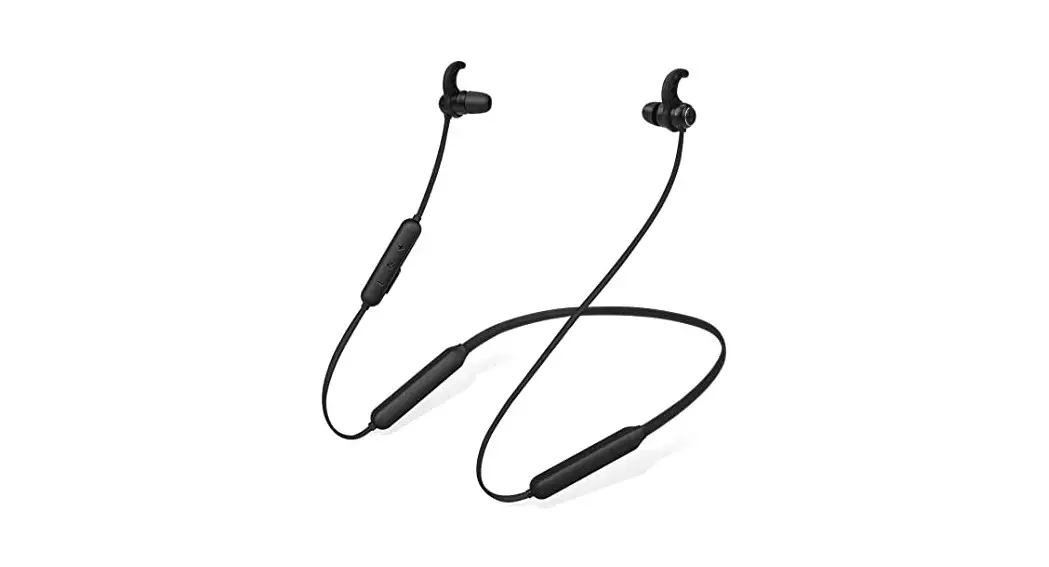
- A Earpiece
- B Soft memory foam earbud x2(L/R)
- C LED indicator
 D Volume up button
 E Power, Pair, Play/Pause button
 F Volume down button
- G Microphone
- H Micro USB charging socket
- I Standard earbud x2 (/R)
- J Double-deck earbud x2 (L/R)
- K Triple-deck earbud x2 (L/R)
- L Micro USB charging cable
- M Cable clip
 D Volume up button
 E Power, Pair, Play/Pause button
 F Volume down button
Before First Use
Check the product for transport damages.
DANGER Risk of suffocation Keep any packaging materials away from children – these materials are a potential source of danger,e.g. suffocation.
Charging
- Connect the USB charging cable (L) to the micro USB charging socket (H).
- Connect the other end of the USB charging cable (L) to a USB power source with a minimum output current of 200 MA.
- While charging: The LED indicator (C) lights up red.
- When fully charged: The LED indicator (C) goes off.
NOTICE
To ensure water resistance, always fully close the USB charging socket (H) cover.
NOTICE
Apple devices such as the iPhone, iPad, or iPod touch will display an on-screen battery indicator when the product is paired via Bluetooth.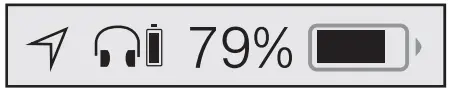
How to use the soft memory foam earbuds
Before inserting it into the ear canal, roll the tip between your fingers to compress the foam. Insert the tip as deep as possible without irritating the ear. Hold in place for 15-30 seconds, allowing the tip to expand and conform to your ear canal. This will create a Custom fit and perfect seal-providing an optimal audio experience.
Operation
 LED indicator (C)
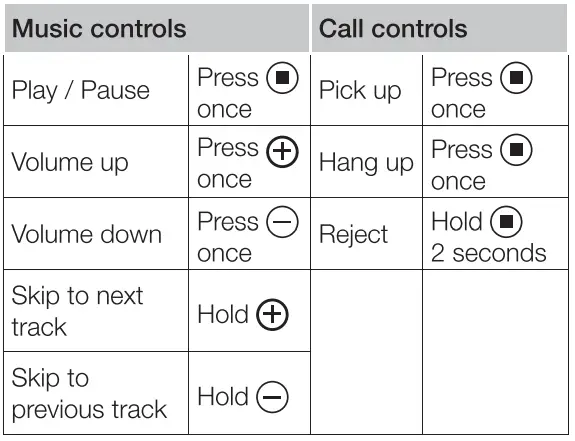 LED indicator (C)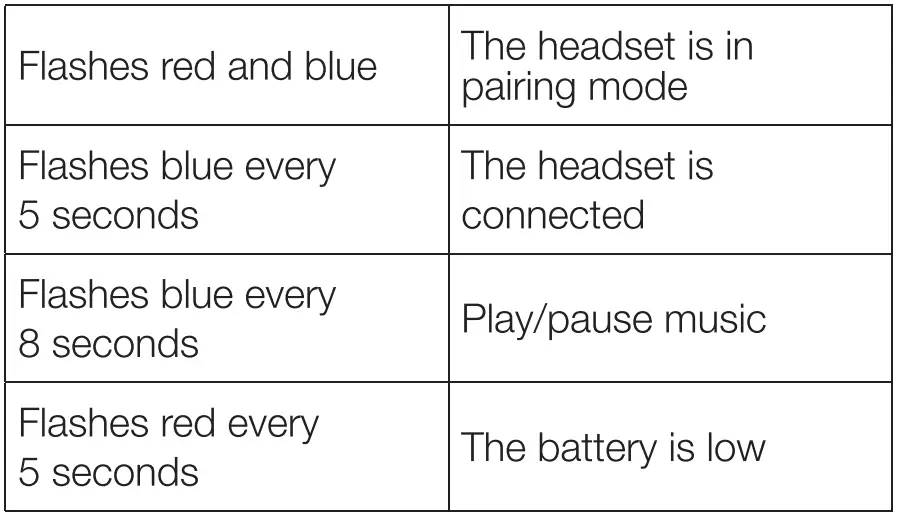
Switching on/off
- To switch the product on, press and hold the button (E) for 3 seconds. The LED indicator (C) flashes blue 1 time.
- To switch the product off, press and hold the button (E) for 3 seconds. The LED indicator (C) flashes red 2 times.
Pairing
NOTICE
Before using the product for the first time, you must pair it with a Bluetooth®-enabled device.
- Activate Bluetooth on the device you wish to pair and search for a new device.
- Select “AmazonBasics Neckband Headset” from the list on your device.
- Once the devices are paired, you will hear the voice prompt “Your headset is connected”, the LED indicator flashes blue every 5 seconds.
NOTICE
When switched on, the product automatically pairs with the last connected device. The product automatically switches off if not paired within 10 minutes.
How to connect to another device
- Hold the button (E) for 3 seconds to switch the product off, then Hold the button (E) for 6 seconds to switch the product on and hear the prompt “Power on – Pairing”. the indicator light will flash alternately red and blue.
- Activate Bluetooth on the device you wish to pair and search for another device.
- Select “AmazonBasics Neckband Headset” from the list on your device.
Restore factory settings
Press and hold the button(E) for 3 seconds while charging. The LED indicator(C) flashes blue 3 times.
FCC-Supplier’s Declaration of Conformity
FCC Compliance Statement
This product complies with Part 15 of the FCC rules.
Operation is subject to the following two conditions:
- This product may not cause harmful interference, and This product must accept any interference received, including interference that may cause undesired operation.
- Changes or modifications not expressly approved by the party responsible for compliance could void the user’s authority to operate the product.
FCC Interference Statement
This product has been tested and found to comply with the limits for a Class B digital device, pursuant to part 15 of the FCC Rules. These limits are designed to provide reasonable protection against harmful interference in a residential installation. This product generates, uses, and can radiate radio frequency energy and, if not installed and used in accordance with the instructions, may cause harmful interference to radio communications. However, there is no guarantee that interference will not occur in a particular installation. If this product does cause harmful interference to radio or television reception, which can be determined by turning the product off and on, the user is encouraged to try to correct the interference by one or more of the following measures:
- Reorient or relocate the receiving antenna.
- Increase the separation between the product and the receiver.
- Connect the product into an outlet on a circuit different from that to which the receiver is Connected.
- Consult the dealer or an experienced radio/TV technician for help.
Canada IC Notice
- This device contains license-exempt transmitter(s)/receiver(s) that comply with Innovation, Science, and Economic Development Canada’s license-exempt RSS(s). Operation is subject to the following two Conditions:
- This device may not cause interference, and
- This device must accept any interference, including interference that may cause undesired operation of the device.
- This equipment complies with Industry Canada radiation exposure limits set forth for an uncontrolled environment.
- This Class B digital apparatus complies with Canadian CAN ICES-3(B)/ NMB-3B) standard.
Disposal
The Waste Electrical and Electronic Equipment (WEEE) Directive aims to minimise the impact of electrical and electronic goods on the environment, by increasing re-use and recycling and by reducing the amount of WEEE going to landfill. The symbol on this product or its packaging signifies that this product must be disposed separately from ordinary household wastes at its end of life. Be aware that this is your responsibility to dispose of electronic equipment at recycling centers in order to conserve natural resources. Each country should have its collection centers for electrical and electronic equipment recycling. For information about your recycling drop-off area, please contact your related electrical and electronic equipment waste management authority, your local city office, or your household waste disposal service.
Battery Disposal
Do not dispose of used batteries with your household waste. Take them to an appropriate disposal/collection site.
Trademarks
The Bluetooth word mark and logos are registered trademarks owned by Bluetooth SIG, Inc. and any use of such marks by Amazon.com, Inc. or its affiliates is under license
Specifications
- Power supply: 5V, 0.8 A
- Battery capacity: 3.7 V, 140 mAh
- Impedance: 32 O+15% @1 kHz
- Frequency range: 20 Hz-20 kHz
- Sensitivity: 97 dB+3 dB @ 1 kHz
- Mic frequency range: 100 Hz-8 kHz
- Mic sensitivity: -42 dB+3 dB@1 kHz
- Mic impedance: s 2.2 KO
- Bluetooth IC: BES WT230S
- Bluetooth version: V5.0
- Supported profile: HSP HFP A2DP
- Operating range: up to 32 feet (10 meters)
- Charging time: 2 hours
- Operating time: up to 8-10 hours
- Water-resistance: IPX5
- Dimensions: 17.8 x 4.9 x 0.37″
- (Wx HxD): (452 x 125 x 9.5 mm)
- Net weight: 1.34 oz (38 g)
Feedback and Help
Love it? Hate it? Let us know with a customer review AmazonBasics is committed to delivering Customer-driven products that live up to your high standards. We encourage you to write a review sharing your experiences with the product.
- US: amazon.com/review/review-your-purchases#
- UK: amazon.co.uk/review/review-your-purchases#
- US: amazon.com/gp/help/customer/contact-us
- UK: amazon.co.uk/gp/help/customer/contact-us
FAQ’s
Amazon Basics
On a single charge, the device can offer up to 20 hours of battery life and its IPX5 splash and sweatproof feature make it ideal for your gym sessions.
While stereo headsets require battery packs with capacities up to 500 mAh, typical battery capacities for mono headsets range from 80 mAh to 150 mAh.
No. The headphones cannot be charged while being worn.
Because Bluetooth headphones are directly connected to the power source, we advise against using them while they are charging. Additionally, short circuits and electrocution can result from poor wiring and exposed wires in the power circuit.
Battery Life
True wireless headphones typically have a battery life of 3 hours or less before they run out of juice. Charger cases come in handy in this situation. A good charging case can extend the listening period of your headphones by at least 5 to 6 hours
The wireless neckband-style earphone uses Bluetooth version 5.0 to connect to other devices. Up to 7 hours of battery life are promised.
To access the Status Bar, swipe down from the top of the screen, then scroll down again to find Bluetooth and tap it to turn it on or off. The Settings app on your Android device offers another way to disable Bluetooth. Open it, then select Bluetooth under Connected Devices > Connection Preferences.
From hands-free phone calls to wireless file sharing to listening to music on a car’s speakers, Bluetooth technology offers ease. However, having your Bluetooth on all the time can be risky, and hackers are taking advantage of the technology to spread harmful software, access sensitive information, and more.
Also, Bluetooth headphones are not energy-efficient devices. So, they will turn themselves off when not in use to help conserve energy. Similarly, when the battery drains itself, the device may turn itself off. The Bluetooth headphones are programmed to turn off when not in use.
Not Nearly As Reliable As Wired Headphones for Audio Transmission.
Weight: Compared to Regular Headphones, Bluetooth Headphones Have More Components.
Battery Life: Chargers for headphones are not always available and are required. Compatibility – Devices Must Share The Same Codecs and Bluetooth Profiles and Be Bluetooth-enabled.
Since Bluetooth is a non-ionizing EMR, it is generally harmless for people and won’t harm them. In fact, Bluetooth has low specific absorption rates (SAR), further demonstrating that it is safe for people to use.
If you use over-the-ear neckband for an extended period of time or listen to loud music, you could end up damaging your hearing. They simply pose less of a risk than earphones do: The level of a sound can be increased by 6 to 9 decibels when the source is in your ear canal, which can result in some major issues.
According to Dr. Foy, you should only listen to MP3 players for a total of 60 minutes per day at volumes no higher than 60% of their maximum settings. “Your duration should be shortened the louder the volume. You should only listen at maximum volume for around five minutes every day.
The Bluetooth headset’s primary button should be pressed and held for a few seconds. Your Bluetooth headset will suddenly turn off after a brief period of an LED light blinking on and off.
A Comprehensive Guide to Neckband Headphone Wear Connecting the headset is step one.
2. Verify that the headset’s L and R characters are correct.
3. Step 3: Take off the earring-area jewelry.
4. Insert the headset into your ear.
Step 5. Put the rope behind the neck
6. Clean the headphone jack.
Your left side should be on the left side of the neckband, and your right side should be on the right side. On the (left) side of the mark, there is a tactile dot. your ears using the left and right units.