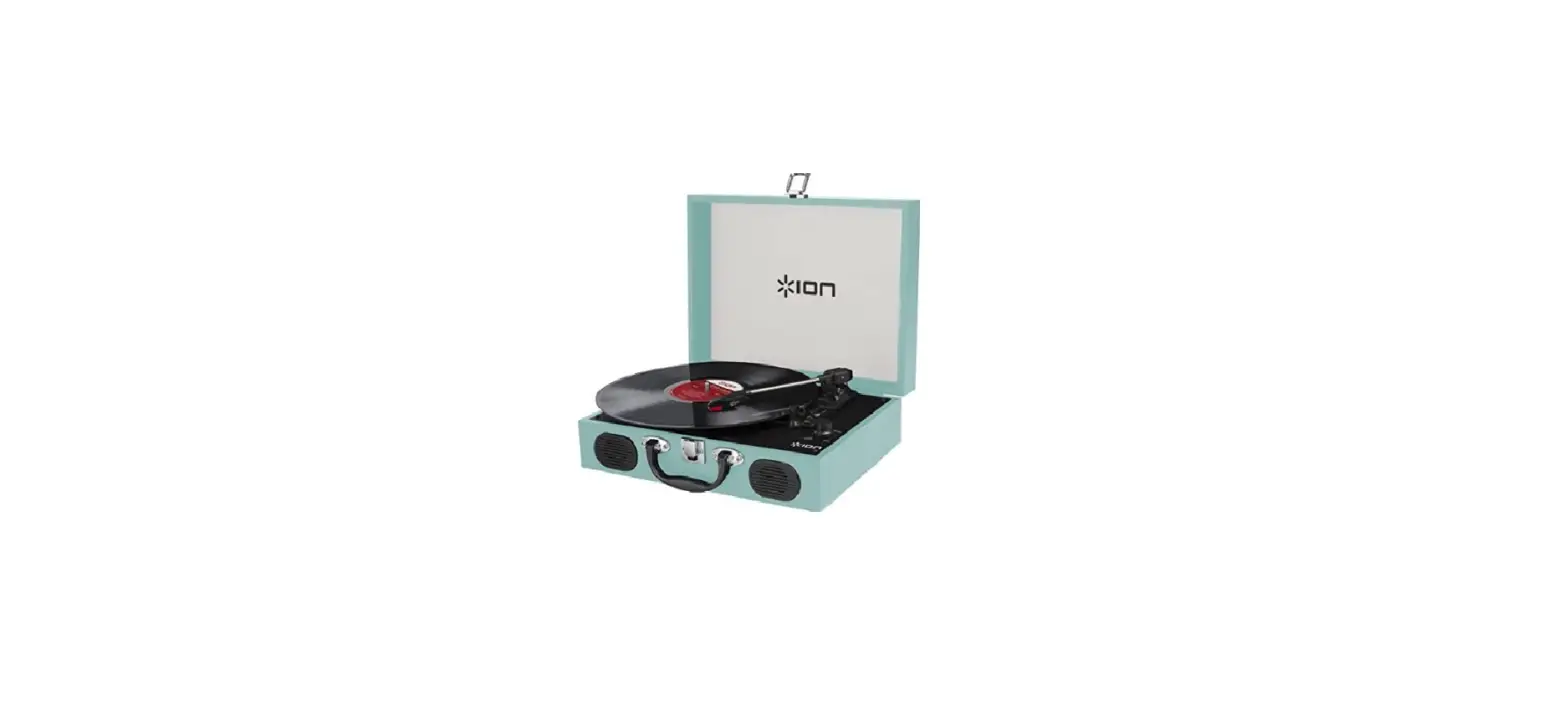

ION Vinyl Transport Audio Suitcase Built-In Speakers
Introduction
Box Contents
Make sure that the items listed below are included in the box:
- Vinyl Transport™
- Felt Slipmat
- Power Adapter
- 45 RPM Adapter
- Quickstart Guide
- Safety & Warranty Manual
Support
For the latest information about this product (system requirements, compatibility information, etc.) and product registration, visit ionaudio.com
Connection Diagram 
Features
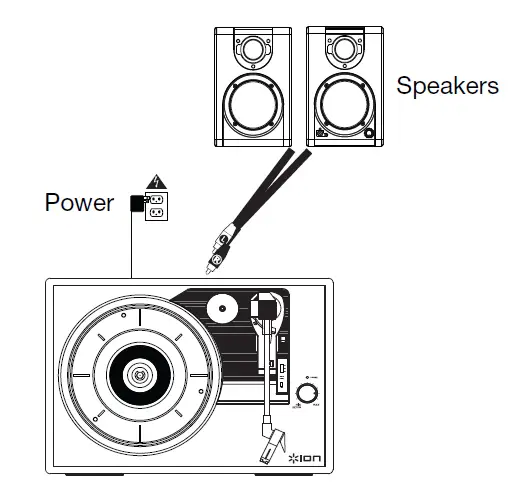
- Platter – Place your record here.
- 45 RPM Adapter Holder – Holds the included 45 RPM adapter. When not using the adapter, please place it in this holder.
- Tonearm – The fixed tonearm can be raised and lowered by hand, or by pressing the raise / lower lever.
- Arm Clip – This specially designed arm clip secures the tonearm while at rest or when not in use. The arm clip has been designed to remain in the up position while unlocked.
- Raise / Lower Lever – Raises and lowers the tonearm.
- 33 / 45 / 78 Switch – This switch controls the RPM of the turntable platter.
- Note: For best results when playing 78 RPM vinyl records, use a 78 stylus (sold separately). Only use a 78 stylus with 78 RPM vinyl records. Purchase the iCT06rs 78 stylus at ionaudio.com/ict06rs.
- Autostop switch – This switch turns autostop on or off.

- When autostop is on, the platter will start spinning when the tonearm is placed over the record and stop spinning when the record has reached the end. (When the autostop is off, the platter will always spin regardless of the position of the tonearm.)
- Note: If your vinyl record stops before it reaches the end of the music, turn Autostop to the off position for this particular record. This is generally recommended for 45 RPM records.
- Volume/Power Knob – To power on Vinyl
- Transport, turn this knob clockwise until it clicks.
- When powered on, use this knob to adjust the volume. To turn off Vinyl Transport, turn this knob counterclockwise until it clicks.
- Power Indicator – This LED illuminates when the power is on.
- Speaker – The record’s audio will be played through this built-in speaker.
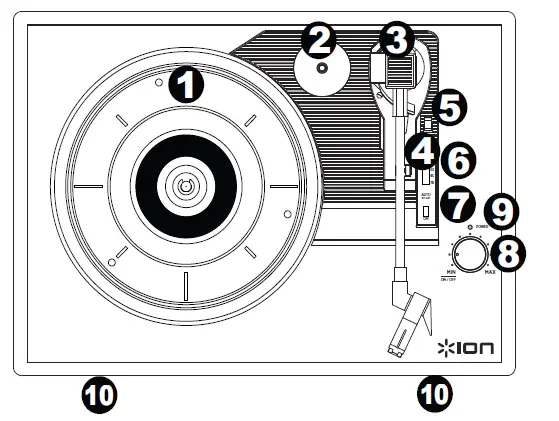
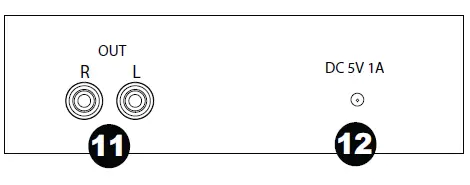
- RCA Output* – The audio from a playing vinyl record is sent to this line-level coaxial audio output. This must not be connected to phono-level devices.
- Power Cable Input – Use the included adapter to connect to wall power.

Troubleshooting
- If you experience any difficulties, please refer to the troubleshooting steps below.
- I’m not hearing any audio when playing music:
- If you are playing music from vinyl:
- Make sure that Vinyl Transport is powered on and that the needle is on the record.
- Connect Vinyl Transport’s RCA outputs to a stereo system or powered speakers. (Do not connect them to phono-level inputs; Vinyl Transport’s RCA outputs are line-level and could damage a device with phono-level inputs.)
- My record is not playing at the correct speed; its pitch is too high or too low:
- Ensure the 33 / 45 / 78 switch is set to the correct speed for your record.
- My record is hitting the edge of the top cover:
- Use a slipmat at all times to raise your records high enough to clear the top cover.
- BEFORE RETURNING THE PRODUCT, please contact ION Audio or your retailer for technical support.
- Contact information can be found in the Safety Instruction Booklet included with this product.
Technical Specifications
| Dimensions (Length x Width x Depth) | 13.75” x 10” x 4.5” 349 mm x 254 mm x 114 mm |
| Weight | 6.1 lbs; 2.8 kg |
| Power | 5V DC, 1A, center pin-positive, tip-negative; or 4 AA batteries (into the bottom compartment). |
| Battery Type | 4 AA batteries |
| Battery Life: | Up to 6 hours |
| Cartridge Type | Ceramic |
| Cartridge and Stylus | CZ-800-10 (sapphire-tipped) is included, and also available at www.ionaudio.com/products/details/CZ-800-10. For a 78 stylus, the iCT06rs is available at |
Trademarks and Licenses
ION Audio is a trademark of ION Audio, LLC, registered in the U.S. and other countries. The Bluetooth word mark and logos are owned by the Bluetooth SIG, Inc. and any use of such marks by ION Audio is under license. All other product or company names are trademarks or registered trademarks of their respective owners.
FAQS
Does it spin? If it spin then how?
No, it doesn’t. The colors change and move through.
Can you play it while plugged in and charging?
ION support here! This speaker can still be used while it’s plugged in and charging. If you have any other questions, please feel free to email me directly at [email protected].
Can it be set to one color?
No, it will only do one pattern but it changes. All colors are on all the time.
can u listen to mysic without the lights as well?
ION support here! Absolutely. The lights can be turned off while the music remains on. If you have any other questions, please feel free to email me directly at [email protected]
Does it have the rr play/pause ff buttons on it? does it also show a light indicator for fully charged?
Yes! My quit working after two days. The lights still work. It won’t connect to the Bluetooth. I give it to my two year nephew because it was small and he can hold it. He love the night.
Does this item can be use with ipod or cell phone?
As long as you have Bluetooth on your phone any cell phone it works! Love this little speaker
Can the battery be replaced by the customer when it inevitably fails to charge at some point?
No the battery cannot be replaced. But you can use it while plugged in.
Do the lights go with the beat of the music?
Yes they do! It makes for a fun night on the patio!
Do I have to have the light on?
ON support here! Thank you for reaching out. There is a switch on the back of the speaker that will allow you to turn off the lights. If you have any other questions, please feel free to email me directly at [email protected].
Can you connect to more than one at a time?
ION support here! You can only connect to one at a time. If you have any other questions, please feel free to call or email us using the contact information on ionaudio.com/support.
Where can i get just the charger for this speaker?
It uses just any standard smartphone / USB charger.
Will a bluetooth mic work with this device?
ION support here! Although we haven’t tested it specifically with Bluetooth microphones, it should still work just fine. If you have any other questions, please feel free to email me directly at [email protected]
Will the light show be relaxing if music with a slower beat is played? (For example, for use in a child’s room at night)?
It isn’t not relaxing, more of a party light so it’s still pretty fast.
How big is it?
I purchased this speaker as a gift to my nieces. I have not personally seen them, but I did ask them if they worked ok and they both responded, yes. My nieces ages are 14 & 13.