
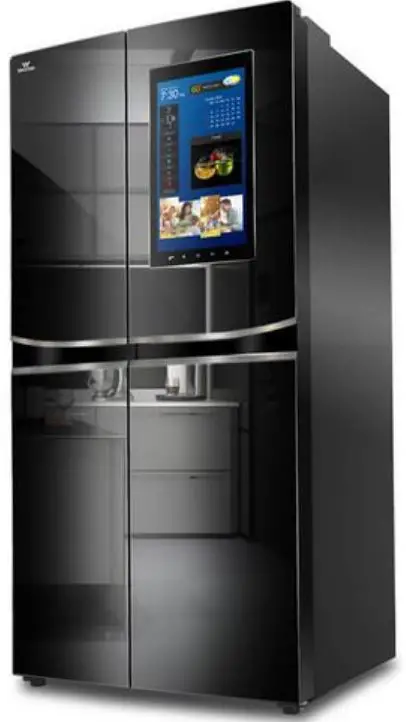
Walton WNI-6A9-GDSD-DD Fridge
USER MANUAL OF DISPLAY OPERATION
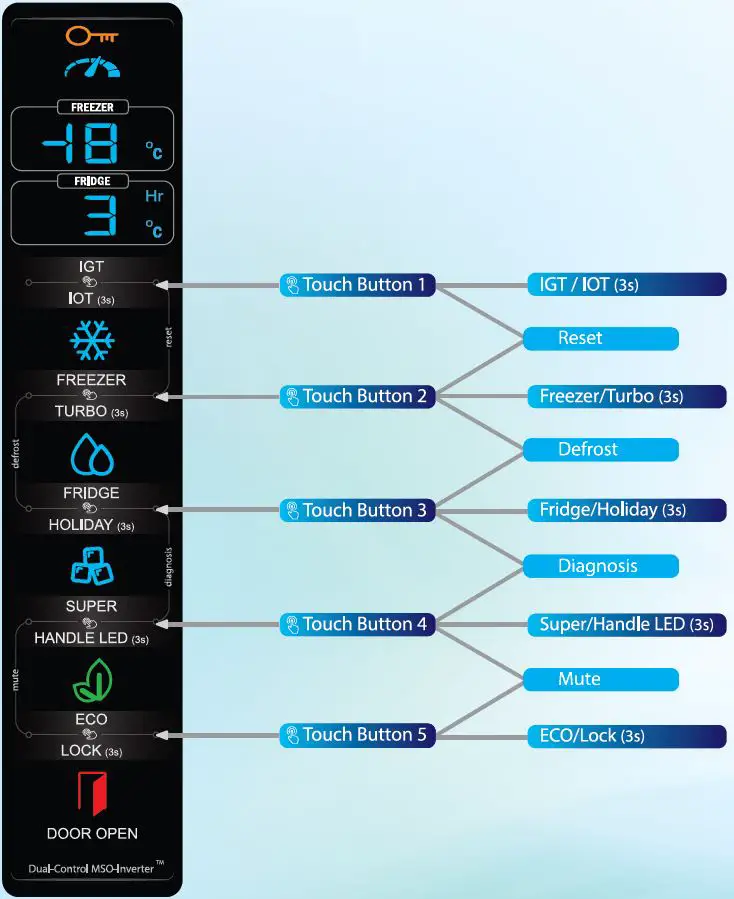
TOUCH BUTTON 1: IGT / IOT (3 SEC)
| *IGT
| IGT (Intelligent Germ Terminator), can kill germs. You can activate or deactivate it by touching once. 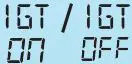 will be shown respectively in Seven-Segment Displays for a while. will be shown respectively in Seven-Segment Displays for a while.Note It operates when Fridge Door is closed, and Holiday is not activated. Warning Don’t touch IGT LEDs (inside Fridge Compartment) with bare hands. |
| *IOT (3sec)
| JOT (Internet of Things), enables wireless data exchange with Walton Smart Appliances (Android/I OS) App. You can check system status, even can control from remote area. You can activate JOT Pairing by touch and hold for 3 seconds.  will be shown in Seven-Segment Displays for a while. will be shown in Seven-Segment Displays for a while.Warning A Wi-Fi connection is mandatory for Refrigerator and your phone must have internet access. |
Attention:Only specific Refrigerator Models (IGT and IOT stickers will be attached) will have these features.
TOUCH BUTTON 2: FREEZER / TURBO (3 SEC)
| Freezer
| By touching once, you can adjust Freezer Set Temperature within -25°C to -15°C range. Compressor speed will automatically change considering power optimization, cooling condition and ambient temperature during Freezer cooling which is known as Al (Artificial Intelligence) based Inverter driver. While Setting, Freezer Set Temperature will appear and blink in the Upper Seven-Se_gment Display. | |
| Turbo (3 sec)
| Turbo will accelerate Freezer cooling. Therefore, you will get your desired Freezer Set Temperature within very short time. You can activate or deactivate it by touch and hold for 3 seconds. However, when Freezer Set Temperature is achieved, turbo will automatically turn OFF. Warning The compressor will run at its maximum Speed during Turbo. |


TOUCH BUTTON 3: FRIDGE / HOLIDAY (3 SEC)
| Fridge
| By touching once, you can adjust Fridge Set Temperature within I °C to 9°C range. While Setting, Fridge Set Temperature will appear and blink in the Lower Seven-Segment Display. §f Note Electronic Damper will operate according to Fridge cooling logic. | |
| Holiday (3 sec)
| Activating Holiday will disable Fridge cooling system. You can activate or deactivate it by touch and hold for 3 seconds. -H- appears in the Lower Seven-Segment Display during Holiday is activated. &Warning Fridge Cooling, Deodorizer and IGT will be disabled during Holiday is activated. |


TOUCH BUTTON 4: SUPER
| Super
| By touching once, you can adjust Super Set Hour within 2hrs to 48hrs range. While Setting, Super Set Hour will appear and blink in the Lower Seven-Segment Display. When Super Set Hour or Super Freezing Temperature is achieved, Super will be automatically turned OFF. Super Freezing mode ensures maximum Freezing of Foods. Highly recommended while storing a lot of meat during Festivals. Note Compressor will follow a unique Speed Pattern of 8 steps specially designed for Super Freezing. &Warning Super may consume a significant amount of power. | |
| Handle LED
| You can disable door handle LEDs by touching 3 seconds. Note Disabling the door handle LEDs will also disable the automatic LED light up in motion detection. |

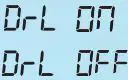
TOUCH BUTTON 5: ECO/ CHILD LOCK (3 SEC)
| ECO
| ECO ensures environment friendly Freezer and Fridge Cooling Systems focusing on maximum power save. You can activate it by touching once. Note Compressor will follow a uni9ue Speed Pattern of 8 steps specially designed for ECO. | |
| Child Lock (3 sec)
| You can lock your system settings; therefore, kids can’t modify. You can activate or deactivate it by touch and hold for 3 seconds. Warning Touch Buttons won’t work during Child Lock, except deactivating of Child Lock. |


TOUCH BUTTON 1 & 2: SYSTEM RESET (3 SEC)
System Reset
- System Reset reinitializes whole system and establishes default setting. You can activate it by touch and hold these two buttons for 3 seconds.
Warning: Previous settings will be lost.
TOUCH BUTTON 2 & 3: MANUAL DEFROST (3 SEC)
 Manual Defrost
Need to clean your Freezer Compartment! You can melt evaporator ice in the Freezer Compartment instantly by activating Manual Defrost. You can activate it by touching and hold these two buttons for 3 seconds. While Manual Defrost, will appear and blink in the Lower Seven Segment Display.
Note: Manual Defrost will start only, if Freezer Compartment Temperature achieves at least – 10°C.
Warning: Freezer and Fridge Compartment Temperature will rise during Manual Defrost.
TOUCH BUTTON 3 & 4: SELF-DIAGNOSIS (3 SEC)
| Self Diagnosis | This option is highly recommended for Service Experts. System will run I minute routine for ensuring proper functionality of all electronic parts one by one. You can activate it by touch and hold these two buttons for 3 seconds. Test serial will appear in the Upper Seven Segment Display and Test Timeline Duration will appear in the Lower Seven Segment Display. | ||||||
| Test Serial | Location | Electronic Device | Test Timeline | ||||
| Start | Stop | ||||||
| t1 t2 | Compressor House | Condenser Fan | Os | +Os | |||
| Compressor | Ss | 40s | |||||
| t3 t4 | Freezer Compartment | Freezer Evaporator Fan | 10s | +Os | |||
| Freezer Cabinet LED | 15s | 60s | |||||
| t5 t6 t7 t8 t9 | Fridge Compartment | Fridge Cabinet LED | 20s | 60s | |||
| Ionizer LED | 22s | 60s | |||||
| t10 | Ionizer Module and Ionizer Fan | 24s | 60s | ||||
| t11 | Damper Open (ON) | 26s | 60s | ||||
| Damper Heater | 28s | 60s | |||||
| Door Handle | Motion Sensor | 30s | 60s | ||||
| t12 | Left Door Handle RGB LED (IfMotion Sensor detects Human) | 30s | 60s | ||||
| Right Door Handle RGB LED (If Motion Sensor detects Human) | 30s | 60s | |||||
| t13 | Freezer Compartment | Evaporator Heater | 40s | 60s | |||
| t14 | Control Board | Buzzer | 55s | 60s | |||
| After 60 seconds or 1 minute, System will resume its regular operation. | |||||||
| Warning | |||||||
| Regular functioning won’t work during Self-Diagnosis. | |||||||
Touch Button 4 & 5: Mute (3s)
- Mute: You can turn off the door open alarm by touching & hold for 3 seconds.
SPECIAL FEATURES
| Auto Defrost
| Auto defrost will melt evaporator ice in the Freezer Compartment in a regular interval. While Auto Defrost,  will appear and blink in the Lower Seven Segment Display. will appear and blink in the Lower Seven Segment Display.Warning Freezer and Frid e Compartment Temperature will rise during Auto Defrost. |
| Door Handle RGB & Human Detection | Your Refrigerator can detect you! When you stand in front of your Refrigerator, Door Handle RGB will follow Walton RG B Pattern for a while. Note RGB Pattern will be OFF after few seconds if ou don’t move. |
Door Open Detection | When Refrigerator Door is opened for more than 1 minute, Door Alarm 1,, will start and follow a regular routine unless doors are closed. During door open, indicator turns ON. Even, the door handle RGB follows a unique pattern to draw your attention. Warning Compartment Temperature will rise durin Door Open. |
| Deodorizer | Deodorizer is a set of ionizers, fans and LED. It automatically functions and removes bad smell. Note It operates when Frid e Door is closed, and Holiday is not activated. |
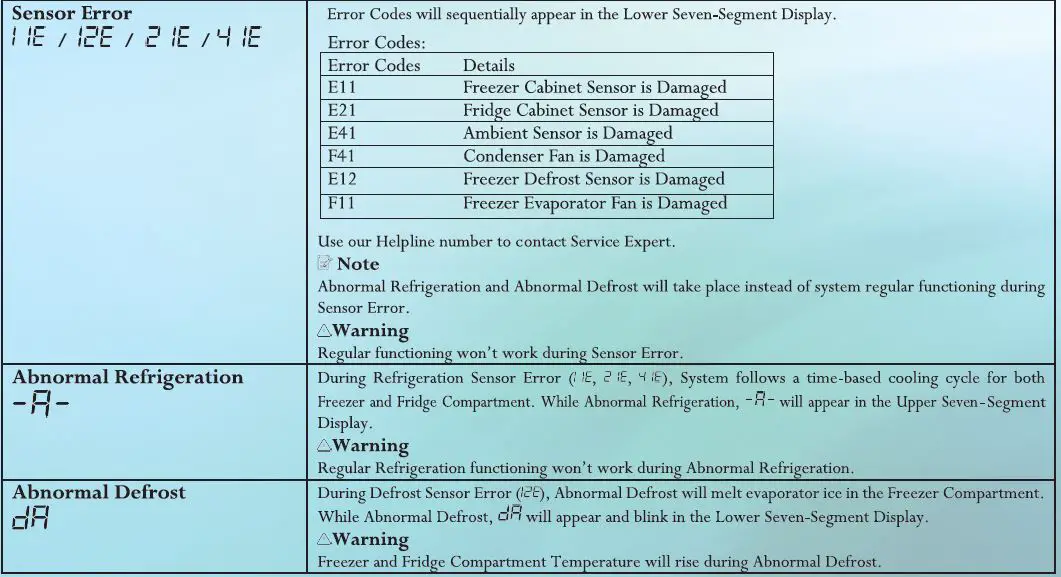
SAFETY OPERATION DURING ABNORMAL SITUATION
Globally Achieved Safety, Energy & Quality Ensuring Certificates




- Please visit: waltonbd.com
All models are tested by

Capable to test as per Bangladesh, India, Saudi Arabia, UAE, Sri Lanka & British Standard
Accepted in ILAC & APLAC Member Countries
HUNDRED OF MODELS & DESIGNS
WIDE VOLTAGE DESIGN
Guarantee
- With Confidence of Best Quality
Compressor
- 12 Years Guarantee
Contact
- waltond.com
- For Details: 16267
Scan