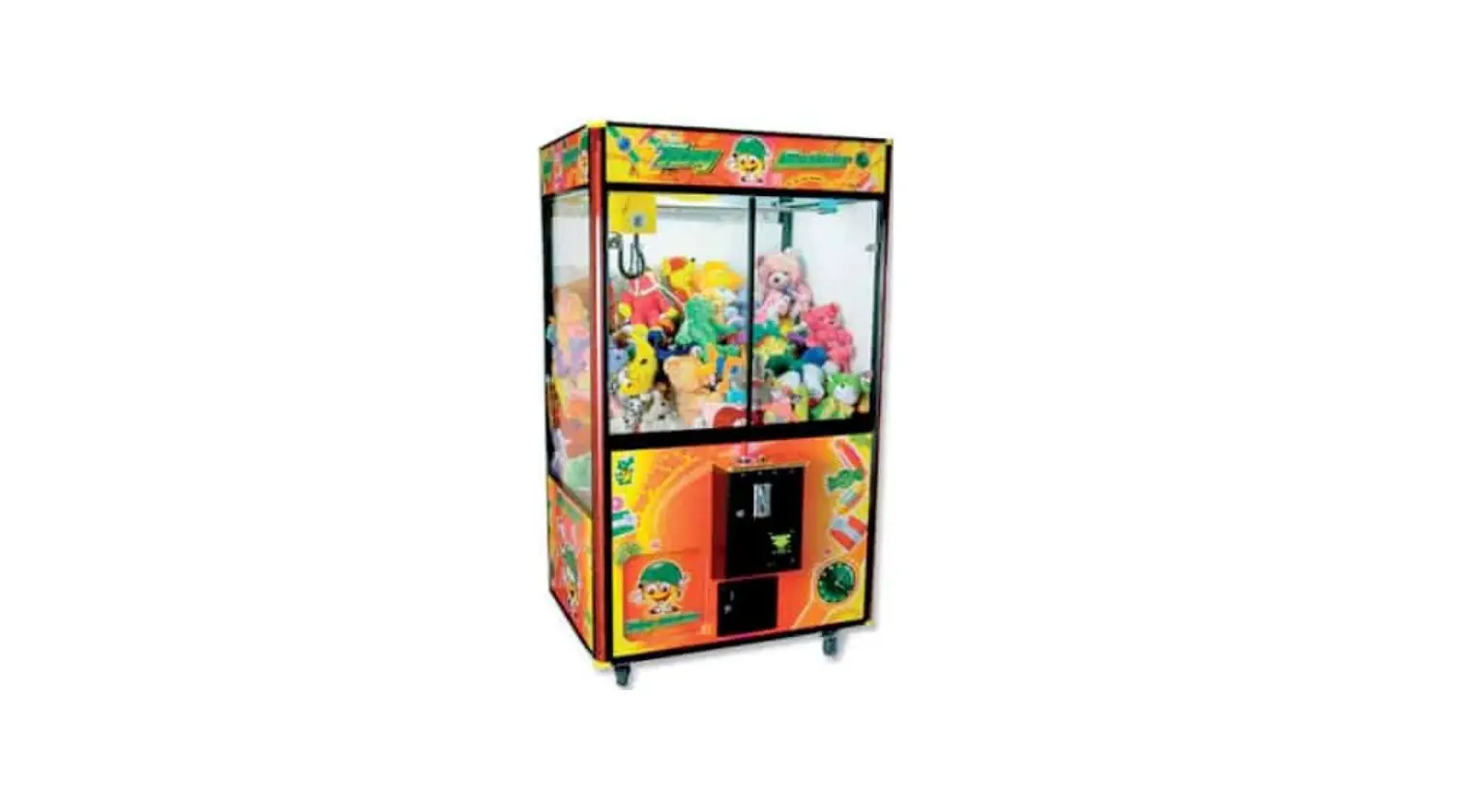
Betson W88L Coastal Toy Soldier User Manual
OPERATION
How to Play
- Insert coins/tokens into coin slot, the display shows credits and the crane plays game music.
- Use joystick to move claws above your selected object. When you move the joystick, the game time is countdown, and [DESCEND] button light is flashing.
- At pressing [ DESCEND] button or time’s up (game’s playing time is adjustable), the gantry drives motor to lower down claws and then catch object.
- If ‘Catch in air’ function is available. press DESCEND button before claw reaches in flied, the claws will catch item in the air.
- After movement of catching (claws closes), the claws rise up till it touches Stop-Up SW. ‘then the claws move to exit area and releases.
Game Rules
DEMO Play Demo music for 2 minutes c’ cry 3 minutes.
Coin In
- Coins v.s. plays: By Dip SW setting
- If COIN pulse speed was lower than 10msec, the machine does not recognize the signal.
- If coin speed is over 200 msec, the machine shows error code.
Shocking Machine
- When a tilt is mounted at machines, and players shock the machines, it plays “Don’t Shock the Machine”.
- When the claw arms close and someone shocks the machines, the arms open and move back to the home position.
DIP SW Setting
| DIP SW1 | 1 | 2 | 3 | 4 | 5 | 6 | 7 | 8 | |
| When the DIP SW PIN #6 is setup on “Play tillyou win”, the claw strength voltage | VR1 Adj. of Power | ON | |||||||
| +48V | OFF | ||||||||
| Position where claws open at the exit | Claws lower down then release object | ON | |||||||
| Claws release object at the top position | OFF | ||||||||
| Coin 1 & Coin 2 Linked Together | Yes | ON | |||||||
| No | OFF | ||||||||
| Adjustment of Credit Value | Inner Value | ON | |||||||
| DIP SW | OFF | ||||||||
| Bonus Plays (see bonus table)( 4 pluses=$1) when Dip SW1-4 if off | YES | ON | |||||||
| NO | OFF | ||||||||
| Claw moving to playfield when game begins | YES | ON | |||||||
| NO | OFF | ||||||||
| Reserved | FIXED | OFF | |||||||
| At the moment the program sends strong strength on the basis of the setup winning percentage, the system will keep sending strongest strength to the claw until a prize is caught. | With | ON | |||||||
| Without | OFF | ||||||||
| Default Setting | OFF | OFF | OFF | OFF | OFF | OFF | OFF | OFF | |
| DIP SW1 | 1 | 2 | 3 | 4 | 5 | 6 | 7 | 8 | |
| Coin1 of method(Coin Selector of Coin Pulse vs. Play) | 8 : 1 | ON | ON | ||||||
| 6 : 1 | OFF | ON | |||||||
| 4 : 1 | ON | OFF | |||||||
| 2 : 1 | OFF | OFF | |||||||
| Coin2 of method(Bill Acceptor ofCoin Pulse vs. Play) | 4 : 1 | ON | ON | ||||||
| 3 : 1 | OFF | ON | |||||||
| 2 : 1 | ON | OFF | |||||||
| 1 : 1 | OFF | OFF | |||||||
| Free Play | YES | ON | |||||||
| No | OFF | ||||||||
| Play till you win function (Output Sensormust be included.) | With | Will deduct 1 credit when win. | ON | ||||||
| Without | Will deduct 1 credit for each game. | OFF | |||||||
| Ability to change the Inner-Values | Yes | ON | |||||||
| No | OFF | ||||||||
| Auto Test | With | ON | |||||||
| Without | OFF | ||||||||
| Default Setting | OFF | OFF | OFF | OFF | OFF | OFF | OFF | OFF | |
MAINTENANCE
TEST System Test:
COIN I NC +COIN2 NC+POWER ON (or Service NC+POWER ON) Enter the system Test, DISPLAY shows 0-3, then press button to confirm.
EXIT
- Claw Setting (COIN1 NC +POWER ON can have Claw Setting)
- Gantry Test (COIN2 NC +POWER ON can have Gantry TEST)
- System Test FO EXIT
;; F 1 DISPLAY and Light Test
;; F2 DIPSW Test
;; F 3 Demo Sound
;; F 4 Auto Demo
;; F5 REVESED
;; F 6 BACK TO DEFAUTL
;; F 7 Length of String adjustment
AUTO PERCENTAGING SETTING
SET Play VS Coin Value: ($0.01-9.99)
Set Prize Value: (500.01-99.99)
Set Win Percentage (Range: 01-99’/o)
How to Setup:
- Tilt (NC) +Button (NC) + Turn Power ON Display shows “P5” for setup auto percentage function.
- Tilt (NO) + Button (NO) Display “00” in flashing:
Use Joystick and button to adjust
Function Code:
00 Exit
- SET Play VS Coin Value
- Set Prize Value
- Win Percentages
- Automatic calculate the times of super power (Qty of wins)
BONUS PLAY TABLE
| CREDIT | PLAYS |
| $1 | 1 |
| $2 | 3 |
| $3 | 4 |
| $4 | 6 |
| $5 | 7 |
| $6 | 9 |
| $7 | 10 |
| $8 | 12 |
| $9 | 13 |
| $10 | 15 |
| $11 | 16 |
| $12 | 18 |
| $13 | 19 |
| $14 | 21 |
| $15 | 22 |
| $16 | 24 |
| $17 | 25 |
| $18 | 27 |
| $19 | 28 |
| $20 | 30 |
| $21 | 31 |
| $22 | 33 |
| $23 | 34 |
| $24 | 36 |
| $25 | 37 |
| $26 | 39 |
| $27 | 40 |
| $28 | 42 |
| $29 | 43 |
| $30 | 45 |
INTERNAL SETTING
| TIEM | Description | Instruction | |
| 01 | COIN1 – quantity of pay-out tickets afterinserting coins (coin selector 1) | 0~9 | 0 |
| 02 | COIN2 – quantity of pay-out tickets afterinserting coins (coin selector 2) | 0~9 | 0 |
| 03 | COIN1 – quantity of Inserted coins (coinselector 1) | 1~99 | 1 |
| 04 | COIN1 – quantity of game’s credits (coinselector 1) | 1~99 | 1 |
| 05 | COIN2 – quantity of Inserted coins (coinselector 2) | 1~99 | 1 |
| 06 | COIN2 – quantity of game’s credits (coinselector 2) | 1~99 | 1 |
| 07 | Quantity of pay-out tickets with winning prizes | 0~9 | 0 |
| 08 | Quantity of pay-out tickets without winning | 0~9 | 0 |
| 09 | Reserved | ||
| 10 | Game time | 0~5=5 5~99 Sec. | 50 |
| 11 | Reserved | ||
| 12 | Reserved | ||
| 13 | Catching in Air | 0~1 0=NO 1=YES | |
| 14 | Super Power Frequency | 0~1 0=Fixed 1=Random | |
| 15 | If Sensor is out of Service | 0~1 0=Machine not working,1=Machine working | |
| 16 | Reserved | ||
| 17 | Reserved | ||
| 18 | Reserved | ||
| 19 | DEMO Music | 0~1 0=Open 1=Off | 0 |
| 20 | Shaking machine-sound | 0~1 0= Open 1=Off | 0 |
| 21 | Reserved | ||
| 22 | Reserved | ||
ERROR CODE
| Error Code | Description | Checking timing | Trouble shooting |
| Er 00 | CPU Error | When switch on the machine | 1. Change U1 CPU 2. PCB is out of service. |
| Er 01 | Error while up the winding cord | 1. When switch on the machine2. When play the game3. Auto Demo | 1. Check if the up-stop SW is loose?2. Check if up-stop SW is out of work? 3. Check if the air-plug of the gantry set connects well? 4. PCB is fault. |
| Er 03 | Error while down the winding cord | When auto demo | 1. Check if the string at the winding wheel is smooth? 2. Check if up-stop SW is out of work? 3. Check if the air-plug of the gantry set connects well? 4. PCB is fault. |
| Er 0E | SENSOR isout of service | 1. Check whether sensitivity of sensor is too high? Please adjust the sensitivity-VR to make sure the LED of Sensor is in Dark status. 2. Check J5 sensor harness is connected well? 3. Sensor is fault. 4. PCB is fault | |
| Er 05 | Stop-Forward SW or Stop- back SW Error | 1. When switch on the machine2. When play the game3. Auto Demo | 1. Check if the stop-forward SW or stop-back SW is out of work? 2. Check if the air-plug of the gantry set connects well? 3. PCB is fault. |
| Er 06 | Stop-Left SW Error | 1. When switch on the machine2. When play the game3. Auto Demo | 1. Check if the Stop-Left SW is out of work? 2. Check if the air-plug of the gantry set connects well? 3. PCB is fault |
| Er 07 | Coin1 Meter disconnectio | 1. Check if the J5 PIN connects well? 2. Check if the Meter is out of work? Check if the Pin connects well?3. PCB is fault. | |
| Er 08 | Coin2 Meterdisconnectio | ||
| Er 09 | |||
| Er 10 | Prize Mater dis connection | ||
| Er 22 | Cabinet size check Error when power on | 1. Check if the stop-front SW or stop-back SW is out of work? 2. Check if the air-plug of the gantry set connects well? 3. Check the J4 Pin on the board connect well? 4. PCB is fault |
TROUBLE SHOOTING
Items Description Coin No credit after coin in In
(law. Power Coins/tokens cannot be inserted into coin slot (law open after hitting upper-stop switch Claw is close after power on Claw doesn’t close Gantry Don’t return to its home position Don’t move either (onward and/or backward by joystick operation
Check and Maintenance
- Check if the Coins vs. Plays is correct.
- If Coins vs. Plays can’t be adjusted, it’s possible main board problem. Please send the main board back for repair.
Comparative Coin Mech:
- Check the sample coin at the coin mech.
- Loose the coin mech sensitivity.
- Check if DCl2V input to coin mech.
- Coin mech breakdown.
Multi-Coin Mech:
- Adjust the coin mech data based on manual.
- Check if DCl2V input to coin mech. VR2 is too low. Adjust VR2 higher according to objects dimension and weight.
Claw coil burned.
- Main board is out of service
- Check if the CW at the fuse board burned?
- Check if the black wire at claw coil connect% well.
- If power off and on again, the gantry still does not return to its home position, then check if stop-back SW (Gantry & Assembly I No. 23) or stop-left SW (Gantry & Assembly I No. 21) are in proper position. Also check if their connecting wires are properly connected.
- Check if the air-plug of the gantry set connects well?
- PCB is out of service.
- Check if the forward/back motor fuse (FB) at the fuse board is burned?
- Check if J5 connecting pin of P.C.B. is properly connected.
- Check if stop-front SW (Gantry & Assembly I No. 22) or back-stop SW (Gantry & Assembly I No. 23) is in proper position. Also check if their connecting wires are properly connected. 4. Check if Front/Back motor is out of function or if its wires are properly connected. Also check if its shaft pinion is properly positioned.
- Check if J9 connecting pin of P.C.B. is properly connected.
- Check if all connecting pins of gantry are properly connected to the machine.
WIRING DIAGRAM
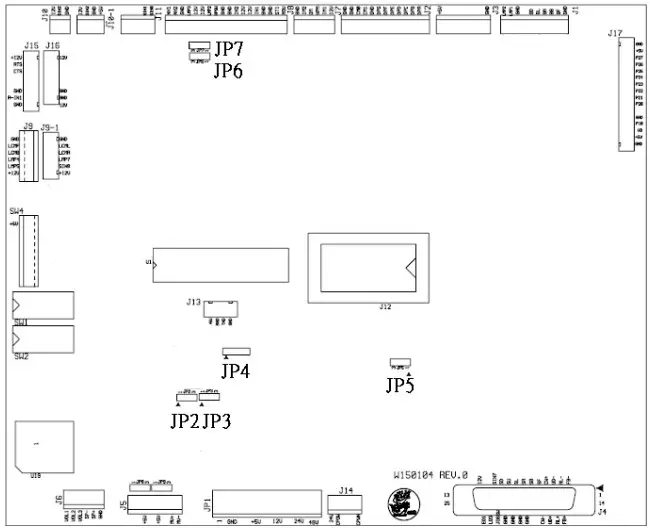
| W150104 3.96mm (JP1) POWER SUPPLY | |
| 1 | GND |
| 2 | GND |
| 3 | GND |
| 4 | +5V |
| 5 | +5V |
| 6 | +12V |
| 7 | +12V |
| 8 | +24V |
| 9 | +24V |
| 10 | +48V |
| W150104 2.54mm (J11) | W9833 JP3 | ||
| 1 | 1 | IN2 | |
| 2 | 2 | IN4 | |
| 3 | 3 | EN04 | |
| 4 | X | ||
| 5 | 4 | EN05 | |
| W150104 2.54mm (J5) | |
| 1 | VR23 |
| 2 | VR13 |
| 3 | VR11 |
| 4 | VR12 |
| 5 | VR21 |
| 6 | VR22 |
| 7 | Voltmeter + |
| 8 | Voltmeter – |
| W150104 2.54mm (J14) | W040316 JP1 | ||
| 1 | 1 | ||
| 2 | 2 | ||
| 3 | 3 | ||
| 4 | 4 | ||
| 5 | 5 | ||
| W150104 2.54mm (J14) | W040316 JP1 | ||
| 1 | 1 | ||
| 2 | 2 | ||
| 3 | 3 | ||
| 4 | 4 | ||
| 5 | 5 | ||
| W150104 2.54mm (J6) | |
| 1 | Speaker VR 1 |
| 2 | VR2 |
| 3 | VR3 |
| 4 | SP- |
| 5 | SP+ |
| W150104 2.54mm (J10) | |
| 1 | GND |
| 2 | PRIZE SENSORSINGAL |
| 3 | 12V |
| W150104 2.54mm (J7) | |
| 1 | 12V |
ERROR! REFERENCE SOURCE NOT FOUND.
| 2 | COIN1 Meter |
| 3 | |
| 4 | Prize Meter |
| 5 | COIN2 Meter |
| W150104 2.54mm (J1) | |
| 1 | GND |
| 2 | Joystick — Front SW(N.O.) |
| 3 | Joystick — Back SW (N.O.) |
| 4 | Joystick — Right SW (N.O.) |
| 5 | Joystick — Left SW (N.O.) |
| 6 | Descend SW (N.O.) |
| 7 | |
| 8 | GND |
| 9 | Descend button lamp |
| 10 | lamp 2 |
| W150104 2.54mm (J2) | W991907 JP1 | ||
| 1 | X | X | |
| 2 | 1 | ||
| 3 | 2 | ||
| 4 | 3 | ||
| 5 | 4 | ||
| 6 | 5 | ||
| 7 | 6 | ||
| 8 | 7 | ||
| 9 | X | 8 | X |
| 10 | 9 | ||
| 11 | 10 | ||
| 12 | X | 11 | X |
| 13 | X | 12 | X |
| W150104 2.54mm (J8) | |
| 1 | TILT SW (N.O.) |
| 2 | DOOR TEST |
| 3 | GND |
| 4 | GND |
| 5 | COIN1 |
| 6 | 12V |
| 7 | 12V |
| 8 | COIN2 |
| 9 | GND |
| 10 | GND |
| 11 | HPSW |
| 12 | HP |
| 13 | 12V |
| 14 | 12V |
| 15 | SSR |
| 16 | GND |
| W150104 2.54mm (J4) | |||
| 1 | Forward/Back Motor + | 14 | Forward/Back Motor – |
| 2 | Left/Right Motor – | 15 | Left/Right Motor + |
| 3 | Up Down Motor – | 16 | Up Down + |
| 4 | Claw Power+ | 17 | Claw Power – |
| 5 | X | 18 | X |
| 6 | STOP FORWARD/BACK | 19 | GND |
| 7 | X | 20 | GND |
| 8 | Stop-Left / Right SW(N.O.) | 21 | GND |
| 9 | Stop-UP SW (N.C.) | 22 | GND |
| 10 | Stop-Down SW (N.O.) | 23 | |
| 11 | X | 24 | |
| 12 | X | 25 | X |
| 13 | 12V | ||
DISPLAY W991907
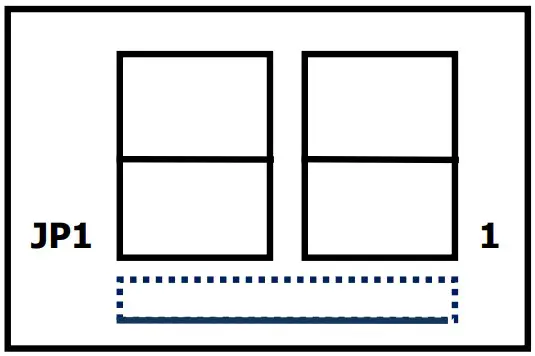
| J1 | Color | 2.54 Pin –- connect W120206 | |
| 1 | Brown | A | Connect to Main Board J5 Pin 1 |
| 2 | Red | B | Connect to Main Board J5 Pin 2 |
| 3 | Orange | C | Connect to Main Board J5 Pin 3 |
| 4 | Yellow | D | Connect to Main Board J5 Pin 4 |
| 5 | Green | E | Connect to Main Board J5 Pin 5 |
| 6 | Blue | F | Connect to Main Board J5 Pin 6 |
| 7 | Purple | G | Connect to Main Board J5 Pin 7 |
| 8 | DP | Connect to Main Board J5 Pin 10 | |
| 9 | White | COM4 | Connect to Main Board J5 Pin 9 |
| 10 | Pink | COM3 | Connect to Main Board J5 GND |
| 11 | COM2 | ||
| 12 | COM1 | ||