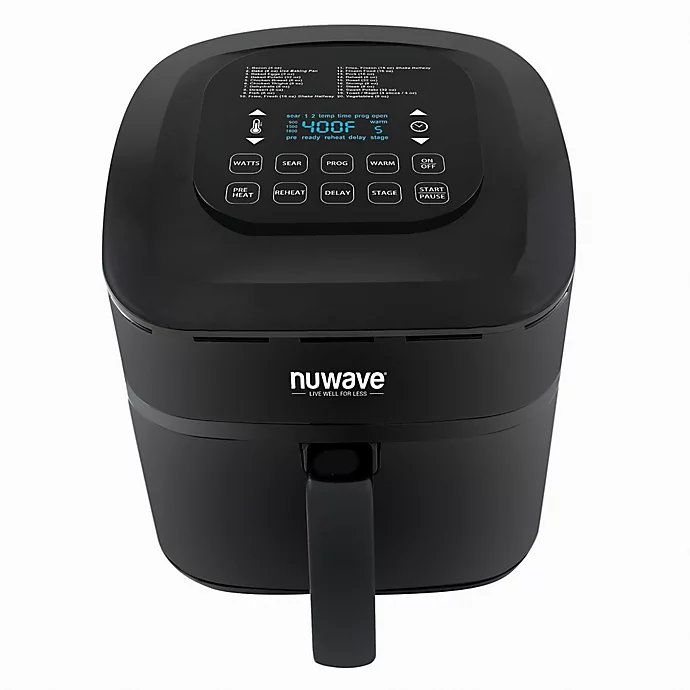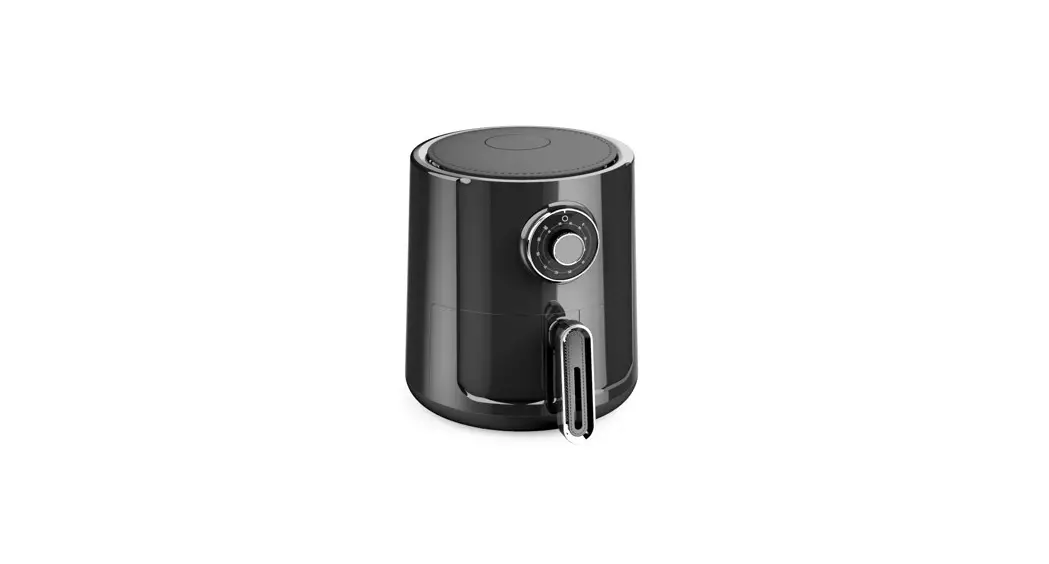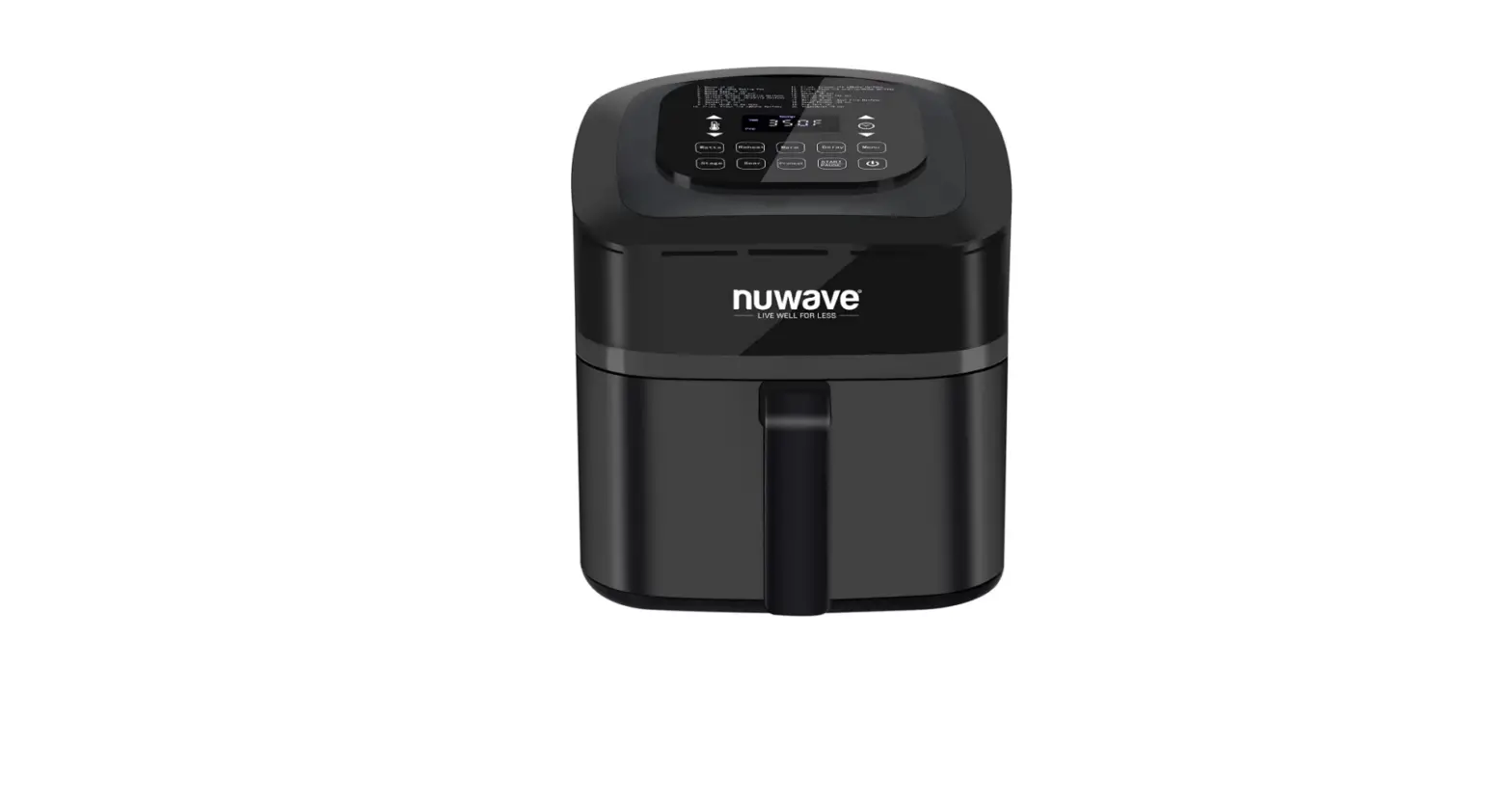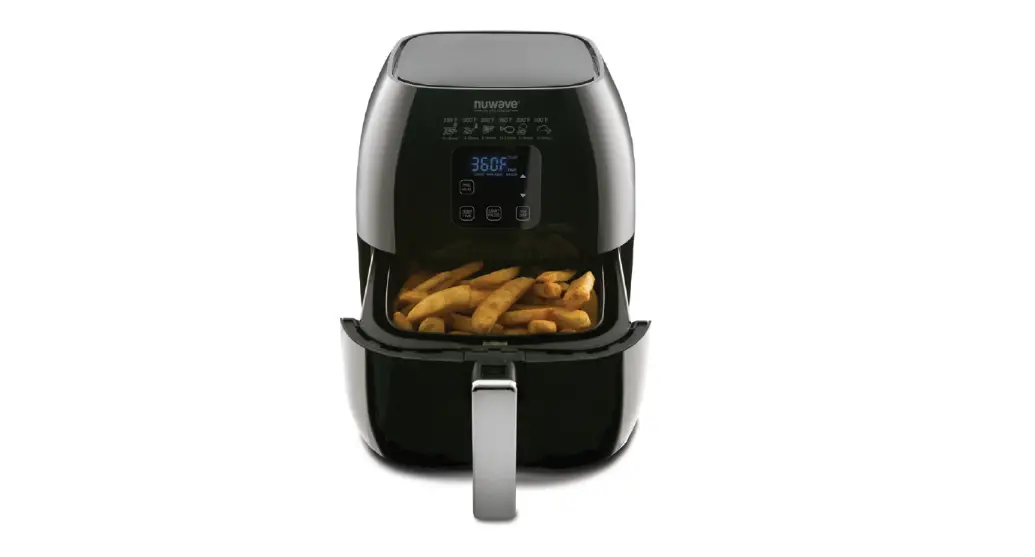
 nuwave Brio Digital Air Fryer User Manual
 nuwave Brio Digital Air Fryer User Manual
IMPORTANT SAFEGUARDS
READ ALL INSTRUCTIONS
When using electrical units, basic safety precautions should always be followed including the following:
- Do not touch hot surfaces.
- To protect against electrical shock, do not immerse the cord, plugs, or the unit in water or other liquid.
- Close supervision is necessary when any unit is used by or near children.
- Unplug from the outlet when not in use and before cleaning. Allow cooling before putting on
or taking off parts. - The use of other accessories that are not intended to be used with this unit is not recommended. Doing so may damage the unit and can cause accidents.
- NOT INTENDED FOR OUTDOOR USE.
- Do not let the cord hang over the edge of the table or counter, or touch hot surface.
- Do not place on or near a hot gas, electric burner and or in a heated oven.
- Extreme caution must be used when moving unit containing hot oil or other hot liquids.
- To disconnect, turn any control “OFF”, then remove plug from the wall outlet.
- Never put the appliance against the wall or other appliances. There should be at least 3 inches of free space for the backside. Left/right sides and the upper side of the appliance. Do not place anything on top of the appliance.
- During air frying, hot steam is released from the air outlet opening. Keep your hands and face distance from the steam and from the air outlet opening. Also, be careful of hot steam and air when you remove the frying pan from the appliance.
- Make sure the ingredients prepared in this appliance come out golden yellow instead of dark or brown. Remove burnt remnants.
Accessories:
The Grill Pan, Baking Pot, and Reversible Rack become extremely HOT during the cooking process. Do not touch the accessories during and immediately after cooking. Only hold the grill pan by the handle and use caution when removing these items from the unit. Always wear oven mitts or use pot holders when handling potentially hot accessories. Allow everything to cool completely before cleaning.
- Do not use the Grill Pan, Baking Pot or Reversible Rack in a microwave, toaster oven, convection oven, conventional oven, ceramic cooktop, electric coil, gas burner range or an outdoor grill.
- Do not use sharp-edged metal utensils or knives as doing so will scratch the non-stick surface.
- Do not fill the Base Tray, Basket or Grill Pan with oil or any other liquid.
DO NOT USE THE UNIT FOR OTHER THAN INTENDED USE.
Note: Put the appliance on a surface that is horizontal, even and stable. This appliance is intended for normal household use. It is not intended to be used in environments such as staff kitchens of shops, offices, farms or other work environments. Nor is it intended to be used by clients in hotels, motels, bed, and breakfasts and other residential environments.
IMPORTANT SAFEGUARDS (Continued)
CAUTION
- Always put the ingredients to be fried in the Fry Pan Basket to prevent direct contact with the heating components.
- Do not cover the air inlet and outlet opening while the appliance is operating.
- Do not pour oil into the Base Tray, this may create a fire hazard.
- Never touch the inside of the appliance while it is operating.
SAVE THESE INSTRUCTIONS
- Do not place the unit close to flammable materials heating units or wet environments.
- The height of ingredients placed in the Base Tray should comply with the directions listed under “Operation Instructions”.
- Do not replace with other parts that are not designed specifically for the NuWave Brio Digital Air Fryer.
- Do not put any other cooking pans in the Fry Pan Basket. Do not replace any parts with other containers.
- If a lot of smoke is escaping from the air vent during operation, unplug the unit immediately and contact customer service.*
- Do not move the unit while in operation. Only after the NuWave Brio Digital Air Fryer has completely cooled down should you attempt to move it. Always wait for the NuWave Brio Digital Air Fryer to cool down prior to handling it.
- Never use a towel to block the vent.
- If any troubles arise during operation, any necessary service must be done by NuWave, LLC or authorized by the manufacturer for repairs.
- Do not disassemble the unit on your own or replace any parts.
- Do not use metal utensils with the coated Fry Pan Basket as this can damage the surface.
- If the power cord is damaged, do not attempt to operate the unit.*
- Keep the unit out of reach of children when the unit is operating or cooling down.
- Keep hands and face away from the venting outlet or where heat or steam is being released.
- Make sure NuWave Brio Digital Air Fryer is always clean prior to cooking.
- It is normal for some smoke to escape the unit when heating for the first time.
PARTS DESCRIPTION
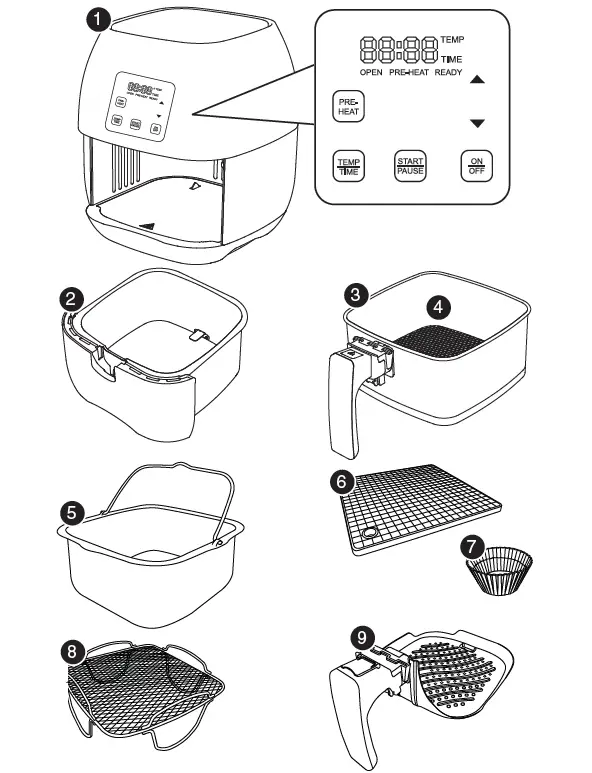
- Air Fryer Part #: 36001 5. Baking Pot* Part #: 36207
- Grill Pan* Part #: 36205
- Base Tray Part #: 36201
- Silicone Mat* Part #: 36208 Carrying Case* Part #: 36203
- Fry Pan Basket Part #: 36202
- Silicone Cup Cake Liners* Part #: 36209 (10 Pack)
- Fry Pan Basket Net
- Part #: 36204 8. Reversible Rack*
- Part #: 36206
OPERATING INSTRUCTIONS
Before Use:
- Remove all the packaging materials.
- Remove the glue and labels on the appliance.
- Clean the Fry Pan Basket, Base Tray, Baking Pot*, Reversible Rack* and Grill Pan* thoroughly with hot water, a nonabrasive sponge, and a mild dish detergent, or in the dishwasher, top rack only.
- Wipe the inside and outside of the appliance with a wet cloth. Do not immerse the appliance in water.
Note: This appliance cook using hot air. DO NOT fill the basket with oil. *Accessories are optional.
Operation Preparation:
- Place the appliance on a level, even and stable heat-resistant surface.
- Place the Base Tray and Fry Pan Basket in the NuWave Brio Digital Air Fryer.
- Plug the appliance into a standard wall socket. The power plug is included in the package.
Note: Do not cover or block the vent located on the top of the NuWave Brio Digital Air Fryer. Doing so can prevent proper ventilation and will adversely affect the cooking results.
Operation Functions
On/Off Function:
Press the “On/Off” button once to turn the unit on. The control panel should display “0” indicating that no cooking time or temperature has been selected and the unit is powered on. Press “On/Off” button again to turn the unit off.
Start/Pause Function: Press the “Start/Pause” button once to begin cooking.
To interrupt the cooking process, press the “Start/Pause” button again.
To resume cooking or preheating, press the “Start/Pause” button again.
Easy Start:
Place the food inside the Base Tray. The NuWave Brio Digital Air Fryer is set to cook at 360˚F for 10 minutes by default once you press “Start/Pause” button. To set a different cooking temperature or time, refer to the Adjusting Temperature and Adjusting Time sections.
“Pre-Heat” Function:
The “Pre-Heat” function ensures that the NuWave Brio Digital Air Fryer reaches the desired temperature before you begin cooking your food. The “Pre-Heat” function is the perfect choice for foods that require a crispier finish, such as frozen appetizers, French fries or chicken wings. Press the “Pre-Heat” button. The control panel will display “360˚F”. “Pre-Heat” and “Temp” will be flashing. If needed, manually adjust the cooking temperature and time, then press “Start/Pause”. Once you press “Start”, the current NuWave Brio Digital Air Fryer temperature will be displayed as well as “Pre-Heat”. If you cook another batch of food shortly after cooking in the NuWave Brio Digital Air Fryer, you do not need to use the “Pre-Heat” Function as the NuWave Brio Digital Air Fryer will already be hot. If you wish to cook your food longer, simply place the Base Tray and Fry Pan Basket back into the appliance and continue cooking in 2-3 minutes increments until desired consistency has been reached.
OPERATING INSTRUCTIONS (Continued)
Once the NuWave Brio Digital Air Fryer reaches the set temperature, the control panel will display “Ready” and the NuWave Brio Digital Air Fryer will beep once. The NuWave Brio Digital Air Fryer will start a countdown of 5 minutes and the number “5” will start flashing. It will remain at this temperature for up to 5 minutes, or until you remove the Fry Pan Basket, whichever comes first. Once the food has been added to the Fry Pan Basket, insert the Fry Pan Basket back in place. This will start the countdown on the set cooking time.
Note: If you remove the Fry Pan Basket at any point during the preheating stage, the NuWave Brio Digital Air Fryer will automatically pause, start a countdown of 5 minutes until you replace the Fry Pan Basket. Once the NuWave Brio Digital Air
Fryer shows “ready”
on the display, press the “Start /Pause” button to begin the cooking process and start the countdown timer.
Adjusting Temperature:
The NuWave Brio Digital Air Fryer is set to cook at 360°F by default. To set a different cooking temperature, press the “Temp/Time” button. The display will show “360˚F”. “Temp” will be flashing. To adjust the temperature, simply press the “up” and “down” arrows. You can adjust your temperature in 5-degree increments between 100˚F and 390˚F. To quickly adjust the temperature in large increments, simply hold down the “up” or “down” arrow to adjust the temperature by 50-degree increments. You can change the cooking temperature at any point during the cooking process. Press the “Temp/Time” button. The programmed temperature will be displayed. “Temp” will be flashing. Press the “Up” or “Down” arrow until you reach your desired temperature. Once your temperature has been selected, the NuWave Brio Digital Air Fryer will automatically adjust to the new temperature and the display will show the remaining cooking time. If no new temperature has been selected within 3 seconds, the NuWave Brio Digital Air Fryer display will once again show the remaining cooking time.
Adjusting Time:
The NuWave Brio Digital Air Fryer is set to cook for 10 minutes by default. To set a different cooking time, press the “Temp/Time” button twice. The display will show “10”. “Time” will be flashing. To adjust the time, simply press the “Up” and “Down” arrows. You can adjust your cooking time in 1-minute increments. To quickly adjust the time in large increments, simply hold down the “Up” or “Down” arrow to adjust the time by 10-minutes increments, followed by 20-minute suite increments, followed by 30-minutes increments. The minutes selectable cooking time is 1 minute. The maximum selectable cooking time differs depending on the selected cooking temperature.
- 100˚F – 345˚F maximum cooking time is 99 hours and 59 minutes
- 350˚F – 390˚F maximum cooking time is 1 hour
You can change the cooking time at any point during the cooking process. Press the “Temp/Time” button twice. The remaining cooking time will be displayed. “Time” will be flashing. Press the “Up” or “Down” arrow until you reach your desired cooking time. Once your cooking time has been selected, the display will show the new remaining cooking time. “Time” will no longer be flashing. If no new cooking time has been selected within 3 seconds, the NuWave Brio Digital Air Fryer display will once again show the remaining cooking time.
Note: After the timer reaches 1 minute, the display will begin showing the remaining time in seconds (59, 58, etc.).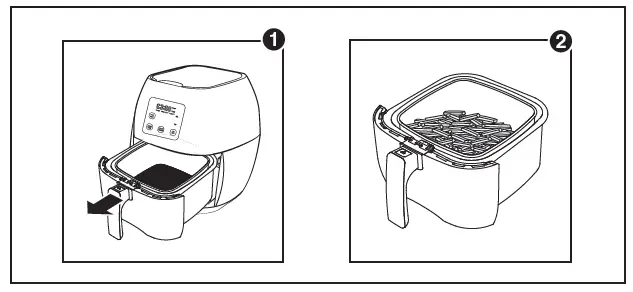
For Best Results
After you have selected your cooking time and temperature and you are ready to add your ingredients to the NuWave Brio Digital Air Fryer: Pull out the Base Tray and Fry Pan Basket from the NuWave Brio Digital Air Fryer. (Fig. 1)
Note: Do not fill more than 4/5 full. Slip the frying pan back in place in the NuWave Brio Digital Air Fryer. Do not use the Base Tray without the Fry Pan Basket in it. (Fig. 2)
Note: Do not touch the inside of the Base Tray immediately after cooking as the pan can become very hot. Only hold the pan by the handle.
Shaking Food: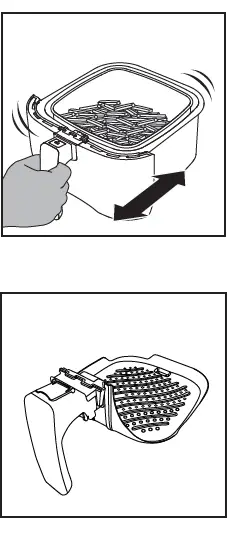
Some foods require shaking halfway through cooking. To properly shake the food, hold the handle, remove the Base Tray from the appliance and shake. Once the food has been adequately shaken, slide the Base Tray and Fry Pan Basket back into the NuWave Brio Digital Air Fryer.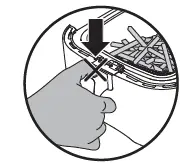
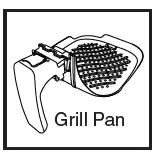
Pull out the Fry Pan Basket from the Base Tray and place it on a flat surface, lift the safety cover, press the demounting button and lift out the Fry Pan Basket. Replace in the Grill Pan into the Fry Pan Basket.To remove the Grill Pan or the Fry Pan Basket from the Base Tray, 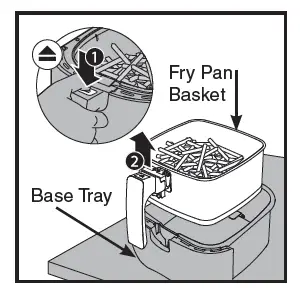
- lift open the safety cover, and press the demounting button.
- Lift the Fry Pan Basket or Grill Pan out of the Base Tray.This will reduce the extra weight of the Base Tray and makes it easier to pour smaller foods, such as French fries.

CARE & MAINTENANCE
Cleaning:
Clean the appliance after every use or in between large amounts of batches. The Fry Pan Basket and insides of the Base Tray have a non-stick coating. Do not use metal utensils or harsh abrasives when cleaning as this can damage the coating.
- Unplug the appliance and make sure it cools completely.
Note: Remove the Base Tray and Fry Pan Basket, and place on a heat-resistant surface to help cool the appliance quicker. - Use a damp cloth to wipe the outside of the appliance.
- Clean the Fry Pan Basket and inside components with a non-abrasive sponge, hot water, and mild detergent.
Note: If you place the Base Tray and Fry Pan Basket into the dishwasher, use the top rack only.
Tip: If there is residual food in the Base Tray and Fry Pan Basket, add some hot water and let it soak separately for about 10 minutes for easier cleaning. - Clean the inside of the appliance with a nonabrasive sponge and hot water.
- Clean the heating components with a cleaning brush to remove any lingering food.
Storage:
- Unplug the appliance and let it cool down completely.
- Make sure that all the parts are cleaned and dry.
- Push the power cord into the storage capsule.
- ix the cord by inserting it into the cord-fixing unit.
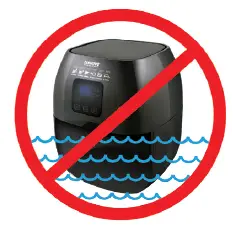
IMPORTANT – Do not immerse unit in water or attempt to cycle it through the dishwasher. The outer surface may be cleaned by wiping carefully with a damp dishcloth or sponge. Make sure unit has cooled completely prior to cleaning.
CARE & USE FOR ACCESSORIES
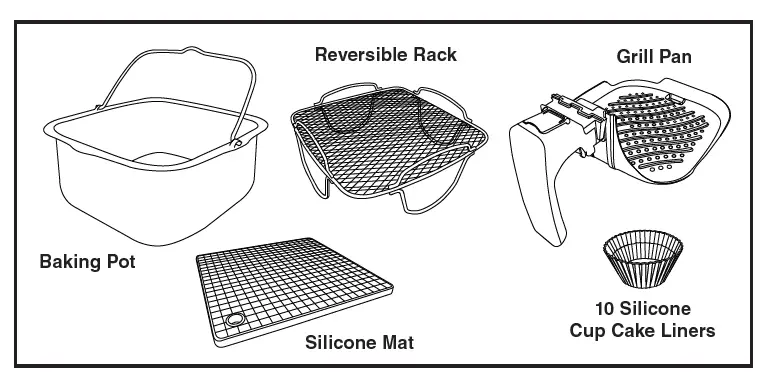
Care & Use:
Before use, wash with mild soap and water or in a dishwasher, top rack only. This should never be cleaned with harsh abrasives nor cut with any sharp objects.
- Do not use steel wool or any sharp objects that may scratch or damage the silicone.
- Do not place silicone products on the top rack of a nor cook on broil in a conventional oven.
- Do not attempt to cut foods while they are in the accessories. Any misuse of the accessories will void the warranty.
Our silicone material can withstand temperatures up to 500°F but keep in mind that these temperatures are above and beyond the recommended use for this product. Damages caused by this type of usage will not be covered under warranty.
- Clean the Grill Pan, Baking Pot and Reversible Rack with hot soapy water and a non-abrasive sponge or in the dishwasher before first use and after each use. Dry thoroughly. Do not soak the accessories for long periods of time.
- Do not scrub the accessories with steel wool, or oven cleaning solutions or use any harsh abrasive cleansers or materials as scratching may occur. Minor scratches or discolor will not impact the pan’s performance.
- Store in a cool dry place.
GUIDE
The following guide indicates the amount of weight, time and temperature for the various food types that are listed below.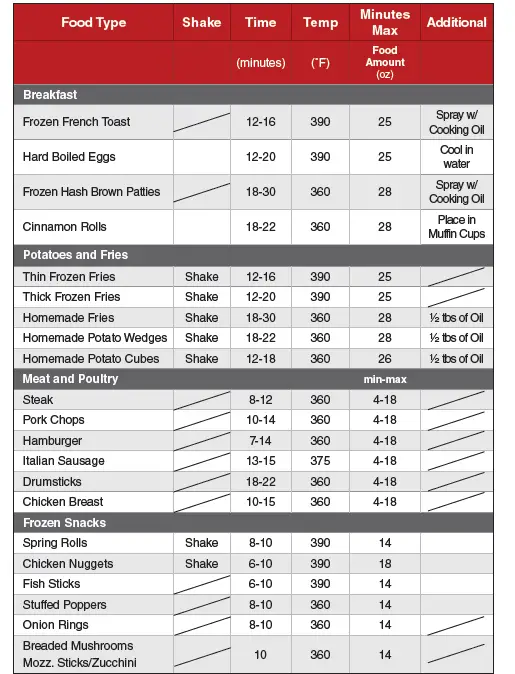
Note: Many ingredients can vary greatly in size and shape, which will affect cooking times so we cannot guarantee that these settings will work best for your ingredients. Adjust the settings as necessary to suit your needs. The NuWave Brio Digital Air Fryer is able to heat extremely quickly, therefore briefly removing the frying pan while the appliance in operation has a minimal effect on the cooking process.
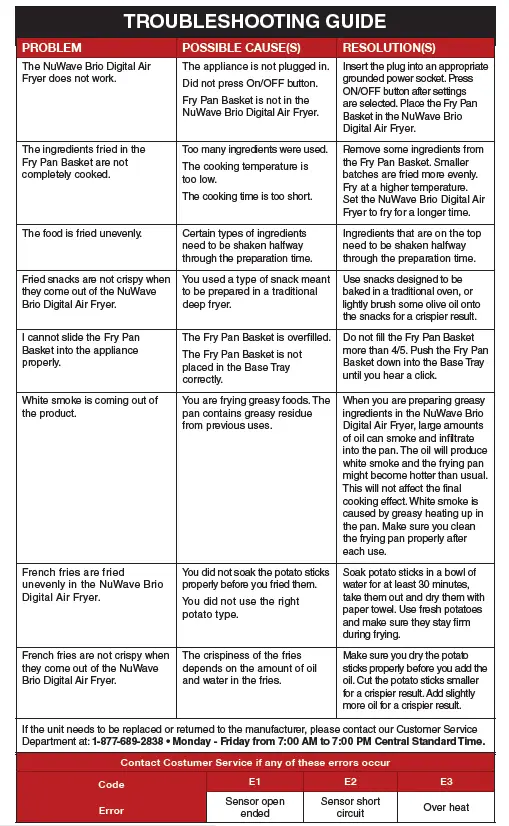
TROUBLESHOOTING GUIDE
WARRANTY
The NuWave Brio Digital Air Fryer
THE MANUFACTURER WARRANTS
The NuWave Brio Digital Air Fryer including the Base Tray, Fry Pan Basket, Fry Pan Basket Net, Baking Pot, Silicone Mat, Silicone Cup Cake Liner, Reversible Rack and Grill Pan (optional) are to be free from manufacturer defects.
All electrical components are warranted for 1 year from the date of purchase, under normal household use, and when operated in accordance with the Manufacturer’s written instructions. The Manufacturer will provide the necessary parts and labor to repair any part of the NuWave Brio Digital Air Fryer at NuWave, LLC. Service Department. After the expiration of the warranty, the cost of the labor and parts will be the responsibility of the owner.
THE WARRANTY DOES NOT COVER
The Limited Warranty is voided if repairs are made by an unauthorized dealer or the serial number data plate is removed or defaced. Normal deterioration of finish due to use or exposure is not covered by this Warranty. This Limited Warranty does not cover failure, damages or inadequate performance due to accident, acts of God (such as lightning), fluctuations in electric power, alterations, abuse, misuse, misapplications, corrosive type atmospheres, improper installation, failure to operate in accordance with the Manufacturer’s written instructions, abnormal use or commercial use.
TO OBTAIN SERVICE
The owner shall have the obligation and responsibility to: Pay for all services and parts not covered by the warranty; Prepay the freight to and from Service Department for any part or system returned under this warranty; Carefully package the product using adequate padding material to prevent damage in transit. The original container is ideal for this purpose. Include in the package the owner’s name, address, daytime telephone number, a detailed description of the problem, and your “RGA number.” (Call 1-877-689-2838, MONDAY – FRIDAY 7:00 AM – 7:00 PM CST) or e-mail [email protected] to obtain the RGA (Return Goods Authorization number). Provide the cooking system model & serial number and proof of date of purchase (a copy of the receipt) when making claims under this warranty.
MANUFACTURER’S OBLIGATION
The Manufacturer’s obligation under this Limited Warranty is limited to repairing or replacing any part covered by this Limited Warranty that upon examination is found to be defective under normal use. The Limited Warranty is applicable only within the continental United States and only to the original purchaser of the manufacturer’s authorized channels of distribution. THE LIMITED WARRANTY MAY NOT BE ALTERED, VARIED OR EXTENDED EXCEPT BY A WRITTEN INSTRUMENT EXECUTED BY THE MANUFACTURER. THE REMEDY OF REPAIR OR REPLACEMENT AS PROVIDED UNDER THIS LIMITED WARRANTY IS EXCLUSIVE. IN NO EVENT SHALL THE MANUFACTURER BE LIABLE FOR ANY CONSEQUENTIAL OR INCIDENTAL DAMAGES TO ANY PERSON, WHETHER OR NOT OCCASIONED BY NEGLIGENCE OF THE MANUFACTURER, INCLUDING WITHOUT LIMITATION, DAMAGES FOR LOSS OF USE, COSTS OF SUBSTITUTION, PROPERTY DAMAGE, OR OTHER MONEY LOSS.
Some states do not allow the exclusion or limitation of incidental or consequential damages, so the above limitation exclusions may not apply. This Limited Warranty gives specific legal rights, and there may also be other rights that vary from state to state. EXCEPT AS OTHERWISE EXPRESSLY PROVIDED ABOVE, THE MANUFACTURER MAKES NO WARRANTIES EXPRESSED OR IMPLIED ARISING BY LAW OR OTHERWISE, INCLUDING WITHOUT LIMITATION, THE IMPLIED WARRANTIES OF MERCHANTABILITY AND FITNESS FOR A PARTICULAR PURPOSE TO ANY OTHER PERSON. READ YOUR OWNER’S MANUAL. IF YOU STILL HAVE ANY QUESTIONS ABOUT THE OPERATION OR WARRANTY OF THE PRODUCT, PLEASE CONTACT NUWAVE, LLC. READ YOUR OWNER’S MANUAL: If you still have any questions about the operation or warranty of the product, please contact NuWave, LLC at: 1-877-689-2838 M-F from to 7:00 AM – 7:00 PM CST or e-mail [email protected].