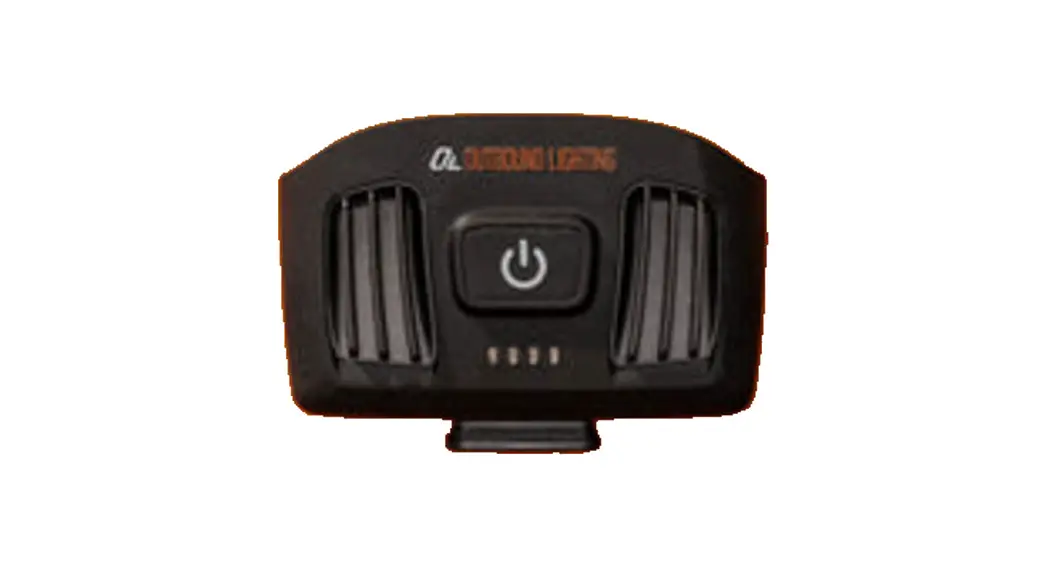
 DETOUR
WIRELESS CUTOFF BEAM
BIKE LIGHT
Instruction Manual
MOUNTING YOUR LIGHT
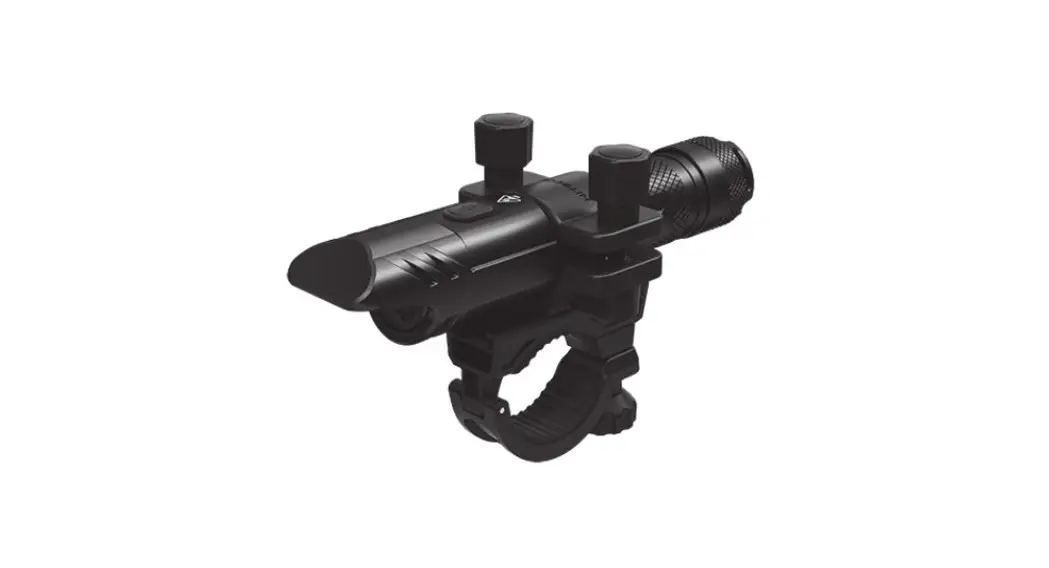
- The handlebar mount is designed for 35.0mm bar diameter but comes with a shim for 31.8mm bars, please ensure you use the correct size for your handlebars.
- Use the M2.5 Allen wrench to bolt the clamp to your handlebars on the left side of the stem with the mounting shoe positioned in front of the stem.
- Ensure the clamp cannot easily rotate around the bar and hand-tighten.
ADJUSTING THE ANGLE OF YOUR LIGHT
When mounted, manually rotate the light up or down. If needed, loosen the thumbscrew on the left and make angle adjustments as needed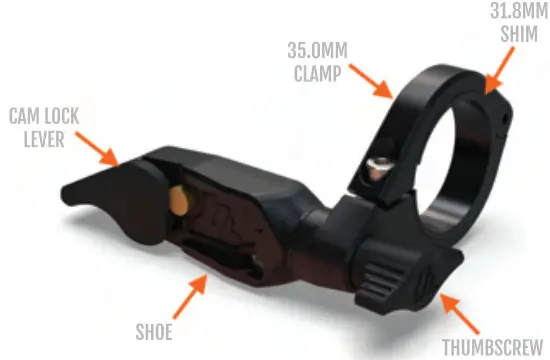 NOTE: The mount works best when positioned as close to the left side of the stem as possible. If you need to, you can also flip the mount over and attach it to the right of the stem.
INSTALLING YOUR LIGHT ON THE MOUNT
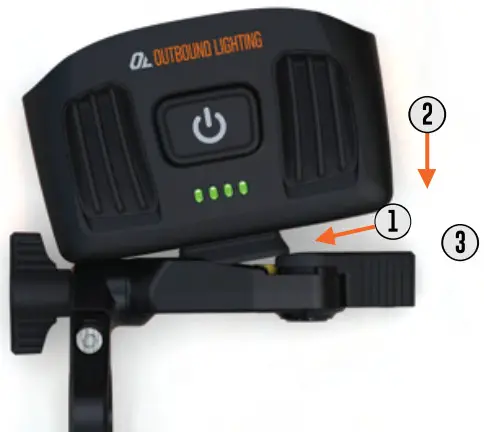
- Angle the foot on the back of the Detour into the left side of the shoe.
- Press the light back against the brass plunger until the cam-lock lever releases.
- Press the cam-lock lever down with light pressure to ensure the light is snug in the mount. NOTE: the cam-lock lever does not need to rotate a full 90° to be secure.

REMOVING THE LIGHT
Pull up on the cam-lock lever until the brass plunger snaps back into place and remove the light from the shoe.
CHARGING YOUR BATTERY
- Detour comes with a customized USB-C to USB-A cable to allow for charging with comm USB-A charging ports. The light can be charged rapidly with compatible Quick Charge 3.4 chargers but can be charged from virtually any USB charger without issue.
- The light will reach -85% charge in less than 2 hours after which the power will begin to taper off and the battery will trickle the charger to finish, due to the inherent properties of lithium-ion batteries. Note: Using a slow charger will result in much longer charge times. For example. while a 3-amp charger will take around -2 hours. a 0,5amp charger can take over more than 10 hours
- The status light animation speed will indicate if it is being Quick Charged or at a normal rate. When first plugged in it will be a slow animation, if QC is enabled the animation will speed up significantly. • When fully charged all 4 status lights will remain fully lit.
- NOTE: If you do manage to run the light until it is completely dead, the main beam will pulse for 10 seconds just before turning off completely as a safety warning so that you have time to slew down and stop safely.
PASS-THRU CHARGING FOR EXTENDED RUNTIME - – Detour is capable of Pass-Thru Charging meaning that the light can be charged from an external USB power bank while in use on the bike if you need an even longer runtime.
• To maximize additional runtime, use a power bank capable of 3.0A output at 5V and a plug-in pack at the start of the ride. Do not wait until the light is completely drained to attach the supplemental battery or all modes may not be available
• NOTE: it is strongly recommended to use a QC3.0-rated USB power bank for best performance, as some lower power and ‘toff brand” power banks can lead to undesired operation. Refer to our website FAQ for more detail.
STATUS LIGHTS AND BATTERY PERCENTAGE
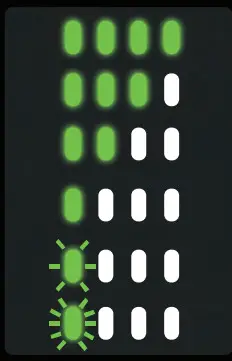
| MEANING | %LEFT |
| FULLY CHARGED | 100% |
| PLENTY TOGO | 75% |
| KEEP AN EYE ON IT | 50% |
| NO REALLY. PAY ATTENTION | 25% |
| HEAD HOME BUD | 5% |
| ALRI HT CM OUT (RAPID FLASH) | 2% |
POWER ON & MODES
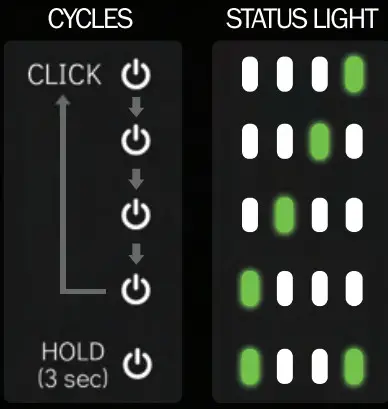
- A single click will turn on the light and default to ADAPTIVE.
- Singe click while ON will change between constant brightness modes as shown below.
- Hoki button for more than 1 second to tum off.
- Commuting modes is accessed by holding the power button from OFF for more than 3 seconds. A singe dick from there will change betwen Day and Night flashing modes.

| MODE | RUN TIME |
| ADAPTIVE | 2.8h |
| HIGH | 1.8h |
| MEDIUM | 4.6h |
| LOW | 8.5h |
| DAYTIME STROBE NIGHTTIME PULSE | 10h 4.5h |
RUNTIME
Using single numbers for runtime can be misleading and ineffective when actually planning your ride, so the graph below shows the expected output over time for each mode on Detour, assuming it starts with a full charge.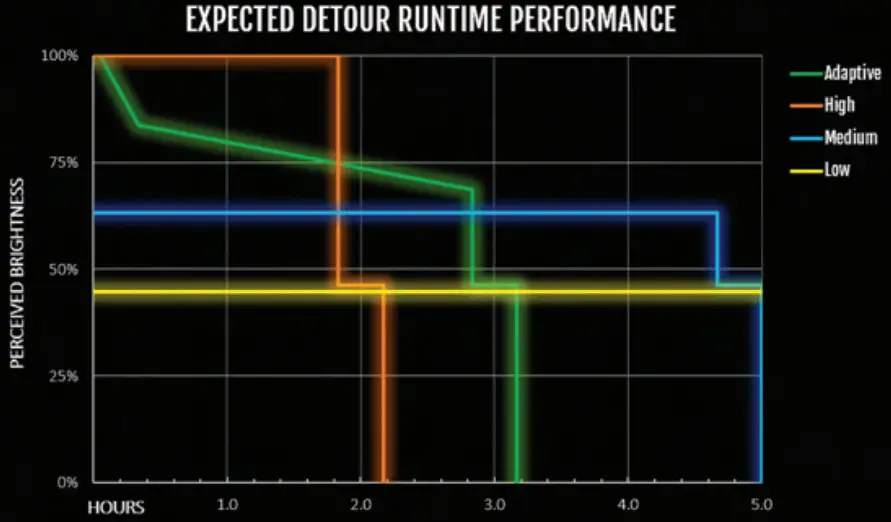
HOW TO PROPERLY AIM YOUR NEW LIGHT
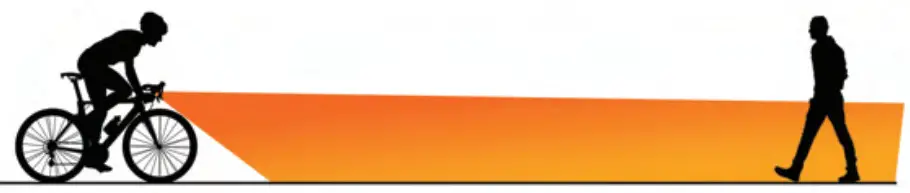
- Detour has a cutoff style beam pattern which means that aiming the light properly is important for optimal performance.
- “Cutoff” means there is a sharp horizontal line at the top of the beam, like a car headlight. It is meant to be aimed parallel or slightly below parallel so that oncoming riders, pedestrians, and drivers are not blinded by your light. This also puts the light exactly where you need it: on the road/path in front of you.
- To precisely aim your light:
Place a mark on a wall at the same height as the bike light.
Back at least 20 feet from the wall on flat ground.
Adjust the light so that the top of the beam is below that mark
COMMUTING MODES
- For safety, we always recommend using light when commuting, day or night, to ensure you are highly visible by other road users. Detour has two different modes that are optimized for daytime and nighttime use.
- To access Commuting Modes, hold the button from OFF for at least 3 seconds. To cycle between them once on, click the button once.
- Daytime Strobe mode uses a triple-blink sequence to be highly visible during daylight hours when it is bright outside.
- Nighttime Pulse mode uses a smooth ramp up and down on the flood beam to increase your visible footprint without hurting drivers’ night vision with harsh flashes, increasing your safety. In this mode, the narrow beam stays constant so that you can always see ahead even with the flood beam pulsing.

THANK YOU FOR YOUR PURCHASE!
As you know, we are a very small company working to make the best bike-specific lights that we can. While we strive for 100% reliability we know that sometimes issues can happen. Please contact us if there are any problems so we can get you taken care of, and so we can determine how to prevent the issue in the future!
Outbound Lighting LLC
8030 St. Louis Ave
Skokie. IL 60076
United States of America
[email protected]