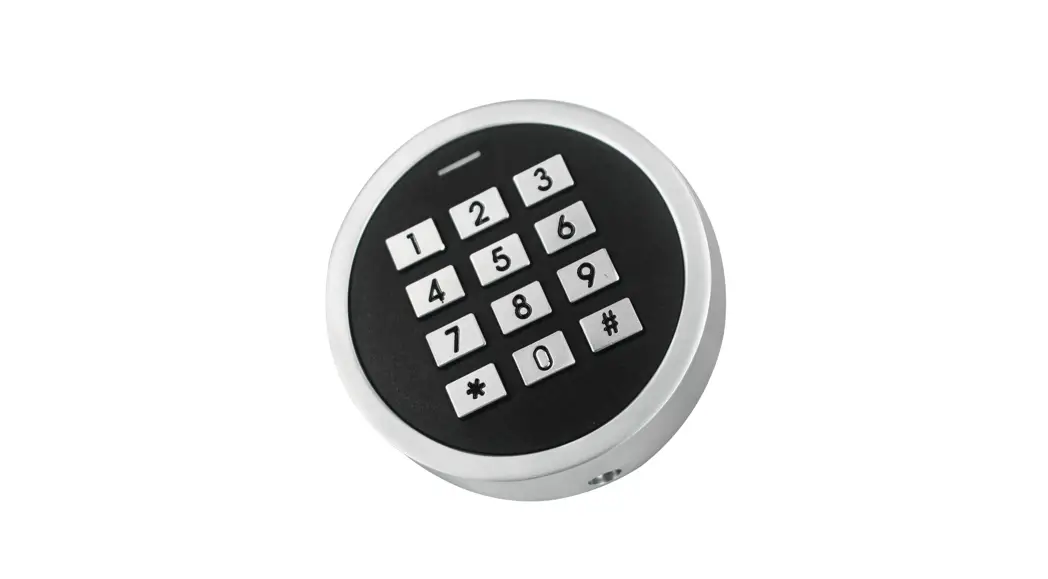
 Mini Keypad
User Manual
INTRODUCTION
The device is single-door standalone access control with Wiegand input & output. It uses Atmel MCU assuring stable performance. The operation is very user-friendly, and the low-power circuit makes it long service life.
The device supports 1,000 users (990 common users + 10 visitor users). It supports multi-access modes in card access, PIN access, card + PIN access, or multi cards/PINs access.
Optional Version:
The device with Bluetooth-enabled. People can install the Bluetooth APP to easily access the door with their smartphone. (APP operation can refer to APP manual)
Features
- Waterproof, conform to IP66
- Vandal-resistant metal enclosure
- One relay, 1,000 users (990 common + 10 visitor)
- PIN length: 4-6 digits
- Card Type: 125KHz EM Card/13.56MHz Mifare Card (optional)
- Wiegand 26 bits output, Wiegand 26/34bits input automatic identification
- Card block enrollment > Tri-color LED status display
- Pulse mode, Toggle mode
- Low-temperature resistance (-40°C)
Specifications
| User Capacity Common User Visitor User | 1000 990 10 |
| Operating Voltage Working Current Idle Current | 12-18V DC ≤150mA ≤60mA |
| Proximity Card Reader Radio Technology Read Range | EM or Mifare 125KHz / 13.56MHz 2-6 cm |
| PIN Length | 4-6 digits |
| Wiring Connections | Relay Output, Exit Button, Wiegand Input, Wiegand Output |
| Relay Adjustable Relay Output Time Lock Output Load | One (NO, NC, Common) 0-99 Seconds (5 seconds default) 2 Amp Maximum |
| Wiegand Interface | Wiegand 26 bits output Wiegand 26/34bits input automatic identification |
| Environment Operating Temperature Operating Humidity | Outdoor (Meets IP66) -40°C – 60°C (-40°F – 140°F) 0%RH-98%RH |
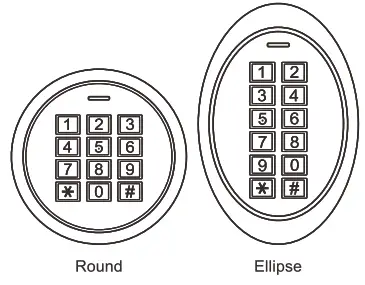
| Physical Color Dimensions Unit Weight Shipping Weight | Zinc-Alloy Enclosure Silver & Black Diameter 73mm,Thickness 20mm(Round) L69 x W105 x D2Omm(Ellipse) 185g(Round) 275g(Ellipse) 285g(Round) 375g(Ellipse) |
Carton Inventory
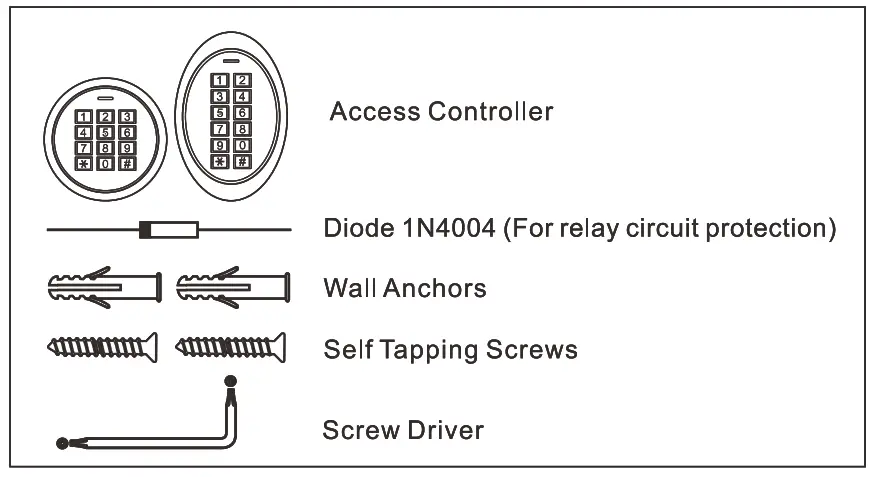
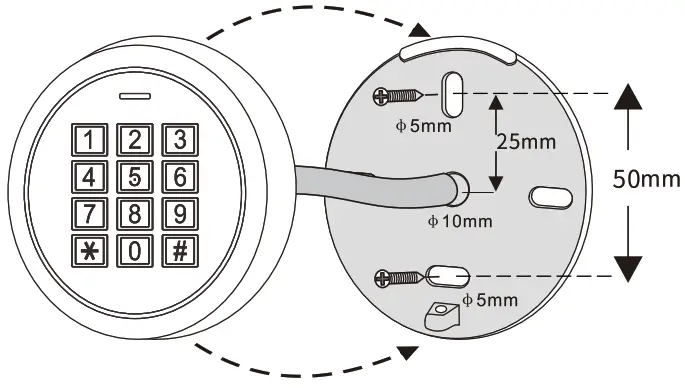
INSTALLATION
- Remove the back cover from the unit
- Drill 2 holes(A,C) on the wall for the screws and one hole for the cable
- Knock the supplied rubber bungs to the screw holes(A,C)
- Fix the back cover firmly on the wall with 4 flat head screws
- Thread the cable through the cable hole(B)
- Attach the unit to the back cover
Wiring
| Colour | Function | Notes | |||
| Red | Power + | 12-18Votes DC Regulated Power Input | |||
| Black | GND | Ground | |||
| Blue | NO | Normally Open | |||
| Brown | COM | Common Connection for Relay Output | |||
| Grey | NC | Normally Closed Relay Output | |||
| Yellow | OPEN | Request to Exit input(REX) | |||
| Green | DO | Wiegand Input/Output Data 0 | |||
| White | D1 | Wiegand Input/Output Data 1 | |||
Sound and light Idacation
| Operation Status | LED | Buzzer |
| Stand by | Red light bright |
|
| Enter into programming mode | Red light shines | One beep |
| In the programming mode | Orange light bright | One beep |
| Operation error | Three beeps | |
| Exit from the Programming mode | Red light bright | One beep |
| Open lock | Greenlight bright | One beep |
| Alarm | Red light Shines quickly | Beeps |
Basic Configure …………………………………………………..
Enter and Exit Program Mode
| Programming Step | Keystroke Combination |
| Enter Program Mode | * (Master Code) # (Factory default is 123456) |
| Exit Program Mode | * |
Set Master Code
| Programming Step | Keystroke Combination |
| 1.Enter Program Mode | * (Master Code) # |
| 2.Update Master Code | 0 (New Master Code) # (Repeat New Master Code) # (Master code is any 6 digits) |
| 3.Exit Program Mode | * |
Connection Diagram
Common Power Supply
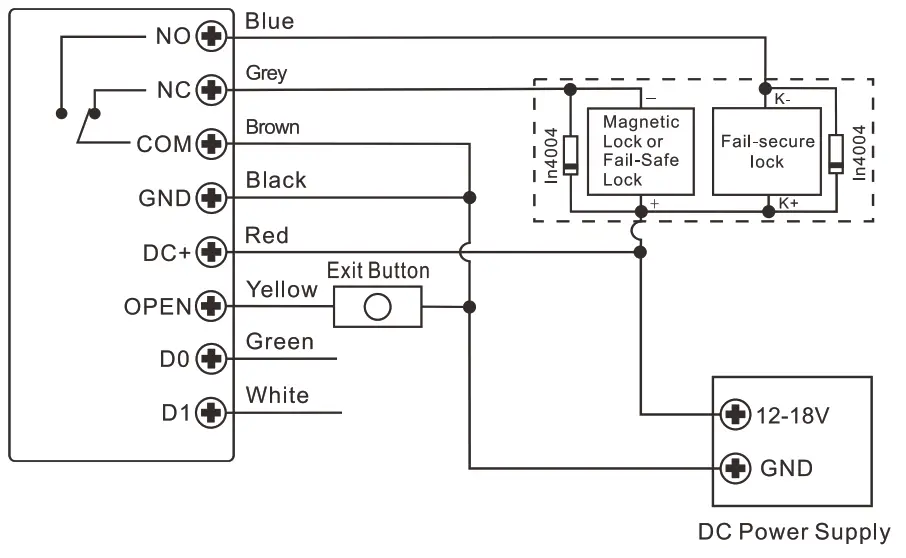
Attention:
Install a 1 N4004 or equivalent diode is needed when using a common power supply, or the keypad might be damaged. (1 N4004 is included in the packing)
Access Control Power Supply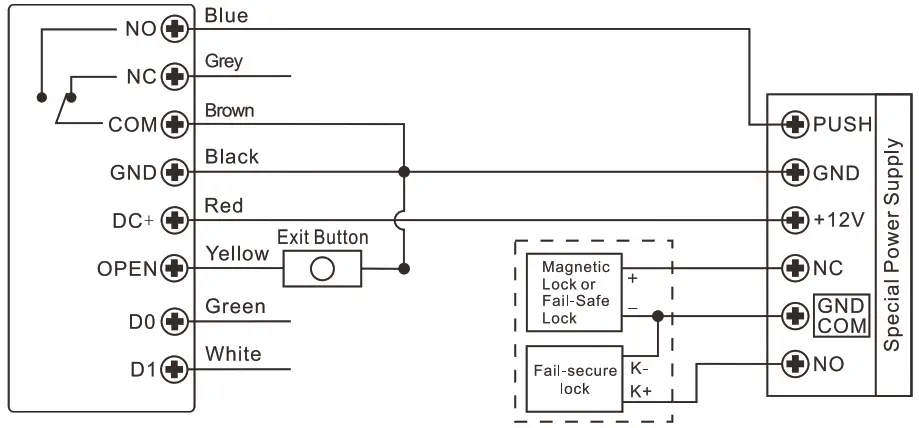
Programming
Programming will be varied depending on access configuration. Follow the instructions according to your access configuration.
Notes:
User ID number. Assign a user ID to the access card/ PIN in order to track it.
The Common User ID:
PIN/ Card user ID: 0 – 989
Visitor User ID: 990 – 999
IMPORTANT: User IDs do not have to proceed with any leading zeros. Recording of User ID is critical. Modifications to the user require the User ID to be available.
- Proximity Card:
Proximity Card: 125KHz EM card or 13.56MHz Mifare card - PIN: Can be any 4-6 digits except 8888 which is reserved.
Add Common Users
PIN/ Card user ID: 0-989; PIN length: 4-6 digits except 8888
Tips for PIN Security (Only valid for 6 digits PIN):
For higher security we allow you to hide your correct PIN with other numbers up to a max of 10 digits.
Example PIN: 123434
You could use **(123434)** or ** (123434) (“*” can be any numbers from 0-9)
| Programming Step | Keystroke Combination |
| 1. Enter Program Mode | * (Master Code) # |
| Add Card User | |
| 2. Using Auto ID (Allows the device to assign Card to next available User ID number) OR 2. Select Specific ID (Allows Master to define a specific User ID to associate the card to) OR 2. Add Card: Block Enrollment (Allows Master to add up to 990 cards to the Reader in a single step) Takes 2 minutes to program. | 1 (Read Card)/ (Input 8/10/17 Digits Card Number) # The cards can be added continuously. 1 (User ID) # (Read Card) / (Input 8/1 0/17 Digits Card Number) # 1 ( User ID) # (Card Quantity) # (The First Card 8/1 0/17 Digits Number) # Cards’ number must be consecutive; (Card quantity is the number of cards to be enrolled) |
| Add PIN User | |
| 2. Using Auto ID (Allows the device to assign PIN to next available User ID number) OR 2. Select Specific ID (Allows manager to define a specific User ID to associate the PIN to) | 1 (PIN) # The PINs can be added continuously 1 (User ID) # (PIN) # |
| 3. Exit | * |
| Simplified Instruction | |
| Function Description | Operation |
| Enter the Programming Mode | * – Master Code – # then you can do the programming (123456 is the factory default master code) |
| Change the Master Code | 0 – New Code – # – Repeat the New Code – # (code: 6 digits) |
| Add Card User | 1 – Read Card – # (can add cards continuously) |
| Add PIN User | 1 – PIN -# (The PIN is any 4-6 digits except 8888 which is reserved ) |
| Delete User | 2 – Read Card – # 2 – PIN – # |
| Exit from the Programming Mode | * |
| How to release the door | |
| Card User | Read Card |
| PIN User | Input PIN # |
Add Visitor Users
(User ID number is 990-999; PIN length: 4-6 digits except 8888) There are 10 groups Visitor PIN/card available, the users can be specified up to 10 times of usage, after a certain number of times, i.e. 5 times, the PIN/card become invalid automatically.
| Programming Step | Keystroke Combination |
| 1. Enter Program Mode | *(Master Code) # |
| 2. Add Card OR 2. Add PIN | 1 (User ID) # (0-9)# (Read Card) / (Input 8/10/17 Digits Card Number) # 1 (User ID) # (0-9)# (PIN) # (0-9 means times of usage, 0=10 times) |
| 3. Exit | * |
Change PIN Users(PIN length:4-6 digits except 8888)
| Programming Step | Keystroke Combination |
| Note: Below is done outside programming mode, users can undertake this themselves | |
| Change PIN | * (User ID) # (Old PIN) # (New PIN) # (Repeat New PIN) # |
| Change PIN of Card + PIN access mode (There will auto allocate PIN (8888) to cards when adding) | *(Read Card) (Old PIN) # (New PIN) # (Repeat New PIN) # |
Delete Users
| Programming Step | Keystroke Combination | |
| 1.Enter Program Mode | * (Master Code) # | |
| 2.Delete User- By Card/ PIN OR 2. Delete User – By ID number OR 2. Delete User – By Card number OR 2. Delete ALL Users | 2 (Read Card)/(Input PIN)# The users can be deleted continuously. 2 (User ID )# 2 (Input 8/10/17 Digits Card Number) # 2 (Master Code)# | |
| 3. Exit | * | |
Set Relay Configuration
The relay configuration sets the behavior of the output relay on activation.
| Programming Step | Keystroke Combination |
| 1. Enter Program Mode | *(Master Code) # |
| 2. Pulse Mode OR 2. Toggle Mode | 3 (1~99) # (factory default) The relay time is 1-99 seconds. (Default is 5 seconds) 3 0 # Sets the relay to ON/OFF Toggle mode |
| 3. Exit | * |
Set Access Mode
For Multi-user access mode, the interval time of reading can not exceed 5 seconds, or else, the device will exit to standby automatically.
| Programming Step | Keystroke Combination |
| 1. Enter Program Mode | * (Master Code) # |
| 2 Card Access OR 2 PIN Access OR 2 Card + PIN Access OR 2 Card or PIN Access OR 2 Multi-User Access | 4 0 # 4 1# 4 2 # 4 3 # (factory default) 4 3 (2-9) # (Only after 2-9 valid users, the door can be opened) |
| 3. Exit | * |
Set Strike-out alarm
The strike-out alarm will engage after 10 failed entry attempts (Factory is OFF). It can be set to deny access for 10 minutes after engaging or disengage only after entering a valid card/PIN or Master code/card.
| Programming Step | Keystroke Combination |
| 1. Enter Program Mode | * (Master Code) # |
| 2. Strike-Out OFF OR 2. Strike-Out ON OR 2. Strike-Out ON (Alarm) Set Alarm Time | 6 0 # (factory default) 61 # Access will be denied for 10 minutes (Exit button is still workable) 6 2 # 5 (0 — 3) # (factory default is 1 minute) Enter Master Code # or Master Card or valid user card/ PIN to silence |
| 3. Exit | * |
Set Audible and Visual Response
| Programming Step | Keystroke Combination |
| 1. Enter Program Mode | * (Master Code) # |
| 2. Disable Sound Enable Sound OR 2. LED Always OFF LED Always ON | 7 0 # 71 # (factory default) 7 2 # 7 3 # (factory default) |
| 3. Exit | * |
WIEGAND MODE
Pass-through Mode
( The keypad Operates as a Wiegand Output Reader)
In this mode the keypad supports a Wiegand 26bits output so the Wiegand data lines can be connected to any controller which supports a Wiegand 26 bits input, and then the keypad will operate as a slave reader.
Wiring Diagram
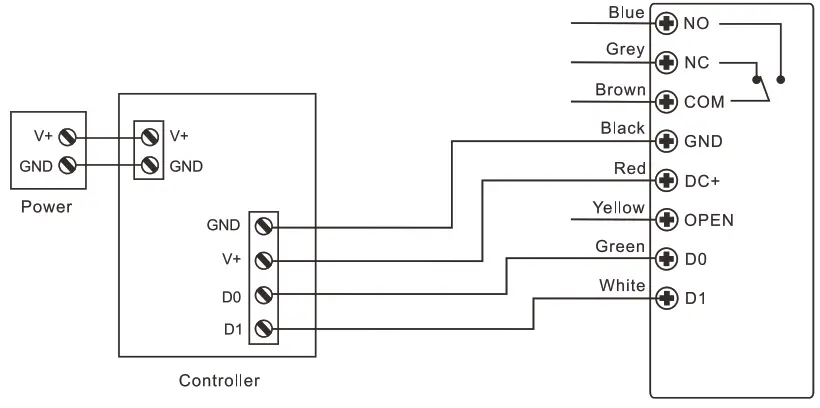
Keypad Transmission Format Virtual Card Number
The reader will transmit the PIN data when it receives the last key (#) after PIN code
Example: PIN code: 999999
Press 999999 #, then the output format will be: 00999999
Controller Mode
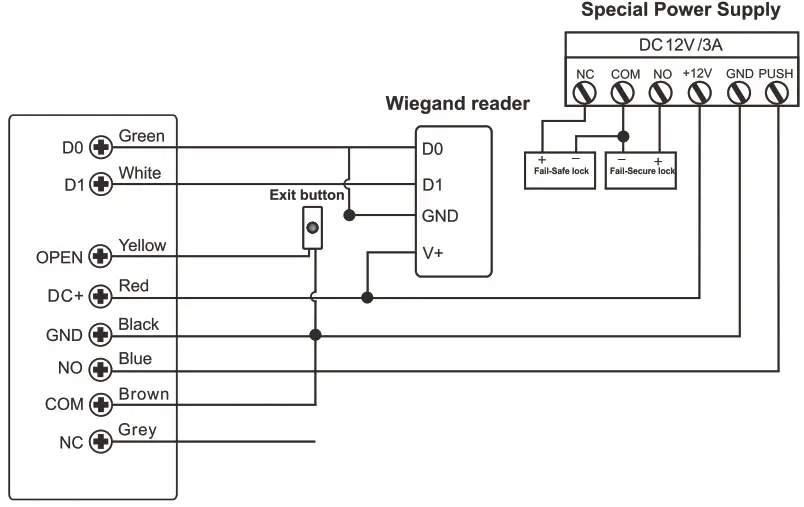
(The keypad Operates as a Controller) It supports Wiegand 26/34 bits input (Automatic Identification), so an external Wiegand device with 26/34 bits output can be connected to the Wiegand input terminals on the keypad.
Either an EM card reader (125 kHz) or a Mifare card reader (13.56MHz) can be connected to the keypad. Cards are required to be added at the external reader, except where an external EM card Reader is used, in this case, cards can be added at either reader or controller.
Wiring Diagram
OTHERS
Users Operation & Reset to Factory Default
- Open the door: Read valid user card or input valid user PIN #
- Remove Alarm: Enter Master Code # or Master Card or valid user card /PIN #
- To reset to factory default & Add Master Card: Power off, press the Exit Button, hold it, and power on, there will be two beeps, then release the exit button, the LED light turns into yellow, then read any 125KHz EM card/ 13.56MHz Mifare card, the LED will turn into red, means reset to factory default successfully. Of the card reading, it is the
Master Card.
- If no Master Card added, must press the Exit Button for at least 5 seconds before release.(this will make the previously registered Master Card invalid)
- Reset to factory default, the user’s information is still retained.
Master Card Usage
(Users can add the Master Card by themselves– Can refer to page 12 ‘Reset to factory default &Add Master Card’)
| Using Master Card to add and delete users | |
| Add Card / PIN Users | 1. Input (Master Card) 2. Input (Card) or (PIN #) Repeat step 2 for additional users 3. Input (Master Card) again |
| Delete Card / PIN Users | 1. Input (Master Card Twice within 5s) 2. Input (Card) or (PIN #) Repeat step 2 for additional users 3. Input (Master Card) again |